5. Thymeleaf görünümleri
Spring uygulamasının mimarisine geri dönelim MVC.
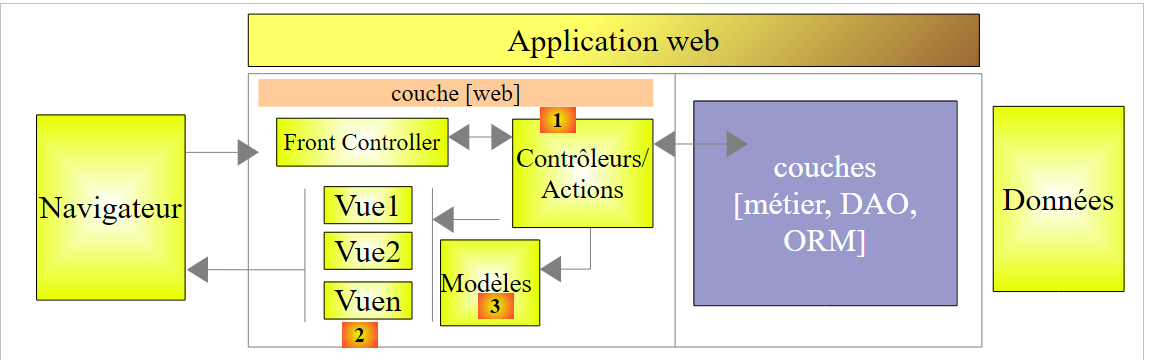 |
Önceki iki bölümde, [1] bloğunun çeşitli yönleri, yani eylemler ele alınmıştı. Şimdi ise şu konuyu ele alacağız:
- V görünümlerinin [2] bloğunu;
- bu görünümler tarafından görüntülenen M modeline ait [3] bloğunu;
Spring MVC'in oluşturulmasından bu yana, istemci tarayıcılarına gönderilen HTML sayfalarının oluşturulmasında JSP (Java Server Pages) teknolojisi kullanılıyordu. Son birkaç yıldır, [Thymeleaf] ve [http://www.thymeleaf.org/] teknolojileri de kullanılabilmektedir. Şimdi size bu teknolojileri tanıtacağız.
5.1. STS projesi
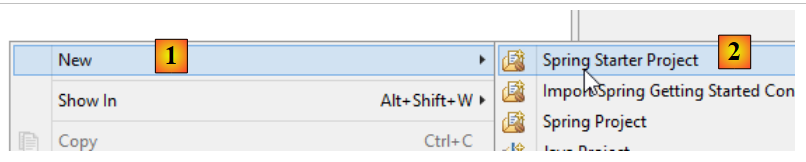
Yeni bir proje oluşturuyoruz:
 |
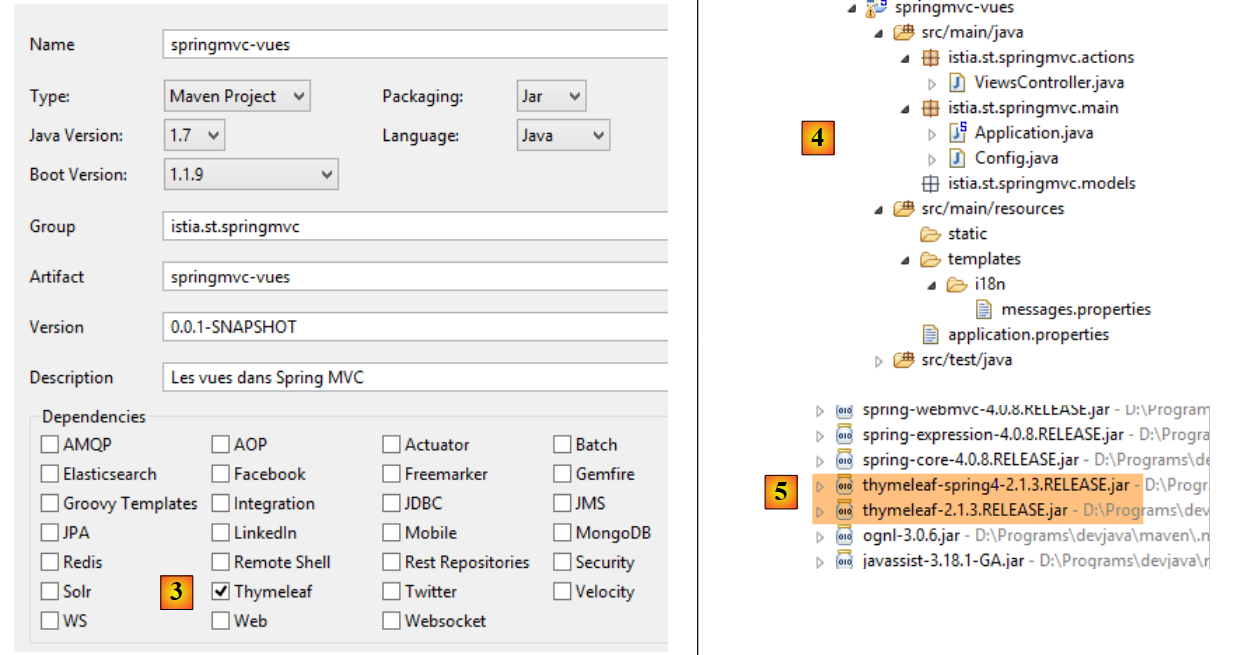 |
- [3] projesinde, projenin [Thymeleaf] bağımlılıklarına ihtiyaç duyduğunu belirtin. Bu, önceki projenin [Spring MVC] bağımlılıklarına ek olarak, [Thymeleaf] ve [5] çerçevelerinin bağımlılıklarını da ekleyecektir;
Şimdi bu projeyi şu şekilde geliştirelim:
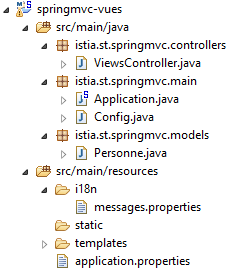 |
Önceki projeden ilham alıyoruz:
- [istia.st.springmvc.controllers], denetleyicileri içerecek;
- [istia.st.springmvc.models], eylem ve görünüm modellerini içerecek;
- [istia.st.springmvc.main], Spring Boot'un çalıştırılabilir sınıf paketidir;
- [templates], Thymeleaf görünümlerini içerecektir;
- [i18n], görünümler tarafından görüntülenen uluslararasılaştırılmış mesajları içerecektir;
[Application] sınıfı şu şekildedir:
package istia.st.springmvc.main;

import org.springframework.boot.SpringApplication;

public class Application {

    public static void main(String[] args) {
        SpringApplication.run(Config.class, args);
    }
}
[Config] sınıfı şöyledir:
package istia.st.springmvc.main;

import java.util.Locale;

import org.springframework.boot.autoconfigure.EnableAutoConfiguration;
import org.springframework.context.MessageSource;
import org.springframework.context.annotation.Bean;
import org.springframework.context.annotation.ComponentScan;
import org.springframework.context.annotation.Configuration;
import org.springframework.context.support.ResourceBundleMessageSource;
import org.springframework.web.servlet.config.annotation.InterceptorRegistry;
import org.springframework.web.servlet.config.annotation.WebMvcConfigurerAdapter;
import org.springframework.web.servlet.i18n.CookieLocaleResolver;
import org.springframework.web.servlet.i18n.LocaleChangeInterceptor;

@Configuration
@ComponentScan({ "istia.st.springmvc.controllers", "istia.st.springmvc.models" })
@EnableAutoConfiguration
public class Config extends WebMvcConfigurerAdapter {
    @Bean
    public MessageSource messageSource() {
        ResourceBundleMessageSource messageSource = new ResourceBundleMessageSource();
        messageSource.setBasename("i18n/messages");
        return messageSource;
    }

    @Bean
    public LocaleChangeInterceptor localeChangeInterceptor() {
        LocaleChangeInterceptor localeChangeInterceptor = new LocaleChangeInterceptor();
        localeChangeInterceptor.setParamName("lang");
        return localeChangeInterceptor;
    }

    @Override
    public void addInterceptors(InterceptorRegistry registry) {
        registry.addInterceptor(localeChangeInterceptor());
    }

    @Bean
    public CookieLocaleResolver localeResolver() {
        CookieLocaleResolver localeResolver = new CookieLocaleResolver();
        localeResolver.setCookieName("lang");
        localeResolver.setDefaultLocale(new Locale("fr"));
        return localeResolver;
    }
}
Bu yapılandırma şimdilik yerel ayarların yönetilmesini sağlar.
[ViewController] denetleyicisi şöyledir:
package istia.st.springmvc.actions;

import org.springframework.stereotype.Controller;

@Controller
public class ViewsController {

}
- 5. satırda, [@Controller] açıklaması, [@RestController] açıklamasının yerini almıştır; çünkü artık eylemler müşteriye yanıt oluşturmayacaktır. Bunlar:
- bir M modeli oluşturacak
- [String] türünü döndürecek; bu, söz konusu modeli görüntülemekle görevli [Thymeleaf] görünümünün adı olacaktır. Müşteriye gönderilen HTML akışını oluşturan, bu V görünümü ile M modelinin birleşimidir;
[messages.properties] dosyası şimdilik boştur.
5.2. [/v01]: Thymeleaf'in temelleri
[ViewsController] dosyasındaki bir sonraki ilk eylemi ele alalım:
    // Thymeleaf'in temelleri - 1
    @RequestMapping(value = "/v01", method = RequestMethod.GET)
    public String v01() {
        return "v01";
}
- 3. satır: eylem, [String] türünde bir değer döndürür. Bu, eylemin adı olacaktır;
- 4. satır: Bu görünüm [v01] olacaktır. Varsayılan olarak, [templates] klasöründe bulunmalı ve adı [v01.html] olmalıdır;
[v01.html] görünümü şu şekildedir:
 |
<!DOCTYPE html>
<html xmlns:th="http://www.thymeleaf.org">
<head>
<title th:text="'Les vues'">Spring 4 MVC</title>
<meta http-equiv="Content-Type" content="text/html; charset=UTF-8" />
</head>
<body>
    <h2 th:text="'Les vues dans Spring MVC'">Spring 4 MVC</h2>
</body>
</html>
Bu bir HTML dosyasıdır. Thymeleaf'in varlığı şu şekilde görülmektedir:
- 2. satırdaki [th] ad alanında;
- 4. ve 8. satırlardaki [th:text] özniteliklerinden;
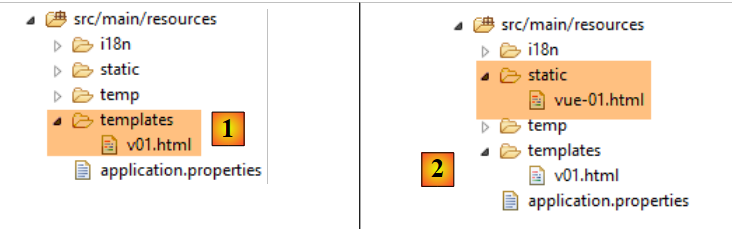
Elimizde görüntülenebilen geçerli bir HTML dosyası var. Bu dosyayı [static] [2] klasörüne [vue-01.html] adıyla yerleştiriyoruz ve bir tarayıcıyla doğrudan çağırıyoruz:
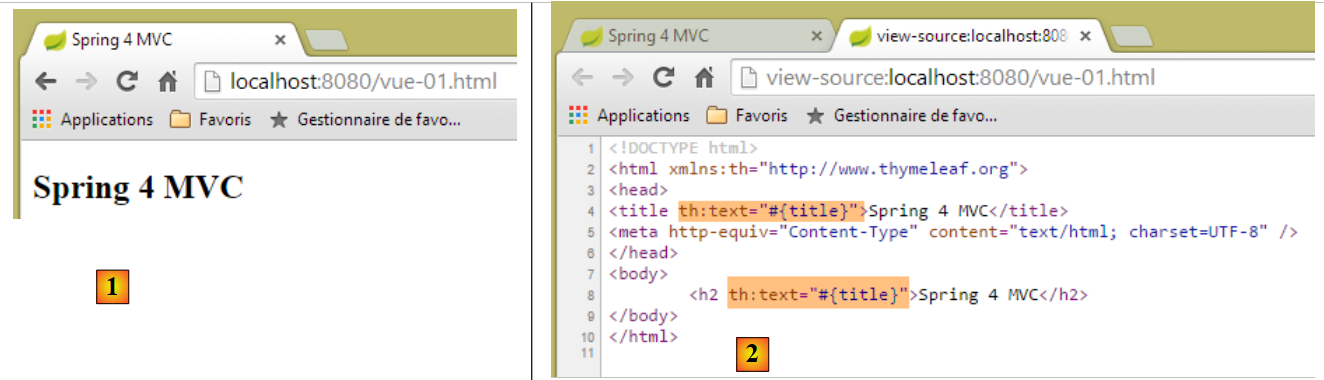 |
[2] sayfasının kaynak kodunu incelersek, [th:text] özniteliklerinin sunucu tarafından gönderildiğini ancak tarayıcı tarafından yok sayıldığını görebiliriz. Bir görünüm bir eylemin sonucu olduğunda, Thymeleaf devreye girer ve yanıt müşteriye gönderilmeden önce [th] özniteliklerini yorumlar.
HTML etiketi:
<title th:text="'Les vues'">Spring 4 MVC</title>
Thymeleaf tarafından şu şekilde işlenir:
- th:text, th:text="ifade" biçiminde bir sözdizimine sahiptir; burada ifade, değerlendirilecek bir ifadedir. Bu ifade, burada olduğu gibi bir karakter dizisiyse, tek tırnak işaretleri içine alınmalıdır;
- [expression] etiketinin değeri, HTML etiketinin metnini, bu örnekte ise [title] etiketinin metnini değiştirir;
İşlemden sonra, yukarıdaki etiket şu hale geldi:
<title>Les vues</title>
Şimdi [/v01] eylemini talep edelim:
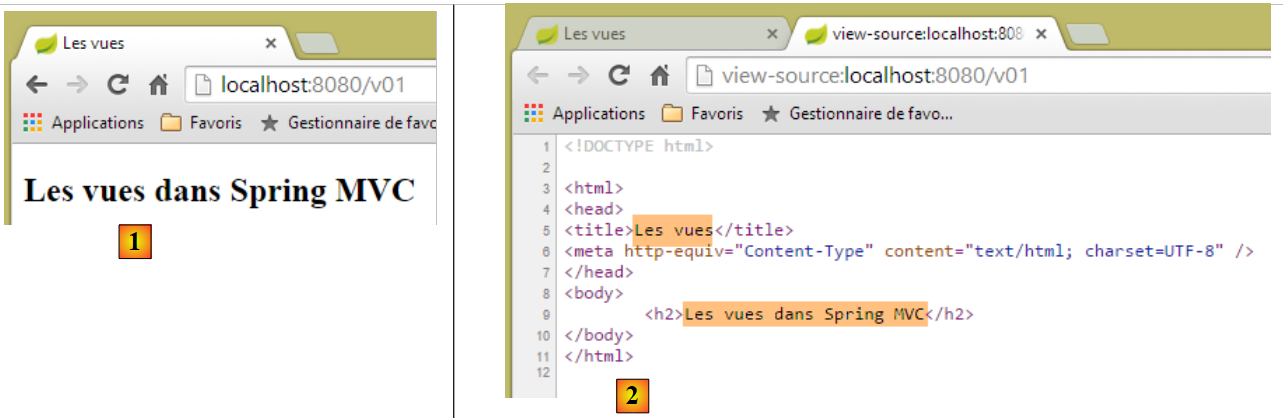 |
- [2]'te, Thymeleaf tarafından yapılan değiştirme işlemini görebiliriz;
Şimdi URL'i [http://localhost:8080/v01.html] olarak talep edelim:
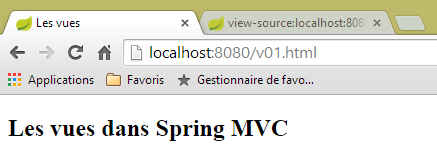 |
Bunu nasıl yorumlamalıyız? [templates/v01.html] görünümü, bir eylemden geçmeden doğrudan sunulmuş mu? Konuyu netleştirmek için şu [/v02] eylemini oluşturuyoruz:
    // Thymeleaf'in temelleri - 2
    @RequestMapping(value = "/v02", method = RequestMethod.GET)
    public String v02() {
        System.out.println("action v02");
        return "vue-02";
}
[vue-02.html] görünümü, [v01.html]'in bir kopyasıdır:
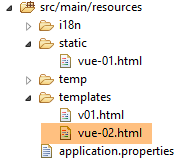 |
Şimdi URL ve [http://localhost:8080/vue-02.html]'i çağıralım:
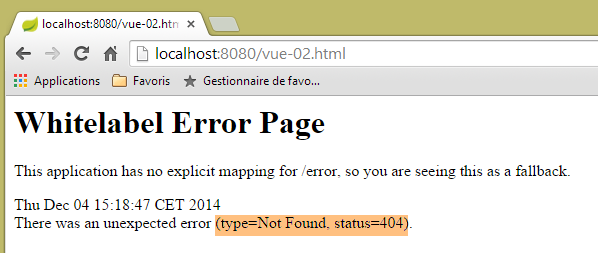 |
URL bulunamadı. Şimdi URL ve [http://localhost:8080/v02.html]'i isteyelim
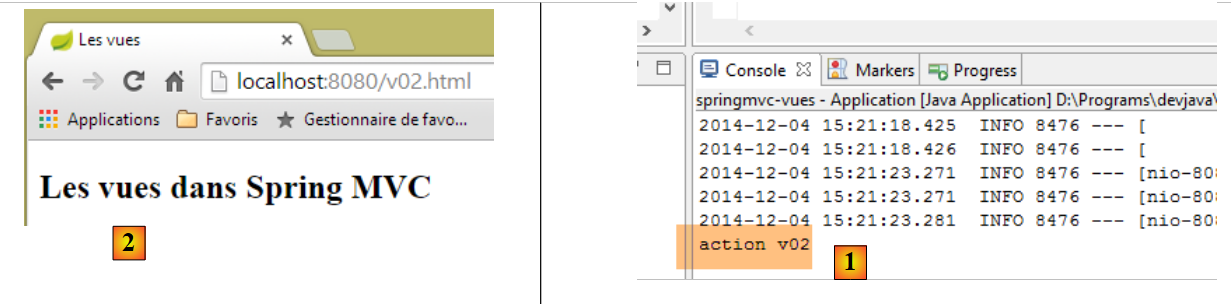 |
- [1] konsol günlüklerinde, [/v02] eyleminin çağrıldığını ve bunun [vue-02.html] görünümünü [2]'te görüntülediğini görüyoruz;
Şimdi, URL [http://localhost:8080/v02.html]'in, [static] klasöründeki [/v02.html] dosyasını da işaret edebileceğini biliyoruz. Bu dosya varsa ne olur? Deneyelim. [static] klasöründe aşağıdaki [v02.html] dosyasını oluşturuyoruz:
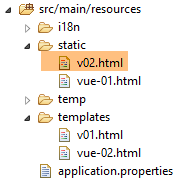 |
<!DOCTYPE html>
<html xmlns:th="http://www.thymeleaf.org">
<head>
<title>Spring 4 MVC</title>
<meta http-equiv="Content-Type" content="text/html; charset=UTF-8" />
</head>
<body>
    <h2>Spring 4 MVC</h2>
</body>
</html>
ardından URL ve [http://localhost:8080/v02.html] dosyalarını talep ediyoruz:
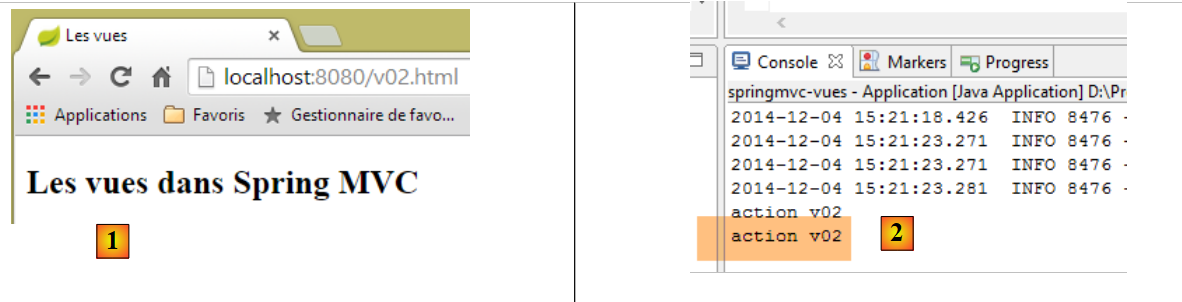 |
[1] ve [2], [/v02] eyleminin çağrıldığını gösterir. Dolayısıyla, istenen URL eylemi [/x.html] biçimindeyse, Spring / Thymeleaf:
- [/x] eylemi varsa onu yürütür;
- [/static/x.html] sayfası varsa bu sayfayı sunar;
- aksi takdirde 404 Not Found istisnası oluşturur;
Karışıklıkları önlemek için, bundan böyle eylemler ve görünümler aynı isimleri taşımayacaktır.
5.3. [/v03]: görünümlerin uluslararasılaştırılması
Spring / Thymeleaf entegrasyonu, Thymeleaf'in Spring mesaj dosyalarını kullanmasına olanak tanır. Aşağıdaki yeni [/v03] eylemini ele alalım:
    // görünümlerin uluslararasılaştırılması
    @RequestMapping(value = "/v03", method = RequestMethod.GET)
    public String v03() {
        return "vue-03";
}
Bu eylem, aşağıdaki [vue-03.html] görünümünü görüntüler:
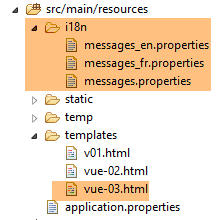 |
<!DOCTYPE html>
<html xmlns:th="http://www.thymeleaf.org">
<head>
<title th:text="#{title}">Spring 4 MVC</title>
<meta http-equiv="Content-Type" content="text/html; charset=UTF-8" />
</head>
<body>
    <h2 th:text="#{title}">Spring 4 MVC</h2>
</body>
</html>
- ve 8. satırlarda, [th:text] özniteliğinin ifadesi #{title} olup, bunun değeri [title] anahtar mesajıdır. Aşağıdaki [messages_fr.properties] ve [messages_en.properties] dosyalarını oluşturuyoruz:
[messages_fr.properties]
title=Les vues dans Spring MVC
[messages_en.properties]
title=Views in Spring MVC
Şimdi de URL, [http://localhost:8080/v03.html?lang=fr] ve [http://localhost:8080/v03.html?lang=en] kodlarını inceleyelim:
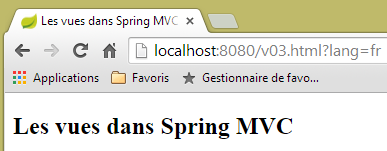 | 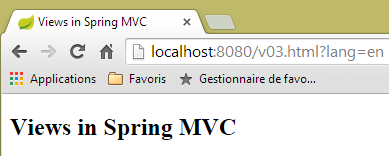 |
Son zamanlarda öğrendiklerimizi kullandığımızı fark edelim. [v03] eylemini [/v03] olarak değil, [/v03.html] olarak adlandırdık.
5.4. [/v04]: V görünümünün M şablonunun oluşturulması
Şu yeni [/v04] eylemini ele alalım:
    // V görünümünün M şablonunun oluşturulması
    @RequestMapping(value = "/v04", method = RequestMethod.GET)
    public String v04(Model model) {
        model.addAttribute("personne", new Personne(7, "martin", 17));
        System.out.println(String.format("Modèle=%s", model));
        return "vue-04";
}
- 4. satır: Görünüm şablonu, eylemin parametrelerine eklenir. Varsayılan olarak, bu başlangıç şablonu boştur. Daha sonra, bu şablonu önceden doldurmanın mümkün olduğunu göreceğiz;
- 4. satır: [Model] türündeki bir şablon, <String, Object> türündeki öğelerden oluşan bir tür sözlüktür. 4. satırda, bu sözlüğe [personne] anahtarıyla [Personne] türünde bir değere sahip bir giriş ekliyoruz;
- 5. satır: Modelin nasıl göründüğünü görmek için konsola görüntülenir;
- 6. satır: [vue-04.html] görünümünü görüntüliyoruz;
[Personne] sınıfı, önceki bölümde kullanılan sınıftır:
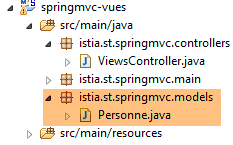 |
package istia.st.springmvc.models;

public class Personne {

    // kimlik
    private Integer id;
    // ad
    private String nom;
    // yaş
    private int age;

    // yapıcılar
    public Personne() {

    }

    public Personne(String nom, int age) {
        this.nom = nom;
        this.age = age;
    }

    public Personne(Integer id, String nom, int age) {
        this(nom, age);
        this.id = id;
    }

    @Override
    public String toString() {
        return String.format("[id=%s, nom=%s,  age=%d]", id, nom, age);
    }

    // alıcı ve ayarlayıcılar
...
}
[vue-04.html] görünümü şöyledir:
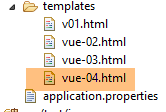 |
<!DOCTYPE html>
<html xmlns:th="http://www.thymeleaf.org">
    <head>
        <title th:text="#{title}">Spring 4 MVC</title>
        <meta http-equiv="Content-Type" content="text/html; charset=UTF-8" />
    </head>
    <body>
        <p>
            <span th:text="#{personne.nom}">Nom :</span>
            <span th:text="${personne.nom}">Bill</span>
        </p>
        <p>
            <span th:text="#{personne.age}">Age :</span>
            <span th:text="${personne.age}">56</span>
        </p>
    </body>
</html>
- 10. satırda, var'ın görünümün M modelindeki bir anahtar olduğu yeni bir Thymeleaf ifade türü olan ${var} eklenmiştir. Hatırlanacağı üzere, [/v04] eylemi, şablona Personne[id, nom, age] türüne bağlı bir [personne] anahtarı eklemiştir;
- 10. satır: şablonda bulunan kişinin adını görüntüler;
- 14. satır: kişinin yaşını görüntüler;
Mesaj dosyaları, 9. ve 13. satırlardaki [personne.nom] ve [personne.age] anahtarlarını eklemek üzere değiştirilir. Sonuç şöyledir:
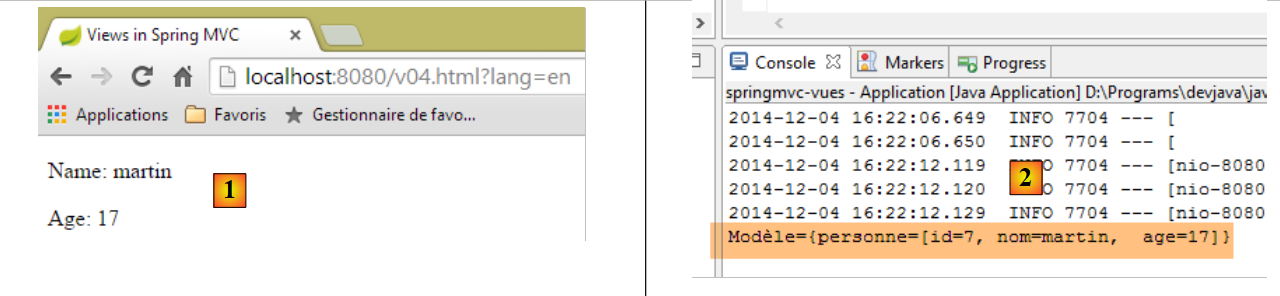 |
ve M şablonunun türü, [2] konsol günlüklerinde bulunur.
Neden [vue-04] görünümünü şu şekilde yazmıyoruz diye sorulabilir:
<!DOCTYPE html>
<html xmlns:th="http://www.thymeleaf.org">
    <head>
        <title th:text="#{title}"></title>
        <meta http-equiv="Content-Type" content="text/html; charset=UTF-8" />
    </head>
    <body>
        <p>
            <span th:text="#{personne.nom}" /></span>
            <span th:text="${personne.nom}"></span>
        </p>
        <p>
            <span th:text="#{personne.age}"></span>
            <span th:text="${personne.age}"></span>
        </p>
    </body>
</html>
Bu görünüm tamamen geçerlidir ve önceki örnekle aynı sonucu verecektir. Thymeleaf'in amaçlarından biri, Thymeleaf'in işleme tabi tutmadığı durumlarda bile Thymeleaf sayfasının görüntülenebilmesidir. Bu nedenle, iki yeni statik sayfa oluşturalım:
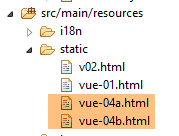 |
[vue-04b.html] görünümü, [vue-04.html] görünümünün bir kopyasıdır. Aynı durum [vue-04a.html] görünümü için de geçerlidir, ancak bu sayfadan statik metinler kaldırılmıştır. Her iki sayfayı da görüntülediğimizde şu sonuçları elde ederiz:
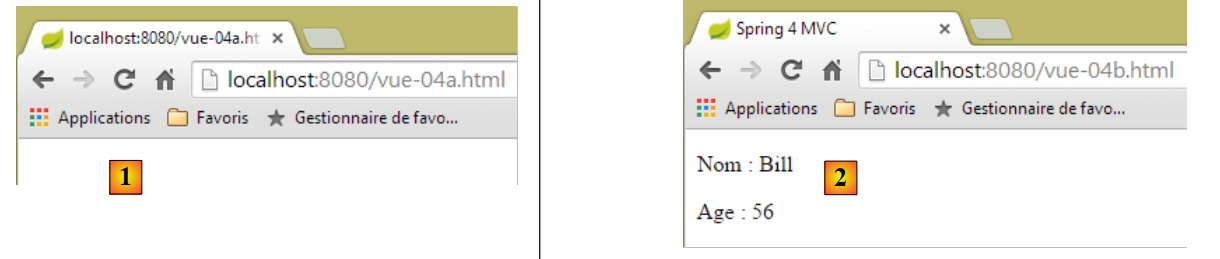 |
[1] örneğinde sayfanın yapısı görünmezken, [2] örneğinde ise açıkça görülebilir. İşte bu nedenle, yürütme sırasında başka metinlerle değiştirilecek olsalar bile, Thymeleaf görünümüne statik metinler eklemenin önemi budur.
Şimdi teknik bir ayrıntıya bakalım. [vue-04.html] görünümünde, kodu [ctrl-Maj-F] ile biçimlendiriyoruz. Şu sonucu elde ediyoruz:
<!DOCTYPE html>
<html xmlns:th="http://www.thymeleaf.org">
<head>
<title th:text="#{title}">Spring 4 MVC</title>
<meta http-equiv="Content-Type" content="text/html; charset=UTF-8" />
</head>
<body>
    <p>
        <span th:text="#{personne.nom}">Nom :</span> <span
            th:text="${personne.nom}">Bill</span>
    </p>
    <p>
        <span th:text="#{personne.age}">Age :</span> <span
            th:text="${personne.age}">56</span>
    </p>
</body>
</html>
Etiketler yanlış hizalanmış ve kodun okunması zorlaşmış. [vue-04.html] dosyasını [vue-04.xml] olarak yeniden adlandırıp kodu yeniden biçimlendirirsek, etiketler tekrar hizalanır. Dolayısıyla [xml] son eki daha kullanışlı olacaktır. Bu son ekle çalışmak mümkündür. Bunun için Thymeleaf’i yapılandırmamız gerekir. Yaptıklarımızı bozmamak için, incelediğimiz [springmvc-vues] projesini [springmvc-vues-xml] projesine kopyalıyoruz
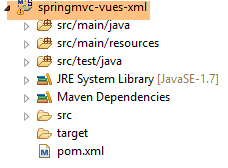 |
[pom.xml] dosyasını şu şekilde değiştiriyoruz:
    <groupId>istia.st.springmvc</groupId>
    <artifactId>springmvc-vues-xml</artifactId>
    <version>0.0.1-SNAPSHOT</version>
    <packaging>jar</packaging>

    <name>springmvc-vues-xml</name>
<description>Les vues dans Spring MVC</description>
Proje adı 2. ve 6. satırlarda değiştirilmiştir. Ayrıca, [templates] klasöründe bulunan görünümlerin soneklerini de değiştiriyoruz:
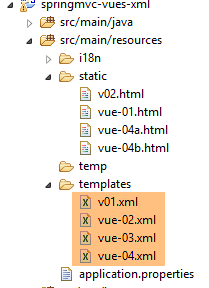 |
[http://docs.spring.io/spring-boot/docs/current/reference/html/common-application-properties.html] belgesi, [application.properties] dosyasında kullanılabilecek Spring Boot yapılandırma özelliklerini listeler:
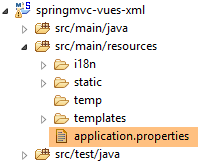 |
Bu belge, Spring Boot'un otomatik yapılandırma sırasında kullandığı ve [application.properties] dosyasında farklı bir yapılandırma yaparak değiştirilebilen özellikleri gösterir. Thymeleaf için otomatik yapılandırma özellikleri şunlardır:
# THYMELEAF (ThymeleafAutoConfiguration)
spring.thymeleaf.check-template-location=true
spring.thymeleaf.prefix=classpath:/templates/
spring.thymeleaf.suffix=.html
spring.thymeleaf.mode=HTML5
spring.thymeleaf.encoding=UTF-8
spring.thymeleaf.content-type=text/html # ;charset=<encoding> eklenir
spring.thymeleaf.cache=true # anlık yenileme için false olarak ayarlandı
Dolayısıyla, şu satırı eklemek yeterli olabilir:
spring.thymeleaf.suffix=.xml
satırını eklemekle yetinebiliriz. Ancak biz başka bir yol izleyeceğiz: programlama yoluyla yapılandırma. Thymeleaf'i [Config] sınıfında yapılandıracağız:
package istia.st.springmvc.main;

import java.util.Locale;

...
import org.thymeleaf.spring4.SpringTemplateEngine;
import org.thymeleaf.spring4.templateresolver.SpringResourceTemplateResolver;

@Configuration
@ComponentScan({ "istia.st.springmvc.controllers", "istia.st.springmvc.models" })
@EnableAutoConfiguration
public class Config extends WebMvcConfigurerAdapter {
    ...

    @Bean
    public SpringResourceTemplateResolver templateResolver() {
        SpringResourceTemplateResolver templateResolver = new SpringResourceTemplateResolver();
        templateResolver.setPrefix("classpath:/templates/");
        templateResolver.setSuffix(".xml");
        templateResolver.setTemplateMode("HTML5");
        templateResolver.setCharacterEncoding("UTF-8");
     templateResolver.setCacheable(true);
        return templateResolver;
    }

    @Bean
    SpringTemplateEngine templateEngine(SpringResourceTemplateResolver templateResolver) {
        SpringTemplateEngine templateEngine = new SpringTemplateEngine();
        templateEngine.setTemplateResolver(templateResolver);
        return templateEngine;
    }

}
- 16-24. satırlar, Thymeleaf için bir [TemplateResolver] nesnesini yapılandırır. Bir eylem tarafından sağlanan görünüm adından, ilgili dosyayı bulmak üzere yüklenen nesne budur;
- 18. ve 19. satırlar, dosyayı bulmak için görünüm adına eklenecek önek ve soneki belirler. Dolayısıyla, görünüm adı [vue04] ise, aranacak dosya [classpath:/templates/vue04.xml] olacaktır. [classpath:/templates], projenin Classpath kök dizininde bulunan [/templates] klasörünü belirten bir Spring sözdizimidir;
- 21. satır: müşteriye gönderilen yanıtta HTTP başlığının yer alması için:
Content-Type:text/html;charset=UTF-8
- 20. satır: görünümün HTML5 standardına uygun olduğunu belirtir;
- 22. satır: Thymeleaf görünümlerinin önbelleğe alınabileceğini belirtir;
- 26-31. satırlar: Spring / Thymeleaf görünüm çözümleme motorunu önceki çözümleme motoruyla ayarlar;
Bu yeni projenin yürütülebilir dosyasını çalıştıralım ve URL [http://localhost:8080/v04.html?lang=en]'i isteyelim:
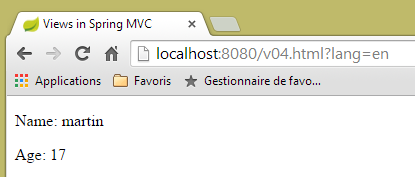 |
URL'te, [/v04] eyleminin yine [v04.html] ile değiştirilebildiğini görüyoruz.
5.5. [/v05]: Thymeleaf görünümünde bir nesnenin faktörleştirilmesi
Aşağıdaki [/v05] eylemini oluşturuyoruz:
    // V görünümünün M şablonunun oluşturulması - 2
    @RequestMapping(value = "/v05", method = RequestMethod.GET)
    public String v05(Model model) {
        model.addAttribute("personne", new Personne(7, "martin", 17));
        return "vue-05";
}
Bu eylem, [/v04] eylemiyle aynıdır. [vue-05.xml] görünümü şöyledir:
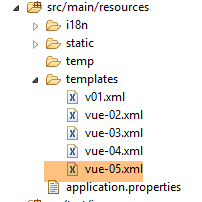 |
<!DOCTYPE html>
<html xmlns:th="http://www.thymeleaf.org">
    <head>
        <title th:text="#{title}">Spring 4 MVC</title>
        <meta http-equiv="Content-Type" content="text/html; charset=UTF-8" />
    </head>
    <body>
        <div th:object="${personne}">
            <p>
                <span th:text="#{personne.nom}">Nom :</span>
                <span th:text="*{nom}">Bill</span>
            </p>
            <p>
                <span th:text="#{personne.age}">Age :</span>
                <span th:text="*{age}">56</span>
            </p>
        </div>
    </body>
</html>
- 8-17. satırlar: Bu satırların içinde, [th:object="${personne}"] özniteliği (8. satır) ile bir Thymeleaf nesnesi tanımlanmıştır. Bu nesne, şablonda bulunan [personne] anahtar nesnesidir:
- 11. satır: [*{nom}] Thymeleaf ifadesi, [${objet.nom}] ifadesine eşdeğerdir; burada [objet], geçerli Thymeleaf nesnesidir. Dolayısıyla burada [*{nom}] ifadesi, [${personne.nom}] ifadesine eşdeğerdir;
- 15. satır: aynı;
Sonuç:
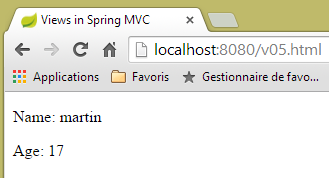 |
5.6. [/v06]: Thymeleaf görünümünde testler
Şu [/v06] eylemini ele alalım:
    // V görünümünün M şablonunun oluşturulması - 3
    @RequestMapping(value = "/v06", method = RequestMethod.GET)
    public String v06(Model model) {
        model.addAttribute("personne", new Personne(7, "martin", 17));
        return "vue-06";
}
Bu eylem, önceki iki eylemle aynıdır. Aşağıdaki [vue-06.xml] görünümünü görüntüler:
<!DOCTYPE html>
<html xmlns:th="http://www.thymeleaf.org">
<head>
<title th:text="#{title}">Spring 4 MVC</title>
<meta http-equiv="Content-Type" content="text/html; charset=UTF-8" />
</head>
<body>
<div th:object="${personne}">
<p>
<span th:text="#{personne.nom}">Nom :</span>
<span th:text="*{nom}">Bill</span>
</p>
<p>
<span th:text="#{personne.age}">Age :</span>
<span th:text="*{age}">56</span>
</p>
<p th:if="*{age} >= 18" th:text="#{personne.majeure}">Vous êtes majeur</p>
<p th:if="*{age} < 18" th:text="#{personne.mineure}">Vous êtes mineur</p>
</div>
</body>
</html>
- 17. satır: [th:if] özniteliği bir Boole ifadesini değerlendirir. Bu ifade doğruysa etiket görüntülenir, aksi takdirde görüntülenmez. Dolayısıyla burada, eğer ${personne.age}>=18 ise, [#{personne.majeure}] metni görüntülenecektir; yani mesaj dosyalarındaki [personne.majeure] anahtar mesajı;
- 18. satır: < işareti ayrılmış bir karakter olduğu için [*{age} < 18] yazılamaz. Bu nedenle, HTML [<] eşdeğerini kullanmak gerekir; bu, HTML [http://en.wikipedia.org/wiki/List_of_XML_and_HTML_character_entity_references] olarak da adlandırılır;
Mesaj dosyaları şu şekilde değiştirilmiştir:
[messages_fr.properties]
title=Les vues dans Spring MVC
personne.nom=Nom :
personne.age=Age :
personne.mineure=Vous êtes mineur
personne.majeure=Vous êtes majeur
[messages_en.properties]
title=Views in Spring MVC
personne.nom=Name:
personne.age=Age:
personne.mineure=You are under 18
personne.majeure=You are over 18
Sonuç şu şekildedir:
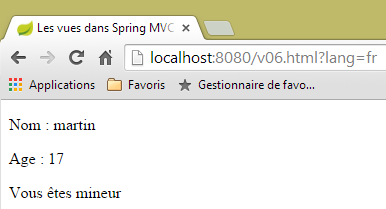 | 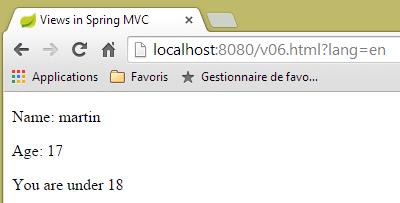 |
5.7. [/v07]: Thymeleaf görünümünde yineleme
Aşağıdaki [/v07] eylemini ele alalım:
    // V görünümünün M şablonunun oluşturulması - 4
    @RequestMapping(value = "/v07", method = RequestMethod.GET)
    public String v07(Model model) {
        model.addAttribute("liste", new Personne[] { new Personne(7, "martin", 17), new Personne(8, "lucie", 32),
                new Personne(9, "paul", 7) });
        return "vue-07";
}
- Bu eylem, üç kişiden oluşan bir liste oluşturur, bu listeyi [liste] anahtarıyla ilişkili şablona yerleştirir ve [vue-07] görünümünü görüntüler;
[vue-07.xml] görünümü şöyledir:
<!DOCTYPE html>
<html xmlns:th="http://www.thymeleaf.org">
    <head>
        <title th:text="#{title}">Spring 4 MVC</title>
        <meta http-equiv="Content-Type" content="text/html; charset=UTF-8" />
    </head>
    <body>
        <h3 th:text="#{liste.personnes}">Liste de personnes</h3>
        <ul>
            <li th:each="element : ${liste}" th:text="'['+ ${element.id} + ', ' +${element.nom}+ ', ' + ${element.age} + ']'">[id,nom,age]</li>
        </ul>
    </body>
</html>
- 10. satır: [th:each] özniteliği, içinde bulunduğu etiketi (burada bir <li> etiketi) tekrarlar. Burada iki parametreye sahiptir: [element : collection] ve [collection]; [collection] bir nesne koleksiyonudur, bu örnekte bir kişi listesi. Thymeleaf, koleksiyonu tarayacak ve koleksiyondaki öğe sayısı kadar <li> etiketi oluşturacaktır. Her bir <li> etiketi için [element], etikete bağlı koleksiyon öğesini temsil edecektir. Bu öğe için [th:text] özniteliği değerlendirilecektir. Bu özniteliğin ifadesi, [id, nom, age] sonucunu elde etmek için dizelerin birleştirilmesinden oluşur;
- 8. satır: mesaj dosyalarına [liste.personnes] anahtarı eklenir;
İşte sonuç:
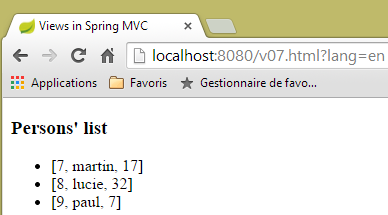 | 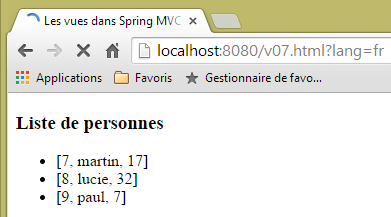 |
5.8. [/v08-/v10] : @ModelAttribute
Eylemleri incelerken gördüğümüz bir konuya, yani [@ModelAttribute] ek açıklamasının rolüne geri dönüyoruz. Aşağıdaki yeni eylemi ekliyoruz:
    // --------------- Bağlama ve ModelAttribute ----------------------------------

    // parametre bir nesne ise, bu nesne örneklenir ve gerekirse istek parametreleri tarafından değiştirilir
    // [key] anahtarıyla otomatik olarak görünüm şablonunun bir parçası olur
    // @ModelAttribute("xx") parametresi için anahtar xx'e eşit olacaktır
    // @ModelAttribute parametresi için anahtar, küçük harfle başlayan parametrenin sınıf adına eşit olacaktır
    // eğer @ModelAttribute yoksa, o zaman anahtar olmadan varmış gibi işlem yapılır
    // Bu parametre bir nesne değilse, modelde otomatik olarak eklenmez

    @RequestMapping(value = "/v08", method = RequestMethod.GET)
    public String v08(@ModelAttribute("someone") Personne p, Model model) {
        System.out.println(String.format("Modèle=%s", model));
        return "vue-08";
}
- 11. satır: [@ModelAttribute("someone")] ek açıklaması, [someone] anahtarıyla ilişkili [Personne p] nesnesini modele otomatik olarak ekleyecektir;
- 12. satır: şablonu kontrol etmek için;
- satır 13: [vue-08.xml] görünümünü görüntüler;
[vue-08.xml] görünümü şöyledir:
<!DOCTYPE html>
<html xmlns:th="http://www.thymeleaf.org">
    <head>
        <title th:text="#{title}">Spring 4 MVC</title>
        <meta http-equiv="Content-Type" content="text/html; charset=UTF-8" />
    </head>
    <body>
        <div th:object="${someone}">
            <p>
                <span th:text="#{personne.id}">Id :</span>
                <span th:text="*{id}">14</span>
            </p>
            <p>
                <span th:text="#{personne.nom}">Nom :</span>
                <span th:text="*{nom}">Bill</span>
            </p>
            <p>
                <span th:text="#{personne.age}">Age :</span>
                <span th:text="*{age}">56</span>
            </p>
        </div>
    </body>
</html>
- 8. satır: Thymeleaf nesnesi, [someone] anahtar nesnesiyle başlatılır;
Sonuç şu şekildedir:
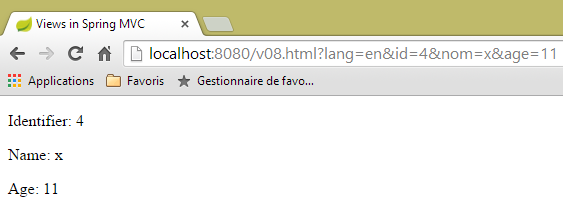 |
ve konsolda şu günlük kaydı görülür:
Modèle={someone=[id=4, nom=x, age=11], org.springframework.validation.BindingResult.someone=org.springframework.validation.BeanPropertyBindingResult: 0 errors}
Şimdi şu [/v09] eylemini ele alalım:
    @RequestMapping(value = "/v09", method = RequestMethod.GET)
    public String v09(Personne p, Model model) {
        System.out.println(String.format("Modèle=%s", model));
        return "vue-09";
}
- 1. satır: [Personne p] parametresinin varlığı, [p] kişisini otomatik olarak şablona ekleyecektir. Anahtar belirtilmediğinden, kullanılan anahtar sınıf adıdır ve ilk harfi küçük harfle yazılır. Dolayısıyla [Personne p], [@ModelAttribute("personne") Personne p] ile eşdeğerdir;
[vue.09.xml] görünümü şu şekildedir:
<!DOCTYPE html>
<html xmlns:th="http://www.thymeleaf.org">
    <head>
        <title th:text="#{title}">Spring 4 MVC</title>
        <meta http-equiv="Content-Type" content="text/html; charset=UTF-8" />
    </head>
    <body>
        <div th:object="${personne}">
            <p>
                <span th:text="#{personne.id}">Id :</span>
                <span th:text="*{id}">14</span>
            </p>
            <p>
                <span th:text="#{personne.nom}">Nom :</span>
                <span th:text="*{nom}">Bill</span>
            </p>
            <p>
                <span th:text="#{personne.age}">Age :</span>
                <span th:text="*{age}">56</span>
            </p>
        </div>
    </body>
</html>
- 8. satır: Kullanılan şablon anahtarı [personne]'tir;
İşte bir sonuç:
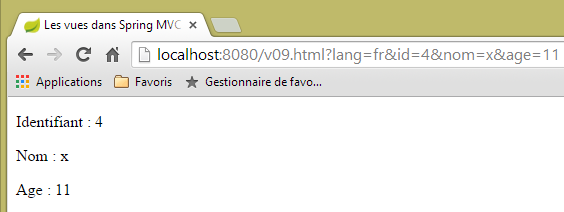 |
ve sunucu konsolundaki günlük kaydı:
Modèle={personne=[id=4, nom=x, age=11], org.springframework.validation.BindingResult.personne=org.springframework.validation.BeanPropertyBindingResult: 0 errors}
Şimdi, aşağıdaki yeni [/v10] eylemini ele alalım:
    @ModelAttribute("uneAutrePersonne")
    private Personne getPersonne(){
        return new Personne(24,"pauline",55);
    }

    @RequestMapping(value = "/v10", method = RequestMethod.GET)
    public String v10(Model model) {
        System.out.println(String.format("Modèle=%s", model));
        return "vue-10";
}
- 1-4. satırlar: Her isteğin modelinde, [new Personne(24,"pauline",55)] nesnesiyle ilişkili bir [uneAutrePersonne] anahtar öğesi oluşturan bir yöntem tanımlar;
- 6-10. satırlar: [/v10] eylemi, aldığı şablonu [vue-10.xml] görünümüne aktarmaktan başka bir şey yapmaz. [Model model] parametresinin yalnızca 8. satırdaki komut için gerekli olduğuna dikkat edin. Bu parametre olmadan işlevsizdir;
[vue-10.xml] görünümü şu şekildedir:
<!DOCTYPE html>
<html xmlns:th="http://www.thymeleaf.org">
    <head>
        <title th:text="#{title}">Spring 4 MVC</title>
        <meta http-equiv="Content-Type" content="text/html; charset=UTF-8" />
    </head>
    <body>
        <div th:object="${uneAutrePersonne}">
            <p>
                <span th:text="#{personne.id}">Id :</span>
                <span th:text="*{id}">14</span>
            </p>
            <p>
                <span th:text="#{personne.nom}">Nom :</span>
                <span th:text="*{nom}">Bill</span>
            </p>
            <p>
                <span th:text="#{personne.age}">Age :</span>
                <span th:text="*{age}">56</span>
            </p>
        </div>
    </body>
</html>
Sonuç şu şekildedir:
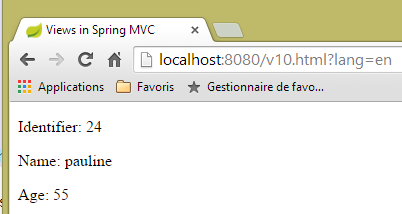 |
ve konsol günlüğü şu şekildedir:
5.9. [/v11] : @SessionAttributes
Eylemleri incelerken gördüğümüz bir konuya, yani [@SessionAttributes] ek açıklamasının rolüne geri dönüyoruz. Aşağıdaki yeni [/v11] eylemini ekliyoruz:
    @ModelAttribute("jean")
    private Personne getJean(){
        return new Personne(33,"jean",10);
    }

    @RequestMapping(value = "/v11", method = RequestMethod.GET)
    public String v11(Model model, HttpSession session) {
        System.out.println(String.format("Modèle=%s, Session[jean]=%s", model, session.getAttribute("jean")));
        return "vue-11";
}
Az önce incelediğimizle benzer bir durumla karşı karşıyayız. Aradaki fark, sınıfın kendisine yerleştirilen [@SessionAttributes] anotasyonunda yatıyor:
@Controller
@SessionAttributes("jean")
public class ViewsController {
- 2. satır: modelin [jean] anahtarının oturuma yerleştirilmesi gerektiği belirtilmiştir;
Bu nedenle eylemin 7. satırında oturum eklenmiştir. 8. satırda, [jean] anahtarına bağlı oturumun değeri görüntülenir.
[vue-11.xml] görünümü şu şekildedir:
<!DOCTYPE html>
<html xmlns:th="http://www.thymeleaf.org">
    <head>
        <title th:text="#{title}">Spring 4 MVC</title>
        <meta http-equiv="Content-Type" content="text/html; charset=UTF-8" />
    </head>
    <body>
        <div th:object="${jean}">
            <p>
                <span th:text="#{personne.id}">Id :</span>
                <span th:text="*{id}">14</span>
            </p>
            <p>
                <span th:text="#{personne.nom}">Nom :</span>
                <span th:text="*{nom}">Bill</span>
            </p>
            <p>
                <span th:text="#{personne.age}">Age :</span>
                <span th:text="*{age}">56</span>
            </p>
        </div>
        <hr />
        <div th:object="${session.jean}">
            <p>
                <span th:text="#{personne.id}">Id :</span>
                <span th:text="*{id}">14</span>
            </p>
            <p>
                <span th:text="#{personne.nom}">Nom :</span>
                <span th:text="*{nom}">Bill</span>
            </p>
            <p>
                <span th:text="#{personne.age}">Age :</span>
                <span th:text="*{age}">56</span>
            </p>
        </div>
    </body>
</html>
İki kişi görüntülenir:
- 8-21. satırlar: şablondaki [jean] anahtarına sahip kişi;
- 23-36. satırlar: oturumdaki [jean] anahtarına sahip kişi;
Sonuçlar şöyledir:
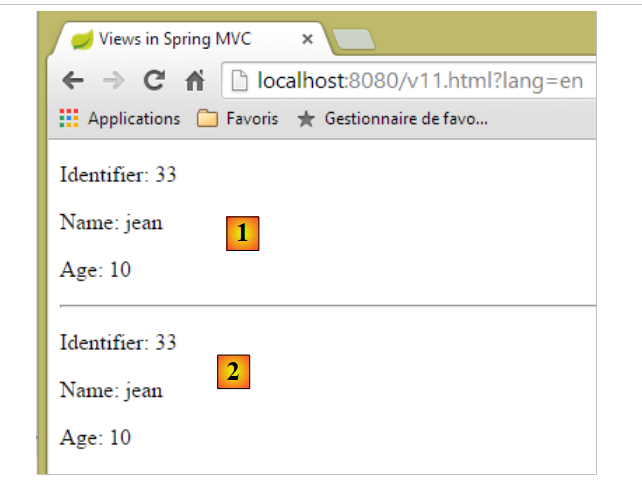 |
- [1]'te, şablondaki [jean] anahtarına sahip kişi;
- [2]'e, oturumdaki [jean] anahtarına sahip kişi;
Konsol günlüğü ise şu şekildedir:
Modèle={uneAutrePersonne=[id=24, nom=pauline, age=55], jean=[id=33, nom=jean, age=10]}, Session[jean]=null
Yukarıda, [jean] anahtarının eylemin alıcı olduğu oturumda bulunmadığı görülmektedir. Bundan, [jean] anahtarının eylemin yürütülmesinden sonra ve görünümün görüntülenmesinden önce oturuma eklendiği sonucuna varılabilir.
Şimdi, bir anahtarın hem [@ModelAttribute] hem de [@SessionAttributes] tarafından referanslandığı durumu ele alalım. Aşağıdaki iki eylemi oluşturuyoruz:
    @RequestMapping(value = "/v12a", method = RequestMethod.GET)
    @ResponseBody
    public void v12a(HttpSession session) {
        session.setAttribute("paul", new Personne(51, "paul", 33));
    }

    // [@ModelAttribute] anahtarının aynı zamanda [@SessionAttributes] anahtarı olduğu durum
    // bu durumda, ilgili parametre oturum değeriyle başlatılır
    @RequestMapping(value = "/v12b", method = RequestMethod.GET)
    public String v12b(Model model, @ModelAttribute("paul") Personne p) {
        System.out.println(String.format("Modèle=%s", model));
        return "vue-12";
}
[/v12a] eylemi, yalnızca ['paul',new Personne(51, "paul", 33)] öğesini oturuma eklemek için kullanılır. Başka hiçbir şey yapmaz. [@ResponseBody] ile etiketlenmiş olması, müşteriye yanıtı oluşturanın bu eylem olduğunu gösterir. Türü [void] olduğu için herhangi bir yanıt oluşturulmaz.
[/v12b] eylemi, [@ModelAttribute("paul") Personne p]'i parametre olarak kabul eder. Başka bir işlem yapılmazsa, bir [Personne] nesnesi oluşturulur ve istek parametreleriyle başlatılır; bu nesne, [/v12a] eylemi tarafından oturuma eklenen [paul] anahtar nesnesiyle hiçbir ilgisi yoktur. Sınıfın oturum özniteliklerine [paul] anahtarını ekleyeceğiz:
@Controller
@SessionAttributes({ "jean", "paul" })
public class ViewsController {
- 2. satırda artık iki oturum özniteliği bulunmaktadır;
[/v12b] eyleminin ayarlarına geri dönelim:
public String v12b(Model model, @ModelAttribute("paul") Personne p) {
Artık [Personne p] nesnesi örneklenmeyecek, ancak oturumdaki [paul] anahtar nesnesine referans verecektir. Sonrasında işlem aynı şekilde devam eder. [paul] anahtar nesnesi, özellikle görüntülenecek görünüm şablonunda yer alacaktır. [/v12b] eyleminin 11. satırında görmek istediğimiz şey budur.
[vue-12.xml] görünümü şu şekilde olacaktır:
<!DOCTYPE html>
<html xmlns:th="http://www.thymeleaf.org">
    <head>
        <title th:text="#{title}">Spring 4 MVC</title>
        <meta http-equiv="Content-Type" content="text/html; charset=UTF-8" />
    </head>
    <body>
        <div th:object="${paul}">
            <p>
                <span th:text="#{personne.id}">Id :</span>
                <span th:text="*{id}">14</span>
            </p>
            <p>
                <span th:text="#{personne.nom}">Nom :</span>
                <span th:text="*{nom}">Bill</span>
            </p>
            <p>
                <span th:text="#{personne.age}">Age :</span>
                <span th:text="*{age}">56</span>
            </p>
        </div>
    </body>
</html>
- 8. satır: görünüm modelindeki [paul] anahtarına atıfta bulunulur;
Bu, [/v12a] eylemini çalıştırdıktan sonra (bu eylem, [paul] anahtarını oturuma ekler) şu sonucu verir:
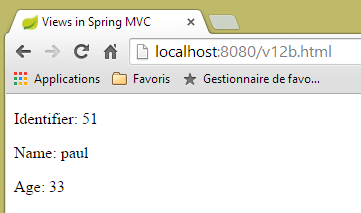 |
Konsol günlüğü şu şekildedir:
Modèle={jean=[id=33, nom=jean, age=10], uneAutrePersonne=[id=24, nom=pauline, age=55], paul=[id=51, nom=paul, age=33], org.springframework.validation.BindingResult.paul=org.springframework.validation.BeanPropertyBindingResult: 0 errors}
[paul] anahtarı, oturumdaki [paul] anahtarına atanan değerle birlikte modele başarıyla eklenmiştir.
5.10. [/v13]: giriş formu oluşturma
Şimdi formlara veri girişi ve bunların doğrulanması konusuna geçiyoruz. Aşağıdaki [/v13] eylemiyle ilk formumuzu oluşturuyoruz:
  // bir kişiyi girmek için bir form oluşturur
  @RequestMapping(value = "/v13", method = RequestMethod.GET)
  public String v13() {
    return "vue-13";
}
Bu eylem, yalnızca aşağıdaki [vue-13.xml] görünümünü görüntüler:
<!DOCTYPE html>
<html xmlns:th="http://www.thymeleaf.org">
    <head>
        <title th:text="#{title}">Spring 4 MVC</title>
        <meta http-equiv="Content-Type" content="text/html; charset=UTF-8" />
    </head>
    <body>
        <form action="/someURL" th:action="@{/v14.html}" method="post">
            <h2 th:text="#{personne.formulaire.titre}">Entrez les informations suivantes</h2>
            <div th:object="${personne}">
                <table>
                    <thead></thead>
                    <tbody>
                        <tr>
                            <td th:text="#{personne.id}">Id :</td>
                            <td>
                                <input type="text" name="id" value="11" th:value="''" />
                            </td>
                        </tr>
                        <tr>
                            <td th:text="#{personne.nom}">Nom :</td>
                            <td>
                                <input type="text" name="nom" value="Tintin" th:value="''" />
                            </td>
                        </tr>
                        <tr>
                            <td th:text="#{personne.age}">Age :</td>
                            <td>
                                <input type="text" name="age" value="17" th:value="''" />
                            </td>
                        </tr>
                    </tbody>
                </table>
            </div>
            <input type="submit" value="Valider" th:value="#{personne.formulaire.valider}" />
        </form>
    </body>
</html>
Bu görünümü [static] klasörüne [vue-13.html] adıyla yerleştirip URL [http://localhost:8080/vue-13.html] adresini çağırırsak, aşağıdaki sayfayı elde ederiz:
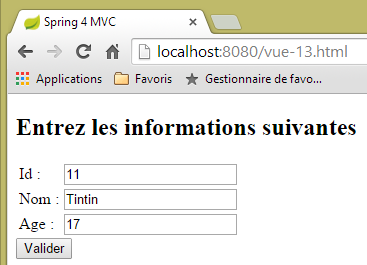 |
- Formun 8. satırında, [th:action] özniteliğine sahip <form> etiketi bulunur. Bu öznitelik Thymeleaf tarafından değerlendirilecek ve değeri, sadece süs amaçlı bulunan [action] özniteliğinin mevcut değerinin yerine geçecektir. Burada [th:action] özniteliğinin değeri [/v14.html] olacaktır;
- 17., 23. ve 29. satırlarda, [th:value] özniteliğinin değeri, [value] özniteliğinin değerinin yerine geçecektir. Burada bu değer boş bir dize olacaktır;
URL ve [/v13.html] sorgulandığında, şu sonuç elde edilir:
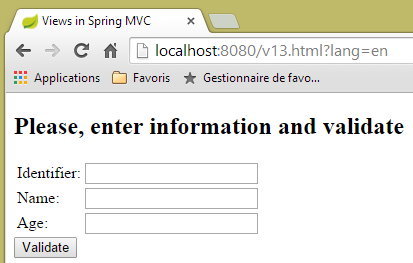 |
Thymeleaf tarafından oluşturulan kaynak koduna bir göz atalım:
<!DOCTYPE html>

<html>
    <head>
        <title>Views in Spring MVC</title>
        <meta http-equiv="Content-Type" content="text/html; charset=UTF-8" />
    </head>
    <body>
        <form action="/v14.html" method="post">
            <h2>Please, enter information and validate</h2>
            <div>
                <table>
                    <thead></thead>
                    <tbody>
                        <tr>
                            <td>Identifier:</td>
                            <td>
                                <input type="text" name="id" value="" />
                            </td>
                        </tr>
                        <tr>
                            <td>Name:</td>
                            <td>
                                <input type="text" name="nom" value="" />
                            </td>
                        </tr>
                        <tr>
                            <td>Age:</td>
                            <td>
                                <input type="text" name="age" value="" />
                            </td>
                        </tr>
                    </tbody>
                </table>
            </div>
            <input type="submit" value="Validate" />
        </form>
    </body>
</html>
9., 18., 24. ve 30. satırlarda, Thymeleaf tarafından [th:action] ve [th:value] özniteliklerinin değerlendirildiğini görüyoruz.
5.11. [/v14]: Form aracılığıyla gönderilen değerleri yönetme
[/v14] eylemi, gönderilen değerleri alan eylemdir. Şu şekildedir:
  // formdaki değerleri işler
  @RequestMapping(value = "/v14", method = RequestMethod.POST)
  public String v14(Personne p) {
    return "vue-14";
}
- 3. satır: Gönderilen değerler, bir [Personne p] nesnesi içinde kapsüllenir. Bu nesnenin, eylem tarafından görüntülenecek V görünümünün M modelinin otomatik olarak bir parçası olduğu ve [personne] anahtarıyla ilişkilendirildiği bilinmektedir;
- 4. satır: Görüntülenen görünüm, [vue-14.xml] görünümüdür;
[vue-14.xml] görünümü şöyledir:
<!DOCTYPE html>
<html xmlns:th="http://www.thymeleaf.org">
    <head>
        <title th:text="#{title}">Spring 4 MVC</title>
        <meta http-equiv="Content-Type" content="text/html; charset=UTF-8" />
    </head>
    <body>
    <h2 th:text="#{personne.formulaire.saisies}">Voici vos saisies</h2>
        <div th:object="${personne}">
            <p>
                <span th:text="#{personne.id}">Id :</span>
                <span th:text="*{id}">14</span>
            </p>
            <p>
                <span th:text="#{personne.nom}">Nom :</span>
                <span th:text="*{nom}">Bill</span>
            </p>
            <p>
                <span th:text="#{personne.age}">Age :</span>
                <span th:text="*{age}">56</span>
            </p>
        </div>
    </body>
</html>
- 9. satır: modelden [personne] anahtarıyla ilişkili nesne alınır;
- 12., 16. ve 20. satırlar: Bu nesnenin özellikleri görüntülenir;
Bu işlem sonucunda şu çıktı elde edilir:
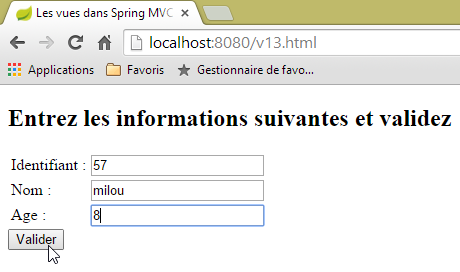 | 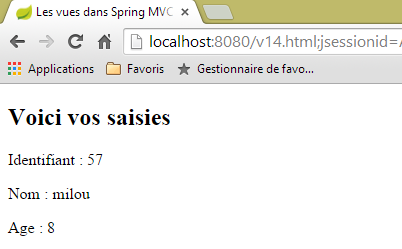 |
5.12. [/v15-/v16]: bir modelin doğrulanması
Önceki örnekten yola çıkarak, şu diziye bakalım:
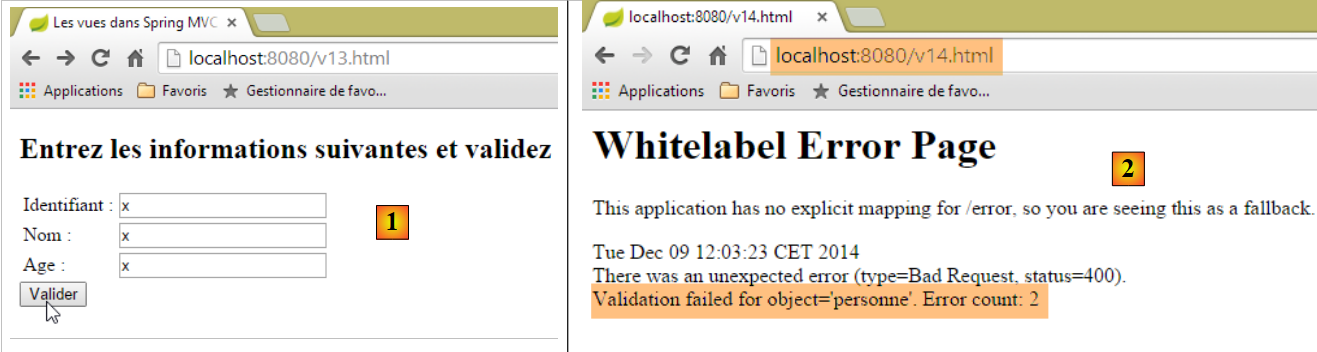 |
- [1]'te, [int] türündeki [id] ve [age] alanlarına hatalı değerler girildi;
- [2]'te, sunucunun yanıtı bize iki hata olduğunu bildirir;
Aynı formu kullanacağız, ancak doğrulama hataları durumunda, kullanıcının bu hataları düzeltebilmesi için hataları bildiren bir sayfa yönlendireceğiz.
[/v15] eylemi şu şekildedir:
    // ---------------------- bir formun görüntülenmesi
    @RequestMapping(value = "/v15", method = RequestMethod.GET)
    public String v15(SecuredPerson p) {
        return "vue-15";
}
Bu eylem, aşağıdaki [SecuredPerson] türünde bir parametre alır:
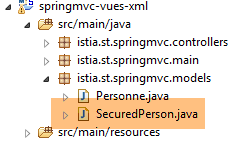 |
package istia.st.springmvc.models;

import javax.validation.constraints.NotNull;

import org.hibernate.validator.constraints.Length;
import org.hibernate.validator.constraints.Range;

public class SecuredPerson {

    @Range(min = 1)
    private int id;

    @Length(min = 4, max = 10)
    private String nom;

    @Range(min = 8, max = 14)
    private int age;

    // oluşturucular
    public SecuredPerson() {

    }

    public SecuredPerson(int id, String nom, int age) {
        this.id=id;
        this.nom = nom;
        this.age = age;
    }

    // alıcı ve ayarlayıcılar
...
}
[id, nom, age] alanlarına doğrulama kısıtlamaları eklenmiştir. [/v15] eylemi tarafından görüntülenen [vue-15.xml] görünümü şöyledir:
<!DOCTYPE html>
<html xmlns:th="http://www.thymeleaf.org">
    <head>
        <title th:text="#{title}">Spring 4 MVC</title>
        <meta http-equiv="Content-Type" content="text/html; charset=UTF-8" />
    </head>
    <body>
        <form action="/someURL" th:action="@{/v16.html}" method="post">
            <h2 th:text="#{personne.formulaire.titre}">Entrez les informations suivantes</h2>
            <div th:object="${securedPerson}">
                <table>
                    <thead></thead>
                    <tbody>
                        <tr>
                            <td th:text="#{personne.id}">Id :</td>
                            <td>
                                <input type="text" name="id" value="11" th:value="*{id}" />
                            </td>
                            <td>
                                <span th:if="${#fields.hasErrors('id')}" th:errors="*{id}" style="color: red">Identifiant erroné</span>
                            </td>
                        </tr>
                        <tr>
                            <td th:text="#{personne.nom}">Nom :</td>
                            <td>
                                <input type="text" name="nom" value="Tintin" th:value="*{nom}" />
                            </td>
                            <td>
                                <span th:if="${#fields.hasErrors('nom')}" th:errors="*{nom}" style="color: red">Nom erroné</span>
                            </td>
                        </tr>
                        <tr>
                            <td th:text="#{personne.age}">Age :</td>
                            <td>
                                <input type="text" name="age" value="17" th:value="*{age}" />
                            </td>
                            <td>
                                <span th:if="${#fields.hasErrors('age')}" th:errors="*{age}" style="color: red">Âge erroné</span>
                            </td>
                        </tr>
                    </tbody>
                </table>
                <input type="submit" value="Valider" th:value="#{personne.formulaire.valider}" />
                <ul>
                    <li th:each="err : ${#fields.errors('*')}" th:text="${err}" style="color: red" />
                </ul>
            </div>
        </form>
    </body>
</html>
- 10-47. satırlar: [securedPerson] anahtarına bağlı sayfa model nesnesi alınır. GET işleminin sonunda, [id=0, nom=null, age=0] örneklendirme değerine sahip bir nesne elde edilir;
- 17. satır: [securedPerson.id] alanının değeri;
- 20. satır: [${#fields.hasErrors('id')}] ifadesi, [securedPerson.id] alanında doğrulama hatası olup olmadığını belirler. Varsa, [th:errors="*{id}"] özniteliği ilgili hata mesajını görüntüler;
- bu senaryo, 29. satırda [nom] alanı ve 38. satırda [age] alanı için tekrarlanır;
- 45. satır: [${#fields.errors('*')}] ifadesi, [securedPerson] nesnesinin alanlarındaki tüm hataları belirtir. Dolayısıyla, 44-46. satırlarda bu hataların tümü görüntülenecektir;
- 16. satır: Form değerlerinin [/v16] eylemine gönderileceği görülmektedir. Bu eylem şöyledir:
    // -------------------- bir modelin doğrulanması------------------
    @RequestMapping(value = "/v16", method = RequestMethod.POST)
    public String v16(@Valid SecuredPerson p, BindingResult result) {
        // hatalar?
        if (result.hasErrors()) {
            return "vue-15";
        } else {
            return "vue-16";
        }
}
- 3. satırda, [@Valid SecuredPerson p] notu, gönderilen değerlerin doğrulanmasını zorunlu kılar;
- 5. satır: eylemin şablonunda hata olup olmadığını kontrol eder;
- 6. satır: hatalıysa, [vue-15.xml] formunu döndürür. Bu form hata mesajlarını görüntülediğinden, bu mesajları inceleyeceğiz;
- 8. satır: eylem şablonu doğrulanırsa, aşağıdaki [vue-16.xml] görünümünü görüntüleriz:
<!DOCTYPE html>
<html xmlns:th="http://www.thymeleaf.org">
    <head>
        <title th:text="#{title}">Spring 4 MVC</title>
        <meta http-equiv="Content-Type" content="text/html; charset=UTF-8" />
    </head>
    <body>
    <h2 th:text="#{personne.formulaire.saisies}">Voici vos saisies</h2>
        <div th:object="${securedPerson}">
            <p>
                <span th:text="#{personne.id}">Id :</span>
                <span th:text="*{id}">14</span>
            </p>
            <p>
                <span th:text="#{personne.nom}">Nom :</span>
                <span th:text="*{nom}">Bill</span>
            </p>
            <p>
                <span th:text="#{personne.age}">Age :</span>
                <span th:text="*{age}">56</span>
            </p>
        </div>
    </body>
</html>
İşte bazı yürütme örnekleri:
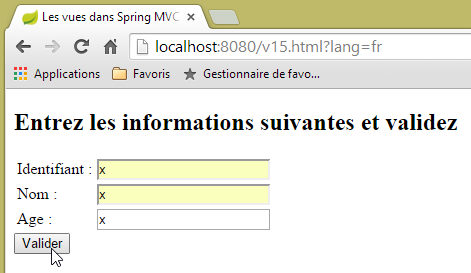 | 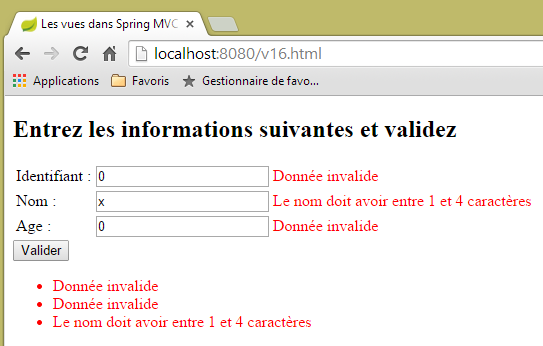 |
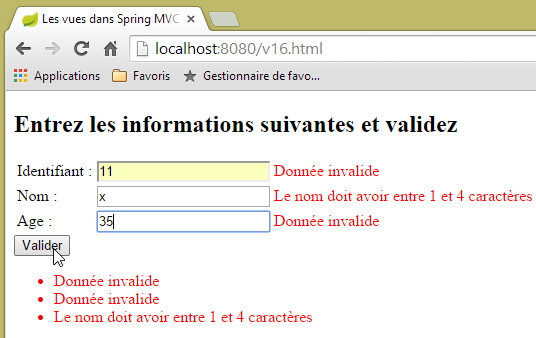 | 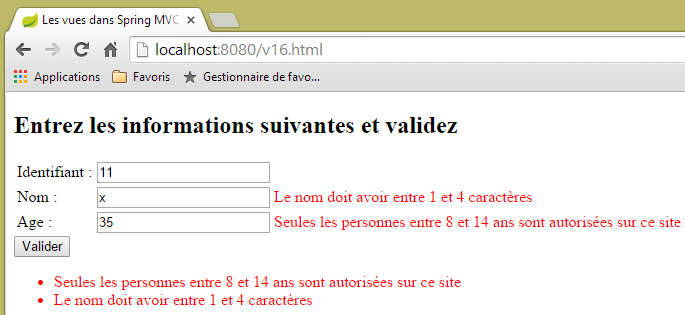 |
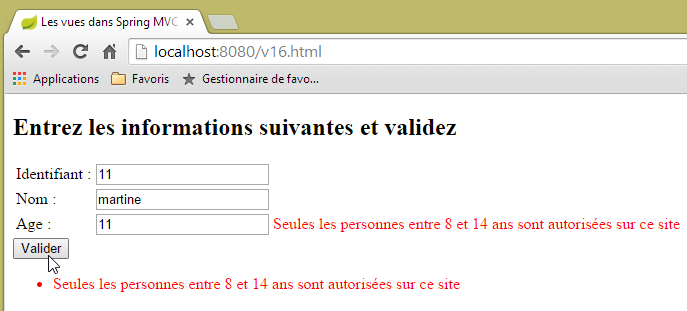 |
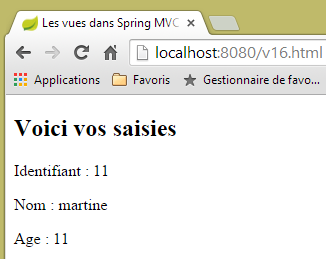 |
5.13. [/v17-/v18]: hata mesajlarının kontrolü
[/v15] eylemi ilk kez çağrıldığında şu sonuç elde edilir:
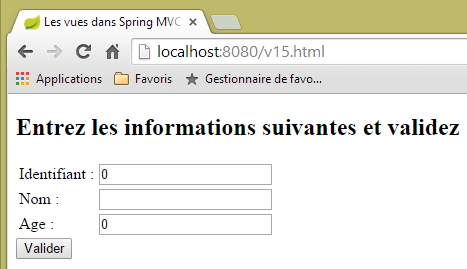 |
[Identifiant, Age] alanlarında sıfırlar yerine boş bir form görmek isteyebilirsiniz. Bunu sağlamak için eylem şablonunu şu şekilde değiştiriyoruz:
package istia.st.springmvc.models;

import javax.validation.constraints.Digits;

import org.hibernate.validator.constraints.Length;
import org.hibernate.validator.constraints.Range;

public class StringSecuredPerson {

    @Range(min = 1)
    @Digits(fraction = 0, integer = 4)
    private String id;

    @Length(min = 4, max = 10)
    private String nom;

    @Range(min = 8, max = 14)
    @Digits(fraction = 0, integer = 2)
    private String age;

    // oluşturucular
    public StringSecuredPerson() {

    }

    public StringSecuredPerson(String id, String nom, String age) {
        this.id = id;
        this.nom = nom;
        this.age = age;
    }

    // getter ve setter'lar
...

}
- 12. ve 19. satırlar: [id] ve [age] alanları, [String] türüne dönüştürülür;
- 11. satır: [id] alanının, ondalık basamak içermeyen en fazla dört basamaklı bir sayı olması gerektiği belirtilir;
- 18. satır: Aynı şekilde, [age] alanı da en fazla iki basamaklı bir tamsayı olmalıdır;
[/v17] eylemi şu şekilde olur:
    // ---------------------- bir formun görüntülenmesi
    @RequestMapping(value = "/v17", method = RequestMethod.GET)
    public String v17(StringSecuredPerson p) {
        return "vue-17";
}
[/v17] eylemi tarafından görüntülenen [vue-17.xml] görünümü şöyledir:
<!DOCTYPE html>
<html xmlns:th="http://www.thymeleaf.org">
    <head>
        <title th:text="#{title}">Spring 4 MVC</title>
        <meta http-equiv="Content-Type" content="text/html; charset=UTF-8" />
    </head>
    <body>
        <form action="/someURL" th:action="@{/v18.html}" method="post">
            <h2 th:text="#{personne.formulaire.titre}">Entrez les informations suivantes</h2>
            <div th:object="${stringSecuredPerson}">
                <table>
                    <thead></thead>
                    <tbody>
                        <tr>
                            <td th:text="#{personne.id}">Id :</td>
                            <td>
                                <input type="text" name="id" value="11" th:value="*{id}" />
                            </td>
                            <td>
                                <span th:each="err,status : ${#fields.errors('id')}" th:if="${status.index}==0" th:text="${err}" style="color: red">
                                    Identifiant erroné
                                </span>
                            </td>
                        </tr>
                        <tr>
                            <td th:text="#{personne.nom}">Nom :</td>
                            <td>
                                <input type="text" name="nom" value="Tintin" th:value="*{nom}" />
                            </td>
                            <td>
                                <span th:if="${#fields.hasErrors('nom')}" th:errors="*{nom}" style="color: red">Nom erroné</span>
                            </td>
                        </tr>
                        <tr>
                            <td th:text="#{personne.age}">Age :</td>
                            <td>
                                <input type="text" name="age" value="17" th:value="*{age}" />
                            </td>
                            <td>
                                <span th:if="${#fields.hasErrors('age')}" th:errors="*{age}" style="color: red">Âge erroné</span>
                            </td>
                        </tr>
                    </tbody>
                </table>
                <input type="submit" value="Valider" th:value="#{personne.formulaire.valider}" />
                <ul>
                    <li th:each="err : ${#fields.errors('*')}" th:text="${err}" style="color: red" />
                </ul>
            </div>
        </form>
    </body>
</html>
Değişiklikler aşağıdaki satırlarda gerçekleşir:
- 10. satır: Artık [stringSecuredPerson] anahtar modeli nesnesiyle çalışıyoruz;
- 20. satır: [id] alanındaki hata listesi taranmaktadır. [th:each="err,status : ${#fields.errors('id')}"] sözdiziminde, listeyi tarayan [err] değişkenidir. [status] değişkeni, her yineleme hakkında bilgi verir. Bu, bir [index, count, size, current] nesnesidir ve burada:
- index: geçerli öğenin numarasıdır,
- current: bu geçerli öğenin değeri,
- count, size: taranan listenin boyutu;
- 20. satır: [th:if="${status.index}==0"] listesinin yalnızca ilk öğesi görüntülenir;
[/v17] eyleminin POST öğesini işleyen [/v18] eylemi şu şekildedir:
    // -------------------- bir modelin doğrulanması------------------
    @RequestMapping(value = "/v18", method = RequestMethod.POST)
    public String v18(@Valid StringSecuredPerson p, BindingResult result) {
        // hatalar?
        if (result.hasErrors()) {
            return "vue-17";
        } else {
            return "vue-18";
        }
}
Mesaj dosyaları şu şekilde değişir:
[messages_fr.properties]
title=Les vues dans Spring MVC
personne.nom=Nom :
personne.age=Age :
personne.id=Identifiant :
personne.mineure=Vous êtes mineur
personne.majeure=Vous êtes majeur
liste.personnes=Liste de personnes
personne.formulaire.titre=Entrez les informations suivantes et validez
personne.formulaire.valider=Valider
personne.formulaire.saisies=Voici vos saisies
notNull=La donnée est obligatoire
Range.securedPerson.id=L''identifiant doit être un nombre entier >=1
Range.securedPerson.age=Seules les personnes entre 8 et 14 ans sont autorisées sur ce site
Length.securedPerson.nom=Le nom doit avoir entre 1 et 4 caractères
typeMismatch=Donnée invalide
Range.stringSecuredPerson.id=L''identifiant doit être un nombre entier >=1
Range.stringSecuredPerson.age=Seules les personnes entre 8 et 14 ans sont autorisées sur ce site
Length.stringSecuredPerson.nom=Le nom doit avoir entre 1 et 4 caractères
Digits.stringSecuredPerson.id=Tapez un nombre entier de 4 chiffres au plus
Digits.stringSecuredPerson.age=Tapez un nombre entier de 2 chiffres au plus
[messages_en.properties]
title=Views in Spring MVC
personne.nom=Name:
personne.age=Age:
personne.id=Identifier:
personne.mineure=You are under 18
personne.majeure=You are over 18
liste.personnes=Persons' list
personne.formulaire.titre=Please, enter information and validate
personne.formulaire.valider=Validate
personne.formulaire.saisies=Here are your inputs
NotNull=Data is required
Range.securedPerson.id=Identifier must be an integer >=1
Range.securedPerson.age=Only kids who are 8 to 14 years old are allowed on this site
Length.securedPerson.nom=Name must be 4 to 10 characters long
typeMismatch=Invalid format
Range.stringSecuredPerson.id=Identifier must be an integer >=1
Range.stringSecuredPerson.age=Only kids who are 8 to 14 years old are allowed on this site
Length.stringSecuredPerson.nom=Name must be 4 to 10 characters long
Digits.stringSecuredPerson.id=Should be an integer with at most four digits
Digits.stringSecuredPerson.age=Should be an integer with at most two digits
Birkaç örneğe bakalım:
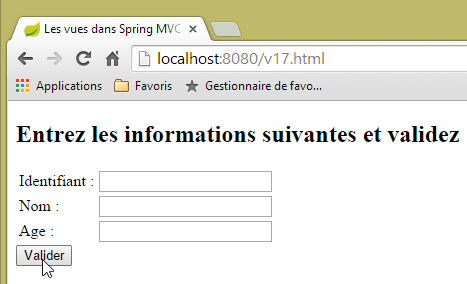 |
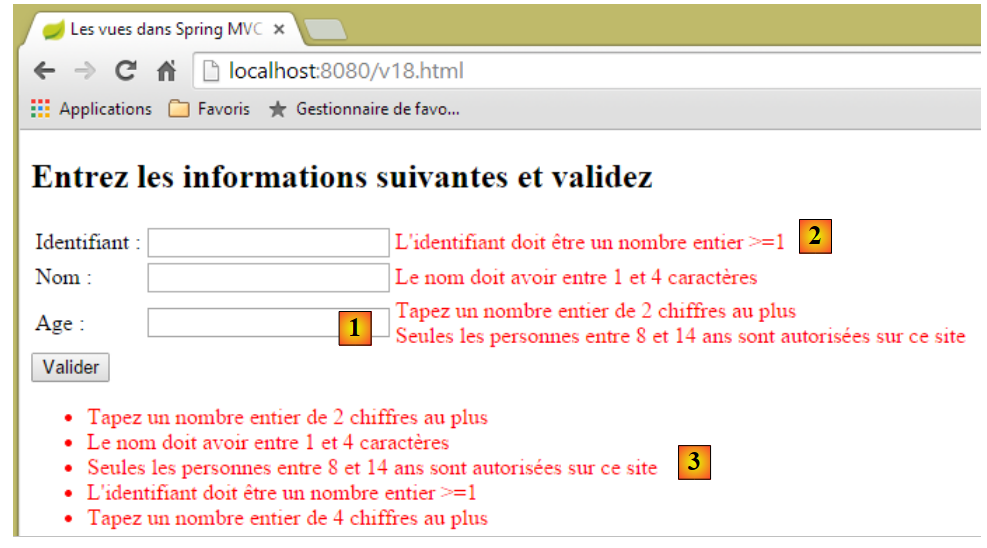 |
[1] örneğinde, [age] alanındaki iki doğrulayıcının da çalıştırıldığı görülüyor:
    @Range(min = 8, max = 14)
    @Digits(fraction = 0, integer = 2)
    private String age;
Hata mesajlarının bir sırası var mı? [age] alanı için, doğrulayıcıların [Digits, Range] sırasına göre çalıştırılmış olduğu görülüyor. Ancak birden fazla sorgu yapıldığında, bu sıranın değişebileceği fark edilebilir. Dolayısıyla, doğrulayıcıların sırasına güvenilemez. [2]'te, [id] alanındaki iki hatadan sadece biri görüntüleniyor. [3]'te ise tüm hata mesajları görünüyor.
5.14. [/v19-/v20]: farklı doğrulayıcıların kullanımı
Şu yeni eylem şablonunu ele alalım:
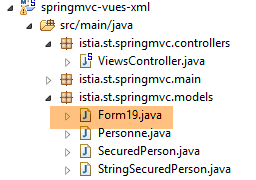 |
package istia.st.springmvc.models;

import java.util.Date;

import javax.validation.constraints.AssertFalse;
import javax.validation.constraints.AssertTrue;
import javax.validation.constraints.Future;
import javax.validation.constraints.Max;
import javax.validation.constraints.Min;
import javax.validation.constraints.NotNull;
import javax.validation.constraints.Past;
import javax.validation.constraints.Pattern;
import javax.validation.constraints.Size;

import org.hibernate.validator.constraints.Email;
import org.hibernate.validator.constraints.Length;
import org.hibernate.validator.constraints.NotBlank;
import org.hibernate.validator.constraints.NotEmpty;
import org.hibernate.validator.constraints.Range;
import org.hibernate.validator.constraints.URL;
import org.springframework.format.annotation.DateTimeFormat;

public class Form19 {

    @NotNull
    @AssertFalse
    private Boolean assertFalse;

    @NotNull
    @AssertTrue
    private Boolean assertTrue;

    @NotNull
    @Future
    @DateTimeFormat(pattern = "yyyy-MM-dd")
    private Date dateInFuture;

    @NotNull
    @Past
    @DateTimeFormat(pattern = "yyyy-MM-dd")
    private Date dateInPast;

    @NotNull
    @Max(value = 100)
    private Integer intMax100;

    @NotNull
    @Min(value = 10)
    private Integer intMin10;

    @NotNull
    @NotEmpty
    private String strNotEmpty;

    @NotNull
    @NotBlank
    private String strNotBlank;

    @NotNull
    @Size(min = 4, max = 6)
    private String strBetween4and6;

    @NotNull
    @Pattern(regexp = "^\\d{2}:\\d{2}:\\d{2}$")
    private String hhmmss;

    @NotNull
    @Email
    @NotBlank
    private String email;

    @NotNull
    @Length(max = 4, min = 4)
    private String str4;

    @Range(min = 10, max = 14)
    @NotNull
    private Integer int1014;

    @URL
    @NotBlank
    private String url;

    // getter ve setter'lar
...
}
Bu, aşağıdaki [/v19] eylemi tarafından görüntülenecektir:
    // ------------------ bir formun görüntülenmesi
    @RequestMapping(value = "/v19", method = RequestMethod.GET, produces = "text/html; charset=UTF-8")
    public String v19(Form19 formulaire) {
        return "vue-19";
}
- 3. satır: Eylem, [Form19 formulaire] nesnesini parametre olarak alır. GET'e parametre verilmezse, bu nesne Java'nın varsayılan değerleriyle başlatılır;
- 4. satır: [vue-19.xml] görünümü görüntülenir. Bu görünüm şöyledir:
<!DOCTYPE HTML>
<html xmlns:th="http://www.thymeleaf.org">
    <head>
        <title>Spring 4 MVC</title>
        <meta http-equiv="Content-Type" content="text/html; charset=UTF-8" />
        <link rel="stylesheet" href="/css/form19.css" />
    </head>
    <body>
        <h3>Formulaire - Validations côté serveur</h3>
        <form action="/someURL" th:action="@{/v20.html}" method="post" th:object="${form19}">
            <table>
                <thead>
                    <tr>
                        <th class="col1">Contrainte</th>
                        <th class="col2">Saisie</th>
                        <th class="col3">Erreur</th>
                    </tr>
                </thead>
                <tbody>
                    <tr>
                        <td class="col1">@NotEmpty</td>
                        <td class="col2">
                            <input type="text" th:field="*{strNotEmpty}" />
                        </td>
                        <td class="col3">
                            <span th:if="${#fields.hasErrors('strNotEmpty')}" th:errors="*{strNotEmpty}" class="error">Donnée erronée</span>
                        </td>
                    </tr>
                    <tr>
                        <td class="col1">@NotBlank</td>
                        <td class="col2">
                            <input type="text" th:field="*{strNotBlank}" />
                        </td>
                        <td class="col3">
                            <span th:if="${#fields.hasErrors('strNotBlank')}" th:errors="*{strNotBlank}" class="error">Donnée erronée</span>
                        </td>
                    </tr>
                    <tr>
                        <td class="col1">@assertFalse</td>
                        <td class="col2">
                            <input type="radio" th:field="*{assertFalse}" value="true" />
                            <label th:for="${#ids.prev('assertFalse')}">True</label>
                            <input type="radio" th:field="*{assertFalse}" value="false" />
                            <label th:for="${#ids.prev('assertFalse')}">False</label>
                        </td>
                        <td class="col3">
                            <span th:if="${#fields.hasErrors('assertFalse')}" th:errors="*{assertFalse}" class="error">Donnée erronée</span>
                        </td>
                    </tr>
                    <tr>
                        <td class="col1">@assertTrue</td>
                        <td class="col2">
                            <select th:field="*{assertTrue}">
                                <option value="true">True</option>
                                <option value="false">False</option>
                            </select>
                        </td>
                        <td class="col3">
                            <span th:if="${#fields.hasErrors('assertTrue')}" th:errors="*{assertTrue}" class="error">Donnée erronée</span>
                        </td>
                    </tr>
                    <tr>
                        <td class="col1">@Past</td>
                        <td class="col2">
                            <input type="date" th:field="*{dateInPast}" th:value="*{dateInPast}" />
                        </td>
                        <td class="col3">
                            <span th:if="${#fields.hasErrors('dateInPast')}" th:errors="*{dateInPast}" class="error">Donnée erronée</span>
                        </td>
                    </tr>
                    <tr>
                        <td class="col1">@Future</td>
                        <td class="col2">
                            <input type="date" th:field="*{dateInFuture}" th:value="*{dateInFuture}" />
                        </td>
                        <td class="col3">
                            <span th:if="${#fields.hasErrors('dateInFuture')}" th:errors="*{dateInFuture}" class="error">Donnée erronée</span>
                        </td>
                    </tr>
                    <tr>
                        <td class="col1">@Max</td>
                        <td class="col2">
                            <input type="text" th:field="*{intMax100}" th:value="*{intMax100}" />
                        </td>
                        <td class="col3">
                            <span th:if="${#fields.hasErrors('intMax100')}" th:errors="*{intMax100}" class="error">Donnée erronée</span>
                        </td>
                    </tr>
                    <tr>
                        <td class="col1">@Min</td>
                        <td class="col2">
                            <input type="text" th:field="*{intMin10}" th:value="*{intMin10}" />
                        </td>
                        <td class="col3">
                            <span th:if="${#fields.hasErrors('intMin10')}" th:errors="*{intMin10}" class="error">Donnée erronée</span>
                        </td>
                    </tr>
                    <tr>
                        <td class="col1">@Size</td>
                        <td class="col2">
                            <input type="text" th:field="*{strBetween4and6}" th:value="*{strBetween4and6}" />
                        </td>
                        <td class="col3">
                            <span th:if="${#fields.hasErrors('strBetween4and6')}" th:errors="*{strBetween4and6}" class="error">Donnée erronée</span>
                        </td>
                    </tr>
                    <tr>
                        <td class="col1">@Pattern(hh:mm:ss)</td>
                        <td class="col2">
                            <input type="text" th:field="*{hhmmss}" th:value="*{hhmmss}" />
                        </td>
                        <td class="col3">
                            <span th:if="${#fields.hasErrors('hhmmss')}" th:errors="*{hhmmss}" class="error">Donnée erronée</span>
                        </td>
                    </tr>
                    <tr>
                        <td class="col1">@Email</td>
                        <td class="col2">
                            <input type="text" th:field="*{email}" th:value="*{email}" />
                        </td>
                        <td class="col3">
                            <span th:if="${#fields.hasErrors('email')}" th:errors="*{email}" class="error">Donnée erronée</span>
                        </td>
                    </tr>
                    <tr>
                        <td class="col1">@Length</td>
                        <td class="col2">
                            <input type="text" th:field="*{str4}" th:value="*{str4}" />
                        </td>
                        <td class="col3">
                            <span th:if="${#fields.hasErrors('str4')}" th:errors="*{str4}" class="error">Donnée erronée</span>
                        </td>
                    </tr>
                    <tr>
                        <td class="col1">@Range</td>
                        <td class="col2">
                            <input type="text" th:field="*{int1014}" th:value="*{int1014}" />
                        </td>
                        <td class="col3">
                            <span th:if="${#fields.hasErrors('int1014')}" th:errors="*{int1014}" class="error">Donnée erronée</span>
                        </td>
                    </tr>
                    <tr>
                        <td class="col1">@URL</td>
                        <td class="col2">
                            <input type="text" th:field="*{url}" th:value="*{url}" />
                        </td>
                        <td class="col3">
                            <span th:if="${#fields.hasErrors('url')}" th:errors="*{url}" class="error">Donnée erronée</span>
                        </td>
                    </tr>
                </tbody>
            </table>
            <p>
                <input type="submit" value="Valider" />
            </p>
        </form>
    </body>
</html>
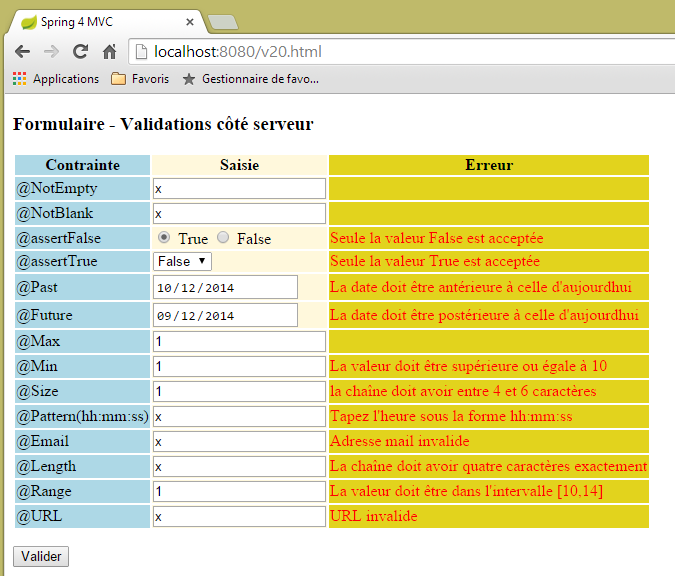
Bu kod aşağıdaki görünümü görüntüler:
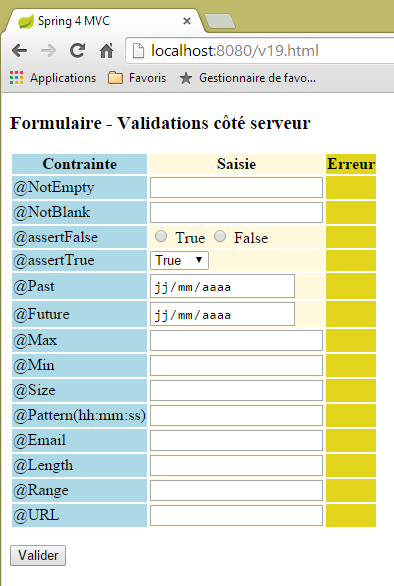 |
Sayfa, üç sütunlu bir tablo içerir:
- 1. sütun: giriş alanının doğrulayıcısı;
- 2. sütun: giriş alanı;
- 3. sütun: giriş alanına ilişkin hata mesajları;
Örnek olarak, [/v19.html] görünümü kodunu, [@Pattern] doğrulayıcısı için inceleyelim:
                    <tr>
                        <td class="col1">@Pattern(hh:mm:ss)</td>
                        <td class="col2">
                            <input type="text" th:field="*{hhmmss}" th:value="*{hhmmss}" />
                        </td>
                        <td class="col3">
                            <span th:if="${#fields.hasErrors('hhmmss')}" th:errors="*{hhmmss}" class="error">Donnée erronée</span>
                        </td>
</tr>
Az önce [Personne] tipi formlarla incelediğimiz kodu burada da görüyoruz:
- 2. satır: 1. sütun: test edilen doğrulayıcının adı;
- 4. satır: [th:field="*{hhmmss}] Thymeleaf özniteliği, HTML, [id="hhmmss"] ve [name="hhmmss"] özniteliklerini oluşturacaktır. Thymeleaf [th:value="*{hhmmss}"] özniteliği, HTML [value="valeur de [form19.hhmmss]] özniteliğini oluşturacaktır;
- 7. satır: [form19.hhmmss] alanı için girilen değer hatalıysa, 7. satırda bu alanla ilgili hata mesajları görüntülenir;
Gönderilen değerler, aşağıdaki [/v20] eylemi tarafından işlenir:
    // ----------------- form modelinin doğrulanması
    @RequestMapping(value = "/v20", method = RequestMethod.POST, produces = "text/html; charset=UTF-8")
    public String v20(@Valid Form19 formulaire, BindingResult result, RedirectAttributes redirectAttributes) {
        if (result.hasErrors()) {
            return "vue-19";
        } else {
            // [vue-19]'e yönlendirme
            redirectAttributes.addFlashAttribute("form19", formulaire);
            return "redirect:/v19.html";
        }
}
- 3. satır: Kaydedilen değerler, geçerliyse [Form19 formulaire] nesnesinin alanlarını doldurur;
- satır 4-6: Kaydedilen değerler geçerli değilse, [vue-19] formu hata mesajlarıyla birlikte yeniden görüntülenir;
- satır 6-10: Gönderilen değerler geçerliyse, bu değerlerle oluşturulan [Form19 formulaire] nesnesi bir sonraki istek için (burada yönlendirme isteği) kullanıma sunulur. Ardından nesne imha edilir;
- 9. satır: İstemci, [/v19.html] eylemine yönlendirilir. Bu eylem, aşağıdaki gibi kod içeren [vue-19] formunu yeniden görüntüler:
<form action="/someURL" th:action="@{/v20.html}" method="post" th:object="${form19}">
[th:object="${form19}"] özniteliği, Flash özniteliği [form19] ile ilişkili nesneyi alır ve böylece formun girildiği haliyle yeniden görüntülenmesini sağlar.
Form kodunun biraz daha açıklanması gerekiyor. Şu kodu ele alalım:
                    <tr>
                        <td class="col1">@assertFalse</td>
                        <td class="col2">
                            <input type="radio" th:field="*{assertFalse}" value="true" />
                            <label th:for="${#ids.prev('assertFalse')}">True</label>
                            <input type="radio" th:field="*{assertFalse}" value="false" />
                            <label th:for="${#ids.prev('assertFalse')}">False</label>
                        </td>
                        <td class="col3">
                            <span th:if="${#fields.hasErrors('assertFalse')}" th:errors="*{assertFalse}" class="error">Donnée erronée</span>
                        </td>
</tr>
Bu, aşağıdaki HTML kodunu oluşturur:
<tr>
  <td class="col1">@assertFalse</td>
  <td class="col2">
    <input type="radio" value="true" id="assertFalse1" name="assertFalse" />
    <label for="assertFalse1">True</label>
    <input type="radio" value="false" id="assertFalse2" name="assertFalse" />
    <label for="assertFalse2">False</label>
  </td>
  <td class="col3">
  </td>
</tr>
Kodda
<input type="radio" th:field="*{assertFalse}" value="true" />
<label th:for="${#ids.prev('assertFalse')}">True</label>
<input type="radio" th:field="*{assertFalse}" value="false" />
<label th:for="${#ids.prev('assertFalse')}">False</label>
'de 1. ve 3. satırlardaki [th:field="*{assertFalse}"] Thymeleaf öznitelikleri bir sorun yaratmaktadır. Bu özniteliğin HTML, [id=assertFalse] ve [name=assertFalse] özniteliklerini oluşturduğu belirtilmiştir. Sorun, bunların 1. ve 3. satırlarda oluşturulması nedeniyle iki adet aynı [name] özniteliği ve iki adet aynı [id] özniteliği oluşmasından kaynaklanıyor. [name] özniteliği ile bu mümkün olsa da, [id] özniteliği ile mümkün değildir. Oluşturulan HTML kodunda görüldüğü gibi, Thymeleaf iki farklı [id] özniteliği ([id=asserFalse1] ve [id=assertFalse2]) oluşturmuştur. Bu iyi bir şeydir. Sorun şu ki, bu tanımlayıcıları bilmiyoruz ve bunlara ihtiyacımız olabilir. 2. satırdaki [label] etiketinde durum böyledir. Bir HTML etiketinin [for] özniteliği, bir [id] özniteliğine atıfta bulunmalıdır; bu durumda 1. satırdaki [input] etiket için oluşturulan özniteliğe. Thymeleaf belgelerinde, [${#ids.prev('assertFalse')}"] ifadesinin, [assertFalse] alanı için oluşturulan en son [id] özniteliğini elde etmeyi sağladığı belirtilmektedir.
Şimdi formdaki açılır listenin koduna bakalım:
<select th:field="*{assertTrue}">
   <option value="true">True</option>
   <option value="false">False</option>
</select>
Bu kod, bir açılır listenin HTML kodunu oluşturur:
Gönderilen değer, [name="assertTrue"] adıyla gönderilecektir.
[vue-19.xml] görünümü bir stil sayfası kullanır:
    <head>
        <title>Spring 4 MVC</title>
        <meta http-equiv="Content-Type" content="text/html; charset=UTF-8" />
        <link rel="stylesheet" href="/css/form19.css" />
</head>
- satırda, kullanılan stil sayfası projenin [static] klasörüne yerleştirilmelidir:
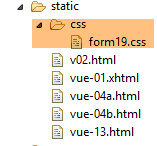 |
İçeriği şöyledir:
@CHARSET "UTF-8";

.col1 {
    background: lightblue;
}

.col2 {
    background: Cornsilk;
}

.col3 {
    background: #e2d31d;
}

.error {
    color: red;
}
Şimdi tarihleri inceleyelim:
    @NotNull
    @Future
    @DateTimeFormat(pattern = "yyyy-MM-dd")
    private Date dateInFuture;

    @NotNull
    @Past
    @DateTimeFormat(pattern = "yyyy-MM-dd")
    private Date dateInPast;
Chrome geliştirici araçlarında (Ctrl-Shift-I) ağ trafiğini incelediğimizde, tarihlerin (yyyy-aa-gg) biçiminde gönderildiğini görüyoruz:
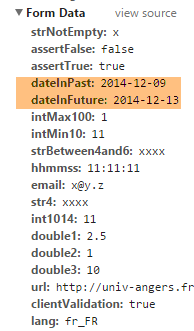 |
Bu nedenle tarihler, doğrulayıcıda şu şekilde işaretlenmiştir:
@DateTimeFormat(pattern = "yyyy-MM-dd")
Bu, tarihlerin gönderilen değeri için beklenen biçimi belirler.
Son olarak, Fransızca mesaj dosyası [messages_fr.properties]:
title=Les vues dans Spring MVC
personne.nom=Nom :
personne.age=Age :
personne.id=Identifiant :
personne.mineure=Vous êtes mineur
personne.majeure=Vous êtes majeur
liste.personnes=Liste de personnes
personne.formulaire.titre=Entrez les informations suivantes et validez
personne.formulaire.valider=Valider
personne.formulaire.saisies=Voici vos saisies
NotNull=La donnée est obligatoire
Range.securedPerson.id=L''identifiant doit être un nombre entier >=1
Range.securedPerson.age=Seules les personnes entre 8 et 14 ans sont autorisées sur ce site
Length.securedPerson.nom=Le nom doit avoir entre 1 et 4 caractères
typeMismatch=Donnée invalide
Range.stringSecuredPerson.id=L''identifiant doit être un nombre entier >=1
Range.stringSecuredPerson.age=Seules les personnes entre 8 et 14 ans sont autorisées sur ce site
Length.stringSecuredPerson.nom=Le nom doit avoir entre 1 et 4 caractères
Digits.stringSecuredPerson.id=Tapez un nombre entier de 4 chiffres au plus
Digits.stringSecuredPerson.age=Tapez un nombre entier de 2 chiffres au plus
Future.form19.dateInFuture=La date doit être postérieure à celle d''aujourd'hui
Past.form19.dateInPast=La date doit être antérieure à celle d''aujourd'hui
Size.form19.strBetween4and6=la chaîne doit avoir entre 4 et 6 caractères
Min.form19.intMin10=La valeur doit être supérieure ou égale à 10
Max.form19.intMax100=La valeur doit être inférieure ou égale à 100
Length.form19.str4=La chaîne doit avoir quatre caractères exactement
Email.form19.email=Adresse mail invalide
URL.form19.url=URL invalide
Range.form19.int1014=La valeur doit être dans l''intervalle [10,14]
AssertTrue=Seule la valeur True est acceptée
AssertFalse=Seule la valeur False est acceptée
Pattern.form19.hhmmss=Tapez l''heure sous la forme hh:mm:ss
NotEmpty=La donnée ne peut être vide
NotBlank=La donnée ne peut être vide
Şimdi birkaç çalışma örneğine bakalım:
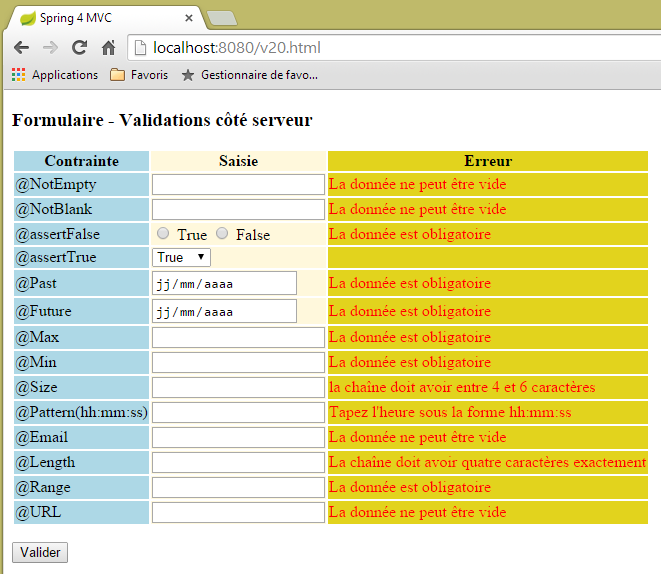 |
 |
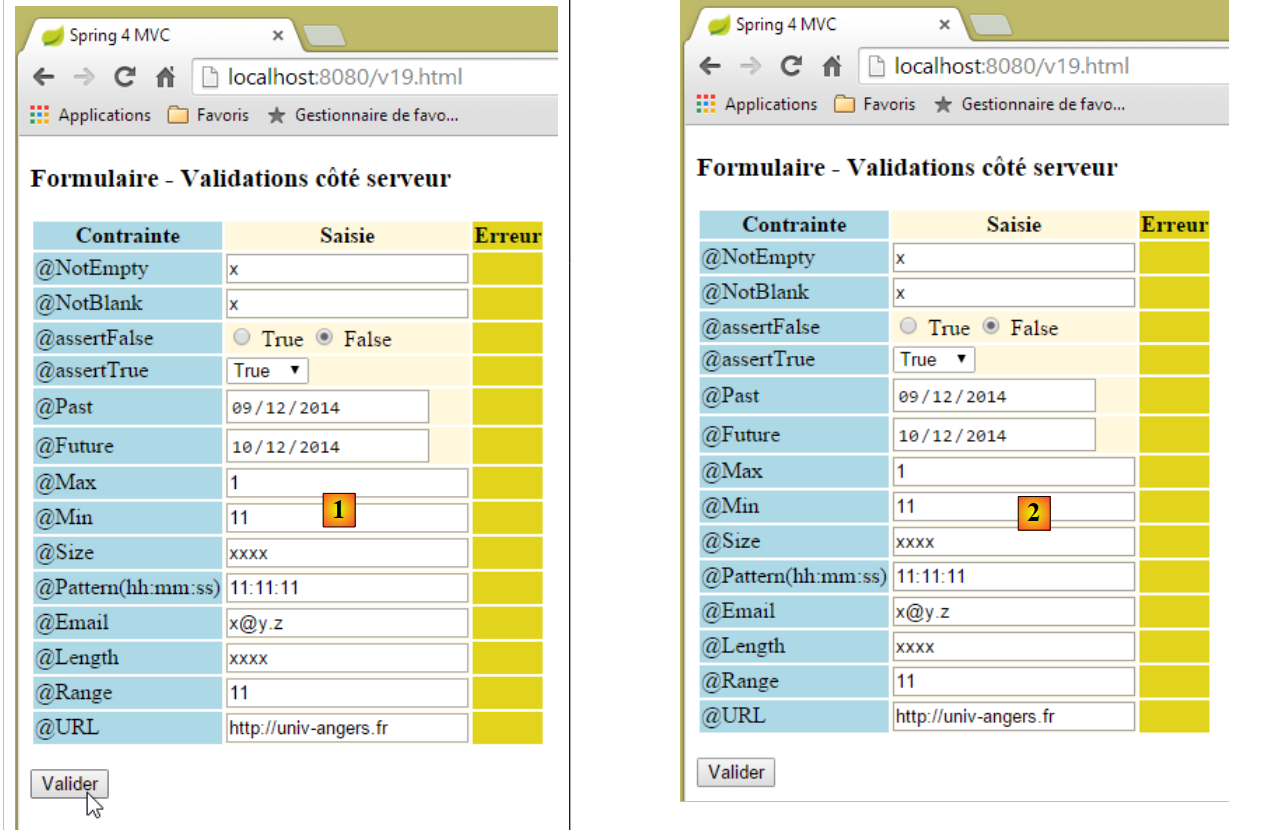 |
Yukarıda, [1] ile [2] arasında sanki hiçbir şey olmamış gibi görünüyor. Ancak ağ trafiğine bakıldığında (Ctrl-Shift-I), sunucuyla iki kez ağ iletişimi gerçekleştiği görülüyor:
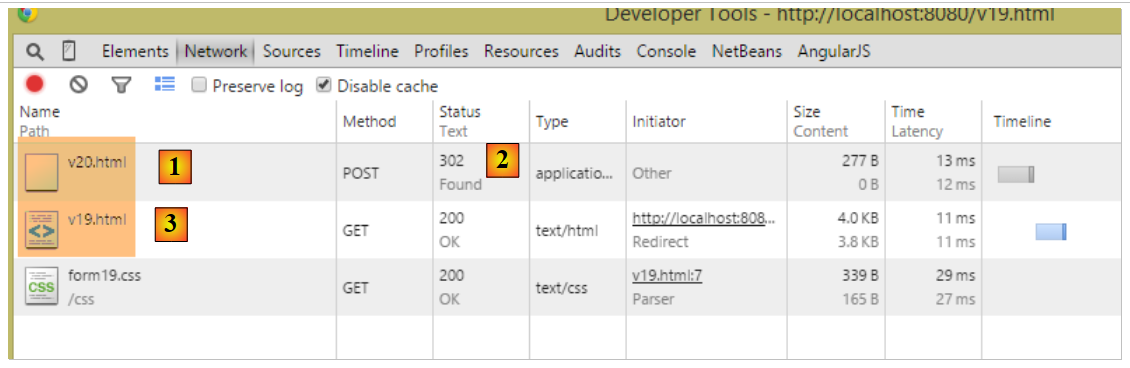 |
- [1]'te, POST'ten [/v20]'e yapılan ilk işlem;
- [2]'e, bu işlemin yanıtı bir yönlendirmedir;
- [3]'te, bu sefer [/v19]'e yönelik ikinci istek;
Ardından [/v19] eylemi yürütülür:
    // ------------------ bir formun görüntülenmesi
    @RequestMapping(value = "/v19", method = RequestMethod.GET, produces = "text/html; charset=UTF-8")
    public String v19(Form19 formulaire) {
        return "vue-19";
}
- 3. satırda, [Form19 formulaire] parametresi, önceki [/v19] eylemi tarafından oluşturulan ve [Form19] türünde bir nesne olan [form19] anahtarının Flash özniteliği ile başlatılır; bu nesnenin değerleri, [/v19] eylemine gönderilen değerler;
- 4. satır: [vue-19.xml] görünümü, şablonunda gönderilen değerlerle başlatılmış bir [Form19 formulaire] nesnesi ile görüntülenecektir. Bu nedenle kullanıcı, formu gönderdiği haliyle tekrar görür;
Neden yönlendirme yapılıyor? Neden yukarıdaki [/v19] eylemine doğrudan gönderim yapılmadı? Aynı sonucu elde ederdik. Birkaç küçük fark dışında:
- tarayıcı, burada olduğu gibi [http://localhost:8080/v19.html] yerine adres çubuğuna [http://localhost:8080/v20.html] yazardı, çünkü en son çağrılan URL'i gösterir;
- kullanıcı sayfayı yenilerse (F5), sonuç hiç de aynı olmaz:
- yönlendirme durumunda, görüntülenen URL, bir GET ile elde edilen [http://localhost:8080/v19.html]'tir. Tarayıcı bu son komutu yeniden çalıştıracak ve böylece yepyeni bir form elde edecektir (Flash özniteliği yalnızca bir kez kullanılır),
- Yönlendirme yapılmadığında, görüntülenen URL, bir POST ile elde edilen [http://localhost:8080/v20.html]'tir. Tarayıcı bu son komutu tekrar çalıştıracak ve dolayısıyla daha önce gönderilen değerlerle yeniden bir POST oluşturacaktır. Burada bunun bir önemi yoktur, ancak bu durum genellikle istenmez ve bu nedenle genellikle yönlendirme tercih edilir;
5.15. [/v21-/v22]: radyo düğmelerini yönetme
Aşağıdaki Spring [Listes] bileşenini ele alalım:
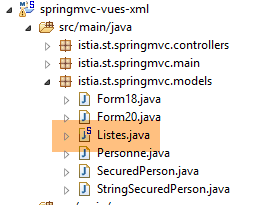 |
package istia.st.springmvc.models;

import org.springframework.stereotype.Component;

@Component
public class Listes {

    private String[] deplacements = new String[] { "0", "1", "2", "3", "4" };
    private String[] libellesDeplacements = new String[] { "vélo", "marche", "train", "avion", "autre" };
    private String[] libellesBijoux = new String[] { "émeraude", "rubis", "diamant", "opaline" };

    // alıcı ve ayarlayıcılar
  ...

}
- 5. satır: [Listes] sınıfı bir Spring bileşeni olacaktır;
- 8-10. satırlar: radyo düğmeleri, onay kutuları ve açılır listeleri beslemek için kullanılan listeler;
[Config] yapılandırma sınıfında şunlar yazmaktadır:
@Configuration
@ComponentScan({ "istia.st.springmvc.controllers", "istia.st.springmvc.models" })
@EnableAutoConfiguration
public class Config extends WebMvcConfigurerAdapter {
- 2. satır: [Listes] bileşeninin bulunduğu [models] paketi, Spring tarafından ayrıntılı bir şekilde taranacaktır;
Aşağıdaki yeni eylemleri oluşturuyoruz:
    // ------------------ radyo düğmeli form
    @Autowired
    private Listes listes;

    @RequestMapping(value = "/v21", method = RequestMethod.GET, produces = "text/html; charset=UTF-8")
    public String v21(@ModelAttribute("form") Form21 formulaire, Model model) {
        model.addAttribute("listes", listes);
        return "vue-21";
    }

    @RequestMapping(value = "/v22", method = RequestMethod.POST, produces = "text/html; charset=UTF-8")
    public String v22(@ModelAttribute("form") Form21 formulaire, RedirectAttributes redirectAttributes) {
        redirectAttributes.addFlashAttribute("form", formulaire);
        return "redirect:/v21.html";
}
- 2-3. satırlar: [Listes] bileşeni denetleyiciye enjekte edilir;
- 6. satır: Aşağıda açıklayacağımız [Form21] türünde bir form yönetiyoruz. Görünüm modelinde bu formun anahtarı olarak [form]'in belirtildiğini unutmayın. Varsayılan olarak bu anahtarın [form21] olacağını hatırlatırız;
- 7. satır: [Listes] bileşenini modele ekliyoruz. Görünümün buna ihtiyacı olacak;
- 8. satır: [vue-21.xml] görünümünü görüntülüyoruz. Bu görünüm, [Form21] formunu gösterecek ve gönderilen değerler, 12-15. satırlardaki [/v22] eylemine aktarılacaktır;
- 12-15. satırlar: [/v22] eylemi, aldığı POST değerlerini [form] anahtarına sahip bir Flash özniteliğine yerleştirerek [/v21] eylemine yönlendirme yapar. Bu anahtarın 6. satırda kullanılan anahtarla aynı olması önemlidir;
[Form21] şablonu şu şekildedir:
 |
package istia.st.springmvc.models;

public class Form21 {

    // gönderilen değerler
    private String marie = "non";
    private String deplacement = "4";
    private String[] couleurs;
    private String strCouleurs;
    private String[] bijoux;
    private String strBijoux;
    private int couleur2;
    private int[] bijoux2;
    private String strBijoux2;

    // getter ve setter'lar
    ...
}
[vue-21.xml] görünümü şöyledir:
<!DOCTYPE HTML>
<html xmlns:th="http://www.thymeleaf.org">
    <head>
        <title>Spring 4 MVC</title>
        <meta http-equiv="Content-Type" content="text/html; charset=UTF-8" />
        <link rel="stylesheet" href="/css/form19.css" />
    </head>
    <body>

        <h3>Formulaire - Boutons radio</h3>
        <form action="/someURL" th:action="@{/v22.html}" method="post" th:object="${form}">
            <table>
                <thead>
                    <tr>
                        <th class="col1">Texte</th>
                        <th class="col2">Saisie</th>
                        <th class="col3">Valeur</th>
                    </tr>
                </thead>
                <tbody>
                    <tr>
                        <td class="col1">Etes-vous marié(e)</td>
                        <td class="col2">
                            <input type="radio" th:field="*{marie}" value="oui" />
                            <label th:for="${#ids.prev('marie')}">Oui</label>
                            <input type="radio" th:field="*{marie}" value="non" />
                            <label th:for="${#ids.prev('marie')}">Non</label>
                        </td>
                        <td class="col3">
                            <span th:text="*{marie}"></span>
                        </td>
                    </tr>
                    <tr>
                        <td class="col1">Mode de déplacement</td>
                        <td class="col2">
                            <span th:each="mode, status : ${listes.deplacements}">
                                <input type="radio" th:field="*{deplacement}" th:value="${mode}" />
                                <label th:for="${#ids.prev('deplacement')}" th:text="${listes.libellesDeplacements[status.index]}">Autre</label>
                            </span>
                        </td>
                        <td class="col3">
                            <span th:text="*{deplacement}"></span>
                        </td>
                    </tr>
                </tbody>
            </table>
            <p>
                <input type="submit" value="Valider" />
            </p>
        </form>
    </body>
</html>
- 36-40. satırlar: Onay kutularının etiketlerini oluşturmak için şablona eklenen [Listes] bileşeninin kullanıldığına dikkat edilmelidir;
- 3. sütun, bir POST için gönderilen değeri veya ilk GET sırasında formun başlangıç değerini gösterir;
Bu kod aşağıdaki sayfayı görüntüler:
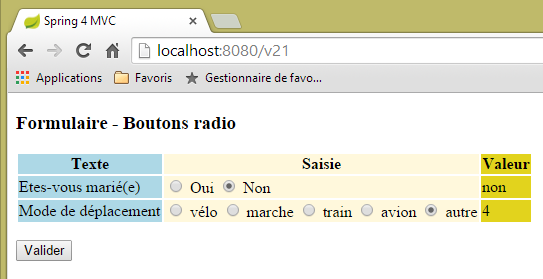 |
Aşağıdaki HTML koduna karşılık gelir:
<!DOCTYPE HTML>

<html>
    <head>
        <title>Spring 4 MVC</title>
        <meta http-equiv="Content-Type" content="text/html; charset=UTF-8" />
        <link rel="stylesheet" href="/css/form19.css" />
    </head>
    <body>

        <h3>Formulaire - Boutons radio</h3>
        <form action="/v22.html" method="post">
            <table>
                <thead>
                    <tr>
                        <th class="col1">Texte</th>
                        <th class="col2">Saisie</th>
                        <th class="col3">Valeur</th>
                    </tr>
                </thead>
                <tbody>
                    <tr>
                        <td class="col1">Etes-vous marié(e)</td>
                        <td class="col2">
                            <input type="radio" value="oui" id="marie1" name="marie" />
                            <label for="marie1">Oui</label>
                            <input type="radio" value="non" id="marie2" name="marie" checked="checked" />
                            <label for="marie2">Non</label>
                        </td>
                        <td class="col3">
                            <span>non</span>
                        </td>
                    </tr>
                    <tr>
                        <td class="col1">Mode de déplacement</td>
                        <td class="col2">
                            <span>
                                <input type="radio" value="0" id="deplacement1" name="deplacement" />
                                <label for="deplacement1">vélo</label>
                            </span>
                            <span>
                                <input type="radio" value="1" id="deplacement2" name="deplacement" />
                                <label for="deplacement2">marche</label>
                            </span>
                            <span>
                                <input type="radio" value="2" id="deplacement3" name="deplacement" />
                                <label for="deplacement3">train</label>
                            </span>
                            <span>
                                <input type="radio" value="3" id="deplacement4" name="deplacement" />
                                <label for="deplacement4">avion</label>
                            </span>
                            <span>
                                <input type="radio" value="4" id="deplacement5" name="deplacement" checked="checked" />
                                <label for="deplacement5">autre</label>
                            </span>
                        </td>
                        <td class="col3">
                            <span>4</span>
                        </td>
                    </tr>
                </tbody>
            </table>
            <p>
                <input type="submit" value="Valider" />
            </p>
        </form>
    </body>
</html>
Gönderilen değerlerin (name öznitelikleri) [Form21] şablonunun aşağıdaki alanlarına yerleştirildiği görülmektedir:
    private String marie = "non";
    private String deplacement = "4";
Okuyucunun testler yapması önerilir. Radyo düğmelerinin [value] özniteliğinin gönderildiğine dikkat edilmelidir.
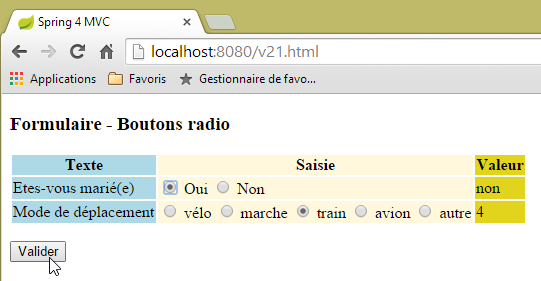 | 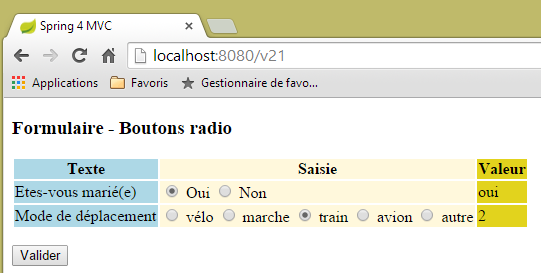 |
5.16. [/v23-/v24]: onay kutularını yönetme
Aşağıdaki yeni eylemi ekliyoruz:
    // ------------------ onay kutuları içeren form
    @RequestMapping(value = "/v23", method = RequestMethod.GET, produces = "text/html; charset=UTF-8")
    public String av20(@ModelAttribute("form") Form21 formulaire, Model model) {
        model.addAttribute("listes", listes);
        return "vue-23";
}
- 3. satır: [Form21] şablonunu kullanmaya devam ediyoruz;
[vue-23.xml] görünümü şöyledir:
<!DOCTYPE HTML>
<html xmlns:th="http://www.thymeleaf.org">
    <head>
        <title>Spring 4 MVC</title>
        <meta http-equiv="Content-Type" content="text/html; charset=UTF-8" />
        <link rel="stylesheet" href="/css/form19.css" />
    </head>
    <body>
        <h3>Formulaire - Cases à cocher</h3>
        <form action="/someURL" th:action="@{/v24.html}" method="post" th:object="${form}">
            <table>
                <thead>
                    <tr>
                        <th class="col1">Texte</th>
                        <th class="col2">Saisie</th>
                        <th class="col3">Valeur</th>
                    </tr>
                </thead>
                <tbody>
                    <tr>
                        <td class="col1">Vos couleurs préférées</td>
                        <td class="col2">
                            <input type="checkbox" th:field="*{couleurs}" value="0" />
                            <label th:for="${#ids.prev('couleurs')}">rouge</label>
                            <input type="checkbox" th:field="*{couleurs}" value="1" />
                            <label th:for="${#ids.prev('couleurs')}">vert</label>
                            <input type="checkbox" th:field="*{couleurs}" value="2" />
                            <label th:for="${#ids.prev('couleurs')}">bleu</label>
                        </td>
                        <td class="col3">
                            <span th:text="*{strCouleurs}"></span>
                        </td>
                    </tr>
                    <tr>
                        <td class="col1">Pierres préférées</td>
                        <td class="col2">
                            <span th:each="label, status : ${listes.libellesBijoux}">
                                <input type="checkbox" th:field="*{bijoux}" th:value="${status.index}" />
                                <label th:for="${#ids.prev('bijoux')}" th:text="${label}">Autre</label>
                            </span>
                        </td>
                        <td class="col3">
                            <span th:text="*{strBijoux}"></span>
                        </td>
                    </tr>
                </tbody>
            </table>
            <p>
                <input type="submit" value="Valider" />
            </p>
        </form>
    </body>
</html>
- 37-41. satırlar: Onay kutularının etiketlerini oluşturmak için [Listes] bileşeninin kullanıldığına dikkat edin;
Bu kod aşağıdaki sayfayı görüntüler:
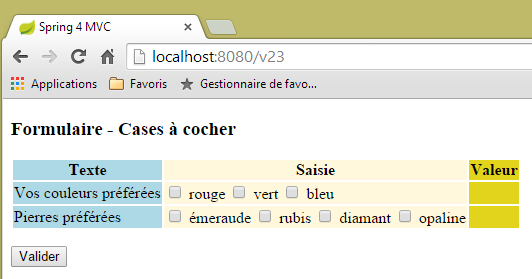 |
Aşağıdaki HTML kodundan elde edilmiştir:
<!DOCTYPE HTML>

<html>
    <head>
        <title>Spring 4 MVC</title>
        <meta http-equiv="Content-Type" content="text/html; charset=UTF-8" />
        <link rel="stylesheet" href="/css/form19.css" />
    </head>
    <body>
        <h3>Formulaire - Cases à cocher</h3>
        <form action="/v24.html" method="post">
            <table>
                <thead>
                    <tr>
                        <th class="col1">Texte</th>
                        <th class="col2">Saisie</th>
                        <th class="col3">Valeur</th>
                    </tr>
                </thead>
                <tbody>
                    <tr>
                        <td class="col1">Vos couleurs préférées</td>
                        <td class="col2">
                            <input type="checkbox" value="0" id="couleurs1" name="couleurs" /><input type="hidden" name="_couleurs" value="on" />
                            <label for="couleurs1">rouge</label>
                            <input type="checkbox" value="1" id="couleurs2" name="couleurs" /><input type="hidden" name="_couleurs" value="on" />
                            <label for="couleurs2">vert</label>
                            <input type="checkbox" value="2" id="couleurs3" name="couleurs" /><input type="hidden" name="_couleurs" value="on" />
                            <label for="couleurs3">bleu</label>
                        </td>
                        <td class="col3">
                            <span></span>
                        </td>
                    </tr>
                    <tr>
                        <td class="col1">Pierres préférées</td>
                        <td class="col2">
                            <span>
                                <input type="checkbox" value="0" id="bijoux1" name="bijoux" /><input type="hidden" name="_bijoux" value="on" />
                                <label for="bijoux1">émeraude</label>
                            </span>
                            <span>
                                <input type="checkbox" value="1" id="bijoux2" name="bijoux" /><input type="hidden" name="_bijoux" value="on" />
                                <label for="bijoux2">rubis</label>
                            </span>
                            <span>
                                <input type="checkbox" value="2" id="bijoux3" name="bijoux" /><input type="hidden" name="_bijoux" value="on" />
                                <label for="bijoux3">diamant</label>
                            </span>
                            <span>
                                <input type="checkbox" value="3" id="bijoux4" name="bijoux" /><input type="hidden" name="_bijoux" value="on" />
                                <label for="bijoux4">opaline</label>
                            </span>
                        </td>
                        <td class="col3">
                            <span></span>
                        </td>
                    </tr>
                </tbody>
            </table>
            <p>
                <input type="submit" value="Valider" />
            </p>
        </form>
    </body>
</html>
Gönderilen değerlerin (name öznitelikleri) [Form21] bileşeninin aşağıdaki alanlarına kaydedildiğine dikkat edilmelidir:
    private String[] couleurs;
    private String[] bijoux;
Bunlar tablolardır, çünkü her alan için alan adını taşıyan birden fazla onay kutusu bulunmaktadır. Dolayısıyla, aynı adla (formdaki name özniteliği) gönderilen birden fazla değer olabilir. Bu nedenle, bunları almak için bir tablo gereklidir.
Sayfanın 3. sütunundaki Thymeleaf koduna geri dönelim:
  <td class="col3">
    <span th:text="*{strCouleurs}"></span>
  </td>
</tr>
<tr>
  <td class="col1">Pierres préférées</td>
  <td class="col2">
    <span th:each="label, status : ${listes.libellesBijoux}">
      <input type="checkbox" th:field="*{bijoux}" th:value="${status.index}" />
      <label th:for="${#ids.prev('bijoux')}" th:text="${label}">Autre</label>
    </span>
  </td>
  <td class="col3">
    <span th:text="*{strBijoux}"></span>
  </td>
</tr>
2. ve 14. satırlarda belirtilen alanlar şunlardır:
    private String strCouleurs;
    private String strBijoux;
Bu alanlar, POST'i yöneten [/v24] eylemi tarafından hesaplanır:
    // Jackson eşleştiricisi / jSON
    private ObjectMapper mapper = new ObjectMapper();

    @RequestMapping(value = "/v24", method = RequestMethod.POST, produces = "text/html; charset=UTF-8")
    public String av21(@ModelAttribute("form") Form21 formulaire, RedirectAttributes redirectAttributes) throws JsonProcessingException {
        redirectAttributes.addFlashAttribute("form", formulaire);
        formulaire.setStrCouleurs(mapper.writeValueAsString(formulaire.getCouleurs()));
        formulaire.setStrBijoux(mapper.writeValueAsString(formulaire.getBijoux()));
        return "redirect:/v23.html";
}
Burada, jackson / jSON kütüphanesinin projenin bağımlılıkları arasında yer aldığını unutmamak gerekir.
- 2. satır: Nesneleri jSON formatında serileştirmeye ve deserileştirmeye olanak tanıyan bir [ObjectMapper] türü oluşturulur,
- 7. satır: Renk tablosu jSON formatında serileştirilir. Sonuç, [strCouleurs] alanına yerleştirilir;
- 8. satır: mücevher tablosu jSON formatında serileştirilir. Sonuç, [strBijoux] alanına yerleştirilir;
İşte bir yürütme örneği:
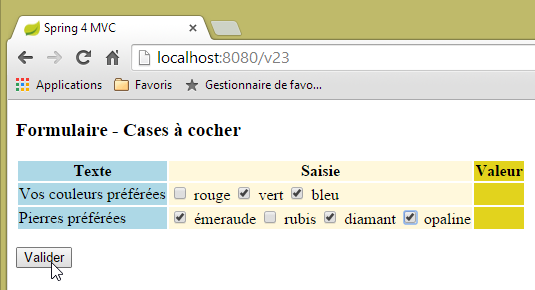 | 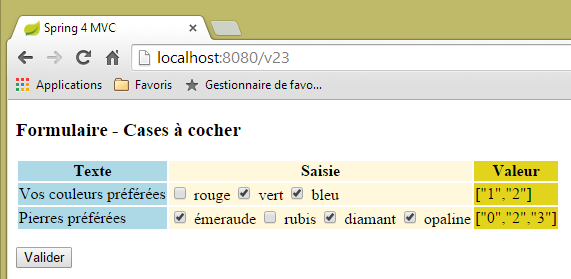 |
Onay kutularının [value] özniteliğinin gönderildiğine dikkat edilmelidir.
5.17. [/25-/v26]: listeleri yönetme
Aşağıdaki [/v25] eylemini ekliyoruz:
  // ------------------ listeli form
  @RequestMapping(value = "/v25", method = RequestMethod.GET, produces = "text/html; charset=UTF-8")
  public String v25(@ModelAttribute("form") Form21 formulaire, Model model) {
        model.addAttribute("listes", listes);
        return "vue-25";
}
[vue-25.xml] görünümü şöyledir:
<!DOCTYPE HTML>
<html xmlns:th="http://www.thymeleaf.org">
    <head>
        <title>Spring 4 MVC</title>
        <meta http-equiv="Content-Type" content="text/html; charset=UTF-8" />
        <link rel="stylesheet" href="/css/form19.css" />
    </head>
    <body>

        <h3>Formulaire - Listes</h3>
        <form action="/someURL" th:action="@{/v26.html}" method="post"
            th:object="${form}">
            <table>
                <thead>
                    <tr>
                        <th class="col1">Texte</th>
                        <th class="col2">Saisie</th>
                        <th class="col3">Valeur</th>
                    </tr>
                </thead>
                <tbody>
                    <tr>
                        <td class="col1">Votre couleur préférée</td>
                        <td class="col2">
                            <select th:field="*{couleur2}">
                                <option value="0">rouge</option>
                                <option value="1">bleu</option>
                                <option value="2">vert</option>
                            </select>
                        </td>
                        <td class="col3">
                            <span th:text="*{couleur2}"></span>
                        </td>
                    </tr>
                    <tr>
                        <td class="col1">Pierres préférées (choix multiple)</td>
                        <td class="col2">
                            <select th:field="*{bijoux2}" multiple="multiple" size="3">
                                <option th:each="label, status : ${listes.libellesBijoux}"
                                    th:text="${label}" th:value="${status.index}">
                                </option>
                            </select>
                        </td>
                        <td class="col3">
                            <span th:text="*{strBijoux2}"></span>
                        </td>
                    </tr>

                </tbody>
            </table>
            <input type="submit" value="Valider" />
        </form>
    </body>
</html>
- 38-42. satırlar: etiketleri daha önce kullandığımız [Listes] bileşeninden alınan çoktan seçmeli bir listenin oluşturulması;
Görüntülenen sayfa şöyledir:
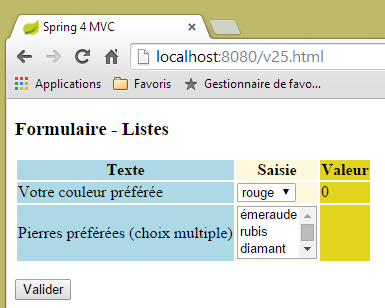 |
Aşağıdaki HTML kodu tarafından oluşturulmuştur:
<!DOCTYPE HTML>

<html>
    <head>
        <title>Spring 4 MVC</title>
        <meta http-equiv="Content-Type" content="text/html; charset=UTF-8" />
        <link rel="stylesheet" href="/css/form19.css" />
    </head>
    <body>

        <h3>Formulaire - Listes</h3>
        <form action="/v26.html" method="post">
            <table>
                <thead>
                    <tr>
                        <th class="col1">Texte</th>
                        <th class="col2">Saisie</th>
                        <th class="col3">Valeur</th>
                    </tr>
                </thead>
                <tbody>
                    <tr>
                        <td class="col1">Votre couleur préférée</td>
                        <td class="col2">
                            <select id="couleur2" name="couleur2">
                                <option value="0" selected="selected">rouge</option>
                                <option value="1">bleu</option>
                                <option value="2">vert</option>
                            </select>
                        </td>
                        <td class="col3">
                            <span>0</span>
                        </td>
                    </tr>
                    <tr>
                        <td class="col1">Pierres préférées (choix multiple)</td>
                        <td class="col2">
                            <select multiple="multiple" size="3" id="bijoux2" name="bijoux2">
                                <option value="0">émeraude</option>
                                <option value="1">rubis</option>
                                <option value="2">diamant</option>
                                <option value="3">opaline</option>
                            </select>
                            <input type="hidden" name="_bijoux2" value="1" />
                        </td>
                        <td class="col3">
                            <span></span>
                        </td>
                    </tr>
                </tbody>
            </table>
            <p>
                <input type="submit" value="Valider" />
            </p>
        </form>
    </body>
</html>
- 44. satır: Thymeleaf'in gizli bir alan oluşturduğu görülebilir. Bunun işlevini tam olarak anlayamadım:
- gönderilen değerler (option etiketlerinin value öznitelikleri), [Form21] etiketinin aşağıdaki alanlarına (name öznitelikleri) aktarılacaktır:
    private int couleur2;
    private int[] bijoux2;
- 38. satır: [bijoux2] listesi çoktan seçmelidir. Dolayısıyla, [bijoux2] adıyla ilişkili olarak birden fazla değer gönderilebilir. Bunları almak için [bijoux2] alanının bir dizi olması gerekir. Bunun bir tamsayı dizisi olduğu dikkatinizi çekecektir. Gönderilen değerler bu türe dönüştürülebildiği için bu mümkündür;
Değerler, aşağıdaki [/v26] eylemine gönderilir:
  @RequestMapping(value = "/v26", method = RequestMethod.POST, produces = "text/html; charset=UTF-8")
  public String v26(@ModelAttribute("form") Form21 formulaire, RedirectAttributes redirectAttributes) throws JsonProcessingException {
    redirectAttributes.addFlashAttribute("form", formulaire);
    formulaire.setStrBijoux2(mapper.writeValueAsString(formulaire.getBijoux2()));
    return "redirect:/v25.html";
}
Burada daha önce görmediğimiz hiçbir şey yoktur. İşte bir yürütme örneği:
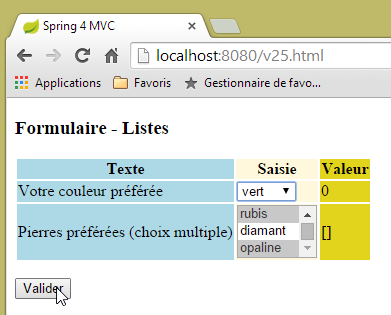 | 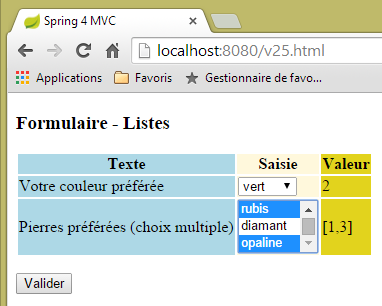 |
5.18. [/v27]: mesajların yapılandırılması
Şu [/v27] eylemini ele alalım:
  // ------------------ parametreli mesajlar
  @RequestMapping(value = "/v27", method = RequestMethod.GET, produces = "text/html; charset=UTF-8")
  public String v27(Model model) {
        model.addAttribute("param1","paramètre un");
        model.addAttribute("param2","paramètre deux");
        model.addAttribute("param3","paramètre trois");
        model.addAttribute("param4","messages.param4");
        return "vue-27";
}
Bu eylem, şablona dört değer eklemekle yetinir ve aşağıdaki [vue-27.xml] görünümünü görüntüler:
<!DOCTYPE html>
<html xmlns:th="http://www.thymeleaf.org">
    <head>
        <title th:text="#{messages.titre}">Spring 4 MVC</title>
        <meta http-equiv="Content-Type" content="text/html; charset=UTF-8" />
    </head>
    <body>
        <h2 th:text="#{messages.titre}">Spring 4 MVC</h2>
        <p th:text="#{messages.msg1(${param1})}"></p>
        <p th:text="#{messages.msg2(${param2},${param3})}"></p>
        <p th:text="#{messages.msg3(#{${param4}})}"></p>
    </body>
</html>
- 8. satır: parametresiz bir mesaj;
- 9. satır: şablondan alınan [$param1] parametresine sahip bir mesaj;
- 10. satır: şablondan alınan iki parametreli bir mesaj ([$param2, $param3]);
- 11. satır: bir parametre içeren bir mesaj. Bu parametre, kendisi de bir mesaj anahtarıdır (# işareti bulunur). Anahtar, [$param4] tarafından sağlanır;
Fransızca mesaj dosyası şöyledir:
[messages_fr.properties]
messages.titre=Messages paramétrés
messages.msg1=Un message avec un paramètre : {0}
messages.msg2=Un message avec deux paramètres : {0}, {1}
messages.msg3=Un message avec une clé de message comme paramètre : {0}
messages.param4=paramètre quatre
Mesajda parametrelerin varlığını belirtmek için {0}, {1}, ... sembolleri kullanılır
[/v27] eylemi tarafından oluşturulan şablonun [vue-27] görünümüyle birleştirilmesi, aşağıdaki HTML kodunu üretecektir:
<!DOCTYPE html>

<html>
    <head>
        <title>Messages paramétrés</title>
        <meta http-equiv="Content-Type" content="text/html; charset=UTF-8" />
    </head>
    <body>
        <h2>Messages paramétrés</h2>
        <p>Un message avec un paramètre : paramètre un</p>
        <p>Un message avec deux paramètre : paramètre deux, paramètre trois</p>
        <p>Un message avec une clé de message comme paramètre : paramètre quatre</p>
    </body>
</html>
Bu da aşağıdaki görünümü verir:
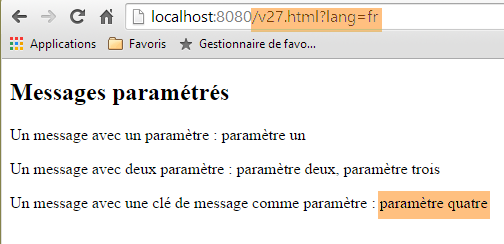 |
İngilizce mesaj dosyası şöyledir:
[messages_fr.properties]
messages.titre=Parameterized messages
messages.msg1=Message with one parameter: {0}
messages.msg2=Message with two parameters: {0}, {1}
messages.msg3=Message with a message key as a parameter: {0}
messages.param4=parameter four
[/v27] eylemi tarafından oluşturulan şablonun [vue-27] görünümüyle birleştirilmesi, aşağıdaki HTML kodunu üretecektir:
<!DOCTYPE html>

<html>
    <head>
        <title>Parameterized messages</title>
        <meta http-equiv="Content-Type" content="text/html; charset=UTF-8" />
    </head>
    <body>
        <h2>Parameterized messages</h2>
        <p>Message with one parameter: paramètre un</p>
        <p>Message with two parameters: paramètre deux, paramètre trois</p>
        <p>Message with a message key as a parameter: parameter four</p>
    </body>
</html>
Bu da aşağıdaki görünümü verir:
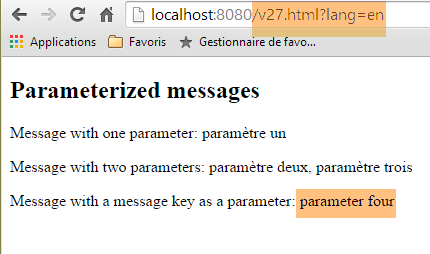 |
Görüldüğü gibi, son mesaj baştan sona uluslararasılaştırılmıştır; ancak önceki iki mesajda bu durum söz konusu değildir.
5.19. Ana sayfa kullanımı
Bir web uygulamasında, görünümlerin bir ana sayfada birleştirilebilecek bir dizi öğeyi paylaşması sık rastlanan bir durumdur. İşte bir örnek:
 |
Yukarıda, [1] parçacığının [2] parçacığıyla değiştirildiği iki benzer sayfa bulunmaktadır. Bu görünüm, üç sabit parça ([3-5]) ve bir değişken parça ([6]) içeren bir ana sayfanın görünümüdür.
5.19.1. Proje
5.1. paragrafındaki yaklaşımı izleyerek bir [springmvc-masterpage] projesi oluşturuyoruz.
 |
[pom.xml] dosyası şu şekildedir:
<?xml version="1.0" encoding="UTF-8"?>
<project xmlns="http://maven.apache.org/POM/4.0.0" xmlns:xsi="http://www.w3.org/2001/XMLSchema-instance"
    xsi:schemaLocation="http://maven.apache.org/POM/4.0.0 http://maven.apache.org/xsd/maven-4.0.0.xsd">
    <modelVersion>4.0.0</modelVersion>

    <groupId>istia.st.springmvc</groupId>
    <artifactId>springmvc-masterpage</artifactId>
    <version>0.0.1-SNAPSHOT</version>
    <packaging>jar</packaging>

    <name>springmvc-masterpage</name>
    <description>Page maître</description>

    <parent>
        <groupId>org.springframework.boot</groupId>
        <artifactId>spring-boot-starter-parent</artifactId>
        <version>1.1.9.RELEASE</version>
        <relativePath/> <!-- depo'dan üst öğeyi arama -->
    </parent>

    <dependencies>
        <dependency>
            <groupId>org.springframework.boot</groupId>
            <artifactId>spring-boot-starter-thymeleaf</artifactId>
        </dependency>
        <dependency>
            <groupId>org.springframework.boot</groupId>
            <artifactId>spring-boot-starter-test</artifactId>
            <scope>test</scope>
        </dependency>
    </dependencies>

    <properties>
        <project.build.sourceEncoding>UTF-8</project.build.sourceEncoding>
        <start-class>istia.st.springmvc.main.Main</start-class>
        <java.version>1.7</java.version>
    </properties>

    <build>
        <plugins>
            <plugin>
                <groupId>org.springframework.boot</groupId>
                <artifactId>spring-boot-maven-plugin</artifactId>
            </plugin>
        </plugins>
    </build>

</project>
Bu dosyanın getirdiği bağımlılıklardan biri, ana sayfa için gereklidir:
 |
[config] ve [main] paketleri, önceki projedeki aynı isimli paketlerle aynıdır.
5.19.2. Ana sayfa
 |
Ana sayfa, aşağıdaki [layout.xml] görünümüdür:
<!DOCTYPE html>
<html xmlns:th="http://www.thymeleaf.org" xmlns:layout="http://www.ultraq.net.nz/thymeleaf/layout">
    <head>
        <title>Layout</title>
        <meta http-equiv="Content-Type" content="text/html; charset=UTF-8" />
    </head>
    <body>
        <table style="width: 400px">
            <tr>
                <td colspan="2" bgcolor="#ccccff">
                    <div th:include="entete" />
                </td>
            </tr>
            <tr style="height: 200px">
                <td bgcolor="#ffcccc">
                    <div th:include="menu" />
                </td>
                <td>
                    <section layout:fragment="contenu">
                        <h2>Contenu</h2>
                    </section>
                </td>
            </tr>
            <tr bgcolor="#ffcc66">
                <td colspan="2">
                    <div th:include="basdepage" />
                </td>
            </tr>
        </table>
    </body>
</html>
- 2. satır: Ana sayfa, 19. satırda bir öğesi kullanılan [xmlns:layout="http://www.ultraq.net.nz/thymeleaf/layout"] ad alanını tanımlamalıdır;
- 10-12. satırlar: Aşağıdaki [1] alanını oluşturur. Thymeleaf [th:include] etiketi, başka bir dosyada tanımlanmış bir parçayı mevcut görünüme dahil etmeyi sağlar. Bu, birden fazla görünümde kullanılan parçaları faktörlere ayırmaya olanak tanır;
- 15-17. satırlar: Aşağıdaki [2] alanını oluşturur;
- 19-20. satırlar: Aşağıdaki [3] alanını oluşturur. [layout:fragment] özniteliği, [xmlns:layout="http://www.ultraq.net.nz/thymeleaf/layout"] ad alanına ait bir özniteliktir. Bu öznitelik, yürütme sırasında başka bir alanla değiştirilebilen bir alanı belirtir;
- 24-28. satırlar: Aşağıdaki [4] alanını oluşturur;
 |
5.19.3. Parçalar
[entete.xml], [menu.xml] ve [basdepage.xml] parçaları şunlardır:
[entete.xml]
<!DOCTYPE html>
<html>
    <h2>entête</h2>
</html>
[menu.xml]
<!DOCTYPE html>
<html>
    <h2>menu</h2>
</html>
[basdepage.xml]
<!DOCTYPE html>
<html>
    <h2>bas de page</h2>
</html>
[page1.xml] parçası şöyledir:
<!DOCTYPE html>
<html xmlns:th="http://www.thymeleaf.org" xmlns:layout="http://www.ultraq.net.nz/thymeleaf/layout" layout:decorator="layout">
    <section layout:fragment="contenu">
        <h2>Page 1</h2>
        <form action="/someURL" th:action="@{/page2.html}" method="post">
            <input type="submit" value="Page 2" />
        </form>
    </section>
</html>
- 2. satır: [layout:decorator="layout"] özniteliği, mevcut sayfanın ([page1.xml]) 'süslenmiş' olduğunu, yani bir ana sayfaya ait olduğunu belirtir. Bu, özniteliğin değeridir; burada [layout.xml] görünümü;
- 3. satır: [page1.xml]'in ana sayfanın hangi parçasına ekleneceği belirtilir. [layout:fragment="contenu"] özniteliği, [page1.xml]'in [contenu] adlı parçaya, yani ana sayfanın [3] alanına ekleneceğini belirtir;
- 5-7. satırlar: Parçanın içeriği, POST'ten [/page2.html] eylemine yönlendiren bir düğme içeren bir formdur;
[page2.xml] parçası da benzerdir:
<!DOCTYPE html>
<html xmlns:th="http://www.thymeleaf.org" xmlns:layout="http://www.ultraq.net.nz/thymeleaf/layout"
    layout:decorator="layout">
    <section layout:fragment="contenu">
        <h2>Page 2</h2>
        <form action="/someURL" th:action="@{/page1.html}" method="post">
            <input type="submit" value="Page 1" />
        </form>
    </section>
</html>
5.19.4. Eylemler
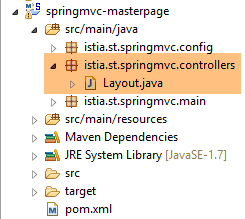 |
[Layout.java] denetleyicisi şu şekildedir:
package istia.st.springmvc.controllers;

import org.springframework.stereotype.Controller;
import org.springframework.web.bind.annotation.RequestMapping;
import org.springframework.web.bind.annotation.RequestMethod;

@Controller
public class Layout {
    @RequestMapping(value = "/page1")
    public String page1() {
        return "page1";
    }

    @RequestMapping(value = "/page2", method=RequestMethod.POST)
    public String page2() {
        return "page2";
    }
}
- 10-12. satırlar: [/page1] eylemi, yalnızca [page1.xml] görünümünü görüntülemekle yetinir;
- 15-17. satırlar: [/page2] eylemi de aynı şekilde [page2.xml] görünümünü görüntüler;