10. Javascript
Bu bölümde, WEB sayfalarında Javascript kullanımına ilişkin üç örnek gösteriyoruz. Formların yönetimine odaklanıyoruz, ancak Javascript çok daha fazlasını yapabilir.
10.1. Formdan bilgi alma
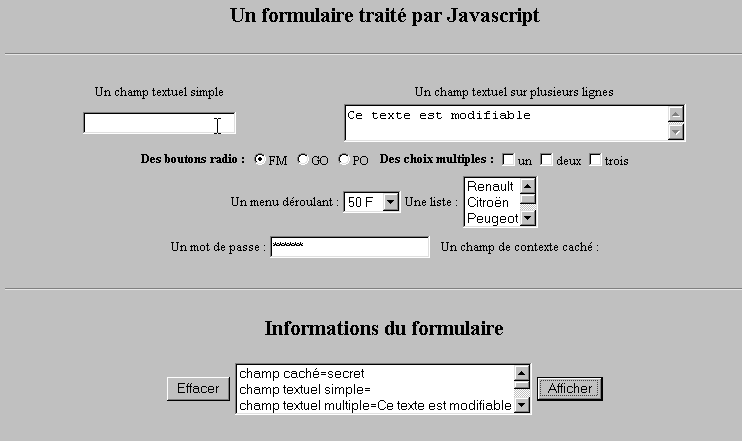
Aşağıdaki örnek, kullanıcının bir forma girdiği verilerin tarayıcı içinde nasıl alınacağını göstermektedir. Bu, genellikle verileri sunucuya göndermeden önce ön işleme tabi tutmaya olanak tanır.
10.1.1. Form
En yaygın bileşenleri içeren bir formumuz ve kullanıcının yaptığı girişleri görüntülemek için bir "Görüntüle" düğmesi var.
10.1.2. Kod
<html>
<head>
<title>Un formulaire traité par Javascript</title>
<script language="javascript">
function afficher(){
// form bilgilerini bir listede görüntüler
// önce siliniyor
effacerInfos();
// # alanlarının değerlerini görüntüler
with(document.frmExemple){
// gizli alan
ecrire("champ caché="+cache.value);
// tekli metin alanı
ecrire("champ textuel simple="+simple.value);
// çoklu metin alanı
ecrire("champ textuel multiple="+lignes.value);
// radyo düğmeleri
for(i=0;i<radio.length;i++){
texte="radio["+i+"]="+radio[i].value;
if(radio[i].checked) texte+=", coché";
ecrire(texte);
}//for
// onay kutuları
for(i=0;i<qcm.length;i++){
texte="qcm["+i+"]="+qcm[i].value;
if(qcm[i].checked) texte+=", coché";
ecrire(texte);
}//for
//açılır liste
ecrire("index sélectionné dans le menu="+menu.selectedIndex);
for(i=0;i<menu.length;i++){
texte="menu["+i+"]="+menu.options[i].text;
if(menu.options[i].selected) texte+=",sélectionné";
ecrire(texte);
}//için
//çoktan seçmeli liste
for(i=0;i<lstVoitures.length;i++){
texte="lstVoitures["+i+"]="+lstVoitures.options[i].text;
if(lstVoitures.options[i].selected) texte+=",sélectionné";
ecrire(texte);
}//for
//şifre
ecrire("mot de passe="+passwd.value);
}//ile
}//işlev
function ecrire(texte){
// bilgi listesine metin yazıyor
frmInfos.lstInfos.options[frmInfos.lstInfos.length]=new Option(texte);
}//yazma
function effacerInfos(){
frmInfos.lstInfos.length=0;
}//effacerInfos
</script>
</head>
<body bgcolor="#C0C0C0" onload="afficher()">
<center>
<h2>Un formulaire traité par Javascript</h2>
<hr>
<form method="POST" name="frmExemple">
<input type="hidden" name="cache" value="secret">
<table border="0">
<tr>
<td align="center">Un champ textuel simple</td>
<td align="center" width="100"> </td>
<td align="center">Un champ textuel sur plusieurs lignes</td>
</tr>
<tr>
<td align="center"><input type="text" size="20" name="simple"></td>
<td align="center" width="100"> </td>
<td align="center">
<textarea name="lignes" rows="2" cols="40">Ce texte est modifiable</textarea>
</td>
</tr>
</table>
<table border="0">
<tr>
<td><strong>Des boutons radio :</strong></td>
<td>
<input type="radio" checked name="radio" value="FM">FM
</td>
<td>
<input type="radio" name="radio" value="GO">GO
</td>
<td>
<input type="radio" name="radio" value="PO">PO
</td>
<td> </td>
<td><strong>Des choix multiples :</strong></td>
<td>
<input type="checkbox" name="qcm" value="un">un
</td>
<td>
<input type="checkbox" name="qcm" value="deux">deux
</td>
<td>
<input type="checkbox" name="qcm" value="trois">trois
</td>
</tr>
</table>
<table border="0">
<tr>
<td>Un menu déroulant : </td>
<td>
<select name="menu" size="1">
<option>50 F</option>
<option>60 F</option>
<option>70 F</option>
<option>100 F</option>
</select>
</td>
<td>Une liste :</td>
<td>
<select name="lstVoitures" multiple size="3">
<option>Renault</option>
<option>Citroën</option>
<option>Peugeot</option>
<option>Fiat</option>
<option>Audi</option>
</select>
</td>
</tr>
</table>
<table border="0">
<tr>
<td>Un mot de passe : </td>
<td><input type="password" size="21" name="passwd"></td>
<td> </td>
<td>Un champ de contexte caché : </td>
</tr>
</table>
</form>
<hr>
<h2>Informations du formulaire</h2>
<form name="frmInfos">
<table>
<tr>
<td><input type="button" value="Effacer" onclick="effacerInfos()"></td>
<td>
<select name="lstInfos" multiple size="3">
</select>
</td>
<td>
<input type="button" name="cmdAfficher" value="Afficher" onclick="afficher()">
</td>
</tr>
</form>
</body>
</html>
10.2. Javascript'te düzenli ifadeler
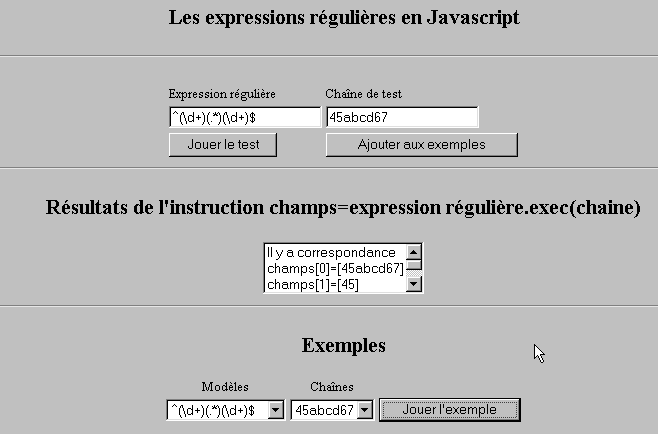
Tarayıcı tarafında, kullanıcı tarafından girilen verilerin sunucuya gönderilmeden önce geçerliliğini kontrol etmek için JavaScript kullanılabilir. İşte bu düzenli ifadeleri test eden bir program.
10.2.1. Test sayfası
10.2.2. Sayfanın kodu
<html>

  <head>
    <title>Les expressions régulières en Javascript</title>
    <script language="javascript">
      function afficherInfos(){
        with(document.frmRegExp){
           // yapılması gereken bir şey mi var?
          if (! verifier()) return;
          // tamam - önceki sonuçları siliyoruz
          effacerInfos();
           // şablon kontrolü
          modele=new RegExp(txtModele.value);
          champs=modele.exec(txtChaine.value);
          if(champs==null)
             // model ile dize arasında eşleşme yok
            ecrireInfos("pas de correspondance");
          else{
             // eşleşme var - elde edilen sonuçlar görüntüleniyor
            ecrireInfos("Il y a correspondance");
            for(i=0;i<champs.length;i++)
              ecrireInfos("champs["+i+"]=["+champs[i]+"]");
          }//aksi takdirde
        }//with
      }//işlev

      function ecrireInfos(texte){
        // bilgi listesine metin yazıyor
        document.frmRegExp.lstInfos.options[document.frmRegExp.lstInfos.length]=new Option(texte);
      }//yaz

      function effacerInfos(){
        frmRegExp.lstInfos.length=0;
      }//effacerInfos

      function jouer(){
         // seçilen örnekteki dizeyle şablonu karşılaştırır
        with(document.frmRegExp){
          txtModele.value=lstModeles.options[lstModeles.selectedIndex].text
          txtChaine.value=lstChaines.options[lstChaines.selectedIndex].text
          afficherInfos();
        }//ile
      }//çalıştır

      function ajouter(){
         //mevcut testi örneklere ekler
        with(document.frmRegExp){
          // yapılması gereken bir şey var mı?
          if (! verifier()) return;
          // ekleme
          lstModeles.options[lstModeles.length]=new Option(txtModele.value);
          lstChaines.options[lstChaines.length]=new Option(txtChaine.value);
          // girişleri sıfırla
          txtModele.value="";
          txtChaine.value="";
        }//ile
      }//ekle

      function verifier(){
         // giriş alanlarının boş olmadığını kontrol et
        with(document.frmRegExp){
          champs=/^\s*$/.exec(txtModele.value);
          if(champs!=null){
            alert("Vous n'avez pas indiqué de modèle");
            txtModele.focus();
            return false;
          }//eğer
          champs=/^\s*$/.exec(txtChaine.value);
          if(champs!=null){
            alert("Vous n'avez pas indiqué de chaîne de test");
            txtChaine.focus();
            return false;
          }//eğer
          // tamam
          return true;
        }//ile
      }//kontrol et
    </script>
  </head>

  <body bgcolor="#C0C0C0">
    <center>
     <h2>Les expressions régulières en Javascript</h2>
    <hr>
    <form name="frmRegExp">
      <table>
        <tr>
          <td>Expression régulière</td>
          <td>Chaîne de test</td>
        </tr>
        <tr>
          <td><input type="text" name="txtModele" size="20"></td>
          <td><input type="text" name="txtChaine" size="20"></td>
        </tr>
        <tr>
          <td>
            <input type="button" name="cmdAfficher" value="Jouer le test" onclick="afficherInfos()">
          </td>
          <td>
            <input type="button" name="cmdAjouter" value="Ajouter aux exemples" onclick="ajouter()">
          </td>
        </tr>
      </table>
      <hr>
      <h2>Résultats de l'instruction champs=expression régulière.exec(chaine)</h2>
      <table>
        <tr>
          <td>
            <select name="lstInfos" size="3">
            </select>
          </td>
        </tr>
      </table>
      <hr>
      <h2>Exemples</h2>
      <table>
 <tr>
          <td align="center">Modèles</td>
          <td align="center">Chaînes</td>
        </tr>
        <tr>
          <td>
            <select name="lstModeles" size="1">
              <option>^\d+$</option>
              <option>^(\d+) (\d+)$</option>
              <option>^(\d+)(.*)(\d+)$</option>
              <option>^(\d+)(\s+)(\d+)$</option>
            </select>
          </td>
          <td>
            <select name="lstChaines" size="1">
              <option>67</option>
              <option>56 84</option>
              <option>45abcd67</option>
              <option>45   67</option>
            </select>
          </td>
          <td>
            <input type="button" name="cmdJouer" value="Jouer l'exemple" onclick="jouer()">
          </td>
        </tr>
    </form>
  </body>
</html>
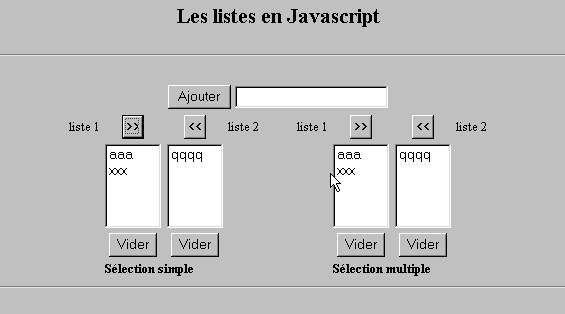
10.3. JavaScript'te liste yönetimi
10.3.1. Form
10.3.2. Kod
<html>

  <head>
    <title>Les listes en Javascript</title>

    <script language="javascript">
       // ekle
      function ajouter(L1,L2,T){
         // T alanının değerini L1 ve L2 listelerine ekle
           // yapılması gereken bir şey var mı?
          champs=/^\s*$/.exec(T.value);
          if(champs!=null){
            // alan boş
            alert("Vous n'avez pas indiqué la valeur à ajouter");
            txtElement.focus();
            return;
          }//if
           // öğeyi ekliyoruz
          L1.options[L1.length]=new Option(T.value);
          L2.options[L2.length]=new Option(T.value);
          T.value="";
      }//ekle

       //boşalt
      function vider(L){
         // L listesini boşalt
        L.length=0;
      }//boşalt

     //aktarma
      function transfert(L1,L2,simple){
        //L1 listesinden seçilen öğeleri L2'e aktar

         // yapılması gereken bir şey var mı?
         // L1'te seçilen öğenin dizini
        index1=L1.selectedIndex;
        if(index1==-1){
          alert("Vous n'avez pas sélectionné d'élément");
          return;
        }//if
         // listelerdeki öğelerin seçim modu nedir
        if(simple){ // tekli seçim
          element1=L1.options[index1].text;
           //L2'te ekleme
          L2.options[L2.length]=new Option(element1);
          //L1'te silme
          L1.options[index1]=null;
        }//tekli
        if(! simple){ //çoklu seçim
           //liste 1'i ters yönde tarama
          for(i=L1.length-1;i>=0;i--){
            //öğe seçildi mi?
            if(L1.options[i].selected){
               //L2'e ekleniyor
              L2.options[L2.length]=new Option(L1.options[i].text);
              //L1'ten siliniyor
              L1.options[i]=null;
            }//eğer
          }//for i
        }//if ! basit
      }//aktarım
   </script>
  </head>

  <body bgcolor="#C0C0C0">
    <center>
     <h2>Les listes en Javascript</h2>
    <hr>
    <form name="frmListes">
      <table>
        <tr>
          <td>
            <input type="button" name="cmdAjouter" value="Ajouter" onclick="ajouter(lst1A,lst1B,txtElement)">
          </td>
          <td>
            <input type="text" name="txtElement">
          </td>
        </tr>
      </table>
      <table>
        <tr>
          <td align="center">liste 1</td>
          <td align="center"><input type="button" value=">>" onclick="transfert(lst1A,lst2A,true)"</td>
          <td align="center"><input type="button" value="<<" onclick="transfert(lst2A,lst1A,true)"</td>
          <td align="center">liste 2</td>
          <td width="30"></td>
          <td align="center">liste 1</td>
          <td align="center"><input type="button" value=">>" onclick="transfert(lst1B,lst2B,false)"</td>
          <td align="center"><input type="button" value="<<" onclick="transfert(lst2B,lst1B,false)"</td>
          <td align="center">liste 2</td>
        </tr>
         <tr>
          <td></td>
          <td align="center">
            <select name="lst1A" size="5">
            </select>
          </td>
          <td align="center">
            <select name="lst2A" size="5">
            </select>
          </td>
          <td></td>
          <td></td>
          <td></td>
          <td align="center">
            <select name="lst1B" size="5" multiple >
            </select>
          </td>
          <td align="center">
            <select name="lst2B" size="5" multiple>
            </select>
          </td>

        </tr>
        <tr>
          <td></td>
          <td align="center"><input type="button" value="Vider" onclick="vider(lst1A)"</td>
          <td align="center"><input type="button" value="Vider" onclick="vider(lst2A)"</td>
          <td></td>
          <td></td>
          <td></td>
          <td align="center"><input type="button" value="Vider" onclick="vider(lst1B)"</td>
          <td align="center"><input type="button" value="Vider" onclick="vider(lst2B)"</td>
          <td></td>
        </tr>
        <tr>
          <td></td>
          <td colspan="2"><strong>Sélection simple</strong></td>
          <td></td>
          <td></td>
          <td></td>
          <td colspan="2"><strong>Sélection multiple</strong></td>
          <td></td>
        </tr>

      </table>
      <hr>
    </form>
  </body>
</html>