12. [nuxt-09] örneği: gezinme kontrolü
[nuxt-09] örneği, istemcinin gezinmesini kontrol etmek için bir ara yazılım kullanır. Ayrıca, kullanıcının sunucudan uygulamada bulunmayan bir URL talep etmesi durumları için yeni bir görünüm eklenmiştir.
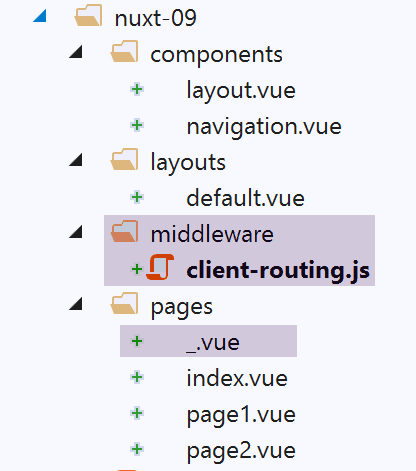
[nuxt-09] örneği, başlangıçta [nuxt-01] örneğinin kopyalanmasıyla elde edilir:
12.1. [_.vue] sayfası
Uygulamanın yönlendirme yollarının [pages] klasörünün içeriğinden oluşturulduğunu belirtmiştik. Burada, bu klasöre [_.vue] sayfasını ekledik. Uygulama, mevcut olmayan bir sayfaya yönlendirildiğinde bu sayfa görüntülenir. Buradaki örneğimizde, bu durum istemci tarafında gerçekleşemez. Ancak örneğin sunucudan URL veya [/nuxt-09/abcd] sayfaları istenirse, sunucu tarafında bu durum meydana gelebilir. [abcd] sayfası mevcut olmadığından, [_.vue] sayfası görüntülenecektir. Burada bu sayfa şöyledir:
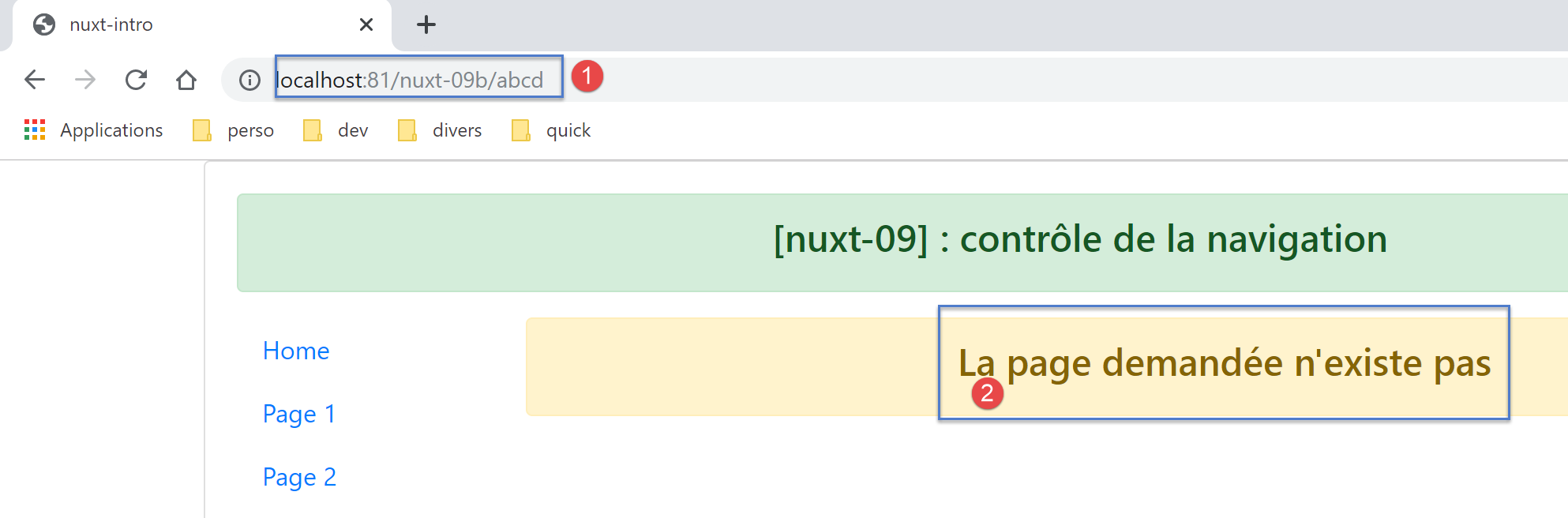
[_.vue] sayfasının kodu şöyledir:
<!-- HTML görünüm tanımı -->
<template>
  <!-- sayfa düzeni -->
  <Layout :left="true" :right="true">
    <!-- sağ sütundaki uyarı -->
    <template slot="right">
      <!-- sarı arka planlı mesaj -->
      <b-alert show variant="warning" align="center">
        <h4>La page demandée n'existe pas</h4>
      </b-alert>
    </template>
    <!-- sol sütundaki gezinme menüsü -->
    <Navigation slot="left" />
  </Layout>
</template>

<script>
/* eslint-disable no-undef */
/* eslint-disable no-console */
/* eslint-disable nuxt/no-env-in-hooks */

import Layout from '@/components/layout'
import Navigation from '@/components/navigation'

export default {
  name: '404',
  // kullanılan bileşenler
  components: {
    Layout,
    Navigation
  },
  // yaşam döngüsü
  beforeCreate() {
    // istemci ve sunucu
    console.log('[404 beforeCreate]')
  },
  created() {
    // istemci ve sunucu
    console.log('[404 created]')
  },
  beforeMount() {
    // sadece istemci
    console.log('[404 beforeMount]')
  },
  mounted() {
    // sadece istemci
    console.log('[404 mounted]')
  }
}
</script>
12.2. İstemci orta katmanı
[client-routing] istemci orta katman yazılımının kodu şöyledir:
/* eslint-disable no-undef */
/* eslint-disable no-console */
export default function({ route, from, redirect }) {
  // sadece istemci
  if (process.client) {
    console.log('[client-routing]')
    // istenen gezinme sırası
    const routes = ['index', 'page1', 'page2', 'index']
    // mevcut rota
    const current = route.name
    // önceki rota
    const previous = from.name
    // dairesel bir navigasyon istiyoruz
    // [i] rotaları ile [i+1] rotaları
    for (let i = 0; i < routes.length - 1; i++) {
      if (previous === routes[i] && current !== routes[i + 1]) {
        // aynı sayfada kalıyoruz
        redirect({ name: routes[i] })
        return
      }
    }
  }
}
- 3. satır: Yönlendirme işlevinin, onu çalıştıran sunucu veya istemciden yalnızca bir parametre, yani [context] nesnesini aldığını biliyoruz. [function({ route, from, redirect })]
- , [function({ route:route, from:from, redirect:redirect })] ile eşdeğerdir;
- bu da { route:route, from:from, redirect:redirect } <-- context ;
- bu da şu şekilde üç [route, from, redirect] parametresi oluşturur:
- route=context.route;
- redirect=context.redirect;
- from=context.from;
[nuxt] belgeleri bu notasyonu sıklıkla kullanır. Bunu bilmek gerekir;
- 8. satır: istenen gezinme sırasına göre sayfa adlarının bir tablosu
- 10. satır: mevcut yönlendirmenin hedef sayfasının adı;
- 12. satır: mevcut yönlendirmenin bir önceki sayfasının adı;
- 14. satır: alıştırma olarak, yalnızca [index --> page1 --> page2 --> index] döngüsel gezinmeye izin vereceğiz;
- satır 15-21: istenen gezinme sırasını veren tabloyu tarayacağız;
- 16. satır: routes[i]'in yönlendirilen son sayfa olduğu tespit edilirse, bir sonraki sayfa routes[i+1] olmalıdır;
- satır 18-19: durum böyle değilse, uygulamayı routes[i] sayfasına yönlendirilir, yani sayfa değiştirilmez: navigasyon reddedilir;
12.3. Exécution
Aşağıdaki [nuxt.config.js] dosyasıyla örneği çalıştırıyoruz:
export default {
  mode: 'universal',
  /*
   ** Headers of the page
   */
  head: {
    title: process.env.npm_package_name || "Introduction à nuxt.js par l'exemple",
    meta: [
      { charset: 'utf-8' },
      { name: 'viewport', content: 'width=device-width, initial-scale=1' },
      { hid: 'description', name: 'description', content: process.env.npm_package_description || '' }
    ],
    link: [{ rel: 'icon', type: 'image/x-icon', href: '/favicon.ico' }]
  },
  /*
   ** Customize the progress-bar color
   */
  loading: { color: '#fff' },
  /*
   ** Global CSS
   */
  css: [],
  /*
   ** Plugins to load before mounting the App
   */
  plugins: [],
  /*
   ** Nuxt.js dev-modules
   */
  buildModules: [
    // Belge: https://github.com/nuxt-community/eslint-module
    '@nuxtjs/eslint-module'
  ],
  /*
   ** Nuxt.js modules
   */
  modules: [
    // Belge: https://bootstrap-vue.js.org
    'bootstrap-vue/nuxt',
    // Belge: https://axios.nuxtjs.org/usage
    '@nuxtjs/axios'
  ],
  /*
   ** Axios module configuration
   ** See https://axios.nuxtjs.org/options
   */
  axios: {},
  /*
   ** Build configuration
   */
  build: {
    /*
     ** You can extend webpack config here
     */
    extend(config, ctx) {}
  },
  // kaynak kod dizini
  srcDir: 'nuxt-09',
  router: {
    base: '/nuxt-09/',
    middleware: ['client-routing']
  },
  // sunucu
  server: {
    port: 81, // varsayılan: 3000
    host: 'localhost' // varsayılan: localhost
  }
}
Aşağıdaki noktaları kontrol edin:
- [Home] sayfasında iken, yalnızca [Page 1] sayfasına gidebilirsiniz;
- [Page 1] sayfasında olduğunuzda, yalnızca [Page 2] sayfasına geçebilirsiniz;
- [Page 2] sayfasında olduğunuzda, yalnızca [Home] sayfasına gidebilirsiniz;
- URL yerine [http://localhost:81/nuxt-09b/abcd] gibi hatalı bir adres talep ettiğinizde, istenen sayfanın mevcut olmadığını belirten bir sayfa görüntülenir;