6. Ficheiros de texto
Um ficheiro de texto é um ficheiro que contém linhas de texto. Vamos analisar a criação e a utilização desses ficheiros através de exemplos.
6.1. Criação e utilização
Programa |
 |
Resultados |
Comentários
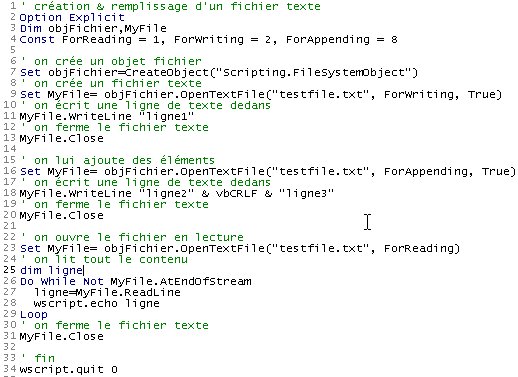
- A linha 7 cria um objeto de ficheiro do tipo "Scripting.FileSystemObject" utilizando a função CreateObject("Scripting.FileSystemObject"). Esse objeto permite o acesso a qualquer ficheiro no sistema, não apenas a ficheiros de texto.
- A linha 9 cria um objeto "TextStream". A criação deste objeto está associada à criação do ficheiro testfile.txt. Este ficheiro não é designado por um caminho absoluto, como c:\dir1\dir2\....\testfile.txt, mas por um caminho relativo testfile.txt. Será então criado no diretório a partir do qual o comando para executar o ficheiro é lançado.
- O sistema de ficheiros do Windows não reconhece conceitos como ficheiros de texto ou ficheiros não textuais. Reconhece apenas ficheiros. Cabe, portanto, ao programa que utiliza este ficheiro determinar se deve tratá-lo como um ficheiro de texto ou não.
- A linha 9 cria um objeto, daí o uso do comando SET para atribuição. A criação de um objeto de ficheiro de texto envolve a criação de dois objetos:
- a criação de um Scripting.FileSystemObject (linha 7)
- seguida da criação de um objeto "TextStream" (ficheiro de texto) utilizando o método OpenTextFile do Scripting.FileSystemObject, que aceita vários parâmetros:
- o nome do ficheiro a ser tratado (obrigatório)
- o modo de acesso ao ficheiro. Trata-se de um número inteiro com três valores possíveis:
- 1: modo de leitura
- 2: modo de escrita. Se o ficheiro ainda não existir e se o terceiro parâmetro estiver presente e tiver o valor true, é criado; caso contrário, não é. Se já existir, é sobrescrito.
- 8: modo de adição, ou seja, escrever no final do ficheiro. Se o ficheiro ainda não existir e o terceiro parâmetro estiver presente e definido como true, ele é criado; caso contrário, não é.
- A linha 11 escreve uma linha de texto utilizando o método WriteLine do objeto TextStream criado.
- A linha 13 «fecha» o ficheiro. Já não é possível escrever ou ler a partir dele.
- A linha 16 cria um novo objeto «TextStream» para utilizar o mesmo ficheiro de antes, mas desta vez no modo «append». As linhas que serão escritas serão acrescentadas às linhas existentes.
- A linha 18 escreve duas novas linhas, observando que a constante vbCRLF é o marcador de fim de linha para ficheiros de texto.
- A linha 20 fecha o ficheiro novamente
- A linha 23 reabre-o no modo «read»: vamos ler o conteúdo do ficheiro.
- A linha 27 lê uma linha de texto utilizando o método ReadLine do objeto TextStream. Quando o ficheiro é "aberto" pela primeira vez, o cursor é posicionado na primeira linha de texto. Assim que esta linha for lida pelo método ReadLine, o cursor move-se para a segunda linha. Assim, o método ReadLine não só lê a linha atual, como também "avança" automaticamente para a linha seguinte.
- Para ler todas as linhas de texto, o método ReadLine deve ser aplicado repetidamente num ciclo. Este ciclo (linha 26) termina quando o atributo AtEndOfStream do objeto TextStream é definido como true. Isto significa que não há mais linhas para ler no ficheiro.
6.2. Casos de erro
Existem dois casos de erro comuns:
- abrir um ficheiro para leitura que não existe
- abrir um ficheiro inexistente para gravação ou para acrescentar dados, com o terceiro parâmetro definido como false na chamada ao método OpenTextFile.
O programa a seguir mostra como detetar estes erros:
Programa
' creating & filling a text file
Option Explicit
Dim objFichier,MyFile
Const ForReading = 1, ForWriting = 2, ForAppending = 8
Dim codeErreur

' create a file object
Set objFichier=CreateObject("Scripting.FileSystemObject")

' open a text file that should exist in read-only mode
On Error Resume Next
Set MyFile= objFichier.OpenTextFile("abcd", ForReading)
codeErreur=err.number
On Error GoTo 0
If codeErreur<>0 Then
    ' file does not exist
    wscript.echo "Le fichier [abcd] n'existe pas"
Else
    ' close the text file
    MyFile.Close
End If


' open a text file that must be writable
On Error Resume Next
Set MyFile= objFichier.OpenTextFile("abcd", ForWriting, False)
codeErreur=err.number
On Error GoTo 0
If codeErreur<>0 Then
    wscript.echo "Le fichier [abcd] n'existe pas"
Else
    ' close the text file
    MyFile.Close
End If

' open a text file that should exist as an addition
On Error Resume Next
Set MyFile= objFichier.OpenTextFile("abcd", ForAppending, False)
codeErreur=err.number
On Error GoTo 0
If codeErreur<>0 Then
    wscript.echo "Le fichier [abcd] n'existe pas"
Else
    ' close the text file
    MyFile.Close
End If

' end
wscript.quit 0
Resultados
6.3. A aplicação IMPOTS com um ficheiro de texto
Voltamos à aplicação de cálculo de impostos, partindo do princípio de que os dados necessários para calcular o imposto se encontram num ficheiro de texto denominado data.txt:
12620 13190 15640 24740 31810 39970 48360 55790 92970 127860 151250 172040 195000 0
0 0,05 0,1 0,15 0,2 0,25 0,3 0,35 0,4 0,45 0,5 0,55 0,6 0,65
0 631 1290,5 2072,5 3309,5 4900 6898,5 9316,5 12106 16754,5 23147,5 30710 39312 49062
As três linhas contêm, respetivamente, os dados das matrizes limit, coeffR e coeffN da aplicação. Graças ao design modular da nossa aplicação, as alterações são feitas principalmente no procedimento getData, responsável pela construção das três matrizes. O novo programa é o seguinte:
Programa
' calculating a taxpayer's tax liability
' the program must be called with three parameters: married children salary
' married: character Y if married, N if unmarried
' children: number of children
' salary: annual salary without cents

' mandatory variable declaration
Option Explicit
Dim erreur

' retrieve arguments and check their validity
Dim marie, enfants, salaire
erreur=getArguments(marie,enfants,salaire)
' mistake?
If erreur(0)<>0 Then wscript.echo erreur(1) : wscript.quit erreur(0)

' retrieve the data needed to calculate taxes
Dim limites, coeffR, coeffN
erreur=getData(limites,coeffR,coeffN)
' mistake?
If erreur(0)<>0 Then wscript.echo erreur(1) : wscript.quit 5

' the result is displayed
wscript.echo "impôt=" & calculerImpot(marie,enfants,salaire,limites,coeffR,coeffN)

' leave without error
wscript.quit 0

' ------------ functions and procedures

' ----------- getArguments
Function getArguments(byref marie, ByRef enfants, ByRef salaire)
    ' must retrieve three values passed as arguments to the main program
    ' an argument is passed to the program without spaces in front and behind it
    ' use regular expressions to check data validity

    ' returns an error array variant with 2 values
    ' error(0): error code, 0 if no error
    ' error(1): error message if error otherwise empty string

    Dim syntaxe
    syntaxe= _
    "Syntaxe : pg marié enfants salaire" & vbCRLF & _
    "marié : caractère O si marié, N si non marié" & vbCRLF & _
    "enfants : nombre d'enfants (entier >=0)" & vbCRLF & _
    "salaire : salaire annuel sans les centimes (entier >=0)"

    ' we check that there are 3 arguments
    Dim nbArguments
    nbArguments=wscript.arguments.count
    If nbArguments<>3 Then
        ' error msg
        getArguments= array(1,syntaxe & vbCRLF & vbCRLF & "erreur : nombre d'arguments incorrect")
        ' end
        Exit Function
    End If

    Dim modele, correspondances
    Set modele=new regexp

    ' marital status must be among the characters oOnN
    modele.pattern="^[oOnN]$"
    Set correspondances=modele.execute(wscript.arguments(0))
    If correspondances.count=0 Then
        ' error msg
        getArguments=array(2,syntaxe & vbCRLF & vbCRLF & "erreur : argument marie incorrect")
        ' we leave
        Exit Function
    End If
    ' the value
    If lcase(wscript.arguments(0)) = "o"Then
        marie=true
    Else
        marie=false
    End If

    ' children must be an integer >=0
    modele.pattern="^\d{1,2}$"
    Set correspondances=modele.execute(wscript.arguments(1))
    If correspondances.count=0 Then
        ' error
        getArguments= array(3,syntaxe & vbCRLF & vbCRLF & "erreur : argument enfants incorrect")
        ' we leave
        Exit Function
    End If
    ' the value
    enfants=cint(wscript.arguments(1))

    ' salary must be an integer >=0
    modele.pattern="^\d{1,9}$"
    Set correspondances=modele.execute(wscript.arguments(2))
    If correspondances.count=0 Then
        ' error
        getArguments= array(4,syntaxe & vbCRLF & vbCRLF & "erreur : argument salaire incorrect")
        ' we leave
        Exit Function
    End If
    ' the value
    salaire=clng(wscript.arguments(2))

    ' finished without error
    getArguments=array(0,"")
End Function

' ----------- getData
Function getData(byref limites, ByRef coeffR, ByRef coeffN)
    ' the data of the three limit tables, coeffR, coeffN are in a text file
    ' called data.txt. Each array occupies a line in the form val1 val2 ... valn
    ' we find, in limit order, coeffR, coeffN

    ' renders a 2-element array error variant to handle possible errors
    ' error(0): 0 if no error, an integer >0 otherwise
    ' error(1): error message if error

    Dim objFichier,MyFile,codeErreur
    Const ForReading = 1, dataFileName="data.txt"

    ' create a file object
    Set objFichier=CreateObject("Scripting.FileSystemObject")
    ' open the data.txt file in read mode
    On Error Resume Next
    Set MyFile= objFichier.OpenTextFile(dataFileName, ForReading)
    ' mistake?
    codeErreur=err.number
    On Error GoTo 0
    If codeErreur<>0 Then
        ' there has been an error - it is noted
        getData=array(1,"Impossible d'ouvrir le fichier des données [" & dataFileName & "] en lecture")
        ' we're back
        Exit Function
    End If

    ' we now assume that the content is correct and do no verification
    ' read the 3 lines

    ' limits
    Dim ligne, i
    ligne=MyFile.ReadLine
    getDataFromLine ligne,limites

    ' coeffR
    ligne=MyFile.ReadLine
    getDataFromLine ligne,coeffR


    ' coeffN
    ligne=MyFile.ReadLine
    coeffN=split(ligne," ")
    getDataFromLine ligne,coeffN

    ' close the file
    MyFile.close

    ' finished without error
    getData=array(0,"")
End Function

' ----------- getDataFromLine
Sub getDataFromLine(byref ligne, ByRef tableau)
    ' places the numerical values contained in line
    ' these are separated by one or more spaces

    ' initially the table is empty
    tableau=array()
    ' we define a model for the
    Dim modele, correspondances
    Set modele= New RegExP
    With modele
        .pattern="\d+,\d+|\d+"    ' 140.5 or 140
        .global=true              ' all values
    End With

    ' we analyze the line
    Set correspondances=modele.execute(ligne)
    Dim i
    For i=0 To correspondances.count-1
        ' resize the table
        ReDim Preserve tableau(i)
        ' assign a value to the new element
        tableau(i)=cdbl(correspondances(i).value)
    Next

    'end
End Sub


' ----------- calculerImpot
Function calculerImpot(byval marie,ByVal enfants,ByVal salaire, ByRef limites, ByRef coeffR, ByRef coeffN)

    ' the number of shares is calculated
    Dim nbParts
    If marie=true Then
        nbParts=(enfants/2)+2
    Else
        nbParts=(enfants/2)+1
    End If
    If enfants>=3 Then nbParts=nbParts+0.5

    ' we calculate the family quotient and taxable income
    Dim revenu, qf
    revenu=0.72*salaire
    qf=revenu/nbParts

    ' tax calculation
    Dim i, impot
    i=0
    Do While i<ubound(limites) And qf>limites(i)
        i=i+1
    Loop
    calculerImpot=int(revenu*coeffr(i)-nbParts*coeffn(i))
End Function
Comentários:
- No ficheiro de texto data.txt, os valores podem estar separados por um ou mais espaços, tornando impossível utilizar a função split para recuperar os valores da linha. Foi necessário utilizar uma expressão regular
- A função getData devolve, além das três matrizes de limites, coeffR e coeffN, um resultado que indica se ocorreu ou não um erro. Este resultado é uma matriz Variant de dois elementos. O primeiro elemento é um código de erro (0 se não houver erro), o segundo é a mensagem de erro, caso tenha ocorrido um erro.
- A função getData não valida os valores encontrados no ficheiro data.txt. Num cenário real, deveria fazê-lo.