3. Noções básicas de JavaScript
Nota: A partir daqui, o termo [JavaScript] referir-se-á sempre à norma ECMAScript 6.
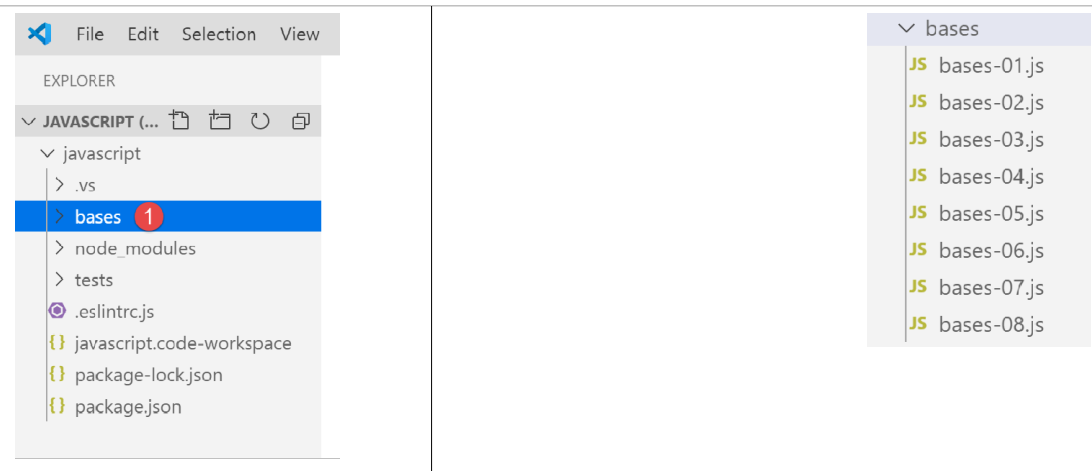
Dentro do projeto JavaScript anterior, crie uma pasta chamada [bases]. Colocaremos os exemplos desta secção nessa pasta:
3.1. script [bases-01]
Para apresentar os conceitos básicos do PHP7, utilizámos o seguinte código (ver parágrafo com link):
<?php

// this is a comment
// variable used without being declared
$nom = "dupont";
// a screen display
print "nom=$nom\n";
// an array with elements of different types
$tableau = array("un", "deux", 3, 4);
// its number of elements
$n = count($tableau);
// a loop
for ($i = 0; $i < $n; $i++) {
  print "tableau[$i]=$tableau[$i]\n";
}
// initialize 2 variables with the contents of an array
list($chaine1, $chaine2) = array("chaine1", "chaine2");
// concatenation of the 2 strings
$chaine3 = $chaine1 . $chaine2;
// result display
print "[$chaine1,$chaine2,$chaine3]\n";
// use function
affiche($chaine1);
// the type of a variable can be known
afficheType("n", $n);
afficheType("chaine1", $chaine1);
afficheType("tableau", $tableau);
// the type of a variable can change at runtime
$n = "a changé";
afficheType("n", $n);
// a function can return a result
$res1 = f1(4);
print "res1=$res1\n";
// a function can return a table of values
list($res1, $res2, $res3) = f2();
print "(res1,res2,res3)=[$res1,$res2,$res3]\n";
// we could have retrieved these values in a table
$t = f2();
for ($i = 0; $i < count($t); $i++) {
  print "t[$i]=$t[$i]\n";
}
// testing
for ($i = 0; $i < count($t); $i++) {
  // displays only channels
  if (getType($t[$i]) === "string") {
    print "t[$i]=$t[$i]\n";
  }
}
// == and === comparison operators
if("2"==2){
  print "avec l'opérateur ==, la chaîne 2 est égale à l'entier 2\n";
}else{
  print "avec l'opérateur ==, la chaîne 2 n'est pas égale à l'entier 2\n";
}
if("2"===2){
  print "avec l'opérateur ===, la chaîne 2 est égale à l'entier 2\n";
}
else{
  print "avec l'opérateur ===, la chaîne 2 n'est pas égale à l'entier 2\n";
}
// other tests
for ($i = 0; $i < count($t); $i++) {
  // displays only integers >10
  if (getType($t[$i]) === "integer" and $t[$i] > 10) {
    print "t[$i]=$t[$i]\n";
  }
}
// a while loop
$t = [8, 5, 0, -2, 3, 4];
$i = 0;
$somme = 0;
while ($i < count($t) and $t[$i] > 0) {
  print "t[$i]=$t[$i]\n";
  $somme += $t[$i];   //$somme=$somme+$t[$i]
  $i++;               //$i=$i+1
}//while
print "somme=$somme\n";

// end of program
exit;

//----------------------------------
function affiche($chaine) {
  // displays $chaine
  print "chaine=$chaine\n";
}

//poster
//----------------------------------
function afficheType($name, $variable) {
  // displays the type of $variable
  print "type[variable $" . $name . "]=" . getType($variable) . "\n";
}

//afficheType
//----------------------------------
function f1($param) {
  // adds 10 to $param
  return $param + 10;
}

//----------------------------------
function f2() {
  // returns 3 values
  return array("un", 0, 100);
}
?>
Traduzido para JavaScript, isto resulta no seguinte código:
'use strict';
// this is a comment
// constant
const nom = "dupont";
// a screen display
console.log("nom : ", nom);
// an array with elements of different types
const tableau = ["un", "deux", 3, 4];
// its number of elements
let n = tableau.length;
// a loop
for (let i = 0; i < n; i++) {
  console.log("tableau[", i, "] = ", tableau[i]);
}
// initialize 2 variables with the contents of an array
let [chaine1, chaine2] = ["chaine1", "chaine2"];
// concatenation of the 2 strings
const chaine3 = chaine1 + chaine2;
// result display
console.log([chaine1, chaine2, chaine3]);
// use function
affiche(chaine1);
// the type of a variable can be known
afficheType("n", n);
afficheType("chaine1", chaine1);
afficheType("tableau", tableau);
// the type of a variable can change at runtime
n = "a changé";
afficheType("n", n);
// a function can return a result
let res1 = f1(4);
console.log("res1=", res1);
// a function can return a table of values
let res2, res3;
[res1, res2, res3] = f2();
console.log("(res1,res2,res3)=", [res1, res2, res3]);
// we could have retrieved these values in a table
let t = f2();
for (let i = 0; i < t.length; i++) {
  console.log("t[i]=", t[i]);
}
// testing
for (let i = 0; i < t.length; i++) {
  // displays only channels
  if (typeof (t[i]) === "string") {
    console.log("t[i]=", t[i]);
  }
}
// == and === comparison operators
if ("2" == 2) {
  console.log("avec l'opérateur ==, la chaîne 2 est égale à l'entier 2");
} else {
  console.log("avec l'opérateur ==, la chaîne 2 n'est pas égale à l'entier 2");
}
if ("2" === 2) {
  console.log("avec l'opérateur ===, la chaîne 2 est égale à l'entier 2");
} else {
  console.log("avec l'opérateur ===, la chaîne 2 n'est pas égale à l'entier 2");
}
// other tests
for (let i = 0; i < t.length; i++) {
  // displays only integers >10
  if (typeof (t[i]) === "number" && Math.floor(t[i]) === t[i] && t[i] > 10) {
    console.log("t[i]=", t[i]);
  }
}
// a while loop
t = [8, 5, 0, -2, 3, 4];
let i = 0;
let somme = 0;
while (i < t.length && t[i] > 0) {
  console.log("t[i]=", t[i]);
  somme += t[i];
  i++;
}
console.log("somme=", somme);

// program stopped because no executable code left

//poster
//----------------------------------
function affiche(chaine) {
  // chain poster
  console.log("chaine=", chaine);
}

//afficheType
//----------------------------------
function afficheType(name, variable) {
  // displays variable type
  console.log("type[variable ", name, "]=", typeof (variable));
}

//----------------------------------
function f1(param) {
  // adds 10 to param
  return param + 10;
}

//----------------------------------
function f2() {
  // returns 3 values
  return ["un", 0, 100];
}
Vamos discutir as diferenças entre o código PHP e o ECMAScript 6 com a declaração [use strict] (linha 1):
- A primeira diferença é que, no ECMAScript, as variáveis são declaradas utilizando as seguintes palavras-chave:
- [let] para declarar uma variável cujo valor pode mudar durante a execução do código;
- [const] para declarar uma variável cujo valor não se alterará (ou seja, uma constante) durante a execução do código;
- Também pode usar a palavra-chave [var] em vez de [let]. Esta era a palavra-chave usada no ECMAScript 5. Não a utilizaremos neste curso;
- linha 6: o método [console.log] pode exibir todos os tipos de dados: cadeias de caracteres, números, booleanos, matrizes e objetos. O método [print] do PHP não consegue exibir matrizes e objetos de forma nativa. Na expressão [console.log], [console] é um objeto e [log] é um método desse objeto;
- linha 8: as matrizes JavaScript são objetos referenciados por um ponteiro. Quando escrevemos:
const tableau = ["un", "deux", 3, 4];
a variável [array] é um ponteiro para a matriz literal ["one", "two", 3, 4]. Modificar o conteúdo da matriz não altera o seu ponteiro. Por isso, uma matriz é frequentemente declarada com a palavra-chave [const]. Em PHP, uma matriz não é referenciada por um ponteiro. É um valor literal;
- Linha 12: A variável do ciclo [i] é declarada (let) dentro do ciclo. A palavra-chave [let] tem âmbito de bloco (código entre chaves). Por conseguinte, a variável [i] na linha 12 só é acessível dentro do ciclo;
- Linha 18: O operador de concatenação de cadeias de caracteres é o operador + em JavaScript e o operador . em PHP. Uma característica distintiva deste operador é que tem precedência sobre o operador de adição +. Assim:
- em PHP, ‘1’ + 2 resulta no número 3;
- em JavaScript, ‘1’+2 resulta na string ‘12’;
- linha 20: [console.log] pode exibir matrizes;
- linha 82: em JavaScript, não é possível especificar o tipo dos parâmetros de uma função;
- linha 91: o operador [typeof] permite determinar o tipo de um elemento de dados. Existem quatro tipos: número, cadeia de caracteres, booleano e objeto. Note-se que em JavaScript não existe o tipo [integer] nem o tipo [array]. Como mencionado, as matrizes são tratadas através de ponteiros e enquadram-se na categoria de objetos;
- linhas 50–59: Tal como em PHP, o JavaScript tem dois operadores de comparação, == e ‘===’, com o mesmo significado que em PHP. O ESLint sinaliza frequentemente o operador == como um erro potencial. Iremos utilizar consistentemente o operador ‘===’;
- linha 79: poderíamos ter incluído a instrução [return], mas o ESLint emite um aviso de que [return] só deve ser usado dentro de uma função;
Vamos executar este código:
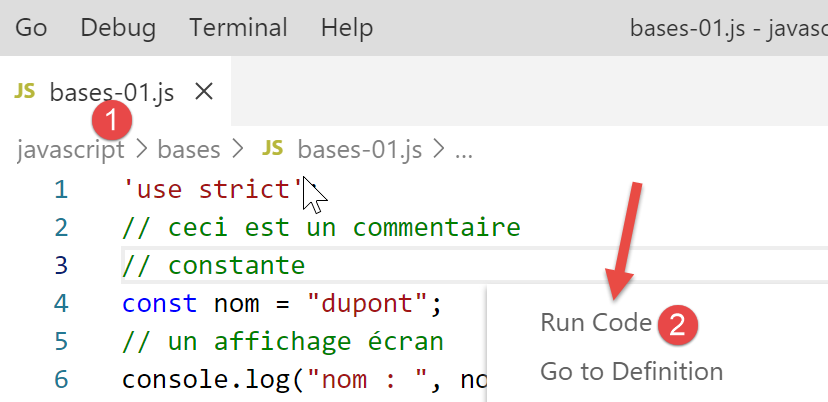
Resultados da execução:
[Running] C:\myprograms\laragon-lite\bin\nodejs\node-v10\node.exe "c:\Temp\19-09-01\javascript\bases\bases-01.js"
nom : dupont
tableau[ 0 ] = un
tableau[ 1 ] = deux
tableau[ 2 ] = 3
tableau[ 3 ] = 4
[ 'chaine1', 'chaine2', 'chaine1chaine2' ]
chaine= chaine1
type[variable n ]= number
type[variable chaine1 ]= string
type[variable tableau ]= object
type[variable n ]= string
res1= 14
(res1,res2,res3)= [ 'un', 0, 100 ]
t[ 0 ]= un
t[ 1 ]= 0
t[ 2 ]= 100
t[ 0 ]= un
avec l'opérateur ==, la chaîne 2 est égale à l'entier 2
avec l'opérateur ===, la chaîne 2 n'est pas égale à l'entier 2
t[ 2 ]= 100
t[ 0 ]= 8
t[ 1 ]= 5
somme= 13

[Done] exited with code=0 in 0.316 seconds
No código escrito, o ESLint reporta dois erros:
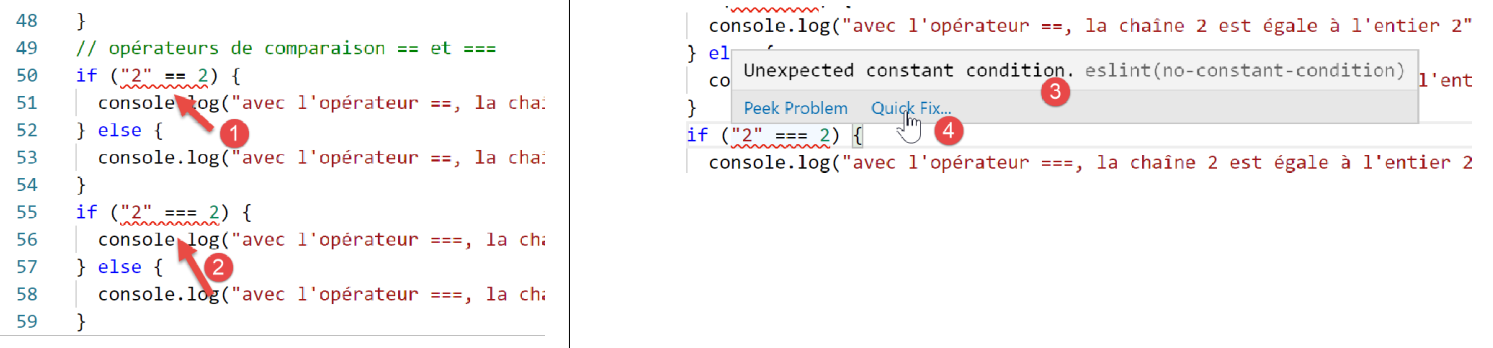
- Ao passar o cursor sobre a linha de aviso vermelha, é apresentada a mensagem de erro [3]. Aqui, o ESLint não reconhece que estão a ser comparadas duas constantes. Um dos dois operandos deve ser uma variável;
- em [4], uma opção [Correção Rápida] permite ignorar o aviso se decidir não corrigir o erro;

- Em [5], pode desativar o aviso para a linha atual ou para todo o ficheiro. Aqui, optamos pela segunda opção. A linha [6] é então gerada no início do ficheiro;
3.2. script [bases-02]
O script [bases-02] demonstra a utilização das palavras-chave [let] e [const]:
'use strict';
// to initialize a variable, use let or const
// let for variables
let x = 4;
x++;
console.log(x);
// const for constants
const y = 10;
x += y;
// prohibited
y++;
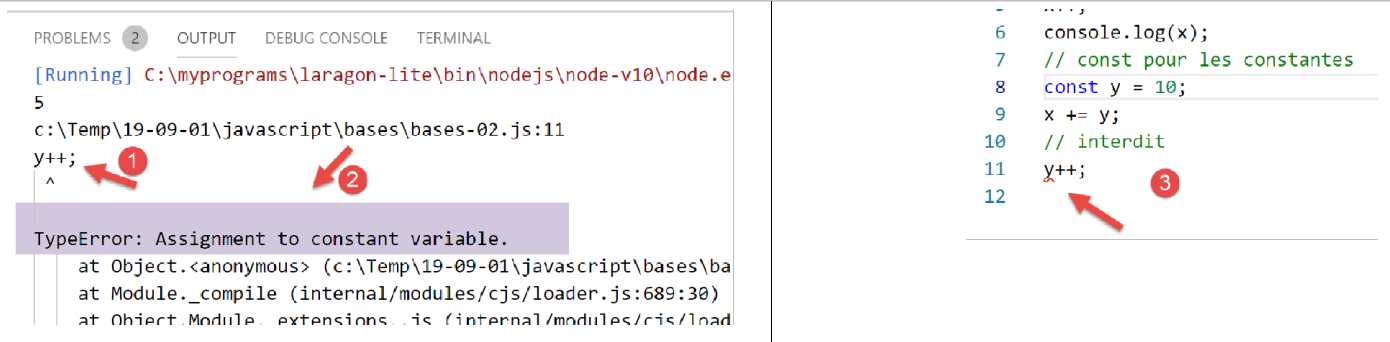
- A linha 11 causa um erro de tempo de execução [1-2]. É sinalizada pelo ESLint antes da execução [3]:
3.3. script [bases-03]
O script [bases-03] examina o âmbito das variáveis em JavaScript:
'use strict';
// variable scope
let count = 1;
function doSomething() {
  // count is known here
  console.log("count=",count);
}
// call
doSomething();
- a variável [count] declarada fora da função [doSomething] é, no entanto, conhecida dentro desta função. Esta é uma diferença fundamental em relação ao PHP;
Execução
[Running] C:\myprograms\laragon-lite\bin\nodejs\node-v10\node.exe "c:\Temp\19-09-01\javascript\bases\bases-03.js"
count= 1

[Done] exited with code=0 in 0.3 seconds
3.4. script [bases-04]
Uma variável local oculta uma variável global com o mesmo nome:
'use strict';
// variable scope
const count = 1;
function doSomething() {
  // the local variable hides the global variable
  const count = 2;
  console.log("count inside function=",count);
}
// global variable
console.log("count outside function=",count);
// local variable
doSomething();
Execução
[Running] C:\myprograms\laragon-lite\bin\nodejs\node-v10\node.exe "c:\Temp\19-09-01\javascript\bases\bases-04.js"
count outside function= 1
count inside function= 2

[Done] exited with code=0 in 0.246 seconds
3.5. script [bases-05]
Uma variável definida dentro de uma função não é conhecida fora dela:
'use strict';
// variable scope
function doSomething() {
  // local variable to the
  const count = 2;
  console.log("count inside function=", count);
}
// here count is unknown
console.log("count outside function=", count);
doSomething();
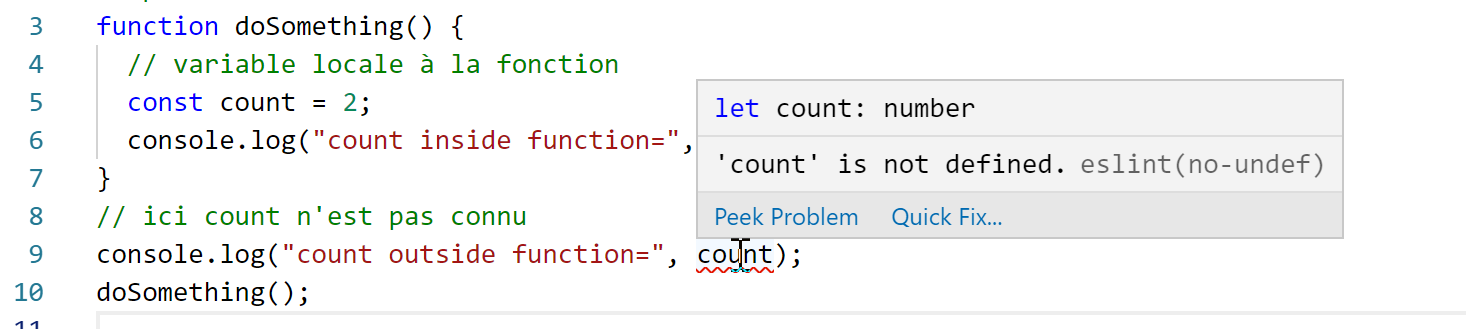
O ESLint reporta um erro na linha 9:
3.6. script [bases-06]
As palavras-chave [let] e [const] definem variáveis com âmbito [block] (código entre chaves), mas não a palavra-chave [var]:
'use strict';
// the [let] keyword is used to define a block-scope variable
{
  // the [count] variable is only known in this block
  let count = 1;
  console.log("count=", count);
}
// here the variable [count] is not known
count++;

// the [const] keyword is used to define a block-span variable
{
  // the [count2] variable is only known in this block
  const count2 = 1;
  console.log("count=", count2);
}
// here the variable [count2] is not known
count2++;

// the [var] keyword cannot be used to define a block-scope variable
{
  // the variable [count3] will be known globally
  var count3 = 1;
  console.log("count=", count3);
}
// here the variable [count3] is known
count3++;
Comentários
- linha 5: a variável [count] só é conhecida dentro do bloco de código em que é declarada (linhas 3–7);
- linha 14: a constante [count2] só é conhecida dentro do bloco de código em que é declarada (linhas 12–16);
- linha 23: a variável [count3] é conhecida fora do bloco de código em que é declarada (linhas 21–25);
O ESLint reporta os seguintes erros:
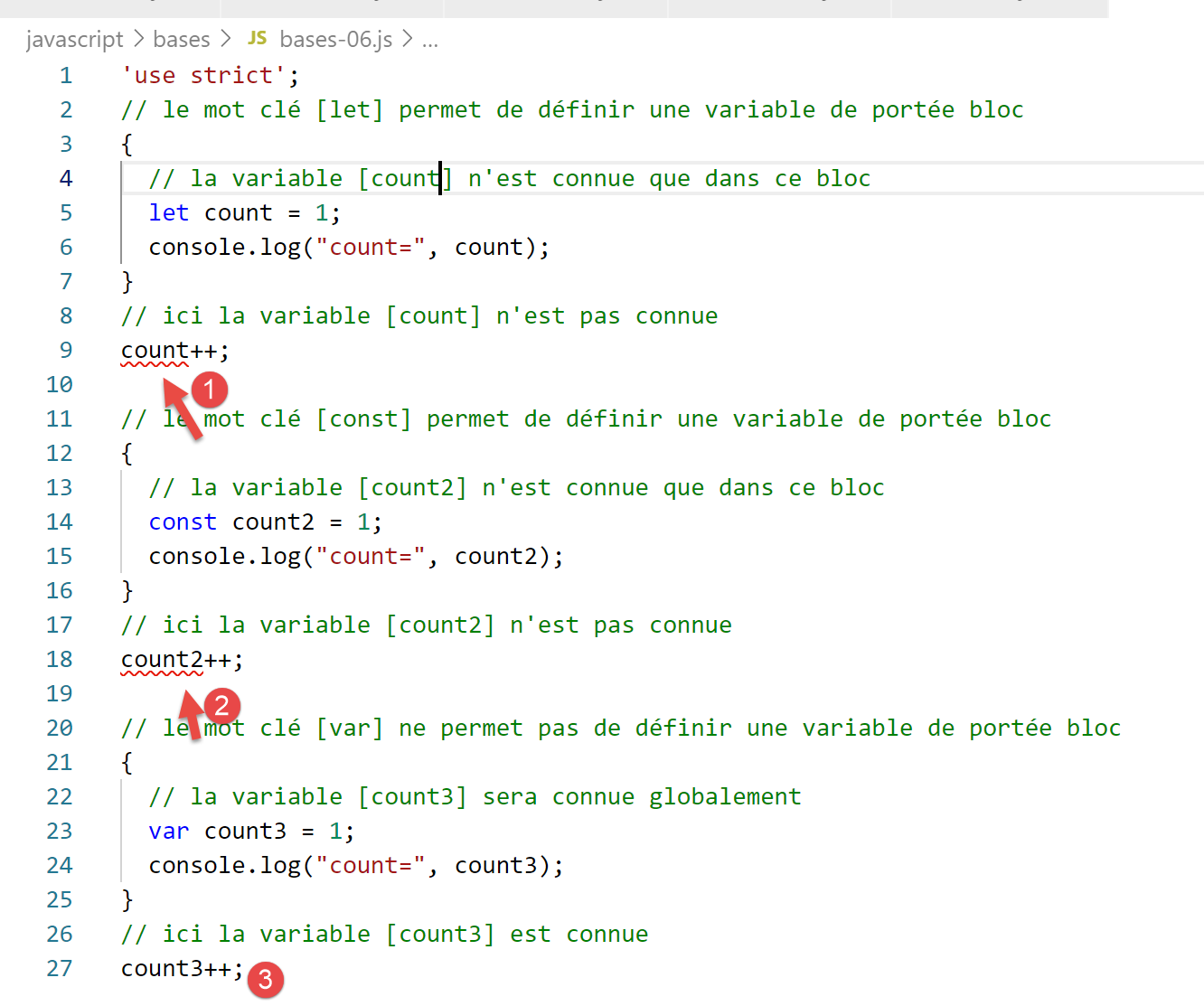
Por estas razões relacionadas com o âmbito do bloco, passaremos a utilizar apenas as palavras-chave [let] e [const] a partir de agora.
3.7. script [bases-07]
Tipos de dados em JavaScript:
'use strict';

// data type jS
const var1 = 10;
const var2 = "abc";
const var3 = true;
const var4 = [1, 2, 3];
const var5 = {
  nom: 'axèle'
};
const var6 = function () {
  return +3;
}
// type display
console.log("typeof(var1)=", typeof (var1));
console.log("typeof(var2)=", typeof (var2));
console.log("typeof(var3)=", typeof (var3));
console.log("typeof(var4)=", typeof (var4));
console.log("typeof(var5)=", typeof (var5));
console.log("typeof(var6)=", typeof (var6));
Execução
[Running] C:\myprograms\laragon-lite\bin\nodejs\node-v10\node.exe "c:\Temp\19-09-01\javascript\bases\bases-07.js"
typeof(var1)= number
typeof(var2)= string
typeof(var3)= boolean
typeof(var4)= object
typeof(var5)= object
typeof(var6)= function

[Done] exited with code=0 in 0.26 seconds
Comentários
- linha 7 (código): uma matriz é um objeto. Como tal, [var4] é um ponteiro para a matriz, não a própria matriz;
- linha 8 (código): [var5] é um ponteiro para um objeto literal. Veremos que os objetos literais do JavaScript se assemelham muito às instâncias de classe do PHP. Eles também são referenciados por meio de ponteiros;
- linha 11 (código): uma variável pode ser do tipo [função] (linha 7 dos resultados);
3.8. script [bases-08]
Este script demonstra as possíveis conversões de tipo em JavaScript.
'use strict';

// implicit type changes
// type -->bool
console.log("---------------[Conversion implicite vers un booléen]------------------------------");
showBool("abcd");
showBool("");
showBool([1, 2, 3]);
showBool([]);
showBool(null);
showBool(0.0);
showBool(0);
showBool(4.6);
showBool({});
showBool(undefined);

function showBool(data) {
  // the conversion from data to Boolean is done automatically in the following test
  console.log("[data=", data, "], [type(data)]=", typeof (data), "[valeur booléenne(data)]=", data ? true : false);
}

// implicit type changes to a nume ric type
console.log("---------------[Conversion implicite vers un nombre]------------------------------");
showNumber("12");
showNumber("45.67");
showNumber("abcd");

function showNumber(data) {
  // data + 1 doesn't work, because then jS concatenates strings rather than adding them together
  const nombre = data * 1;
  console.log("[data=", data, "], [type(data)]=", typeof (data), "[nombre]=", nombre, "[type(nombre)]=", typeof (nombre));
}

// explicit type changes to Boolean
console.log("---------------[Conversion explicite vers un booléen]------------------------------");
showBool2("abcd");
showBool2("");
showBool2([1, 2, 3]);
showBool2([]);
showBool2(null);
showBool2(0.0);
showBool2(0);
showBool2(4.6);
showBool2({});
showBool2(undefined);

function showBool2(data) {
  // the conversion from data to Boolean is explicitly done in the following test
  console.log("[", data, "], [type(data)]=", typeof (data), "[valeur booléenne(data)]=", Boolean(data));
}
// changements explicites de type vers Number
console.log("---------------[Conversion explicite vers un nombre]------------------------------");
showNumber2("12.45");
showNumber2(67.8);
showNumber2(true);
showNumber2(null);

function showNumber2(data) {
  const nombre = Number(data);
  console.log("[data=", data, "], [type(data)]=", typeof (data), "[nombre]=", nombre, "[type(nombre)]=", typeof (nombre));
}

// to String
console.log("---------------[Conversion explicite vers un string]------------------------------");
showString(5);
showString(6.7);
showString(false);
showString(null);

function showString(data) {
  const chaîne = String(data);
  console.log("[data=", data, "], [type(data)]=", typeof (data), "[chaîne]=", chaîne, "[type(chaîne)]=", typeof (chaîne));
}

// some unexpected implicit conversions
console.log("---------------[Autres cas]------------------------------");
const string1 = '1000.78';
// default string concatenation
const data1 = string1 + 1.034;
console.log("data1=", data1, "type=", typeof (data1));
const data2 = 1.034 + string1;
console.log("data2=", data2, "type=", typeof (data2));
// explicit conversion to number
const data3 = Number(string1) + 1.034;
console.log("data3=", data3, "type=", typeof (data3));
// true is converted into the number 1
const data4 = true * 1.18;
console.log("data4=", data4, "type=", typeof (data4));
// false is converted into the number 0
const data5 = false * 1.18;
console.log("data5=", data5, "type=", typeof (data5));
Execução
[Running] C:\myprograms\laragon-lite\bin\nodejs\node-v10\node.exe "c:\Data\st-2019\dev\es6\javascript\bases\bases-08.js"
---------------[Conversion implicite vers un booléen]------------------------------
[data= abcd ], [type(data)]= string [valeur booléenne(data)]= true
[data= ], [type(data)]= string [valeur booléenne(data)]= false
[data= [ 1, 2, 3 ] ], [type(data)]= object [valeur booléenne(data)]= true
[data= [] ], [type(data)]= object [valeur booléenne(data)]= true
[data= null ], [type(data)]= object [valeur booléenne(data)]= false
[data= 0 ], [type(data)]= number [valeur booléenne(data)]= false
[data= 0 ], [type(data)]= number [valeur booléenne(data)]= false
[data= 4.6 ], [type(data)]= number [valeur booléenne(data)]= true
[data= {} ], [type(data)]= object [valeur booléenne(data)]= true
[data= undefined ], [type(data)]= undefined [valeur booléenne(data)]= false
---------------[Conversion implicite vers un nombre]------------------------------
[data= 12 ], [type(data)]= string [nombre]= 12 [type(nombre)]= number
[data= 45.67 ], [type(data)]= string [nombre]= 45.67 [type(nombre)]= number
[data= abcd ], [type(data)]= string [nombre]= NaN [type(nombre)]= number
---------------[Conversion explicite vers un booléen]------------------------------
[ abcd ], [type(data)]= string [valeur booléenne(data)]= true
[ ], [type(data)]= string [valeur booléenne(data)]= false
[ [ 1, 2, 3 ] ], [type(data)]= object [valeur booléenne(data)]= true
[ [] ], [type(data)]= object [valeur booléenne(data)]= true
[ null ], [type(data)]= object [valeur booléenne(data)]= false
[ 0 ], [type(data)]= number [valeur booléenne(data)]= false
[ 0 ], [type(data)]= number [valeur booléenne(data)]= false
[ 4.6 ], [type(data)]= number [valeur booléenne(data)]= true
[ {} ], [type(data)]= object [valeur booléenne(data)]= true
[ undefined ], [type(data)]= undefined [valeur booléenne(data)]= false
---------------[Conversion explicite vers un nombre]------------------------------
[data= 12.45 ], [type(data)]= string [nombre]= 12.45 [type(nombre)]= number
[data= 67.8 ], [type(data)]= number [nombre]= 67.8 [type(nombre)]= number
[data= true ], [type(data)]= boolean [nombre]= 1 [type(nombre)]= number
[data= null ], [type(data)]= object [nombre]= 0 [type(nombre)]= number
---------------[Conversion explicite vers un string]------------------------------
[data= 5 ], [type(data)]= number [chaîne]= 5 [type(chaîne)]= string
[data= 6.7 ], [type(data)]= number [chaîne]= 6.7 [type(chaîne)]= string
[data= false ], [type(data)]= boolean [chaîne]= false [type(chaîne)]= string
[data= null ], [type(data)]= object [chaîne]= null [type(chaîne)]= string
---------------[Autres cas]------------------------------
data1= 1000.781.034 type= string
data2= 1.0341000.78 type= string
data3= 1001.814 type= number
data4= 1.18 type= number
data5= 0 type= number