10. JavaScript
W tej części przedstawiamy trzy przykłady wykorzystania JavaScriptu na stronach WEB. Skupiamy się na obsłudze formularzy, ale JavaScript ma znacznie szersze zastosowanie.
10.1. Pobieranie danych z formularza
Poniższy przykład pokazuje, jak pobrać w przeglądarce dane wprowadzone przez użytkownika w formularzu. Zazwyczaj pozwala to na wstępne przetworzenie danych przed wysłaniem ich na serwer.
10.1.1. Formularz
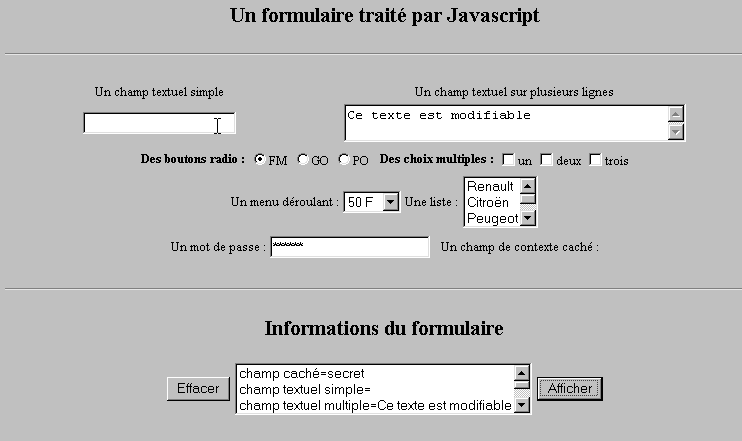
Mamy formularz zawierający najczęściej spotykane elementy oraz przycisk „Wyświetl”, który pozwala wyświetlić dane wprowadzone przez użytkownika.
10.1.2. Kod
<html>
<head>
<title>Un formulaire traité par Javascript</title>
<script language="javascript">
function afficher(){
// wyświetla informacje z formularza na liście
// najpierw się kasuje
effacerInfos();
// wyświetla wartości # pól
with(document.frmExemple){
// ukryte pole
ecrire("champ caché="+cache.value);
// pole tekstowe pojedyncze
ecrire("champ textuel simple="+simple.value);
// pole tekstowe z wieloma wartościami
ecrire("champ textuel multiple="+lignes.value);
// przyciski opcji
for(i=0;i<radio.length;i++){
texte="radio["+i+"]="+radio[i].value;
if(radio[i].checked) texte+=", coché";
ecrire(texte);
}//for
// pola wyboru
for(i=0;i<qcm.length;i++){
texte="qcm["+i+"]="+qcm[i].value;
if(qcm[i].checked) texte+=", coché";
ecrire(texte);
}//for
//lista rozwijana
ecrire("index sélectionné dans le menu="+menu.selectedIndex);
for(i=0;i<menu.length;i++){
texte="menu["+i+"]="+menu.options[i].text;
if(menu.options[i].selected) texte+=",sélectionné";
ecrire(texte);
}//dla
//lista z wieloma opcjami
for(i=0;i<lstVoitures.length;i++){
texte="lstVoitures["+i+"]="+lstVoitures.options[i].text;
if(lstVoitures.options[i].selected) texte+=",sélectionné";
ecrire(texte);
}//dla
//hasło
ecrire("mot de passe="+passwd.value);
}//z
}//funkcja
function ecrire(texte){
// zapisuje tekst na liście informacji
frmInfos.lstInfos.options[frmInfos.lstInfos.length]=new Option(texte);
}//zapisać
function effacerInfos(){
frmInfos.lstInfos.length=0;
}//effacerInfos
</script>
</head>
<body bgcolor="#C0C0C0" onload="afficher()">
<center>
<h2>Un formulaire traité par Javascript</h2>
<hr>
<form method="POST" name="frmExemple">
<input type="hidden" name="cache" value="secret">
<table border="0">
<tr>
<td align="center">Un champ textuel simple</td>
<td align="center" width="100"> </td>
<td align="center">Un champ textuel sur plusieurs lignes</td>
</tr>
<tr>
<td align="center"><input type="text" size="20" name="simple"></td>
<td align="center" width="100"> </td>
<td align="center">
<textarea name="lignes" rows="2" cols="40">Ce texte est modifiable</textarea>
</td>
</tr>
</table>
<table border="0">
<tr>
<td><strong>Des boutons radio :</strong></td>
<td>
<input type="radio" checked name="radio" value="FM">FM
</td>
<td>
<input type="radio" name="radio" value="GO">GO
</td>
<td>
<input type="radio" name="radio" value="PO">PO
</td>
<td> </td>
<td><strong>Des choix multiples :</strong></td>
<td>
<input type="checkbox" name="qcm" value="un">un
</td>
<td>
<input type="checkbox" name="qcm" value="deux">deux
</td>
<td>
<input type="checkbox" name="qcm" value="trois">trois
</td>
</tr>
</table>
<table border="0">
<tr>
<td>Un menu déroulant : </td>
<td>
<select name="menu" size="1">
<option>50 F</option>
<option>60 F</option>
<option>70 F</option>
<option>100 F</option>
</select>
</td>
<td>Une liste :</td>
<td>
<select name="lstVoitures" multiple size="3">
<option>Renault</option>
<option>Citroën</option>
<option>Peugeot</option>
<option>Fiat</option>
<option>Audi</option>
</select>
</td>
</tr>
</table>
<table border="0">
<tr>
<td>Un mot de passe : </td>
<td><input type="password" size="21" name="passwd"></td>
<td> </td>
<td>Un champ de contexte caché : </td>
</tr>
</table>
</form>
<hr>
<h2>Informations du formulaire</h2>
<form name="frmInfos">
<table>
<tr>
<td><input type="button" value="Effacer" onclick="effacerInfos()"></td>
<td>
<select name="lstInfos" multiple size="3">
</select>
</td>
<td>
<input type="button" name="cmdAfficher" value="Afficher" onclick="afficher()">
</td>
</tr>
</form>
</body>
</html>
10.2. Wyrażenia regularne w JavaScript
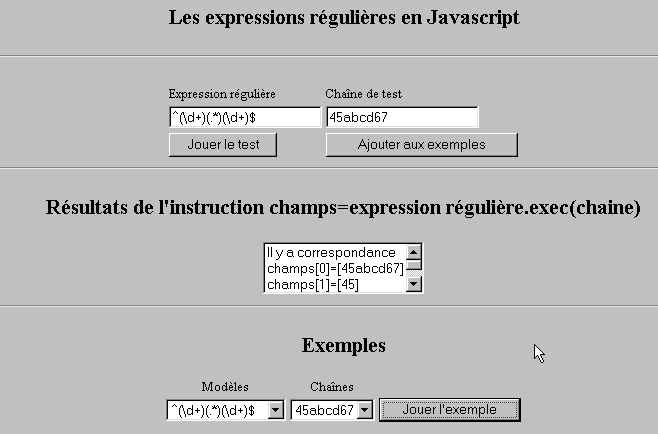
Jeśli chodzi o przeglądarkę, JavaScript może służyć do sprawdzania poprawności danych wprowadzonych przez użytkownika przed wysłaniem ich na serwer. Oto program do testowania tych wyrażeń regularnych.
10.2.1. Strona testowa
10.2.2. Kod strony
<html>

  <head>
    <title>Les expressions régulières en Javascript</title>
    <script language="javascript">
      function afficherInfos(){
        with(document.frmRegExp){
           // coś do zrobienia?
          if (! verifier()) return;
          // w porządku – usuwamy poprzednie wyniki
          effacerInfos();
           // weryfikacja szablonu
          modele=new RegExp(txtModele.value);
          champs=modele.exec(txtChaine.value);
          if(champs==null)
             // brak zgodności między wzorem a ciągiem znaków
            ecrireInfos("pas de correspondance");
          else{
             // zgodność – wyświetlamy uzyskane wyniki
            ecrireInfos("Il y a correspondance");
            for(i=0;i<champs.length;i++)
              ecrireInfos("champs["+i+"]=["+champs[i]+"]");
          }//w przeciwnym razie
        }//with
      }//funkcja

      function ecrireInfos(texte){
        // zapisuje tekst na liście informacji
        document.frmRegExp.lstInfos.options[document.frmRegExp.lstInfos.length]=new Option(texte);
      }//zapisać

      function effacerInfos(){
        frmRegExp.lstInfos.length=0;
      }//effacerInfos

      function jouer(){
         // sprawdza szablon względem ciągu znaków z wybranego przykładu
        with(document.frmRegExp){
          txtModele.value=lstModeles.options[lstModeles.selectedIndex].text
          txtChaine.value=lstChaines.options[lstChaines.selectedIndex].text
          afficherInfos();
        }//z
      }//odtworzyć

      function ajouter(){
         //dodaje bieżący test do przykładów
        with(document.frmRegExp){
          // coś do zrobienia?
          if (! verifier()) return;
          // dodaj
          lstModeles.options[lstModeles.length]=new Option(txtModele.value);
          lstChaines.options[lstChaines.length]=new Option(txtChaine.value);
          // wyczyść wprowadzone dane
          txtModele.value="";
          txtChaine.value="";
        }//z
      }//dodaj

      function verifier(){
         // sprawdź, czy pola wprowadzania danych nie są puste
        with(document.frmRegExp){
          champs=/^\s*$/.exec(txtModele.value);
          if(champs!=null){
            alert("Vous n'avez pas indiqué de modèle");
            txtModele.focus();
            return false;
          }//if
          champs=/^\s*$/.exec(txtChaine.value);
          if(champs!=null){
            alert("Vous n'avez pas indiqué de chaîne de test");
            txtChaine.focus();
            return false;
          }//jeśli
          // w porządku
          return true;
        }//with
      }//sprawdź
    </script>
  </head>

  <body bgcolor="#C0C0C0">
    <center>
     <h2>Les expressions régulières en Javascript</h2>
    <hr>
    <form name="frmRegExp">
      <table>
        <tr>
          <td>Expression régulière</td>
          <td>Chaîne de test</td>
        </tr>
        <tr>
          <td><input type="text" name="txtModele" size="20"></td>
          <td><input type="text" name="txtChaine" size="20"></td>
        </tr>
        <tr>
          <td>
            <input type="button" name="cmdAfficher" value="Jouer le test" onclick="afficherInfos()">
          </td>
          <td>
            <input type="button" name="cmdAjouter" value="Ajouter aux exemples" onclick="ajouter()">
          </td>
        </tr>
      </table>
      <hr>
      <h2>Résultats de l'instruction champs=expression régulière.exec(chaine)</h2>
      <table>
        <tr>
          <td>
            <select name="lstInfos" size="3">
            </select>
          </td>
        </tr>
      </table>
      <hr>
      <h2>Exemples</h2>
      <table>
 <tr>
          <td align="center">Modèles</td>
          <td align="center">Chaînes</td>
        </tr>
        <tr>
          <td>
            <select name="lstModeles" size="1">
              <option>^\d+$</option>
              <option>^(\d+) (\d+)$</option>
              <option>^(\d+)(.*)(\d+)$</option>
              <option>^(\d+)(\s+)(\d+)$</option>
            </select>
          </td>
          <td>
            <select name="lstChaines" size="1">
              <option>67</option>
              <option>56 84</option>
              <option>45abcd67</option>
              <option>45   67</option>
            </select>
          </td>
          <td>
            <input type="button" name="cmdJouer" value="Jouer l'exemple" onclick="jouer()">
          </td>
        </tr>
    </form>
  </body>
</html>
10.3. Zarządzanie listami w JavaScript
10.3.1. Formularz
10.3.2. Kod
<html>

  <head>
    <title>Les listes en Javascript</title>

    <script language="javascript">
       // dodaj
      function ajouter(L1,L2,T){
         // dodaj wartość pola T do list L1, L2
           // coś do zrobienia?
          champs=/^\s*$/.exec(T.value);
          if(champs!=null){
            // pole jest puste
            alert("Vous n'avez pas indiqué la valeur à ajouter");
            txtElement.focus();
            return;
          }//if
           // dodajemy element
          L1.options[L1.length]=new Option(T.value);
          L2.options[L2.length]=new Option(T.value);
          T.value="";
      }//dodaj

       //wyczyść
      function vider(L){
         // opróżnia listę L
        L.length=0;
      }//opróżnij

     //przeniesienie
      function transfert(L1,L2,simple){
        //przenosi do L2 elementy zaznaczone na liście L1

         // coś do zrobienia?
         // indeks wybranego elementu z listy L1
        index1=L1.selectedIndex;
        if(index1==-1){
          alert("Vous n'avez pas sélectionné d'élément");
          return;
        }//if
         // jaki jest tryb wyboru elementów z list
        if(simple){ // wybór pojedynczy
          element1=L1.options[index1].text;
           //dodanie w L2
          L2.options[L2.length]=new Option(element1);
          //usuwanie w L1
          L1.options[index1]=null;
        }//pojedynczy
        if(! simple){ //wybór wielokrotny
           //przeglądanie listy 1 w odwrotnym kierunku
          for(i=L1.length-1;i>=0;i--){
            //czy element został zaznaczony?
            if(L1.options[i].selected){
               //dodaj go do L2
              L2.options[L2.length]=new Option(L1.options[i].text);
              //usuwa się go z L1
              L1.options[i]=null;
            }//if
          }//dla i
        }//if ! proste
      }//przeniesienie
   </script>
  </head>

  <body bgcolor="#C0C0C0">
    <center>
     <h2>Les listes en Javascript</h2>
    <hr>
    <form name="frmListes">
      <table>
        <tr>
          <td>
            <input type="button" name="cmdAjouter" value="Ajouter" onclick="ajouter(lst1A,lst1B,txtElement)">
          </td>
          <td>
            <input type="text" name="txtElement">
          </td>
        </tr>
      </table>
      <table>
        <tr>
          <td align="center">liste 1</td>
          <td align="center"><input type="button" value=">>" onclick="transfert(lst1A,lst2A,true)"</td>
          <td align="center"><input type="button" value="<<" onclick="transfert(lst2A,lst1A,true)"</td>
          <td align="center">liste 2</td>
          <td width="30"></td>
          <td align="center">liste 1</td>
          <td align="center"><input type="button" value=">>" onclick="transfert(lst1B,lst2B,false)"</td>
          <td align="center"><input type="button" value="<<" onclick="transfert(lst2B,lst1B,false)"</td>
          <td align="center">liste 2</td>
        </tr>
         <tr>
          <td></td>
          <td align="center">
            <select name="lst1A" size="5">
            </select>
          </td>
          <td align="center">
            <select name="lst2A" size="5">
            </select>
          </td>
          <td></td>
          <td></td>
          <td></td>
          <td align="center">
            <select name="lst1B" size="5" multiple >
            </select>
          </td>
          <td align="center">
            <select name="lst2B" size="5" multiple>
            </select>
          </td>

        </tr>
        <tr>
          <td></td>
          <td align="center"><input type="button" value="Vider" onclick="vider(lst1A)"</td>
          <td align="center"><input type="button" value="Vider" onclick="vider(lst2A)"</td>
          <td></td>
          <td></td>
          <td></td>
          <td align="center"><input type="button" value="Vider" onclick="vider(lst1B)"</td>
          <td align="center"><input type="button" value="Vider" onclick="vider(lst2B)"</td>
          <td></td>
        </tr>
        <tr>
          <td></td>
          <td colspan="2"><strong>Sélection simple</strong></td>
          <td></td>
          <td></td>
          <td></td>
          <td colspan="2"><strong>Sélection multiple</strong></td>
          <td></td>
        </tr>

      </table>
      <hr>
    </form>
  </body>
</html>