14. Wersja 9: Implementacja warstwy internetowej przy użyciu Primefaces
Wymagania wstępne: należy zapoznać się z rozdziałem „Wprowadzenie do Primefaces” w pliku [ref3].
Zadanie 1: Utworzyć nowy projekt Maven typu [Web Application], w którym strony XHTML z poprzedniego przykładu zostaną zbudowane przy użyciu komponentów Primefaces. Nie należy wprowadzać żadnych zmian w beanach.
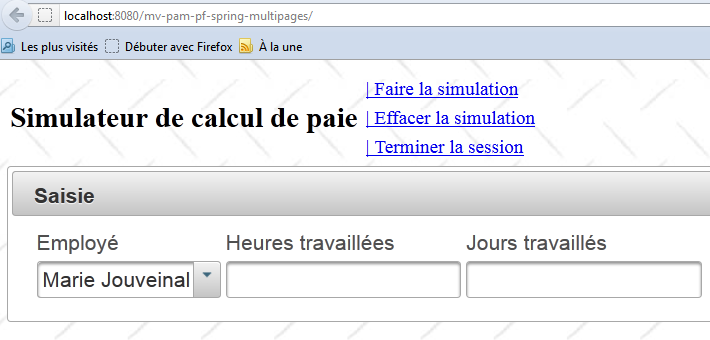
Strona główna wykorzystuje komponenty <p:panel>, <p:inputText>, <p:selectOneMenu>, <p:message>:
 |
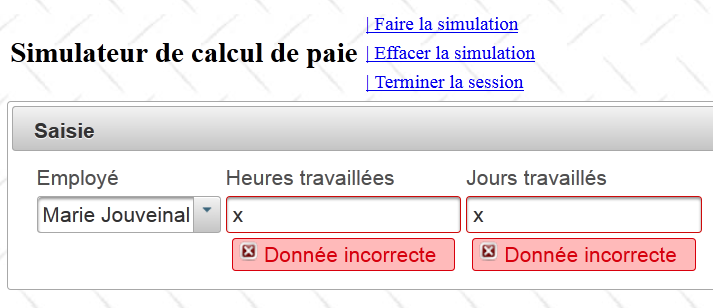
Błędne wprowadzenie danych:
 |
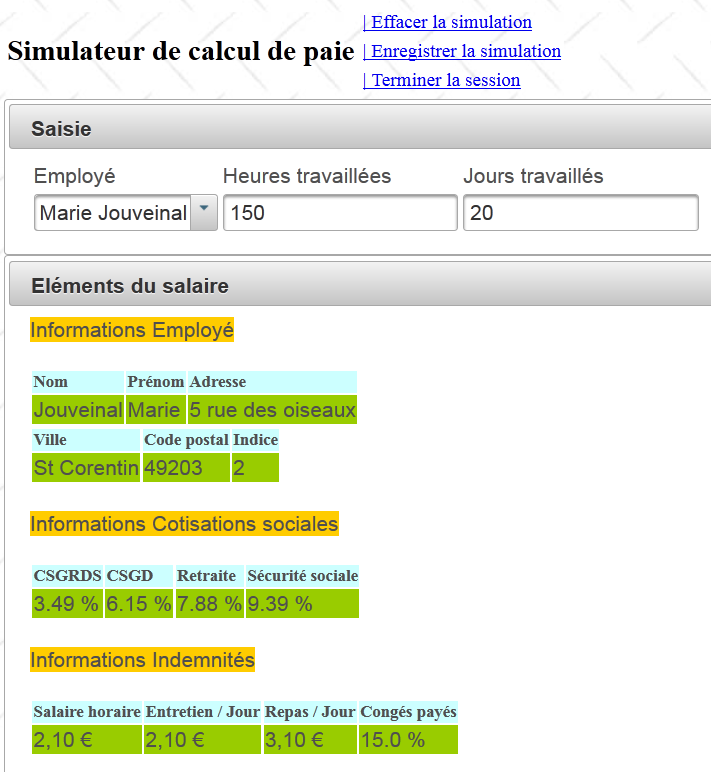
Symulacja:
 |
Lista symulacji wykorzystuje komponenty <p:dataTable>, <p:commandLink>:
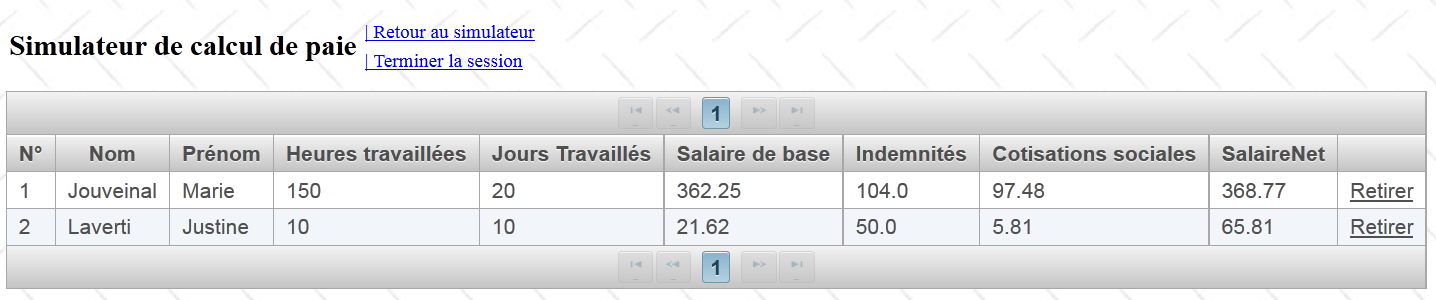 |
Metody AJAX zaktualizują obszar o identyfikatorze id='formulaire', który obejmuje całą stronę (patrz wiersz 11 poniżej):
<?xml version='1.0' encoding='UTF-8' ?>
<!DOCTYPE html PUBLIC "-//W3C//DTD XHTML 1.0 Transitional//EN" "http://www.w3.org/TR/xhtml1/DTD/xhtml1-transitional.dtd">
<html xmlns="http://www.w3.org/1999/xhtml"
      xmlns:h="http://java.sun.com/jsf/html"
      xmlns:f="http://java.sun.com/jsf/core"
      xmlns:ui="http://java.sun.com/jsf/facelets">

  <f:view locale="#{sessionData.locale}">
    ...
    <h:body style="background-image: url('${request.contextPath}/resources/images/standard.jpg');">
      <h:form id="formulaire">
        <!-- nagłówek -->
        <ui:include src="entete.xhtml" />
        <!-- treść -->
        <ui:insert name="part1" >
          Gestion des assistantes maternelles
        </ui:insert>
        <ui:insert name="part2"/>
      </h:form>
    </h:body>
  </f:view>
</html>
Gdy aplikacja zacznie działać, należy zastąpić stronę [entete.xhtml] następującą stroną:
<?xml version='1.0' encoding='UTF-8' ?>
<!DOCTYPE html PUBLIC "-//W3C//DTD XHTML 1.0 Transitional//EN" "http://www.w3.org/TR/xhtml1/DTD/xhtml1-transitional.dtd">
<html xmlns="http://www.w3.org/1999/xhtml"
      xmlns:h="http://java.sun.com/jsf/html"
      xmlns:p="http://primefaces.org/ui"
      xmlns:f="http://java.sun.com/jsf/core"
      xmlns:ui="http://java.sun.com/jsf/facelets">


  <!-- nagłówek -->
  <h:panelGroup>
    <h2><h:outputText value="#{msg['form.titre']}"/></h2>
  </h:panelGroup>

  <p:menubar id="menu" header="Menu" style="width: 500px">
    <p:submenu label="#{msg['form.menu.simulation']}">
      <p:menuitem  id="cmdFaireSimulation" style="width: 200px" value="#{msg['form.menu.faireSimulation']}" actionListener="#{form.faireSimulation}" rendered="#{sessionData.menu.faireSimulation}" update=":formulaire:contenu"/>
      <p:menuitem id="cmdEffacerSimulation" style="width: 200px" onclick="raz();" immediate="true" value="#{msg['form.menu.effacerSimulation']}" actionListener="#{form.effacerSimulation}" rendered="#{sessionData.menu.effacerSimulation}" update=":formulaire:contenu"/>
      <p:menuitem id="cmdEnregistrerSimulation" style="width: 200px" immediate="true" value="#{msg['form.menu.enregistrerSimulation']}" actionListener="#{form.enregistrerSimulation}" rendered="#{sessionData.menu.enregistrerSimulation}" update=":formulaire:contenu"/>
    </p:submenu>
    <p:submenu label="Navigation">
      <p:menuitem id="cmdRetourSimulateur" style="width: 200px" immediate="true" value="#{msg['form.menu.retourSimulateur']}" actionListener="#{form.retourSimulateur}" rendered="#{sessionData.menu.retourSimulateur}" update=":formulaire:contenu"/>
      <p:menuitem id="cmdVoirSimulations" style="width: 200px" immediate="true" value="#{msg['form.menu.voirSimulations']}" actionListener="#{form.voirSimulations}" rendered="#{sessionData.menu.voirSimulations}" update=":formulaire:contenu"/>
    </p:submenu>
    <p:menuitem id="cmdTerminerSession" immediate="true" value="#{msg['form.menu.terminerSession']}" actionListener="#{form.terminerSession}" rendered="#{sessionData.menu.terminerSession}" update=":formulaire:contenu"/>
  </p:menubar>

  <p:spacer height="50px"/>

</html>
- wiersz 15: pasek menu Primefaces,
- wiersz 16: opcja menu w tym pasku,
- wiersz 17: element tej opcji menu.
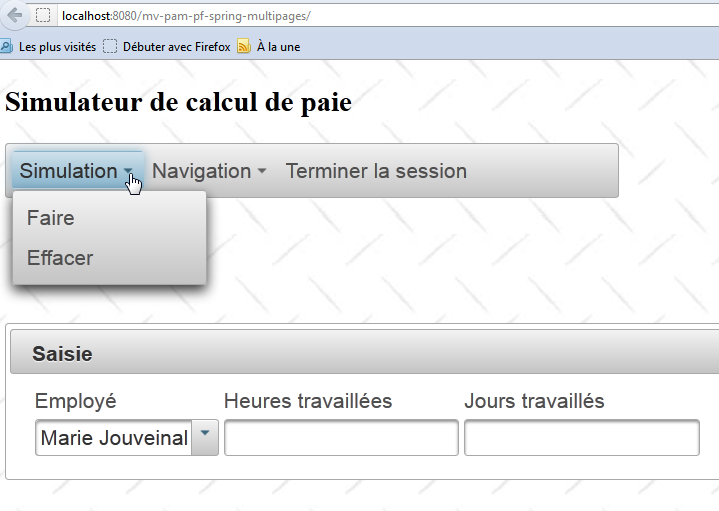
Zmiana ta nie ma wpływu na szablon. Nowy widok wygląda następująco: