20. Distribuzione dell’applicazione client/server su un servizio di hosting
Di seguito illustriamo a grandi linee la distribuzione dell’applicazione client/server che abbiamo sviluppato su un server OVH [https://www.ovh.com/fr/]. La distribuzione su altri provider di hosting non dovrebbe essere molto diversa. Vogliamo semplicemente dimostrare che la nostra applicazione si presta bene a questo tipo di distribuzione.
20.1. Implementazione del server
L’hosting OVH in questione è un hosting di base:
- un ambiente PHP 7.3;
- un SGBD MySQL;
- nessun server [Redis];
Il terzo punto ci obbliga a modificare la versione 14 del nostro server di calcolo delle imposte.
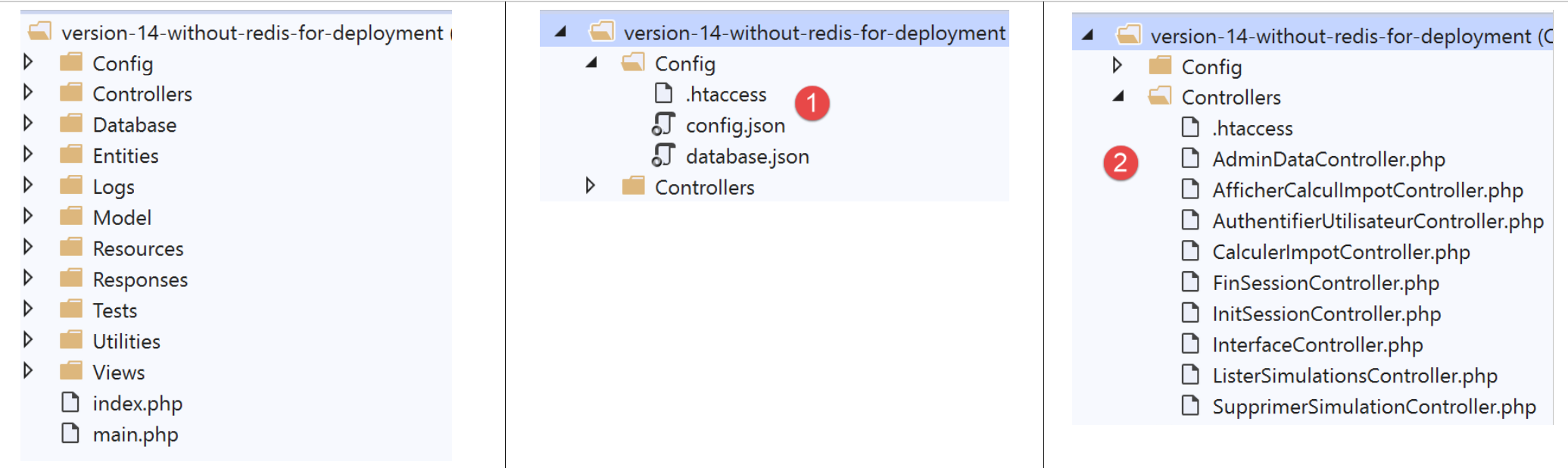
Dobbiamo modificare:
- i file di configurazione [1];
- i controller [AdminDataController] e [CalculerImpotController] per tenere conto del fatto che non esiste il server [Redis];
Il file [config.json] viene modificato come segue:
{
    "databaseFilename": "Config/database.json",
    "corsAllowed": false,
    "redisAvailable":false,
    "rootDirectory": "/.../www/apps/impot/serveur-php7",
    "relativeDependencies": [

        "/Entities/BaseEntity.php",
        ...
        "/Controllers/AdminDataController.php"
    ],
    "absoluteDependencies": [
        "/.../vendor/autoload.php",
        "/.../vendor/predis/predis/autoload.php"
    ],
    "users": [
        {
            "login": "admin",
            "passwd": "admin"
        }
    ],
    ...
}
Commenti
- riga 4: si introduce un valore booleano [redisAvailable] per indicare se si ha o meno accesso a un server [Redis];
- righe 5, 13, 14: i percorsi assoluti cambieranno;
Il file [database.json] si evolve come segue:
{
    "dsn": "mysql:host=...;dbname=...",
    "id": "...",
    "pwd": "...",
    "tableTranches": "dbimpots_tbtranches",
    "colLimites": "limites",
    "colCoeffR": "coeffr",
    "colCoeffN": "coeffn",
    "tableConstantes": "dbimpots_tbconstantes",
    "colPlafondQfDemiPart": "plafondQfDemiPart",
    ...
}
Commenti
- righe 2-4: l’identificativo del database e le credenziali del suo proprietario cambieranno;
Il controller [AdminDataController] subirà le seguenti modifiche:
<?php

namespace Application;

// dipendenze Symfony
use \Symfony\Component\HttpFoundation\Response;
use \Symfony\Component\HttpFoundation\Request;
use \Symfony\Component\HttpFoundation\Session\Session;
// alias del livello [dao]
use \Application\ServerDaoWithSession as ServerDaoWithRedis;

class AdminDataController implements InterfaceController {

  // $config è la configurazione dell'applicazione
  // elaborazione di una richiesta Request
  // utilizza la sessione Session e può modificarla
  // $infos sono informazioni aggiuntive specifiche per ciascun controller
  // restituisce un array [$statusCode, $état, $content, $headers]
  public function execute(
    array $config,
    Request $request,
    Session $session,
    array $infos = NULL): array {

    // deve esserci un unico parametro GET
    $method = strtolower($request->getMethod());
    ...

    // si può lavorare
    // Redis
    if ($config["redisAvailable"]) {
      \Predis\Autoloader::register();
      ...
    } else {
      try {
        // si recuperano i dati fiscali dal database
        $dao = new ServerDaoWithRedis($config["databaseFilename"], NULL);
        // taxAdminData
        $taxAdminData = $dao->getTaxAdminData();
      } catch (\Throwable $ex) {
        // è andato male
        // risultato restituito con errore al controller principale
        $état = 1051;
        return [Response::HTTP_INTERNAL_SERVER_ERROR, $état,
          ["réponse" => utf8_encode($ex->getMessage())], []];
      }
    }

    // risultato restituito al controller principale
    $état = 1000;
    return [Response::HTTP_OK, $état, ["réponse" => $taxAdminData], []];
  }

}
Commenti
- riga 31: ora si verifica se è presente o meno un server [Redis];
- righe 32-34: in caso affermativo, il codice precedente viene ripreso integralmente;
- righe 35-46: in caso contrario, i dati dell’amministrazione fiscale vengono prelevati dal database;
Anche il controller [CalculerImpotController], che a sua volta necessita dei dati dell’amministrazione fiscale, viene modificato in modo identico.
Fatto. L’implementazione sul server OVH ha comportato la creazione di FTP. Su OVH è stata caricata:
- la versione [vuejs-14-without-redis];
- la cartella [vendor] contenente tutte le dipendenze del server [vuejs-14-without-redis];
Una volta completato il trasferimento FTP, sono state generate le tabelle necessarie al server con il seguente script SQL:
-- phpMyAdmin SQL Dump
-- versione 4.8.5
-- https://www.phpmyadmin.net/
--
-- Host: localhost:3306
-- Ora di generazione: 12 ottobre 2019 alle 07:45 AM
-- Versione del server: 5.7.24
-- PHP Versione: 7.2.11

SET SQL_MODE = "NO_AUTO_VALUE_ON_ZERO";
SET AUTOCOMMIT = 0;
START TRANSACTION;
SET time_zone = "+00:00";


/*!40101 SET @OLD_CHARACTER_SET_CLIENT=@@CHARACTER_SET_CLIENT */;
/*!40101 SET @OLD_CHARACTER_SET_RESULTS=@@CHARACTER_SET_RESULTS */;
/*!40101 SET @OLD_COLLATION_CONNECTION=@@COLLATION_CONNECTION */;
/*!40101 SET NAMES utf8mb4 */;

--
-- Struttura della tabella `dbimpots_tbconstantes`
--

CREATE TABLE `dbimpots_tbconstantes` (
  `id` int(11) NOT NULL,
  `plafondQfDemiPart` decimal(10,2) NOT NULL,
  `plafondRevenusCelibatairePourReduction` decimal(10,2) NOT NULL,
  `plafondRevenusCouplePourReduction` decimal(10,2) NOT NULL,
  `valeurReducDemiPart` decimal(10,2) NOT NULL,
  `plafondDecoteCelibataire` decimal(10,2) NOT NULL,
  `plafondDecoteCouple` decimal(10,2) NOT NULL,
  `plafondImpotCelibatairePourDecote` decimal(10,2) NOT NULL,
  `plafondImpotCouplePourDecote` decimal(10,2) NOT NULL,
  `abattementDixPourcentMax` decimal(10,2) NOT NULL,
  `abattementDixPourcentMin` decimal(10,2) NOT NULL
) ENGINE=InnoDB DEFAULT CHARSET=utf8;

--
-- Esportazione dei dati della tabella `dbimpots_tbconstantes`
--

INSERT INTO `dbimpots_tbconstantes` (`id`, `plafondQfDemiPart`, `plafondRevenusCelibatairePourReduction`, `plafondRevenusCouplePourReduction`, `valeurReducDemiPart`, `plafondDecoteCelibataire`, `plafondDecoteCouple`, `plafondImpotCelibatairePourDecote`, `plafondImpotCouplePourDecote`, `abattementDixPourcentMax`, `abattementDixPourcentMin`) VALUES
(8, '1551.00', '21037.00', '42074.00', '3797.00', '1196.00', '1970.00', '1595.00', '2627.00', '12502.00', '437.00');

-- --------------------------------------------------------

--
-- Struttura della tabella `dbimpots_tbtranches`
--

CREATE TABLE `dbimpots_tbtranches` (
  `id` int(11) NOT NULL,
  `limites` decimal(10,2) NOT NULL,
  `coeffR` decimal(10,2) NOT NULL,
  `coeffN` decimal(10,2) NOT NULL
) ENGINE=InnoDB DEFAULT CHARSET=utf8;

--
-- Esportazione dei dati della tabella `dbimpots_tbtranches`
--

INSERT INTO `dbimpots_tbtranches` (`id`, `limites`, `coeffR`, `coeffN`) VALUES
(36, '9964.00', '0.00', '0.00'),
(37, '27519.00', '0.14', '1394.96'),
(38, '73779.00', '0.30', '5798.00'),
(39, '156244.00', '0.41', '13913.69'),
(40, '0.00', '0.45', '20163.45');

--
-- Indici delle tabelle di cui è stato eseguito il dump
--

--
-- Indici per la tabella `dbimpots_tbconstantes`
--
ALTER TABLE `dbimpots_tbconstantes`
  ADD PRIMARY KEY (`id`);

--
-- Indici per la tabella `dbimpots_tbtranches`
--
ALTER TABLE `dbimpots_tbtranches`
  ADD PRIMARY KEY (`id`);

--
-- AUTO_INCREMENT per le tabelle sottoposte a dump
--

--
-- AUTO_INCREMENT per la tabella `dbimpots_tbconstantes`
--
ALTER TABLE `dbimpots_tbconstantes`
  MODIFY `id` int(11) NOT NULL AUTO_INCREMENT, AUTO_INCREMENT=9;

--
-- AUTO_INCREMENT per la tabella `dbimpots_tbtranches`
--
ALTER TABLE `dbimpots_tbtranches`
  MODIFY `id` int(11) NOT NULL AUTO_INCREMENT, AUTO_INCREMENT=41;
COMMIT;

/*!40101 SET CHARACTER_SET_CLIENT=@OLD_CHARACTER_SET_CLIENT */;
/*!40101 SET CHARACTER_SET_RESULTS=@OLD_CHARACTER_SET_RESULTS */;
/*!40101 SET COLLATION_CONNECTION=@OLD_COLLATION_CONNECTION */;
Una volta completate queste operazioni, i file [config.json, database.json] sono stati adattati al loro nuovo ambiente.
20.2. Distribuzione del client [Vue.js]
Si è deciso di distribuire il client [Vue.js] su URL e [http://machine/apps/impot/client-vuejs/]. Ciò ha comportato le seguenti modifiche:
Nella directory principale di [workspace], a partire da [VSCode], è stato creato il seguente file [vue.config.js]:
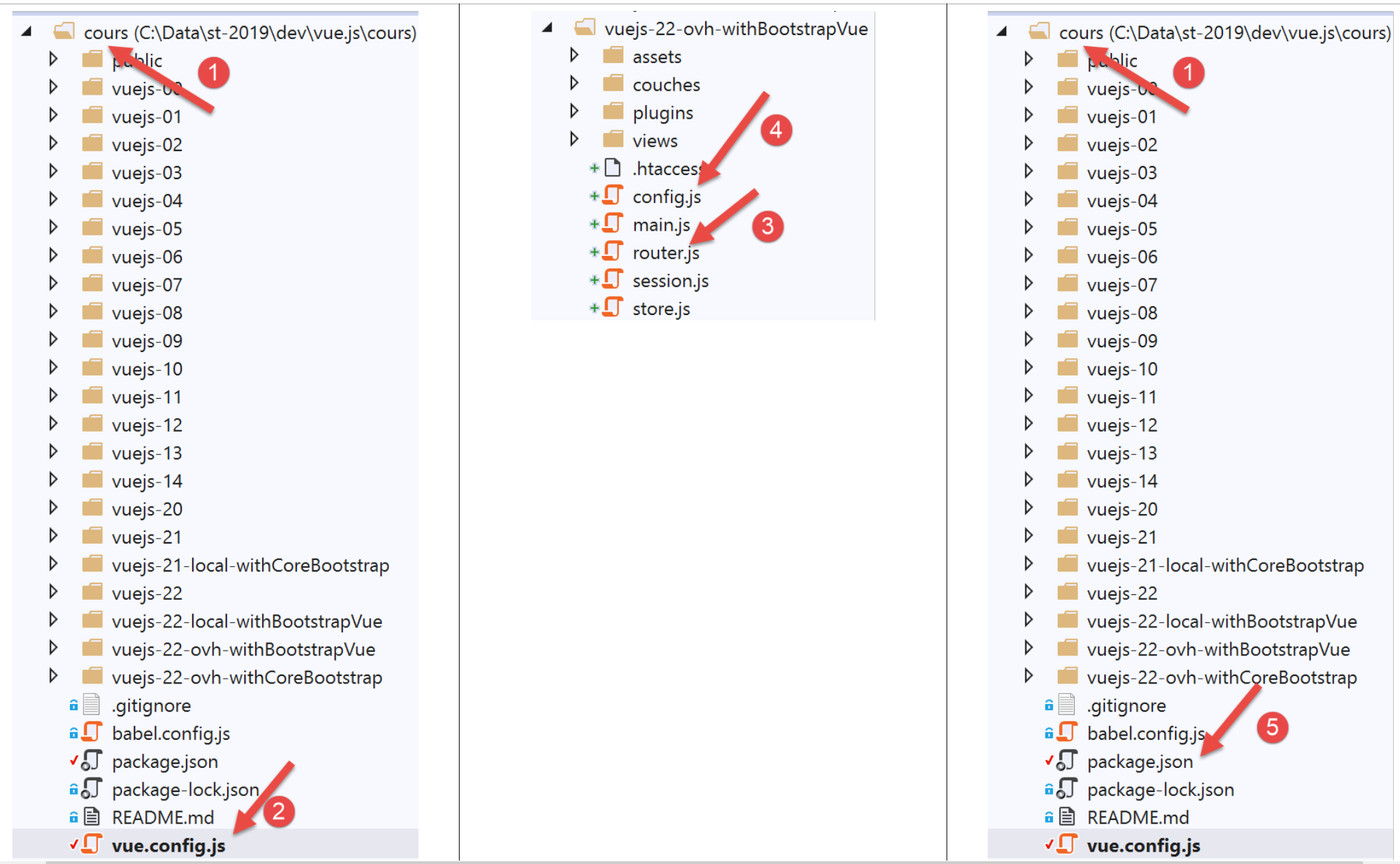
Il file [vue.config.js] è il seguente:
// vue.config.js
module.exports = {
  // URL del servizio clienti [vuejs] del server di calcolo delle imposte
  publicPath: '/apps/impot/client-vuejs/'
}
Anche il file [router.js] [3] è stato modificato:
// importazioni
import Vue from 'vue'
import VueRouter from 'vue-router'
...

// plugin di instradamento
Vue.use(VueRouter)

// percorsi dell'applicazione
const routes = [
  ...
]

// il router
const router = new VueRouter({
  // i percorsi
  routes,
  // modalità di visualizzazione di URL
  mode: 'history',
  // URL di base dell'applicazione
  base: '/apps/impot/client-vuejs/'
})

// verifica delle rotte
router.beforeEach((to, from, next) => {
  ...
})

// esportazione del router
export default router
Commenti
- riga 21: la base del file URL è stata modificata;
Il file [config.js] è stato modificato come segue:
// utilizzo della libreria [axios]
const axios = require('axios');
// timeout delle richieste HTTP
axios.defaults.timeout = 5000;
// il database del server di calcolo delle imposte URL
// lo schema [https] causa problemi a Firefox perché il server di calcolo
// invia un certificato autofirmato. Funziona con Chrome ed Edge. Safari non testato.
// con Firefox è possibile richiedendo direttamente l'URL riportato di seguito e indicando a Firefox
// che si accetta il rischio di un certificato non firmato. A quel punto il client [vuejs] funzionerà.
axios.defaults.baseURL = 'http://.../apps/impot/serveur-php7';
// utilizzeremo i cookie
axios.defaults.withCredentials = true;

// esportazione della configurazione
export default {
  // oggetto [axios]
  axios: axios,
  // tempo massimo di inattività della sessione: 5 min = 300 s = 300000 ms
  duréeSession: 300000
}
Commenti
- riga 10: si inserisce il file URL dal server di calcolo delle imposte;
La versione di produzione del progetto è stata generata con il comando [build] dal seguente file [package.json] [5]:
{
  "name": "vuejs",
  "version": "0.1.0",
  "private": true,
  "scripts": {
    "serve": "vue-cli-service serve vuejs-22/main.js",
    "build": "vue-cli-service build vuejs-22-ovh-withBootstrapVue/main.js",
    "lint": "vue-cli-service lint"
  },
  ...
}
Una volta fatto ciò, la cartella [dist] contenente la versione di produzione generata è stata «caricata» sul server OVH nella cartella [/.../apps/impot] e successivamente rinominata [client-vuejs], in modo che il codice del cliente si trovasse nella cartella [/.../apps/impot/client-vuejs/] come previsto. Successivamente, in questa cartella abbiamo caricato il seguente file [.htaccess]:
<IfModule mod_rewrite.c>
  RewriteEngine On
  RewriteBase /apps/impot/client-vuejs/
  RewriteRule ^index\.html$ - [L]
  RewriteCond %{REQUEST_FILENAME} !-f
  RewriteCond %{REQUEST_FILENAME} !-d
  RewriteRule . /apps/impot/client-vuejs/index.html [L]
</IfModule>
questo perché il server web di OVH utilizzato in questo caso è un server Apache. Per altri tipi di server, fare riferimento alla documentazione |https://cli.vuejs.org/guide/deployment.html|.
L'applicazione server PHP 7 può essere testata |qui|.
Il client [Vue.js] può essere testato |qui|.
20.3. Conclusion
La versione [vuejs-21] non era indispensabile. Avevamo constatato che la versione [vuejs-20] gestiva correttamente i URL digitati dall’utente. Tuttavia, la nuova versione offre un ulteriore comfort all’utente. L’utente può navigare digitando i codici URL. L’applicazione gli propone quindi la vista più adatta allo stato attuale (la sessione) dell’applicazione. Inoltre, la versione [vuejs-22] apporta miglioramenti alla visualizzazione dell’applicazione sui dispositivi mobili.