6. File di testo
Un file di testo è un file contenente righe di testo. Esaminiamo la creazione e l'uso di tali file attraverso alcuni esempi.
6.1. Creazione e utilizzo
Programma |
 |
Risultati |
Commenti
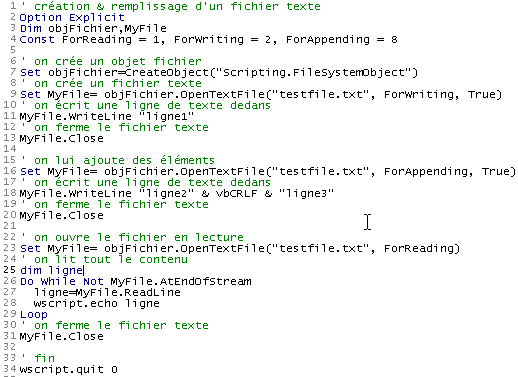
- La riga 7 crea un oggetto file di tipo "Scripting.FileSystemObject" utilizzando la funzione CreateObject("Scripting.FileSystemObject"). Tale oggetto consente di accedere a qualsiasi file presente nel sistema, non solo ai file di testo.
- La riga 9 crea un oggetto "TextStream". La creazione di questo oggetto è associata alla creazione del file testfile.txt. Questo file non è designato da un percorso assoluto come c:\dir1\dir2\....\testfile.txt ma da un percorso relativo testfile.txt. Verrà quindi creato nella directory da cui viene lanciato il comando per eseguire il file.
- Il file system di Windows non conosce concetti quali file di testo o file non di testo. Riconosce solo i file. Spetta quindi al programma che utilizza questo file determinare se trattarlo come un file di testo o meno.
- La riga 9 crea un oggetto, da qui l'uso del comando SET per l'assegnazione. La creazione di un oggetto file di testo comporta la creazione di due oggetti:
- la creazione di uno Scripting.FileSystemObject (riga 7)
- seguita dalla creazione di un oggetto "TextStream" (file di testo) utilizzando il metodo OpenTextFile di Scripting.FileSystemObject, che accetta diversi parametri:
- il nome del file da gestire (obbligatorio)
- la modalità di accesso al file. Si tratta di un numero intero con tre possibili valori:
- 1: modalità di sola lettura
- 2: modalità di scrittura. Se il file non esiste già e se il terzo parametro è presente e ha il valore true, viene creato; altrimenti no. Se esiste già, viene sovrascritto.
- 8: modalità di aggiunta, ovvero scrittura alla fine del file. Se il file non esiste già e il terzo parametro è presente e impostato su true, viene creato; altrimenti no.
- La riga 11 scrive una riga di testo utilizzando il metodo WriteLine dell'oggetto TextStream creato.
- La riga 13 "chiude" il file. Non è più possibile scrivere o leggere da esso.
- La riga 16 crea un nuovo oggetto "TextStream" per utilizzare lo stesso file di prima, ma questa volta in modalità "append". Le righe che verranno scritte saranno aggiunte alle righe esistenti.
- La riga 18 scrive due nuove righe, tenendo presente che la costante vbCRLF è il marcatore di fine riga per i file di testo.
- La riga 20 chiude nuovamente il file
- La riga 23 lo riapre in modalità "read": leggeremo il contenuto del file.
- La riga 27 legge una riga di testo utilizzando il metodo ReadLine dell'oggetto TextStream. Quando il file viene "aperto" per la prima volta, il cursore si posiziona sulla prima riga di testo. Una volta che questa riga è stata letta dal metodo ReadLine, il cursore si sposta sulla seconda riga. Pertanto, il metodo ReadLine non solo legge la riga corrente, ma "passa" automaticamente alla riga successiva.
- Per leggere tutte le righe di testo, il metodo ReadLine deve essere applicato ripetutamente in un ciclo. Questo ciclo (riga 26) termina quando l'attributo AtEndOfStream dell'oggetto TextStream viene impostato su true. Ciò significa che non ci sono più righe da leggere nel file.
6.2. Casi di errore
Esistono due casi di errore comuni:
- apertura di un file per la lettura che non esiste
- apertura di un file inesistente per la scrittura o l'aggiunta di dati con il terzo parametro impostato su false nella chiamata al metodo OpenTextFile.
Il programma seguente mostra come rilevare questi errori:
Programma
' creating & filling a text file
Option Explicit
Dim objFichier,MyFile
Const ForReading = 1, ForWriting = 2, ForAppending = 8
Dim codeErreur

' create a file object
Set objFichier=CreateObject("Scripting.FileSystemObject")

' open a text file that should exist in read-only mode
On Error Resume Next
Set MyFile= objFichier.OpenTextFile("abcd", ForReading)
codeErreur=err.number
On Error GoTo 0
If codeErreur<>0 Then
    ' file does not exist
    wscript.echo "Le fichier [abcd] n'existe pas"
Else
    ' close the text file
    MyFile.Close
End If


' open a text file that must be writable
On Error Resume Next
Set MyFile= objFichier.OpenTextFile("abcd", ForWriting, False)
codeErreur=err.number
On Error GoTo 0
If codeErreur<>0 Then
    wscript.echo "Le fichier [abcd] n'existe pas"
Else
    ' close the text file
    MyFile.Close
End If

' open a text file that should exist as an addition
On Error Resume Next
Set MyFile= objFichier.OpenTextFile("abcd", ForAppending, False)
codeErreur=err.number
On Error GoTo 0
If codeErreur<>0 Then
    wscript.echo "Le fichier [abcd] n'existe pas"
Else
    ' close the text file
    MyFile.Close
End If

' end
wscript.quit 0
Risultati
6.3. L'applicazione IMPOTS con un file di testo
Torniamo all'applicazione per il calcolo delle imposte, supponendo che i dati necessari per il calcolo siano contenuti in un file di testo denominato data.txt:
12620 13190 15640 24740 31810 39970 48360 55790 92970 127860 151250 172040 195000 0
0 0,05 0,1 0,15 0,2 0,25 0,3 0,35 0,4 0,45 0,5 0,55 0,6 0,65
0 631 1290,5 2072,5 3309,5 4900 6898,5 9316,5 12106 16754,5 23147,5 30710 39312 49062
Le tre righe contengono, rispettivamente, i dati provenienti dagli array limit, coeffR e coeffN dell'applicazione. Grazie alla struttura modulare della nostra applicazione, le modifiche vengono apportate principalmente nella procedura getData, responsabile della costruzione dei tre array. Il nuovo programma è il seguente:
Programma
' calculating a taxpayer's tax liability
' the program must be called with three parameters: married children salary
' married: character Y if married, N if unmarried
' children: number of children
' salary: annual salary without cents

' mandatory variable declaration
Option Explicit
Dim erreur

' retrieve arguments and check their validity
Dim marie, enfants, salaire
erreur=getArguments(marie,enfants,salaire)
' mistake?
If erreur(0)<>0 Then wscript.echo erreur(1) : wscript.quit erreur(0)

' retrieve the data needed to calculate taxes
Dim limites, coeffR, coeffN
erreur=getData(limites,coeffR,coeffN)
' mistake?
If erreur(0)<>0 Then wscript.echo erreur(1) : wscript.quit 5

' the result is displayed
wscript.echo "impôt=" & calculerImpot(marie,enfants,salaire,limites,coeffR,coeffN)

' leave without error
wscript.quit 0

' ------------ functions and procedures

' ----------- getArguments
Function getArguments(byref marie, ByRef enfants, ByRef salaire)
    ' must retrieve three values passed as arguments to the main program
    ' an argument is passed to the program without spaces in front and behind it
    ' use regular expressions to check data validity

    ' returns an error array variant with 2 values
    ' error(0): error code, 0 if no error
    ' error(1): error message if error otherwise empty string

    Dim syntaxe
    syntaxe= _
    "Syntaxe : pg marié enfants salaire" & vbCRLF & _
    "marié : caractère O si marié, N si non marié" & vbCRLF & _
    "enfants : nombre d'enfants (entier >=0)" & vbCRLF & _
    "salaire : salaire annuel sans les centimes (entier >=0)"

    ' we check that there are 3 arguments
    Dim nbArguments
    nbArguments=wscript.arguments.count
    If nbArguments<>3 Then
        ' error msg
        getArguments= array(1,syntaxe & vbCRLF & vbCRLF & "erreur : nombre d'arguments incorrect")
        ' end
        Exit Function
    End If

    Dim modele, correspondances
    Set modele=new regexp

    ' marital status must be among the characters oOnN
    modele.pattern="^[oOnN]$"
    Set correspondances=modele.execute(wscript.arguments(0))
    If correspondances.count=0 Then
        ' error msg
        getArguments=array(2,syntaxe & vbCRLF & vbCRLF & "erreur : argument marie incorrect")
        ' we leave
        Exit Function
    End If
    ' the value
    If lcase(wscript.arguments(0)) = "o"Then
        marie=true
    Else
        marie=false
    End If

    ' children must be an integer >=0
    modele.pattern="^\d{1,2}$"
    Set correspondances=modele.execute(wscript.arguments(1))
    If correspondances.count=0 Then
        ' error
        getArguments= array(3,syntaxe & vbCRLF & vbCRLF & "erreur : argument enfants incorrect")
        ' we leave
        Exit Function
    End If
    ' the value
    enfants=cint(wscript.arguments(1))

    ' salary must be an integer >=0
    modele.pattern="^\d{1,9}$"
    Set correspondances=modele.execute(wscript.arguments(2))
    If correspondances.count=0 Then
        ' error
        getArguments= array(4,syntaxe & vbCRLF & vbCRLF & "erreur : argument salaire incorrect")
        ' we leave
        Exit Function
    End If
    ' the value
    salaire=clng(wscript.arguments(2))

    ' finished without error
    getArguments=array(0,"")
End Function

' ----------- getData
Function getData(byref limites, ByRef coeffR, ByRef coeffN)
    ' the data of the three limit tables, coeffR, coeffN are in a text file
    ' called data.txt. Each array occupies a line in the form val1 val2 ... valn
    ' we find, in limit order, coeffR, coeffN

    ' renders a 2-element array error variant to handle possible errors
    ' error(0): 0 if no error, an integer >0 otherwise
    ' error(1): error message if error

    Dim objFichier,MyFile,codeErreur
    Const ForReading = 1, dataFileName="data.txt"

    ' create a file object
    Set objFichier=CreateObject("Scripting.FileSystemObject")
    ' open the data.txt file in read mode
    On Error Resume Next
    Set MyFile= objFichier.OpenTextFile(dataFileName, ForReading)
    ' mistake?
    codeErreur=err.number
    On Error GoTo 0
    If codeErreur<>0 Then
        ' there has been an error - it is noted
        getData=array(1,"Impossible d'ouvrir le fichier des données [" & dataFileName & "] en lecture")
        ' we're back
        Exit Function
    End If

    ' we now assume that the content is correct and do no verification
    ' read the 3 lines

    ' limits
    Dim ligne, i
    ligne=MyFile.ReadLine
    getDataFromLine ligne,limites

    ' coeffR
    ligne=MyFile.ReadLine
    getDataFromLine ligne,coeffR


    ' coeffN
    ligne=MyFile.ReadLine
    coeffN=split(ligne," ")
    getDataFromLine ligne,coeffN

    ' close the file
    MyFile.close

    ' finished without error
    getData=array(0,"")
End Function

' ----------- getDataFromLine
Sub getDataFromLine(byref ligne, ByRef tableau)
    ' places the numerical values contained in line
    ' these are separated by one or more spaces

    ' initially the table is empty
    tableau=array()
    ' we define a model for the
    Dim modele, correspondances
    Set modele= New RegExP
    With modele
        .pattern="\d+,\d+|\d+"    ' 140.5 or 140
        .global=true              ' all values
    End With

    ' we analyze the line
    Set correspondances=modele.execute(ligne)
    Dim i
    For i=0 To correspondances.count-1
        ' resize the table
        ReDim Preserve tableau(i)
        ' assign a value to the new element
        tableau(i)=cdbl(correspondances(i).value)
    Next

    'end
End Sub


' ----------- calculerImpot
Function calculerImpot(byval marie,ByVal enfants,ByVal salaire, ByRef limites, ByRef coeffR, ByRef coeffN)

    ' the number of shares is calculated
    Dim nbParts
    If marie=true Then
        nbParts=(enfants/2)+2
    Else
        nbParts=(enfants/2)+1
    End If
    If enfants>=3 Then nbParts=nbParts+0.5

    ' we calculate the family quotient and taxable income
    Dim revenu, qf
    revenu=0.72*salaire
    qf=revenu/nbParts

    ' tax calculation
    Dim i, impot
    i=0
    Do While i<ubound(limites) And qf>limites(i)
        i=i+1
    Loop
    calculerImpot=int(revenu*coeffr(i)-nbParts*coeffn(i))
End Function
Commenti:
- Nel file di testo data.txt, i valori possono essere separati da uno o più spazi, rendendo impossibile l'uso della funzione split per estrarre i valori dalla riga. È stato necessario utilizzare un'espressione regolare
- La funzione getData restituisce, oltre ai tre array limite, coeffR e coeffN, un risultato che indica se si è verificato o meno un errore. Questo risultato è un array Variant di due elementi. Il primo elemento è un codice di errore (0 se non c'è errore), il secondo è il messaggio di errore se si è verificato un errore.
- La funzione getData non convalida i valori trovati nel file data.txt. In uno scenario reale, dovrebbe farlo.