5. Viste Thymeleaf
Torniamo all'architettura di un'applicazione Spring MVC.
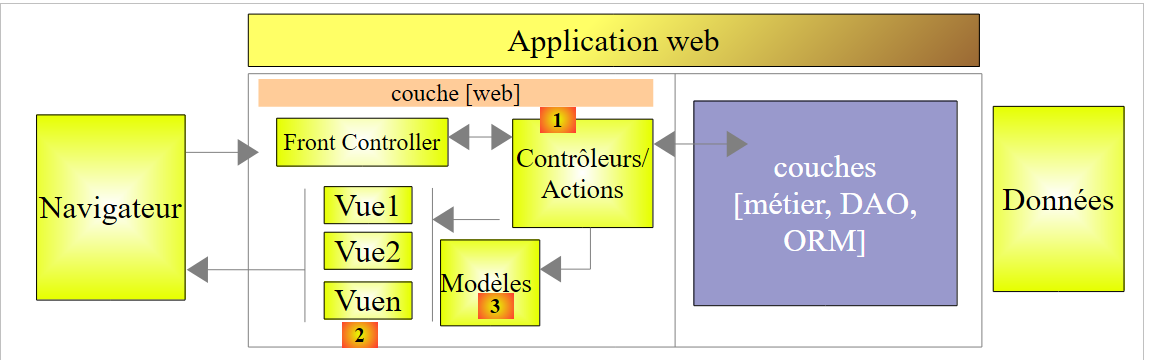 |
I due capitoli precedenti hanno descritto vari aspetti del blocco [1], ovvero le azioni. Ora tratteremo:
- il blocco [2] delle viste V;
- il modello [3] (M) visualizzato da queste viste;
Sin dalla creazione di Spring MVC, la tecnologia utilizzata per generare le pagine HTML inviate ai browser dei client è stata JSP (Java Server Pages). Negli ultimi anni è diventata disponibile anche la tecnologia [Thymeleaf] [http://www.thymeleaf.org/]. Introdurremo ora questa tecnologia.
5.1. Il progetto STS
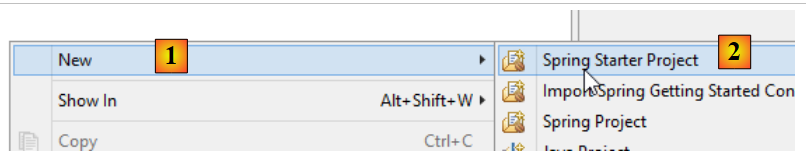
Creiamo un nuovo progetto:
 |
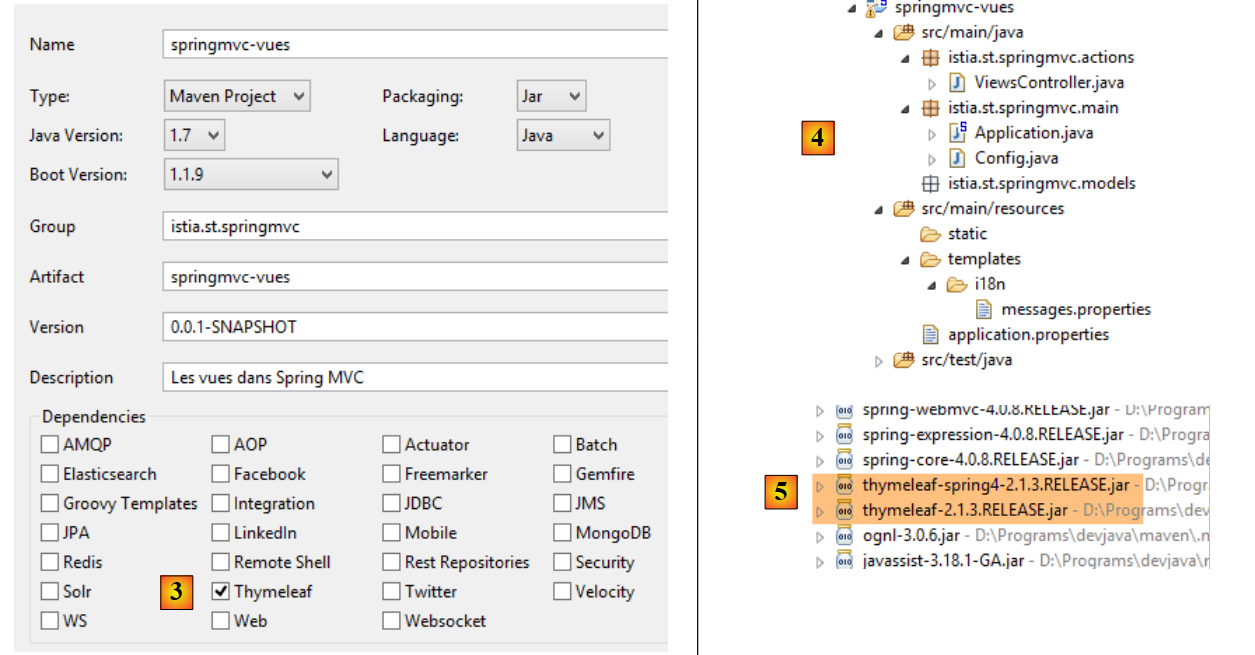 |
- in [3], specificare che il progetto richiede le dipendenze [Thymeleaf]. In questo modo, le dipendenze del framework [Thymeleaf] [5] verranno aggiunte alle dipendenze [Spring MVC] del progetto precedente;
Ora, evolviamo questo progetto come segue:
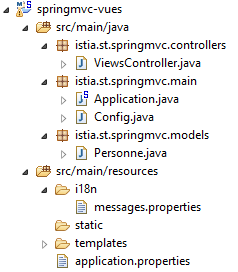 |
Prenderemo spunto dal progetto precedente:
- [istia.st.springmvc.controllers] conterrà i controller;
- [istia.st.springmvc.models] conterrà i modelli di azione e di vista;
- [istia.st.springmvc.main] è il pacchetto per la classe eseguibile di Spring Boot;
- [templates] conterrà le viste Thymeleaf;
- [i18n] conterrà i messaggi internazionalizzati visualizzati dalle viste;
La classe [Application] è la seguente:
package istia.st.springmvc.main;

import org.springframework.boot.SpringApplication;

public class Application {

    public static void main(String[] args) {
        SpringApplication.run(Config.class, args);
    }
}
La classe [Config] è la seguente:
package istia.st.springmvc.main;

import java.util.Locale;

import org.springframework.boot.autoconfigure.EnableAutoConfiguration;
import org.springframework.context.MessageSource;
import org.springframework.context.annotation.Bean;
import org.springframework.context.annotation.ComponentScan;
import org.springframework.context.annotation.Configuration;
import org.springframework.context.support.ResourceBundleMessageSource;
import org.springframework.web.servlet.config.annotation.InterceptorRegistry;
import org.springframework.web.servlet.config.annotation.WebMvcConfigurerAdapter;
import org.springframework.web.servlet.i18n.CookieLocaleResolver;
import org.springframework.web.servlet.i18n.LocaleChangeInterceptor;

@Configuration
@ComponentScan({ "istia.st.springmvc.controllers", "istia.st.springmvc.models" })
@EnableAutoConfiguration
public class Config extends WebMvcConfigurerAdapter {
    @Bean
    public MessageSource messageSource() {
        ResourceBundleMessageSource messageSource = new ResourceBundleMessageSource();
        messageSource.setBasename("i18n/messages");
        return messageSource;
    }

    @Bean
    public LocaleChangeInterceptor localeChangeInterceptor() {
        LocaleChangeInterceptor localeChangeInterceptor = new LocaleChangeInterceptor();
        localeChangeInterceptor.setParamName("lang");
        return localeChangeInterceptor;
    }

    @Override
    public void addInterceptors(InterceptorRegistry registry) {
        registry.addInterceptor(localeChangeInterceptor());
    }

    @Bean
    public CookieLocaleResolver localeResolver() {
        CookieLocaleResolver localeResolver = new CookieLocaleResolver();
        localeResolver.setCookieName("lang");
        localeResolver.setDefaultLocale(new Locale("fr"));
        return localeResolver;
    }
}
Questa configurazione attualmente abilita la gestione delle impostazioni locali.
Il [ViewController] è il seguente:
package istia.st.springmvc.actions;

import org.springframework.stereotype.Controller;

@Controller
public class ViewsController {

}
- Riga 5: L'annotazione [@Controller] ha sostituito l'annotazione [@RestController] perché, d'ora in poi, le azioni non genereranno la risposta al client. Al contrario, esse:
- costruire un modello M
- restituire un tipo [String] che sarà il nome della vista [Thymeleaf] responsabile della visualizzazione di questo modello. È la combinazione di questa vista V e di questo modello M che genererà il flusso HTML inviato al client;
Il file [messages.properties] è attualmente vuoto.
5.2. [/v01]: Nozioni di base su Thymeleaf
Esamineremo l'azione successiva in [ViewsController]:
    // thymeleaf basics - 1
    @RequestMapping(value = "/v01", method = RequestMethod.GET)
    public String v01() {
        return "v01";
}
- Riga 3: l'azione restituisce un tipo [String]. Questo sarà il nome dell'azione;
- riga 4: questa vista sarà [v01]. Per impostazione predefinita, deve trovarsi nella cartella [templates] e chiamarsi [v01.html];
La vista [v01.html] è la seguente:
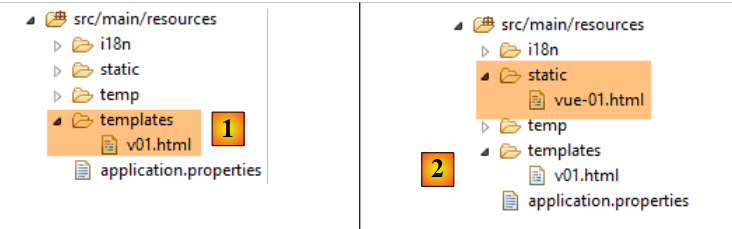 |
<!DOCTYPE html>
<html xmlns:th="http://www.thymeleaf.org">
<head>
<title th:text="'Les vues'">Spring 4 MVC</title>
<meta http-equiv="Content-Type" content="text/html; charset=UTF-8" />
</head>
<body>
    <h2 th:text="'Les vues dans Spring MVC'">Spring 4 MVC</h2>
</body>
</html>
Questo è un file HTML. La presenza di Thymeleaf è evidente:
- nel namespace [th] alla riga 2;
- negli attributi [th:text] alle righe 4 e 8;
Questo è un file HTML valido che può essere visualizzato. Lo inseriamo nella cartella [static] [2] con il nome [vue-01.html] e vi accediamo direttamente utilizzando un browser:
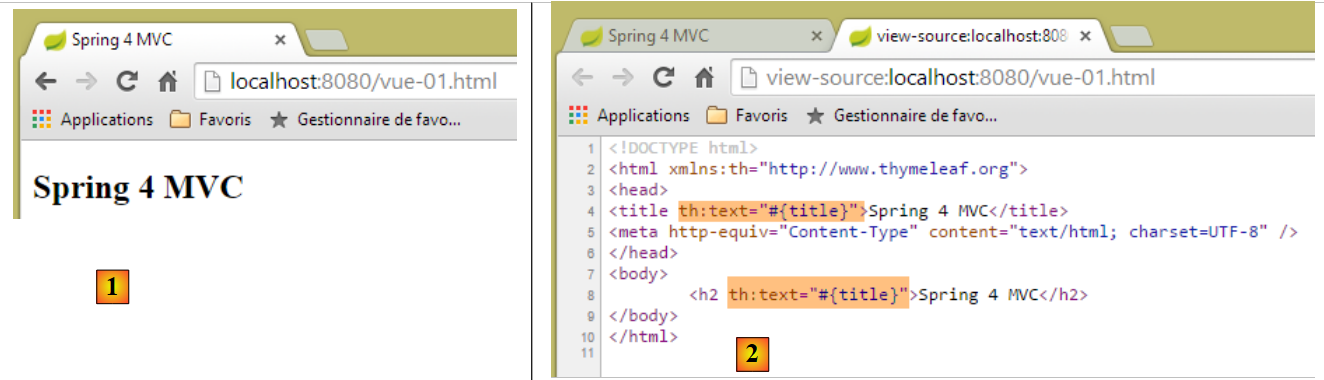 |
Se esaminiamo il codice sorgente della pagina in [2], possiamo vedere che gli attributi [th:text] sono stati inviati dal server e ignorati dal browser. Quando una vista è il risultato di un'azione, Thymeleaf entra in funzione e interpreta gli attributi [th] prima di inviare la risposta al client.
Il tag HTML:
<title th:text="'Les vues'">Spring 4 MVC</title>
viene elaborato come segue da Thymeleaf:
- th:text ha la sintassi th:text="espressione", dove espressione è un'espressione da valutare. Quando questa espressione è una stringa, come in questo caso, deve essere racchiusa tra virgolette singole;
- il valore di [espressione] sostituisce il testo del tag HTML, in questo caso il testo del tag [title];
Dopo l'elaborazione, il tag sopra riportato diventa:
<title>Les vues</title>
Chiamiamo l'azione [/v01]:
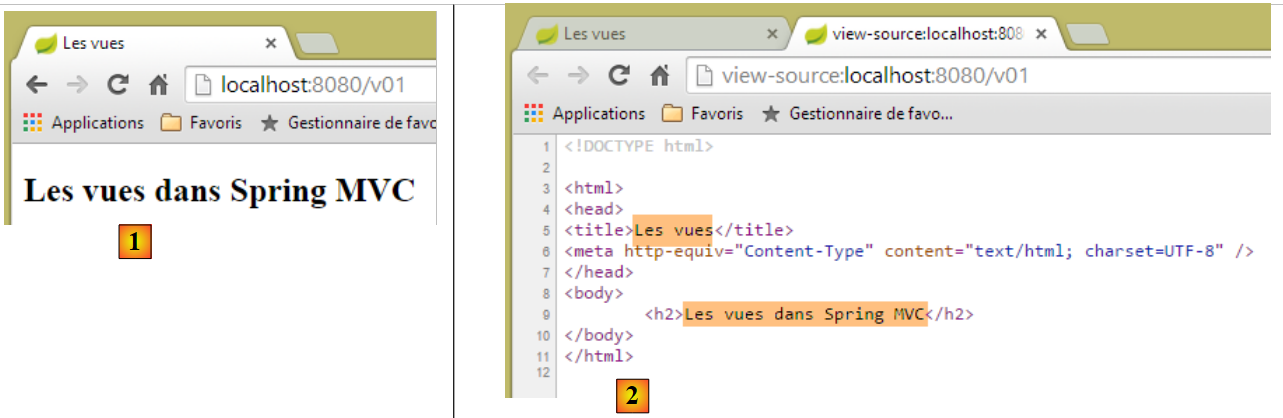 |
- in [2], vediamo il lavoro di sostituzione effettuato da Thymeleaf;
Ora richiediamo l'URL [http://localhost:8080/v01.html]:
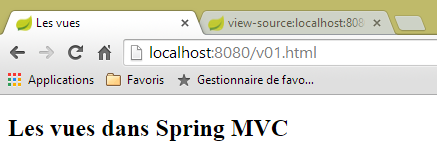 |
Come dobbiamo interpretare questo? La vista [templates/v01.html] è stata servita direttamente senza passare attraverso un'azione? Per chiarire le cose, creiamo la seguente azione [/v02]:
    // thymeleaf basics - 2
    @RequestMapping(value = "/v02", method = RequestMethod.GET)
    public String v02() {
        System.out.println("action v02");
        return "vue-02";
}
La vista [vue-02.html] è una copia di [v01.html]:
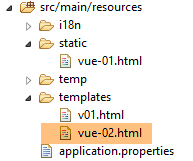 |
Ora richiediamo l'URL [http://localhost:8080/vue-02.html]:
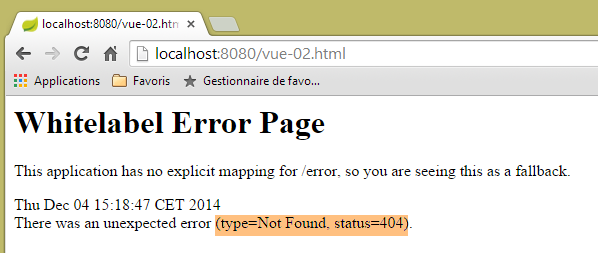 |
L'URL non è stato trovato. Ora proviamo a richiedere l'URL [http://localhost:8080/v02.html]
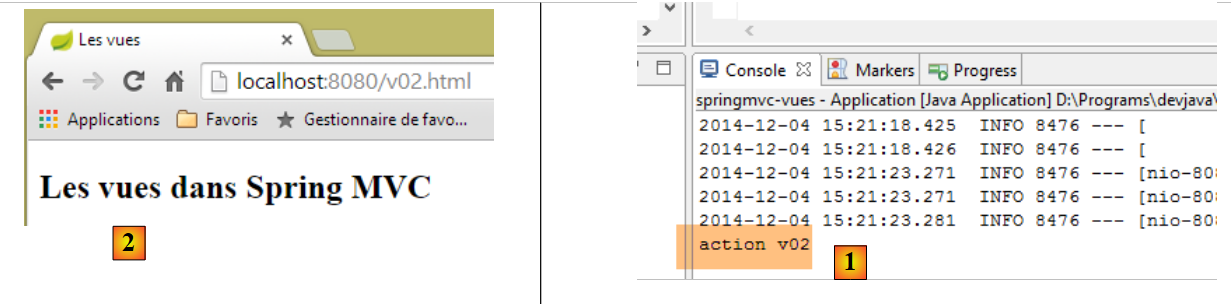 |
- Nei log della console al punto [1], vediamo che è stata richiamata l'azione [/v02], e questo ha causato la visualizzazione della vista [vue-02.html] al punto [2];
Ora sappiamo che l'URL [http://localhost:8080/v02.html] può anche fare riferimento a un file [/v02.html] nella cartella [static]. Cosa succede se questo file esiste? Proviamo. Creiamo il seguente file [v02.html] nella cartella [static]:
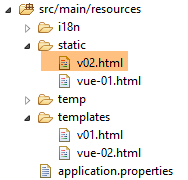 |
<!DOCTYPE html>
<html xmlns:th="http://www.thymeleaf.org">
<head>
<title>Spring 4 MVC</title>
<meta http-equiv="Content-Type" content="text/html; charset=UTF-8" />
</head>
<body>
    <h2>Spring 4 MVC</h2>
</body>
</html>
quindi richiediamo l'URL [http://localhost:8080/v02.html]:
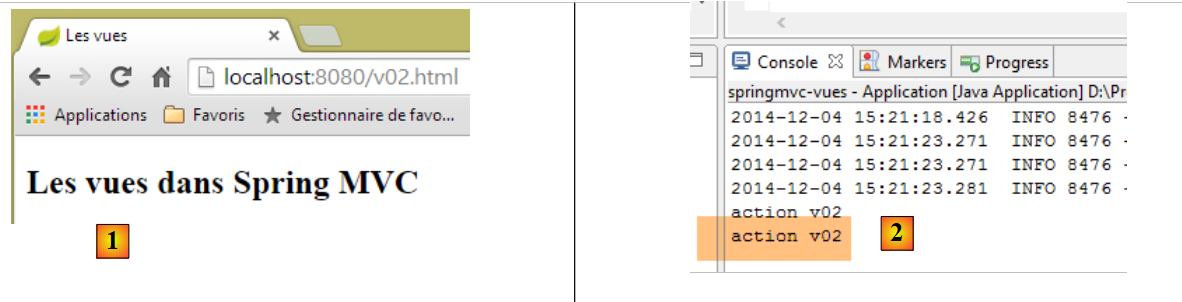 |
[1] e [2] mostrano che è stata chiamata l'azione [/v02]. Possiamo quindi concludere che quando l'URL richiesto è nella forma [/x.html], Spring / Thymeleaf:
- esegue l'azione [/x] se esiste;
- fornisce la pagina [/static/x.html] se esiste;
- genera un'eccezione 404 Not Found in caso contrario;
Per evitare confusione, d'ora in poi, le azioni e le viste non avranno gli stessi nomi.
5.3. [/v03]: Internazionalizzazione delle viste
L'integrazione tra Spring e Thymeleaf consente a Thymeleaf di utilizzare i file di messaggi di Spring. Si consideri la seguente nuova azione [/v03]:
    // internationalization of views
    @RequestMapping(value = "/v03", method = RequestMethod.GET)
    public String v03() {
        return "vue-03";
}
Visualizza la seguente vista [vue-03.html]:
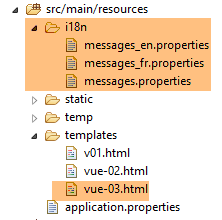 |
<!DOCTYPE html>
<html xmlns:th="http://www.thymeleaf.org">
<head>
<title th:text="#{title}">Spring 4 MVC</title>
<meta http-equiv="Content-Type" content="text/html; charset=UTF-8" />
</head>
<body>
    <h2 th:text="#{title}">Spring 4 MVC</h2>
</body>
</html>
Alle righe 4 e 8, l'espressione per l'attributo [th:text] è #{title}, il cui valore è il messaggio della chiave [title]. Creiamo i seguenti file [messages_fr.properties] e [messages_en.properties]:
[messages_fr.properties]
title=Les vues dans Spring MVC
[messages_en.properties]
title=Views in Spring MVC
Richiediamo gli URL [http://localhost:8080/v03.html?lang=fr] e [http://localhost:8080/v03.html?lang=en]:
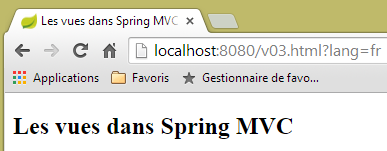 | 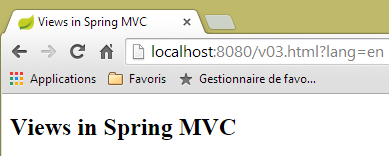 |
Si noti che abbiamo messo in pratica ciò che abbiamo imparato di recente. Anziché riferirci all'azione [v03] come [/v03], l'abbiamo indicata come [/v03.html].
5.4. [/v04]: Creazione del modello M per una vista V
Consideriamo la seguente nuova azione [/v04]:
    // creation of the M model of a V view
    @RequestMapping(value = "/v04", method = RequestMethod.GET)
    public String v04(Model model) {
        model.addAttribute("personne", new Personne(7, "martin", 17));
        System.out.println(String.format("Modèle=%s", model));
        return "vue-04";
}
- Riga 4: Il modello di vista viene iniettato nei parametri dell'azione. Per impostazione predefinita, questo modello iniziale è vuoto. Vedremo che è possibile precompilarlo;
- Riga 4: un modello di tipo [Model] è una sorta di dizionario di elementi di tipo <String, Object>. Alla riga 4, aggiungiamo una voce a questo dizionario con la chiave [person] associata a un valore di tipo [Person];
- riga 5: visualizziamo il modello sulla console per vedere come appare;
- riga 6: visualizziamo la vista [vue-04.html];
La classe [Person] è quella utilizzata nel capitolo precedente:
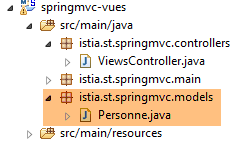 |
package istia.st.springmvc.models;

public class Personne {

    // identifier
    private Integer id;
    // name
    private String nom;
    // age
    private int age;

    // manufacturers
    public Personne() {

    }

    public Personne(String nom, int age) {
        this.nom = nom;
        this.age = age;
    }

    public Personne(Integer id, String nom, int age) {
        this(nom, age);
        this.id = id;
    }

    @Override
    public String toString() {
        return String.format("[id=%s, nom=%s,  age=%d]", id, nom, age);
    }

    // getters and setters
...
}
La vista [vue-04.html] è la seguente:
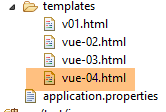 |
<!DOCTYPE html>
<html xmlns:th="http://www.thymeleaf.org">
    <head>
        <title th:text="#{title}">Spring 4 MVC</title>
        <meta http-equiv="Content-Type" content="text/html; charset=UTF-8" />
    </head>
    <body>
        <p>
            <span th:text="#{personne.nom}">Nom :</span>
            <span th:text="${personne.nom}">Bill</span>
        </p>
        <p>
            <span th:text="#{personne.age}">Age :</span>
            <span th:text="${personne.age}">56</span>
        </p>
    </body>
</html>
- La riga 10 introduce un nuovo tipo di espressione Thymeleaf, ${var}, dove var è una chiave del modello M della vista. Ricordiamo che l'azione [/v04] ha aggiunto una chiave [person] al modello, associata a un tipo Person[id, name, age];
- Riga 10: visualizza il nome della persona nel modello;
- riga 14: visualizza la sua età;
I file dei messaggi vengono modificati per aggiungere le chiavi [person.name] e [person.age] delle righe 9 e 13. Il risultato è il seguente:
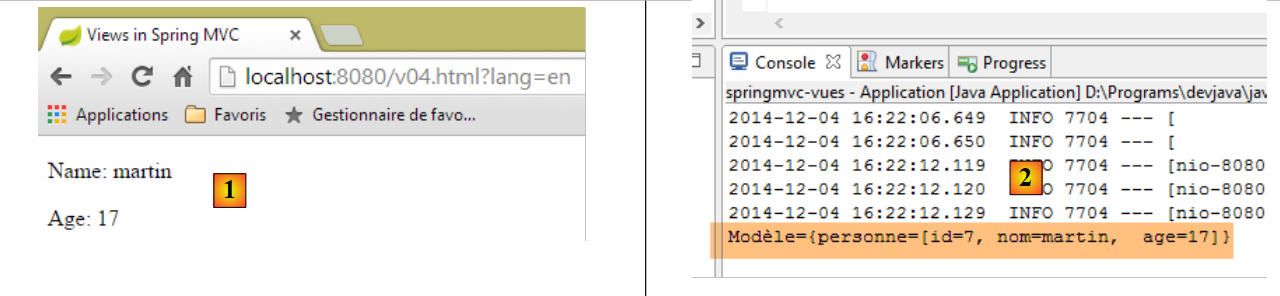 |
e la natura del modello M è riportata nei log della console [2].
Ci si potrebbe chiedere perché non scriviamo la vista [view-04] come segue:
<!DOCTYPE html>
<html xmlns:th="http://www.thymeleaf.org">
    <head>
        <title th:text="#{title}"></title>
        <meta http-equiv="Content-Type" content="text/html; charset=UTF-8" />
    </head>
    <body>
        <p>
            <span th:text="#{personne.nom}" /></span>
            <span th:text="${personne.nom}"></span>
        </p>
        <p>
            <span th:text="#{personne.age}"></span>
            <span th:text="${personne.age}"></span>
        </p>
    </body>
</html>
Questa vista è perfettamente valida e produrrà lo stesso risultato di prima. Uno degli obiettivi di Thymeleaf è garantire che una pagina Thymeleaf possa essere visualizzata anche se non passa attraverso Thymeleaf. Quindi, creiamo due nuove pagine statiche:
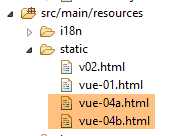 |
La vista [view-04b.html] è una copia della vista [view-04.html]. Lo stesso vale per la vista [view-04a.html], ma abbiamo rimosso il testo statico dalla pagina. Se visualizziamo entrambe le pagine, otteniamo i seguenti risultati:
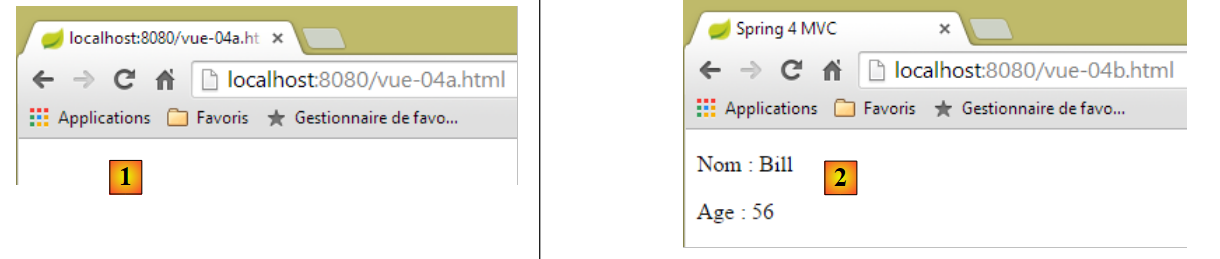 |
Nel caso [1], la struttura della pagina non appare, mentre nel caso [2] è chiaramente visibile. Questo è il vantaggio di inserire il testo statico in una vista Thymeleaf, anche se verrà sostituito da altro testo in fase di esecuzione.
Ora, esaminiamo un dettaglio tecnico. Nella vista [vue-04.html], formattiamo il codice utilizzando [Ctrl+Shift+F]. Otteniamo il seguente risultato:
<!DOCTYPE html>
<html xmlns:th="http://www.thymeleaf.org">
<head>
<title th:text="#{title}">Spring 4 MVC</title>
<meta http-equiv="Content-Type" content="text/html; charset=UTF-8" />
</head>
<body>
    <p>
        <span th:text="#{personne.nom}">Nom :</span> <span
            th:text="${personne.nom}">Bill</span>
    </p>
    <p>
        <span th:text="#{personne.age}">Age :</span> <span
            th:text="${personne.age}">56</span>
    </p>
</body>
</html>
I tag sono disallineati e il codice diventa più difficile da leggere. Se rinominiamo [vue-04.html] in [vue-04.xml] e riformattiamo il codice, i tag saranno nuovamente allineati. Pertanto, il suffisso [xml] sarebbe più pratico. È possibile lavorare con questo suffisso. Per farlo, dobbiamo configurare Thymeleaf. Per evitare di annullare ciò che abbiamo fatto, duplichiamo il progetto [springmvc-vues] che abbiamo studiato in un progetto [springmvc-vues-xml]
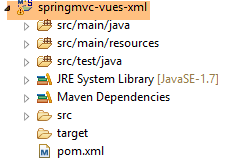 |
Modifichiamo il file [pom.xml] come segue:
    <groupId>istia.st.springmvc</groupId>
    <artifactId>springmvc-vues-xml</artifactId>
    <version>0.0.1-SNAPSHOT</version>
    <packaging>jar</packaging>

    <name>springmvc-vues-xml</name>
<description>Les vues dans Spring MVC</description>
Il nome del progetto viene modificato alle righe 2 e 6. Inoltre, modifichiamo il suffisso delle viste nella cartella [templates]:
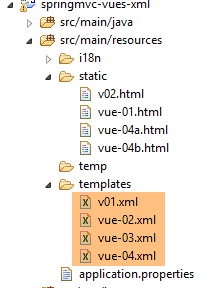 |
Il documento [http://docs.spring.io/spring-boot/docs/current/reference/html/common-application-properties.html] elenca le proprietà di configurazione di Spring Boot che possono essere utilizzate nel file [application.properties]:
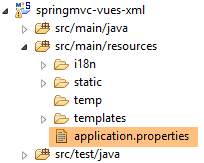 |
Questo documento elenca le proprietà che Spring Boot utilizza durante l'autoconfigurazione e che possono essere modificate configurando [application.properties] in modo diverso. Per Thymeleaf, le proprietà di autoconfigurazione sono le seguenti:
# THYMELEAF (<a href="http://github.com/spring-projects/spring-boot/tree/v1.1.9.RELEASE/spring-boot-autoconfigure/src/main/java/org/springframework/boot/autoconfigure/thymeleaf/ThymeleafAutoConfiguration.java">ThymeleafAutoConfiguration</a>)
spring.thymeleaf.check-template-location=true
spring.thymeleaf.prefix=classpath:/templates/
spring.thymeleaf.suffix=.html
spring.thymeleaf.mode=HTML5
spring.thymeleaf.encoding=UTF-8
spring.thymeleaf.content-type=text/html # ;charset=<encoding> is added
spring.thymeleaf.cache=true # set to false for hot refresh
Quindi potremmo semplicemente aggiungere la riga
spring.thymeleaf.suffix=.xml
nel file [application.properties]. Tuttavia, adotteremo un approccio diverso: la configurazione tramite codice. Configureremo Thymeleaf nella classe [Config]:
package istia.st.springmvc.main;

import java.util.Locale;

...
import org.thymeleaf.spring4.SpringTemplateEngine;
import org.thymeleaf.spring4.templateresolver.SpringResourceTemplateResolver;

@Configuration
@ComponentScan({ "istia.st.springmvc.controllers", "istia.st.springmvc.models" })
@EnableAutoConfiguration
public class Config extends WebMvcConfigurerAdapter {
    ...

    @Bean
    public SpringResourceTemplateResolver templateResolver() {
        SpringResourceTemplateResolver templateResolver = new SpringResourceTemplateResolver();
        templateResolver.setPrefix("classpath:/templates/");
        templateResolver.setSuffix(".xml");
        templateResolver.setTemplateMode("HTML5");
        templateResolver.setCharacterEncoding("UTF-8");
     templateResolver.setCacheable(true);
        return templateResolver;
    }

    @Bean
    SpringTemplateEngine templateEngine(SpringResourceTemplateResolver templateResolver) {
        SpringTemplateEngine templateEngine = new SpringTemplateEngine();
        templateEngine.setTemplateResolver(templateResolver);
        return templateEngine;
    }

}
- Le righe 16–24 configurano un [TemplateResolver] per Thymeleaf. Questo oggetto ha il compito di trovare il file corrispondente in base al nome della vista fornito da un'azione;
- Le righe 18 e 19 impostano il prefisso e il suffisso da aggiungere al nome della vista per individuare il file. Pertanto, se il nome della vista è [vue04], il file cercato sarà [classpath:/templates/vue04.xml]. [classpath:/templates] è una sintassi Spring che fa riferimento a una cartella [/templates] situata nella radice del classpath del progetto;
- Riga 21: in modo che l'intestazione HTTP nella risposta inviata al client sia:
Content-Type:text/html;charset=UTF-8
- riga 20: indica che la vista è conforme allo standard HTML5;
- riga 22: indica che le viste Thymeleaf possono essere memorizzate nella cache;
- righe 26–31: imposta il motore di risoluzione della vista sulla coppia Spring/Thymeleaf utilizzando il motore di risoluzione precedente;
Eseguiamo l'eseguibile per questo nuovo progetto e richiediamo l'URL [http://localhost:8080/v04.html?lang=en]:
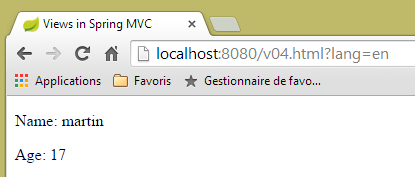 |
Si noti che nell'URL l'azione [/v04] è stata nuovamente sostituita da [v04.html].
5.5. [/v05]: inserimento di un oggetto in una vista Thymeleaf
Creiamo la seguente azione [/v05]:
    // creation of the M model of a V - 2 view
    @RequestMapping(value = "/v05", method = RequestMethod.GET)
    public String v05(Model model) {
        model.addAttribute("personne", new Personne(7, "martin", 17));
        return "vue-05";
}
È identica all'azione [/v04]. La vista [vue-05.xml] è la seguente:
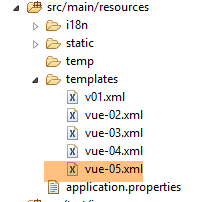 |
<!DOCTYPE html>
<html xmlns:th="http://www.thymeleaf.org">
    <head>
        <title th:text="#{title}">Spring 4 MVC</title>
        <meta http-equiv="Content-Type" content="text/html; charset=UTF-8" />
    </head>
    <body>
        <div th:object="${personne}">
            <p>
                <span th:text="#{personne.nom}">Nom :</span>
                <span th:text="*{nom}">Bill</span>
            </p>
            <p>
                <span th:text="#{personne.age}">Age :</span>
                <span th:text="*{age}">56</span>
            </p>
        </div>
    </body>
</html>
- righe 8–17: all'interno di queste righe, un oggetto Thymeleaf è definito dall'attributo [th:object="${person}"] (riga 8). Questo oggetto è l'oggetto con la chiave [person] presente nel modello:
- riga 11: l'espressione Thymeleaf [*{name}] è equivalente a [${object.name}] dove [object] è l'oggetto Thymeleaf corrente. Quindi, in questo caso, l'espressione [*{name}] è equivalente a [${person.name}];
- riga 15: come sopra;
Il risultato:
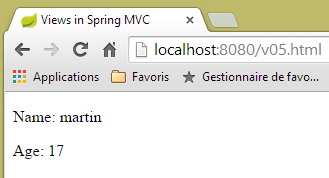 |
5.6. [/v06]: Test in una vista Thymeleaf
Si consideri la seguente azione [/v06]:
    // creation of the M model of a V - 3 view
    @RequestMapping(value = "/v06", method = RequestMethod.GET)
    public String v06(Model model) {
        model.addAttribute("personne", new Personne(7, "martin", 17));
        return "vue-06";
}
È identico alle due azioni precedenti. Visualizza la seguente vista [vue-06.xml]:
<!DOCTYPE html>
<html xmlns:th="http://www.thymeleaf.org">
<head>
<title th:text="#{title}">Spring 4 MVC</title>
<meta http-equiv="Content-Type" content="text/html; charset=UTF-8" />
</head>
<body>
<div th:object="${personne}">
<p>
<span th:text="#{personne.nom}">Nom :</span>
<span th:text="*{nom}">Bill</span>
</p>
<p>
<span th:text="#{personne.age}">Age :</span>
<span th:text="*{age}">56</span>
</p>
<p th:if="*{age} >= 18" th:text="#{personne.majeure}">Vous êtes majeur</p>
<p th:if="*{age} < 18" th:text="#{personne.mineure}">Vous êtes mineur</p>
</div>
</body>
</html>
- Riga 17: L'attributo [th:if] valuta un'espressione booleana. Se questa espressione è vera, il tag viene visualizzato; altrimenti, no. Quindi qui, se ${person.age} >= 18, verrà visualizzato il testo [#{person.majeure}], ovvero la chiave del messaggio [person.majeure] nei file dei messaggi;
- riga 18: non è possibile scrivere [*{age} < 18] perché il segno < è un carattere riservato. È quindi necessario utilizzare il suo equivalente HTML [<], noto anche come entità HTML [http://en.wikipedia.org/wiki/List_of_XML_and_HTML_character_entity_references];
I file dei messaggi vengono modificati:
[messages_fr.properties]
title=Les vues dans Spring MVC
personne.nom=Nom :
personne.age=Age :
personne.mineure=Vous êtes mineur
personne.majeure=Vous êtes majeur
[messages_en.properties]
title=Views in Spring MVC
personne.nom=Name:
personne.age=Age:
personne.mineure=You are under 18
personne.majeure=You are over 18
Il risultato è il seguente:
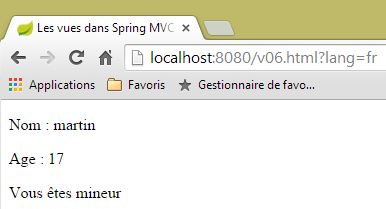 | 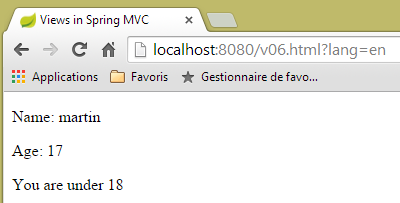 |
5.7. [/v07]: Iterazione in una vista Thymeleaf
Consideriamo la seguente azione [/v07]:
    // creation of the M model of a V - 4 view
    @RequestMapping(value = "/v07", method = RequestMethod.GET)
    public String v07(Model model) {
        model.addAttribute("liste", new Personne[] { new Personne(7, "martin", 17), new Personne(8, "lucie", 32),
                new Personne(9, "paul", 7) });
        return "vue-07";
}
- L'azione crea un elenco di tre persone, lo aggiunge al modello associato alla chiave [list] e visualizza la vista [view-07];
La vista [view-07.xml] è la seguente:
<!DOCTYPE html>
<html xmlns:th="http://www.thymeleaf.org">
    <head>
        <title th:text="#{title}">Spring 4 MVC</title>
        <meta http-equiv="Content-Type" content="text/html; charset=UTF-8" />
    </head>
    <body>
        <h3 th:text="#{liste.personnes}">Liste de personnes</h3>
        <ul>
            <li th:each="element : ${liste}" th:text="'['+ ${element.id} + ', ' +${element.nom}+ ', ' + ${element.age} + ']'">[id,nom,age]</li>
        </ul>
    </body>
</html>
- Riga 10: L'attributo [th:each] ripete il tag in cui si trova, in questo caso un tag <li>. Qui ha due parametri: [element : collection], dove [collection] è una collezione di oggetti, in questo caso un elenco di persone. Thymeleaf itererà attraverso la collezione e genererà tanti tag <li> quanti sono gli elementi nella collezione. Per ogni tag <li>, [element] rappresenterà l'elemento della collezione associato al tag. Per questo elemento, verrà valutato l'attributo [th:text]. La sua espressione qui è una concatenazione di stringhe per produrre il risultato [id, nome, età];
- riga 8: aggiungiamo la chiave [liste.personnes] ai file di messaggi;
Ecco il risultato:
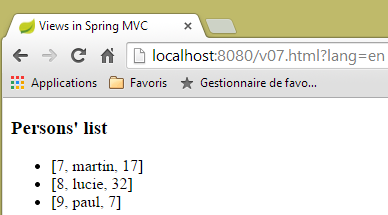 | 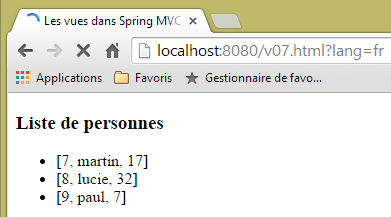 |
5.8. [/v08-/v10]: @ModelAttribute
Stiamo riprendendo un argomento che abbiamo visto quando abbiamo studiato le azioni: il ruolo dell'annotazione [@ModelAttribute]. Aggiungiamo la seguente nuova azione:
    // --------------- Binding and ModelAttribute ----------------------------------

    // if the parameter is an object, it is instantiated and possibly modified by the query parameters
    // it will automatically become part of the view model with the key [key]
    // for @ModelAttribute("xx") parameter, key will equal xx
    // for @ModelAttribute parameter, key will be equal to the parameter's lowercase class name
    // if @ModelAttribute is absent, then everything happens as if it were present without a key
    // note that this automatic presence in the model is not performed if the parameter is not a

    @RequestMapping(value = "/v08", method = RequestMethod.GET)
    public String v08(@ModelAttribute("someone") Personne p, Model model) {
        System.out.println(String.format("Modèle=%s", model));
        return "vue-08";
}
- riga 11: l'annotazione [@ModelAttribute("someone")] aggiunge automaticamente l'oggetto [Person p] al modello, associato alla chiave [someone];
- riga 12: per controllare il modello;
- riga 13: visualizza la vista [vue-08.xml];
La vista [view-08.xml] è la seguente:
<!DOCTYPE html>
<html xmlns:th="http://www.thymeleaf.org">
    <head>
        <title th:text="#{title}">Spring 4 MVC</title>
        <meta http-equiv="Content-Type" content="text/html; charset=UTF-8" />
    </head>
    <body>
        <div th:object="${someone}">
            <p>
                <span th:text="#{personne.id}">Id :</span>
                <span th:text="*{id}">14</span>
            </p>
            <p>
                <span th:text="#{personne.nom}">Nom :</span>
                <span th:text="*{nom}">Bill</span>
            </p>
            <p>
                <span th:text="#{personne.age}">Age :</span>
                <span th:text="*{age}">56</span>
            </p>
        </div>
    </body>
</html>
- Riga 8: L'oggetto Thymeleaf viene inizializzato con l'oggetto chiave [someone];
Il risultato è il seguente:
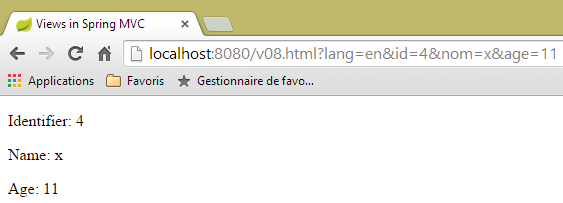 |
e nella console vediamo il seguente log:
Modèle={someone=[id=4, nom=x, age=11], org.springframework.validation.BindingResult.someone=org.springframework.validation.BeanPropertyBindingResult: 0 errors}
Consideriamo ora la seguente azione [/v09]:
    @RequestMapping(value = "/v09", method = RequestMethod.GET)
    public String v09(Personne p, Model model) {
        System.out.println(String.format("Modèle=%s", model));
        return "vue-09";
}
- Riga 1: La presenza del parametro [Person p] inserisce automaticamente la persona [p] nel modello. Poiché non è specificata alcuna chiave, viene utilizzato il nome della classe con il primo carattere minuscolo. Pertanto, [Person p] è equivalente a [@ModelAttribute("person") Person p];
La vista [view.09.xml] è la seguente:
<!DOCTYPE html>
<html xmlns:th="http://www.thymeleaf.org">
    <head>
        <title th:text="#{title}">Spring 4 MVC</title>
        <meta http-equiv="Content-Type" content="text/html; charset=UTF-8" />
    </head>
    <body>
        <div th:object="${personne}">
            <p>
                <span th:text="#{personne.id}">Id :</span>
                <span th:text="*{id}">14</span>
            </p>
            <p>
                <span th:text="#{personne.nom}">Nom :</span>
                <span th:text="*{nom}">Bill</span>
            </p>
            <p>
                <span th:text="#{personne.age}">Age :</span>
                <span th:text="*{age}">56</span>
            </p>
        </div>
    </body>
</html>
- riga 8: la chiave del modello utilizzata è [person];
Ecco il risultato:
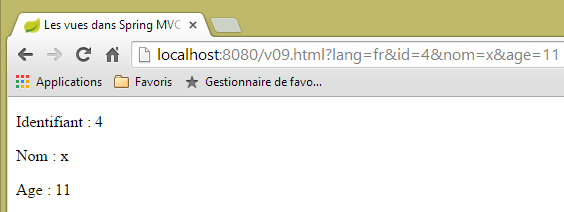 |
e il log nella console del server:
Modèle={personne=[id=4, nom=x, age=11], org.springframework.validation.BindingResult.personne=org.springframework.validation.BeanPropertyBindingResult: 0 errors}
Ora, consideriamo la seguente nuova azione [/v10]:
    @ModelAttribute("uneAutrePersonne")
    private Personne getPersonne(){
        return new Personne(24,"pauline",55);
    }

    @RequestMapping(value = "/v10", method = RequestMethod.GET)
    public String v10(Model model) {
        System.out.println(String.format("Modèle=%s", model));
        return "vue-10";
}
- righe 1-4: definiscono un metodo che crea un elemento chiave [anotherPerson] nel modello per ogni richiesta, associato all'oggetto [new Person(24, "pauline", 55)];
- righe 6-10: l'azione [/v10] non fa altro che passare il modello che riceve alla vista [vue-10.xml]. Si noti che il parametro [Model model] è necessario solo per l'istruzione alla riga 8. Senza di esso, non è necessario;
La vista [view-10.xml] è la seguente:
<!DOCTYPE html>
<html xmlns:th="http://www.thymeleaf.org">
    <head>
        <title th:text="#{title}">Spring 4 MVC</title>
        <meta http-equiv="Content-Type" content="text/html; charset=UTF-8" />
    </head>
    <body>
        <div th:object="${uneAutrePersonne}">
            <p>
                <span th:text="#{personne.id}">Id :</span>
                <span th:text="*{id}">14</span>
            </p>
            <p>
                <span th:text="#{personne.nom}">Nom :</span>
                <span th:text="*{nom}">Bill</span>
            </p>
            <p>
                <span th:text="#{personne.age}">Age :</span>
                <span th:text="*{age}">56</span>
            </p>
        </div>
    </body>
</html>
Il risultato è il seguente:
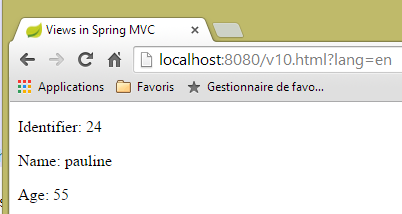 |
e il log della console è il seguente:
5.9. [/v11]: @SessionAttributes
Stiamo riprendendo un argomento che abbiamo visto quando abbiamo studiato le azioni: il ruolo dell'annotazione [@SessionAttributes]. Aggiungeremo la seguente nuova azione [/v11]:
    @ModelAttribute("jean")
    private Personne getJean(){
        return new Personne(33,"jean",10);
    }

    @RequestMapping(value = "/v11", method = RequestMethod.GET)
    public String v11(Model model, HttpSession session) {
        System.out.println(String.format("Modèle=%s, Session[jean]=%s", model, session.getAttribute("jean")));
        return "vue-11";
}
Abbiamo qualcosa di simile a quanto appena visto. La differenza sta nell'annotazione [@SessionAttributes] inserita sulla classe stessa:
@Controller
@SessionAttributes("jean")
public class ViewsController {
- Riga 2: specifichiamo che la chiave [jean] del modello deve essere inserita nella sessione;
Ecco perché, alla riga 7 dell'azione, abbiamo iniettato la sessione. Alla riga 8, visualizziamo il valore della sessione associato alla chiave [jean].
La vista [view-11.xml] è la seguente:
<!DOCTYPE html>
<html xmlns:th="http://www.thymeleaf.org">
    <head>
        <title th:text="#{title}">Spring 4 MVC</title>
        <meta http-equiv="Content-Type" content="text/html; charset=UTF-8" />
    </head>
    <body>
        <div th:object="${jean}">
            <p>
                <span th:text="#{personne.id}">Id :</span>
                <span th:text="*{id}">14</span>
            </p>
            <p>
                <span th:text="#{personne.nom}">Nom :</span>
                <span th:text="*{nom}">Bill</span>
            </p>
            <p>
                <span th:text="#{personne.age}">Age :</span>
                <span th:text="*{age}">56</span>
            </p>
        </div>
        <hr />
        <div th:object="${session.jean}">
            <p>
                <span th:text="#{personne.id}">Id :</span>
                <span th:text="*{id}">14</span>
            </p>
            <p>
                <span th:text="#{personne.nom}">Nom :</span>
                <span th:text="*{nom}">Bill</span>
            </p>
            <p>
                <span th:text="#{personne.age}">Age :</span>
                <span th:text="*{age}">56</span>
            </p>
        </div>
    </body>
</html>
Vengono visualizzate due persone:
- righe 8–21: la persona con la chiave [jean] nel modello;
- righe 23–36: la persona con la chiave [jean] nella sessione;
I risultati sono i seguenti:
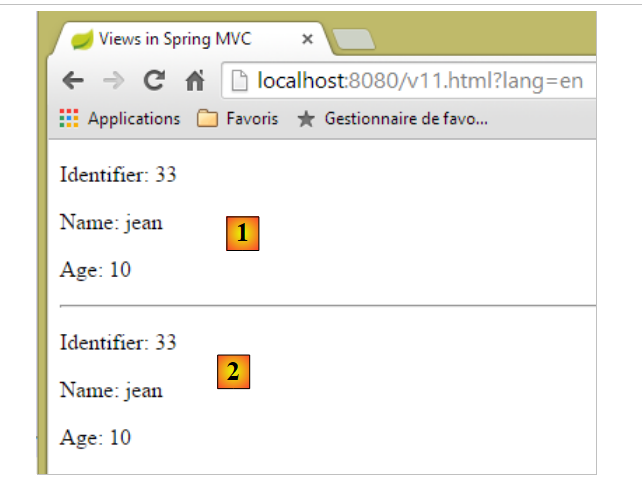 |
- in [1], la persona con la chiave [jean] nel modello;
- in [2], la persona con la chiave [jean] nella sessione;
Il log della console è il seguente:
Modèle={uneAutrePersonne=[id=24, nom=pauline, age=55], jean=[id=33, nom=jean, age=10]}, Session[jean]=null
Sopra, vediamo che la chiave [jean] non è presente nella sessione ricevuta dall'azione. Possiamo dedurre che la chiave [jean] sia stata aggiunta alla sessione dopo l'esecuzione dell'azione e prima del rendering della vista.
Ora, consideriamo il caso in cui una chiave sia referenziata sia da [@ModelAttribute] che da [@SessionAttributes]. Creeremo le seguenti due azioni:
    @RequestMapping(value = "/v12a", method = RequestMethod.GET)
    @ResponseBody
    public void v12a(HttpSession session) {
        session.setAttribute("paul", new Personne(51, "paul", 33));
    }

    // if the key of [@ModelAttribute] is also a key of [@SessionAttributes]
    // in this case, the corresponding parameter is initialized with the session value
    @RequestMapping(value = "/v12b", method = RequestMethod.GET)
    public String v12b(Model model, @ModelAttribute("paul") Personne p) {
        System.out.println(String.format("Modèle=%s", model));
        return "vue-12";
}
L'azione [/v12a] viene utilizzata solo per memorizzare l'elemento ['paul', new Person(51, "paul", 33)] nella sessione. Non fa nient'altro. Il fatto che sia contrassegnata con [@ResponseBody] indica che genera la risposta al client. Poiché il suo tipo è [void], non viene generata alcuna risposta.
L'azione [/v12b] accetta [@ModelAttribute("paul") Person p] come parametro. Se non viene fatto nient'altro, viene istanziato un oggetto [Person] e poi inizializzato con i parametri della richiesta, e questo oggetto non ha nulla a che vedere con l'oggetto con la chiave [paul] inserito nella sessione dall'azione [/v12a]. Aggiungeremo la chiave [paul] agli attributi di sessione della classe:
@Controller
@SessionAttributes({ "jean", "paul" })
public class ViewsController {
- La riga 2 ora ha due attributi di sessione;
Torniamo ai parametri dell'azione [/v12b]:
public String v12b(Model model, @ModelAttribute("paul") Personne p) {
Ora, l'oggetto [Person p] non verrà istanziato, ma farà riferimento all'oggetto con la chiave [paul] nella sessione. Il resto del processo rimane invariato. L'oggetto con la chiave [paul] apparirà nel modello di vista che verrà visualizzato. Questo è ciò che vogliamo vedere alla riga 11 dell'azione [/v12b].
La vista [vue-12.xml] sarà la seguente:
<!DOCTYPE html>
<html xmlns:th="http://www.thymeleaf.org">
    <head>
        <title th:text="#{title}">Spring 4 MVC</title>
        <meta http-equiv="Content-Type" content="text/html; charset=UTF-8" />
    </head>
    <body>
        <div th:object="${paul}">
            <p>
                <span th:text="#{personne.id}">Id :</span>
                <span th:text="*{id}">14</span>
            </p>
            <p>
                <span th:text="#{personne.nom}">Nom :</span>
                <span th:text="*{nom}">Bill</span>
            </p>
            <p>
                <span th:text="#{personne.age}">Age :</span>
                <span th:text="*{age}">56</span>
            </p>
        </div>
    </body>
</html>
- riga 8: fa riferimento alla chiave [paul] del modello di vista;
Questo produce il seguente risultato (dopo aver eseguito l'azione [/v12a], che inserisce la chiave [paul] nella sessione):
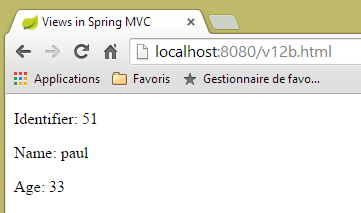 |
Il log della console è il seguente:
Modèle={jean=[id=33, nom=jean, age=10], uneAutrePersonne=[id=24, nom=pauline, age=55], paul=[id=51, nom=paul, age=33], org.springframework.validation.BindingResult.paul=org.springframework.validation.BeanPropertyBindingResult: 0 errors}
La chiave [paul] è stata aggiunta con successo al modello con il valore associato alla chiave [paul] nella sessione.
5.10. [/v13]: Generazione di un modulo di input
Ora parleremo dell'input e della convalida dei moduli. Creeremo un primo modulo utilizzando la seguente azione [/v13]:
  // generates a form for entering a person
  @RequestMapping(value = "/v13", method = RequestMethod.GET)
  public String v13() {
    return "vue-13";
}
che visualizza semplicemente la seguente vista [vue-13.xml]:
<!DOCTYPE html>
<html xmlns:th="http://www.thymeleaf.org">
    <head>
        <title th:text="#{title}">Spring 4 MVC</title>
        <meta http-equiv="Content-Type" content="text/html; charset=UTF-8" />
    </head>
    <body>
        <form action="/someURL" th:action="@{/v14.html}" method="post">
            <h2 th:text="#{personne.formulaire.titre}">Entrez les informations suivantes</h2>
            <div th:object="${personne}">
                <table>
                    <thead></thead>
                    <tbody>
                        <tr>
                            <td th:text="#{personne.id}">Id :</td>
                            <td>
                                <input type="text" name="id" value="11" th:value="''" />
                            </td>
                        </tr>
                        <tr>
                            <td th:text="#{personne.nom}">Nom :</td>
                            <td>
                                <input type="text" name="nom" value="Tintin" th:value="''" />
                            </td>
                        </tr>
                        <tr>
                            <td th:text="#{personne.age}">Age :</td>
                            <td>
                                <input type="text" name="age" value="17" th:value="''" />
                            </td>
                        </tr>
                    </tbody>
                </table>
            </div>
            <input type="submit" value="Valider" th:value="#{personne.formulaire.valider}" />
        </form>
    </body>
</html>
Se inseriamo questa vista nella cartella [static] con il nome [view-13.html] e richiediamo l'URL [http://localhost:8080/vue-13.html], otteniamo la seguente pagina:
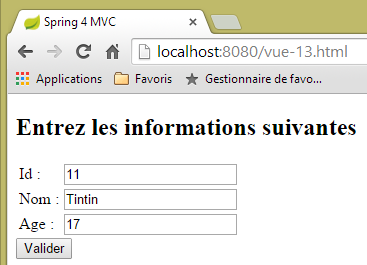 |
- Alla riga 8 del modulo, troviamo il tag <form> con l'attributo [th:action]. Questo attributo verrà valutato da Thymeleaf e il suo valore sostituirà il valore corrente dell'attributo [action], che è quindi presente solo a scopo decorativo. In questo caso, il valore dell'attributo [th:action] sarà [/v14.html];
- Alle righe 17, 23 e 29, il valore dell'attributo [th:value] sostituirà quello dell'attributo [value]. In questo caso, tale valore sarà la stringa vuota;
Quando richiediamo l'URL [/v13.html], otteniamo il seguente risultato:
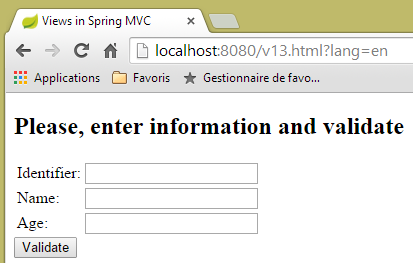 |
Diamo un'occhiata al codice sorgente generato da Thymeleaf:
<!DOCTYPE html>

<html>
    <head>
        <title>Views in Spring MVC</title>
        <meta http-equiv="Content-Type" content="text/html; charset=UTF-8" />
    </head>
    <body>
        <form action="/v14.html" method="post">
            <h2>Please, enter information and validate</h2>
            <div>
                <table>
                    <thead></thead>
                    <tbody>
                        <tr>
                            <td>Identifier:</td>
                            <td>
                                <input type="text" name="id" value="" />
                            </td>
                        </tr>
                        <tr>
                            <td>Name:</td>
                            <td>
                                <input type="text" name="nom" value="" />
                            </td>
                        </tr>
                        <tr>
                            <td>Age:</td>
                            <td>
                                <input type="text" name="age" value="" />
                            </td>
                        </tr>
                    </tbody>
                </table>
            </div>
            <input type="submit" value="Validate" />
        </form>
    </body>
</html>
Le righe 9, 18, 24 e 30 mostrano Thymeleaf mentre valuta gli attributi [th:action] e [th:value].
5.11. [/v14]: Gestione dei valori inviati da un modulo
L'azione [/v14] è l'azione che riceve i valori inviati. È la seguente:
  // processes form values
  @RequestMapping(value = "/v14", method = RequestMethod.POST)
  public String v14(Personne p) {
    return "vue-14";
}
- Riga 3: I valori inviati sono incapsulati in un oggetto [Person p]. Sappiamo che questo oggetto diventa automaticamente parte del modello M della vista V che verrà visualizzata dall'azione, associato alla chiave [person];
- riga 4: la vista visualizzata è la vista [vue-14.xml];
La vista [view-14.xml] è la seguente:
<!DOCTYPE html>
<html xmlns:th="http://www.thymeleaf.org">
    <head>
        <title th:text="#{title}">Spring 4 MVC</title>
        <meta http-equiv="Content-Type" content="text/html; charset=UTF-8" />
    </head>
    <body>
    <h2 th:text="#{personne.formulaire.saisies}">Voici vos saisies</h2>
        <div th:object="${personne}">
            <p>
                <span th:text="#{personne.id}">Id :</span>
                <span th:text="*{id}">14</span>
            </p>
            <p>
                <span th:text="#{personne.nom}">Nom :</span>
                <span th:text="*{nom}">Bill</span>
            </p>
            <p>
                <span th:text="#{personne.age}">Age :</span>
                <span th:text="*{age}">56</span>
            </p>
        </div>
    </body>
</html>
- riga 9: recupera l'oggetto associato alla chiave [person] dal modello;
- righe 12, 16 e 20: visualizziamo le proprietà di questo oggetto;
Questo produce il seguente risultato:
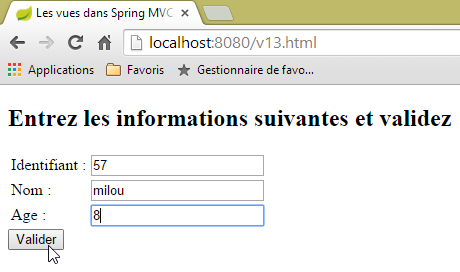 | 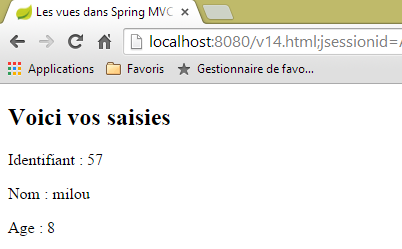 |
5.12. [/v15-/v16]: convalida di un modello
Utilizzando l'esempio precedente, esaminiamo la seguente sequenza:
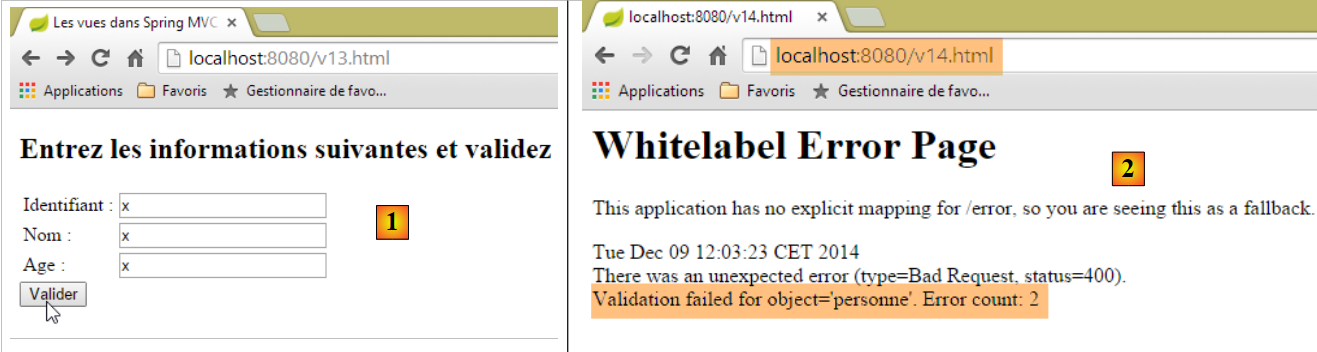 |
- in [1], inseriamo valori errati per i campi [id] e [age] di tipo [int];
- In [2], la risposta del server indica che si sono verificati due errori;
Utilizzeremo lo stesso modulo, ma in caso di errori di convalida reindirizzeremo l'utente a una pagina che elenca tali errori, in modo che possa correggerli.
L'azione [/v15] è la seguente:
    // ---------------------- form display
    @RequestMapping(value = "/v15", method = RequestMethod.GET)
    public String v15(SecuredPerson p) {
        return "vue-15";
}
Riceve come parametro il seguente tipo [SecuredPerson]:
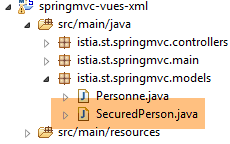 |
package istia.st.springmvc.models;

import javax.validation.constraints.NotNull;

import org.hibernate.validator.constraints.Length;
import org.hibernate.validator.constraints.Range;

public class SecuredPerson {

    @Range(min = 1)
    private int id;

    @Length(min = 4, max = 10)
    private String nom;

    @Range(min = 8, max = 14)
    private int age;

    // manufacturers
    public SecuredPerson() {

    }

    public SecuredPerson(int id, String nom, int age) {
        this.id=id;
        this.nom = nom;
        this.age = age;
    }

    // getters and setters
...
}
I campi [id, name, age] sono stati annotati con vincoli di validazione. La vista [view-15.xml] visualizzata dall'azione [/v15] è la seguente:
<!DOCTYPE html>
<html xmlns:th="http://www.thymeleaf.org">
    <head>
        <title th:text="#{title}">Spring 4 MVC</title>
        <meta http-equiv="Content-Type" content="text/html; charset=UTF-8" />
    </head>
    <body>
        <form action="/someURL" th:action="@{/v16.html}" method="post">
            <h2 th:text="#{personne.formulaire.titre}">Entrez les informations suivantes</h2>
            <div th:object="${securedPerson}">
                <table>
                    <thead></thead>
                    <tbody>
                        <tr>
                            <td th:text="#{personne.id}">Id :</td>
                            <td>
                                <input type="text" name="id" value="11" th:value="*{id}" />
                            </td>
                            <td>
                                <span th:if="${#fields.hasErrors('id')}" th:errors="*{id}" style="color: red">Identifiant erroné</span>
                            </td>
                        </tr>
                        <tr>
                            <td th:text="#{personne.nom}">Nom :</td>
                            <td>
                                <input type="text" name="nom" value="Tintin" th:value="*{nom}" />
                            </td>
                            <td>
                                <span th:if="${#fields.hasErrors('nom')}" th:errors="*{nom}" style="color: red">Nom erroné</span>
                            </td>
                        </tr>
                        <tr>
                            <td th:text="#{personne.age}">Age :</td>
                            <td>
                                <input type="text" name="age" value="17" th:value="*{age}" />
                            </td>
                            <td>
                                <span th:if="${#fields.hasErrors('age')}" th:errors="*{age}" style="color: red">Âge erroné</span>
                            </td>
                        </tr>
                    </tbody>
                </table>
                <input type="submit" value="Valider" th:value="#{personne.formulaire.valider}" />
                <ul>
                    <li th:each="err : ${#fields.errors('*')}" th:text="${err}" style="color: red" />
                </ul>
            </div>
        </form>
    </body>
</html>
- righe 10-47: viene recuperato l'oggetto del modello di pagina associato alla chiave [securedPerson]. Dopo la richiesta GET, si ottiene un oggetto con i valori di istanziazione [id=0, name=null, age=0];
- riga 17: il valore del campo [securedPerson.id];
- riga 20: l'espressione [${#fields.hasErrors('id')}] determina se ci sono stati errori di convalida sul campo [securedPerson.id]. In tal caso, l'attributo [th:errors="*{id}"] visualizza il messaggio di errore associato;
- questo scenario si ripete alla riga 29 per il campo [name] e alla riga 38 per il campo [age];
- riga 45: l'espressione [${#fields.errors('*')}] si riferisce a tutti gli errori presenti nei campi dell'oggetto [securedPerson]. Pertanto, è l'insieme di questi errori che verrà visualizzato dalle righe 44–46;
- riga 16: vediamo che i valori del modulo saranno inviati all'azione [/v16]. Questo avviene come segue:
    // -------------------- model validation------------------
    @RequestMapping(value = "/v16", method = RequestMethod.POST)
    public String v16(@Valid SecuredPerson p, BindingResult result) {
        // mistakes?
        if (result.hasErrors()) {
            return "vue-15";
        } else {
            return "vue-16";
        }
}
- Riga 3: l'annotazione [@Valid SecuredPerson p] impone la convalida dei valori inviati;
- riga 5: verifica se il modello dell'azione è non valido o meno;
- riga 6: se non è valido, viene restituito il modulo [vue-15.xml]. Poiché questo modulo visualizza i messaggi di errore, li vedremo;
- riga 8: se il modello di azione è convalidato, viene visualizzata la seguente vista [vue-16.xml]:
<!DOCTYPE html>
<html xmlns:th="http://www.thymeleaf.org">
    <head>
        <title th:text="#{title}">Spring 4 MVC</title>
        <meta http-equiv="Content-Type" content="text/html; charset=UTF-8" />
    </head>
    <body>
    <h2 th:text="#{personne.formulaire.saisies}">Voici vos saisies</h2>
        <div th:object="${securedPerson}">
            <p>
                <span th:text="#{personne.id}">Id :</span>
                <span th:text="*{id}">14</span>
            </p>
            <p>
                <span th:text="#{personne.nom}">Nom :</span>
                <span th:text="*{nom}">Bill</span>
            </p>
            <p>
                <span th:text="#{personne.age}">Age :</span>
                <span th:text="*{age}">56</span>
            </p>
        </div>
    </body>
</html>
Ecco alcuni esempi di esecuzione:
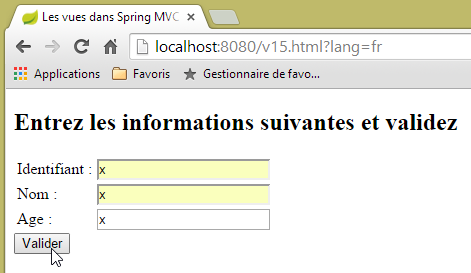 | 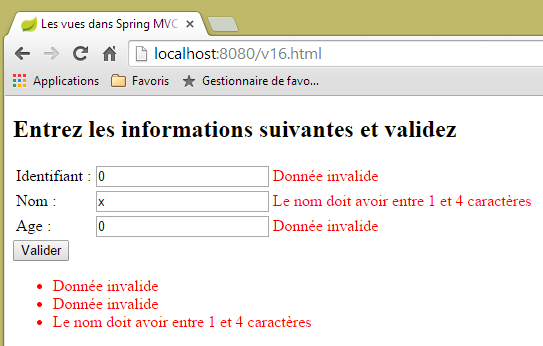 |
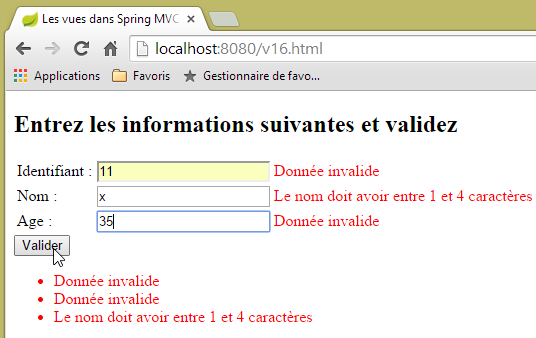 | 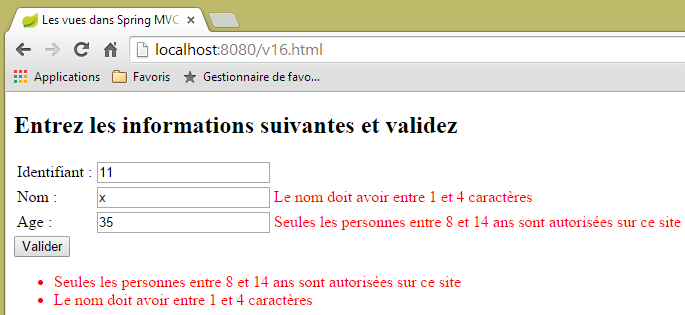 |
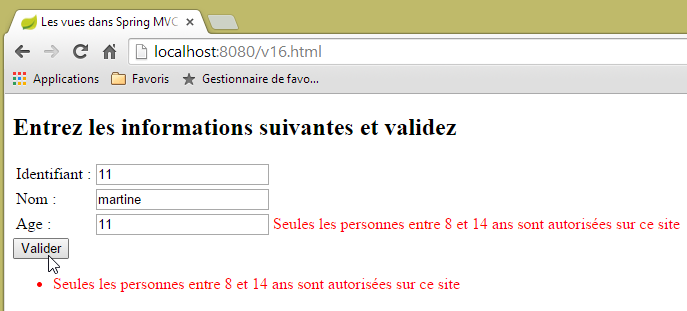 |
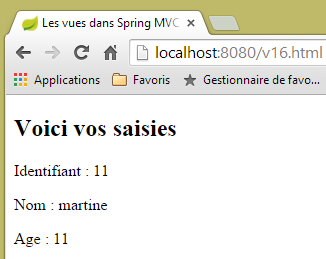 |
5.13. [/v17-/v18]: Controllo dei messaggi di errore
Quando l'azione [/v15] viene richiesta per la prima volta, si ottiene il seguente risultato:
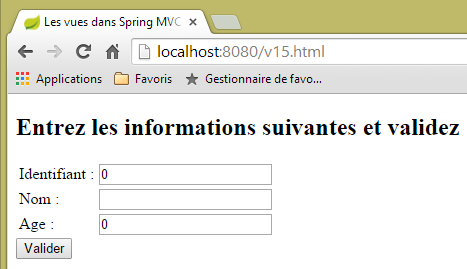 |
Potresti preferire un campo vuoto invece degli zeri nei campi [Username, Age]. Per ottenere questo risultato, modifichiamo il modello dell'azione come segue:
package istia.st.springmvc.models;

import javax.validation.constraints.Digits;

import org.hibernate.validator.constraints.Length;
import org.hibernate.validator.constraints.Range;

public class StringSecuredPerson {

    @Range(min = 1)
    @Digits(fraction = 0, integer = 4)
    private String id;

    @Length(min = 4, max = 10)
    private String nom;

    @Range(min = 8, max = 14)
    @Digits(fraction = 0, integer = 2)
    private String age;

    // manufacturers
    public StringSecuredPerson() {

    }

    public StringSecuredPerson(String id, String nom, String age) {
        this.id = id;
        this.nom = nom;
        this.age = age;
    }

    // getters and setters
...

}
- righe 12 e 19: i campi [id] e [age] sono impostati come tipo [String];
- riga 11: si specifica che il campo [id] deve essere un numero con al massimo quattro cifre, senza decimali;
- riga 18: lo stesso vale per il campo [age], che deve essere un numero intero di al massimo due cifre;
L'azione [/v17] diventa la seguente:
    // ---------------------- form display
    @RequestMapping(value = "/v17", method = RequestMethod.GET)
    public String v17(StringSecuredPerson p) {
        return "vue-17";
}
La vista [vue-17.xml] visualizzata dall'azione [/v17] è la seguente:
<!DOCTYPE html>
<html xmlns:th="http://www.thymeleaf.org">
    <head>
        <title th:text="#{title}">Spring 4 MVC</title>
        <meta http-equiv="Content-Type" content="text/html; charset=UTF-8" />
    </head>
    <body>
        <form action="/someURL" th:action="@{/v18.html}" method="post">
            <h2 th:text="#{personne.formulaire.titre}">Entrez les informations suivantes</h2>
            <div th:object="${stringSecuredPerson}">
                <table>
                    <thead></thead>
                    <tbody>
                        <tr>
                            <td th:text="#{personne.id}">Id :</td>
                            <td>
                                <input type="text" name="id" value="11" th:value="*{id}" />
                            </td>
                            <td>
                                <span th:each="err,status : ${#fields.errors('id')}" th:if="${status.index}==0" th:text="${err}" style="color: red">
                                    Identifiant erroné
                                </span>
                            </td>
                        </tr>
                        <tr>
                            <td th:text="#{personne.nom}">Nom :</td>
                            <td>
                                <input type="text" name="nom" value="Tintin" th:value="*{nom}" />
                            </td>
                            <td>
                                <span th:if="${#fields.hasErrors('nom')}" th:errors="*{nom}" style="color: red">Nom erroné</span>
                            </td>
                        </tr>
                        <tr>
                            <td th:text="#{personne.age}">Age :</td>
                            <td>
                                <input type="text" name="age" value="17" th:value="*{age}" />
                            </td>
                            <td>
                                <span th:if="${#fields.hasErrors('age')}" th:errors="*{age}" style="color: red">Âge erroné</span>
                            </td>
                        </tr>
                    </tbody>
                </table>
                <input type="submit" value="Valider" th:value="#{personne.formulaire.valider}" />
                <ul>
                    <li th:each="err : ${#fields.errors('*')}" th:text="${err}" style="color: red" />
                </ul>
            </div>
        </form>
    </body>
</html>
Le modifiche sono state apportate nelle seguenti righe:
- riga 10: ora lavoriamo con l'oggetto modello chiave [stringSecuredPerson];
- riga 20: si esegue un'iterazione sull'elenco degli errori per il campo [id]. Nella sintassi [th:each="err,status : ${#fields.errors('id')}"], la variabile [err] esegue l'iterazione sull'elenco. La variabile [status] fornisce informazioni su ciascuna iterazione. Si tratta di un oggetto [index, count, size, current] dove:
- index: è il numero dell'elemento corrente,
- current: è il valore dell'elemento corrente,
- count, size: la dimensione dell'elenco su cui si sta eseguendo l'iterazione;
- riga 20: visualizziamo solo il primo elemento dell'elenco [th:if="${status.index}==0"] ;
L'azione [/v18] che elabora il POST proveniente dall'azione [/v17] è la seguente:
    // -------------------- model validation------------------
    @RequestMapping(value = "/v18", method = RequestMethod.POST)
    public String v18(@Valid StringSecuredPerson p, BindingResult result) {
        // mistakes?
        if (result.hasErrors()) {
            return "vue-17";
        } else {
            return "vue-18";
        }
}
I file dei messaggi vengono aggiornati come segue:
[messages_fr.properties]
title=Les vues dans Spring MVC
personne.nom=Nom :
personne.age=Age :
personne.id=Identifiant :
personne.mineure=Vous êtes mineur
personne.majeure=Vous êtes majeur
liste.personnes=Liste de personnes
personne.formulaire.titre=Entrez les informations suivantes et validez
personne.formulaire.valider=Valider
personne.formulaire.saisies=Voici vos saisies
notNull=La donnée est obligatoire
Range.securedPerson.id=L''identifiant doit être un nombre entier >=1
Range.securedPerson.age=Seules les personnes entre 8 et 14 ans sont autorisées sur ce site
Length.securedPerson.nom=Le nom doit avoir entre 1 et 4 caractères
typeMismatch=Donnée invalide
Range.stringSecuredPerson.id=L''identifiant doit être un nombre entier >=1
Range.stringSecuredPerson.age=Seules les personnes entre 8 et 14 ans sont autorisées sur ce site
Length.stringSecuredPerson.nom=Le nom doit avoir entre 1 et 4 caractères
Digits.stringSecuredPerson.id=Tapez un nombre entier de 4 chiffres au plus
Digits.stringSecuredPerson.age=Tapez un nombre entier de 2 chiffres au plus
[messages_en.properties]
title=Views in Spring MVC
personne.nom=Name:
personne.age=Age:
personne.id=Identifier:
personne.mineure=You are under 18
personne.majeure=You are over 18
liste.personnes=Persons' list
personne.formulaire.titre=Please, enter information and validate
personne.formulaire.valider=Validate
personne.formulaire.saisies=Here are your inputs
NotNull=Data is required
Range.securedPerson.id=Identifier must be an integer >=1
Range.securedPerson.age=Only kids who are 8 to 14 years old are allowed on this site
Length.securedPerson.nom=Name must be 4 to 10 characters long
typeMismatch=Invalid format
Range.stringSecuredPerson.id=Identifier must be an integer >=1
Range.stringSecuredPerson.age=Only kids who are 8 to 14 years old are allowed on this site
Length.stringSecuredPerson.nom=Name must be 4 to 10 characters long
Digits.stringSecuredPerson.id=Should be an integer with at most four digits
Digits.stringSecuredPerson.age=Should be an integer with at most two digits
Vediamo alcuni esempi:
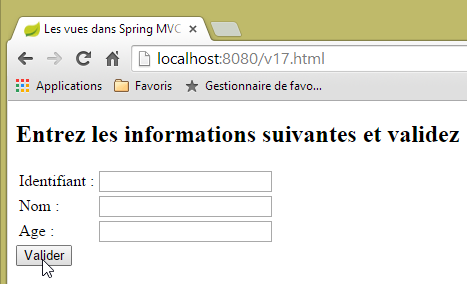 |
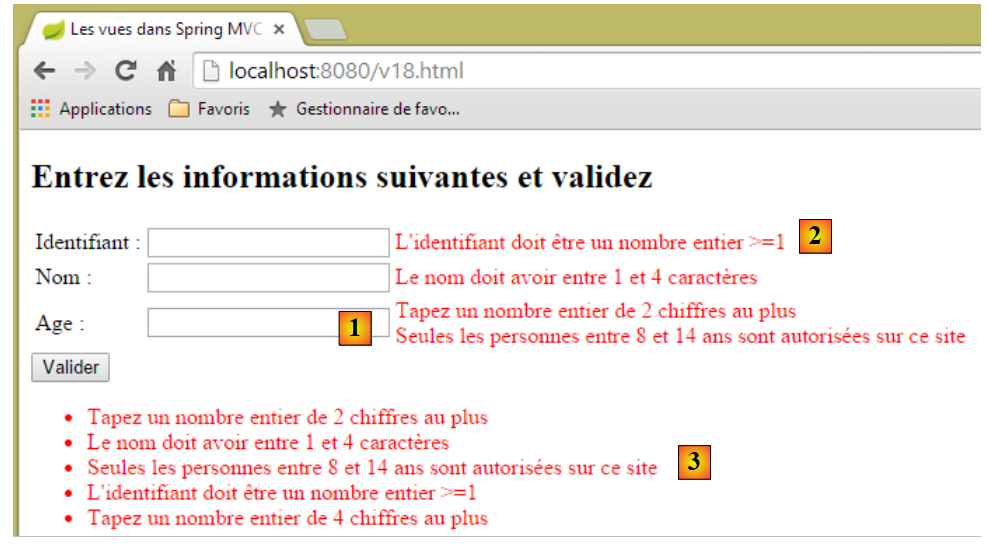 |
In [1], vediamo che entrambi i validatori per il campo [age] sono stati eseguiti:
    @Range(min = 8, max = 14)
    @Digits(fraction = 0, integer = 2)
    private String age;
Esiste un ordine specifico per i messaggi di errore? Per il campo [age], sembra che i validatori siano stati eseguiti nell'ordine [Digits, Range]. Tuttavia, se effettuiamo più richieste, possiamo notare che questo ordine può cambiare. Pertanto, non possiamo fare affidamento sull'ordine dei validatori. In [2], viene visualizzato solo uno dei due messaggi di errore per il campo [id]. In [3], vengono mostrati tutti i messaggi di errore.
5.14. [/v19-/v20]: Utilizzo di validatori diversi
Consideriamo il seguente nuovo modello di azione:
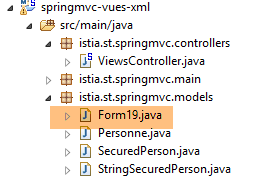 |
package istia.st.springmvc.models;

import java.util.Date;

import javax.validation.constraints.AssertFalse;
import javax.validation.constraints.AssertTrue;
import javax.validation.constraints.Future;
import javax.validation.constraints.Max;
import javax.validation.constraints.Min;
import javax.validation.constraints.NotNull;
import javax.validation.constraints.Past;
import javax.validation.constraints.Pattern;
import javax.validation.constraints.Size;

import org.hibernate.validator.constraints.Email;
import org.hibernate.validator.constraints.Length;
import org.hibernate.validator.constraints.NotBlank;
import org.hibernate.validator.constraints.NotEmpty;
import org.hibernate.validator.constraints.Range;
import org.hibernate.validator.constraints.URL;
import org.springframework.format.annotation.DateTimeFormat;

public class Form19 {

    @NotNull
    @AssertFalse
    private Boolean assertFalse;

    @NotNull
    @AssertTrue
    private Boolean assertTrue;

    @NotNull
    @Future
    @DateTimeFormat(pattern = "yyyy-MM-dd")
    private Date dateInFuture;

    @NotNull
    @Past
    @DateTimeFormat(pattern = "yyyy-MM-dd")
    private Date dateInPast;

    @NotNull
    @Max(value = 100)
    private Integer intMax100;

    @NotNull
    @Min(value = 10)
    private Integer intMin10;

    @NotNull
    @NotEmpty
    private String strNotEmpty;

    @NotNull
    @NotBlank
    private String strNotBlank;

    @NotNull
    @Size(min = 4, max = 6)
    private String strBetween4and6;

    @NotNull
    @Pattern(regexp = "^\\d{2}:\\d{2}:\\d{2}$")
    private String hhmmss;

    @NotNull
    @Email
    @NotBlank
    private String email;

    @NotNull
    @Length(max = 4, min = 4)
    private String str4;

    @Range(min = 10, max = 14)
    @NotNull
    private Integer int1014;

    @URL
    @NotBlank
    private String url;

    // getters and setters
...
}
Verrà visualizzato dall'azione [/v19] seguente:
    // ------------------ form display
    @RequestMapping(value = "/v19", method = RequestMethod.GET, produces = "text/html; charset=UTF-8")
    public String v19(Form19 formulaire) {
        return "vue-19";
}
- Riga 3: L'azione riceve un oggetto [Form19 form] come parametro. Se la richiesta GET non riceve alcun parametro, questo oggetto verrà inizializzato con i valori predefiniti di Java;
- riga 4: viene visualizzata la vista [vue-19.xml]. È la seguente:
<!DOCTYPE HTML>
<html xmlns:th="http://www.thymeleaf.org">
    <head>
        <title>Spring 4 MVC</title>
        <meta http-equiv="Content-Type" content="text/html; charset=UTF-8" />
        <link rel="stylesheet" href="/css/form19.css" />
    </head>
    <body>
        <h3>Formulaire - Validations côté serveur</h3>
        <form action="/someURL" th:action="@{/v20.html}" method="post" th:object="${form19}">
            <table>
                <thead>
                    <tr>
                        <th class="col1">Contrainte</th>
                        <th class="col2">Saisie</th>
                        <th class="col3">Erreur</th>
                    </tr>
                </thead>
                <tbody>
                    <tr>
                        <td class="col1">@NotEmpty</td>
                        <td class="col2">
                            <input type="text" th:field="*{strNotEmpty}" />
                        </td>
                        <td class="col3">
                            <span th:if="${#fields.hasErrors('strNotEmpty')}" th:errors="*{strNotEmpty}" class="error">Donnée erronée</span>
                        </td>
                    </tr>
                    <tr>
                        <td class="col1">@NotBlank</td>
                        <td class="col2">
                            <input type="text" th:field="*{strNotBlank}" />
                        </td>
                        <td class="col3">
                            <span th:if="${#fields.hasErrors('strNotBlank')}" th:errors="*{strNotBlank}" class="error">Donnée erronée</span>
                        </td>
                    </tr>
                    <tr>
                        <td class="col1">@assertFalse</td>
                        <td class="col2">
                            <input type="radio" th:field="*{assertFalse}" value="true" />
                            <label th:for="${#ids.prev('assertFalse')}">True</label>
                            <input type="radio" th:field="*{assertFalse}" value="false" />
                            <label th:for="${#ids.prev('assertFalse')}">False</label>
                        </td>
                        <td class="col3">
                            <span th:if="${#fields.hasErrors('assertFalse')}" th:errors="*{assertFalse}" class="error">Donnée erronée</span>
                        </td>
                    </tr>
                    <tr>
                        <td class="col1">@assertTrue</td>
                        <td class="col2">
                            <select th:field="*{assertTrue}">
                                <option value="true">True</option>
                                <option value="false">False</option>
                            </select>
                        </td>
                        <td class="col3">
                            <span th:if="${#fields.hasErrors('assertTrue')}" th:errors="*{assertTrue}" class="error">Donnée erronée</span>
                        </td>
                    </tr>
                    <tr>
                        <td class="col1">@Past</td>
                        <td class="col2">
                            <input type="date" th:field="*{dateInPast}" th:value="*{dateInPast}" />
                        </td>
                        <td class="col3">
                            <span th:if="${#fields.hasErrors('dateInPast')}" th:errors="*{dateInPast}" class="error">Donnée erronée</span>
                        </td>
                    </tr>
                    <tr>
                        <td class="col1">@Future</td>
                        <td class="col2">
                            <input type="date" th:field="*{dateInFuture}" th:value="*{dateInFuture}" />
                        </td>
                        <td class="col3">
                            <span th:if="${#fields.hasErrors('dateInFuture')}" th:errors="*{dateInFuture}" class="error">Donnée erronée</span>
                        </td>
                    </tr>
                    <tr>
                        <td class="col1">@Max</td>
                        <td class="col2">
                            <input type="text" th:field="*{intMax100}" th:value="*{intMax100}" />
                        </td>
                        <td class="col3">
                            <span th:if="${#fields.hasErrors('intMax100')}" th:errors="*{intMax100}" class="error">Donnée erronée</span>
                        </td>
                    </tr>
                    <tr>
                        <td class="col1">@Min</td>
                        <td class="col2">
                            <input type="text" th:field="*{intMin10}" th:value="*{intMin10}" />
                        </td>
                        <td class="col3">
                            <span th:if="${#fields.hasErrors('intMin10')}" th:errors="*{intMin10}" class="error">Donnée erronée</span>
                        </td>
                    </tr>
                    <tr>
                        <td class="col1">@Size</td>
                        <td class="col2">
                            <input type="text" th:field="*{strBetween4and6}" th:value="*{strBetween4and6}" />
                        </td>
                        <td class="col3">
                            <span th:if="${#fields.hasErrors('strBetween4and6')}" th:errors="*{strBetween4and6}" class="error">Donnée erronée</span>
                        </td>
                    </tr>
                    <tr>
                        <td class="col1">@Pattern(hh:mm:ss)</td>
                        <td class="col2">
                            <input type="text" th:field="*{hhmmss}" th:value="*{hhmmss}" />
                        </td>
                        <td class="col3">
                            <span th:if="${#fields.hasErrors('hhmmss')}" th:errors="*{hhmmss}" class="error">Donnée erronée</span>
                        </td>
                    </tr>
                    <tr>
                        <td class="col1">@Email</td>
                        <td class="col2">
                            <input type="text" th:field="*{email}" th:value="*{email}" />
                        </td>
                        <td class="col3">
                            <span th:if="${#fields.hasErrors('email')}" th:errors="*{email}" class="error">Donnée erronée</span>
                        </td>
                    </tr>
                    <tr>
                        <td class="col1">@Length</td>
                        <td class="col2">
                            <input type="text" th:field="*{str4}" th:value="*{str4}" />
                        </td>
                        <td class="col3">
                            <span th:if="${#fields.hasErrors('str4')}" th:errors="*{str4}" class="error">Donnée erronée</span>
                        </td>
                    </tr>
                    <tr>
                        <td class="col1">@Range</td>
                        <td class="col2">
                            <input type="text" th:field="*{int1014}" th:value="*{int1014}" />
                        </td>
                        <td class="col3">
                            <span th:if="${#fields.hasErrors('int1014')}" th:errors="*{int1014}" class="error">Donnée erronée</span>
                        </td>
                    </tr>
                    <tr>
                        <td class="col1">@URL</td>
                        <td class="col2">
                            <input type="text" th:field="*{url}" th:value="*{url}" />
                        </td>
                        <td class="col3">
                            <span th:if="${#fields.hasErrors('url')}" th:errors="*{url}" class="error">Donnée erronée</span>
                        </td>
                    </tr>
                </tbody>
            </table>
            <p>
                <input type="submit" value="Valider" />
            </p>
        </form>
    </body>
</html>
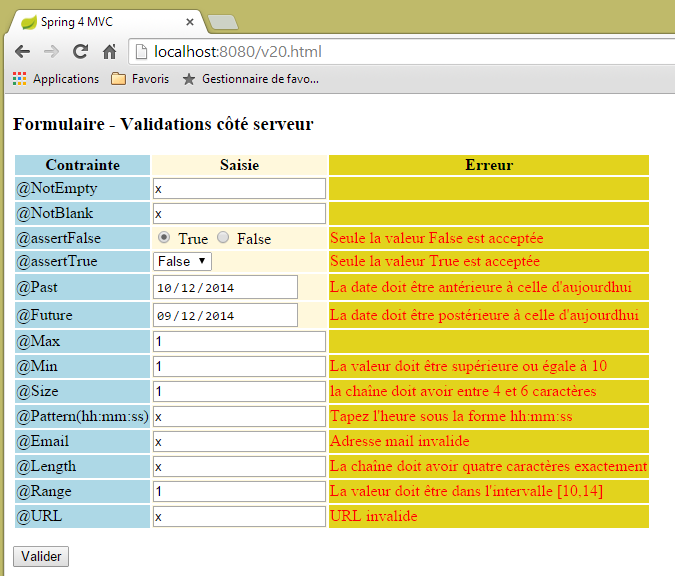
Questo codice visualizza la seguente vista:
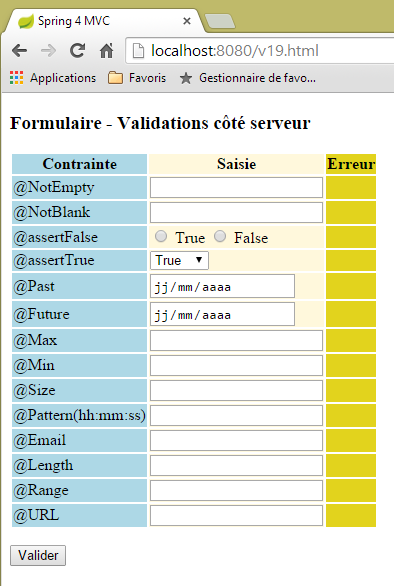 |
La pagina mostra una tabella a tre colonne:
- Colonna 1: il validatore del campo di immissione;
- colonna 2: il campo di immissione;
- colonna 3: i messaggi di errore per il campo di immissione;
Esaminiamo, ad esempio, il codice della vista [/v19.html] per il validatore [@Pattern]:
                    <tr>
                        <td class="col1">@Pattern(hh:mm:ss)</td>
                        <td class="col2">
                            <input type="text" th:field="*{hhmmss}" th:value="*{hhmmss}" />
                        </td>
                        <td class="col3">
                            <span th:if="${#fields.hasErrors('hhmmss')}" th:errors="*{hhmmss}" class="error">Donnée erronée</span>
                        </td>
</tr>
Vediamo il codice che abbiamo appena studiato con i moduli [Person]:
- riga 2: la prima colonna: il nome del validatore in fase di test;
- riga 4: l'attributo Thymeleaf [th:field="*{hhmmss}] genererà gli attributi HTML [id="hhmmss"] e [name="hhmmss"]. L'attributo Thymeleaf [th:value="*{hhmmss}"] genererà l'attributo HTML [value="valore di [form19.hhmmss]]";
- riga 7: se il valore inserito per il campo [form19.hhmmss] non è corretto, la riga 7 visualizza i messaggi di errore associati a questo campo;
I valori inviati vengono elaborati dalla seguente azione [/v20]:
    // ----------------- form template validation
    @RequestMapping(value = "/v20", method = RequestMethod.POST, produces = "text/html; charset=UTF-8")
    public String v20(@Valid Form19 formulaire, BindingResult result, RedirectAttributes redirectAttributes) {
        if (result.hasErrors()) {
            return "vue-19";
        } else {
            // redirection to [vue-19]
            redirectAttributes.addFlashAttribute("form19", formulaire);
            return "redirect:/v19.html";
        }
}
- riga 3: i valori inviati popoleranno i campi dell'oggetto [Form19] se sono validi;
- righe 4–6: se i valori inviati non sono validi, il modulo [view-19] viene visualizzato nuovamente con i messaggi di errore;
- righe 6–10: se i valori inviati sono validi, l'oggetto [Form19] costruito con questi valori viene reso disponibile per la richiesta successiva, in questo caso il reindirizzamento. Viene quindi distrutto;
- riga 9: il client viene reindirizzato all'azione [/v19.html]. Questo visualizzerà nuovamente il modulo [vue-19], che contiene codice come:
<form action="/someURL" th:action="@{/v20.html}" method="post" th:object="${form19}">
L'attributo [th:object="${form19}"] recupererà quindi l'oggetto associato all'attributo Flash [form19] e visualizzerà nuovamente il modulo così come era stato compilato.
Il codice del modulo richiede ulteriori spiegazioni. Consideriamo il seguente codice:
                    <tr>
                        <td class="col1">@assertFalse</td>
                        <td class="col2">
                            <input type="radio" th:field="*{assertFalse}" value="true" />
                            <label th:for="${#ids.prev('assertFalse')}">True</label>
                            <input type="radio" th:field="*{assertFalse}" value="false" />
                            <label th:for="${#ids.prev('assertFalse')}">False</label>
                        </td>
                        <td class="col3">
                            <span th:if="${#fields.hasErrors('assertFalse')}" th:errors="*{assertFalse}" class="error">Donnée erronée</span>
                        </td>
</tr>
Questo genera il seguente codice HTML:
<tr>
  <td class="col1">@assertFalse</td>
  <td class="col2">
    <input type="radio" value="true" id="assertFalse1" name="assertFalse" />
    <label for="assertFalse1">True</label>
    <input type="radio" value="false" id="assertFalse2" name="assertFalse" />
    <label for="assertFalse2">False</label>
  </td>
  <td class="col3">
  </td>
</tr>
Nel codice
<input type="radio" th:field="*{assertFalse}" value="true" />
<label th:for="${#ids.prev('assertFalse')}">True</label>
<input type="radio" th:field="*{assertFalse}" value="false" />
<label th:for="${#ids.prev('assertFalse')}">False</label>
Gli attributi Thymeleaf nelle righe 1 e 3 [th:field="*{assertFalse}"] pongono un problema. Abbiamo notato che questo attributo genera gli attributi HTML [id=assertFalse] e [name=assertFalse]. La difficoltà sorge perché, dato che questo viene generato alle righe 1 e 3, ci ritroviamo con due attributi [name] identici e due attributi [id] identici. Mentre questo è possibile con l'attributo [name], non lo è con l'attributo [id]. Come si vede nel codice HTML generato, Thymeleaf ha generato due diversi attributi [id]: [id=assertFalse1] e [id=assertFalse2]. Questo è un bene. Il problema è che non conosciamo questi identificatori e potremmo averne bisogno. È il caso del tag [label] alla riga 2. L'attributo [for] di un tag HTML [label] deve fare riferimento a un attributo [id], in questo caso quello generato per il tag [input] alla riga 1. La documentazione di Thymeleaf afferma che l'espressione [${#ids.prev('assertFalse')}] recupera l'ultimo attributo [id] generato per il campo [assertFalse].
Ora diamo un'occhiata al codice per l'elenco a discesa del modulo:
<select th:field="*{assertTrue}">
   <option value="true">True</option>
   <option value="false">False</option>
</select>
Questo codice genera il codice HTML per un elenco a discesa:
Il valore inviato verrà trasmesso con il nome [name="assertTrue"].
La vista [vue-19.xml] utilizza un foglio di stile:
    <head>
        <title>Spring 4 MVC</title>
        <meta http-equiv="Content-Type" content="text/html; charset=UTF-8" />
        <link rel="stylesheet" href="/css/form19.css" />
</head>
Riga 4: Il foglio di stile utilizzato deve essere inserito nella cartella [static] del progetto:
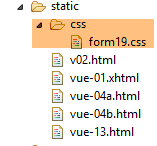 |
Il contenuto è il seguente:
@CHARSET "UTF-8";

.col1 {
    background: lightblue;
}

.col2 {
    background: Cornsilk;
}

.col3 {
    background: #e2d31d;
}

.error {
    color: red;
}
Ora, diamo un'occhiata alle date:
    @NotNull
    @Future
    @DateTimeFormat(pattern = "yyyy-MM-dd")
    private Date dateInFuture;

    @NotNull
    @Past
    @DateTimeFormat(pattern = "yyyy-MM-dd")
    private Date dateInPast;
Esaminando il traffico di rete in Chrome DevTools (Ctrl+Shift+I) si nota che le date vengono inviate nel formato (yyyy-mm-dd):
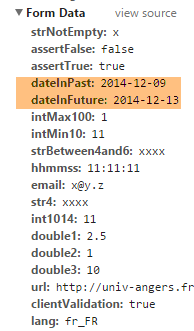 |
Ecco perché le date sono state annotate con il validatore:
@DateTimeFormat(pattern = "yyyy-MM-dd")
che imposta il formato previsto per i valori della data inviati.
Infine, il file dei messaggi in francese [messages_fr.properties]:
title=Les vues dans Spring MVC
personne.nom=Nom :
personne.age=Age :
personne.id=Identifiant :
personne.mineure=Vous êtes mineur
personne.majeure=Vous êtes majeur
liste.personnes=Liste de personnes
personne.formulaire.titre=Entrez les informations suivantes et validez
personne.formulaire.valider=Valider
personne.formulaire.saisies=Voici vos saisies
NotNull=La donnée est obligatoire
Range.securedPerson.id=L''identifiant doit être un nombre entier >=1
Range.securedPerson.age=Seules les personnes entre 8 et 14 ans sont autorisées sur ce site
Length.securedPerson.nom=Le nom doit avoir entre 1 et 4 caractères
typeMismatch=Donnée invalide
Range.stringSecuredPerson.id=L''identifiant doit être un nombre entier >=1
Range.stringSecuredPerson.age=Seules les personnes entre 8 et 14 ans sont autorisées sur ce site
Length.stringSecuredPerson.nom=Le nom doit avoir entre 1 et 4 caractères
Digits.stringSecuredPerson.id=Tapez un nombre entier de 4 chiffres au plus
Digits.stringSecuredPerson.age=Tapez un nombre entier de 2 chiffres au plus
Future.form19.dateInFuture=La date doit être postérieure à celle d''aujourd'hui
Past.form19.dateInPast=La date doit être antérieure à celle d''aujourd'hui
Size.form19.strBetween4and6=la chaîne doit avoir entre 4 et 6 caractères
Min.form19.intMin10=La valeur doit être supérieure ou égale à 10
Max.form19.intMax100=La valeur doit être inférieure ou égale à 100
Length.form19.str4=La chaîne doit avoir quatre caractères exactement
Email.form19.email=Adresse mail invalide
URL.form19.url=URL invalide
Range.form19.int1014=La valeur doit être dans l''intervalle [10,14]
AssertTrue=Seule la valeur True est acceptée
AssertFalse=Seule la valeur False est acceptée
Pattern.form19.hhmmss=Tapez l''heure sous la forme hh:mm:ss
NotEmpty=La donnée ne peut être vide
NotBlank=La donnée ne peut être vide
Vediamo alcuni esempi di esecuzione:
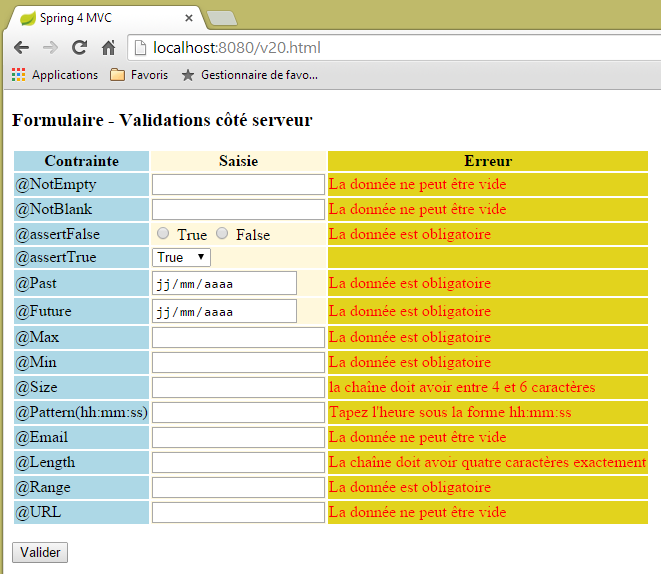 |
 |
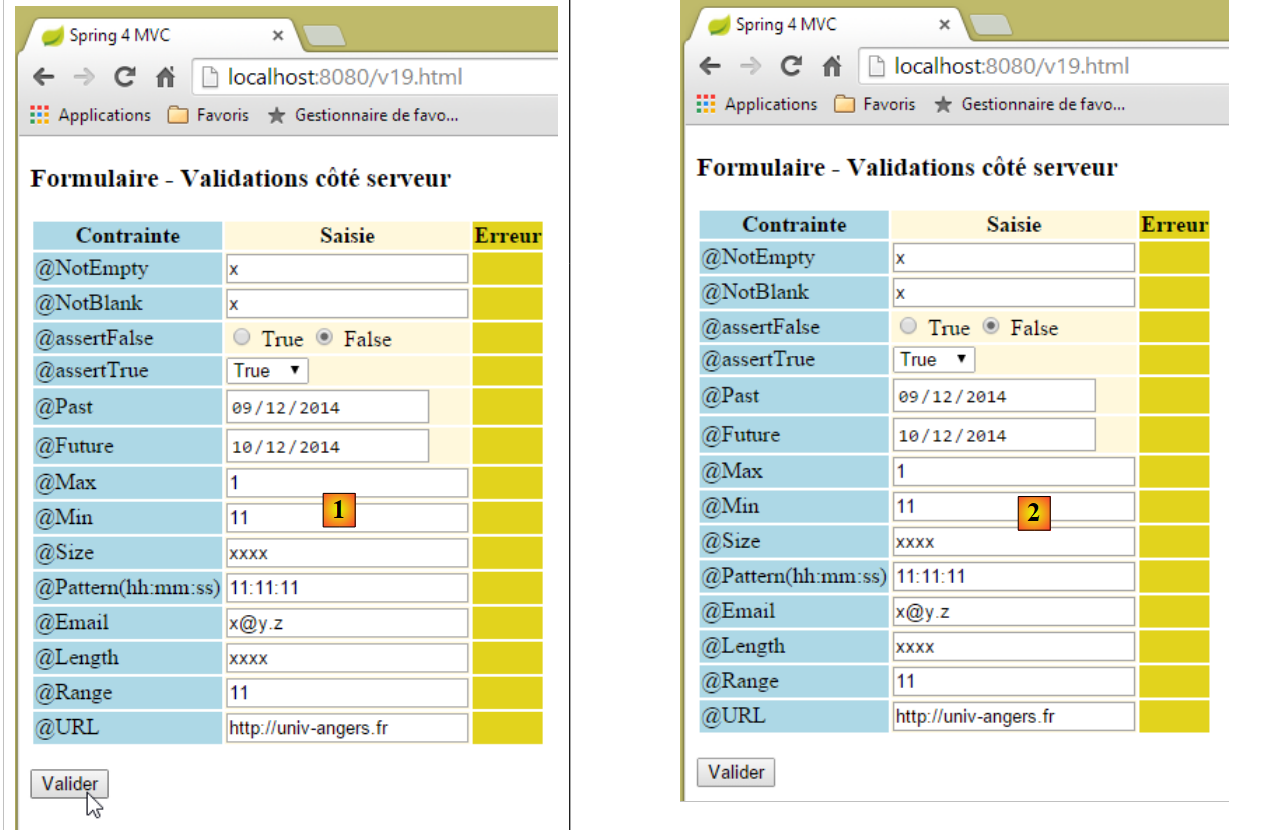 |
Sopra, tra [1] e [2], sembra che non sia successo nulla. Tuttavia, se osserviamo il traffico di rete (Ctrl-Shift-I), vediamo che ci sono stati due scambi di dati con il server:
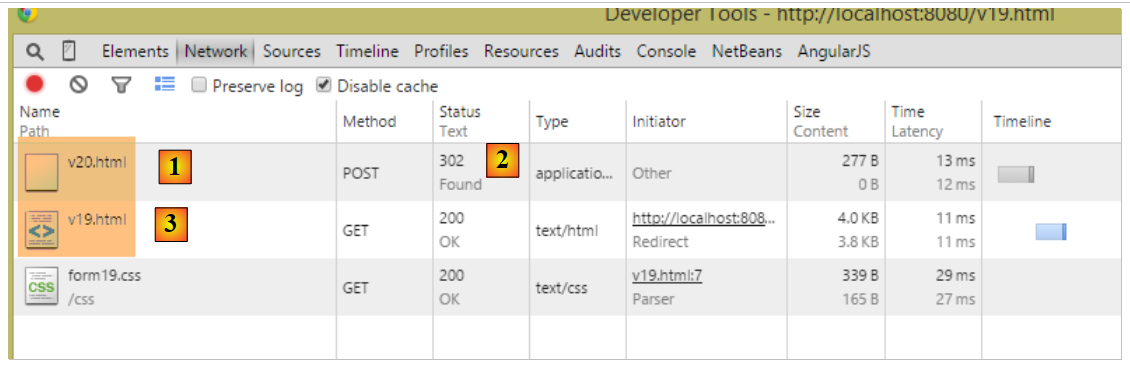 |
- in [1], il POST iniziale a [/v20];
- in [2], la risposta a questa azione è un reindirizzamento;
- in [3], la seconda richiesta, questa volta a [/v19];
Viene quindi eseguita l'azione [/v19]:
    // ------------------ form display
    @RequestMapping(value = "/v19", method = RequestMethod.GET, produces = "text/html; charset=UTF-8")
    public String v19(Form19 formulaire) {
        return "vue-19";
}
- riga 3: il parametro [Form19 form] viene inizializzato con l'attributo Flash [form19], creato dall'azione precedente [/v19] e che è un oggetto di tipo [Form19] contenente i valori inviati all'azione [/v19];
- Riga 4: la vista [view-19.xml] verrà visualizzata con un oggetto [Form19 form] nel suo modello, inizializzato con i valori inviati. Questo è il motivo per cui l'utente vede il modulo esattamente come lo ha inviato;
Perché un reindirizzamento? Perché non abbiamo semplicemente inviato i dati all'azione [/v19] sopra? Avremmo ottenuto lo stesso risultato, con alcune differenze:
- il browser avrebbe inserito [http://localhost:8080/v20.html] nella barra degli indirizzi invece di [http://localhost:8080/v19.html] come ha fatto qui, perché visualizza l'ultimo URL chiamato;
- se l'utente aggiorna la pagina (F5), il risultato è completamente diverso:
- nel caso del reindirizzamento, l'URL visualizzato è [http://localhost:8080/v19.html], ottenuto tramite una richiesta GET. Il browser rieseguirà questo comando e riceverà quindi un modulo nuovo di zecca (l'attributo Flash viene utilizzato una sola volta),
- in caso di assenza di reindirizzamento, l'URL visualizzato è [http://localhost:8080/v20.html], ottenuto tramite una richiesta POST. Il browser rieseguirà questo comando ed effettuerà quindi un altro POST con gli stessi valori di prima. In questo caso ciò non ha conseguenze, ma spesso è indesiderabile, quindi in genere si preferisce il reindirizzamento;
5.15. [/v21-/v22]: Gestione dei pulsanti di opzione
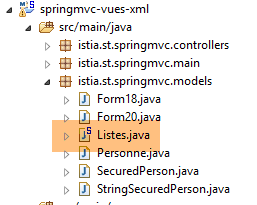
Si consideri il seguente componente Spring [Lists]:
 |
package istia.st.springmvc.models;

import org.springframework.stereotype.Component;

@Component
public class Listes {

    private String[] deplacements = new String[] { "0", "1", "2", "3", "4" };
    private String[] libellesDeplacements = new String[] { "vélo", "marche", "train", "avion", "autre" };
    private String[] libellesBijoux = new String[] { "émeraude", "rubis", "diamant", "opaline" };

    // getters and setters
  ...

}
- riga 5: la classe [Lists] sarà un componente Spring;
- righe 8–10: elenchi utilizzati per popolare pulsanti di opzione, caselle di controllo ed elenchi a discesa;
Nella classe di configurazione [Config] è indicato:
@Configuration
@ComponentScan({ "istia.st.springmvc.controllers", "istia.st.springmvc.models" })
@EnableAutoConfiguration
public class Config extends WebMvcConfigurerAdapter {
- Riga 2: Il pacchetto [models], in cui si trova il componente [Lists], verrà analizzato da Spring;
Creiamo le seguenti nuove azioni:
    // ------------------ form with radio buttons
    @Autowired
    private Listes listes;

    @RequestMapping(value = "/v21", method = RequestMethod.GET, produces = "text/html; charset=UTF-8")
    public String v21(@ModelAttribute("form") Form21 formulaire, Model model) {
        model.addAttribute("listes", listes);
        return "vue-21";
    }

    @RequestMapping(value = "/v22", method = RequestMethod.POST, produces = "text/html; charset=UTF-8")
    public String v22(@ModelAttribute("form") Form21 formulaire, RedirectAttributes redirectAttributes) {
        redirectAttributes.addFlashAttribute("form", formulaire);
        return "redirect:/v21.html";
}
- righe 2-3: il componente [Lists] viene iniettato nel controller;
- riga 6: gestiamo un modulo [Form21], che descriveremo in seguito. Si noti che ne abbiamo specificato la chiave [form] nel modello di vista. Ricordiamo che, per impostazione predefinita, questa sarebbe stata [form21];
- riga 7: iniettiamo il componente [Lists] nel modello. La vista ne avrà bisogno;
- riga 8: visualizziamo la vista [vue-21.xml]. Questa vista mostrerà il modulo [Form21] e i valori inviati saranno trasmessi all'azione [/v22] nelle righe 12–15;
- righe 12–15: l'azione [/v22] reindirizza semplicemente all'azione [/v21], inserendo i valori inviati che ha ricevuto in un attributo Flash con la chiave [form]. È importante che questa chiave corrisponda a quella utilizzata nella riga 6;
Il modello [Form21] è il seguente:
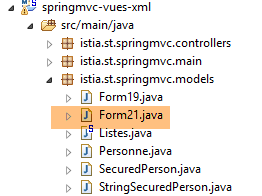 |
package istia.st.springmvc.models;

public class Form21 {

    // posted values
    private String marie = "non";
    private String deplacement = "4";
    private String[] couleurs;
    private String strCouleurs;
    private String[] bijoux;
    private String strBijoux;
    private int couleur2;
    private int[] bijoux2;
    private String strBijoux2;

    // getters and setters
    ...
}
La vista [view-21.xml] è la seguente:
<!DOCTYPE HTML>
<html xmlns:th="http://www.thymeleaf.org">
    <head>
        <title>Spring 4 MVC</title>
        <meta http-equiv="Content-Type" content="text/html; charset=UTF-8" />
        <link rel="stylesheet" href="/css/form19.css" />
    </head>
    <body>

        <h3>Formulaire - Boutons radio</h3>
        <form action="/someURL" th:action="@{/v22.html}" method="post" th:object="${form}">
            <table>
                <thead>
                    <tr>
                        <th class="col1">Texte</th>
                        <th class="col2">Saisie</th>
                        <th class="col3">Valeur</th>
                    </tr>
                </thead>
                <tbody>
                    <tr>
                        <td class="col1">Etes-vous marié(e)</td>
                        <td class="col2">
                            <input type="radio" th:field="*{marie}" value="oui" />
                            <label th:for="${#ids.prev('marie')}">Oui</label>
                            <input type="radio" th:field="*{marie}" value="non" />
                            <label th:for="${#ids.prev('marie')}">Non</label>
                        </td>
                        <td class="col3">
                            <span th:text="*{marie}"></span>
                        </td>
                    </tr>
                    <tr>
                        <td class="col1">Mode de déplacement</td>
                        <td class="col2">
                            <span th:each="mode, status : ${listes.deplacements}">
                                <input type="radio" th:field="*{deplacement}" th:value="${mode}" />
                                <label th:for="${#ids.prev('deplacement')}" th:text="${listes.libellesDeplacements[status.index]}">Autre</label>
                            </span>
                        </td>
                        <td class="col3">
                            <span th:text="*{deplacement}"></span>
                        </td>
                    </tr>
                </tbody>
            </table>
            <p>
                <input type="submit" value="Valider" />
            </p>
        </form>
    </body>
</html>
- Righe 36–40: Notare l'uso del componente [Lists] nel template per generare le etichette delle caselle di controllo;
- La colonna 3 visualizza il valore inviato tramite POST, ovvero il valore iniziale del modulo durante la richiesta GET iniziale;
Questo codice visualizza la seguente pagina:
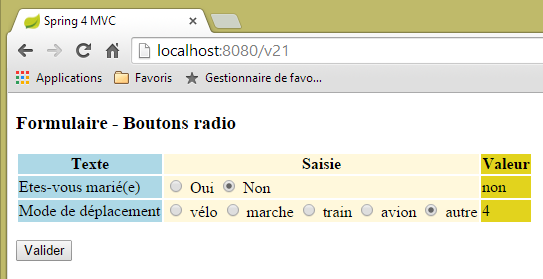 |
corrispondente al seguente codice HTML:
<!DOCTYPE HTML>

<html>
    <head>
        <title>Spring 4 MVC</title>
        <meta http-equiv="Content-Type" content="text/html; charset=UTF-8" />
        <link rel="stylesheet" href="/css/form19.css" />
    </head>
    <body>

        <h3>Formulaire - Boutons radio</h3>
        <form action="/v22.html" method="post">
            <table>
                <thead>
                    <tr>
                        <th class="col1">Texte</th>
                        <th class="col2">Saisie</th>
                        <th class="col3">Valeur</th>
                    </tr>
                </thead>
                <tbody>
                    <tr>
                        <td class="col1">Etes-vous marié(e)</td>
                        <td class="col2">
                            <input type="radio" value="oui" id="marie1" name="marie" />
                            <label for="marie1">Oui</label>
                            <input type="radio" value="non" id="marie2" name="marie" checked="checked" />
                            <label for="marie2">Non</label>
                        </td>
                        <td class="col3">
                            <span>non</span>
                        </td>
                    </tr>
                    <tr>
                        <td class="col1">Mode de déplacement</td>
                        <td class="col2">
                            <span>
                                <input type="radio" value="0" id="deplacement1" name="deplacement" />
                                <label for="deplacement1">vélo</label>
                            </span>
                            <span>
                                <input type="radio" value="1" id="deplacement2" name="deplacement" />
                                <label for="deplacement2">marche</label>
                            </span>
                            <span>
                                <input type="radio" value="2" id="deplacement3" name="deplacement" />
                                <label for="deplacement3">train</label>
                            </span>
                            <span>
                                <input type="radio" value="3" id="deplacement4" name="deplacement" />
                                <label for="deplacement4">avion</label>
                            </span>
                            <span>
                                <input type="radio" value="4" id="deplacement5" name="deplacement" checked="checked" />
                                <label for="deplacement5">autre</label>
                            </span>
                        </td>
                        <td class="col3">
                            <span>4</span>
                        </td>
                    </tr>
                </tbody>
            </table>
            <p>
                <input type="submit" value="Valider" />
            </p>
        </form>
    </body>
</html>
Possiamo vedere che i valori inviati (attributi name) vengono inviati ai seguenti campi nel modello [Form21]:
    private String marie = "non";
    private String deplacement = "4";
Si invitano i lettori a eseguire dei test. Si noti che è l'attributo [value] dei pulsanti di opzione a essere inviato.
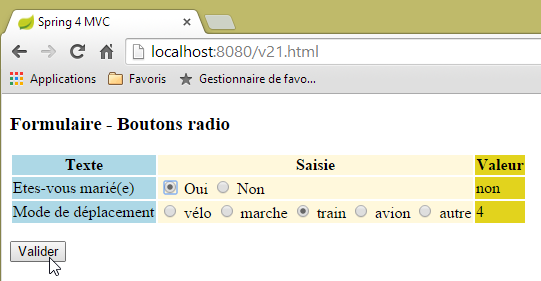 | 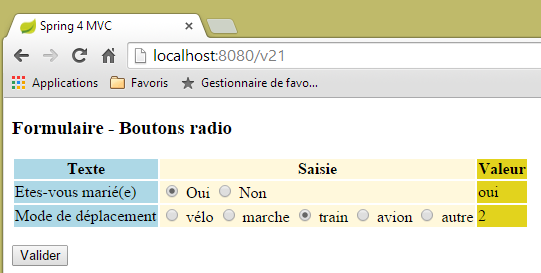 |
5.16. [/v23-/v24]: gestione delle caselle di controllo
Aggiungiamo la seguente nuova azione:
    // ------------------ form with checkboxes
    @RequestMapping(value = "/v23", method = RequestMethod.GET, produces = "text/html; charset=UTF-8")
    public String av20(@ModelAttribute("form") Form21 formulaire, Model model) {
        model.addAttribute("listes", listes);
        return "vue-23";
}
- Riga 3: Continuiamo a utilizzare il modello [Form21];
La vista [vue-23.xml] è la seguente:
<!DOCTYPE HTML>
<html xmlns:th="http://www.thymeleaf.org">
    <head>
        <title>Spring 4 MVC</title>
        <meta http-equiv="Content-Type" content="text/html; charset=UTF-8" />
        <link rel="stylesheet" href="/css/form19.css" />
    </head>
    <body>
        <h3>Formulaire - Cases à cocher</h3>
        <form action="/someURL" th:action="@{/v24.html}" method="post" th:object="${form}">
            <table>
                <thead>
                    <tr>
                        <th class="col1">Texte</th>
                        <th class="col2">Saisie</th>
                        <th class="col3">Valeur</th>
                    </tr>
                </thead>
                <tbody>
                    <tr>
                        <td class="col1">Vos couleurs préférées</td>
                        <td class="col2">
                            <input type="checkbox" th:field="*{couleurs}" value="0" />
                            <label th:for="${#ids.prev('couleurs')}">rouge</label>
                            <input type="checkbox" th:field="*{couleurs}" value="1" />
                            <label th:for="${#ids.prev('couleurs')}">vert</label>
                            <input type="checkbox" th:field="*{couleurs}" value="2" />
                            <label th:for="${#ids.prev('couleurs')}">bleu</label>
                        </td>
                        <td class="col3">
                            <span th:text="*{strCouleurs}"></span>
                        </td>
                    </tr>
                    <tr>
                        <td class="col1">Pierres préférées</td>
                        <td class="col2">
                            <span th:each="label, status : ${listes.libellesBijoux}">
                                <input type="checkbox" th:field="*{bijoux}" th:value="${status.index}" />
                                <label th:for="${#ids.prev('bijoux')}" th:text="${label}">Autre</label>
                            </span>
                        </td>
                        <td class="col3">
                            <span th:text="*{strBijoux}"></span>
                        </td>
                    </tr>
                </tbody>
            </table>
            <p>
                <input type="submit" value="Valider" />
            </p>
        </form>
    </body>
</html>
- Righe 37–41: Notare l'uso del componente [Lists] per generare le etichette delle caselle di controllo;
Questo codice visualizza la seguente pagina:
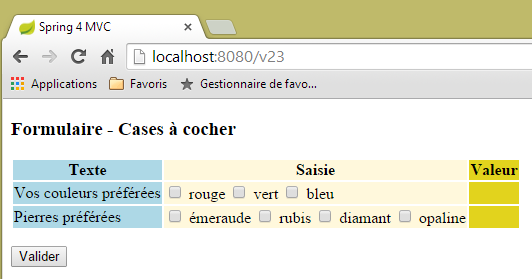 |
generata dal seguente codice HTML:
<!DOCTYPE HTML>

<html>
    <head>
        <title>Spring 4 MVC</title>
        <meta http-equiv="Content-Type" content="text/html; charset=UTF-8" />
        <link rel="stylesheet" href="/css/form19.css" />
    </head>
    <body>
        <h3>Formulaire - Cases à cocher</h3>
        <form action="/v24.html" method="post">
            <table>
                <thead>
                    <tr>
                        <th class="col1">Texte</th>
                        <th class="col2">Saisie</th>
                        <th class="col3">Valeur</th>
                    </tr>
                </thead>
                <tbody>
                    <tr>
                        <td class="col1">Vos couleurs préférées</td>
                        <td class="col2">
                            <input type="checkbox" value="0" id="couleurs1" name="couleurs" /><input type="hidden" name="_couleurs" value="on" />
                            <label for="couleurs1">rouge</label>
                            <input type="checkbox" value="1" id="couleurs2" name="couleurs" /><input type="hidden" name="_couleurs" value="on" />
                            <label for="couleurs2">vert</label>
                            <input type="checkbox" value="2" id="couleurs3" name="couleurs" /><input type="hidden" name="_couleurs" value="on" />
                            <label for="couleurs3">bleu</label>
                        </td>
                        <td class="col3">
                            <span></span>
                        </td>
                    </tr>
                    <tr>
                        <td class="col1">Pierres préférées</td>
                        <td class="col2">
                            <span>
                                <input type="checkbox" value="0" id="bijoux1" name="bijoux" /><input type="hidden" name="_bijoux" value="on" />
                                <label for="bijoux1">émeraude</label>
                            </span>
                            <span>
                                <input type="checkbox" value="1" id="bijoux2" name="bijoux" /><input type="hidden" name="_bijoux" value="on" />
                                <label for="bijoux2">rubis</label>
                            </span>
                            <span>
                                <input type="checkbox" value="2" id="bijoux3" name="bijoux" /><input type="hidden" name="_bijoux" value="on" />
                                <label for="bijoux3">diamant</label>
                            </span>
                            <span>
                                <input type="checkbox" value="3" id="bijoux4" name="bijoux" /><input type="hidden" name="_bijoux" value="on" />
                                <label for="bijoux4">opaline</label>
                            </span>
                        </td>
                        <td class="col3">
                            <span></span>
                        </td>
                    </tr>
                </tbody>
            </table>
            <p>
                <input type="submit" value="Valider" />
            </p>
        </form>
    </body>
</html>
Si noti che i valori inviati (attributi name) vengono inviati ai seguenti campi in [Form21]:
    private String[] couleurs;
    private String[] bijoux;
Si tratta di array perché per ogni campo sono presenti più caselle di controllo etichettate con il nome del campo. È quindi possibile che arrivino più valori inviati con lo stesso nome (l'attributo name del modulo). È quindi necessario un array per recuperarli.
Torniamo al codice Thymeleaf nella colonna 3 della pagina:
  <td class="col3">
    <span th:text="*{strCouleurs}"></span>
  </td>
</tr>
<tr>
  <td class="col1">Pierres préférées</td>
  <td class="col2">
    <span th:each="label, status : ${listes.libellesBijoux}">
      <input type="checkbox" th:field="*{bijoux}" th:value="${status.index}" />
      <label th:for="${#ids.prev('bijoux')}" th:text="${label}">Autre</label>
    </span>
  </td>
  <td class="col3">
    <span th:text="*{strBijoux}"></span>
  </td>
</tr>
I campi a cui si fa riferimento nelle righe 2 e 14 sono i seguenti:
    private String strCouleurs;
    private String strBijoux;
Sono calcolati dall'azione [/v24] che gestisce il POST:
    // mapper Jackson / jSON
    private ObjectMapper mapper = new ObjectMapper();

    @RequestMapping(value = "/v24", method = RequestMethod.POST, produces = "text/html; charset=UTF-8")
    public String av21(@ModelAttribute("form") Form21 formulaire, RedirectAttributes redirectAttributes) throws JsonProcessingException {
        redirectAttributes.addFlashAttribute("form", formulaire);
        formulaire.setStrCouleurs(mapper.writeValueAsString(formulaire.getCouleurs()));
        formulaire.setStrBijoux(mapper.writeValueAsString(formulaire.getBijoux()));
        return "redirect:/v23.html";
}
Si noti che la libreria Jackson/JSON è inclusa nelle dipendenze del progetto.
- Riga 2: creiamo un tipo [ObjectMapper] che ci permette di serializzare e deserializzare oggetti da e verso JSON.
- Riga 7: Serializziamo l'array dei colori in JSON. Il risultato viene inserito nel campo [strCouleurs];
- Riga 8: Serializziamo l'array dei gioielli in JSON. Il risultato viene memorizzato nel campo [strBijoux];
Ecco un esempio di esecuzione:
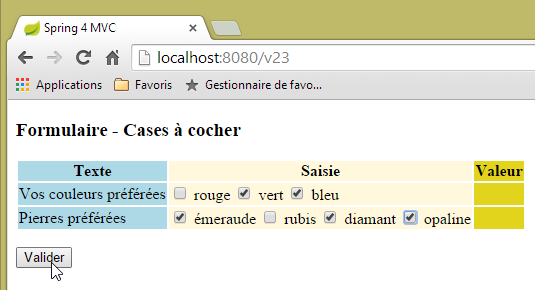 | 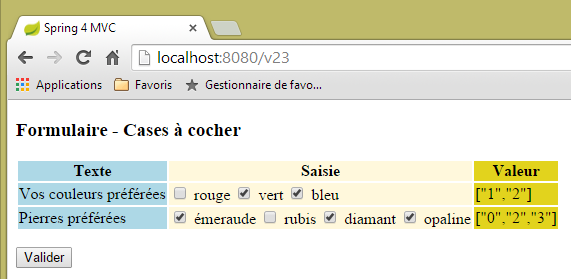 |
Si noti che è l'attributo [value] delle caselle di controllo a essere inviato.
5.17. [/25-/v26]: gestione delle liste
Aggiungiamo la seguente azione [/v25]:
  // ------------------ form with lists
  @RequestMapping(value = "/v25", method = RequestMethod.GET, produces = "text/html; charset=UTF-8")
  public String v25(@ModelAttribute("form") Form21 formulaire, Model model) {
        model.addAttribute("listes", listes);
        return "vue-25";
}
La vista [vue-25.xml] è la seguente:
<!DOCTYPE HTML>
<html xmlns:th="http://www.thymeleaf.org">
    <head>
        <title>Spring 4 MVC</title>
        <meta http-equiv="Content-Type" content="text/html; charset=UTF-8" />
        <link rel="stylesheet" href="/css/form19.css" />
    </head>
    <body>

        <h3>Formulaire - Listes</h3>
        <form action="/someURL" th:action="@{/v26.html}" method="post"
            th:object="${form}">
            <table>
                <thead>
                    <tr>
                        <th class="col1">Texte</th>
                        <th class="col2">Saisie</th>
                        <th class="col3">Valeur</th>
                    </tr>
                </thead>
                <tbody>
                    <tr>
                        <td class="col1">Votre couleur préférée</td>
                        <td class="col2">
                            <select th:field="*{couleur2}">
                                <option value="0">rouge</option>
                                <option value="1">bleu</option>
                                <option value="2">vert</option>
                            </select>
                        </td>
                        <td class="col3">
                            <span th:text="*{couleur2}"></span>
                        </td>
                    </tr>
                    <tr>
                        <td class="col1">Pierres préférées (choix multiple)</td>
                        <td class="col2">
                            <select th:field="*{bijoux2}" multiple="multiple" size="3">
                                <option th:each="label, status : ${listes.libellesBijoux}"
                                    th:text="${label}" th:value="${status.index}">
                                </option>
                            </select>
                        </td>
                        <td class="col3">
                            <span th:text="*{strBijoux2}"></span>
                        </td>
                    </tr>

                </tbody>
            </table>
            <input type="submit" value="Valider" />
        </form>
    </body>
</html>
- righe 38-42: generazione di un elenco a discesa in cui le etichette sono prese dal componente [Lists] che abbiamo già utilizzato;
La pagina visualizzata è la seguente:
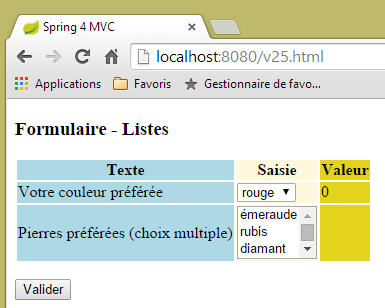 |
generato dal seguente codice HTML:
<!DOCTYPE HTML>

<html>
    <head>
        <title>Spring 4 MVC</title>
        <meta http-equiv="Content-Type" content="text/html; charset=UTF-8" />
        <link rel="stylesheet" href="/css/form19.css" />
    </head>
    <body>

        <h3>Formulaire - Listes</h3>
        <form action="/v26.html" method="post">
            <table>
                <thead>
                    <tr>
                        <th class="col1">Texte</th>
                        <th class="col2">Saisie</th>
                        <th class="col3">Valeur</th>
                    </tr>
                </thead>
                <tbody>
                    <tr>
                        <td class="col1">Votre couleur préférée</td>
                        <td class="col2">
                            <select id="couleur2" name="couleur2">
                                <option value="0" selected="selected">rouge</option>
                                <option value="1">bleu</option>
                                <option value="2">vert</option>
                            </select>
                        </td>
                        <td class="col3">
                            <span>0</span>
                        </td>
                    </tr>
                    <tr>
                        <td class="col1">Pierres préférées (choix multiple)</td>
                        <td class="col2">
                            <select multiple="multiple" size="3" id="bijoux2" name="bijoux2">
                                <option value="0">émeraude</option>
                                <option value="1">rubis</option>
                                <option value="2">diamant</option>
                                <option value="3">opaline</option>
                            </select>
                            <input type="hidden" name="_bijoux2" value="1" />
                        </td>
                        <td class="col3">
                            <span></span>
                        </td>
                    </tr>
                </tbody>
            </table>
            <p>
                <input type="submit" value="Valider" />
            </p>
        </form>
    </body>
</html>
- Riga 44: Si noti che Thymeleaf ha creato un campo nascosto. Non ne capisco lo scopo:
- i valori inviati (attributi value dei tag option) verranno memorizzati nei seguenti campi (attributi name) di [Form21]:
    private int couleur2;
    private int[] bijoux2;
- riga 38: l'elenco [jewelry2] è un elenco a scelta multipla. Pertanto, è possibile pubblicare più valori associati al nome [jewelry2]. Per recuperarli, il campo [jewelry2] deve essere un array. Si noti che si tratta di un array di interi. Ciò è possibile perché i valori pubblicati possono essere convertiti in questo tipo;
I valori vengono inviati alla seguente azione [/v26]:
  @RequestMapping(value = "/v26", method = RequestMethod.POST, produces = "text/html; charset=UTF-8")
  public String v26(@ModelAttribute("form") Form21 formulaire, RedirectAttributes redirectAttributes) throws JsonProcessingException {
    redirectAttributes.addFlashAttribute("form", formulaire);
    formulaire.setStrBijoux2(mapper.writeValueAsString(formulaire.getBijoux2()));
    return "redirect:/v25.html";
}
Non c'è nulla qui che non abbiamo già visto in precedenza. Ecco un esempio di esecuzione:
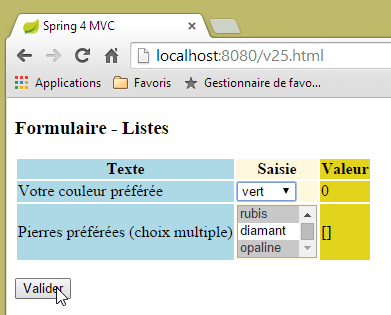 | 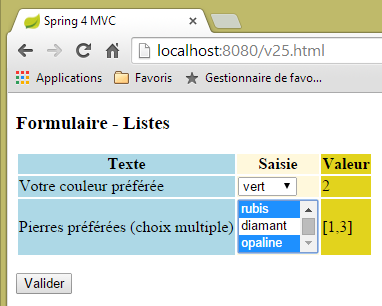 |
5.18. [/v27]: configurazione dei messaggi
Consideriamo la seguente azione [/v27]:
  // ------------------ set messages
  @RequestMapping(value = "/v27", method = RequestMethod.GET, produces = "text/html; charset=UTF-8")
  public String v27(Model model) {
        model.addAttribute("param1","paramètre un");
        model.addAttribute("param2","paramètre deux");
        model.addAttribute("param3","paramètre trois");
        model.addAttribute("param4","messages.param4");
        return "vue-27";
}
L'azione imposta semplicemente quattro valori nel modello e visualizza la seguente vista [view-27.xml]:
<!DOCTYPE html>
<html xmlns:th="http://www.thymeleaf.org">
    <head>
        <title th:text="#{messages.titre}">Spring 4 MVC</title>
        <meta http-equiv="Content-Type" content="text/html; charset=UTF-8" />
    </head>
    <body>
        <h2 th:text="#{messages.titre}">Spring 4 MVC</h2>
        <p th:text="#{messages.msg1(${param1})}"></p>
        <p th:text="#{messages.msg2(${param2},${param3})}"></p>
        <p th:text="#{messages.msg3(#{${param4}})}"></p>
    </body>
</html>
- riga 8: un messaggio senza parametri;
- riga 9: un messaggio con un parametro [$param1] preso dal modello;
- riga 10: un messaggio con due parametri [$param2, $param3] presi dal modello;
- riga 11: un messaggio con un parametro. Questo parametro è esso stesso una chiave di messaggio (indicata da #). La chiave è fornita da [$param4];
Il file dei messaggi in francese è il seguente:
[messages_fr.properties]
messages.titre=Messages paramétrés
messages.msg1=Un message avec un paramètre : {0}
messages.msg2=Un message avec deux paramètres : {0}, {1}
messages.msg3=Un message avec une clé de message comme paramètre : {0}
messages.param4=paramètre quatre
Per indicare la presenza di parametri nel messaggio, utilizziamo i simboli {0}, {1}, ...
Unendo il template creato dall'azione [/v27] con la vista [vue-27] si otterrà il seguente codice HTML:
<!DOCTYPE html>

<html>
    <head>
        <title>Messages paramétrés</title>
        <meta http-equiv="Content-Type" content="text/html; charset=UTF-8" />
    </head>
    <body>
        <h2>Messages paramétrés</h2>
        <p>Un message avec un paramètre : paramètre un</p>
        <p>Un message avec deux paramètre : paramètre deux, paramètre trois</p>
        <p>Un message avec une clé de message comme paramètre : paramètre quatre</p>
    </body>
</html>
che genera la seguente visualizzazione:
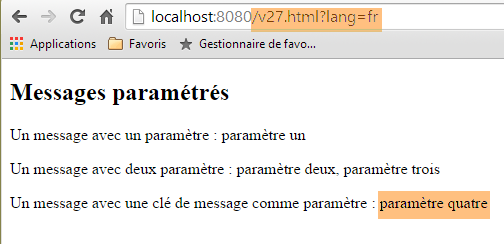 |
Il file dei messaggi in inglese è il seguente:
[messages_fr.properties]
messages.titre=Parameterized messages
messages.msg1=Message with one parameter: {0}
messages.msg2=Message with two parameters: {0}, {1}
messages.msg3=Message with a message key as a parameter: {0}
messages.param4=parameter four
L'unione del modello creato dall'azione [/v27] con la vista [vue-27] produrrà il seguente codice HTML:
<!DOCTYPE html>

<html>
    <head>
        <title>Parameterized messages</title>
        <meta http-equiv="Content-Type" content="text/html; charset=UTF-8" />
    </head>
    <body>
        <h2>Parameterized messages</h2>
        <p>Message with one parameter: paramètre un</p>
        <p>Message with two parameters: paramètre deux, paramètre trois</p>
        <p>Message with a message key as a parameter: parameter four</p>
    </body>
</html>
il che porta alla seguente visualizzazione:
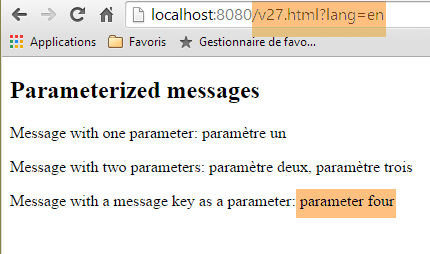 |
Possiamo notare che l'ultimo messaggio è stato completamente internazionalizzato, cosa che non si può dire dei due precedenti.
5.19. Utilizzo di una pagina master
In un'applicazione web, le viste spesso condividono una serie di elementi che possono essere raggruppati in una pagina master. Ecco un esempio:
 |
Sopra, abbiamo due pagine simili in cui il frammento [1] è stato sostituito dal frammento [2]. La vista è quella di una pagina master con tre frammenti fissi [3-5] e un frammento variabile [6].
5.19.1. Il progetto
Stiamo realizzando un progetto [springmvc-masterpage] seguendo l'approccio descritto nella Sezione 5.1.
 |
Il file [pom.xml] è il seguente:
<?xml version="1.0" encoding="UTF-8"?>
<project xmlns="http://maven.apache.org/POM/4.0.0" xmlns:xsi="http://www.w3.org/2001/XMLSchema-instance"
    xsi:schemaLocation="http://maven.apache.org/POM/4.0.0 http://maven.apache.org/xsd/maven-4.0.0.xsd">
    <modelVersion>4.0.0</modelVersion>

    <groupId>istia.st.springmvc</groupId>
    <artifactId>springmvc-masterpage</artifactId>
    <version>0.0.1-SNAPSHOT</version>
    <packaging>jar</packaging>

    <name>springmvc-masterpage</name>
    <description>Page maître</description>

    <parent>
        <groupId>org.springframework.boot</groupId>
        <artifactId>spring-boot-starter-parent</artifactId>
        <version>1.1.9.RELEASE</version>
        <relativePath/> <!-- lookup parent from repository -->
    </parent>

    <dependencies>
        <dependency>
            <groupId>org.springframework.boot</groupId>
            <artifactId>spring-boot-starter-thymeleaf</artifactId>
        </dependency>
        <dependency>
            <groupId>org.springframework.boot</groupId>
            <artifactId>spring-boot-starter-test</artifactId>
            <scope>test</scope>
        </dependency>
    </dependencies>

    <properties>
        <project.build.sourceEncoding>UTF-8</project.build.sourceEncoding>
        <start-class>istia.st.springmvc.main.Main</start-class>
        <java.version>1.7</java.version>
    </properties>

    <build>
        <plugins>
            <plugin>
                <groupId>org.springframework.boot</groupId>
                <artifactId>spring-boot-maven-plugin</artifactId>
            </plugin>
        </plugins>
    </build>

</project>
Una delle dipendenze incluse in questo file è necessaria per la pagina master:
 |
I pacchetti [config] e [main] sono identici a quelli con lo stesso nome nel progetto precedente.
5.19.2. La pagina master
 |
La pagina master è la seguente vista [layout.xml]:
<!DOCTYPE html>
<html xmlns:th="http://www.thymeleaf.org" xmlns:layout="http://www.ultraq.net.nz/thymeleaf/layout">
    <head>
        <title>Layout</title>
        <meta http-equiv="Content-Type" content="text/html; charset=UTF-8" />
    </head>
    <body>
        <table style="width: 400px">
            <tr>
                <td colspan="2" bgcolor="#ccccff">
                    <div th:include="entete" />
                </td>
            </tr>
            <tr style="height: 200px">
                <td bgcolor="#ffcccc">
                    <div th:include="menu" />
                </td>
                <td>
                    <section layout:fragment="contenu">
                        <h2>Contenu</h2>
                    </section>
                </td>
            </tr>
            <tr bgcolor="#ffcc66">
                <td colspan="2">
                    <div th:include="basdepage" />
                </td>
            </tr>
        </table>
    </body>
</html>
- riga 2: la pagina master deve definire lo spazio dei nomi [xmlns:layout="http://www.ultraq.net.nz/thymeleaf/layout"], un cui elemento viene utilizzato alla riga 19;
- righe 10–12: generano l'area [1] sottostante. Il tag Thymeleaf [th:include] consente di includere nella vista corrente un frammento definito in un altro file. Ciò permette di riutilizzare i frammenti in più viste;
- righe 15–17: generano l'area [2] sottostante;
- righe 19–20: generano l'area [3] sottostante. L'attributo [layout:fragment] appartiene allo spazio dei nomi [xmlns:layout="http://www.ultraq.net.nz/thymeleaf/layout"]. Indica un'area che può essere sostituita da un'altra in fase di esecuzione;
- righe 24–28: generano l'area [4] sottostante;
 |
5.19.3. I frammenti
I frammenti [entete.xml], [menu.xml] e [basdepage.xml] sono i seguenti:
[entete.xml]
<!DOCTYPE html>
<html>
    <h2>entête</h2>
</html>
[menu.xml]
<!DOCTYPE html>
<html>
    <h2>menu</h2>
</html>
[footer.xml]
<!DOCTYPE html>
<html>
    <h2>bas de page</h2>
</html>
Il frammento [page1.xml] è il seguente:
<!DOCTYPE html>
<html xmlns:th="http://www.thymeleaf.org" xmlns:layout="http://www.ultraq.net.nz/thymeleaf/layout" layout:decorator="layout">
    <section layout:fragment="contenu">
        <h2>Page 1</h2>
        <form action="/someURL" th:action="@{/page2.html}" method="post">
            <input type="submit" value="Page 2" />
        </form>
    </section>
</html>
- riga 2: l'attributo [layout:decorator="layout"] indica che la pagina corrente [page1.xml] è "decorata", ovvero appartiene a una pagina master. Questo è il valore dell'attributo, in questo caso la vista [layout.xml];
- riga 3: specifica in quale frammento della pagina master [page1.xml] verrà inserito il contenuto. L'attributo [layout:fragment="contenu"] indica che [page1.xml] verrà inserito nel frammento denominato [contenu], ovvero nella zona [3] della pagina master;
- righe 5–7: il contenuto del frammento è un modulo che include un pulsante POST che punta all'azione [/page2.html];
Il frammento [page2.xml] è simile:
<!DOCTYPE html>
<html xmlns:th="http://www.thymeleaf.org" xmlns:layout="http://www.ultraq.net.nz/thymeleaf/layout"
    layout:decorator="layout">
    <section layout:fragment="contenu">
        <h2>Page 2</h2>
        <form action="/someURL" th:action="@{/page1.html}" method="post">
            <input type="submit" value="Page 1" />
        </form>
    </section>
</html>
5.19.4. Le azioni
 |
Il controller [Layout.java] è il seguente:
package istia.st.springmvc.controllers;

import org.springframework.stereotype.Controller;
import org.springframework.web.bind.annotation.RequestMapping;
import org.springframework.web.bind.annotation.RequestMethod;

@Controller
public class Layout {
    @RequestMapping(value = "/page1")
    public String page1() {
        return "page1";
    }

    @RequestMapping(value = "/page2", method=RequestMethod.POST)
    public String page2() {
        return "page2";
    }
}
- righe 10–12: l'azione [/page1] visualizza semplicemente la vista [page1.xml];
- righe 15-17: lo stesso vale per l'azione [/page2], che visualizza la vista [page2.xml];