7. مثال 05B – پیمایش یک فرم ورود داده
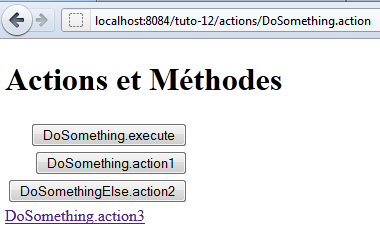
ما در حال بررسی فرمی هستیم که شامل چندین دکمه برای ارسال دادههای واردشده به یک اقدام است.
 |
7.1. پروژه NetBeans
پروژه NetBeans به شرح زیر است:
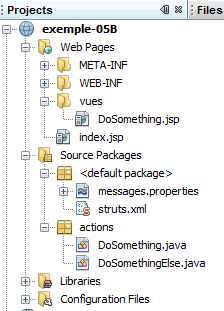 |
اجزای پروژه به شرح زیر است:
- [DoSomething.JSP]: نمای واحد برنامه، که سه دکمه ناوبری و یک پیوند را نمایش میدهد.
- [DoSomething.java] و [DoSomethingElse.java]: دو اکشن در پروژه
- [messages.properties]: فایل پیامهای بینالمللیشده
- [struts.xml]: فایل پیکربندی Struts 2
7.2. Configuration
فایل زیر، [struts.xml]، برنامه را پیکربندی میکند:
<!DOCTYPE struts PUBLIC
"-//Apache Software Foundation//DTD Struts Configuration 2.0//EN"
"http://struts.apache.org/dtds/struts-2.0.dtd">

<struts>
 <constant name="struts.custom.i18n.resources" value="messages" />
 <package name="actions" namespace="/actions" extends="struts-default">
    <action name="DoSomething" class="actions.DoSomething">
      <result name="success">/vues/DoSomething.JSP</result>
    </action>
    <action name="DoSomethingElse" class="actions.DoSomethingElse">
      <result name="success">/vues/DoSomething.JSP</result>
    </action>
  </package>
</struts>
- اقدام [/actions/DoSomething] کلاس [actions.DoSomething] را نمونه سازی میکند و متد execute آن به طور پیشفرض اجرا خواهد شد. این رفتار پیشفرض را میتوان در صورتی که پارامترهای ارسالشده به اکشن [Something] متد متفاوتی را مشخص کنند، بازنویسی کرد. هر متدی که اجرا شود، باید کلید ناوبری success را بازگرداند، زیرا این تنها کلیدی است که تعریف شده است. در این صورت نما [DoSomething.JSP] نمایش داده خواهد شد.
- پیکربندی اقدام [/actions/DoSomethingElse] یکسان است.
7.3. فایل پیام
فایل پیام [messages.properties] به شرح زیر است:
formulaire.titre1=Actions et M\u00e9thodes
formulaire.titre2=Actions et M\u00e9thodes
formulaire.execute=DoSomething.execute
formulaire.action1=DoSomething.action1
formulaire.action2=DoSomethingElse.action2
formulaire.action3=DoSomething.action3
7.4. نما [DoSomething.JSP]
نما [DoSomething.JSP] به شرح زیر است:
|
کد آن به شرح زیر است:
<%@page contentType="text/html" pageEncoding="UTF-8"%>
<%@ taglib prefix="s" uri="/struts-tags" %>
<!DOCTYPE html>
<html>
  <head>
    <meta http-equiv="Content-Type" content="text/html; charset=UTF-8">
    <title><s:text name="formulaire.titre1"/></title>
  </head>
  <body>
    <h1><s:text name="formulaire.titre2"/></h1>
    <s:form action="DoSomething">
      <s:submit key="formulaire.execute"/>
      <s:submit key="formulaire.action1" method="action1"/>
      <s:submit key="formulaire.action2" action="DoSomethingElse" method="action2"/>
    </s:form>
    <s:url id="URL" action="DoSomething" method="action3"/>
    <s:a href="%{URL}"><s:text name="formulaire.action3"/></s:a>
  </body>
</html>
- خط ۱۱: فرم به اکشن [DoSomething] ارسال خواهد شد. این لزوماً به این معنا نیست که این همان اکشنی است که اجرا خواهد شد. این موضوع به دکمهی submit که برای POST استفاده میشود، بستگی دارد.
- خط ۱۲: دکمه submit نه اکشن و نه متدی را مشخص نمیکند. اکشن [DoSomething] که توسط تگ <form> مشخص شده است، آن چیزی است که instantiate میشود. روش اجرا شده همان روشی است که در فایل [struts.xml] تعریف شده است، یعنی روش execute.
- خط ۱۳: دکمه submit یک متد را مشخص میکند. این اقدام [DoSomething] است که توسط تگ <form> مشخص شده و نمونه آن ایجاد میشود. متد اجرا شده، متد action1 خواهد بود.
- خط 14: دکمه submit یک اکشن و یک متد را مشخص میکند. اکشن [DoSomethingElse] نمونه سازی خواهد شد. متد اجرا شده action2 خواهد بود.
- خطوط ۱۶–۱۷: یک لینک به اکشن [DoSomething] و متد action3. اکشن [DoSomething] نمونه سازی خواهد شد و متد آن action3 اجرا خواهد شد. برخلاف دکمههای submit، کلیک روی لینک باعث اجرای POST نمیشود، بلکه GET را اجرا میکند. بنابراین، هیچ پارامترهایی ارسال نمیشوند.
کد HTML تولید شده توسط این کد، هنگامی که URL [http://localhost:8084/exemple-05B/actions/DoSomething.action] درخواست میشود، به شرح زیر است:
- خط ۹: تگ form در فرم HTML. ویژگی action مشخص میکند که پارامترهای فرم به کدام URL ارسال شوند. این URL با اقدام [DoSomething] مطابقت دارد.
- خطوط 11، 13، 15: ویژگیهای name دکمهها به اکشن هدف دکمه submit ارسال میشوند. این همان چیزی است که به Struts امکان میدهد تا تعیین کند کدام اکشن را نمونهسازی کرده و کدام متد را اجرا کند.
- خط ۱۳: ویژگی name=method:action1 مشخص میکند که متد DoSomething.action1 باید اجرا شود.
- خط ۱۵: ویژگی `name= action:DoSomethingElse!action2` مشخص میکند که متد `DoSomethingElse.action2` باید اجرا شود.
- خط ۱۱: ویژگی name= formulaire.execute هیچ اقدام یا متدی را مشخص نمیکند. بنابراین متد DoSomething.execute اجرا خواهد شد.
- خط ۱۹: لینک صراحتاً درخواست میکند که متد `DoSomething.action3` اجرا شود
7.5. اقدامات
عمل [DoSomething] به شرح زیر است:
package actions;

import com.opensymphony.xwork2.ActionSupport;

public class DoSomething extends ActionSupport {

  public DoSomething() {
    System.out.println("DoSomething");
  }

  @Override
  public String execute() {
    System.out.println("DoSomething.execute");
    return SUCCESS;
  }

  public String action1() {
    System.out.println("DoSomething.action1");
    return SUCCESS;
  }

  public String action3() {
    System.out.println("DoSomething.action3");
    return SUCCESS;
  }
}
- متدهای execute، action1 و action3 به کنسول وبسرور مینویسند و کلید ناوبری success را بازمیگردانند.
- خط ۸: سازنده همچنین به کنسول وبسرور مینویسد
پیامهای مختلف خروجی کنسول به شما امکان میدهند تشخیص دهید کدام متدها در طول یک درخواست اجرا میشوند.
عمل [DoSomethingElse] به روشی مشابه عمل میکند:
package actions;

import com.opensymphony.xwork2.ActionSupport;

public class DoSomethingElse extends ActionSupport {

  public DoSomethingElse() {
    System.out.println("DoSomethingElse");
  }

  @Override
  public String execute() {
    System.out.println("DoSomethingElse.execute");
    return SUCCESS;
  }

  public String action2() {
    System.out.println("DoSomethingElse.action2");
    return SUCCESS;
  }
}
7.6. آزمونها
تستها نتایج زیر را نشان میدهند (در کنسول وبسرور):
- وقتی دکمه [DoSomething.execute] کلیک میشود، اکشن [DoSomething] نمونهسازی شده و متد execute آن اجرا میشود.
- وقتی دکمه [DoSomething.action1] کلیک میشود، اکشن [DoSomething] نمونه سازی شده و متد action1 آن اجرا میشود.
- وقتی دکمه [DoSomethingElse.action2] کلیک میشود، اکشن [DoSomethingElse] ایجاد شده و متد action2 آن اجرا میشود.
- وقتی لینک [DoSomething.action3] کلیک میشود، اکشن [DoSomething] ایجاد شده و متد action3 آن اجرا میشود.