9. PHP Funciones de red
Ahora hablaremos de las funciones de red de PHP, que nos permiten realizar programación TCP/IP (Protocolo de Control de Transmisión/Protocolo de Internet).
9.1. Recuperar el nombre o la dirección IP de una máquina en Internet (inet_01)
1. <?php
2.
3. // Machine name <--> machine IP address functions
4. ini_set("display_errors", "off");
5. // constants
6. $HOSTS = array("istia.univ-angers.fr", "www.univ-angers.fr", "www.ibm.com", "localhost", "", "xx");
7. // IP addresses of the machines in $HOTES
8. for ($i = 0; $i < count($HOTES); $i++) {
9.   getIPandName($HOTES[$i]);
10. }
11. // end
12. exit;
13.
14. //------------------------------------------------
15. function getIPandName($machineName) {
16. //$machineName: name of the machine whose IP address is wanted
17. // machineName --> IP address
18.   $ip = gethostbyname($machineName);
19.   if ($ip != $machineName) {
20.     print "ip[$machineName]=$ip\n";
21. // IP address --> machineName
22.     $name = gethostbyaddr($ip);
23.     if ($name != $ip) {
24.       print "name[$ip]=$name\n";
25.     } else {
26.       print "Error, machine[$ip] not found\n";
27.     }
28.   } else {
29.     print "Error, machine[$machineName] not found\n";
30.   }
31. }
Resultados:
ip[istia.univ-angers.fr]=193.49.146.171
name[193.49.146.171]=istia.istia.univ-angers.fr
ip[www.univ-angers.fr]=193.49.144.40
name[193.49.144.40]=ametys-fo.univ-angers.fr
ip[www.ibm.com]=129.42.56.216
Error, machine[129.42.56.216] not found
ip[localhost]=127.0.0.1
name[127.0.0.1]=localhost127.0.0.1
ip[]=192.168.1.11
name[192.168.1.11]=st-PC.home
Error, machine [xx] not found
Comentarios
- Línea 4: Ordenamos al sistema que no muestre errores de ejecución.
las funciones de red de PHP se utilizan en el getIpandName en la línea 15.
- Línea 18: El gethostbyname($nombre) recupera la dirección IP "ip3.ip2.ip1.ip0" de la máquina denominada $nombre. Si la máquina $nombre no existe, la función devuelve $nombre como resultado.
- Línea 22: El gethostbyaddr($ip) recupera el nombre de host de la máquina con la dirección IP $ip en el formato "ip3.ip2.ip1.ip0". Si la máquina $ip no existe, la función devuelve $ip como resultado.
9.2. Un cliente web ( inet_02)
Un script para recuperar el contenido de la página índice de un sitio web.
1. <?php
2.
3. // error handling
4. ini_set("display_errors","off");
5. // retrieve the HTML text from the URL
6. // list of websites
7. $SITES = array("istia.univ-angers.fr", "www.univ-angers.fr", "www.ibm.com", "xx");
8. // read the index pages of the sites in the $SITES array
9. for ($i = 0; $i < count($SITES); $i++) {
10. // read the index page of the site $SITES[$i]
11.   $result = getIndex($SITES[$i]);
12. // display result
13.   print "$result\n";
14. }//for
15. // end
16. exit;
17.
18. //-----------------------------------------------------------------------
19. function getIndex($site) {
20. // reads the URL $site/ and stores it in the file $site.html
21. // create the $site.html file
22.   $html = fopen("$site.html", "w");
23.   if (!$html)
24.     return "Error creating the $site.html file";
25.
26. // Open a connection on port 80 of $site
27.   $connection = fsockopen($site, 80);
28. // return if error
29.   if (!$connection)
30.     return "Failed to connect to the site ($site,80): $error";
31. // $connection represents a bidirectional communication stream
32. // between the client (this program) and the contacted web server
33. // this channel is used for exchanging commands and information
34. // The communication protocol is HTTP
35. // the client sends the GET request to retrieve the URL /
36. // get URL syntax: HTTP/1.0
37. // HTTP protocol headers must end with a blank line
38.   fputs($connection, "GET / HTTP/1.0\n\n");
39. // The server will now respond on the $connexion channel. It will send all
40. // this data and then close the channel. The client therefore reads everything coming from $connexion
41. // until the channel is closed
42.   while ($line = fgets($connection, 1000))
43.     fputs($html, $line);
44. // The client closes the connection in turn
45.   fclose($connection);
46. // close the $html file
47.   fclose($html);
48. // return
49.   return "Successful transfer of the index page of the $site website";
50. }
Resultados: por ejemplo, el fichero recibido para el sitio [www.ibm.com]:
1. HTTP/1.1 302 Found
2. Date: Wed, 08 Jun 2011 15:43:56 GMT
3. Server: IBM_HTTP_Server
4. Content-Type: text/html
5. Expires: Fri, 01 Jan 1990 00:00:00 GMT
6. Pragma: no-cache
7. Cache-Control: no-cache, must-revalidate
8. Location: http://www.ibm.com/us/en/
9. Content-Length: 209
10. Kp-eeAlive: timeout=10, max=14
11. Connection: Keep-Alive
12.
13. <!DOCTYPE HTML PUBLIC "-//IETF//DTD HTML 2.0//EN">
14. <html><head>
15. <title>302 Found</title>
16. </head><body>
17. <h1>Found</h1>
18. <p>The document has moved <a href="http://www.ibm.com/us/en/">here</a>.</p>
19. </body></html>
- Las líneas 1-11 son las cabeceras HTTP de la respuesta del servidor
- línea 1: el servidor indica al cliente que redirija al URL especificado en la línea 8
- línea 2: fecha y hora de la respuesta
- línea 3: identidad del servidor web
- Línea 4: Contenido enviado por el servidor. Aquí, una página HTML que comienza en la línea 13
- Línea 12: La línea vacía que finaliza las cabeceras HTTP
- Líneas 13-19: La página HTML enviada por el servidor web.
Comentarios sobre el código:
- línea 7: la lista de URLs de los sitios web cuyas páginas índice queremos. Estos se almacenarán en el archivo de texto [sitename.html].
- Línea 11: El getIndex hace el trabajo
- línea 19: el getIndex($sitio) descarga la página raíz (o página índice) de la página sitio y lo almacena en el archivo de texto $site.html.
- línea 27: el fsockopen($sitio,$puerto) crea una conexión con un servicio TCP/IP que se ejecuta en el puerto $puerto de la sitio máquina. Una vez abierta la conexión cliente/servidor, muchos servicios TCP/IP intercambian líneas de texto. Es el caso del HTTP (Protocolo de transferencia HyperText). El flujo de datos del servidor al cliente puede tratarse como un archivo de texto. Lo mismo ocurre con el flujo de datos del cliente al servidor.
- Línea 38: El fputs permite al cliente enviar datos al servidor. Aquí, la línea de texto enviada tiene el siguiente significado: "Quiero (GET) la página raíz (/) del sitio web al que estoy conectado. Estoy utilizando HTTP versión 1.0" La versión actual de este protocolo es la 1.1.
- Línea 42: Las líneas de texto de la respuesta del servidor pueden leerse línea por línea utilizando una etiqueta mientras que y se guarda en el archivo de texto [$site.html]. Una vez que el servidor web ha enviado la página solicitada, cierra su conexión con el cliente. En el lado del cliente, esto se detectará como fin de archivo.
9.3. Un cliente SMTP (inet_03)
Entre los protocolos TCP/IP, SMTP (Simple Mail Transfer Protocol) es el protocolo de comunicación para el servicio de entrega de correo.
Notas:
- En una máquina Windows con software antivirus, es probable que el antivirus impida que el script PHP se conecte al puerto 25 de un servidor SMTP. Por lo tanto, debe desactivar el antivirus. Para McAfee, por ejemplo, puede hacer lo siguiente:
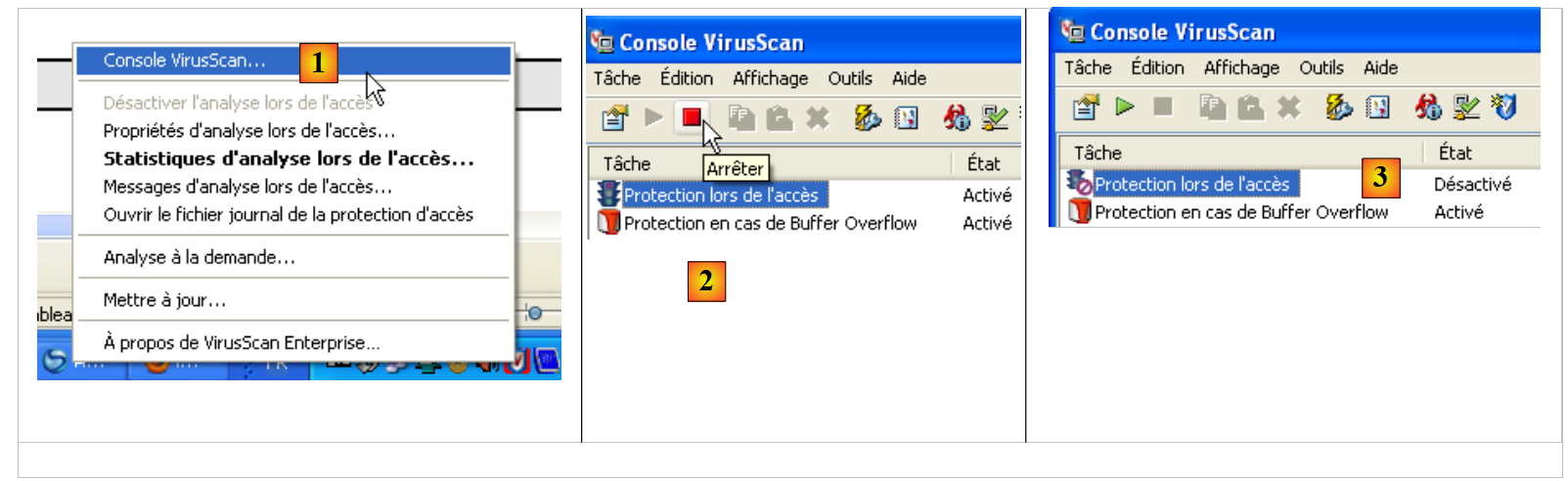 |
- En [1], abra la consola VirusScan
- En [2], detenga el servicio [On-Access Protection]
- en [3], se detiene
El guión:
1. <?php
2.
3. // SMTP (Simple Mail Transfer Protocol) client for sending a message
4. // the information is taken from a file named $INFOS containing the following lines
5. // line 1: smtp, sender, recipient
6. // subsequent lines: the message text
7. // sender: sender's email
8. // recipient: recipient's email
9. // smtp: name of the SMTP server to use
10. // SMTP client-server communication protocol
11. // -> client connects to port 25 of the SMTP server
12. // <- server sends a welcome message
13. // -> client sends the EHLO command: its hostname
14. // <- server responds with OK or not
15. // -> client sends the mail from command: <sender>
16. // <- server responds with OK or not
17. // -> client sends the rcpt to command: <recipient>
18. // <- server responds OK or not
19. // -> client sends the data command
20. // <- server responds OK or not
21. // -> client sends all lines of its message and ends with a line containing the
22. // single character .
23. // <- server responds OK or not
24. // -> client sends the quit command
25. // <- server responds OK or not
26. // Server responses are in the form xxx text, where xxx is a 3-digit number. Any number xxx >=500
27. // indicates an error. The response may contain multiple lines, all starting with xxx except the last one
28. // in the form xxx(space)
29. // exchanged text lines must end with the characters RC(#13) and LF(#10)
30.
31. // data
32. $INFOS = "mail.txt"; // email sending parameters
33. // retrieve the email parameters
34. list($error, $smtpServer, $sender, $recipient, $message) = getInfo($INFO);
35. // error?
36. if ($error) {
37.   print "$error\n";
38.   exit;
39. }
40. print "Sending message [$smtpServer,$sender,$recipient]\n";
41. // send email in verbose mode
42. $result = sendmail($smtpServer, $sender, $recipient, $message, 1);
43. print "Result of sending: $result\n";
44. // end
45. exit;
46.
47. //-----------------------------------------------------------------------
48. function getInfo($file) {
49. // returns the information ($smtp, $sender, $recipient, $message) from the text file $file
50. // line 1: smtp, sender, recipient
51. // following lines: the message text
52.
53. // open $file
54.   $info = fopen($file, "r");
55. // does the file $file exist
56.   if (!$info)
57.     return array("The file $file could not be opened for reading");
58. // read the first line
59.   $line = fgets($info, 1000);
60. // Remove the end-of-line character
61.   $line = cutNewLineChar($line);
62. // retrieve the smtp, sender, and recipient fields
63.   $fields = explode(",", $line);
64. // Do we have the correct number of fields?
65.   if (count($fields) != 3)
66.     return "Line 1 of the file $file (SMTP server, sender, recipient) has an
67. incorrect number of fields";
68. // "Processing" the retrieved information
69.   for ($i = 0; $i < count($fields); $i++)
70.     $fields[$i] = trim($fields[$i]);
71. // retrieve the fields
72.   list($smtpServer, $sender, $recipient) = $fields;
73. // read message
74.   $message = "";
75.   while ($line = fgets($info, 1000))
76.     $message.=$line;
77.   fclose($info);
78. // return
79.   return array("", $smtpServer, $sender, $recipient, $message);
80. }
81.
82. //-----------------------------------------------------------------------
83.
84. function sendmail($smtpServer, $sender, $recipient, $message, $verbose) {
85. // sends $message to the $smtpServer SMTP server on behalf of $sender
86. // to $recipient. If $verbose=1, logs client-server exchanges
87. // retrieve the client's name
88.   $client = gethostbyaddr(gethostbyname(""));
89. // Open a connection on port 25 of $smtpServer
90.   $connection = fsockopen($smtpServer, 25);
91. // return if error
92.   if (!$connection)
93.     return "Failed to connect to the server ($smtpServer,25)";
94. // $connection represents a bidirectional communication channel
95. // between the client (this program) and the contacted SMTP server
96. // this channel is used for exchanging commands and information
97.
98. // After the connection, the server sends a welcome message that we read
99.   $error = sendCommand($connection, "", $verbose, 1);
100.   if ($error) {
101.     fclose($connection);
102.     return $error;
103.   }
104.
105. // "hello" command:
106.   $error = sendCommand($connection, "EHLO $client", $verbose, 1);
107.   if ($error) {
108.     fclose($connection);
109.     return $error;
110.   }
111.
112. // mail command from:
113.   $error = sendCommand($connection, "MAIL FROM: <$sender>", $verbose, 1);
114.   if ($error) {
115.     fclose($connection);
116.     return $error;
117.   }
118.
119. // RCPT TO command:
120.   $error = sendCommand($connection, "RCPT TO: <$recipient>", $verbose, 1);
121.   if ($error) {
122.     fclose($connection);
123.     return $error;
124.   }
125.
126. // data command
127.   $error = sendCommand($connection, "DATA", $verbose, 1);
128.   if ($error) {
129.     fclose($connection);
130.     return $error;
131.   }
132.
133. // prepare message to send
134.   // it must contain the following lines
135.   // From: sender
136.   // To: recipient
137.   // blank line
138.   // Message
139.   // .
140.   $data = "From: $sender\r\nTo: $recipient\r\n$message\r\n.\r\n";
141.   $error = sendCommand($connection, $data, $verbose, 0);
142.   if ($error) {
143.     fclose($connection);
144.     return $error;
145.   }
146.
147. // quit command
148.   $error = sendCommand($connection, "QUIT", $verbose, 1);
149.   if ($error) {
150.     fclose($connection);
151.     return $error;
152.   }
153.
154. // end
155.   fclose($connection);
156.   return "Message sent";
157. }
158.
159. // --------------------------------------------------------------------------
160.
161. function sendCommand($connection, $command, $verbose, $withRCLF) {
162. // sends $command to the $connection channel
163. // verbose mode if $verbose=1
164. // if $withRCLF=1, add the RCLF sequence to the exchange
165.
166. // data
167.   if ($withRCLF)
168.     $RCLF = "\r\n"; else
169.     $RCLF="";
170.
171. // send command if $command is not empty
172.   if ($command) {
173.     fputs($connection, "$command$RCLF");
174.
175. // print message if applicable
176.     if ($verbose)
177.       display($command, 1);
178.   }//if
179.
180. // read response
181.   $response = fgets($connection, 1000);
182.
183. // print if necessary
184.   if ($verbose)
185.     display($response, 2);
186.
187. // retrieve error code
188.   $errorCode = substr($response, 0, 3);
189.
190. // last line of the response?
191.   while (substr($response, 3, 1) == "-") {
192.
193.     // read response
194.     $response = fgets($connection, 1000);
195.
196.     // print if necessary
197.     if ($verbose)
198.       print($response, 2);
199.   }//while
200. // response completed
201.
202. // Error returned by the server?
203.   if ($errorCode >= 500)
204.     return substr($response, 4);
205.
206. // return without error
207.   return "";
208. }
209.
210. // --------------------------------------------------------------------------
211.
212. function display($exchange, $direction) {
213. // display $exchange on the screen
214. // if $direction=1, display -->$exchange
215. // if $direction=2, display <-- $exchange without the last 2 RCLF characters
216.   switch ($direction) {
217.     case 1:
218.       print "--> [$exchange]\n";
219.       return;
220.     case 2:
221.       $L = strlen($exchange);
222.       print "<-- [" . substr($exchange, 0, $L - 2) . "]\n";
223.       return;
224.   }//switch
225. }
226.
227. // --------------------------------------------------------------------------
228.
229. function cutNewLinechar($line) {
230. // remove the end-of-line character from $line if it exists
231.   ...
232. }
En infos.txt archivo:
1. smtp.orange.fr, serge.tahe@univ-angers.fr, serge.tahe@istia.univ-angers.fr
2. Subject: test
3.
4. line1
5. line2
6.
7. line3
- línea 1: [smtp.orange.fr] el servidor utilizado para enviar el correo electrónico, [serge.tahe@univ-angers.fr] la dirección del remitente, [serge.tahe@istia.univ-angers.fr] la dirección del destinatario
- línea 2: cabeceras del mensaje. Aquí sólo hay una, el asunto del mensaje.
- línea 3: la línea en blanco termina las cabeceras del mensaje
- líneas 4-7: el cuerpo del mensaje
Pantalla resultados:
1. Sending message [smtp.orange.fr,serge.tahe@univ-angers.fr,serge.tahe@univ-angers.fr]
2. <-- [220 mwinf5d05 ME ESMTP server ready]
3. --> [EHLO st-PC.home]
4. <-- [250-mwinf5d05 hello [2.1.22.82], pleased to meet you]
5. <-- [250-HELP]
6. <-- [250-AUTH LOGIN PLAIN]
7. <-- [250-SIZE 44000000]
8. <-- [250-ENHANCEDSTATUSCODES]
9. <-- [250-8BITMIME]
10. <-- [250 OK]
11. --> [MAIL FROM: <serge.tahe@univ-angers.fr>]
12. <-- [250 2.1.0 <serge.tahe@univ-angers.fr> sender ok]
13. --> [RCPT TO: <serge.tahe@univ-angers.fr>]
14. <-- [250 2.1.5 <serge.tahe@univ-angers.fr> recipient ok]
15. --> [DATA]
16. <-- [354 enter mail, end with "." on a line by itself]
17. --> [From: serge.tahe@univ-angers.fr
18. To: serge.tahe@univ-angers.fr
19. Subject: test
20.
21. line1
22. line2
23. line3
24. .
25. ]
26. <-- [250 2.0.0 Ag3i1h0051mFoG203g3ip1 mail accepted for delivery]
27. --> [QUIT]
28. <-- [221 2.0.0 mwinf5d05 ME closing connection]
29. Send result: Message sent
- línea 1: mensaje de seguimiento de la ejecución del script
- línea 2: primera respuesta del servidor SMTP. Sigue a la conexión del cliente al puerto 25 del servidor SMTP. Las respuestas del servidor son líneas con la forma [xxx mensaje] o [xxx-mensaje]. La primera sintaxis indica que la respuesta está completa. xxx es un código de estado. Un valor mayor o igual a 500 indica un error. La segunda sintaxis indica que la respuesta no está completa y que seguirá otra línea.
- Línea 2: El servidor SMTP indica que está listo para recibir órdenes
- línea 3: el cliente envía el comando [EHLO machineName], donde machineName es el nombre de host de la máquina en la que se ejecuta el cliente
- Líneas 4-10: Respuesta del servidor SMTP
- línea 11: el cliente envía el comando [MAIL FROM: <remitente>], que especifica la dirección de correo electrónico del remitente.
- Línea 12: El servidor SMTP indica que acepta esta dirección. Podría haberla rechazado si la sintaxis hubiera sido incorrecta. Dicho esto, no verifica que la dirección de correo electrónico exista realmente.
- línea 13: el cliente envía el comando [RCPT TO: <receptor>], que especifica la dirección de correo electrónico del destinatario del mensaje.
- Línea 14: El servidor SMTP responde que acepta esta dirección. De nuevo, se realiza una comprobación sintáctica.
- Línea 15: El cliente envía el comando [DATA], que indica al usuario que las líneas que siguen son el cuerpo del mensaje.
- Línea 16: El servidor responde que el mensaje puede ser enviado. El mensaje es una secuencia de líneas de texto que debe terminar con una línea de un solo carácter: un punto.
- Líneas 17-25: El mensaje enviado por el cliente
- Líneas 17-19: Las cabeceras del mensaje [De:, Para:, Asunto:] indican el remitente, el destinatario y el asunto del mensaje, respectivamente.
- Línea 20: Una línea vacía que indica el final de las cabeceras
- Líneas 21-23: el cuerpo del mensaje
- línea 24: la línea formada por un solo punto que señala el final del mensaje.
- Línea 26: El servidor SMTP responde que acepta el mensaje
- línea 27: el cliente envía el comando [QUIT] para indicar que ha terminado
- Línea 28: El servidor SMTP responde que cerrará la conexión con el cliente
Código Comentarios
No entraremos en muchos detalles sobre el código del script, ya que ha sido ampliamente comentado.
- Líneas 48-80: Función que procesa el fichero [infos.txt], que contiene el mensaje a enviar junto con la información necesaria para enviarlo. Devuelve un array ($error, $smtpServer, $sender, $recipient, $message) con:
- $error: un posible mensaje de error; vacío en caso contrario.
- $smtpServer: el nombre del servidor SMTP al que conectarse
- remitente: la dirección de correo electrónico del remitente
- $receptor: la dirección de correo electrónico del destinatario
- mensaje: el mensaje que se va a enviar. Además del cuerpo del mensaje, puede haber cabeceras.
- líneas 84-157: el sendMail se encarga de enviar el mensaje. Sus parámetros son los siguientes:
- $smtpServer: el nombre del servidor SMTP al que conectarse
- remitente: la dirección de correo electrónico del remitente
- $receptor: la dirección de correo electrónico del destinatario
- mensaje: el mensaje a enviar.
- $verbose: 1 indica que la comunicación con el servidor SMTP debe registrarse en la consola.
En sendMail devuelve un mensaje de error; devuelve una cadena vacía si no hubo errores.
- Línea 88: recupera el nombre de Windows de un ordenador que ejecuta el OS de Windows.
- línea 99: hemos visto que el diálogo cliente/servidor sigue este patrón:
- el cliente envía un comando en una sola línea
- respuesta del servidor en una o varias líneas
- Líneas 161-208: La `sendCommand` acepta los siguientes parámetros:
- $connection: el canal TCP/IP que conecta el cliente con el servidor
- $command: el comando que se enviará por este canal. Se leerá la respuesta del servidor a este comando.
- $verbose: establecido a 1 indica que los intercambios con el servidor SMTP deben mostrarse en la consola.
- $withRCLF: el valor 1 indica que debe añadirse el marcador de fin de línea "\r\n" al final del comando
- línea 173: el cliente envía el comando
- línea 181: lectura de la primera línea de la respuesta del servidor SMTP en la forma xxx texto o xxx-texto. Este último caso indica que el servidor tiene otra línea que enviar. xxx es el código de error enviado por el servidor.
- línea 188 - recuperación del código de error de la respuesta
- líneas 191-199: lectura de las demás líneas de la respuesta
- líneas 203-204: si el código de error es >=500, entonces el servidor SMTP está informando de un error.
9.4. Un segundo programa para enviar correo electrónico (inet_04)
Este script tiene la misma funcionalidad que el anterior: enviar un correo electrónico. Para ello utilizamos módulos de la librería PEAR. Esta librería contiene docenas de módulos que cubren varios campos. Usaremos los siguientes:
- Net/SMTP: un módulo de comunicación con un servidor SMTP
- Correo: un módulo para gestionar el envío de correo electrónico mediante diversos protocolos.
- Correo/Mime: un módulo para crear un mensaje que puede incluir documentos adjuntos.
Para utilizar estos módulos, primero debe instalarlos en la máquina que ejecuta el script PHP. Instalación de los módulos WampServer instala un intérprete PHP. Dentro de su estructura de directorios, puede instalar módulos PEAR.
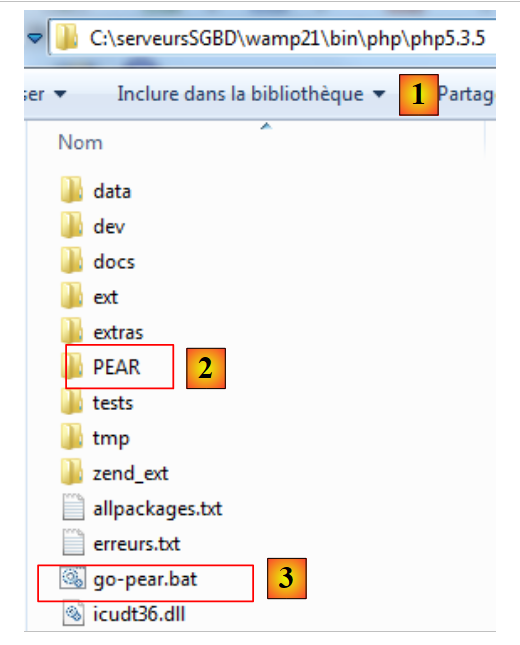 |
- en [1], el directorio de instalación del intérprete PHP
- en [2], la carpeta PEAR que contendrá los módulos PEAR a instalar
- [3] es el archivo por lotes [go-pear.bat] que inicializa la biblioteca PEAR
Para inicializar la biblioteca PEAR, abra una ventana DOS y ejecute el archivo [go-pear.bat]. Este script se conectará al sitio web de la biblioteca PEAR. Por lo tanto, se requiere una conexión a Internet.
Una vez conectado al sitio web de la biblioteca PEAR, el script descargará una serie de elementos. Entre ellos se encuentra un nuevo script [pear.bat]. Utilizaremos este script para instalar los distintos módulos PEAR que necesitamos. Este script se llama con argumentos. Entre ellos, el argumento [help] proporciona una lista de comandos aceptados por el script:
C:\DBServers\wamp21\bin\PHP\php5.3.5>pear help
Commands:
build                  Build an Extension From C Source
bundle                 Unpacks a Pecl Package
channel-add            Add a Channel
channel-alias          Specify an alias for a channel name
channel-delete         Remove a Channel From the List
channel-discover       Initialize a Channel from its server
channel-info           Retrieve information about a channel
channel-login          Connects to and authenticates with the remote channel server
channel-logout         Logs out from the remote channel server
channel-update         Update an existing channel
clear-cache            Clear Web Services Cache
config-create          Create a default configuration file
config-get             Show a single setting
config-help            Show Information About a Setting
config-set             Change a setting
config-show            Show All Settings
convert                Convert a package.xml 1.0 file to the package.xml 2.0 format
cvsdiff                Run a "cvs diff" for all files in a package
cvstag                 Set CVS Release Tag
download               Download Package
download-all           Downloads each available package from the default channel

info                   Display information about a package
install                Install Package
list                   List installed packages in the default channel
list-all               List all packages
list-channels          List available channels
list-files             List files in installed package
list-upgrades          List available upgrades
login                  Connects and authenticates to remote server [Deprecated in
favor of channel-login]
logout                 Logs out from the remote server [Deprecated in favor of c
hannel-logout]
makerpm                Builds an RPM spec file from a PEAR package
package                Build Package
package-dependencies   Show package dependencies
package-validate       Validate Package Consistency
pickle                 Build PECL Package
remote-info            Information About Remote Packages
remote-list            List Remote Packages
run-scripts            Run post-install scripts bundled with a package
run-tests              Run Regression Tests
search                 Search remote package database
shell-test             Shell Script Test
sign                   Sign a package distribution file
svntag                 Set SVN Release Tag
uninstall              Uninstall Package
update-channels        Update the Channel List
upgrade                Upgrade Package
upgrade-all            Upgrade All Packages [Deprecated in favor of calling upgr
with no parameters]
Usage: pear [options] command [command-options] <parameters>
Type "pear help options" to list all options.
Type "pear help shortcuts" to list all command shortcuts.
Type "pear help <command>" to get help for the specified command.
El comando [install] se utiliza para instalar módulos PEAR. Puede obtener ayuda sobre el comando [install]:
C:\DBServers\wamp21\bin\PHP\php5.3.5>pear help install
pear install [options] [channel/]<package> ...
Installs one or more PEAR packages. You can specify a package to install in four ways:

"Package-1.0.tgz": installs from a local file

"http://example.com/Package-1.0.tgz": installs from anywhere on the net.

"package.xml": installs the package described in package.xml. Useful for testing, or for wrapping a PEAR package in another package manager such as RPM.

"Package[-version/state][.tar]": queries your default channel's server (pear.php.net) and downloads the newest package with the preferred quality/state (stable).

To retrieve Package version 1.1, use "Package-1.1"; to retrieve Package state beta, use "Package-beta." To retrieve an uncompressed file, append .tar (make sure there is no file with the same name first)

To download a package from another channel, prefix the package name with the channel name, like "channel/Package"

You can specify more than one package at a time. It is okay to mix these four ways of specifying packages.

Options:
  -f, --force
        will overwrite newer installed packages
  -l, --loose
        do not check for recommended dependency versions
  -n, --nodeps
        ignore dependencies, install anyway
  -r, --register-only
        do not install files, only register the package as installed
  -s, --soft
        soft install, fail silently, or upgrade if already installed
  -B, --nobuild
        do not build C extensions
  -Z, --nocompress
        request uncompressed files when downloading
  -R DIR, --installroot=DIR
        root directory used when installing files (similar to PHP's INSTALL_ROOT), use packagingroot for RPM
  -P DIR, --packagingroot=DIR
        root directory used when packaging files, like RPM packaging
  --ignore-errors
        force installation even if errors occurred
  -a, --alldeps
        install all required and optional dependencies
  -o, --onlyreqdeps
        install all required dependencies
  -O, --offline
        do not attempt to download any URLs or contact channels
  -p, --pretend
        Only list the packages that would be downloaded
Los módulos PEAR a instalar son: [Correo], [Mail_Mime], [Net_SMTP]. En la ventana de símbolo del sistema, introduzca los siguientes comandos uno tras otro:
<PHP_installDir>pear install Mail
...
<PHP_installDir>pear install Mail_Mime
…
<PHP_installDir>pear install Net_SMTP
…
donde <PHP_installDir> es el directorio de instalación del intérprete PHP (C:\serveursSGBD\wamp21\binPHP\php5.3.5 en este ejemplo)
Puede ver los módulos instalados:
C:\DBServers\wamp21\bin\PHP\php5.3.5>pear list
INSTALLED PACKAGES, CHANNEL PEAR.php.NET:
=========================================
PACKAGE          VERSION STATE
Archive_Tar      1.3.7   stable
Console_Getopt   1.3.1   stable
Mail             1.2.0   stable
Mail_Mime        1.8.1   stable
Net_SMTP         1.6.0   stable
Net_Socket       1.0.10 stable
PEAR             1.9.4   stable
PHPUnit          1.3.2   stable
Structures_Graph 1.0.4   stable
XML_Util         1.2.1   stable
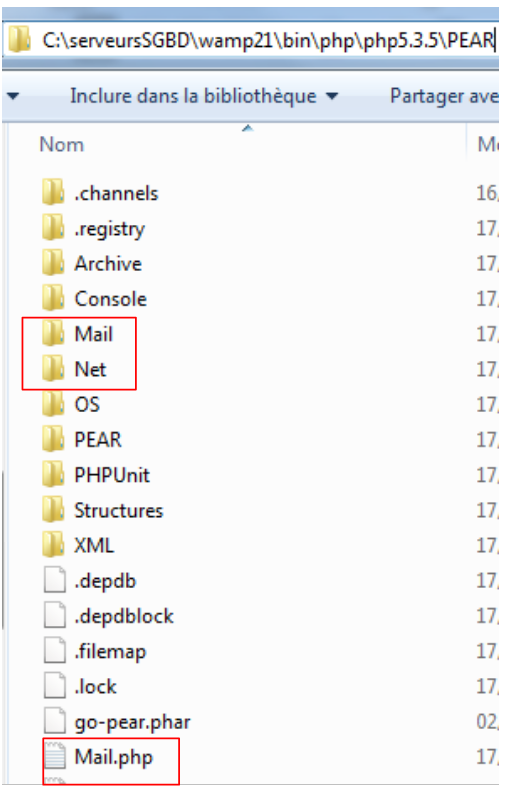
Los módulos se instalan en la carpeta <PHP_installDir>/PEAR:
 |
Con los módulos PEAR instalados, el script PHP para enviar correo electrónico tiene el siguiente aspecto:
1. <?php
2.
3. // error handling
4. ini_set("display_errors", "off");
5. // modules
6. ini_set("include_path", ".;C:\serveursSGBD\wamp21\bin\PHP\php5.3.5\PEAR");
7. require_once "Mail.php";
8. require_once "Mail/Mime.php";
9. require_once "Net/SMTP.php";
10.
11.
12. // SMTP (Simple Mail Transfer Protocol) client for sending messages
13. // the information is taken from a file named $INFOS containing the following lines
14. // line 1: smtp, sender, recipient, attachment
15. // subsequent lines: the message text
16. // sender: sender's email
17. // recipient: recipient's email
18. // smtp: name of the SMTP server to use
19. // attachment: name of the document to attach
20. //
21. // data
22. $INFOS = "mail2.txt"; // email sending parameters
23. // retrieve the email parameters
24. list($error, $smtpServer, $sender, $recipient, $message, $subject, $attachment) = getInfos($INFOS);
25. // error?
26. if ($error) {
27.   print "$error\n";
28.   exit;
29. }
30. print "Sending message [$smtpServer,$sender,$recipient,$subject, $attachment]\n";
31. // send email in verbose mode
32. $result = sendmail($smtpServer, $sender, $recipient, $message, $subject, $attachment);
33. print "Result of sending: $result\n";
34. // end
35. exit;
36.
37. //-----------------------------------------------------------------------
38. function getInfo($file) {
39. // returns the information ($smtp, $sender, $recipient, $message, $subject, $attachment) from the text file $file
40. // line 1: smtp, sender, recipient, subject, attachment
41. // subsequent lines: the message text
42. ...
43. // return
44.   return array("", $smtpServer, $sender, $recipient, $message, $subject, $attachment);
45. }
46.
47. //getInfo
48. //-----------------------------------------------------------------------
49.
50. function sendmail($smtpServer, $sender, $recipient, $message, $subject, $attachment) {
51. // sends $message to the $smtpServer SMTP server on behalf of $sender
52. // to $recipient. The file $attachment is attached to the message
53. // the message has the subject $subject
54. //
55.   // message
56.   $msg = new Mail_Mime();
57.   $msg->setTXTBody($message);
58.   $msg->addAttachment($attachment);
59.   $headers = $msg->headers(array("From" => $sender, "To" => $recipient, "Subject" => $subject));
60.   // send
61.   $mailer = &Mail::factory("smtp", array("host" => $smtpServer, "port" => 25));
62.   $send = $mailer->send($sender, $headers, $msg->get());
63.   if ($send === TRUE) {
64.     return "Message sent";
65.   } else {
66.     return $send;
67.   }
68. }
69.
70. // --------------------------------------------------------------------------
71.
72. function cutNewLinechar($line) {
73. // Remove the end-of-line character from $line if it exists
74.   …
75. }
El archivo [mail2.txt]:
1. smtp.orange.fr, serge.tahe@univ-angers.fr , serge.tahe@univ-angers.fr, test, document.pdf
2. line1
3. line2
4. line3
- línea 1: por orden, el servidor SMTP, la dirección del remitente, la dirección del destinatario, el asunto del mensaje, el documento a adjuntar.
- líneas 2-4: el texto del mensaje
Pantalla resultados
Sending the message [smtp.orange.fr,serge.tahe@univ-angers.fr,serge.tahe@univ-angers.fr,test, document.pdf]
Send result: Message sent
Comentarios
Esta secuencia de comandos sólo difiere de la anterior en el uso de la función sendmail función. A continuación describimos esta función:
- Línea 6: Los scripts PHP para los módulos PEAR se han instalado en un directorio en el que el intérprete PHP no busca por defecto. Para asegurar que el intérprete puede encontrar los módulos PEAR, especificamos manualmente los directorios en los que debe buscar. Es posible modificar ciertos parámetros de configuración del intérprete PHP en tiempo de ejecución. Esta modificación sólo es visible para el script que la realiza y sólo mientras dure su ejecución. La configuración por defecto del intérprete PHP se encuentra en el fichero <PHP_installdir>/PHP.ini. Este archivo contiene líneas de la forma
El valor de la clave puede modificarse en tiempo de ejecución mediante la función ini_set(key, new_value). La clave utilizada para especificar la ruta de búsqueda de las funciones y clases PHP referenciadas por el script es include_path'. Aquí, añadimos a la ruta de búsqueda tanto el directorio del script (.) como el directorio PEAR dentro del directorio de instalación del intérprete PHP.
- Líneas 7-9: Se cargan los scripts PHP para el envío de correo electrónico.
- línea 50: el sendmail que se encarga de enviar el correo electrónico. Sus parámetros son los siguientes:
- $smtpServer: el nombre del servidor SMTP al que conectarse
- remitente: la dirección de correo electrónico del remitente
- $receptor: la dirección de correo electrónico del destinatario
- mensaje: el mensaje a enviar.
- asunto: el asunto del mensaje
- $adjunto: el nombre del documento que se adjuntará al mensaje
En sendMail devuelve un mensaje de error; está vacío si no se ha producido ningún error.
- Línea 56: creación de un Mail_Mime mensaje. Este mensaje consta de cabeceras (De, Para, Asunto) y un cuerpo (el mensaje propiamente dicho)
- Línea 57: El cuerpo del Mail_Mime se activa el mensaje.
- línea 58: adjuntar un documento al mensaje
- línea 59: Establecer las cabeceras (De, Para, Asunto) del Mail_Mime mensaje
- línea 61: crea la clase responsable de enviar el Mail_Mime mensaje. El primer parámetro del método es el nombre del protocolo a utilizar, en este caso el protocolo SMTP. El segundo parámetro es un array que especifica el nombre y el puerto del servicio SMTP a utilizar
- línea 62: envío del mensaje. El método send toma tres parámetros: la dirección del remitente, el Mail_Mime y las cabeceras de los mensajes Mail_Mime cuerpo del mensaje. La función de envío devuelve el booleano TRUE si el mensaje se ha enviado correctamente, o un mensaje de error en caso contrario.