8. Las funciones
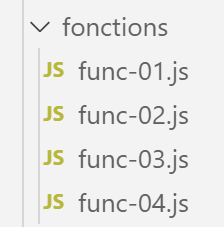
8.1. script [func-01]
El script analiza el modo de paso de los parámetros de una función:
- paso por valor para números, cadenas y valores booleanos;
- paso por referencia para matrices, objetos literales y funciones;
'use strict';
// modo de paso de parámetros de una función
// -----------------------número: paso por valor
function doSomethingWithNumber(param) {
  param++;
  console.log("[param inside function]=", param, "[type]=", typeof (param), "[passage par référence]=", param === count);
}
// código de llamada
let count = 10;
doSomethingWithNumber(count);
console.log("[count outside function]=", count);

// --------------------- cadena - paso por valor
function doSomethingWithString(param) {
  param += " xyz"
  console.log("[param inside function]=", param, "[type]=", typeof (param), "[passage par référence]=", param === text);
}
// código de llamada
let text = "abcd";
doSomethingWithString(text);
console.log("[text outside function]=", text);

// --------------------- booleano - paso por valor
function doSomethingWithBoolean(param) {
  param = !param;
  console.log("[param inside function]=", param, "[type]=", typeof (param), "[passage par référence]=", param === bool);
}
// código de llamada
let bool = true;
doSomethingWithBoolean(bool);
console.log("bool [outside function]=", bool);

// --------------------- matriz - paso por referencia
function doSomethingWithArray(param) {
  param.push(1000);
  console.log("[param inside function]=", param, "[type]=", typeof (param), "[passage par référence]=", param === tab);
}
// código de llamada
const tab = [10, 20, 30];
doSomethingWithArray(tab);
console.log("[tab outside function]=", tab);

// --------------------- objeto - paso por referencia
function doSomethingWithObject(param) {
  param.unePropriétéNouvelle = "xyz";
  console.log("[param inside function]=", param, "[type]=", typeof (param), "[passage par référence]=", param === obj);
}
// código de llamada
const obj = [10, 20, 30];
doSomethingWithObject(obj);
console.log("[obj outside function]=", obj);

// --------------------- función - paso por referencia
function doSomethingWithFunction(param) {
  // algo bastante extraño que, sin embargo, funciona
  param.unePropriétéNouvelle = "xyz";
  console.log("[param inside function]=", param, "[type]=", typeof (param), "[passage par référence]=", param === f);
}
// código de llamada
const f = x => x + 4;
doSomethingWithFunction(f);
console.log("[f outside function]=", f, f.unePropriétéNouvelle, typeof (f));
Ejecución
[Running] C:\myprograms\laragon-lite\bin\nodejs\node-v10\node.exe -r esm "c:\Data\st-2019\dev\es6\javascript\fonctions\func-01.js"
[param inside function]= 11 [type]= number [passage par référence]= false
[count outside function]= 10
[param inside function]= abcd xyz [type]= string [passage par référence]= false
[text outside function]= abcd
[param inside function]= false [type]= boolean [passage par référence]= false
bool [outside function]= true
[param inside function]= [ 10, 20, 30, 1000 ] [type]= object [passage par référence]= true
[tab outside function]= [ 10, 20, 30, 1000 ]
[param inside function]= [ 10, 20, 30, 'unePropriétéNouvelle': 'xyz' ] [type]= object [passage par référence]= true
[obj outside function]= [ 10, 20, 30, 'unePropriétéNouvelle': 'xyz' ]
[param inside function]= x => x + 4 [type]= function [passage par référence]= true
[f outside function]= x => x + 4 xyz function
8.2. script [func-02]
El siguiente script muestra que el tipo [function] es un tipo de datos como cualquier otro y que una variable puede tener este tipo. También muestra dos formas de definir una función:
- una con la palabra clave [function];
- la otra con la notación «flecha» =>;
'«use strict»;
// se puede asignar una función a una variable
const variable1 = function (a, b) {
  return a + b;
};
console.log("typeof(variable1)=", typeof (variable1));
// la variable se puede utilizar entonces como una función
console.log("variable1(10,12)=", variable1(10, 12));
// la definición de la función se puede realizar con la notación =>
const variable2 = (a, b, c) => {
  return a - b + c;
};
console.log("variable2(10,12,14)=", variable2(10, 12, 14));
// se pueden omitir las llaves si solo hay una expresión en el código de la función
// esta expresión es, entonces, el valor de retorno de la función
const variable3 = (a, b, c) => a + b + c;
console.log("variable3(10,12,14)=", variable3(10, 12, 14));
Ejecución
[Running] C:\myprograms\laragon-lite\bin\nodejs\node-v10\node.exe -r esm "c:\Data\st-2019\dev\es6\javascript\fonctions\func-02.js"
typeof(variable1)= function
variable1(10,12)= 22
variable2(10,12,14)= 12
variable3(10,12,14)= 36
8.3. script [func-03]
Este script aborda la posibilidad de pasar una función como parámetro a otra función. Este procedimiento se utiliza ampliamente en los frameworks de JavaScript.
'«use strict»;
// los parámetros de una función pueden ser de tipo [fonction]

// función f1
function f1(param1, param2) {
  return param1 + param2 + 10;
}
// función f2
function f2(param1, param2) {
  return param1 + param2 + 20;
}
// función g con la función f como parámetro
function g(param1, param2, f) {
  return f(param1, param2) + 100;
}
// usos de g
console.log(g(0, 10, f1));
console.log(g(0, 10, f2));
// el parámetro efectivo de tipo función se puede pasar directamente —forma 1
console.log(g(0, 10, (param1, param2) => {
  return param1 + param2 + 30;
}));
// el parámetro efectivo de tipo función se puede pasar directamente - forma 2
console.log(g(0, 10, function (param1, param2) {
  return param1 + param2 + 40;
}));
Ejecución
[Running] C:\myprograms\laragon-lite\bin\nodejs\node-v10\node.exe -r esm "c:\Data\st-2019\dev\es6\javascript\fonctions\func-03.js"
120
130
140
150
8.4. script [func-04]
El siguiente script muestra que una función de JavaScript puede comportarse como una clase:
'«use strict»;
// una función se puede utilizar como un objeto

// una carcasa vacía
function f() {

}
// a la que se le asignan propiedades desde el exterior
f.prop1 = "val1";
f.show = function () {
  console.log(this.prop1);
}
// uso de f
f.show();

// una función g que funciona como una clase
function g() {
  this.prop2 = "val2";
  this.show = function () {
    console.log(this.prop2);
  }
}
// instanciación de la función con [new]
new g().show();
Comentarios
- líneas 5-7: el cuerpo de la función f no define ninguna propiedad;
- líneas 9-12: se asignan propiedades a la función f desde el exterior;
- línea 14: uso de la función (objeto) f. Fíjate en que no se escribe [f()], sino simplemente [f]. Aquí tenemos la notación de un objeto;
- líneas 17-22: se define una función [g] como si fuera una clase con propiedades y métodos;
- línea 24: la función [g] es instanciada por [new g()];
Resultados de la ejecución
[Running] C:\myprograms\laragon-lite\bin\nodejs\node-v10\node.exe -r esm "c:\Data\st-2019\dev\es6\javascript\classes\class-00.js"
val1
val2
ES6 ha introducido el concepto de clase, lo que nos permite ahora evitar tener que recurrir a funciones para obtener clases.
8.5. script [func-05]
El script [func-05] muestra el uso de un operador denominado [rest operator]:
'«use strict»;
// operador resto
function f(arg1, ...otherArgs) {
  // primer argumento
  console.log("arg1=", arg1);
  // los demás argumentos
  let i = 0;
  otherArgs.forEach(element => {
    console.log("otherArguments[", i, "]=", element);
    i++;
  });
}

// llamada
f(1, "deux", "trois", { x: 2, y: 3 })
- línea 3: la notación [...otherArgs] hace que, con una llamada del tipo f(param1, param2, param3), se obtenga la línea 3:
- arg1=param1
- otherArgs = [param2, param3]. Por lo tanto, [otherArgs] es una matriz que reúne todos los parámetros efectivos pasados tras [param1];
Los resultados de la aplicación son los siguientes: