4. Chapter 3 - The [NestJS] server for the [RdvMedecins] application
This chapter details, file by file, the contents of the [rdvmedecins-nestjs-server] folder included with this document. It follows the same format used throughout this course: the source code, numbered line by line, followed by a section titled “Let’s Comment on This Code,” which explains the lines that require further clarification. Each project folder also contains its own README.md file, which includes a condensed version of these explanations.
4.1. The Database
The [dbrdvmedecins] database mirrors, in its structure, that of the original document (2014, Spring 4 / [MySQL] 5): same tables—[doctors], [clients], [slots], [appointments]—same foreign keys, same uniqueness constraint. The only new addition, introduced by the “authentication” step of this port: the table [users].
4.1.1. [database/dbrdvmedecins.sql]
Let’s comment on this code:
- lines 20–24: [DROP TABLE IF EXISTS …] — the script starts with an empty database on each execution, in the reverse order of dependencies (starting with `appointments`, which references `[slots]` and `clients`, all the way down to `users`, which is not referenced by anyone): [MySQL] would refuse to delete a table still referenced by a foreign key;
- line 48: [doctor_id INT NOT NULL], then line 53: [CONSTRAINT fk_slots_doctor FOREIGN KEY …] — a time slot always belongs to a doctor;
- line 64: [CONSTRAINT unq1_appointments UNIQUE (day, slot_id)] — the application’s central business rule: the same time slot on the same day can be booked only once. It is this constraint, and this constraint alone, that prevents a duplicate appointment—neither the validator nor the business logic layer explicitly rechecks it (see below, addAppointment);
- lines 67–74: [CREATE TABLE users (…)] — the table added by this step. `login` is UNIQUE (two users cannot share the same login ID); `password` stores a password hashed using bcrypt (never in plaintext); role is either 'ADMIN' or 'USER'—a simple text column, whereas the original document used three tables (users, roles, users_roles) to allow multiple roles per user. Since this application requires only two mutually exclusive roles, the original many-to-many relationship would have been more than necessary;
- lines 91–93: [INSERT INTO users …] — two demo accounts, admin/admin (role ADMIN) and user/user (role USER), with their passwords already hashed using bcrypt (10 rounds of salting)—never in plaintext, including in this demo script.
4.2. Layered Organization
The server follows the layered structure of the original project:
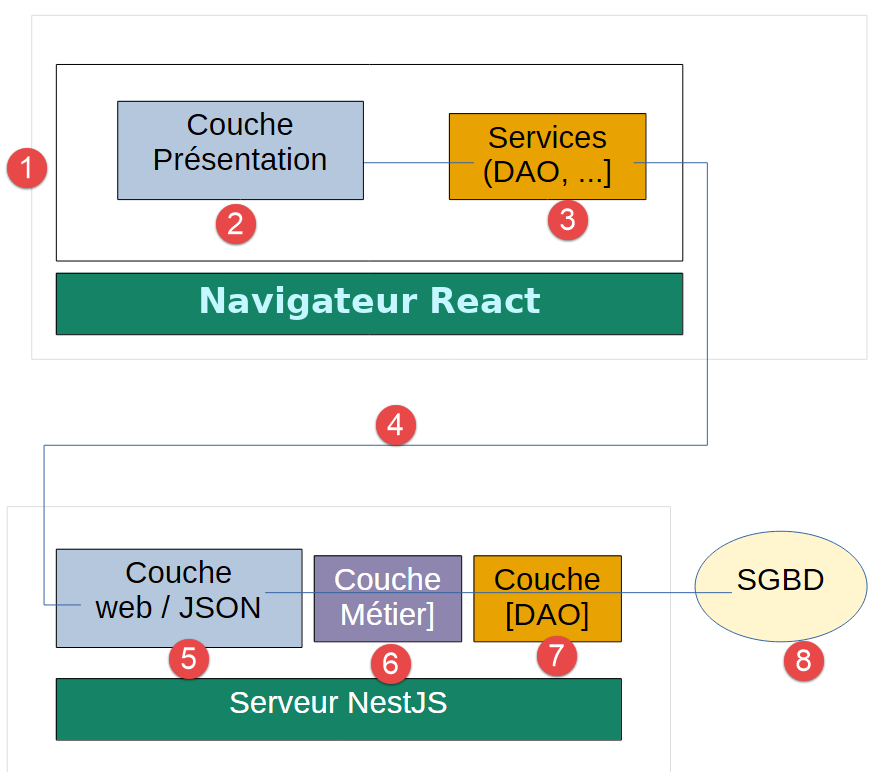
Each layer communicates only with the layer immediately to its right, [5-8]: thus, the controller [5] never communicates directly with layer [7], for example. This follows the same design principle as the original Spring project, and it makes each layer replaceable independently of the others.
4.3. The [TypeORM] entities (src/entities/)
Entities are the classes that represent database table rows as TypeScript objects—the direct equivalent of the JPA entities from the original project (package rdvmedecins.entities).
4.3.1. src/entities/abstract.entity.ts
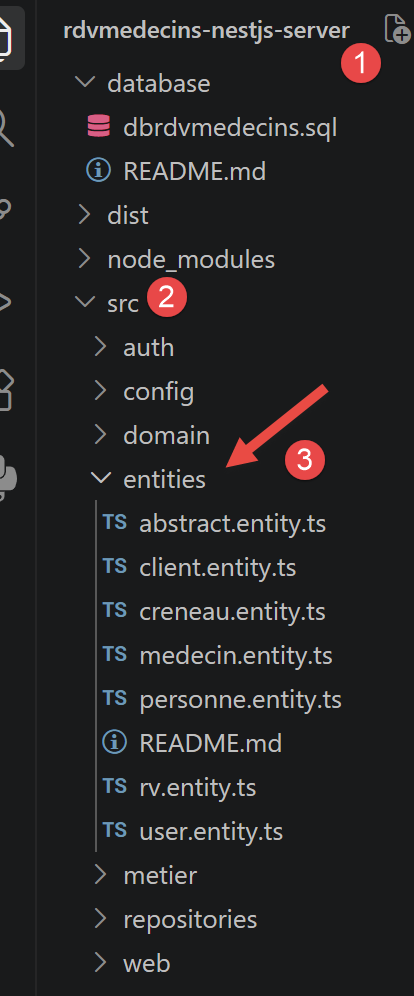
Let’s comment on this code:
- line 4: [@PrimaryGeneratedColumn()] — declares an auto-incrementing primary key using DBMS - the exact equivalent of @Id + @GeneratedValue(strategy = GenerationType.AUTO) in JPA;
- Line 7: [@VersionColumn()] — [TypeORM]’s native mechanism for optimistic locking: [TypeORM] automatically increments this column with every modification and raises an error if you attempt to save an entity whose version no longer matches the one in the database (someone else has modified it in the meantime) - the exact equivalent of @Version in JPA/Hibernate;
- Line 3: [export abstract class AbstractEntity {] — this class is not decorated by [@Entity]: it does not correspond to any table on its own. [TypeORM] refers to this technique as “Concrete Table Inheritance”: each subclass decorated with [@Entity] gets its own table, with all inherited columns—the exact equivalent of @MappedSuperclass in JPA.
4.3.2. src/entities/person.entity.ts
Let’s comment on this code:
- Line 4: [export abstract class Person extends AbstractEntity {] — includes the fields common to both a doctor and a patient (title, last name, first name), while inheriting the id/version ([AbstractEntity]). Like its parent class, it is not decorated by [@Entity]: it is the [TypeORM] counterpart of the class [Personne]—which is also @MappedSuperclass—from the original project;
- lines 5, 8, 11: [@Column({ length: N })], [@Column({ name: '...', length: N })] — three text columns of bounded length (the name option gives the actual snake_case column name: last_name, first_name), equivalent to [@Column](length = N) private String ... in JPA.
4.3.3. src/entities/doctor.entity.ts
Let’s comment on this code:
- line 5: [@Entity({ name: 'doctors' })] — declares the class as the [TypeORM] entity, persisted in the table [doctors]—the exact equivalent of [@Entity] + @Table(name = "[doctors]") in JPA;
- line 6: [export class Doctor extends Person {] — inherits title/lastName/firstName (from [Person]) and id/version (from [AbstractEntity]), without having to redeclare them;
- line 7: [@OneToMany(() => Slot, (slot) => slot.doctor)] — declares the inverse relationship “a doctor has multiple time slots”: a navigation convenience feature, absent from the original project (which declared it only in the other direction, on the [Creneau] side), but easy to add with TypeORM.
4.3.4. src/entities/client.entity.ts
Let’s comment on this code:
- lines 4–5: [@Entity({ name: 'clients' }) export class Client extends Person {}] — exactly the same principle as [Doctor], with no additional relationships: a table [clients], with the same three columns inherited from Person. Vocabulary reminder: [Client] refers here to a patient at the medical practice (vocabulary from the original business domain), not to be confused with “client HTTP.”
4.3.5. src/entities/slot.entity.ts
Let’s break down this code:
- lines 7–10: [@Column({ name: 'start_hour' }) startHour: number; …] — the four time boundaries of the appointment slot (start and end hour/minute), four single integers, each mapped to its snake_case column (start_hour, start_minute, end_hour, end_minute);
- line 12: [@ManyToOne(() => Doctor, (doctor) => doctor.slots)] — multiple time slots belong to the same doctor. By default, [TypeORM] does not load the “doctor” relationship when reading a time slot (default “lazy” behavior): you must request it explicitly (relationship option: [...] in a query)—exactly as FetchType.LAZY required, on the JPA side, an explicit `left join fetch` in the JPQL query to retrieve the doctor;
- line 13: [@JoinColumn({ name: 'doctor_id' })] — specifies the name of the foreign key column in table [slots];
- line 16: [@RelationId((slot: Slot) => slot.doctor)] — the exact and idiomatic equivalent, on the [TypeORM] side, of the read-only field idMedecin in the original project ([@Column](name = "id_medecin", insertable = false, updatable = false)): it directly exposes the foreign key value, without needing to load the entire [Doctor] entity—useful for building lightweight JSON responses (see below, the web layer).
Note: A [@RelationId] field is a virtual column, calculated after the fact by [TypeORM] —it is not a true SQL column that can be used in a WHERE clause of a “query builder” (see below, [SlotRepository]). It is used solely to retrieve the foreign key value once the entity has been loaded.
4.3.6. src/entities/appointment.entity.ts
Let’s comment on this code:
- Line 7: [@Unique('unq1_appointments', ['day', 'slot'])] — refers, on the [TypeORM] side, to the constraint SQL in the database script. Note: Here, we are referencing the relation name (“slot”), not the field [@RelationId] (“slotId”)—the latter is a virtual column, which [TypeORM] does not accept in an @Unique constraint. [TypeORM] itself maps 'slot' to its actual foreign key column (slot_id);
- line 9: [@Column({ type: 'date' })] — type 'date' (not 'datetime'): only the day is retained, not the time—exactly as TemporalType.DATE specified on the JPA side;
- lines 12–18: [@ManyToOne(...) / @JoinColumn(...)] — two relationships, to [Client] and to [Slot], following the same principle as [slot.entity.ts];
- lines 20–24: [@RelationId(...)] — the read-only equivalents of the idClient/idCreneau fields from the original project (same mechanism as Slot.doctorId; see above).
4.3.7. src/entities/user.entity.ts
Let’s comment on this code:
- line 4: [export type Role = ‘ADMIN’ | ‘USER’;] — a simple concatenation of two strings, TypeScript: the only two roles managed by the application. This type is reused everywhere else where a role is handled (roles.decorator.ts, jwt.strategy.ts, the client [Vue.js]…);
- line 6: [@Entity({ name: 'users' })] — like the other entities, a dedicated table;
- line 12: [password: string;] — stores a hashed (bcrypt) password, never in plain text—see auth.service.ts;
- line 18: [role: Role;] — a single column, rather than the many-to-many relationship (users/roles/users_roles) in the original Spring project. This application recognizes only two mutually exclusive roles (a user is either ADMIN or USER, never both): reconstructing the original relationship would have added complexity without any real benefit. This is a deliberate simplification for educational purposes, just like the enumeration `[ResponseStatus]` encountered earlier in this chapter.
4.4. Business objects (src/domain/)
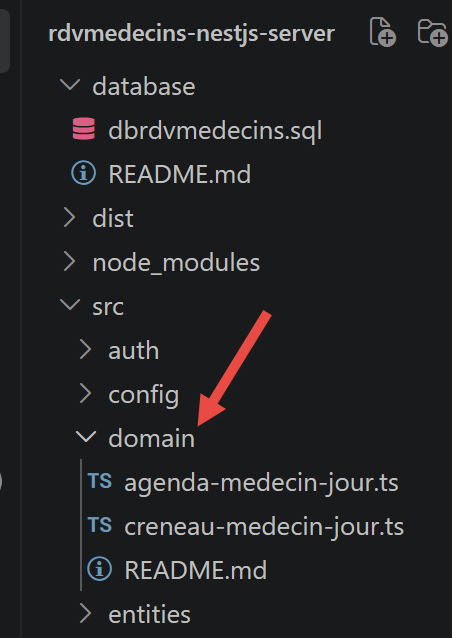
These classes do not correspond to any database table: they are constructed on the fly by combining several entities to represent a concept useful to the application (“Dr. Pelissier’s schedule for 09/13/2026”) but which does not need to be stored as-is. Equivalent to the same “domain” subfolder (or package) in the original project.
4.4.1. src/domain/doctor-day-slot.ts
Let’s comment on this code:
- line 4: [export class DoctorDaySlot {] — associates a time slot with the appointment that may have been scheduled during that slot, for a given day;
- lines 5–8: [constructor(public slot: Slot, public appointment: Appointment | null) {}] — the syntax [public] directly in the constructor’s parameters is a shortcut for TypeScript: it declares AND initializes both properties on a single line each, without having to write [this.slot = slot] separately. [appointment] is null when the time slot is available.
4.4.2. src/domain/doctor-day-schedule.ts
Let’s comment on this code:
- line 4: [export class DoctorDaySchedule {] — a doctor’s complete schedule for a given day: the doctor in question, the day, and the list of their time slots (each marked as available or booked; see [DoctorDaySlot] above);
- line 8: [public doctorDaySlots: DoctorDaySlot[],] — calculated by [BusinessService.getDoctorDaySchedule] (see below); it is this list that the controller converts into JSON for the client [Vue.js].
4.5. The DAO layer (src/repositories/)
The DAO layer (Data Access Object) is the only part of the project that communicates directly with TypeORM/MySQL—the equivalent of the Spring Data interfaces in the original project (package rdvmedecins.repositories).
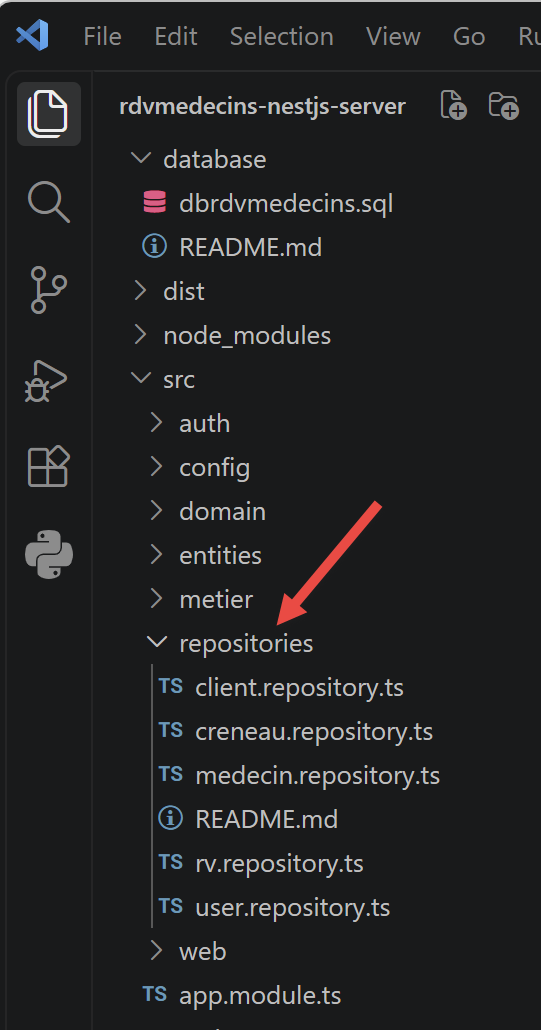
The most important difference to understand between Spring Data and [TypeORM]: With Spring Data, all you had to do was declare an interface (extends CrudRepository<...>) to automatically get the basic methods (findAll, findOne, save, delete, etc.) - Spring itself generated a class that implemented it at startup. With [TypeORM], there is no automatic generation of an implementation from an interface: we directly inject the generic Repository<Entity> provided by [TypeORM] (via [@InjectRepository]), and we write the methods we want to expose ourselves, building on the pre-defined methods of this Repository or using the query builder for more specific queries.
4.5.1. src/repositories/doctor.repository.ts
Let’s comment on this code:
- line 9: [@InjectRepository(Doctor)] — asks [NestJS] to provide the Repository<[Doctor]> automatically generated by [TypeORM] for the Doctor entity. This is equivalent to the automatic injection (@Autowired) of the implementation generated by Spring Data;
- line 14: [return this.repository.find();] — equivalent to medecinRepository.findAll(), inherited from CrudRepository;
- line 18: [return this.repository.findOneBy({ id });] — equivalent to medecinRepository.findOne(id); returns null if no doctor has this ID (like findOne in Spring Data, rather than throwing an exception).
4.5.2. src/repositories/client.repository.ts
This file is exactly the same in principle as [DoctorRepository] (see the explanation above), but applied to the entity [Client] (a patient).
4.5.3. src/repositories/slot.repository.ts
Let’s comment on this code:
- lines 13–19: [findAll() / findById(id)] — identical to the principle already seen in [DoctorRepository];
- line 21: [getAllSlots(doctorId: number): Promise<Slot[]> {] — a “custom” query, equivalent to the original query JPQL select c from [Creneau] c where c.medecin.[id]=?1;
- line 23: [.createQueryBuilder(‘s’)] — the alias SQL s is named, just as [Creneau] c is named in JPQL;
- line 24: [.where(‘s.doctor = :doctorId’, { doctorId })] — here, we are comparing the relationship itself (s.doctor), not the field [@RelationId] (s.doctorId): as noted above (slot.entity.ts), the latter is not a column that can be used in a WHERE. By comparing the relationship to a number, [TypeORM] recognizes that its foreign key is being targeted and generates the correct SQL, without a join;
- lines 25–26: [.orderBy(‘s.startHour’, ‘ASC’).addOrderBy(‘s.startMinute’, ‘ASC’)] — sorts the time slots in chronological order, a useful addition that did not exist explicitly in the original Spring version.
4.5.4. src/repositories/appointment.repository.ts
Let’s comment on this code:
- lines 13–18: [findById(id) { … relations: [‘client’, ‘slot’] }] — relationships: [...] explicitly instructs [TypeORM] to also load the associated client and time slot (reminder: these relationships are in “lazy” mode by default; see slot.entity.ts) — useful for constructing the response JSON (see below, getMapForAppointment);
- line 21: [return this.repository.save(appointment);] — equivalent to rvRepository.save(new Rv(jour, client, creneau));
- line 25: [await this.repository.delete(id);] — equivalent to rvRepository.delete(rv.getId()) ;
- line 28: [getDoctorDayAppointments(doctorId: number, day: string): Promise<Appointment[]> {] — equivalent to the original query JPQL SELECT rv FROM Rv rv LEFT JOIN FETCH rv.client c LEFT JOIN FETCH rv.creneau cr WHERE cr.medecin.[id]=?1 and rv.[jour]=?2 ;
- lines 31–32: [.leftJoinAndSelect(‘appointment.client’, ‘client’) / .leftJoinAndSelect(‘appointment.slot’, ‘slot’)] — the equivalent of the LEFT JOIN FETCH of the original JPQL: retrieves, in a single query SQL, the client and time slot associated with each appointment;
- Line 33: [.where(‘slot.doctor = :doctorId’, { doctorId })] — condition on the physician, obtained via a join on the time slot (rv.creneau.medecin.[id]=?1 in JPQL) — again, we are comparing the “doctor” relationship, not the corresponding [@RelationId] field.
4.5.5. src/repositories/user.repository.ts
Let’s comment on this code:
- line 13: [findByLogin(login: string): Promise<User | null> {] — the only search method needed here, used by the login (see auth.service.ts): it replaces the role-based search across three tables in the original project, which has become unnecessary since the simplification to a single column [role] (see user.entity.ts).
4.6. The business layer (src/business/)
It is here, and nowhere else, that the application’s business rules reside—equivalent to the rdvmedecins.metier package in the original project.
4.6.1. src/business/business.interface.ts
Let’s comment on this code:
- line 7: [export interface IBusiness {] — the business layer contract, independent of its implementation—the exact equivalent of the Java interface [IMetier] from the original project;
- lines 8–18: eleven methods, one for each application requirement (lists, searches by ID, adding/deleting appointments, calculating the calendar);
- line 21: [export const BUSINESS_TOKEN = ‘IBusiness’;] — we define an injection “token” (InjectionToken) to be able to inject this interface into the controller, exactly as Spring injected the business reference [IMetier] without knowing its concrete implementation class [Metier]. In TypeScript, interfaces are eliminated at compile time: so they cannot be used directly as injection tokens ([NestJS]); this workaround is necessary (see its use in app.module.ts and application-model.service.ts).
4.6.2. src/business/business.service.ts
Let’s comment on this code:
- line 10: [export class BusinessService implements IBusiness {] — [@Injectable]() is equivalent to @Service("métier"): this class becomes a “provider” ([NestJS]) that [NestJS] can construct and inject where needed;
- lines 11–16: [constructor(private readonly doctorRepository: …, …) {}] — injection of the four DAO instances, equivalent to the four @Autowired fields in the original project. [NestJS] chooses constructor injection here rather than field injection (as @Autowired does on a Java field): this is the recommended approach in TypeScript; it makes dependencies explicit and facilitates testing;
- lines 18–23: most methods simply delegate to the DAO layer—no custom business logic;
- lines 25–31: [addAppointment(…) { const appointment = new Appointment(); … }]—creates a new Appointment entity and saves it; it is the SQL unq1_appointments constraint (see above, the database script), and it alone, that prevents a duplicate reservation—no explicit check is performed here; a duplicate attempt will trigger a SQL exception, propagated by the DAO layer;
- line 37: [async getDoctorDaySchedule(doctorId: number, day: string): Promise<DoctorDaySchedule | null> {] — the only method in the business layer that performs actual business logic (the others merely delegate): it calculates a doctor’s complete schedule for a given day. The algorithm is reproduced exactly as in the original document, in three steps;
- line 42: [const timeSlots = await this.getAllSlots(doctorId);] — 1. Retrieve all of the doctor’s available time slots;
- line 43: [const bookings = await this.getDoctorDayAppointments(doctorId, day);] — 2. retrieve all of the doctor’s appointments for the requested day;
- lines 45–48: [const hBookings = new Map<number, Appointment>(); …] — these appointments are stored in a dictionary indexed by the time slot ID, so they can be quickly retrieved in the next step—equivalent to the `Map<Long, Rv> hReservations` in the original code;
- lines 50–53: [const doctorDaySlots = timeSlots.map((slot) => { … })] — 3. For each time slot, we check whether it matches one of the found reservations: if so, it is “occupied” (we associate the found appointment with it); otherwise, it is “free” (appointment = null).
4.7. The web layer (src/web/)
This is the application’s entry point HTTP—the equivalent of the [rdvmedecins.web] package from the original project.
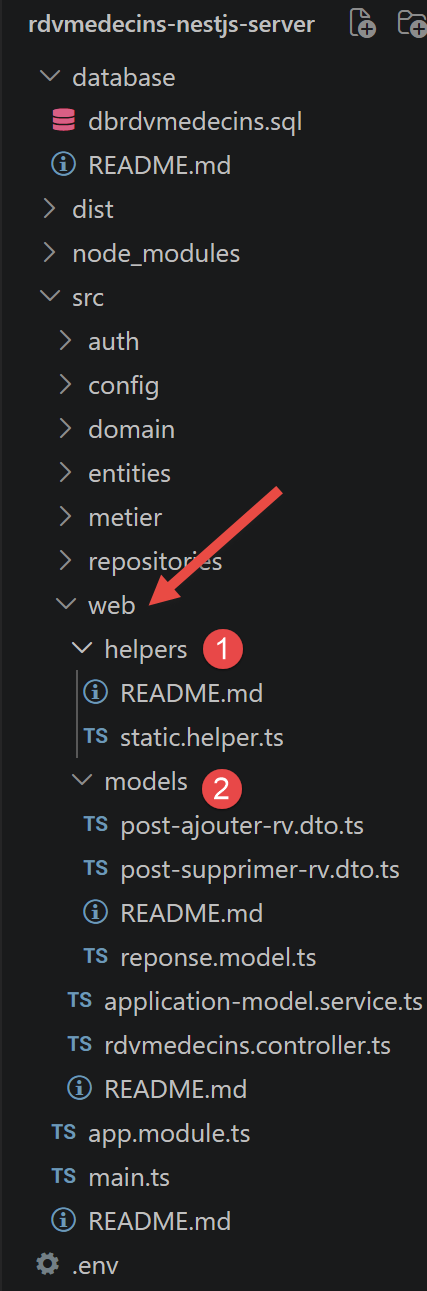
4.7.1. src/web/models/response.model.ts
Let’s comment on this code:
- Lines 1–6: [export enum ResponseStatus { … }] — the original Spring project used “ad hoc” numbers (0, 1, 2, 3, 4…) whose meaning varied from one controller method to another. This port takes the opportunity to consolidate all possible codes into a single enumeration, which is easier to learn and maintain: the behavior observable to the client (0 = success, anything else = failure) remains strictly the same;
- Line 8: [export class ServerResponse<T = unknown> {] — the common response body for all JSON responses from the web service: { "status": 0, "data": ... }. New feature compared to the original: this class is generic ([ServerResponse]<T>) thanks to TypeScript, so that the data type is known at compile time (e.g., [ServerResponse]<[Doctor][]>) - The Java language of the original project did not allow this so easily with an `Object` type;
- lines 17–19: [static ok<T>(data: T): ServerResponse<T> {] — a small static “factory” method, to write more readable controller code (ServerResponse.ok([doctors]) rather than new [ServerResponse](ResponseStatus.OK, [doctors]));
- lines 21–23: [static error<T = unknown>(status: ResponseStatus, data: T | null = null): ServerResponse<T> {] — its counterpart for error responses.
4.7.2. src/web/models/post-add-appointment.dto.ts
Let’s comment on this code:
- line 3: [export class PostAddAppointmentDto {] — describes the format of the JSON body expected by the /addAppointment route ({ day, clientId, slotId }) — a “DTO” (Data Transfer Object), a class whose sole purpose is to describe the format of the exchanged data, without any logic;
- line 4: [@IsDateString()] — verifies that the received string is indeed a valid date in the ISO format. If this is not the case, [NestJS] automatically returns a HTTP 400 error (Bad [Request]) before executing the controller—thanks to the global variable [ValidationPipe] declared in [main.ts] (see below);
- lines 7, 10: [@IsInt()] — verifies that the received value is indeed an integer. These decorators, combined with [ValidationPipe], are the [NestJS] equivalent of the automatic type conversions that Spring MVC performed with @RequestBody.
4.7.3. src/web/models/post-delete-appointment.dto.ts
Same principle as [PostAddAppointmentDto] above, for the body JSON expected by /deleteAppointment ({ appointmentId }).
4.7.4. src/web/helpers/static.helper.ts
Let’s comment on this code:
- line 4: [export function getErrorsForException(exception: unknown): string[] {] — equivalent to Static.getErreursForException (Exception exception). Java could chain exceptions (exception.getCause()) to explain “why” an exception occurred; in modern JavaScript/TypeScript (ES2022), errors also have a chain of causes, via the `cause` property;
- lines 6–10: [while (cause instanceof Error) { … cause = cause.cause; }] — this is processed in the same way as the original Java code, by stacking each message encountered;
- lines 17–19: [export interface SlotJson { … }] — the [Slot] entity is not returned as-is in JSON: it contains a relationship to “doctor” which, if loaded, would duplicate information already known to the client (the client already knows which doctor is being referred to; see the {doctorId} parameter in URL). We therefore construct a “custom” object containing only the fields needed for display;
- line 21: [export function getMapForSlot(slot: Slot | null | undefined): SlotJson | null {] — equivalent to Static.getMapForCreneau ([Creneau] time slot): converts an entity into a lightweight JSON object;
- line 29: [export function getListMapForSlots(slots: Slot[]): SlotJson[] {] — its counterpart for an entire list (equivalent to Static.getListMapForCreneaux);
- lines 33–38, 40–50, 52–54: [AppointmentJson / getMapForAppointment / getListMapForAppointments] — same principle, applied to appointments: the embedded client (appointment.client) is also reduced to only those fields needed for display.
4.7.5. src/web/application-model.service.ts
Let’s comment on this code:
- line 6: [export class ApplicationModelService implements IBusiness, OnModuleInit {] — equivalent to the ApplicationModel class in the original project: a cache, built once when the server starts up, that stores the list of doctors and clients in memory (short lists that change infrequently, so there’s no need to query the database for them with every request). This class serves two purposes, just like the original: it acts as a cache on one hand, and as the controller’s single entry point to the business layer on the other—if the caching strategy is ever changed, only this file needs to be modified;
- Line 11: [constructor(@Inject(BUSINESS_TOKEN) private readonly business: IBusiness) {}] — here, the interface [IBusiness] is injected (via the token [BUSINESS_TOKEN], see app.module.ts), not the concrete class [BusinessService]—exactly as the original Java code wrote @Autowired private [IMetier] métier; without ever mentioning the Metier class;
- line 13: [async onModuleInit(): Promise<void> {] — [OnModuleInit] is the “lifecycle” interface for [NestJS], which plays exactly the same role as @PostConstruct in Spring: onModuleInit() is automatically called by [NestJS] immediately after all of this class’s dependencies have been injected;
- lines 17–18: [catch (ex) { this.messages = getErrorsForException(ex); }]—if the database is unavailable at startup, the error is caught and stored in `messages`, rather than causing the server to crash—exactly the behavior of the original project;
- line 26: [async getAllClients(): Promise<Client[]> { return this.clients; }] — the lists of doctors and clients come from the cache; everything else (line 29 and following) is simply delegated to the business layer.
4.7.6. src/web/rdvmedecins.controller.ts
RdvMedecinsController declares the application’s eleven routes, which intentionally mirror, translated into English, those in the original document (/getAllDoctors for /getAllMedecins, /addAppointment for /ajouterRv…) rather than “modernized” in the REST style (/doctors, /clients/:id…) - The purpose of this document is to compare the two implementations, not to modernize API.
1 2 3 4 5 6 7 8 9 10 11 12 13 14 15 16 17 18 19 20 21 22 23 24 25 26 27 28 29 30 31 32 33 34 35 36 37 38 39 40 41 42 43 44 45 46 47 48 49 50 51 52 53 54 55 56 57 58 59 60 61 62 63 64 65 66 67 68 69 70 71 72 73 74 75 76 77 78 79 80 81 82 83 84 85 86 87 88 89 90 91 92 93 94 95 96 97 98 99 100 101 102 103 104 105 106 107 108 109 110 111 112 113 114 115 116 117 118 | |
Let’s comment on this code:
- line 12: [@UseGuards(JwtAuthGuard)] — applied to the class, protects all eleven routes of this controller at once: none are accessible without a valid JWT token (see the “Authentication” chapter below). This is equivalent to the original Spring Security rule .antMatchers("/**").hasRole("ADMIN"), except that here, the only requirement is to be authenticated (any role) - the restriction to the ADMIN role applies only to the two routes that modify data (lines 75–76 and 95–96);
- line 13: [@Controller()] — no prefix: the routes are therefore exactly /getAllDoctors, /getAllClients, etc. This is equivalent to @RestController in Spring: each value returned by a method is automatically serialized as JSON;
- line 15: [constructor(private readonly application: ApplicationModelService) {}] — cache/facade injection, equivalent to @Autowired private ApplicationModel application; ;
- lines 19–22: [const messages = this.application.getMessages(); if (messages !== null) { … }] — first, we verify that the application has initialized correctly (see ApplicationModelService.onModuleInit), equivalent to `if (messages != null) { return new [Reponse](-1, messages); }`;
- line 33: [async getAllSlots(@Param('doctorId') doctorId: string) {] — [@Param]('doctorId') retrieves the segment {doctorId} from URL, as a string (similar to @PathVariable(String) in Spring); we convert it to a number ourselves (line 34), whereas Spring would have done this automatically for a parameter declared as `long`;
- lines 35–38: [const doctor = await this.application.getDoctorById(id); if (doctor === null) { … }] — we first retrieve the doctor to verify that it exists before proceeding further (equivalent to the private method getMedecin(id) in the original controller);
- line 41: [return ServerResponse.ok(getListMapForSlots(slots));] — converts the list of entities [Slot] into a list of “lightweight” JavaScript objects (see static.helper.ts);
- line 59: [return ServerResponse.ok({ doctor: …, day: …, slots: … });] — the calendar is formatted in “light” mode for JSON, following the same principles as getMapForSlot/getMapForAppointment;
- line 75: [@UseGuards(RolesGuard)], then line 76: [@Roles('ADMIN')] — in addition to being authenticated (already required by [@UseGuards]([JwtAuthGuard]) for the class), you must have the role ADMIN here—the role USER receives a 403 Forbidden response (see roles.guard.ts). [RolesGuard] reads request.user (submitted by JwtAuthGuard/JwtStrategy): it therefore must run after [JwtAuthGuard] ([NestJS] first applies class guards, then method guards, in the order in which they appear);
- lines 87–92: [try { const appointment = await this.application.addAppointment(…); … } catch (e) { … }] — at this point, class-validator (see [PostAddAppointmentDto]) has already verified that post.[day] is a valid date and that post.clientId/post.slotId are indeed integers. The constraint SQL unq1_appointments (day, slot_id) prevents two reservations from being made for the same time slot on the same day: a duplicate attempt will throw an exception, caught here, exactly like the SQLException from the original JDBC driver;
- line 95: same restriction as line 75, for deleteAppointment: only the role ADMIN can cancel an appointment;
- Line 112: [function isValidDate(day: string): boolean {] — a small local utility function, equivalent to the pair SimpleDateFormat("yyyy-MM-dd") + setLenient(false) from the original code, which rejected, for example, “2026-13-40” (invalid month and day): Date.toISOString() reconstructs the date from the received string—if it differs from the input, it means the date did not exist.
4.8. Authentication (src/auth/)
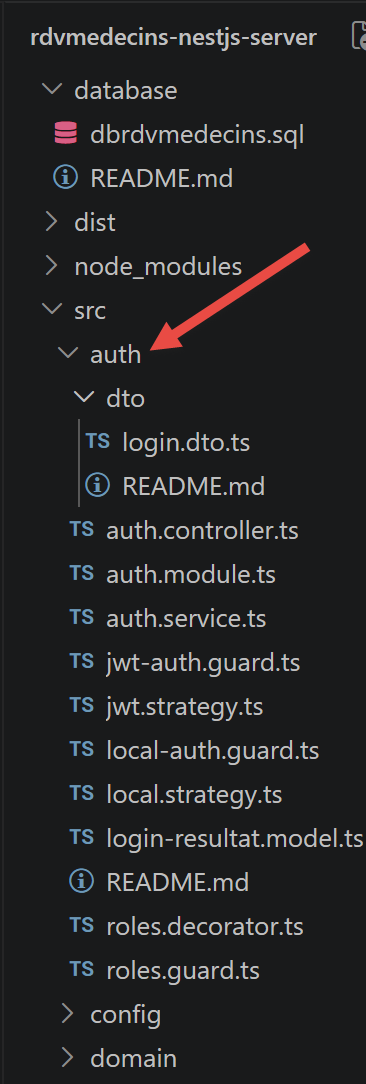
This section documents the addition, at this stage of the course, of token-based authentication (JWT) and role-based access control (ADMIN/USER) - the functional equivalent of the Spring Security layer from the original document, rewritten using standard tools from the [NestJS] ecosystem: [@nestjs/passport] and @nestjs/jwt.
Two intentional differences from the original project, documented here once and for all:
- JWT instead of HTTP Basic. The original Spring project sent the Authorization: Basic <login:password in Base64> header with every request: the password (encoded, not encrypted) was therefore transmitted over the network with every call. This port uses a token instead: JWT (JSON Web Token). The password is presented only once, upon login (POST /login); the server then returns a signed token, which the client subsequently includes in every subsequent request (Authorization: Bearer <token> header). This is the current practice for this type of API, as already mentioned in the conclusion of the previous chapter.
- One role per user, a single database column, rather than the many-to-many relationship (users/roles/users_roles) in the original project—see user.entity.ts above.
An architectural point to understand before reading the code that follows: when a Guard rejects a request (401 Unauthorized, 403 Forbidden), the response never goes through the usual [ServerResponse]<T> envelope ({ status, data }): [NestJS] responds directly in its native JSON format, { statusCode, message, error }. This is a deliberate choice: security errors are handled before entering the controller (by a guard), whereas [ServerResponse]<T> is generated by the controller for business errors (resource not found, invalid date, etc.). The client [Vue.js] must therefore distinguish between these two types of error responses (see the following chapter, auth.interceptor.ts).
4.8.1. src/auth/dto/login.dto.ts
Let’s comment on this code:
- line 3: [export class LoginDto {] — describes the format of the JSON body expected by POST /login ({ login, password }), the same mechanism as the DTO already encountered in src/web/models;
- lines 4–5, 8–9: [@IsString() @IsNotEmpty()] — verifies that both fields are non-empty strings.
This DTO serves a purely informational purpose here: it is actually [LocalStrategy] (see below) that reads {login, password} from the request body, not a [@Body]([LoginDto]) parameter of the controller - Nevertheless, [LoginDto] illustrates to the reader the exact format expected by this route.
4.8.2. src/auth/login-result.model.ts
Let’s comment on this code:
- line 3: [export interface LoginResult {] — the format of the data returned by POST /login upon success, in the standard [ServerResponse]<T> envelope: { "status": 0, "data": { accessToken, login, name, role } } ;
- line 4: [accessToken: string;] — the JWT token to be included in every subsequent request;
- line 7: [role: Role;] — the role of the logged-in user, so that the client [Vue.js] can adapt its interface (see the next chapter, hiding the “Book”/“Cancel” buttons for a USER role).
4.8.3. src/auth/local.strategy.ts
A Passport “strategy” describes how to authenticate a request. [LocalStrategy] can read a {login, password} pair from the body of a POST request and delegate the verification to AuthService. It is used only once, by the route POST /login (via [LocalAuthGuard]): all other protected routes will then use [JwtStrategy] (see below), not this one.
Let’s break down this code:
- line 8: [export class LocalStrategy extends PassportStrategy(Strategy) {] — conceptually equivalent to the AppUserDetailsService class from the original Spring Security project: “given some credentials, tell me who this user is”;
- line 10: [super({ usernameField: ‘login’, passwordField: ‘password’ });] — by default, passport-local expects fields named “username” and “password” in the request body; we rename them here to match our DTO ([LoginDto]), which uses “login” instead of “username”;
- line 13: [async validate(login: string, password: string): Promise<User> {] — automatically called by Passport with the two fields extracted from the request. What it returns becomes request.user in the controller (see auth.controller.ts);
- line 16: [throw new UnauthorizedException(‘incorrect login or password’);] — Passport automatically converts this exception into a HTTP 401 Unauthorized response, before it even reaches the controller.
4.8.4. src/auth/jwt.strategy.ts
The second Passport strategy: it can read a JWT token from the HTTP Authorization: Bearer <token> header of each request, verify its signature, and extract the user’s identity—without ever querying the database (the token already contains everything needed). This is the mechanism that protects the eleven routes of RdvMedecinsController.
Let’s comment on this code:
- lines 5–9: [export interface JwtPayload { sub: number; login: string; role: … }] — the format of the information we chose to store in the JWT token when it was generated (see auth.service.ts); sub (“subject”) is the conventional name, in JWT, for the field that contains the user’s identifier;
- lines 11–15: [export interface ConnectedUser { … }] — what request.user will contain in the controllers once the token has been verified;
- line 18: [export class JwtStrategy extends PassportStrategy(Strategy, ‘jwt’) {] — the second argument 'jwt' names this strategy (unlike [LocalStrategy], which did not specify one): this is the name that [JwtAuthGuard] ([AuthGuard]('jwt'), see below) uses to say “use this strategy”;
- line 21: [jwtFromRequest: ExtractJwt.fromAuthHeaderAsBearerToken(),] — the token is expected in the Authorization: Bearer xxx header;
- line 22: [ignoreExpiration: false,] — if the token has expired, Passport rejects it (401) before even calling validate();
- line 23: [secretOrKey: process.env.JWT_SECRET ?? ‘…’] — the secret key used to verify the token’s signature—the same one used to sign it (see auth.module.ts, which reads it from the same environment variable, JWT_SECRET);
- line 27: [validate(payload: JwtPayload): ConnectedUser {] — automatically called by Passport once the token’s signature has been verified; converts the token’s contents to request.user.
4.8.5. src/auth/local-auth.guard.ts
Let’s break down this code:
- line 5: [export class LocalAuthGuard extends AuthGuard(‘local’) {}] — a “guard” ([NestJS]) determines, before a controller method is executed, whether the request is authorized to access it. [AuthGuard]('local') is a factory provided by [@nestjs/passport] that constructs a guard based on the Passport strategy named 'local' (implicitly, [LocalStrategy], which was not given an explicit name in its own constructor). This guard is used only by the route POST /login (see auth.controller.ts).
4.8.6. src/auth/jwt-auth.guard.ts
Let’s comment on this code:
- line 5: [export class JwtAuthGuard extends AuthGuard(‘jwt’) {}] — the guard that protects the eleven routes of RdvMedecinsController: it requires a valid JWT token (“jwt” refers to [JwtStrategy]; see above). Without a token, or with an invalid or expired token, [NestJS] automatically responds with a 401 Unauthorized error—even before the controller is reached.
4.8.7. src/auth/roles.decorator.ts
Let’s comment on this code:
- Line 5: [export const Roles = (…roles: Role[]) => SetMetadata(ROLES_KEY, roles);] — [@Roles]('ADMIN') is a custom decorator (we write it ourselves, unlike @Get, @Post, and @Injectable, which are provided by [NestJS]): it simply attaches metadata (“this method requires such-and-such a role”) to the method it decorates, without performing any checks itself—it is [RolesGuard] (below) that will read this metadata and perform the check. [SetMetadata](key, value) is the low-level function of [NestJS] that allows you to write your “own” decorators of this type.
4.8.8. src/auth/roles.guard.ts
Second level of validation, following [JwtAuthGuard]: this function only verifies that the user is properly authenticated (a valid JWT token); [RolesGuard] additionally verifies that the logged-in user’s role is among those required by [@Roles](...) on the target method.
Let’s comment on this code:
- line 8: [export class RolesGuard implements CanActivate {] — conceptually equivalent to the Spring Security rule http.authorizeRequests().antMatchers(...).hasRole("ADMIN"), but applied here method by method rather than URL followed by URL, thanks to the decorator pair ([@Roles]) + [Reflector] (which can re-read the metadata set by a decorator);
- line 12: [const requiredRoles = this.reflector.getAllAndOverride<Role[]>(ROLES_KEY, […])] — the metadata set by [@Roles](...) is read back on the target method—getAllAndOverride first searches the method (line 13), then the class (line 14);
- lines 17–19: [if (!requiredRoles || requiredRoles.length === 0) { return true; }] — no [@Roles](...) metadata for this method: no additional role restrictions ([JwtAuthGuard], on the other hand, will have already required valid authentication, regardless of the role);
- line 21: [const request = context.switchToHttp().getRequest<{ user: ConnectedUser }>();] — request.user was submitted by JwtStrategy.validate(): [RolesGuard] therefore always executes after [JwtAuthGuard] (see their order in [@UseGuards](...), rdvmedecins.controller.ts);
- Lines 24–28: [if (!requiredRoles.includes(user.role)) { throw new ForbiddenException(…); }] — if the logged-in user’s role is not among those required, a 403 Forbidden exception is thrown, with a message specifying the received role and the expected role.
4.8.9. src/auth/auth.service.ts
The service that handles all authentication logic: verifying a username/password pair and generating the JWT token sent back to the client once the user is validated.
Let’s comment on this code:
- line 10: [export class AuthService {] — conceptually equivalent to the AppUserDetailsService class from the original Spring Security project, combined here with token generation;
- line 16: [async validateUser(login: string, password: string): Promise<User | null> {] — verifies that a user exists with this login and that the provided password matches; returns the user if everything is correct, null otherwise;
- line 21: [const passwordCorrect = await bcrypt.compare(password, user.password);] — bcrypt.compare() hashes the password using the same salt as the one stored in user.[password], then compares the two results—the stored password is never decrypted (the hash is not reversible);
- line 25: [login(user: User): LoginResult {] — generates the token JWT for an already authenticated user (called by [AuthController], once LocalAuthGuard/LocalStrategy have been successfully completed);
- line 28: [accessToken: this.jwtService.sign(payload),] — jwtService.sign() signs the payload with the secret key and expiration time configured in auth.module.ts (JwtModule.register).
4.8.10. src/auth/auth.controller.ts
A single route: POST /login. This is the only route in the entire application that does not already require a JWT token (since this is precisely the route that issues one).
Let’s comment on this code:
- Line 12: [@UseGuards(LocalAuthGuard)] — places this guard before the method: it triggers LocalStrategy.validate(), which verifies the login/password pair. If the verification fails, [NestJS] returns a 401 Unauthorized response before even executing the body of this method;
- line 14: [login(@Request() req: { user: User }): ServerResponse<LoginResult> {] — if we reach this point, [LocalAuthGuard] was successful: req.user contains the user returned by LocalStrategy.validate(). Note the absence of a [@Body]([LoginDto]) parameter: it was the guard, not this method, that read {login, password} from the request body;
- line 15: [return ServerResponse.ok<LoginResult>(this.authService.login(req.user));] — generates the token JWT and wraps it in the standard [ServerResponse]<T> response—unlike the 401/403 responses from the guards (see above), a successful connection goes through this wrapper.
4.8.11. src/auth/auth.module.ts
The module that handles everything related to authentication. Imported only once by AppModule.
Let’s comment on this code:
- line 14: [TypeOrmModule.forFeature([User]),] — makes Repository<[User]> injectable (see repositories/user.repository.ts);
- line 15: [PassportModule,] — declares 'jwt' as the default strategy for [AuthGuard]() without arguments; our guards still explicitly specify [AuthGuard]('local')/AuthGuard('jwt') to remain readable;
- lines 16–19: [JwtModule.register({ secret: …, signOptions: { expiresIn: … } }),] — configures token generation and verification: the secret signing key (JWT_SECRET, see .env) and their validity period (JWT_EXPIRES_IN, e.g., "2h");
- lines 25–26: [LocalStrategy, JwtStrategy,] — register the 'local' and 'jwt' strategies with Passport, respectively; without this declaration in `providers`, [NestJS] would not be able to construct these two classes.
4.9. Configuration and Launch
4.9.1. package.json
Let’s comment on this code:
- lines 7–13: [“scripts”: { … }] — the available `npm run <name>` commands. start:dev (used throughout this document) automatically recompiles and restarts the server whenever a .ts file is modified (the --watch option of CLI [NestJS], equivalent to Spring Boot’s devtools). start:prod directly launches the pre-compiled JavaScript (dist/main.js), without going through the CLI or recompiling—this is the mode that would be used in production;
- Lines 14–31: [“dependencies”: { … }]—the packages required to run the server. It contains the core of [NestJS] ([@nestjs/common], [@nestjs/core], [@nestjs/platform-express]), the integration package [TypeORM] ([@nestjs/typeorm], typeorm, mysql2—the driver [MySQL] used by [TypeORM]), validation by DTO (class-validator, class-transformer), reading the .env file (dotenv), and - provided by authentication (see the next chapter) - [@nestjs/jwt] and [@nestjs/passport] (the [NestJS] integration of Passport.js), passport-jwt/passport-local (the two Passport strategies used), and bcryptjs (password hashing);
- lines 32–39: [“devDependencies”: { … }] — packages needed only during development (compilation, typing), never included in dist/: CLI [NestJS] itself ([@nestjs/cli]), the TypeScript compiler, and the type definitions (@types/...) for JavaScript packages that do not provide them natively (bcryptjs, passport-jwt, passport-local).
As with the [Vue.js] client (see the next chapter), this is the file that [npm install] reads (Chapter 1) to determine what to download into node_modules/—the equivalent, in the Node/TypeScript ecosystem, of the pom.xml from the original Spring project.
4.9.2. [tsconfig.json]
Let's comment on this code:
- Line 3: [“module”: “commonjs”,] — the format of the JavaScript modules produced by the compilation; commonjs (require/module.exports) remains the format expected by Node.js for this type of server-side project, as opposed to the ESM format (native import/export) found on the client side ([Vue.js]);
- lines 6–7: [“emitDecoratorMetadata”: true, “experimentalDecorators”: true,] — the two options essential for [NestJS] (and [TypeORM]) to function: they enable support for decorators ([@Controller](), [@Injectable](), [@Entity](), etc.) and, most importantly, ensure that the compiler preserves, at runtime, the TYPE for each constructor parameter—this is the information that [NestJS] reads to determine on its own what to inject (see Chapter 2, section on dependency injection). Without these two lines, constructor injection simply would not work;
- line 9: [“target”: “ES2022”,]—the version of JavaScript produced by the compilation; ES2022 is widely supported by the versions of Node.js used in this course (20+), and allows you to use recent JavaScript features directly in the source code (private class fields #x, Array.at()…);
- line 16: [“strictNullChecks”: true,] — requires explicit handling of null/undefined values (using ?, ??, an if statement…)—one of the options in TypeScript’s strict mode, enabled here in isolation rather than the full strict mode (line 17: noImplicitAny remains set to false, which is more permissive): an educational compromise, to retain the essence of type safety without requiring a type annotation on every variable.
4.9.3. nest-cli.json
Let’s comment on this code:
- line 3: [“collection”: “@nestjs/schematics”,] — the code generator used by the `nest generate ...` commands (not used in this document, where all files were written by hand, but available for the rest of the course);
- line 4: [“sourceRoot”: “src”,] — tells CLI [NestJS] where the source code to be compiled is located—this is what allows it to know, for example, that the entry point is [src/main.ts];
- line 6: [“deleteOutDir”: true] — Before each compilation, the dist/ folder (line outDir of [tsconfig.json]) is completely emptied: this prevents a .js file compiled from a .ts file that has since been deleted from lingering indefinitely in dist/.
This file is specific to the [NestJS] ecosystem: it has no direct equivalent in [Vue.js] projects (see the next chapter), where vite.config.ts plays a fairly similar role.
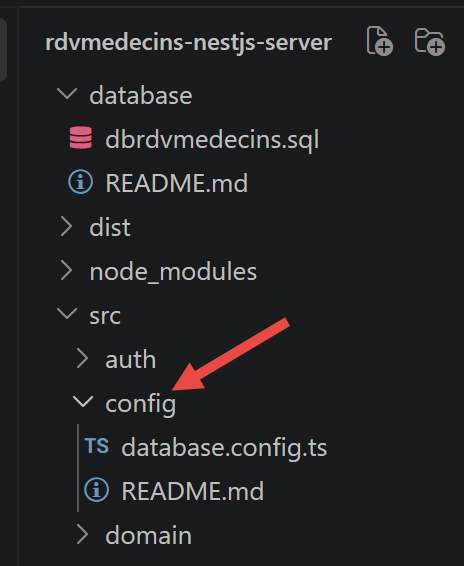
4.9.4. src/config/database.config.ts
Let’s comment on this code:
- line 8: [export function getDatabaseConfig(): TypeOrmModuleOptions {] — equivalent to the DomainAndPersitenceConfig class from the original Spring project, which defined a DataSource (@Bean block). Here, there is no class: just a simple function that returns a configuration object, read from the environment variables (the .env file; see below);
- line 16: [entities: [Doctor, Client, Slot, Appointment, User],] — the list of entities that [TypeORM] must manage—equivalent to the automatic “scan” of [@Entity] classes performed by Spring Boot. [User] was added to this list with the inclusion of authentication: omitting it would cause a “no metadata found for [User]” error at startup;
- Line 17: [synchronize: false,] — always present in this course: if `synchronize` were set to `true`, [TypeORM] would automatically modify the database schema based on the entities—useful for a disposable prototype, but dangerous once real data is involved (risk of data loss). We maintain control over the schema via the script [database/dbrdvmedecins.sql];
- line 18: [logging: process.env.NODE_ENV !== ‘production’,] — displays the SQL queries generated by [TypeORM] in the console, exactly like the Hibernate logs in the original Spring project.
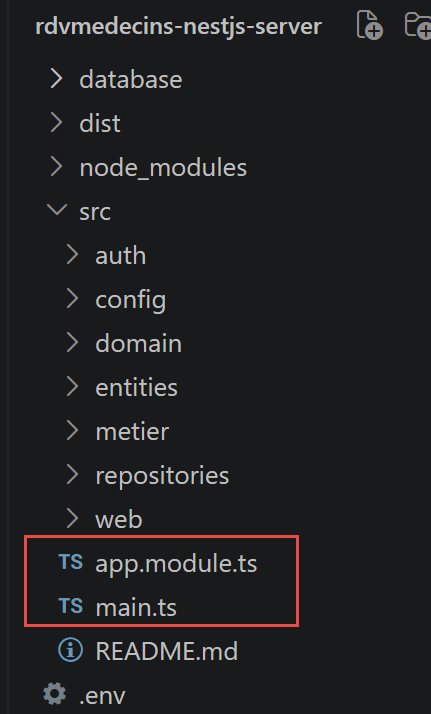
4.9.5. [src/main.ts]
Let’s comment on this code:
- Line 1: [import ‘dotenv/config’;] — must be the very first import in this file: its sole purpose is to read the .env file and copy its contents into process.env, before anything else is evaluated - specifically, before app.module.ts (imported on line 5) in turn loads database.config.ts and auth/auth.module.ts, both of which read process.env as soon as they are loaded (DB_HOST, JWT_SECRET…). Without this line, in this specific location, an .env file present on disk would serve no purpose: the variables would simply not exist in process.env when these modules need them;
- line 8: [const app = await NestFactory.create(AppModule);] — builds the application from the root module—the equivalent of SpringApplication.run(Boot.class, args);
- line 9: [app.enableCors();] — authorizes the [Vue.js] client (running on a different port) to call this server. Without this, the browser would block the requests for security reasons;
- lines 10–15: [app.useGlobalPipes(new ValidationPipe({ transform: true, whitelist: true }));] — automatically verifies, for each incoming request, that the JSON body conforms to the expected format (see classes decorated with class-validator); `transform: true` automatically converts types (e.g., string "3" → number 3), and `whitelist: true` removes fields from the received data that are not declared in the `DTO`;
- Line 16: [const port = process.env.PORT ? parseInt(process.env.PORT, 10) : 8080;] — the default port, 8080, is the same as that of the original Spring Boot server.
4.9.6. src/app.module.ts
Let’s comment on this code:
- line 9: [TypeOrmModule.forRoot(getDatabaseConfig()),] — configures the global database connection—equivalent to the @Bean DataSource in the original Spring project;
- line 10: [TypeOrmModule.forFeature([Doctor, Client, Slot, Appointment]),] — declares the entities used in this module, making their Repository<T> injectable (via [@InjectRepository]) into the classes in src/repositories/. [User] is not listed there: it is [AuthModule] (line 11) that declares its own TypeOrmModule.forFeature([User]) (see auth/auth.module.ts);
- line 11: [AuthModule,] — provides its own route (POST /login) and its own providers (Passport strategies, JWT tokens…) - an entire [NestJS] module, rather than files added directly to [AppModule], to keep authentication isolated and easy to remove or replace;
- line 21: [{ provide: BUSINESS_TOKEN, useClass: BusinessService },] — [BusinessService] is registered under the token [BUSINESS_TOKEN], so that any class that requests [IBusiness] (via [@Inject]([BUSINESS_TOKEN])) receives an instance of [BusinessService]—exactly in the spirit of Spring’s interface injection (@Autowired [IBusiness] business).
4.9.7. .env.example
Let’s comment on this code:
- line 1: [PORT=8080] — uses the port of the original Spring Boot server;
- lines 11–12: [JWT_SECRET=… / JWT_EXPIRES_IN=2h] — the two new variables introduced by authentication: the secret token signing key (must be changed in production—a long random string, never committed) and their validity period.
This file is just an example: copy it to .env (never commit it, as it may contain secrets), then adjust the values for your machine.
4.10. End-to-End Verification
This step was verified using about ten curl scenarios against a test copy of the server (in-memory database, pre-populated with the two accounts admin/admin and user/user):
- POST /login with the correct credentials correctly returns { "status": 0, "data": { "accessToken": "...", "login": "admin", "name": "Administrator", "role": "ADMIN" } };
- POST /login with an incorrect password returns 401 Unauthorized (native JSON form of [NestJS], not the [ServerResponse]<T> envelope);
- GET /getAllDoctors without an Authorization header returns a 401 Unauthorized response;
- GET /getAllDoctors with a valid JWT token (admin or user) normally returns the list of doctors in the usual [ServerResponse]<T> envelope;
- POST /addAppointment with the admin token normally reserves an available time slot;
- POST /addAppointment with the user token returns a 403 Forbidden error, with the message that the role [USER] does not allow this action (required role: ADMIN);
- POST /deleteAppointment behaves symmetrically to /addAppointment depending on the role of the presented token.