6. Chapter 5 - The [React] client for the [RdvMedecins] application
This chapter details, file by file, the contents of the [rdvmedecins-react-client] folder included with this document, using the format adopted throughout this course: source code numbered line by line, followed by a “Let’s Comment on This Code:” section. Each folder in the project also contains its own [README.md].
6.1. Architecture Overview
As in the original document, the client follows a layered architecture, which we will refer to here as V-Services (View-Services):
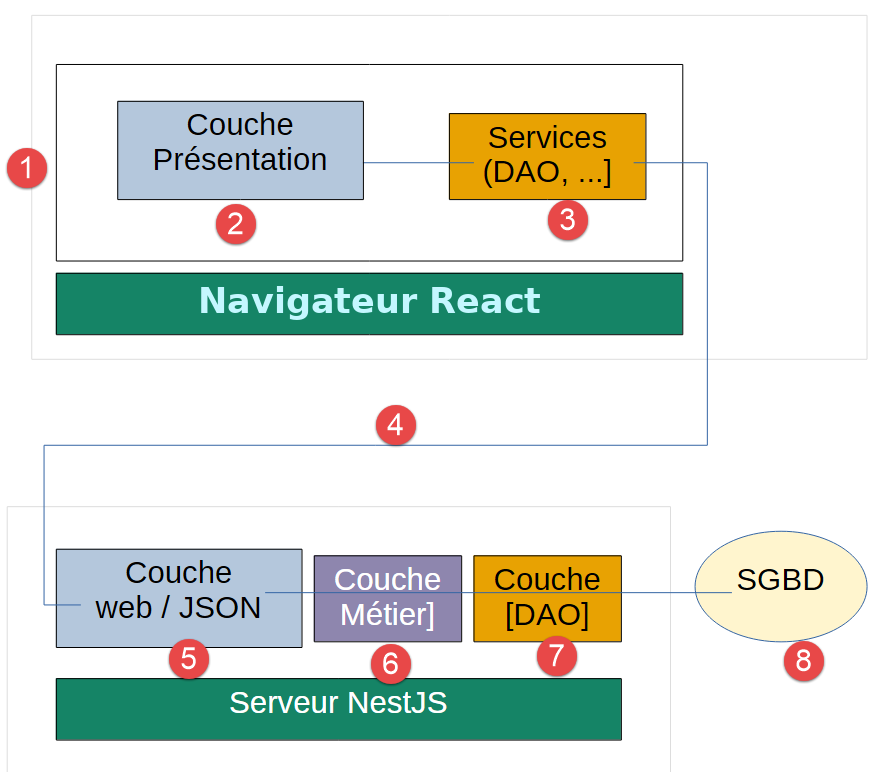
One difference in terminology is worth noting: in AngularJS 1.x, the View (the HTML template) and the Controller (the associated JavaScript class) were two separate entities, linked by $scope. In [React], they are combined into a single entity, the component (see previous chapter)—exactly as in [Angular], even though the form differs (a function rather than a class)—which is why, in what follows, we will simply refer to “components” where the original document distinguished between view and controller.
As in the original document, components NEVER communicate directly with the server: this role is exclusively reserved for the Services layer (here, the hook useAppointmentService() and the context AuthContext). This is a design principle that applies equally to AngularJS 1.x as well as to [Angular] and [React]—it has not changed.
6.2. Project Tree
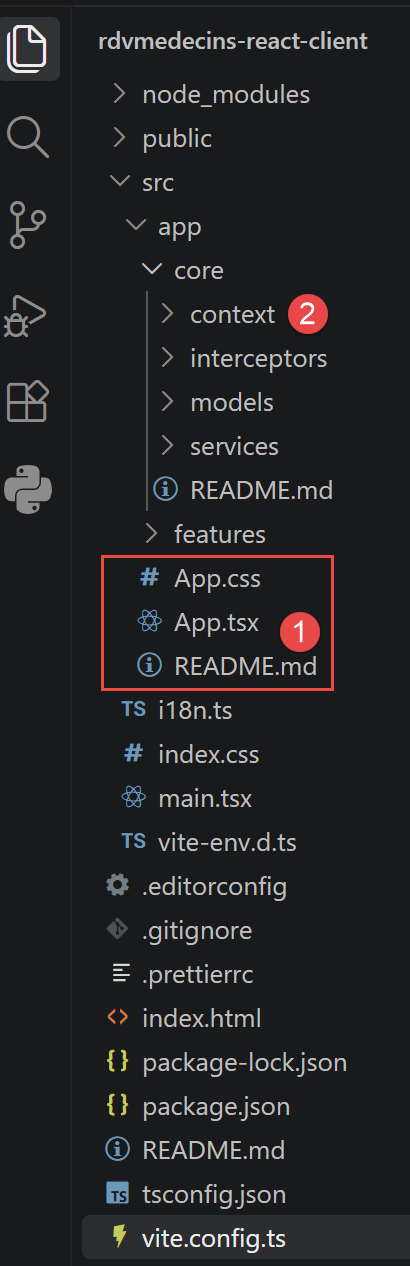
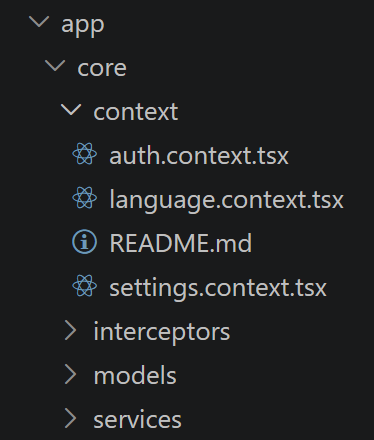
This breakdown directly follows the flow of the original document (login, doctor/day selection, calendar display, booking), simply organized here into functional components [React] rather than separate controllers/views AngularJS 1.x, or standalone components [Angular]. There are two structural differences compared to the [Angular] directory structure from this course:
- the root component consists of three files (App.tsx, App.css, README.md) rather than five (app.ts, app.html, app.css, app.config.ts, app.routes.ts): [JSX] merges the class and the template, and [React] does not have an application configuration file equivalent to app.config.ts (see “Application Configuration” below);
- A `core/context/` folder appears, which is absent from the [Angular] variant: it contains the custom hooks and the [React] [Context] files that serve as injectable services ([SettingsService], [AuthService], [LanguageService]) of the [Angular] variant—this mechanism (hooks + [Context]) was presented in the previous chapter, along with a generic example (see previous chapter, “Sharing Logic”).
[Bootstrap] 5 is used in all views (imported into main.tsx; see below)—a direct evolution of Bootstrap 3, already used by the original document, and unchanged from the [Angular] variant in this course.
6.3. Project configuration files
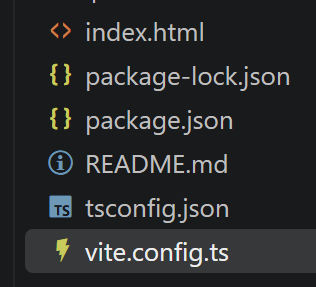
6.3.1. package.json
Let’s comment on this code:
- line 5: "type": "module", — tells Node that this project natively uses the ECMAScript modules (import/export) without any prior transformation—a setting that a [Angular] CLI project also defines, implicitly, in its own toolset;
- lines 6–11: "scripts": { … } — the available [npm run <name>] commands. [start] (like `dev`) starts the [Vite] development server with automatic reloading whenever a source file is modified ([Vite] refers to this mechanism as Hot Module Replacement)—this is the command used throughout this document, on port 4200 (see [vite.config.ts] below), the same port as the [Angular] variant in this course;
- Lines 12–19: "dependencies": { … } — the packages required to run the application in the browser: [react]/[react-dom] (the core of [React] and its integration with the browser’s DOM), [Bootstrap] (style sheet only), and - added in this chapter - [i18next]/[i18next-http-backend]/[react-i18next], the third-party library used for translating the interface FR/EN (see i18n.ts and core/context/language.context.tsx below). Unlike the [Angular] variant of this course, there is no equivalent of [@angular/router] (no router; see the previous chapter), nor of RxJS ([fetch] directly returns a Promise; see the previous chapter);
- lines 20–26: "devDependencies": { … } — packages needed only during development, never included in the final bundle delivered to the browser: the types TypeScript and [React] ([@types/react], [@types/react-dom] - [React] itself is written in JavaScript, not in TypeScript, unlike [Angular]), [@vitejs/plugin-react] (the transformation of [JSX] into JavaScript, and Fast Refresh during development), TypeScript, and [Vite] itself.
Unlike the [NestJS] server ([commonjs] module, see Chapter 3), this project runs on native ECMAScript modules (import/export)—exactly like the [Angular] variant from this course (“module”: “preserve” in tsconfig.json, see below).
6.3.2. vite.config.ts
Let’s break down this code:
- line 5: plugins: [react()], — enables the transformation of [JSX]/[TSX] and hot reloading — the equivalent, for [React], of what @angular/build:dev-server does for [Angular] in the background (see angular.json from the [Angular] variant of this course);
- lines 6–8: server: { port: 4200, }, — sets the development server port to 4200, the same as [ng serve] on the [Angular] side—a purely educational choice, so that the two variants of this course remain interchangeable without changing your workflow.
This file has no equivalent in the original AngularJS 1.x project (the build tools at the time—Grunt, Gulp—were configured separately); on the [Angular] side of this course, [angular.json] serves this purpose; on the [NestJS] side (Chapter 3), it is [nest-cli.json].
6.3.3. tsconfig.json
Let’s break down this code:
- line 5: "jsx": "react-jsx", — tells the TypeScript compiler how to transform the [JSX]; [react-jsx] is the modern setting (since React 17), which eliminates the need to write [import React from 'react'] in every .tsx file that uses [JSX] - a slight simplification compared to the very first [React] projects;
- line 6: "strict": true, — like the [tsconfig.json] in the [Angular] variant of this course, TypeScript’s full strict mode is enabled: every variable must have a determinable type, and every null or undefined value must be handled explicitly;
- lines 7–8: "noUnusedLocals": true, "noUnusedParameters": true, — flags any variable or parameter declared but never used during compilation—a setting that the [Angular] variant of this course does not explicitly enable (the [Angular] compiler has its own, different checks via strictTemplates) ;
- line 14: "noEmit": true — TypeScript is used here solely for type CHECKING ([npm run build] first runs `tsc -b`, which fails if a type error exists): it is [Vite] (via esbuild) that actually produces the JavaScript executed by the browser, not the TypeScript compiler itself—a notable difference from the [Angular] (ngc), which itself produces the final JavaScript.
Whereas the [Angular] variant of this course separates [tsconfig.json] (common base) and [tsconfig.app.json] (via the project references mechanism), this smaller [React] project consists of a single file—since the type checks for the templates ([Angular] and strictTemplates) have no equivalent here anyway: it is the TypeScript compiler itself that checks [JSX], just like any other .tsx file.
6.4. Starting the application
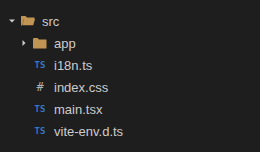
6.4.1. index.html
Let’s comment on this code:
- line 2: <html lang="en"> — as with [Angular], since this page (HTML) is static (loaded by the browser BEFORE the [React] application even starts), it cannot immediately reflect a language selection made later by the user;
- line 10: <div id="root"></div> — the only element this page contains initially, which [React] fills entirely once it starts (see [main.tsx] below) - the exact equivalent of <app-root></app-root> on the [Angular] side, and of [ng-app="rdvmedecinsApp"] on the <html> tag of the original document (AngularJS 1.x, 2014);
- line 11: <script type="module" src="/src/main.tsx"></script> — first notable difference from the [Angular] variant of this course: it is index.html that directly references main.tsx (a convention specific to [Vite]), rather than the other way around (a pre-compiled JavaScript bundle, injected into the page by the [Angular] build process). During development, [Vite] transforms and serves this .tsx file on the fly; in production (npm run build), it is, of course, compiled beforehand.
As with [Angular], there is only one entry point for the entire application: this is the very definition of a single-page web application (SPA), as already described in the original document.
6.4.2. src/main.tsx
Let’s comment on this code:
- line 11: createRoot(document.getElementById('root')!).render(…) — the direct equivalent of bootstrapApplication(App, appConfig) on the [Angular] side: starts the application in the #root element of index.html. The exclamation point (!) tells TypeScript that we are certain this element exists (it is defined on line 10 of [index.html]);
- lines 13–19: <SettingsProvider><AuthProvider><LanguageProvider><App /></LanguageProvider></AuthProvider></SettingsProvider> — the three providers from core/context/ (see below) wrap the root component [App]: this is what makes useSettings(), useAuth(), and useLanguage() usable from any descendant component—the equivalent of the three provideXxx() of [app.config.ts] on the [Angular] side (providers: [...]), but expressed here as a nesting of components rather than as a list;
- Line 7: import 'bootstrap/dist/css/bootstrap.min.css'; — [Vite] allows you to import a stylesheet directly from a TypeScript file; As for [Angular], it is angular.json (styles array: [...]) that serves this purpose—same result, different mechanism;
- line 9: import './i18n'; — imported solely for its side effect (initializing [i18next]; see i18n.ts below): nothing from this import is used, but executing it is necessary before [useTranslation()] works in the components.
<StrictMode> is a component specific to [React] that affects only development (no effect in production): it helps detect certain poorly written side effects by running certain renderings twice—there is no direct equivalent in [Angular], where the compiler detects these types of errors at compile time instead.
6.4.3. src/i18n.ts
Let’s comment on this code:
- line 6: .use(HttpBackend) — loads each dictionary via a query HTTP GET, on the URL formed by [backend.loadPath] (line 15): [/i18n/fr.json] or [/i18n/en.json], EXACTLY the same URL as the one constructed by [TranslateHttpLoader] on the [Angular] side (prefix: '/i18n/', suffix: '.json'), so that [public/i18n/fr.json] and [public/i18n/en.json] (see below) can be reused as-is, without any modifications;
- line 7: .use(initReactI18next) — branches from [i18next] to [React]: provides the useTranslation() hook used in every component in features/, and the React hook [Context] (internal to the library, not visible here), which triggers a full re-render of the entire interface when the language changes—the equivalent of what, on the [Angular] side, the [TranslatePipe] decorator combined with [provideTranslateService(...)];
- line 9: lng: navigator.language?.toLowerCase().startsWith('fr') ? 'fr' : 'en', — startup language (French if the browser is set to French, English otherwise; fallbackLng: 'en' on line 10); the hook [useLanguage()] (see core/context/language.context.tsx below) immediately replaces it with the selection stored in localStorage, if there is one—exactly like lang: 'en' in [app.config.ts] on the [Angular] side;
- lines 11–13: interpolation: { escapeValue: false, }, — [React] already escapes HTML itself (protection against XSS vulnerabilities): there’s no need for [i18next] to do it a second time.
In the original document (2014), the client AngularJS 1.x relied on the angular-translate library for this same need—the predecessor, within the AngularJS 1.x ecosystem, of [@ngx-translate/core] (the [Angular] variant from this course) and, here, of [i18next]. The TWO modern libraries ([ngx-translate] on the [Angular] side, [i18next] on the [React] side) load JSON dictionaries via a simple HTTP GET request, using the same “one file per language, one section per screen” schema.
6.4.4. src/index.css
Let’s comment on this code:
- line 1: body { background-color: #f5f7fa; } — copied exactly from src/styles.css on the [Angular] side: a very light gray rather than the default pure white, so that the [Bootstrap] cards (white background, .card) stand out slightly from the page background;
- lines 5–7: .free-slot:hover — applied to the rows in the calendar table representing an available slot (see Schedule.tsx, className={scheduleSlot.appointment === null ? 'free-slot' : undefined} discussed later): the background turns slightly green on hover. The hand-shaped cursor (cursor: pointer as shown in [Angular]) is applied directly to the “Book” button itself (a true <button>), rather than to the entire row of the table.
This file contains global styles, as opposed to the “local” styles defined in each component’s .css file (login.css, schedule.css…), which apply only to the [JSX] of that specific component—the same principle as in [Angular] (CSS files per component). App.css, the style sheet for the root component, remains empty: [Bootstrap] and index.css are sufficient for everything this document implements.
6.5. The core/models layer

6.5.1. src/app/core/models/appointment.models.ts
Let’s comment on this code:
- This file is a direct copy-and-paste of the file with the same name from the [Angular] variant of this course: The TypeScript interfaces describing the data exchanged with the server do not depend on any interface library, such as [React] or [Angular] - This is “pure” TypeScript, which corresponds term-for-term to the [ServerResponse]<T> class and the [TypeORM] entities of the [NestJS] server (Chapter 3);
- [Client] refers here—as it does on the [Angular] side and in the original document—to a PATIENT from the medical practice—not to be confused with “HTTP client”;
- Role / LoginResult — certified copies of the server types of the same name (src/entities/user.entity.ts, auth/login-result.model.ts, Chapter 3).
In AngularJS 1.x (2014), the pure JavaScript did not allow the expected data format to be described in this way. With TypeScript—used by both [Angular] and [React]—a typo in a field name is flagged even before the program is run, right at compile time.
6.6. The core/context layer
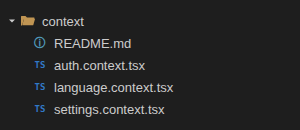
This folder has no equivalent in the [Angular] variant of this course (see the previous chapter, “Sharing Logic”): it combines the three [React] [Context]s, which, in this context, fulfill the role played by the injectable services ([SettingsService], [AuthService], and part of [LanguageService]) on the [Angular] side.
6.6.1. src/app/core/context/settings.context.tsx
Let's comment on this code:
- line 11: const [apiBaseUrl, setApiBaseUrl] = useState('http://localhost:8080'); — Replaces [readonly apiBaseUrl = signal('http://localhost:8080');] exactly with [SettingsService] on the [Angular] side: the same default value, the same ability to modify it from the “Server URL” field on the home view of the original document;
- lines 12–16: <SettingsContext.Provider value={{ apiBaseUrl, setApiBaseUrl }}>{children}</SettingsContext.Provider> — publishes the (value, setter) pair to all descendants, exactly the role that [providedIn: 'root'] played on the [Angular] side;
- lines 19–25: export function useSettings(): SettingsContextValue { — the hook that components call (const settings = useSettings();), a direct equivalent of inject(SettingsService).
6.6.2. src/app/core/context/auth.context.tsx
Port of [AuthService]: manages the user’s connection, calls [POST /login], stores the received JWT token (and the accompanying identity/role), and ensures it survives a page reload using [localStorage]. This is the only place in the application, along with [useAppointmentService()] (see below), that communicates with the server via HTTP.
Let’s break down this code:
- Lines 14–21: function readStoredSession(): StoredSession | null { — protected by a try/catch block, exactly like on the [Angular] side: [localStorage] may be unavailable (very restrictive private browsing) or contain a corrupted value—in this case, we simply assume there is no session;
- line 38: const [session, setSession] = useState<StoredSession | null>(readStoredSession); — [useState(function)] executes this function only ONCE, during the very first rendering (not on every rendering): exactly the role played by the initializer [signal(readStoredSession())] on the [Angular] side. If the user reloads the page after logging in, they remain logged in;
- lines 40–54: async function logIn(login: string, password: string): Promise<LoginResult> { — equivalent to [POST /login, JSON body { login, password }]; unlike [AuthService.logIn()] on the [Angular] side (which returns an Observable and saves the session in a separate tap() operator), the [fetch]/async-await version naturally chains the steps from top to bottom, without a dedicated operator;
- lines 56–59: function logOut(): void { — purely local (no server call): a JWT token is not “revoked” on the server side in this port; it expires on its own after JWT_EXPIRES_IN (see the .env server, Chapter 3);
- lines 61–73: const value = useMemo<AuthContextValue>(() => ({ … }), [session, apiBaseUrl]); — [useMemo]() prevents a new `value` object from being recreated each time [AuthProvider] is rendered when neither [session] nor [apiBaseUrl] has changed: without it, any component using [useAuth()] would be redrawn unnecessarily every time [AuthProvider] is rendered - a performance issue that has no direct equivalent on the [Angular] side, where `computed()` only recalculates what actually depends on a modified signal anyway.
6.6.3. src/app/core/context/language.context.tsx
Port of part of [LanguageService]: centralizes the interface language switch (French/English) on top of the [useTranslation()] hook provided by [react-i18next].
Let’s comment on this code:
- line 18: const { i18n } = useTranslation(); — [react-i18next] already exposes the i18n instance (and its current language, i18n.language) via this hook: there’s no need to create a separate state for it, unlike with [SettingsContext]/[AuthContext]; this is the same concept as with [Angular], where LanguageService simply republishes this.translate.currentLang under a different name;
- lines 20–27: useEffect(() => { … }, []); — an empty dependencies array ([]) means “execute this effect only once, when the component is mounted”—the direct equivalent of the constructor() in [LanguageService] on the [Angular] side: if the user had already selected a language during a previous visit, it is restored; otherwise, the default language set in [i18n.ts] (English, or French for a French browser) is used;
- lines 29–33: function changeLanguage(language: Language): void { — called by the two buttons FR/EN on the navigation bar (see [App.tsx] below); [i18n.changeLanguage(...)] loads (if necessary) the corresponding [public/i18n/<language>.json] file, then switches the current language—unlike [translate.use(language)] on the [Angular] side (an Observable, see previous chapter)—here, the code chooses not to wait for the Promise (it resolves very quickly, since the file is cached after the very first load);
- Line 32: document.documentElement.lang = language; — updates the <html lang="..."> attribute of the page (useful for accessibility), which neither library handles on its own since [index.html] is a static page loaded even before the application starts—exactly the same requirement and the same solution as for [Angular].
Equivalent to the “FR / EN” button in the original AngularJS 1.x client, which at the time relied on the [angular-translate] library —the predecessor, within the AngularJS 1.x ecosystem, of [ngx-translate] ([Angular]) and then [i18next] ([React]).
6.7. Translation dictionaries (public/i18n/)

[i18next-http-backend] (configured in i18n.ts, see above) loads one of these two files via a [HTTP GET /i18n/<language>.json] request whenever the language changes (or is used for the first time). [react-i18next] then resolves each key ("LOGIN.TITLE", "SCHEDULE.FREE"…) via the [useTranslation() (function t(...))] hook used in all components in the features/ directory (see later in this chapter).
6.7.1. public/i18n/fr.json
Let’s comment on this code:
- This file is taken as-is from the [Angular] variant of this course (same keys, same texts), with one exception: line 3, ["TITLE"], which now refers to [React] instead of [Angular]—the only difference between the two clients that actually affects text displayed to the user;
- a nested JSON object, with one section per component (APP, LOGIN, DOCTOR_DAY_PICKER, SCHEDULE, BOOKING_DIALOG); [i18next] flattens it into a flat dictionary, where each complete key ("LOGIN.TITLE") is formed by concatenating the path with dots—exactly like [TranslateService] next to [Angular].
6.7.2. public/i18n/en.json
Let’s break down this code:
- line 3: "TITLE": "RdvMedecins - NestJS / React port", — only the subtitle changes: “[RdvMedecins]” remains unchanged in both languages; it is the application’s proper name.
Both files must remain structurally identical (same keys in both): this ensures that a key exists in both languages. What is NOT translated remains unchanged compared to the [Angular] variant of this course: error messages returned by the server [NestJS] remain in English regardless of the language selected on the client side, and the names of doctors and patients come directly from the database.
6.8. The core/interceptors layer

6.8.1. src/app/core/interceptors/auth.interceptor.ts
[React], being merely an interface library, does not have a built-in HTTP interceptor concept, as found in [HttpClient]/withInterceptors ([...]) on the [Angular] side. This file reimplements the same concept as a hook that encapsulates [fetch]: this is the modern equivalent of the $http interceptors from AngularJS 1.x, which were already discussed in the original document (chapter “Example 6”).
Let’s break down this code:
- line 3: export function useAuthFetch() { — unlike [authInterceptor] on the [Angular] side (a function registered once and for all in [app.config.ts], which is then automatically applied to every call to [HttpClient]), [useAuthFetch()] is a hook that each caller (here, useAppointmentService(), see below) must explicitly call and use in place of fetch()—a difference in mechanism between the two libraries, not in final behavior;
- Lines 6–10: if (auth.accessToken) { headers.set('Authorization', …); } — the direct equivalent of [request.clone({ setHeaders: { Authorization: … } })] on the [Angular] side. Unlike a [HttpClient] request (which is immutable), the options for [fetch] are simply a JavaScript object: there’s no need to create a “cloned” copy of it; you just need to construct the [headers] object before the call;
- lines 12–14: if (response.status === 401) { auth.logOut(); } — same principle as on the [Angular] side (catchError + HttpErrorResponse.status === 401): a 401 during a session means the token is no longer valid, so the client is gracefully logged out; here, [fetch] does not reject its Promise with a HTTP status as an error (unlike an Observable [HttpClient])—which is why this test targets [response.status] directly, without a try/catch block;
- line 15: return response; — the response (potentially 401) is nevertheless returned as-is to the caller, who remains responsible for handling it (see useAppointmentService(), extract<T>(), below) — the interceptor must not hide the error from the calling code.
We could manually add [Authorization: Bearer ...] to each of the methods in [useAppointmentService()]. A shared hook avoids this repetition, offering the same benefit as a [Angular] interceptor: the question “How do we authenticate a request?” is answered in a single location.
6.9. The core/services layer

6.9.1. src/app/core/services/appointment.service.ts
Porting of [AppointmentService]: the part of the application (the ONLY one, along with [core/context/auth.context.tsx] for the connection itself) that communicates over HTTP with the [NestJS] server. This is the direct equivalent of the [dao] service presented in the chapter “Example 6: the HTTP services” in the original document (which used the AngularJS $http service).
Let’s comment on this code:
- line 6: async function extract<T>(httpResponse: Response): Promise<T> { — rather than repeating, in each of the public functions, the check “if status !== 0, it’s an error,” we centralize it here just once—exactly the role of [AppointmentService.extract()] on the [Angular] side, but declared outside the hook (a regular function, so it doesn’t need to be recreated on every render);
- line 14: export function useAppointmentService() { — a custom hook that reads and is used exactly like [inject(AppointmentService)] on the [Angular] side: it’s called once at the top of a component, then the functions it returns are used;
- lines 18–21: const getAllDoctors = useCallback(async () => { … }, [authFetch, apiBaseUrl]); — [useCallback]() caches this function between renders, as long as [authFetch] and [[apiBaseUrl]] do not change: this optimization is necessary here because this hook is called every time the component that uses it is rendered (App.tsx)—without it, a new function [getAllDoctors] would be recreated on every render, which would unnecessarily trigger certain effects again (useEffect(…, [api]), see App.tsx below); this technical detail has no equivalent on the [Angular] side, where [AppointmentService] exists only once for the entire application (providedIn: 'root');
- each function corresponds exactly to one of the eleven routes in the [NestJS] controller (Chapter 3)—in fact, the same names appear on both sides (getAllDoctors, addAppointment, deleteAppointment…), which makes it easier to compare the server and client sides, just as with [Angular].
Unlike [AuthService.logIn()] (previous chapter), none of the methods in this hook need to store anything after the call: it is the calling component (App.tsx) that decides what to do with the result (setDoctors(...), setSchedule(...)…) - the same separation of responsibilities as on the [Angular] side, where [AppointmentService] knows nothing about the state displayed on the screen.
6.10. The features layer: the four components

6.10.1. src/app/features/login/Login.tsx
Port of [login.component.ts/.html]: the login screen, equivalent to view [login.html] from the original client AngularJS 1.x.
Let’s comment on this code:
- line 6: export function Login() { — a standalone component [Angular] declares, within its decorator [@Component], the pipes it uses (imports: [TranslatePipe]); a [React] component has nothing equivalent to declare: [useTranslation()]] (line 7) is simply imported and called, just like any other function;
- lines 10–13: const [login, setLogin] = useState(''); … — a state that is purely local to the form (what the user is currently typing), equivalent to [signal()] local variables of the [Angular] component;
- lines 15–16: async function onSubmit(event?: FormEvent): Promise<void> { event?.preventDefault(); — a deliberate difference from the [Angular] variant in this course: rather than listening (keyup.enter) to each field separately, this component uses a real <form> element (line 34) and its native [onSubmit] event—both the Enter key and a click on the “Log in” button (type="submit") then trigger [onSubmit()], without any additional code; [event?.preventDefault()] prevents the browser’s default behavior (reloading the page), which would violate the very principle of a Single Page Application;
- lines 23–24: await auth.logIn(login, password); setSubmitting(false); — no further processing is needed here: [AuthContext] has already stored the session (state + localStorage)—it is App.tsx that calls useAuth().isLoggedIn, which will respond by stopping the display of <Login />;
- lines 24–27: catch { … setError('LOGIN.ERROR'); } — an invalid username/password pair causes [logIn()] to fail with a JavaScript exception (thrown by [auth.context.tsx], see above): "LOGIN.ERROR" is displayed to the user, without attempting to distinguish between a nonexistent username and an incorrect password—exactly the same approach as in [Angular]. Storing a translation key rather than an already-resolved text has the same advantage as in [Angular]: if the user switches languages while this message is displayed, it translates itself automatically (t(error), line 38, re-evaluated on each render).
This component combines in a SINGLE .tsx file what [Angular] splits into two (login.component.ts for the logic, login.component.html for the template): the [JSX] returned by the Login() function IS the template, combined with the code TypeScript that drives it. Therefore, there is no separate .html file to comment on, unlike the equivalent chapter for the [Angular] variant of this course.
6.10.2. src/app/features/doctor-day-picker/DoctorDayPicker.tsx
Port of [doctor-day-picker.component.ts/.html]: the component that allows you to select a doctor and a day, then request to view their schedule. Conceptually equivalent to examples 7 through 10 of the original AngularJS 1.x client.
Let’s comment on this code:
- line 11: export function DoctorDayPicker({ doctors, onSearch }: DoctorDayPickerProps) { — a [input.required<Doctor[]>()] [Angular] simply becomes a field of the `props` object (`doctors`); an `output<...>()` becomes a prop that contains a callback function provided by the parent `[(onSearch)]`—`[App.tsx]` will call it exactly as it subscribed to the `search` event of the `[Angular]` template;
- lines 39–43: {doctors.map((doctor) => ( <option key={doctor.id} …>…</option> ))} — .map(...), with [key={doctor.id}], is the [React] equivalent of [@for (doctor of doctors(); track doctor.id)] on the [Angular] side: in both cases, a stable identifier specifies how to recognize a doctor that has already been displayed if it is redrawn;
- line 37: onChange={onDoctorChange} — unlike the “login” field of [Login.tsx] (which uses [onChange] with each keystroke), a <select> only notifies when the selection actually changes—the same event HTML [change] that was already being used by [(change)="onDoctorChange($event)] on the [Angular] side.
6.10.3. src/app/features/schedule/Schedule.tsx
Port of [schedule.component.ts/.html]: displays a doctor’s schedule for a given day. Equivalent to examples 8 and 9 from the original AngularJS 1.x client. Since the addition of authentication, this component also accepts [canEdit]: when set to false (role USER), the “Book”/“Cancel” buttons disappear—the schedule remains viewable, but in read-only mode.
Let’s comment on this code:
- lines 30–32: if (schedule === null) { return <p …>{t('SCHEDULE.EMPTY_STATE')}</p>; } — an early return replaces [@if (schedule(); as currentSchedule) { … } @else { … }] on the [Angular] side: a component function [React] can return any [JSX] at any point in its body, including before the end—here, as long as no search has been performed (or the agenda is empty), the function stops after displaying the empty status message, without even constructing the array;
- line 7: canEdit: boolean; — a new feature introduced by authentication, similar to the [Angular] side: [App.tsx] passes [auth.isAdmin] to it (see below). When set to false (role USER), the “Book”/“Cancel” buttons do not even exist in DOM (see line 61, [{canEdit && (…)}])—they are not merely grayed out or disabled, but entirely absent;
- lines 52–58: {scheduleSlot.appointment === null ? ( <span …>Free</span> ) : ( <span …>{patient name}</span> )} — the ternary operator replaces [@if (…) { … } @else { … }] on the [Angular] side: green [Bootstrap] badge (“Free”) or gray (patient’s name), depending on the slot’s status;
- line 61: {canEdit && (…)} — the && operator displays its second operand only if the first is true (and nothing at all otherwise)—the shortest form of conditional rendering in [JSX], used here instead of the ternary operator because there is nothing to display otherwise;
- line 65: {scheduleSlot.appointment === null ? t('SCHEDULE.BOOK') : t('SCHEDULE.CANCEL_APPOINTMENT')} — as on the [Angular] side (where a pipe can be used in any template expression), t(...) is a standard JavaScript function: it can be used directly in a ternary operator without any special syntax.
This component does not make any HTTP calls itself: it displays data received via props and notifies its parent (App.tsx) of the user’s intentions via [onBook/onCancel]—exactly the same separation of responsibilities as on the [Angular] side (book/cancel, via output()).
6.10.4. src/app/features/booking-dialog/BookingDialog.tsx
Port of [booking-dialog.component.ts/.html]: the (modal) window that allows you to select a patient to book an available slot. Equivalent to Example 9 of the original AngularJS 1.x client.
Let’s comment on this code:
- lines 18–20: if (!open) { return null; } — a [React] component can return null to display nothing at all: this is the exact equivalent of [@if (open()) { … }] on the [Angular] side (nothing is even loaded into the DOM as long as `open` is false), and of [ngIf/ngShow] in AngularJS 1.x;
- Line 37: <div className="modal-backdrop fade show"></div> — the semi-transparent background that darkens the rest of the page—hard-coded here, whereas [Bootstrap] usually inserts it itself via JavaScript when the modal is displayed;
- line 38: <div className="modal fade show d-block" …> — d-block replaces the role normally filled by JavaScript from [Bootstrap] (add [display:block] upon opening)—here, it is directly the conditional rendering from line 18 ([if (!open) return null;]) that plays this role;
- line 44: aria-label={t('BOOKING_DIALOG.CLOSE_ARIA')} — unlike [attr.aria-label="'BOOKING_DIALOG.CLOSE_ARIA' | translate"] on the [Angular] side (an attribute binding distinct from the {{ }} interpolation), [JSX] makes no distinction between a HTML attribute and the content of an element: {expression} is used identically in both places.
Like the [Angular] side, this component uses the REAL classes of a modal, but its visibility is controlled by [React] (a conditional rendering based on the [open] property) rather than by the JavaScript of [Bootstrap] ([bootstrap.bundle.js, new bootstrap.Modal(...)])—to prevent [Bootstrap] and [React] from each independently managing the same information (is the modal open?), a common source of subtle bugs. The original document (2014) used a component from the angular-ui-bootstrap library (a “turnkey” modal AngularJS 1.x), which was already designed according to this same principle.
6.11. The root App component: orchestrator and authentication guardian
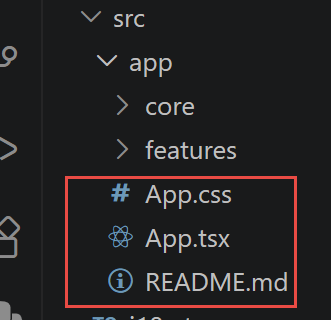
This component fulfills the role played by the “main controller” of the original AngularJS 1.x application, and by the App component on the [Angular] side: it maintains the application’s global state and responds to events from the features/ components to call [useAppointmentService()] at the right time. Since authentication was added, it has taken on a second role: that of a “gatekeeper” on the presentation layer, which decides whether to display the login screen or the rest of the application. A [React] component combines into a single .tsx file what [Angular] splits into three ([app.ts, app.html, app.css]): the [JSX] returned by App() IS the template ([App.css] is imported below solely as a side effect).
6.11.1. src/app/App.tsx
1 2 3 4 5 6 7 8 9 10 11 12 13 14 15 16 17 18 19 20 21 22 23 24 25 26 27 28 29 30 31 32 33 34 35 36 37 38 39 40 41 42 43 44 45 46 47 48 49 50 51 52 53 54 55 56 57 58 59 60 61 62 63 64 65 66 67 68 69 70 71 72 73 74 75 76 77 78 79 80 81 82 83 84 85 86 87 88 89 90 91 92 93 94 95 96 97 98 99 100 101 102 103 104 105 106 107 108 109 110 111 112 113 114 115 116 117 118 119 120 121 122 123 124 125 126 127 128 129 130 131 132 | |
Let’s comment on this code:
- lines 27–28: const lastDoctorId = useRef<number | null>(null); const lastDay = useRef<string | null>(null); — we store the last search (doctor + day) so we can refresh the calendar after a booking or cancellation. A [useRef](), not a [useState](): these two values are never used directly for display (unlike “schedule” or “error”), so there’s no need to redraw the component when they change—exactly the same reasoning that, on the [Angular] side, kept [lastDoctorId/lastDay] as simple private fields rather than signals; Modifying a [useRef]() (.current = …) does not redraw the component, unlike a [setXxx()] from [useState]();
- lines 30–35: useEffect(() => { if (auth.isLoggedIn) { loadInitialLists(); } }, [auth.isLoggedIn]); — re-executes its body every time [auth.isLoggedIn] changes—the direct equivalent of [effect(() => { if (this.auth.isLoggedIn()) { … } })] on the [Angular] side. It also runs once when the component is mounted: if a session was already stored in [localStorage] (page reload), the lists load immediately upon startup, without waiting for a login;
- lines 89–94: <div className="btn-group btn-group-sm" …> …FR…EN… </div> — the language selector is visible (including on the login screen); the role badge, name, and logout button, however, are only displayed if [auth.isLoggedIn] (lines 95–103, [{auth.isLoggedIn && (…)})]—exactly the same logic as on the [Angular] and [(@if (auth.isLoggedIn()) { … })] sides;
- lines 119–130: {!auth.isLoggedIn ? ( <Login /> ): ( <>…</> )} — as long as [useAuth().isLoggedIn] equals false, this component displays only <Login />; since all server routes are now protected by [JwtAuthGuard] (Chapter 3), it would be pointless anyway (and cause 401 errors) to load doctors/clients/calendar before logging in—exactly the same reasoning as for [Angular];
- lines 123–127: <DoctorDayPicker doctors={doctors} onSearch={onSearchSchedule} /> … — the three “business logic” components from features/ are assembled here, each receiving its props (data + callback functions) — the exact equivalent of the [app.html] template on the [Angular] side, where the same three components appeared with [doctors]="doctors()" ([search)="onSearchSchedule($event)"]….
State ([useState/useRef]), effect ([useEffect]), and event handlers (the onXxx functions): these are exactly the four components already presented in the previous chapter, applied here to the entire root component—nothing new has been introduced in this file; it has simply been assembled.
6.12. Step-by-Step Guide to Using the Application
The following screenshots were obtained using exactly the same sequence of actions as the [Angular] variant of this course, on this [React] client: The server’s URL setting was left at its default value (http://localhost:8080), with demo accounts admin/admin and user/user.
6.12.1. 1. Login screen
When the page first loads, [useAuth().isLoggedIn] is equal to false (no session in localStorage): only <Login /> is displayed.
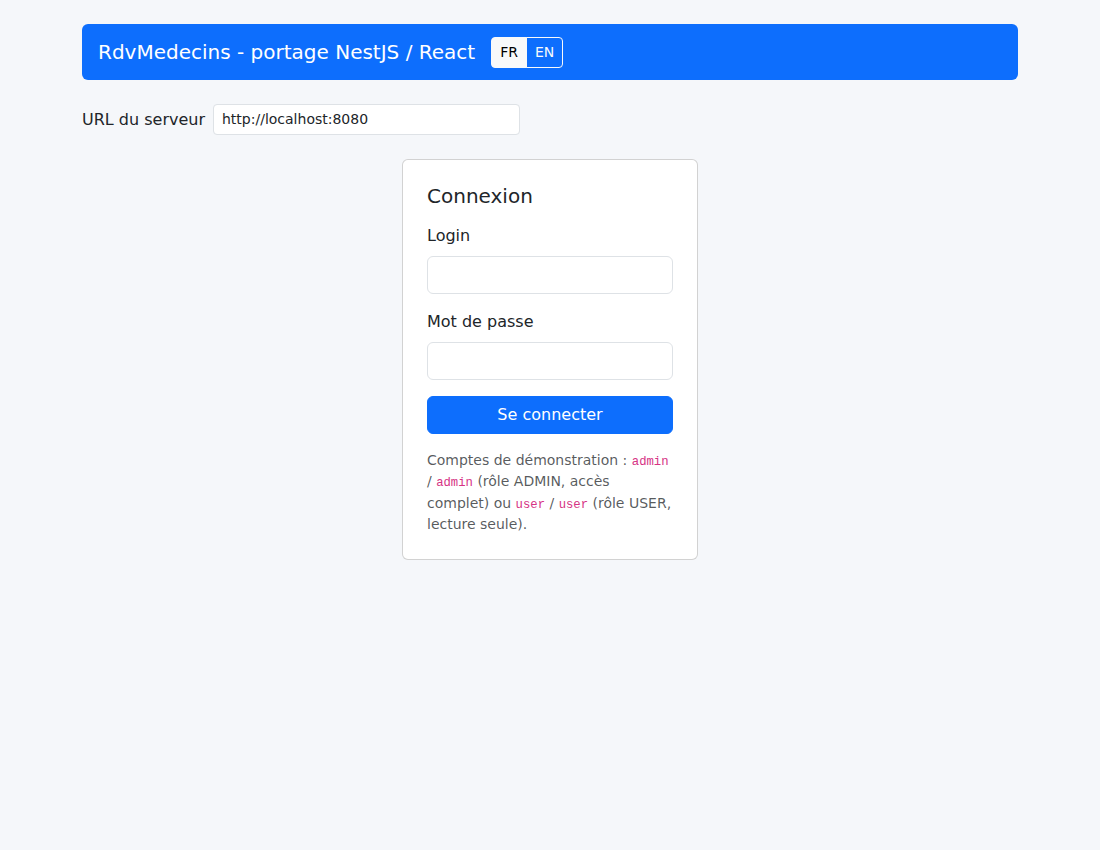
Login screen
An attempt with an invalid username/password combination displays the error message stored by [Login.tsx]:
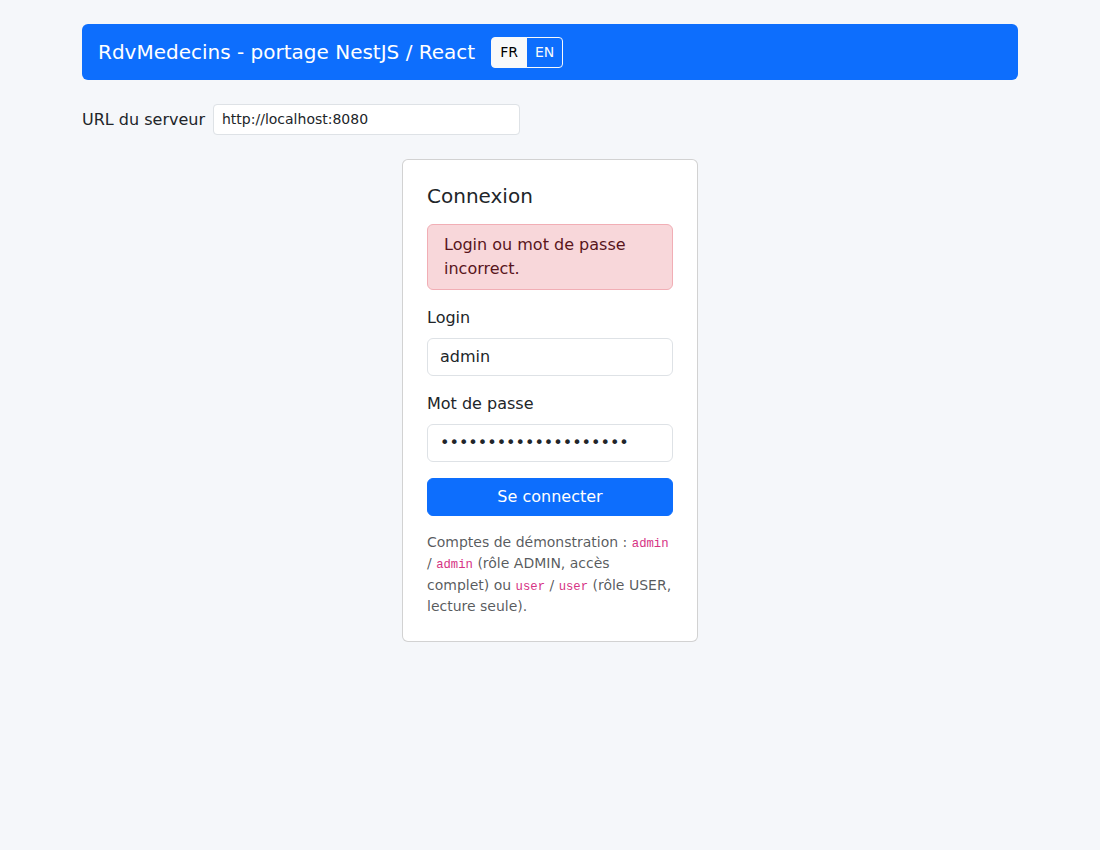
Login error
The FR/EN selector, which is always visible, also translates this screen into French (and the stored error message, which is retranslated without additional code; see [Login.tsx] above):
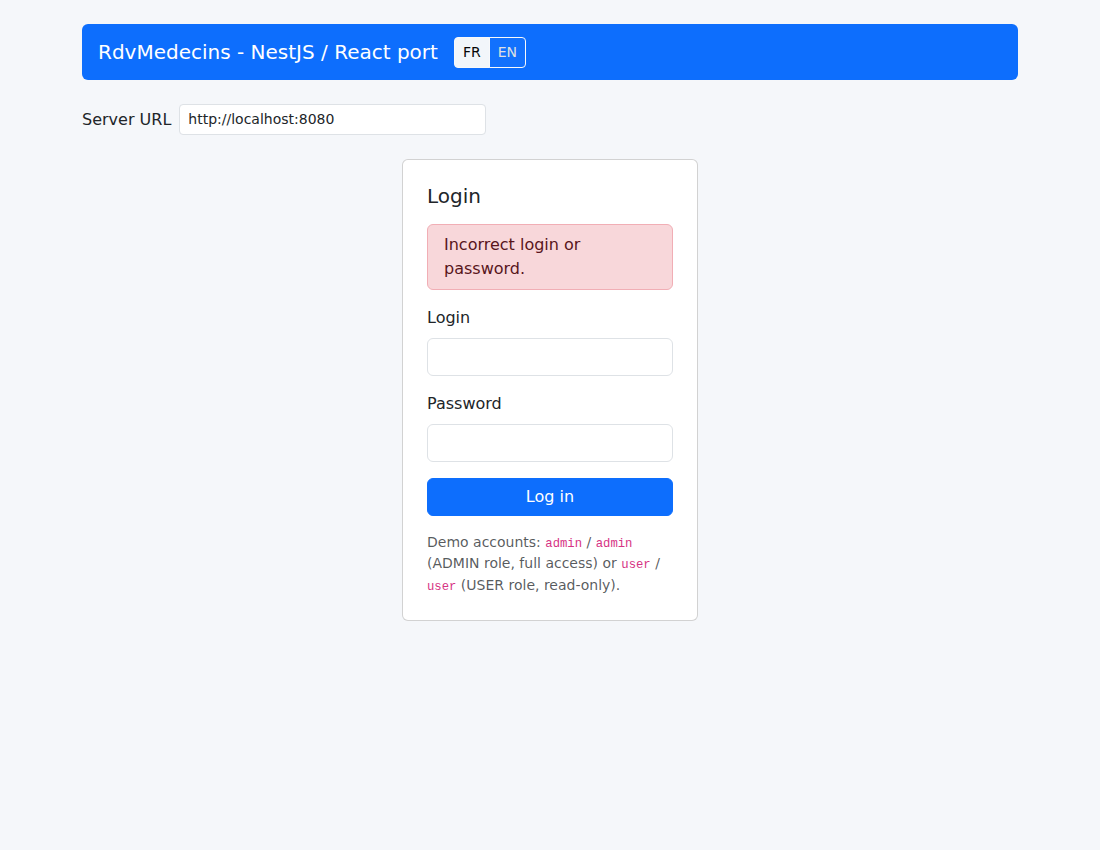
Login screen in French
6.12.2. 2. Logging in as an administrator (role ADMIN, full access)
Once logged in with admin/admin, [App.tsx] stops displaying <Login /> and loads doctors/clients ([loadInitialLists()], triggered by [useEffect(…, [auth.isLoggedIn])] on line 30):
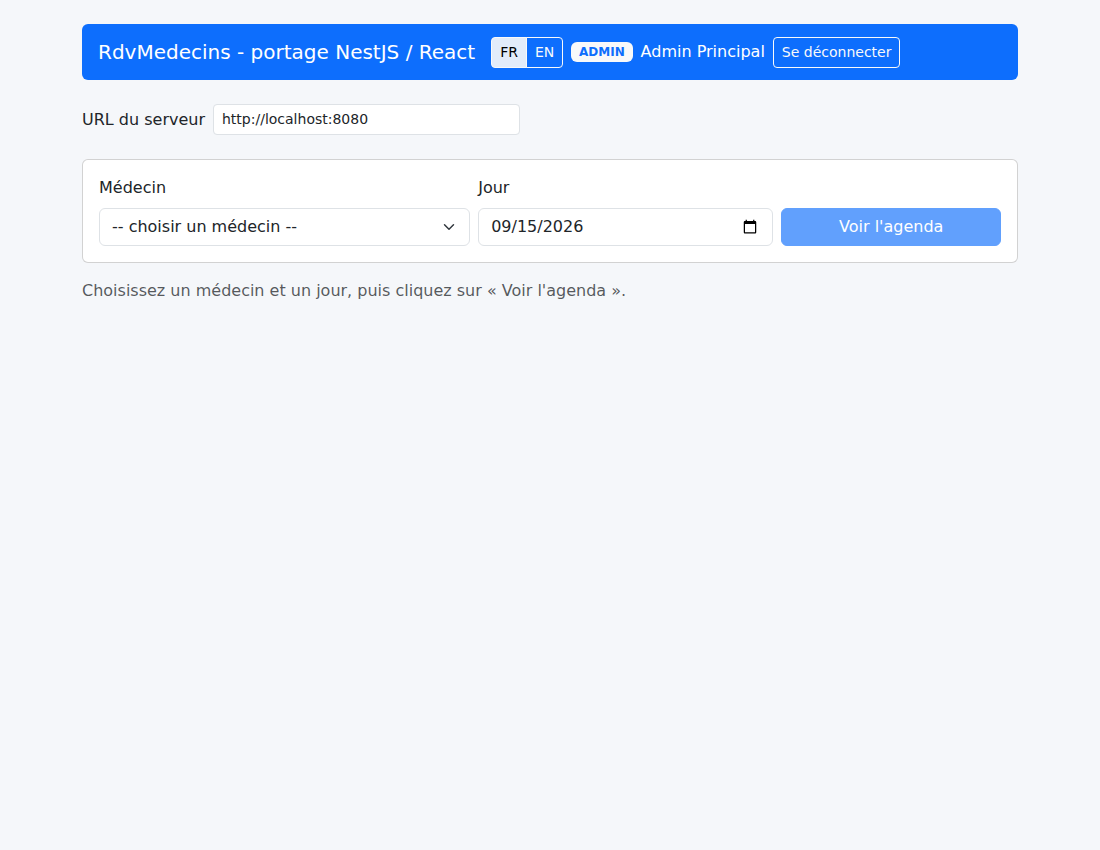
Home, once logged in via ADMIN
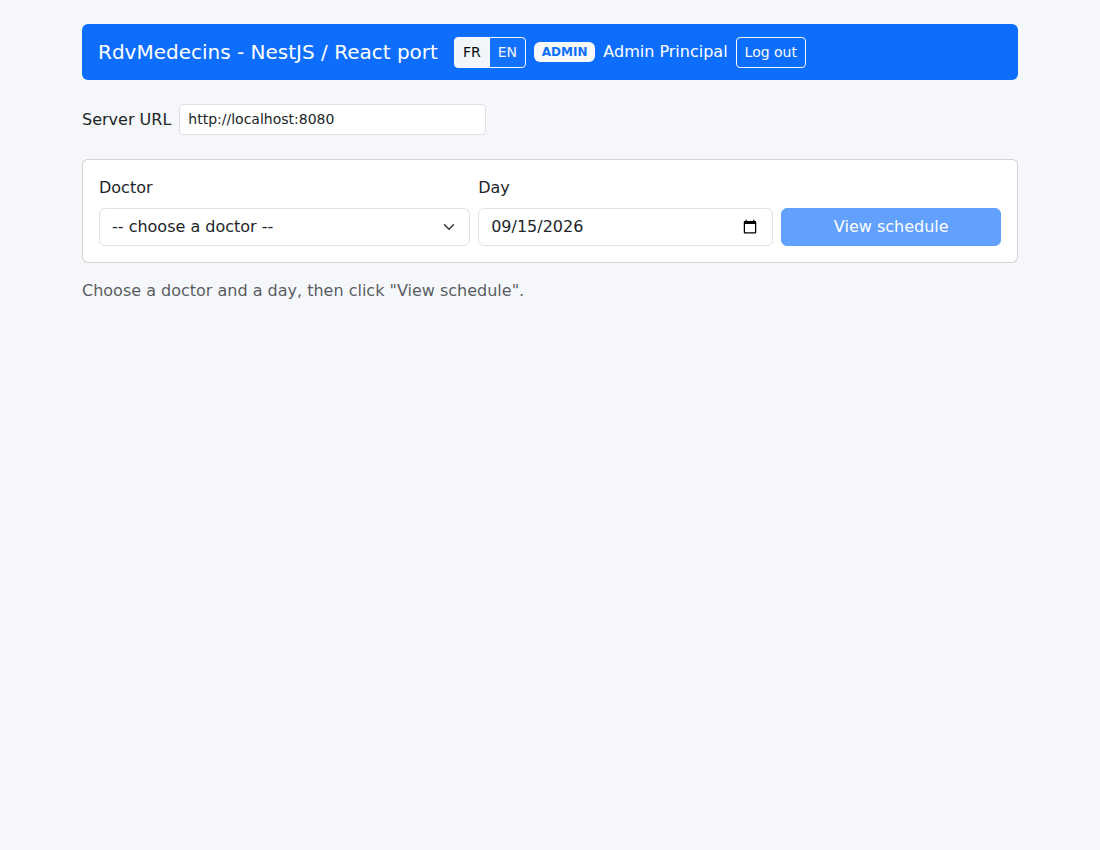
Home page, after logging in via ADMIN, in French
After selecting a doctor and a date in <DoctorDayPicker />, the calendar is displayed with the “Book”/“Cancel” buttons (canEdit is set to true for role ADMIN):
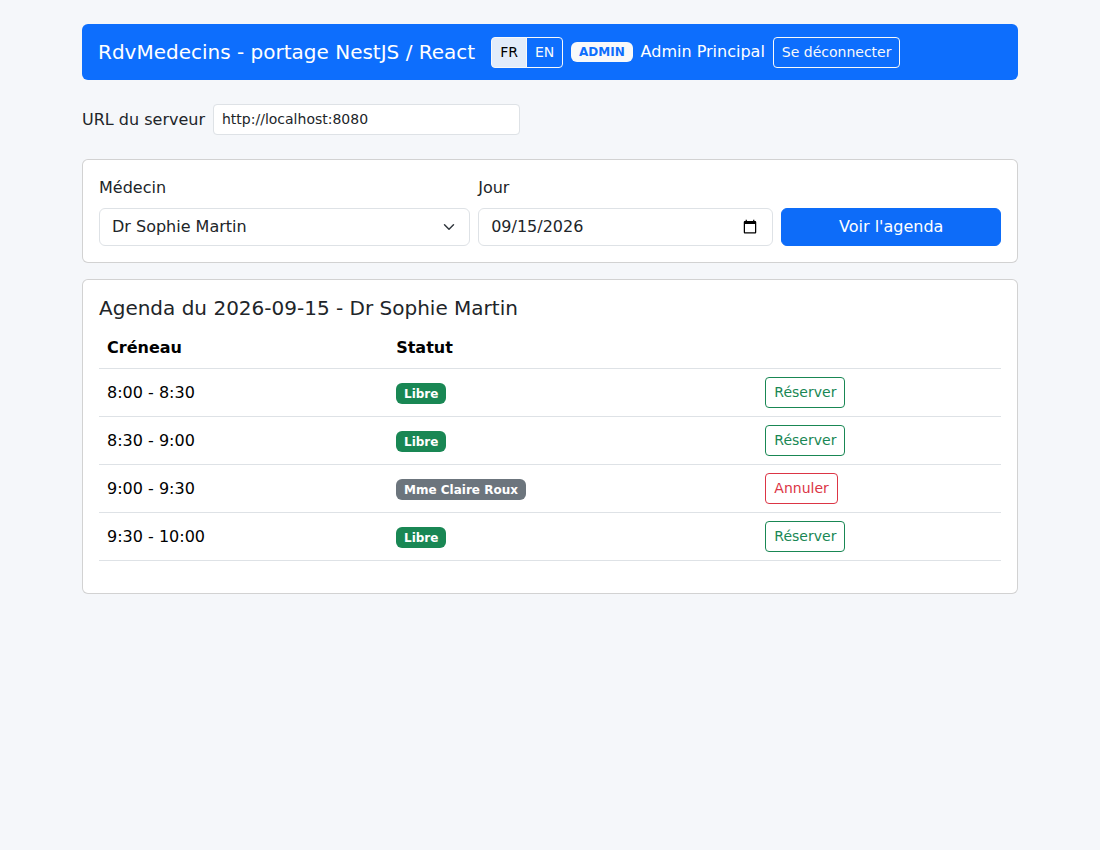
Calendar, view ADMIN (Book/Cancel buttons visible)
Clicking “Book” opens <BookingDialog /> ([open] changes to true; see [onBookingRequest] in [App.tsx]):
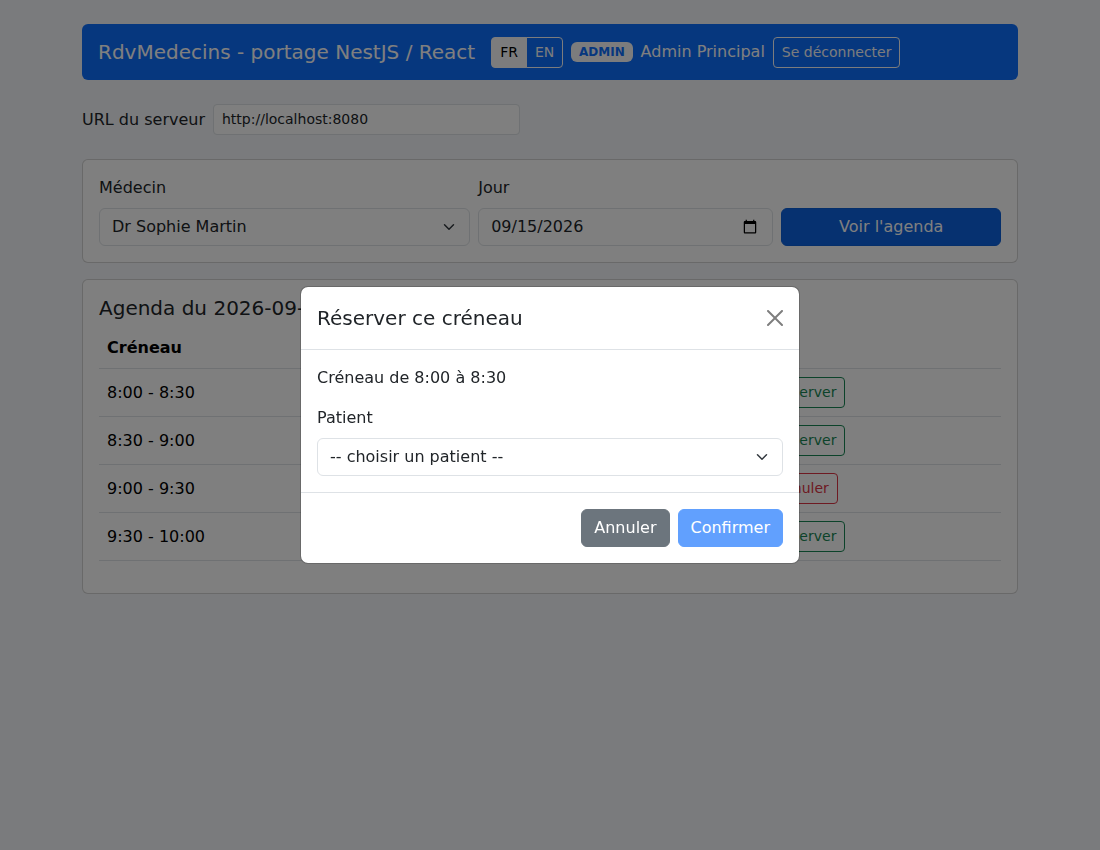
Reservation window (Bootstrap modal)
After confirmation ([onConfirmBooking] calls [api.addAppointment(...)], then [loadSchedule()] refreshes the display), the time slot appears as booked:
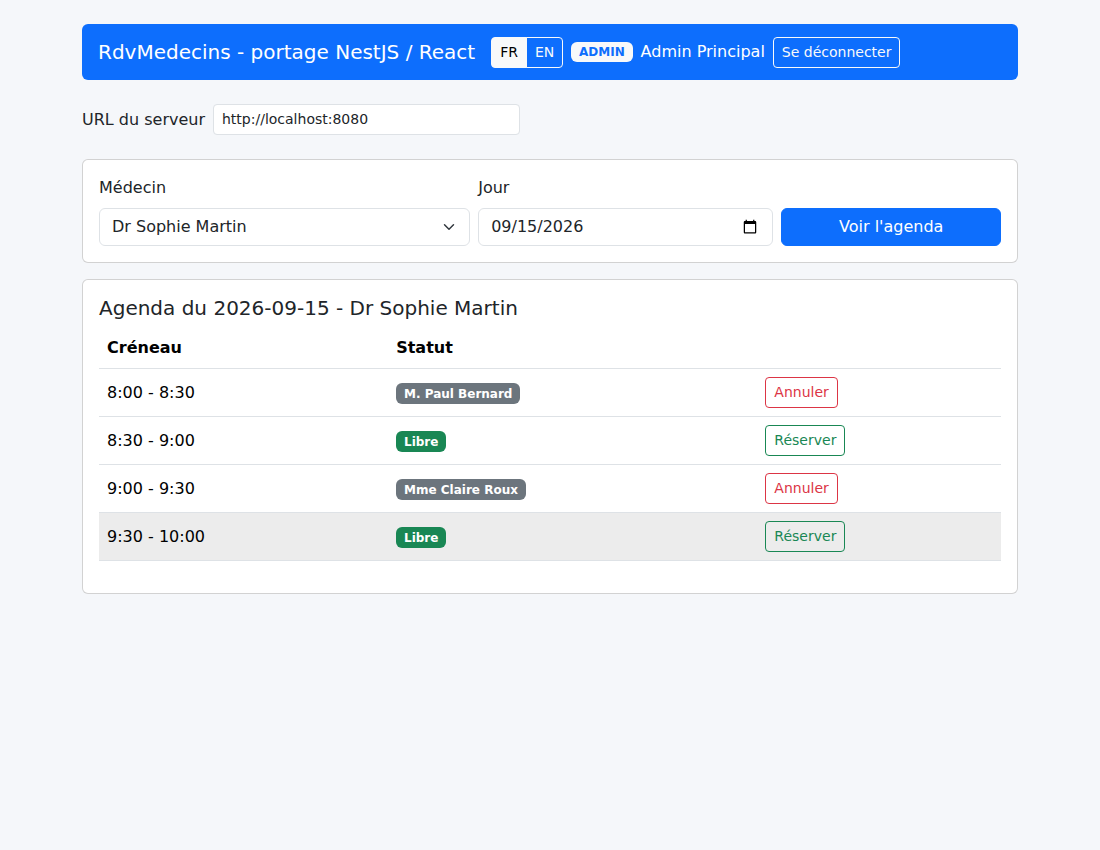
Calendar after booking
Clicking “Cancel” ([onCancelAppointment] calls [api.deleteAppointment(...)]) makes the time slot available again:
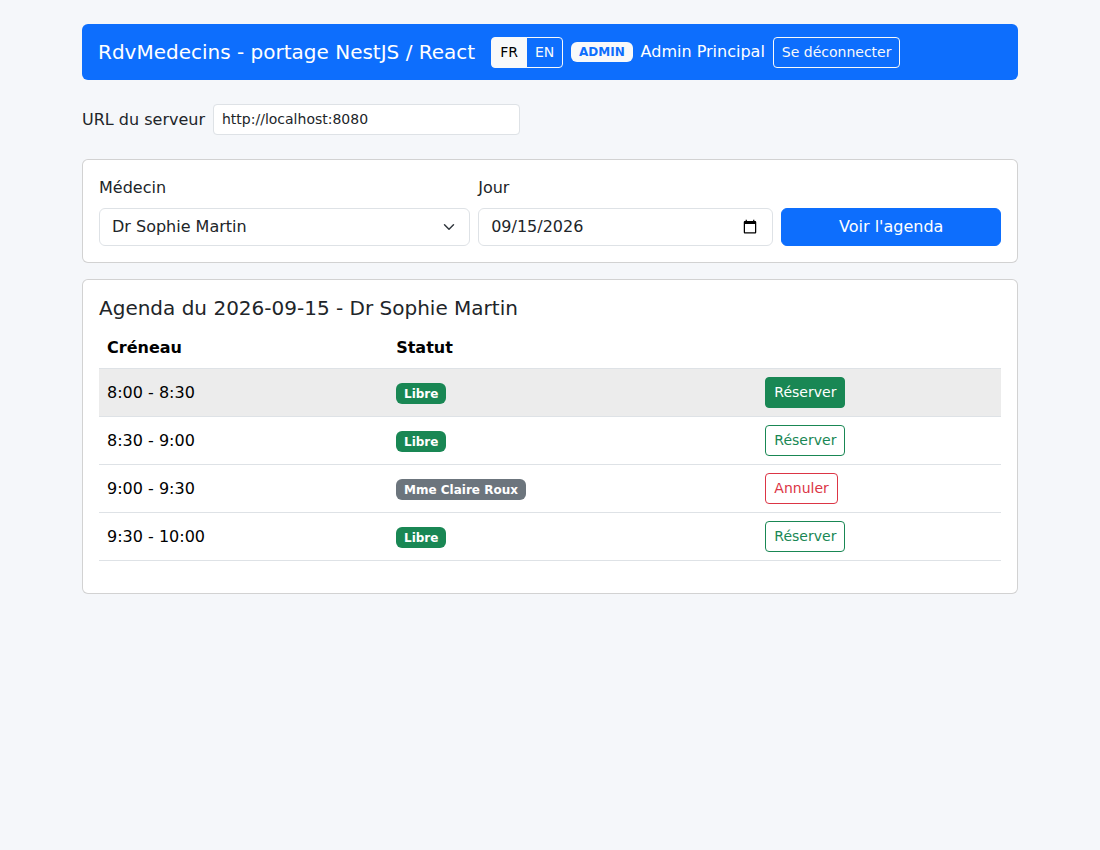
Calendar after cancellation
6.12.3. 3. Log in as a user (role USER, read-only)
After logging out (onLogout), logging in with the user/user account displays a different badge: “USER”:
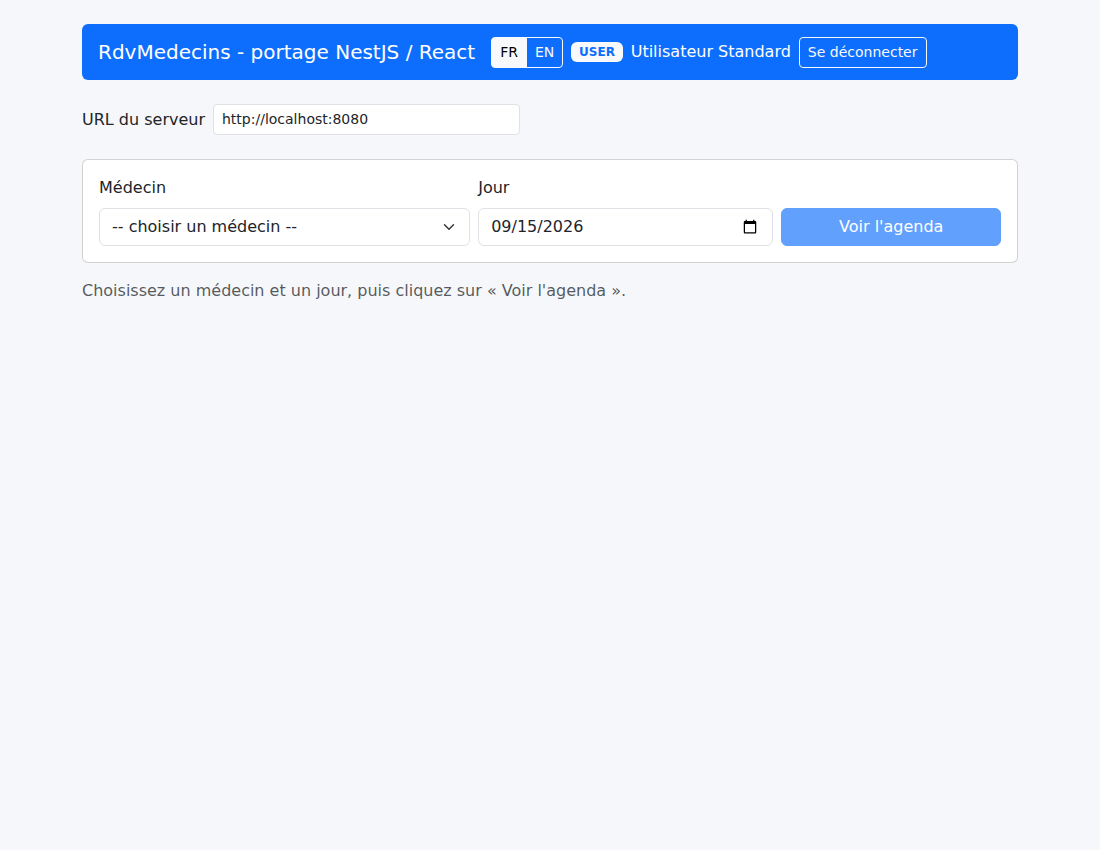
Home page, once logged in as USER
The calendar remains viewable, but no “Book”/“Cancel” buttons appear: the actions column is empty for each time slot (see [Schedule.tsx, {canEdit && (…)}]). A direct request to the server (for example, using Postman and providing the user’s token) would still receive a 403 Forbidden response—the hiding of the buttons is merely a display convenience; the actual restriction is enforced by [RolesGuard] on the server side (Chapter 3):
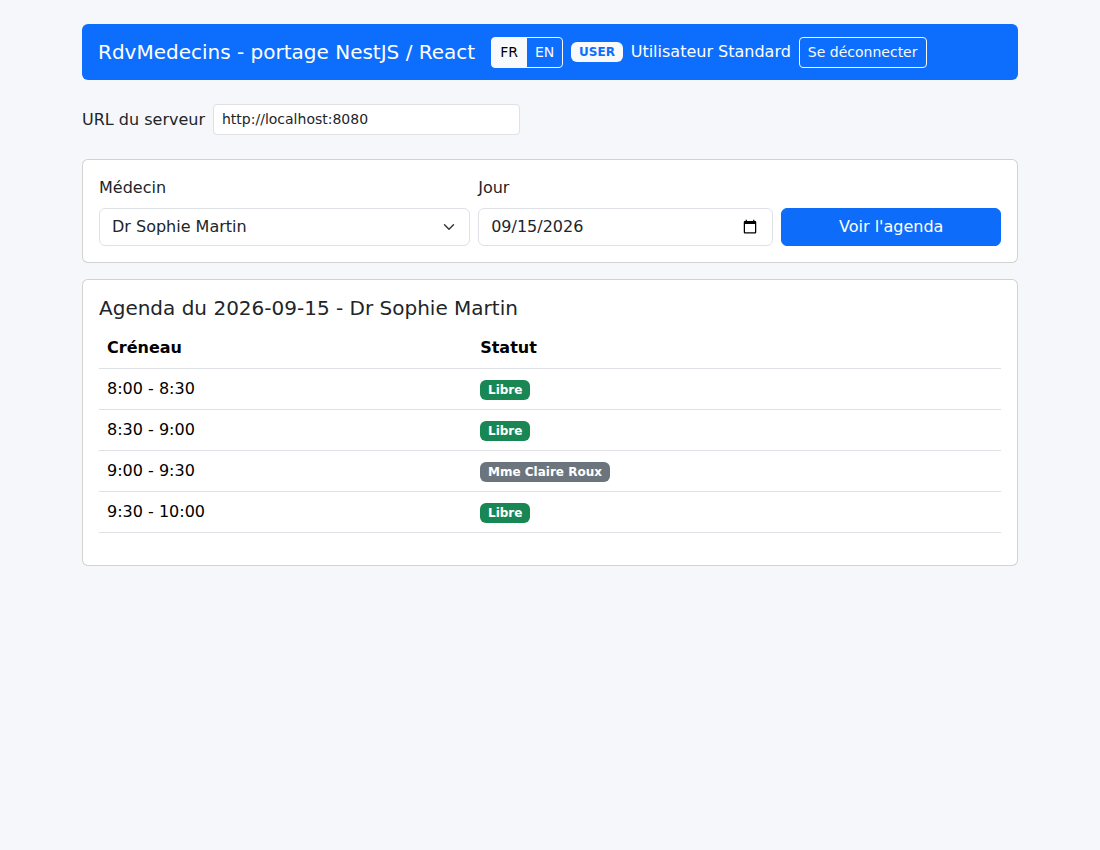
Calendar, USER view (read-only, no action buttons)
6.13. What remains out of scope or deferred
The “debug” mode (display of the raw template for the current view) of the original AngularJS 1.x client is a feature deliberately omitted from this port, just as in the [Angular] variant of this course—it will not appear in a later stage of the course (see Chapter 6, Conclusion, for the rationale behind this decision). The setting of an artificial network delay, however, is indeed deferred to a later stage in both variants.
Two additional differences, specific to this [React] port, are worth mentioning here:
- unit tests (which are absent from this project as well as from the [Angular] project in this course) would follow a different approach in [React]: rather than TestBed (specific to [Angular]), the [React] ecosystem typically relies on [React Testing Library]—not presented in this document;
- type checking for templates ([Angular] strictTemplates, see previous chapter) has no equivalent that needs to be configured separately on the [React] side: it is the TypeScript compiler itself that checks the [JSX], just like any other .tsx file—a simplification of the configuration, at the cost, in theory, of slightly less deep integration between the template language and the type system (in practice, on this project, no observable difference).