11. Hibernate
The previous chapter demonstrated how a Kotlin application interacts with a database through a JDBC driver: a connection is opened, SQL commands are executed, the result rows are read column by column, and they are copied into objects. This process of copying—from rows to objects and from objects to the [INSERT], [UPDATE], and [DELETE] commands—is repetitive. It can be automated using a tool: an “Object-Relational Mapper” (ORM). This chapter introduces the most widely used ORM in the Java world, Hibernate, and the standard it implements, Jakarta Persistence. Kotlin does not have its own ORM of the same caliber: it directly uses those from the Java platform—Hibernate foremost among them—just as it uses ORMs. You only need to know a few rules to write Kotlin entities that work with Hibernate: this chapter introduces them as we go along.
The chapter revisits the sample code from the articles in Chapter 10 and concludes with version 7 of the tax calculation application, whose [dao] layer uses Hibernate.
11.1. What is a ORM?
11.1.1. Objects and Tables
A Kotlin application works with objects: an item has a name, a price, and a stock level; an order has a customer and a list of line items, each of which refers to an item. A relational database stores this same information in tables: one row in the [articles] table per item, one row in the [orders] table per order, with the relationships between rows expressed by foreign keys. The two worlds do not quite align:
- an object directly references other objects ([order.client]); a row contains the primary key value of another row ([client_id]);
- an object can contain a collection ([order.lines]); a table contains only single values; the collection is represented by the rows of another table that point to the order;
- the Kotlin types ([String], [BigDecimal], [LocalDate], [Boolean]) and the SQL types ([varchar(30)], [decimal(10,2)], [date], [bit]) are not the same;
- objects are queried using Kotlin (the [filter], [map]... operations on collections) and tables are queried using SQL.
A ORM bridges the two worlds. We define the correspondence between classes and tables (the model, or “mapping”) once and for all; it then takes care of:
- translating queries written in an object-oriented language (HQL) or constructed using code (API Criteria) into SQL and [SELECT] commands ;
- create objects from the read lines (this is called materialization);
- to store the read objects and detect those that have been modified, added, or deleted;
- to generate the [INSERT], [UPDATE], and [DELETE] commands that reflect these changes in the database;
- and, if necessary, to create and update the database schema (tables, columns, indexes) based on the classes.
The architecture of an application that uses Hibernate with MySQL is as follows:
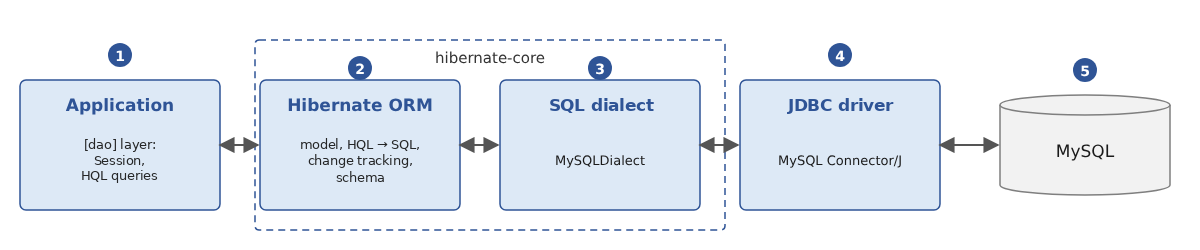
- [1]: the application. Its [dao] layer no longer communicates directly with the JDBC driver but with Hibernate, through a [Session] object and HQL queries;
- [2]: Hibernate, independent of the DBMS: model, query translation, change tracking, schema generation;
- [3]: the dialect specific to the DBMS (here, [MySQLDialect]): it knows the SQL syntax of the DBMS, its column types, and its functions. The dialects of the main DBMSs are part of Hibernate itself: nothing needs to be added to the project;
- [4]: the JDBC driver for the DBMS, the one discussed in Chapter 10 (MySQL Connector/J): Hibernate does not replace JDBC; it uses it;
- [5]: the DBMS.
Whether the application is written in Java or Kotlin does not change this pattern: Hibernate is a Java library that Kotlin code calls just like any other Java library (Chapter 5), and the compiled Kotlin classes are, to Hibernate, Java classes just like any others.
11.1.2. Jakarta Persistence and Hibernate
Hibernate was created in 2001 by Gavin King in response to the cumbersomeness of the “entity beans” in the Java platform EE of that time. Its success was such that its ideas were incorporated into a standard, JPA (Java Persistence API), released in 2006 with Java EE 5. When Java EE was transferred to the Eclipse Foundation and renamed Jakarta EE, JPA became Jakarta Persistence, and its packages changed from [javax.persistence] to [jakarta.persistence] (version 3.0, 2020). The current version is Jakarta Persistence 3.2 (2024).
Jakarta Persistence is a specification: a set of interfaces ([EntityManagerFactory], [EntityManager]...), annotations ([@Entity], [@Id], [@Column]...), and a query language, JPQL. It is implemented by several products: Hibernate ORM (the most widely used, used in Spring Boot and Quarkus), EclipseLink (the reference implementation)... This course uses Hibernate ORM 7.4.5, which implements Jakarta Persistence 3.2.
Hibernate offers two ways to use it:
- exclusively through the standard interfaces: in this case, the code depends only on [jakarta.persistence], and it would, in principle, be possible to switch implementations;
- through its own (“native”) API, which is more feature-rich and whose interfaces extend those of the standard: a [SessionFactory] is a [EntityManagerFactory], and a [Session] is a [EntityManager].
We use Hibernate’s own API, as recommended in its documentation: It provides all the standard methods ([persist], [find], [merge], [remove]...) as well as Hibernate’s extensions. The annotations, however, are always those defined by the standard. The following table shows the correspondences:
Jakarta Persistence | Hibernate | Role |
[EntityManagerFactory] | [SessionFactory] | Hibernate configuration for a database: a heavy object, created once, shared by the entire application |
[EntityManager] | [Session] | A database session: a lightweight, short-lived object |
[EntityTransaction] | [Transaction] | a transaction |
JPQL | HQL | the query language; HQL is a superset of JPQL |
[CriteriaBuilder] | [HibernateCriteriaBuilder] | query construction via code |
In the Kotlin ecosystem, you’ll also encounter data access libraries of a different nature, such as Exposed (from JetBrains), which allows you to write SQL queries using a dedicated Kotlin language. These are lighter than a full ORM; Hibernate remains the standard for Spring applications, in both Java and Kotlin, and that is what we are studying.
11.1.3. Libraries
The libraries used in this chapter are as follows (they are summarized in the appendix on dependencies):
Gradle Dependency | Role |
[org.hibernate.orm:hibernate-core] 7.4.5.Final | Hibernate itself; it includes the API from Jakarta Persistence 3.2 ([jakarta.persistence-api]) and its own dependencies (Byte Buddy for class generation, ANTLR for query analysis, JBoss Logging for logging, etc.) |
[com.mysql:mysql-connector-j] 9.7.0 | the JDBC driver for MySQL, the one from Chapter 10 |
[ch.qos.logback:logback-classic] 1.5.38 | Logback, which will receive the Hibernate log |
Hibernate writes its log (executed SQL commands, warnings, etc.) through JBoss Logging, a small library that simply forwards messages to the logging system it finds in the classpath: Log4j 2, or Logback (via SLF4J), or, failing that, the one from JDK or [java.util.logging]. Without configuration, the latter displays each message on two lines, in red in most consoles, which makes the program output difficult to read. We therefore add Logback to our projects and configure it using a [logback.xml] file.
In addition to these libraries, there are two Kotlin compiler plugins that adapt Kotlin classes to Hibernate’s requirements: [kotlin("plugin.jpa")] and [kotlin("plugin.allopen")]. We’ll see why they’re necessary when we look at the first entity.
11.1.4. Code-First or Database-First
The model (the mapping between classes and tables) can be built in two ways:
- code-first: you write the Kotlin classes, and Hibernate infers the database schema from them, which it can then create on its own. This is the approach taken in this chapter;
- database-first: the database already exists, and the classes are generated from its schema using Hibernate’s reverse-engineering tools (Hibernate Tools) or those provided by development environments (IntelliJ IDEA can generate entities from database tables in both Java and Kotlin). This is the approach used for applications that need to work with an existing database. The generated code is similar to what we would write by hand.
11.2. A First Example
11.2.1. The project
The examples in this chapter are subprojects of a multi-project Gradle build (see Chapter 6), located in the [11-hibernate] folder:
The file [settings.gradle.kts] declares the subprojects:
- lines 3–6: the plugin that allows Gradle to download JDK 25 itself if it cannot find it on the machine (Chapter 2);
- line 8: the name of the root project;
- line 11: the two libraries common to the examples;
- lines 13–14: a subproject, for example. Gradle does not require them to be listed in the order of their dependencies; it deduces this itself from the dependencies declared between subprojects;
- Line 16: The two subprojects for version 7 of the tax calculation application. The name [TaxV7:tax-dao-hibernate] refers to the folder [TaxV7/tax-dao-hibernate];
- Line 19: the composite structure of Chapter 6, whose application TaxV7 will reuse the layers [business] and [ui].
The root project declares, along with their versions, the plugins used by the subprojects:
- line 3: the Kotlin plugin for JVM;
- lines 4–5: the two Kotlin compiler plugins required by the entities (described later);
- line 6: the “all-open” plugin configured for Spring (Chapter 6), used by the [injection] example;
- [apply false]: The plugins are only declared here, along with their versions; each subproject applies the ones it needs, without repeating the version.
The first example is the subproject [first]. It is independent of the others:
- lines 3–8: the applied plugins: Kotlin, the two entity plugins, and [application] to run the program;
- lines 17–20: Hibernate, the JDBC driver for MySQL, and Logback. The driver and Logback are used only at runtime ([runtimeOnly]): the program code does not reference any of their classes;
- lines 24–27: the configuration of the [allopen] plugin (described below);
- lines 31–34: the standard compilation options for the course (JDK 25, warnings treated as errors);
- line 40: the main class of the subproject. A [Main.kt] file from the [first] package is compiled into a [first.MainKt] class (Chapter 3);
- lines 43–46: The programs launched by Gradle write their output to UTF-8 so that accented characters display correctly on Windows (Chapter 2).
To run an example, navigate to the [11-hibernate] folder and specify the subproject’s task [run] by its path ([:first:run]); Gradle first builds the subprojects it depends on (on Linux and macOS, type [./gradlew]):
The program is executed in the subproject folder ([11-hibernate/first]). The database used is the [hbfirst] database on the local MySQL server, which is the Laragon server (see appendices). It does not need to exist: MySQL will create it.
11.2.2. The entity [Article]
A class whose objects are stored in a table is called an entity. Our first entity is a store item, as in the table [articles] from Chapter 10:
- Line 10: The annotation [@Entity] (package [jakarta.persistence]) makes the class an entity. This is a regular Kotlin class that does not extend any Hibernate class; it is referred to as a POJO (“Plain Old Java Object”);
- lines 13–16: the properties declared in the primary constructor (Chapter 4). These are [var]: Hibernate must be able to modify their values, and so must the application (to change a price or inventory level). Each property becomes a column with the same name;
- lines 19–21: the primary key is designated by the [@Id] annotation. There is no naming convention: the annotation is required. [@GeneratedValue(strategy = GenerationType.IDENTITY)] indicates that its values will be generated by the DBMS (the [AUTO_INCREMENT] column of MySQL). The identifier is not a constructor parameter: it will be provided by the DBMS. Its type is [Int?], and its initial value is [null], which means “not yet recorded in the database.” The type [Int?] is compiled into [java.lang.Integer], and the type [Int] into [int] (Chapter 3);
- line 24: a convenient display of the item. The format [%.2f] displays the price with two decimal places, in accordance with common cultural conventions (a comma in France, a point in the English locale used for the results).
Where do annotations go? In bytecode, a Kotlin property corresponds to several Java elements: a private field, an accessor ([getX]), a modifier ([setX]), and, in this case, a constructor parameter. An annotation placed before a property, without further specification, is positioned by Kotlin 2.4 based on the targets it accepts: on the constructor parameter if it is a constructor property and if the annotation allows it, and additionally on the Kotlin property itself if the annotation allows it; otherwise, on the field. Jakarta Persistence annotations ([@Id], [@Column]...) do not apply to Kotlin parameters or properties, but only to Java fields and methods: they are therefore placed on the field. This is exactly what we want: since the [@Id] annotation is on a field, Hibernate accesses the fields directly (it reads and writes them via reflection, even if they are private). You can verify this using the [javap] tool from JDK, which displays the contents of a [.class] file. You can also specify the target of an annotation using a prefix: [@field:Column(length = 30)] places it on the field, [@get:Transient] on the accessor.
Jakarta Persistence requires two things that Kotlin classes do not provide out of the box:
- a parameterless constructor, which Hibernate uses to create objects read from the database (it then populates their fields). Our class has only one constructor, with four parameters. In Java, you manually add a protected parameterless constructor. In Kotlin, it is the compiler plugin [no-arg], configured for JPA ([kotlin("plugin.jpa")]), that adds it to any class annotated with [@Entity], [@Embeddable], or [@MappedSuperclass]. This constructor exists in the bytecode, where Hibernate finds it through reflection, but it is not visible from the Kotlin code: [Article()] remains a compilation error (“[no value passed for parameter 'name'.]”). Note that it does not execute property initializations: a property declared as [var x = "a"] is set to [null] in an object created by Hibernate, as long as Hibernate has not assigned a value to it (the [noArg { invokeInitializers = true }] option in the build file changes this behavior). This is not a problem for properties stored in the database, since Hibernate assigns them the value that was read;
- non-final classes and methods. To implement lazy loading (which we’ll cover when discussing relationships), Hibernate creates proxies at runtime: classes derived from the entities, whose methods load the object from the database on the first call. For this to work, the class and its methods must be overridable. In Java, this is the default behavior; in Kotlin, classes and their members are final by default (Chapter 4). The [all-open] ([kotlin("plugin.allopen")]) plugin, configured by the [allOpen] block in the build file, makes classes bearing one of the listed annotations—as well as their properties and methods—non-final ([open]). The [plugin.spring] plugin from Chapter 6 is the same plugin, configured for Spring annotations.
With these two plugins, the entity is written as a regular Kotlin class. Without them, you would have to write [open class Article(...)], declare [open] for each property, and add a secondary constructor with no parameters: we’ll do this for a class without annotations in the following example.
Why not use a data class ([data class], Chapter 4)? It would seem ideal for representing a table row. However, this is a bad idea for an entity, for several reasons:
- The generated methods [equals] and [hashCode] compare all properties of the primary constructor, which are modifiable. The hash code of an entity therefore changes as soon as its price is modified: an item stored in a [HashSet] or serving as the key of a [HashMap] becomes untraceable. Hibernate itself stores the elements of relationship collections ([Set]) using these methods;
- two objects representing two different rows (with two different identifiers) but with the same values would be considered equal, whereas an item read from the database and then modified would no longer be equal to itself when read again;
- the generated [toString] method displays all properties: with relationships, it iterates through the linked objects, which can cause them to be loaded from the database (unexpected SQL queries), an exception if the session is closed, or even an infinite recursion between two entities that reference each other;
- The method [copy] creates a new object with the same identifier, which is unknown to the session: this results in two objects for the same row, which can lead to confusion;
- A data class cannot be declared as open ([open]) by the programmer. The [all-open] plugin opens it anyway, which allows proxies to be created (we verified this using the [javap] tool), but it does not correct any of the previous issues.
An entity is therefore an ordinary class: its identity is that of the table row, not the value of its properties. As in Java, it retains the [equals]/[hashCode] inherited from [Any] (object identity), which is fine as long as you do not mix objects from different sessions. Data classes remain very useful with Hibernate for query results that are not entities (projections), as we will see. This is the same rule as in Java, where an entity cannot be a record.
One final note: Hibernate does not recognize Kotlin’s nullable types. The fact that the property [name] is of type [String] (non-nullable) does not tell Hibernate that the column is required; only the annotation [@Column(nullable = false)] tells it that, as we’ll see in the results.
11.2.3. [SessionFactory] and [Session]
The program uses three Hibernate objects:
- the [SessionFactory] represents Hibernate configured for a database: the list of entities, the database, and the options. Its creation is resource-intensive (Hibernate analyzes the entities, connects to the server to determine its version, and prepares the SQL for common operations): only one is created per database and per application, at startup. It is thread-safe: all application threads can use it;
- the [Session] represents a working session with the database. It obtains a connection when needed, stores the entities it has read or saved, and knows how to commit their changes to the database. It is a lightweight, short-lived object that is not thread-safe: one is opened for each unit of work and then closed;
- [Transaction]: With Hibernate, all writes to the database occur within an explicit transaction, opened by [session.beginTransaction()] and closed by [commit] (commit) or [rollback] (rollback).
[SessionFactory] and [Session] implement the [AutoCloseable] interface: they are used with the Kotlin function [use] (Chapter 3), which closes them at the end of the block, whether it terminates normally or with an exception (the equivalent of the [try] statement with Java resources).
11.2.4. The program
- lines 8–16: creation of the [SessionFactory]. There are several ways to configure Hibernate (we’ll discuss them later); we’re using the [HibernatePersistenceConfiguration] class from Hibernate 7, an enhanced version of the [PersistenceConfiguration] class introduced with Jakarta Persistence 3.2, which allows you to configure everything via code. Its parameter is the name of the persistence unit—a freely chosen name that appears in Hibernate messages. Each method returns the configuration itself, allowing calls to be chained together;
- line 10: the list of entities. [Article::class.java] is the Java object [Class] (the Kotlin class [KClass] is not suitable: Hibernate is a Java library);
- Lines 12–13: the URL JDBC from the [hbfirst] database, in the same format as in Chapter 10, and the user ([root], with no password in Laragon). The parameter [createDatabaseIfNotExist=true] of URL is an option of the driver MySQL: it creates the database if it does not exist;
- Line 15: [showSql(true, true, false)] instructs Hibernate to print each SQL command it executes to the console, formatted across multiple lines (second parameter), without colors (third parameter). Looking at the SQL sent to the server is the best way to understand what Hibernate does: we’ll do this in all the examples;
- Line 16: [createEntityManagerFactory] constructs [SessionFactory] (the method name follows the standard; the returned type is Hibernate’s). The function [use] will close it at the end of the program; within the block, it is called [sessionFactory];
- Lines 19–20: The [SchemaManager] object of [SessionFactory] (Jakarta Persistence 3.2) manages the entity tables: [drop(false)] deletes them if they exist, while [create(false)] creates them (the parameter [false] specifies that the database itself should not be deleted or created). This is convenient for examples and tests; a real-world application manages its database differently, as we will see. Kotlin presents the Java method [getSchemaManager()] as a property, [schemaManager] (Chapter 4);
- line 23: [openSession()] opens a session, which is closed at the end of the [use] block;
- line 24: the start of a transaction;
- lines 26–28: [persist] adds three new items to the session: they will be stored in the database. No value is specified for the identifier; it will be generated by the DBMS;
- line 30: [commit] commits the transaction. Prior to this, the session sends the SQL commands to the server, which are still necessary to save the changes it has stored: this is referred to as “flushing” the session to the database;
- lines 36–38: a query written in HQL, Hibernate’s query language: the articles in alphabetical order by name. It refers to the entity [Article] and its property [name], not to the table. The second parameter of [createSelectionQuery] is the result type: the property [resultList] (the Java method [getResultList]) returns a [List<Article>];
- Line 39: Displaying the items.
If an exception were to occur between [beginTransaction] and [commit], the transaction would neither be committed nor explicitly rolled back by our code: we’ll see later a safer way to write a transaction using a higher-order function.
The [src/main/resources/logback.xml] file in the subproject configures Logback. It displays Hibernate messages of level [INFO] or higher, one per line (level, log name, message):
Results:
Comments:
- Lines 2–17: Hibernate informational messages: the name of the persistence unit, the Hibernate version, and database characteristics (URL, driver, selected dialect, server version, transaction isolation level, connection pool size). Hibernate queried the server to select the [MySQLDialect] dialect appropriate for its version;
- line 4: a warning. Hibernate manages its own small connection pool, which is not intended for a production application. We’ll see, with Spring, how to provide it with the HikariCP pool from Chapter 10; for our examples, the built-in pool is sufficient;
- Lines 18–28: Deleting and then creating the table [Article] based on the entity: the table name is the same as the entity’s name, the columns are named after the properties, and the column [id] is the primary key, with a generated value ([auto_increment]). The columns for properties of type [Int] are [not null]: compiled into [int]; a [Int] cannot equal [null]. Properties of type [String] and [BigDecimal] accept the value [NULL], even though these types are non-nullable in Kotlin: for Hibernate, these are Java references ([java.lang.String], [java.math.BigDecimal]), which can be set to [null];
- note the default types: [varchar(255)] for a string, and [decimal(38,2)] for a [BigDecimal] (38 digits, including 2 decimal places). These are rarely the ones you want: the following paragraph shows how to specify them;
- Lines 29–51: The three configured [INSERT] commands were executed as soon as [persist] was called, before [commit]. This is a consequence of the key being generated by the DBMS ([IDENTITY]): the session must know an entity’s identifier as soon as it takes over that entity, and to obtain it, it must execute the insertion (the JDBC driver returns the generated key; see Chapter 10). With other generation methods, insertions are deferred until the session is synchronized. The parameter values ([?]) are not displayed: we will see how to make them appear;
- lines 53–63: the query HQL [from Article order by name] was translated into a statement [SELECT ... ORDER BY]. Hibernate assigned the alias [a1_0] to the table and created a [Article] object for each row read (lines 64–66), using the parameterless constructor added by the [no-arg] plugin.
We did not write any SQL statements or any column-reading code: that is the whole point of a ORM. We can also see that this does not eliminate the need to understand SQL: to determine whether the generated SQL is correct and effective, you need to know how to read it.
11.3. The Model
Hibernate builds its model from entities in three steps:
- First, it applies its default rules: anything that isn’t specified is assigned a reasonable value (this is known as “configuration by exception”);
- it then supplements or corrects these values using the annotations placed on the entities;
- finally, it applies the mapping files XML ([orm.xml]), which can fully describe a class without annotations or modify what its annotations specify.
11.3.1. Default Rules
We saw the essentials of this in the first example:
- an entity carries the annotation [@Entity] and has an identifier designated by [@Id]; both of these annotations are required;
- the placement of the [@Id] annotation determines the access mode: when placed on a field, Hibernate reads and writes the fields directly; When placed on a getter or setter ([getId]), access goes through the getters and setters ([getX]/[setX]). Access via fields is the most common: it allows the class to have whatever methods it wants. In Kotlin, an annotation placed before a property is applied to the field (as we’ve seen): this provides access via fields without any explicit specification. For access via getters and setters, you would need to write [@get:Id];
- any property that has a backing field is stored in a column, unless it bears the Jakarta Persistence annotation [@Transient] or the annotation [@kotlin.jvm.Transient] (which adds the Java modifier [transient] to the field); a calculated property, whose custom accessor does not use [field] (Chapter 4), has no field: it is never stored;
- the table name is the entity name (the simple class name), and the column name is the property name. These names then go through a naming strategy: Hibernate’s strategy keeps the names as-is, while another strategy—which we’ll try below—converts them to “snake case” ([currentStock] becomes [current_stock]). Spring Boot uses the latter by default;
- a column of a type compiled to a primitive type (non-nullable [Int], [Double], [Boolean]) becomes [NOT NULL]; a column of a type compiled to a reference ([Int?], [String], [BigDecimal], [LocalDate], whether nullable or not for Kotlin) accepts the value [NULL]. To make a column of a property of type [String] mandatory, you must therefore use the annotation [@Column(nullable = false)], even though the Kotlin type already prohibits the value [null];
- The SQL types are selected based on the dialect. With MySQL: [integer] for [Int], [bigint] for [Long], [bit] for [Boolean], [varchar(255)] for [String], [decimal(38,2)] for [BigDecimal], [date] for [LocalDate], [datetime(6)] (to the microsecond) for [LocalDateTime]. An enumeration ([enum class]) is registered by default by its sequence number (see Chapter 3); the annotation [@Enumerated(EnumType.STRING)] registers it by its name, which is more reliable;
- a property that refers to another entity, or to a collection of entities, defines a relationship (we will discuss this later).
11.3.2. The annotations and the mapping file XML
The subproject [model] defines two entities configured in two different ways. Its build file is that of [first], with the Logback dependency replaced by a dependency on the [tools] library described below (which provides Logback and its configuration). The first entity is configured using annotations:
- lines 3–9: the Jakarta Persistence annotations. The explicit import of [jakarta.persistence.Transient] takes precedence over the annotation [kotlin.jvm.Transient]—which has the same name—that Kotlin imports by default;
- line 15: [@Table] specifies the table name;
- lines 18–19: [@Column] specifies the column; [nullable = false] makes it required ([NOT NULL]); [length = 50] sets its length ([varchar(50)]);
- lines 22–23: [@Column] also specifies the column name ([price_excl_tax]) and, for a decimal number, its precision (the total number of digits) and its scale (the number of digits after the decimal point): [decimal(10,2)];
- lines 26–27: an optional description of up to 200 characters: the column will accept the value [NULL]. The property is of type [String?], with the default value [null]: the Kotlin type matches the column. It is good practice to match the property’s nullable or non-nullable type with the column’s optional or required nature, even though Hibernate only reads the annotation;
- line 30: an optional date. The type [LocalDate] (Chapter 5) represents a date without a time: it is associated with the types SQL and [date];
- lines 32–35: the primary key, designated by [@Id] regardless of its name;
- lines 38–39: [@Transient] excludes a property from the model: in this case, information useful to the user interface that does not belong in the database;
- lines 42–43: a computed property. Its accessor does not use a field: there is nothing to save, and Hibernate, which accesses the fields, ignores it. The operator [*] between two [BigDecimal] is the function [times] that the Kotlin standard library adds to [BigDecimal] (Chapter 4, Operator Overloading): we write [priceExclTax * BigDecimal("1.2")] instead of Java’s [priceExclTax.multiply(new BigDecimal("1.2"))].
The second entity has no annotations:
- Line 8: Since the class is not annotated with [@Entity], the [no-arg] and [all-open] plugins do not recognize it. So we declare it ourselves as [open], so that Hibernate can derive proxies from it;
- lines 9–13: private properties: Kotlin generates neither accessors nor mutators for them, only a private field, which Hibernate will read from and write to. This is the exact equivalent of private fields in a Java class;
- Line 16: The parameterless constructor required by Hibernate, written by hand: a secondary constructor that calls the primary constructor (Chapter 4) with arbitrary values, which Hibernate will replace with those read from the database. It is protected: the application code will not use it.
Its mapping to the table is described by a file named XML, located in the [src/main/resources/META-INF] folder of the subproject (this is the same file as in Java):
- lines 3–7: the XML schema for Jakarta Persistence 3.2 mapping files;
- line 8: the described class, with access via fields;
- lines 9–12: the table, and a unique index on the company name: no two suppliers can have the same one. The equivalent annotation is [@Table(name = "suppliers", indexes = [Index(...)])] (in Kotlin, an array passed as an annotation argument is written in square brackets);
- lines 14–16: the identifier, generated by the DBMS;
- lines 17–18: a required column with a maximum of 60 characters;
- lines 20–21: the property [phone] is stored in the column [tel];
- lines 24–26: the creation date has a default value, calculated by the DBMS. The [column-definition] attribute provides the text SQL from the column definition, copied verbatim in the order [CREATE TABLE]; [insertable="false"] and [updatable="false"] indicate that Hibernate must never write to this column, which allows the DBMS to use [current_timestamp(6)].
Everything that annotations do can be done in XML. Annotations have the advantage of placing the configuration next to the property, and this is the most common approach; the XML file, on the other hand, keeps the classes independent of Jakarta Persistence and centralizes the configuration in a single location. The two approaches can be combined: the XML file takes precedence in case of a conflict. Jakarta Persistence does not support configuring the model via code, as other frameworks such as ORM (for example, Entity Framework in C# or Exposed in Kotlin) do.
The program displays the model built by Hibernate, followed by the SQL script that would create the tables:
- line 11: a [StringWriter] (package [java.io]), a write stream to a string in memory, will receive the script SQL;
- lines 15–16: the annotated entity is declared by [managedClass], and the file XML by [mappingFile];
- lines 18–20: The database will never exist: this [SessionFactory] is used solely to examine the model. Therefore, there is no URL or JDBC. To select the SQL dialect without querying the server, Hibernate needs the name of the DBMS and its version; the [ALLOW_METADATA_ON_BOOT] property ([hibernate.boot.allow_jdbc_metadata_access]) prevents it from connecting at startup. The names of the configuration properties are constants in the [AvailableSettings] interface;
- line 22: the “snake case” naming convention, denoted by the name of its class ([::class.java.name]);
- lines 25–28: Hibernate will write the table creation script (["create"]) to the [script] object without executing it; the commands are terminated by a semicolon and formatted across multiple lines;
- line 32: the property [metamodel] (the [getMetamodel] method from Jakarta Persistence) provides access to the model: its entities ([EntityType]) and, for each one, its attributes ([Attribute]);
- Lines 33–37: For each entity, its name and class; for each attribute, its name, Java type, and whether it is the identifier. On line 35, the [attribute is SingularAttribute<*, *>] test is followed by a smart type conversion (Chapter 4): in the continuation of the expression [&&], [attribute] is a [SingularAttribute], from which the property [isId] can be read. The [<*, *>] projection replaces Java’s [<?, ?>];
- Lines 42–45: The script as displayed, without the four spaces that Hibernate adds to its lines ([removePrefix] removes the prefix only if it is present).
Results:
- Line 2: The Hibernate warning confirms that it has no way to establish a connection;
- lines 3–13: the two entities and their attributes (the identifier first, then the others in alphabetical order; the order of the entities is not significant). The property [selected] and the calculated property [priceInclTax] do not appear in the model. The types are the Java types: [Integer] for [Int?];
- lines 15–21: the table [suppliers], described by the file XML. The naming strategy has changed [companyName] and [creationDate] to [company_name] and [creation_date]; the column [tel], whose name is fixed, remains unchanged. The definition of the column [creation_date] is that of the file XML, supplemented by [not null];
- Lines 23–30: the table [products]. The types SQL come from annotations ([varchar(50)], [decimal(10,2)]) or from dialect-specific choices for a type ([integer], [date]);
- lines 32–33: the unique index, created under MySQL by a uniqueness constraint ([unique]).
11.3.3. Generated identifiers
The annotation [@GeneratedValue] indicates that the identifier value is generated. Its parameter [strategy] specifies how:
Strategy | Identifier Generation |
[IDENTITY] | by the DBMS, when inserting the row (column [AUTO_INCREMENT] of MySQL, [IDENTITY] of SQL Server, and PostgreSQL) |
[SEQUENCE] | by a sequence from the DBMS (PostgreSQL, Oracle), which Hibernate queries before insertion |
[TABLE] | by a counter table managed by Hibernate |
[UUID] | by Hibernate: a random universal identifier, such as [java.util.UUID] |
[AUTO] (by default) | Hibernate chooses; with MySQL, which has no sequences, it simulates them using a table named [<table>_SEQ] |
With MySQL, we always use [IDENTITY], which corresponds to the natural behavior of the [AUTO_INCREMENT] column. We’ve seen the result of this: the [INSERT] command is executed as soon as [persist] is called, and Hibernate cannot group multiple inserts into a batch (we’ll discuss batches later). The [SEQUENCE] strategy, which allows you to know the ID before the insertion, is preferred for the DBMS methods that use sequences.
In Kotlin, the generated identifier should preferably be declared as [var id: Int? = null]: the value [null] clearly indicates “not yet registered.” We also encounter [var id: Int = 0], where the value 0 serves this purpose; Hibernate accepts it (for an identifier of a primitive type, it treats 0 as the “not yet registered” value), but this convention is less readable.
11.3.4. Optional Values and Columns [NULL]
Whether a column is optional is therefore determined by the property’s type (compiled as a primitive type or a reference) and by the [nullable] attribute of [@Column]; in Kotlin, the property type also specifies whether the value may be missing ([String?]) or not ([String]). You must choose carefully and ensure that the two match: the rule expresses both a code constraint (“this value may be missing”) and a database constraint. A few notes:
- [@Column(nullable = false)] represents the constraint [NOT NULL] from the schema created by Hibernate, and Hibernate also uses it before sending a command [INSERT] or [UPDATE]: if the field is [null], it does not send the command and throws a [PropertyValueException] error (“not-null property references a null or transient value”). This Hibernate check is disabled by default when Jakarta Validation (below) is present: validation then falls back to its annotations, or, failing that, to the DBMS, which rejects the command. In Kotlin, this scenario is less common than in Java: the compiler prohibits assigning [null] to a property of type [String];
- for a more comprehensive validation performed before any database access, we use Jakarta Validation ([hibernate-validator] library) and its annotations [@NotNull], [@Size(max = 30)], [@Positive]... When present in the classpath, Hibernate validates entities before saving them and uses these annotations to create the columns. In Kotlin, these annotations also accept parameters as targets: when applied to a constructor property, Kotlin 2.4 applies them to both the parameter and the field, which the validator reads. Earlier versions placed them only on the parameter: you had to specify the field target, [@field:Size(max = 30)], a form that is still encountered in many examples;
- there is no need to use [Optional] (Chapter 4): Kotlin’s nullable type ([var description: String? = null]) directly indicates that a value is optional, and it is read using the operators [?.] and [?:] (Chapter 3): [product.description ?: "(no description)"].
11.4. The following examples: two common libraries
The examples in the following paragraphs almost all use the [hbarticles] database and its [articles] table, populated with the six entries from Chapter 10. Rather than repeating the Hibernate entity and configuration in each subproject, we place them in a library—the [articles] subproject—on which the other subprojects depend. We also replace the SQL log from [showSql]—which is too verbose for our examples—with a more compact log, placed in a second library, the [tools] subproject.
11.4.1. The compact SQL log
Rather than writing directly to the console ([showSql]), Hibernate can forward its activity to the logging system (in this case, Logback), with each message category written to a different logger:
Log | Level | Messages |
[org.hibernate.SQL] | [DEBUG] | SQL orders executed |
[org.hibernate.orm.jdbc.bind] | [TRACE] | the value of each parameter in an order SQL |
[org.hibernate.orm.resource.jdbc] | [TRACE] | including, among other things, the initiation, confirmation, and cancellation of transactions |
[org.hibernate.orm.jdbc.batch] | [TRACE] | execution of order batches SQL |
[org.hibernate.orm.jdbc.error] | [WARN] | Errors reported by the DBMS |
A log only records messages of a level equal to or higher than its own. Therefore, you simply need to set the desired level for these logs in the [logback.xml] file to capture these messages. We process them through a layout class that makes them more compact:
1 2 3 4 5 6 7 8 9 10 11 12 13 14 15 16 17 18 19 20 21 22 23 24 25 26 27 28 29 30 31 32 33 34 35 36 37 38 39 40 41 42 43 44 45 46 47 48 49 50 51 52 53 54 55 56 57 58 59 60 61 62 63 64 65 66 67 68 69 70 71 72 73 74 75 76 77 78 79 80 81 82 83 84 85 86 87 88 89 90 91 92 93 94 95 96 97 98 99 100 101 102 103 104 105 106 107 108 109 110 111 112 113 114 115 | |
- line 10: a Logback layout derives from the Java class [LayoutBase<ILoggingEvent>] (note the parentheses: the call to the parent class’s constructor, Chapter 4); its method [doLayout] (lines 13–21) receives each message (a [ILoggingEvent]) and returns the text to be written. Logback creates the object itself, via reflection, based on the class name: it requires a parameterless constructor, which is the class’s implicit primary constructor;
- lines 15–21: the processing depends on the log that sent the message (a
***[when]on a channel, Chapter 3). The branches use the constants from***[companion object]; - line 25: the class’s “static” members are stored in its companion object (Chapter 4);
- lines 27–31: the names of the Hibernate logs used and the public compilation constants ([const val]); other subprojects refer to them as [SqlLog.SQL]...;
- lines 37–40: two regular expressions (Chapter 5), written as raw strings (["""..."""]), which avoids having to double the backslashes, as Java does (["\\((\\d+)..."]);
- lines 43–71: the order SQL, as formatted by Hibernate ([format_sql]), spread across many lines, with one column per line. We make it more compact. Non-empty lines are grouped into clauses (lines 47–51): a clause begins with a top-level line ([select], [from], [where]...) and includes the indented lines that follow it. [minOfOrNull] specifies the smallest indentation, or [null] if there is no line, in which case it is replaced by 0 using the operator [?:]. Each clause is then written on a single line, preceded by [SQL>], if it does not exceed 100 characters (lines 63–64); otherwise, its lines are retained (lines 67–68). The clauses [insert] and [delete] are combined with the following one (lines 58–61). The text is constructed by [buildString] (Chapter 5), whose block has a [StringBuilder] as its receiver: [append] is called there without a prefix;
- lines 80–82: the Hibernate message that returns the value of a parameter resembles [binding parameter (1:VARCHAR) <- [bike]]. [matchEntire] returns a [MatchResult] if the entire message matches the regular expression, and [null] otherwise; [?.let] constructs the text from the captured groups (the parameter number and its value), and [?: ""] returns an empty string when there is no match;
- Lines 85–89: Among the many messages in the [org.hibernate.orm.resource.jdbc] log, only those indicating the start, commit, and rollback of a transaction are retained. Each Hibernate message begins with a code ([HHH10003002]...) that uniquely identifies it. A [when] without arguments (Chapter 3) replaces Java’s [if] sequence;
- lines 93–94: an error in the DBMS. Hibernate writes this as two messages: one providing the error codes (which we ignore) and the other providing the error text;
- lines 97–99: execution of a batch of SQL commands, which we will encounter at the end of the chapter;
- lines 102–111: the function [withoutLog] executes a logless action SQL. This is a higher-order function (Chapter 7): its parameter is a function [() -> T], and it returns the result of the action (Java, which uses a [Runnable], does not allow this quite so easily). It uses Logback’s API: each log ([Logger]) has a level, which can be modified at runtime (the [level] property, which corresponds to the Java methods [getLevel]/[setLevel]). We set the five logs to level [OFF], execute the action, and then restore the original levels in a [finally] clause, so that they remain at those levels even if the action throws an exception. The original level may be [null] (a log that inherits its level from its parent), hence the type [List<Level?>]; [zip] associates each log with its original level, and the [(logger, level)] decomposition (Chapter 3) names the two elements of each pair;
- line 104: [LoggerFactory] is the class of SLF4J that returns a log; Since Logback is the current implementation of SLF4J, the rendered object is a [ch.qos.logback.classic.Logger], as indicated by the type conversion [as Logger].
The [tools] subproject also contains the [logback.xml] file used by the examples (it is the same file as in Java). Placed at the root of the classpath ([src/main/resources]), it is found by Logback when the program starts:
- lines 6–10: An “appender” writes the messages, in this case to the console. It uses our layout, identified by its class name ([tools.SqlLog]);
- lines 13–17: a second “appender” for the other messages: level, short log name, text;
- Lines 20–34: The Hibernate logs from the previous table, along with their levels. Their messages are sent to the “appender” [SQL] and only to it ([additivity="false"]: they are not additionally forwarded to the root log);
- line 37: the warning regarding Hibernate’s built-in connection pool is suppressed;
- line 40: Hibernate deletes tables starting with their foreign keys; on an empty database, these deletions fail without consequence, but Hibernate logs this at length. These messages are suppressed;
- lines 43–45: the other logs record only warnings and errors.
The build file for the [tools] subproject is that of a library (Chapter 6):
- line 5: the library plugin, which adds the [api] configuration;
- line 15: the only dependency, Logback. It is declared by [api] and not by [implementation]: the class [SqlLog] derives from a Logback class, and the subprojects that use it must be able to see this parent class at compile time. A dependency on [api] is provided to users of the library, for both compilation and runtime.
A library does not typically impose its logging configuration on the applications that use it; we are doing so here to avoid repeating this file in every example.
11.4.2. The Entity and the Article Database
The [Article] entity in the [articles] subproject uses the annotations from the previous paragraph:
- lines 13–14: a reminder of what the [jpa] and [allopen] plugins do for this class;
- lines 16–18: the table is named [articles], as in Chapter 10. The parameter [uniqueConstraints] declares a uniqueness constraint, named [uk_articles_name], on the column [name]: two items cannot have the same name. Without an explicit name, Hibernate would generate an unreadable one ([UK3f8k...]), which would appear in error messages. Array-type annotation parameters are written in Kotlin within square brackets ([[UniqueConstraint(...)]], [["name"]]); an annotation used as an argument for another annotation is written without [@];
- lines 22–23: a required name of no more than 30 characters;
- lines 25–26: a price in the format [decimal(10,2)];
- lines 28–29: the two stock levels, of type [Int]: columns [NOT NULL];
- lines 32–36: the identifier. The property modifier is declared as [protected]: the application can read the identifier but cannot change it, since it is managed by Hibernate (the Java class does not have a [setId] method, for the same reason). It could not be [private]: the property is public ([all-open]), and Kotlin prohibits a private modifier on a public property, which a derived class could redefine (“[private setters for open properties are prohibited.]”);
- line 39: the same method [toString] as in the first example.
The Java version of this class has nearly ninety lines, including the two constructors and about ten accessors ([getX]/[setX]); in Kotlin, the properties of the primary constructor and the two plugins serve this purpose.
The [BaseArticles] object contains the Hibernate configuration for the [hbarticles] database:
- line 11: a [object] (Chapter 4): a singleton, created on first use. This is equivalent to a Java utility class (a [final] class with static members and a private constructor);
- lines 14–16: the base URL and the user URL, which are public so that other subprojects can use them;
- Lines 19–24: The Hibernate configuration. It is returned by a public function, which will allow an example to complete it before creating the [SessionFactory]. The [FORMAT_SQL] ([hibernate.format_sql]) property instructs Hibernate to format the SQL, which it then passes to the [org.hibernate.SQL] log: it is this formatted output that the [SqlLog] class then condenses;
- line 27: the [SessionFactory] from the [hbarticles] base, a function whose body is an expression;
- lines 30–41: a function that recreates the table [articles] with its six entries, without the log SQL: we do not want to see the SQL from this initialization in the example results. The block passed to [withoutLog] is a lambda written after the parentheses, which are omitted here (Chapter 7);
- line 35: [sessionFactory.inTransaction { session -> ... }] opens a session, starts a transaction, executes the lambda by passing it the session, commits the transaction (or rolls it back if the lambda throws an exception), and closes the session. This is the shortest way to write a unit of work; we’ll use it often, along with its variants [inSession] (a session without a transaction), [fromTransaction], and [fromSession] (which return the result of the lambda). The parameter for these Java methods is a functional interface ([Consumer<Session>], [Function<Session, R>]): Kotlin directly accepts a lambda there (conversion SAM, Chapter 7);
- lines 36–41: [BigDecimal(500)] calls the constructor of [BigDecimal], which takes an integer; it returns the same value as the Java method [BigDecimal.valueOf(500)].
The [articles] subproject depends on the [tools] subproject, Hibernate, and the JDBC driver:
- lines 5–9: the library defines an entity; it applies both entity plugins and the library plugin;
- line 18: the dependency on another subproject in the build, identified by its path ([":tools"]);
- line 20: Hibernate, declared by [api]: subprojects that use the library directly manipulate its types ([SessionFactory], [Session]...);
- line 22: the driver JDBC, required only at runtime;
- lines 26–29: the configuration for the [all-open] plugin.
The example subprojects then require only one dependency: the [articles] subproject. Gradle adds its dependencies (known as transitive dependencies): the [api] dependencies for compilation and execution, and the [runtimeOnly] dependency for execution. Here is the build file for the [crud] subproject:
- line 4: the subproject does not define any entities: it does not need the plugins [jpa] and [allopen], which are used when compiling annotated classes, in this case those from the [articles] subproject;
- line 15: the only dependency;
- Lines 31–34: The programs launched by Gradle write their output to UTF-8 so that accented characters display correctly on Windows (Chapter 2).
11.4.3. Other Ways to Configure Hibernate
We configure Hibernate programmatically using [HibernatePersistenceConfiguration]. There are other ways to do this, which can be found in applications and documentation:
- a [META-INF/persistence.xml] file, the traditional approach used by Jakarta Persistence: it describes one or more persistence units (entity classes, connection properties, options), and the factory is created using [Persistence.createEntityManagerFactory("articles")];
- a [hibernate.properties] (or [hibernate.cfg.xml]) file, specific to Hibernate, read by the [org.hibernate.cfg.Configuration] class: [Configuration().addAnnotatedClass(Article::class.java).buildSessionFactory()]. This is the approach used in older versions of Hibernate;
- In a Spring Boot application, the properties [spring.datasource.*] and [spring.jpa.*] in the file [application.properties]: Spring Boot creates the factory itself.
The properties are the same everywhere ([hibernate.format_sql], [jakarta.persistence.jdbc.url]...): only the way they are specified changes.
11.5. Basic operations: add, read, update, delete
11.5.1. The [crud] program
The [crud] subproject demonstrates the four basic operations (CRUD: Create, Read, Update, Delete), as well as entity tracking via the session. To make this tracking visible, it uses a few internal Hibernate methods (its “SPI,” Service Provider Interface), intended for Hibernate extensions rather than applications: they are grouped in the utility functions at the end of the file, written as extension functions of [Session] (Chapter 4). Transactions are written using the session’s [inTransaction] method, a higher-order function: [session.inTransaction { ... }] starts a transaction, executes the block, and then commits the transaction or rolls it back if the block throws an exception. The code can no longer omit [commit] or [rollback] in the event of an error.
Results:
Comments:
- Line 17: [session.find(Article::class.java, 1)] searches for the primary key record 1. It returns [null] if the key does not exist; the operator [?:] then throws an exception ([error], Chapter 3), and [bike] is of type [Article], which is non-nullable. The generated SQL (lines 3–6 of the results) is a parameterized [SELECT], whose parameter is set to 1: the compact log now displays the parameter values;
- line 20: the second call to [find(Article::class.java, 1)] does not send any SQL commands and returns the same object (line 9). The [===] operator compares references (the Java [] operator), whereas [] would call [equals] (Chapter 3). The session stores the entities it has read or saved in its persistence context—also known as the first-level cache: before querying the database, [find] checks to see if the requested entity is already there. A session never contains two objects for the same row in the database;
- Lines 25–29: adding an item. Before [persist], the object is [TRANSIENT] (“transient”): the session does not recognize it, and its identifier is [null] (line 12). [persist] brings it into the session, which immediately executes the command [INSERT] (lines 13–18) to obtain the generated key, and places it in the field [id] (Hibernate writes to the field directly: the property’s protected modifier does not prevent this). The item is then [MANAGED] (“managed” or “persistent”), and its identifier is 7 (line 19). The transaction is opened at the beginning of the block [inTransaction] and committed at its end (lines 11 and 20 of the results). The block parameter ([Transaction]) is not used: it is not named;
- line 35: to modify a row in the database, simply modify the object. No [update] method is required: the session has retained a copy of the read or saved values (the original state) and compares the current values to those. This is known as “dirty checking.” The [*=] operator is translated here by Kotlin into [x.price = x.price * BigDecimal("1.1")]: a new [BigDecimal] object (which is immutable) is assigned to the property;
- Lines 36–37: The property [isDirty] (the Java method [isDirty()]) indicates whether the session contains changes that have not yet been committed to the database: this is the case (line 23). The function [originalValue] (lines 84–85) reads the original price value, 100, from the persistence context, whereas the current value is 110.0;
- line 38: the end of the block. The subsequent [commit] synchronizes the session with the database (“flush”): the [UPDATE] command is executed (lines 25–32), and then the transaction is committed. After that, the session has no pending changes (line 34);
- Note that the [UPDATE] command writes all columns in the table, not just the one that has changed. This is Hibernate’s default behavior: a single SQL command, prepared once and for all, is used for all article modifications. In contrast, the [@DynamicUpdate] annotation placed on the entity instructs it to generate a query limited to the modified columns each time;
- Lines 45–48: deletion. [remove] changes the article’s status to [DELETED] (line 37); [commit] sends the command [DELETE] (lines 38–40). The object is then no longer recognized by the session: it becomes [DETACHED] (“detached,” line 42);
- lines 52–55: the bow is read (lines 44–47), then detached from the session by [detach]: the session forgets it (line 48). Any change to its price is then ignored. A detached object is a common occurrence in an application: it is an object read by a session that is now closed—for example, during a previous HTTP query—and subsequently modified by the user;
- line 57: [session.merge(bow)] merges the detached object with the session. The session reads the item from the database (lines 50–53), copies the state of the detached object into the entity it manages, and returns the latter: this is not the same object (line 54). The object passed to [merge] remains detached; the returned object is the one that must be used next. [commit] records the new price (lines 55–62);
- line 64: the bike’s inventory is updated, without a transaction;
- lines 71–72: the session’s persistence context, obtained via an extension property: in the following functions, [trackingContext] is treated as a session property. [unwrap] provides access to the session’s internal interface [SessionImplementor];
- lines 75–80: the status of an item, calculated by a [when] without arguments. First, [isEntryFor] is used to check whether the session is associated with the item: the [getEntry] method, which returns [null] for an unknown object (which is what the Java code tests for), is nevertheless annotated as [@NonNull] in Hibernate. Kotlin takes these nullability annotations from the Java libraries into account: it considers that [getEntry] returns a non-nullable [EntityEntry] and flags a check for [?.] on its result (“[unnecessary safe call on a non-null receiver of type 'EntityEntry'.]”) as unnecessary ( a warning, and thus an error with our compilation options). This is a rare but instructive case: the types in a Java library are always exactly what their annotations specify;
- Lines 88–101: display of the persistence context. For each tracked entity ([EntityEntry]), its name, identifier, and state are displayed, followed by the current value of each property and its original value if it differs. The [EntityPersister] object is the one in Hibernate that knows the mapping between an entity and its table: it provides the names of the properties and their values. The [for ((entity, entry) in ...)] loop unpacks each element of the array, a [Map.Entry] (Chapter 5); [forEachIndexed] iterates over the property names along with their indices. The [==] operator between two values—which can be [null]—replaces Java’s [Objects.equals]. In an extension function, [isDirty] refers to the receiver’s property, the session;
- Lines 65–75 of the results: The session tracks the bike, whose stock has changed from 10 to 9, and the bow. The change to the bike is not saved: the session is closed without synchronization. There is no [commit], and a session does not synchronize automatically upon closure.
11.5.2. The States of an Entity
An entity is, with respect to a session, in one of the following states (Jakarta Persistence refers to them as “new,” “managed,” “detached,” and “removed”):
State | Meaning |
transient ([TRANSIENT]) | The object was created by a constructor call and has never been registered: it has no identifier, and no session is aware of it |
Managed ([MANAGED]) | The object has been read or saved by the session, which is tracking it: changes to it will be reflected in the database during the next synchronization |
Deleted ([DELETED]) | The object has been marked for deletion ([remove]): the next synchronization will send the command [DELETE] |
detached ([DETACHED]) | The object corresponds to a row in the database, but the session that read it is closed or has forgotten it ([detach], [clear]): its changes are ignored unless it is merged with a session ([merge]) |
Synchronizing (“flushing”) the session sends the SQL commands to the DBMS, which propagate the changes to the managed entities. This occurs:
- during the [commit] phase of the transaction;
- before executing a query whose result might depend on changes that have not yet been committed ([FlushMode.AUTO] mode, the default mode): the query thus sees the session data;
- during an explicit call to [session.flush()]. The commands are then executed, but they will not be permanently saved until the transaction’s [commit].
Here’s an overview of the workflow with Hibernate: we open a session and a transaction, read entities, modify them as ordinary objects, add them ([persist]), and delete them ([remove]), then commit the transaction, which sends all necessary commands to the database in a single batch. The session acts as a “unit of work.” It is a lightweight object designed for a short lifespan: a unit of work, such as a HTTP request in a web application. You do not use the same session throughout the entire lifetime of an application—it would accumulate the tracked entities in its persistence context.
In Kotlin, this cycle is naturally implemented using Hibernate’s higher-order functions: [sessionFactory.inTransaction { session -> ... }] for a complete unit of work (session and transaction), [sessionFactory.fromTransaction { session -> ... }] when it returns a result, and [session.inTransaction { ... }] for a transaction within an already open session. In short, these are the equivalents of the [use] function for transactions.
11.6. The queries HQL
11.6.1. HQL and JPQL
To retrieve entities other than by their primary key, queries are written in a language similar to SQL, but one that refers to entities and attributes rather than tables and columns: HQL (Hibernate Query Language). Jakarta Persistence defines a similar language, JPQL (Jakarta Persistence Query Language), of which HQL is a superset: a JPQL query is a valid HQL query. Hibernate translates the query into SQL, in the DBMS dialect, and it is the DBMS that executes it.
Some differences from SQL:
- We use the entity name ([Article]), not the table name ([articles]), and the attribute names ([currentStock]), not the column names. Entity and attribute names are case-sensitive, just like in Kotlin. With our Kotlin entities, an attribute’s name is the same as the property’s name (Hibernate accesses the field that stores it, and that field is named after the property);
- the clause [select] is optional in HQL: [from Article] returns entities [Article]. JPQL requires writing [select a from Article a];
- relationships between entities are traversed using a dot ([p.category.name]), with Hibernate writing the joins itself, as we will see.
A query is created by the session's [createSelectionQuery] method, which receives the text HQL and the result type ([Article::class.java], the Java class of the entity), and returns a [SelectionQuery<T>] object. You can then assign values to its parameters and execute it with [getResultList] (a list), [getSingleResult] (a single result; an exception if there are zero or more), [getSingleResultOrNull] ([null] if there are none), or [getResultStream] (a stream). As is always the case with Java classes, Kotlin allows you to write these parameterless [getXxx] methods as properties: [query.resultList], [query.singleResult], [query.singleResultOrNull]. The [createQuery] method from Jakarta Persistence also exists; it is used for both read queries and updates.
11.6.2. The program [hql]
The [hql] subproject provides several examples of queries. It has only one dependency: the [articles] library (which provides Hibernate, the MySQL driver, and the compact SQL log); it does not define any entities, and therefore does not require either the [jpa] plugin or the [allopen] plugin:
The program:
1 2 3 4 5 6 7 8 9 10 11 12 13 14 15 16 17 18 19 20 21 22 23 24 25 26 27 28 29 30 31 32 33 34 35 36 37 38 39 40 41 42 43 44 45 46 47 48 49 50 51 52 53 54 55 56 57 58 59 60 61 62 63 64 65 66 67 68 69 70 71 72 73 74 75 76 77 78 79 80 81 82 83 84 85 86 87 88 89 90 91 92 93 94 95 96 97 98 99 100 101 102 103 104 | |
Results:
Comments:
- Lines 24–26: The clause [where] compares two attributes of the entity; the clause [order by] sorts by name: they become the clauses [WHERE] and [ORDER BY] in the order SQL. The query is executed by [resultList] (the [getResultList] method), which returns a [List<Article>]; [forEach(::println)] displays each item using its method [toString];
- Lines 30–38: a projection. The query does not return entities, but rather two values per item: the name and the stock value. The generated SQL retrieves only the necessary columns and performs the calculation itself. The result type is the [StockValue] data class from line 11: Hibernate creates one object per row, passing the values from the [select] clause to its constructor in order (the Java course used a record). These objects are not entities: the session does not track them. A data class is perfectly suited for this role, and we take advantage of its destructuring: [for ((name, value) in values)] (line 37);
- lines 32–34: the query is written in a raw string (["""..."""], Chapter 5), which is more readable than a long string on a single line. Unlike Java text blocks, a raw string preserves its line indentation and the initial line break; this is irrelevant here, since spaces and line breaks do not matter in HQL: there is no need to call [trimIndent];
- lines 44–53: a query written as in JPQL, with an alias ([a]). [:minPrice] is a named parameter, whose value is given by [setParameter]. It becomes a parameter of the order SQL (the [?] from the clause [WHERE], whose value is displayed by the log): so there is no need to worry about SQL injections, since the value is passed separately from the order text. This is the rule that Chapter 10 applied to prepared statements. [setMaxResults(1)] limits the result to a single row: the [LIMIT] clause of MySQL. [singleResultOrNull] returns a [Article?]: the nullable type clearly states that there may be no result, and the Elvis operator [?:] displays [none] in this case;
- It’s important to highlight a pitfall specific to Kotlin. Its string templates make it very tempting to write ["... where a.price > $minPrice"]. The program would work, but the value would then be copied into the query text: it is precisely this concatenation that opens the door to injections (Chapter 10), and Hibernate would have to parse a new query for each value. We never use the character [$] to set a value in a query HQL: values are passed via named parameters. A literal value written in the query text (such as ['b%'] on line 72) is also copied into the text of the SQL command, as shown in the log: this is acceptable for a program constant, but never for a value coming from an external source;
- Lines 57–63: The aggregates [count] and [sum] are calculated by the DBMS: only the result is transferred, not the rows. [Long::class.java] refers to the class of the primitive type [long] in Java (the Kotlin type [Long] is compiled to [long]), whereas the Java course used [Long.class], the wrapper class [java.lang.Long]; Hibernate accepts both (the wrapper class would be written as [Long::class.javaObjectType]). HQL also recognizes [avg], [min], [max], the clauses [group by] and [having];
- lines 67–76: the [like] operator of SQL, and the [in] operator, whose operand is a parameter that accepts a Kotlin list (a Kotlin [List] is a Hibernate [java.util.List]): Hibernate expands it into as many SQL parameters as there are elements in the list. HQL supports numerous functions on strings ([upper], [length], [substring]...), dates, and numbers, which it translates into the DBMS dialect;
- lines 82–85: pagination, to display a long list page by page. [setFirstResult] skips the entries from the previous pages, while [setMaxResults] keeps those from the requested page: the [LIMIT ?, ?] clause of MySQL, whose two parameters are 4 and 2. Pagination only makes sense on a sorted list ([order by]). Lines 86–87 construct the page display using [joinToString] and its transformation function (Chapter 5);
- lines 91–94: a query that uses a [stock] attribute that does not exist. The error is detected as soon as the query is created, before any execution, because Hibernate parses the text HQL and compares it to the model: it throws a [SemanticException] (Hibernate messages are in English). A syntax error would result in a [SyntaxException]. Note that the value returned by [createSelectionQuery] is ignored: in Kotlin, there is no requirement to use the result of a function;
- lines 15 and 99–100: a query cannot use a Kotlin function, such as the extension function [isOutOfStock]: Hibernate does not know its code, and even if it did, it would not necessarily know how to write it as SQL. You can read all entities and filter them in memory: [resultStream] (the [getResultStream] method) returns a Java [Stream<Article>], which holds a JDBC resource open and must be closed after use: the [use] function handles this, since a [Stream] is a [AutoCloseable]. The result is correct, but the entire table was transferred (the last SQL order has no [WHERE] clause): with a large table, this should be avoided. It’s better to write the condition in the query, as shown on line 24. The extension function also demonstrates a very “Kotlin”-like way of writing a business rule on an entity without modifying its class (Chapter 4).
11.6.3. Named Queries and Compile-Time Validation
A query written in a string is only parsed at runtime. There are two ways to detect errors earlier:
- Named queries: The [@NamedQuery(name = "Article.outOfStock", query = "from Article where currentStock < minimumStock")] annotation, applied to the entity, declares a query that Hibernate parses at startup, when creating the [SessionFactory]. It is then executed by its name: [session.createNamedSelectionQuery("Article.outOfStock", Article::class.java)]. It is written in Kotlin exactly the same way as in Java; the annotation is repeatable: it is applied as many times as there are queries to declare;
- the Hibernate annotation processor (“Hibernate Processor,” library [org.hibernate.orm:hibernate-processor]). In Java, it is executed by [javac] during compilation: it checks the queries in the annotations and generates, for each entity, a “metamodel” class ([Article_] for [Article]), which we’ll see again with the API Criteria. This mechanism does not apply solely to Kotlin: we’ll return to this below when discussing the static metamodel.
11.7. The API Criteria
11.7.1. Queries Built with Code
A HQL query is a string that can be constructed through concatenation (or, in Kotlin, using templates): this approach is unreliable and hard to read as soon as the query depends on many optional criteria (a search form, for example). Jakarta Persistence offers another way to write queries: API Criteria, where the query is a tree of objects built through method calls. Hibernate translates this tree into SQL, just like a HQL query (it also translates HQL into such a tree). The subproject [criteria] (its [build.gradle.kts] is that of the subproject [hql], except for the program name) includes several queries from the previous program:
Results:
Comments:
- line 26: the session returns a [HibernateCriteriaBuilder] ([criteriaBuilder], the [getCriteriaBuilder] method), the Hibernate-enhanced version of Jakarta Persistence’s [CriteriaBuilder]: This is the factory for all elements of a query (conditions, expressions, sorts);
- lines 30–34: the query from the first example, HQL. [createQuery(Article::class.java)] creates a query that returns articles; [from(Article::class.java)] declares the queried entity and returns its root ([Root<Article>]), which is the equivalent of the alias [a] for [from Article a]; [a.get<Int>("currentStock")] designates an attribute. The condition is constructed by [cb.lt(x, y)] (“less than,” [x < y]), and the sort by [cb.asc(...)]. The explicit type argument [<Int>] (in Java: [a.<Integer>get(...)]) specifies the attribute’s type, which cannot be determined from the string ["currentStock"]. The compiler cannot verify that it is correct: it takes our word for it;
- line 35: the query is executed by the session, as a HQL query. The generated SQL is the same as that of the HQL query;
- line 18: an extension function of the Jakarta Persistence interface [Path], which refers to an attribute using a property reference ([Article::price], of type [KProperty1<Article, BigDecimal>], Chapter 7) rather than a string. It simply passes the property name ([property.name], here ["price"]) to the original [get] method, but it provides two guarantees: the compiler verifies that the property exists, and the type of the rendered path ([Path<BigDecimal>]) is inferred from that of the property, without an explicit type argument. This relies on the fact that the attribute name JPA is the same as the Kotlin property name, which is the case for our entities;
- Lines 39–46: a projection to the data class [StockValue], using the extension function: [p.get(Article::price)]. [cb.prod(x, y)] is the product of two expressions; [
as(BigDecimal::class.java)] specifies the result type ([as] is a Kotlin keyword: to call the Java method with this name, it is enclosed in grave accents); [cb.construct(StockValue::class.java, ...)] indicates that each line of the result must be passed to the data class’s constructor; - Lines 73–83: This is where the API Criteria function is most useful. The [search] function constructs a query based on the criteria provided. Its criteria are nullable parameters with a default value ([maxPrice: BigDecimal? = null]), which allows for the named-argument calls in lines 51 and 53 (in Java, [null] had to be passed explicitly). The list of conditions is constructed by [buildList]: each condition is added to it only if the corresponding criterion is not [null] ([maxPrice?.let { ... \}]), and the clause [where] receives the entire list ([where(conditions)], an overhead introduced with Jakarta Persistence 3.2), with the conditions combined by [and]. The first call produces a query with one condition; the second produces a query with two conditions. Note that with the API Criteria, Hibernate passes the values ([150], [d%]) as parameters in the order SQL: the template ["$it%"] on line 80 constructs the value for the parameter (the pattern for [like]), not the query text;
- Lines 57–64: the aggregates [count] and [sum].
11.7.2. The Static Metamodel
The weakness of the queries in the first example is that attributes are designated by strings ([a.get<Int>("currentStock")]): a typo will not be detected until runtime, and the compiler ignores the attribute’s type. To address this, Jakarta Persistence provides a static metamodel: for each entity [Article], there is a class [Article_] that contains one field per attribute, describing its name and type. In Java, you then write ***[cb.lt(a.get(Article\_.currentStock), a.get(Article\_.minimumStock))]***, which the compiler fully validates. These classes are not written by hand: they are generated during compilation by Hibernate’s annotation processor. This is the recommended approach in a Java project that uses the API Criteria.
In Kotlin, it’s not quite that simple. The Hibernate annotation processor is a Java annotation processor: it is executed by [javac] on Java source code, but our entities are compiled by the Kotlin compiler. The Kotlin tool for this type of code generation is KSP (Kotlin Symbol Processing), but Hibernate does not provide a KSP processor. That leaves kapt (“Kotlin annotation processing tool”), which runs Java processors on “stubs ” generated from Kotlin code; however, kapt is in maintenance mode at JetBrains (which recommends KSP), it slows down compilation, and the kapt + Hibernate Processor combination is not a configuration documented by Hibernate. Therefore, we do not use it. Kotlin’s property references provide much of the benefit without any tools: with the program’s extension function, a typo is detected at compile time. Here’s what the compiler says for [a.get(Article::stock)], compiled into a test file:
(The compiler also displays, beforehand, the list of candidate [get] methods, none of which are suitable.) However, the check is not comprehensive: a Kotlin property that is not a persistent attribute (a computed property, for example) would be accepted by the compiler but rejected by Hibernate at runtime.
For a fixed query, HQL is more readable than the API Criteria; for a query that is constructed based on the circumstances, the API Criteria is safer. The two can be combined: Hibernate allows you to create a Criteria query from a HQL ([cb.createQuery(hql, Article::class.java)]) string and then supplement it with code.
11.8. Relationships
11.8.1. The Store Model
The tables in a database are linked to one another. Hibernate represents these links as associations: properties that reference another entity or a collection of entities. The [relations] subproject uses a [hbshop] database that describes a small store with six entities. Since it defines entities, its [build.gradle.kts] applies the [jpa] and [allopen] plugins, just like the one in the [articles] library; it depends directly on the [tools] library (the SQL log), Hibernate, and the MySQL driver:
A category groups products together:
A product belongs to a category and has tags:
A tag is assigned to multiple products:
A customer places orders:
An order belongs to a customer and contains line items:
An order line has an ID, a quantity, and two many-to-one associations—one to its order and one to its product:
It contains three types of associations:
- a many-to-one relationship ([@ManyToOne]): a product belongs to a category (the property [category] of [Product]). In the database, this is represented by a foreign key, the column [category_id] in the table [products], where [@JoinColumn] specifies the name and the constraint name ([fk_products_category]). [optional = false] makes the relationship mandatory: the column will be [NOT NULL]. Note the syntax for nested annotations in Kotlin: an annotation passed as an argument to another is written without [@] ([foreignKey = ForeignKey(name = ...)]), and an array of annotations is written in square brackets ([joinColumns = [JoinColumn(name = "product_id")]]), such as the array [cascade = [CascadeType.PERSIST]];
- the inverse, one-to-many relationship ([@OneToMany]): a category contains multiple products (the property [products] of [Category]). It does not create anything in the database: [mappedBy = "category"] indicates that it is described by the property [category] of the entity [Product]. [Product.category] is said to be the owner side of the relationship, and [Category.products] its inverse side: Hibernate stores the value of the owner side. However, both sides must be kept consistent in memory: this is the role of the function [add] of [Category], which adds the product to the list ([products += product], the [+=] operator for a mutable collection, Chapter 5) and sets its category;
- a many-to-many relationship ([@ManyToMany]): a product has multiple tags, and a tag is associated with multiple products. It is stored in an association table, [products_tags], for which [@JoinTable] specifies the name, the names of the two columns, and the names of the two foreign keys (the property [tags] of [Product]). The reverse side is [Tag.products] ([mappedBy = "tags"]). For a many-to-many relationship, a set ([MutableSet]) is preferred over a list ([MutableList]): with a list, Hibernate deletes and re-inserts all rows in the association table every time the collection is modified;
- [fetch = FetchType.LAZY] requests lazy loading of a product’s category: it will only be read when it is used. This is the default behavior for collections ([@OneToMany], [@ManyToMany]), but not for relationships to a single entity ([@ManyToOne]), which the standard loads immediately by default ([EAGER]): [fetch = FetchType.LAZY] is systematically added to them, as recommended by the Hibernate documentation;
- [cascade = [CascadeType.PERSIST]] propagates the operation [persist]: persisting a category persists its products, and persisting a product persists its tags. The other values ([MERGE], [REMOVE], [ALL]...) propagate the other operations.
The transition to Kotlin warrants several comments:
- Collections are declared using Kotlin's mutable interfaces, [MutableList] and [MutableSet], which are initialized by [mutableListOf()] and [mutableSetOf()]. This choice is mandatory: Hibernate replaces the collection of an entity it reads with its own collection (a [PersistentBag] or a [PersistentSet]), which is a mutable [java.util.List] or [java.util.Set], and which can be loaded on demand. A read-only [List] from Kotlin would be acceptable to the compiler, but it would not accurately represent an object that Hibernate and the [add] function modify. Properties are [val]: we modify the contents of the collection, never the reference;
- a relationship to a single entity, which is required, is declared as [lateinit var category: Category] (in [Product]; the same applies to [CustomerOrder.client] and [OrderLine.order]). The type is not nullable, because a registered product always has a category; however, at the time of its creation, it does not yet have one: [Category.add] will populate it. [lateinit] expresses exactly that: the property will be initialized later, and reading it before then would throw a [UninitializedPropertyAccessException], which is more descriptive than a [NullPointerException]. The Java course had relied on [null] up until then. We could also have written [var category: Category? = null], at the cost of having to use [?.] or [!!] each time;
- the modifier [internal set] placed under these properties reserves the modification of a product’s category (of an order’s customer, of an order’s line item) for the module—that is, for the Gradle subproject [relations]: only the function [add] uses it. In Java, the method [setCategory] was visible only within the package; Kotlin does not have “package” visibility, and [internal] is the closest equivalent;
- A product’s tags are passed to its constructor via a [vararg] parameter, which is not a property (there is no [val] or [var]): it is used only in the block [init], which adds them to the set. In this block, [tags] refers to the parameter and [this.tags] to the property; the block [init] is placed after the property declaration, because initializations are executed in the order they appear in the text. The operator [+=] adds all elements of an array to a mutable collection;
- the parameterless constructor added by the [jpa] plugin (the one Hibernate uses to create the entities it reads) does not execute property initializations: the [tags] collection for a product read by Hibernate is therefore not created by [mutableSetOf()]. This is not a problem, because Hibernate itself populates all associations for the entities it reads using its lazy-loaded collections;
- entities remain ordinary classes, not data classes. Relationships provide yet another reason for this: the functions [toString], [equals], and [hashCode] generated for a data class all use the properties of its primary constructor; if they included associations, they would iterate over the lazy collections (triggering queries or a [LazyInitializationException] outside the session), and two entities that reference each other would call each other indefinitely ([StackOverflowError]);
- Finally, the [allopen] plugin is essential here: for a lazy relationship to a single entity, Hibernate places a proxy—an object of a subclass of the entity generated at runtime—in the property, which requires that the class and its accessors be non-final. We’ll see this proxy in action in the program.
The [Shop] object configures Hibernate for the [hbshop] database and creates an initial dataset there:
- Line 11: Like [BaseArticles], a [object] replaces the Java utility class;
- lines 16–18: the six entities, declared by [managedClasses];
- line 26: the function is an expression: the result of [SqlLog.withoutLog], to which the processing to be executed without a log (SQL) is passed;
- lines 31–42: an object graph: three categories, their products, and the products’ tags;
- lines 44–46: it is sufficient to persist the categories: thanks to cascading, Hibernate traverses the associations and persists all the entities it reaches, in the correct order (the categories before the products that reference them), populating the foreign keys and the association table;
- lines 48–53: a customer, their order, and its two line items, persisted in a single operation.
The tables created by Hibernate are as follows:
- The list of tables: one table per entity, and the association table [products_tags];
- the table [products]: its foreign key [category_id] references the table [categories]. It is [NOT NULL] ([optional = false]). MySQL creates an index on each foreign key (row [KEY]). Unlike other ORM entries, Hibernate does not require cascade deletion in the database ([ON DELETE CASCADE]): this can be achieved using the [@OnDelete(action = OnDeleteAction.CASCADE)] annotation;
- the association table has two columns—foreign keys to the two linked tables—which together form its primary key.
The schema is exactly the same as the one used in the Java course: the annotations, written in Kotlin, are identical.
11.8.2. The program
1 2 3 4 5 6 7 8 9 10 11 12 13 14 15 16 17 18 19 20 21 22 23 24 25 26 27 28 29 30 31 32 33 34 35 36 37 38 39 40 41 42 43 44 45 46 47 48 49 50 51 52 53 54 55 56 57 58 59 60 61 62 63 64 65 66 67 68 69 70 71 72 73 74 75 76 77 78 79 80 81 82 83 84 85 86 87 88 89 90 91 92 93 94 95 96 97 98 99 100 101 102 103 104 105 106 107 108 109 110 111 112 113 114 115 116 117 118 119 120 121 122 123 124 125 126 127 128 129 130 131 132 133 134 135 136 137 138 | |
Results:
1 2 3 4 5 6 7 8 9 10 11 12 13 14 15 16 17 18 19 20 21 22 23 24 25 26 27 28 29 30 31 32 33 34 35 36 37 38 39 40 41 42 43 44 45 46 47 48 49 50 51 52 53 54 55 56 57 58 59 60 61 62 63 64 65 66 67 68 69 70 71 72 73 74 75 76 77 78 79 80 81 82 83 84 85 86 87 88 89 90 91 92 93 94 95 96 97 98 99 100 101 102 103 104 105 106 107 108 109 110 111 112 113 114 115 116 117 118 119 120 121 | |
Comments:
- Lines 11–15: The data classes that will receive the projection results. Their types correspond to those returned by the DBMS: [Long] for [count], [Double] for [avg];
- lines 135–138: the product with the given name, read by an extension function of the Hibernate interface [Session]: inside it, [createSelectionQuery] is called on the session itself ([this], implicit). It is called as a session method: [session.product("bike")] (line 25), where the Java code previously defined a static method [product(session, "bike")];
- lines 24–33: a customer, their order, and its two lines are persisted with a single call to [persist]. SQL shows the order of insertions: first the customer, then the order—whose foreign key [client_id] receives the generated key from the customer (2)—and finally the lines, whose foreign key [order_id] receives the key from the order. [inTransaction] receives a Kotlin lambda where Hibernate expects a Java functional interface ([Consumer<Session>]): this is the conversion SAM from Chapter 7;
- lines 39–45: lazy loading. The query reads only the orders: the customer and the lines for each order are read only when the program uses them, via additional queries (two for the first order, two for the second). For the customer, Hibernate has placed a proxy in the [client] property—an object of a subclass of [Client] generated by Hibernate (using Byte Buddy)—which contains only the identifier and reads the client on the first call to an accessor ([order.client.name], i.e., [getName()]). Line 48 shows this: the object’s class is [relations.Client$HibernateProxy]. This is why an entity must not be a final class, nor its accessors final methods: in Kotlin, where classes and members are final by default, it is the [allopen] plugin that makes them non-final. For the rows, the list is a Hibernate collection, loaded on first use ([size]);
- Lines 53–57: The command is read by a session that is immediately closed ([fromSession], which returns the result of the lambda). These lines were not loaded, and once the session is closed, they can no longer be loaded: accessing the collection triggers a [LazyInitializationException], one of the most common exceptions in applications that use Hibernate. Nothing in the property’s [MutableList<OrderLine>] type signals this risk to the Kotlin compiler: type safety ends where on-demand loading begins. You must load what you’ll need while the session is open;
- lines 63–69: preloading via a query. [join fetch] instructs Hibernate to load, along with the orders, their customers, their lines, and the product of each line: a single query with joins. The output shows both orders and their lines. The join with the rows produces one SQL row per order line; Hibernate derives a single order for each ID: the rendered list does indeed contain two orders. The query text, spanning multiple lines, is a raw string;
- lines 82–88: an “entity graph” (Jakarta Persistence) describes, outside of any query, the associations to be loaded with an entity: here, the products in the category, identified by the property reference [Category::products.name] rather than by the string ["products"]. [session.find(graph, 2)] (Jakarta Persistence 3.2) reads category 2 along with its products in a single query (an outer join, [left join]). Once the session is closed, the products remain accessible. To load an association later, while the session is open, use [Hibernate.initialize(category.products)]. Note the call to [addAttributeNodes] (plural) rather than [addAttributeNode]: the latter, which is generic, returns a
*[AttributeNode<Y>]*, and Kotlin cannot infer the type*[Y]* when the result is not used (“cannot infer type for type parameter 'Y'”); - Lines 95–100: associations are used in queries: [join p.tags e] traverses the many-to-many relationship (two joins, with the association table and the label table), and [p.category.name] is translated into an implicit join with the category table. The label text is passed via a named parameter (the Java course wrote it as a literal in the query); each result is unpacked into the lambda’s parameters: [{ (product, category) -> ... \}];
- lines 108–114: a calculation involving two relations—the amount of each order—entirely performed by the DBMS: joins, [sum] and [group by];
- lines 123–128: a grouping. [group by p.category.name] groups products by category name; for each group, the number of products ([count], of type [Long]) and the average price ([avg], of type [Double]) are calculated by the DBMS. The category [diving], which has no product, does not appear: the join with the category table is an inner join ([join]).
11.8.3. The N+1 Query Problem
The lazy loading in the example illustrates a problem that affects any user of a ORM, known as the “N+1 queries” problem: one query to read the N orders, then one query per order to read its customer (and another for its line items). With a thousand orders, this results in a thousand and one round trips to the server, when a single one would have sufficed. The problem is all the more insidious because it’s invisible in the code: [order.client.name] doesn’t look like a query, and Kotlin’s property syntax hides it even better than the Java call [getClient().getName()]. The solutions are those shown in the example: [join fetch], an entity graph, or better yet, a projection onto a data class that retrieves only the necessary data. Hibernate also offers batch loading ([@BatchSize(size = 20)] applied to a collection, or to the referenced entity class, in this case [Client]), which, for example, retrieves the customers for twenty orders in a single query. The SQL log helps identify the problem: the same query being repeated numerous times.
11.9. Changes to the database schema
11.9.1. The Problem
Until now, tables were created by Hibernate after being deleted. This is impossible for a live application: its database contains data that must be preserved when the model evolves (a new column, a new table). It must be possible to migrate the database from one schema version to the next, in a safe and reproducible manner, both on the developer’s machine and on the production server. This is referred to as schema migration.
Hibernate does not support schema migrations: it can create a schema, validate it, and make limited updates to it. The standard practice, as described in JVM (in both Java and Kotlin), is to delegate migrations to versioned SQL scripts, applied by a dedicated tool—most commonly Flyway or Liquibase—and to have Hibernate verify that the resulting schema matches the entities.
11.9.2. Schema Management by Hibernate
The [hibernate.hbm2ddl.auto] property (or the [schemaToolingAction] method in the configuration, which is used by the program below) specifies what Hibernate should do with the schema when creating the [SessionFactory]:
Value | Constant [Action] | Effect |
[none] | [NONE] | none (default value) |
[create-only] | [CREATE_ONLY] | table creation |
[create] | [CREATE] | Deleting and then creating tables |
[create-drop] | [CREATE_DROP] | such as [create], and deletion of tables upon closing [SessionFactory]: for testing |
[drop] | [DROP] | Delete the tables |
[validate] | [VALIDATE] | Check that the tables and columns of the entities exist, with compatible types; throw an exception otherwise |
[update] | [UPDATE] | Create any missing tables and columns |
Jakarta Persistence defines a related property, [jakarta.persistence.schema-generation.database.action], with the values [none], [create], [drop-and-create], and [drop]. The same actions are available programmatically, as we did with [SchemaManager] from [SessionFactory] ([create], [drop], [validate], [truncate]).
The [update] option is tempting: Hibernate compares the entities to the database schema and adds what’s missing. It has limitations that make it unsuitable for a production application:
- it only adds: it never deletes a column or table that has become unnecessary, does not modify the type or length of an existing column, and cannot rename (renaming a property creates a new empty column, while the old one remains with its data);
- it cannot transform data (fill a new required column, split a column into two);
- what it does depends on the state of the database it encounters: it is impossible to know in advance which commands will be executed, or in what order, and no record of this is kept.
We therefore reserve [create], [create-drop], and [update] for development and testing, and we use [validate] (or [none]) in production, with the schema managed by scripts.
11.9.3. Versioned SQL scripts
The principle behind script-based migrations is simple:
- each schema change is described by an SQL script, numbered sequentially: [V1__create_clients.sql], [V2__add_phone.sql]... Once a script has been applied to a database, it is never modified again: any correction is the subject of a new script;
- the database contains a history table that lists the versions that have been applied to it;
- When the application starts (or during deployment), a tool compares the available scripts with the history and applies, in order, those that have not yet been applied.
The scripts are part of the application’s source code: they are stored and managed along with the rest of the code (in a Git repository, for example). To understand how this works, the [clients] subproject implements a small versioned script runner, modeled after Flyway; we will then introduce Flyway itself.
11.9.4. The [clients] subproject
The [clients] subproject uses the [hbclients] database. It has two programs: [clients.MainKt], which runs by default, and [clients.GenerateScriptKt], which is specified as needed by the [main] property, as in the previous chapters. Its [build.gradle.kts] is the same as that of the [relations] subproject, with one exception:
The entity is a customer:
In the first version of the application, the customer does not have a phone number: lines 18–20 do not yet exist. We will add them in the second version. The phone number is optional, which Kotlin expresses using the nullable type [String?] and the default value [null] (so we can create a customer without a phone number: [Client("Durand", "durand@example.com")]). Hibernate, however, does not recognize Kotlin types: it is the absence of ***[nullable = false] in *[@Column] that makes the column optional (conversely, a non-nullable Kotlin [String] only produces a [NOT NULL] column if explicitly requested, as is the case with [name] and [email]). The [toString] function (line 27) uses the Elvis operator to display the absence of a phone number.
The scripts are located in the [src/main/resources/db/migration] folder of the subproject, which Gradle copies to the classpath (into the [build/resources/main] folder). These are the scripts from the Java course: an SQL script does not depend on the application’s programming language. The first one creates the table:
The second adds the phone number column:
The [Migrations] class applies the scripts using JDBC (Chapter 10), independently of Hibernate:
- lines 14–17: the database is described by the private properties of the primary constructor;
- lines 20–21: a script is described by a nested data class, [Migrations.Script]: its version, description, and path; its [toString] method is overridden for display;
- lines 24–34: the class constants, in a private companion object. Line 26: a script’s name follows the Flyway convention: [V]—the version number, two underscores, and a description. The regular expression is written as a raw string, where the backslash does not need to be doubled (["""V(\d+)__(\w+)\.sql"""]; in Java: ["V(\\d+)__(\\w+)\\.sql"]). The history table (one row per applied version, with its description and the date it was applied) is created by a command written as a raw string, a constant [const val];
- lines 41–50: the list of scripts. [getResource("/db/migration")] returns the URL from the directory in the classpath, or [null] if it does not exist: the Elvis operator then immediately returns an empty list ([?: return emptyList()]). The directory is listed by the [listDirectoryEntries] extension function of [kotlin.io.path] (Chapter 5). Each file is checked against the regular expression by [matchEntire], which returns [null] if the name does not match: [mapNotNull] filters out these files, and the expression’s groups are retrieved via destructuring ([destructured], Chapter 5). This code assumes that the directory is a real directory (which is the case when the program is run by Gradle from the [build/resources/main] directory); Flyway can also read scripts from a [.jar] archive. The scripts are sorted by version number ([sortedBy]): alphabetical sorting would place [V10] before [V2];
- Lines 54–59: The versions that have already been applied, retrieved from the history table, which is created as needed ([create table if not exists]). The three JDBC resources (connection, statement, results) are closed by three nested [use] resources. The function returns a sorted set ([sortedSetOf], a Java [TreeSet]), populated by [apply];
- lines 66–68: the remaining scripts to be applied: the [!in] operator checks for the absence of a version in the set;
- lines 72–73: application of the pending scripts, up to a given version (all by default: [target: Int = Int.MAX_VALUE]). [takeWhile] retains the scripts as long as their version does not exceed the target; [onEach] applies each of them and returns the list itself: the function fits into a single expression, whereas Java would have written a loop using [break];
- lines 76–97: applying a script: its commands (comment lines removed by [filterNot], the text split at semicolons), then adding its version to the history table, within a transaction ([cnx.autoCommit = false], the Kotlin property corresponding to [setAutoCommit]). One caveat, noted in the comment on line 95: under MySQL, a schema modification command ([CREATE TABLE], [ALTER TABLE]) implicitly commits the current transaction and cannot be rolled back. If an error occurs in the middle of a script, the database may remain in an intermediate state. This is why it is advisable to use short scripts, each performing a single operation.
Note that no function in the class declares the exceptions it may throw: the Java version had to specify [throws SQLException, IOException, URISyntaxException] on most of its methods, as well as on the [main] method that calls them. Kotlin does not have controlled exceptions (Chapter 3): a [SQLException] simply propagates up to whoever wants to handle it.
The main program applies the migrations, then asks Hibernate to validate the schema:
- line 9: the database’s URL, a top-level constant in the [clients] package, which the second program will also use;
- line 13: You can specify, as an argument, the version up to which to apply the migrations; by default, all are applied. [args.firstOrNull()?.toInt() ?: Int.MAX_VALUE] combines the safe call and the Elvis operator;
- lines 16–22: the status of the migrations, followed by their application;
- lines 27–34: [SessionFactory] is created with the action [VALIDATE]: Hibernate verifies that the database schema matches the entity [Client]. If this is not the case, the creation of [SessionFactory] fails with a [PersistenceException], the cause of which is the validation error (lines 46–49). [e.cause ?: e] captures the cause, or the exception itself if it has none;
- lines 37–43: the new column is used.
11.9.5. Generating Scripts with Hibernate
The SQL scripts are written by hand. However, Hibernate can help write them: it can generate—without executing it—the script to create the schema, or, by comparing the entities to an existing database, the script to update it. This is what the program [GenerateScript.kt] does:
- line 10: the action, passed as an argument: [create] or [update];
- lines 14–23: [SessionFactory] is created solely to generate the script: it is closed immediately after creation, without even being stored in a variable (the Java course declared it in a [try] statement with resources, using the anonymous Java variable [_] from Java 22);
- lines 18–21: the script generation properties, already encountered in the subproject [model]. This time, Hibernate connects to the database: for the action [update], it needs to know its schema;
- lines 25–27: the script, with the 4-space indentation removed from its lines by [removePrefix], which only removes the prefix if it is present.
Note that the two programs in the subproject each have a top-level [main] function in the same package: this is permitted for the [main] function, as each is compiled into its own file class ([clients.MainKt], [clients.GenerateScriptKt]).
The creation script, generated from the current version of the entity, is used to create a new database all at once (for testing, for example):
With the first version of the entity (without a phone number), it would have produced, in the same column order, the script [V1__create_clients.sql].
11.9.6. Apply the migrations
Let’s assume the database does not yet exist. We apply only the first migration, passing version 1 as an argument (option [--args] of task [run]):
- No version is applied; two scripts are pending (the Kotlin list is displayed the same way as the Java list, in square brackets). The history table was created by function [appliedVersions], and the database [hbclients] by MySQL ([createDatabaseIfNotExist=true]);
- the script [V1] is applied;
- Hibernate detects that the [phone] column of the entity does not exist in the table: this is normal, since the database is at version 1 and the entity is at version 2. With the version 1 entity, the validation would have succeeded.
The application is evolving: we’re adding the phone number to the entity. To write the script for version 2, we ask Hibernate to compare the entity to the database, which is still at version 1:
This is, apart from the formatting, the same as the script [V2__add_phone.sql]. We now apply all pending migrations:
- Version 1 is applied, version 2 is pending, and it is applied;
- Validation succeeds;
- the new column is ready for use: the customer is saved with their phone number, then retrieved.
The history table now contains both versions:
Running the program again does not apply any changes: both versions appear in the history (however, it does add a second customer named Dupont, which we are not showing):
11.9.7. Flyway
Flyway is the most widely used migration tool for JVM (Spring Boot runs it automatically when an application starts if it is present in the classpath). It works exactly according to the same principle as our executor, but is more comprehensive: [V<version>__<description>.sql] scripts are searched for by default in the [db/migration] folder of the classpath, the [flyway_schema_history] history table is used, and pending scripts are applied in version order. In particular, it adds a checksum for each script, which detects changes to a script that has already been applied; “repeatable” scripts ([R__description.sql], reapplied with each change, for views for example); migrations written in the application’s language (Java or Kotlin classes); a lock that prevents two instances of the application from migrating the database at the same time, and a Gradle plugin (tasks [flywayMigrate], [flywayInfo]).
To use it in the [clients] subproject, simply add the dependencies [org.flywaydb:flyway-core] and [org.flywaydb:flyway-mysql] (in their latest versions) to [build.gradle.kts], keep both scripts as is—since they already follow its convention—and replace the use of the [Migrations] class with a single line: [Flyway.configure().dataSource(URL, "root", "").load().migrate()].
Liquibase, the other commonly used tool, describes schema changes in XML, YAML, or SQL files (the “changelogs”), and can generate the SQL specific to each DBMS. In both cases, Hibernate is configured with [validate] or [none], and no longer modifies the schema.
11.10. Hibernate and Virtual Threads
A database query is an I/O operation: while the server is processing the request, the waiting thread does nothing. Chapters 8 and 9 presented two ways to avoid wasting threads during these waits: JDK virtual threads and Kotlin coroutines. Hibernate’s API, like the JDBC it uses, is blocking: [getResultList] (the [resultList] property in Kotlin) does not yield control until the lines have been read. With virtual threads, this is no longer a drawback: a virtual thread blocked on I/O frees up the system thread that was executing it, and you can create thousands of them. So you write ordinary blocking code, executed by virtual threads. With coroutines, we similarly entrust this blocking code to a dispatcher designed for I/O, [Dispatchers.IO] (Chapter 9), using [withContext]: the coroutine waiting for the result is suspended, without blocking its thread.
One rule must be followed in both cases: a session is not thread-safe. It is never shared among multiple threads or multiple coroutines: each thread, each task, and each coroutine opens its own session with [SessionFactory], which is itself shared. With coroutines, this rule requires special attention: a coroutine may resume execution after a suspension on a different thread than the one where it started; a session opened before a suspended call and used after it would therefore switch threads. The simplest approach is to open and close the session within the [withContext] block, which contains no suspension points. Hibernate does not always detect concurrent use of the same session; the resulting errors are unpredictable.
The [async] subproject enforces this rule. In addition to the [articles] library, it depends on kotlinx-coroutines:
- line 14: the [Article] entity and the [hbarticles] database, as in the previous examples;
- line 16: the coroutines library (Chapter 9);
- lines 32–35: the programs launched by Gradle write their output to UTF-8, so that accented characters display correctly on Windows (Chapter 2).
The program:
Results:
Comments:
- line 23: an executor that creates a virtual thread per task (Chapter 8). A [ExecutorService] is [AutoCloseable]: the function [use] closes it at the end of the block, and its closure waits for all tasks to finish;
- Lines 24–33: Two tasks submitted to the executor. Each opens its own session ([fromSession]) and executes a query; both queries run simultaneously, on two connections from the pool. Their order in the log (lines 3–9 of the results) may therefore vary from one execution to another. The result type is specified in [submit] ([submit<List<Article>>]): otherwise, the lambda might be interpreted as a [Runnable]—which returns nothing—rather than as a [Callable];
- Line 33: the type of the result of the count query. [Long::class.java] here refers to the Java primitive type [long]; Hibernate accepts it and returns the value as a [java.lang.Long], which Kotlin treats as a [Long];
- lines 36–38: [get()] waits for each task to complete and returns its result (lines 10–13);
- lines 44–53: a [CompletableFuture] (Chapter 9) whose first step—a complete transaction—is executed by a virtual thread ([supplyAsync(..., executor)]), and the second step displays its result. The function [apply] modifies the read record and returns it: this is the value of the lambda, and thus the result of the transaction. The record returned by the transaction is detached (its session is closed): we can read its properties but not load its associations;
- lines 58–68: the same idea using coroutines. [runBlocking] creates a main coroutine; [async] launches two child coroutines, which call the suspension function [countArticles]. Both requests run simultaneously (lines 30–35), and [await] suspends the main coroutine until each one returns (lines 36–37);
- lines 95–96: the suspension function delegates the blocking work to the [Dispatchers.IO] dispatcher, whose threads are designed to wait for I/O operations. The session is opened and closed by [fromSession] within the [withContext] block: it is used by only one coroutine, and on a single thread. This is the approach to use when calling Hibernate from suspended code. One could also use a dispatcher built on virtual threads ([Executors.newVirtualThreadPerTaskExecutor().asCoroutineDispatcher()], Chapter 9);
- lines 73–76: the property [resultStream] (the method [getResultStream]) returns a Java stream: entities are processed as they are read, without forming a list (lines 42–44). A stream is [AutoCloseable]: [use] closes it, which releases the JDBC cursor. It could also be converted to a Kotlin sequence ([asSequence()], Chapter 5). This is useful for processing a large number of lines. With MySQL, note that by default the driver reads all lines of the result before returning the first one; for truly progressive reading, you must instruct it to use a cursor (parameter [useCursorFetch=true] of URL and batch size set by [setFetchSize]);
- Lines 83–87: A maximum execution time, in seconds, set by [setTimeout]. The query (a native SQL query, which we’ll discuss later) takes five seconds; after one second, the JDBC driver interrupts it, and Hibernate launches a [QueryTimeoutException] (lines 46–48).
The duration of the last request warrants a note. In Chapter 9, we canceled coroutines ([job.cancel()], [withTimeout]) and tasks ([Future.cancel]). These cancellations would have no effect on the request here: canceling a coroutine is cooperative, and a coroutine blocked in the JDBC driver does not check whether it has been canceled; as for interrupting a thread blocked in the driver, it does not interrupt the request currently in progress on the server. A [withTimeout(1000) { countArticles(...) }] would indeed launch a [TimeoutCancellationException]... but only once the request is complete, after five seconds: the [withContext] block of [countArticles] does not yield control until it has finished its blocking operation. To limit the duration of a request, you must therefore address the JDBC driver via [setTimeout].
For applications that require a truly non-blocking API, there is Hibernate Reactive, a variant of Hibernate that relies on reactive drivers (those from Vert.x) rather than JDBC, and whose methods return [CompletionStage] or objects from the Mutiny library; A [CompletionStage] is expected in a coroutine with the [await] extension function from kotlinx-coroutines. Virtual threads and the [Dispatchers.IO] dispatcher eliminate this complexity in most cases: this is the approach taken in this course.
11.11. Transactions and Concurrency
11.11.1. Transactions
Chapter 10 introduced transactions: a set of operations that either all succeed or all fail. With Hibernate:
- every write operation is performed within a transaction, opened by [session.beginTransaction()] and closed by [commit] or [rollback]. The methods [inTransaction] and [fromTransaction] of [SessionFactory] handle this for us: they commit the transaction if the lambda completes normally, and roll it back if it throws an exception, which is then rethrown;
- all commands sent during the transaction (immediate commands via [INSERT], explicit synchronizations via [flush], and synchronization via [commit]) are either committed or rolled back together;
- An error from the DBMS is propagated as a Hibernate exception, derived from [JDBCException], which encapsulates the driver’s [SQLException]: [ConstraintViolationException] for a constraint violation (primary key, uniqueness, foreign key, [NOT NULL]), [SQLGrammarException] for an error in the SQL statement, and so on. These are uncaught exceptions, in both Java and Kotlin (which, as a reminder, does not have caught exceptions: Chapter 3); we only catch those that we know how to handle.
The subproject [transactions] illustrates the two ways to handle a transaction:
Results:
Comments:
- Lines 18–20: Two items are added to a transaction managed by [inTransaction]; the second item has the same name as an existing item. Both [INSERT] processes are executed immediately (lines 4–15); the second violates the uniqueness constraint on the [name] column: MySQL rejects it (line 16), [persist] launches a [ConstraintViolationException], [inTransaction] rolls back the transaction (line 17) and rethrows the exception;
- lines 22–23: the exception is caught; the [constraintName] property (the [getConstraintName] method) returns the name of the violated constraint (line 18). This demonstrates the value of having named the constraint;
- line 25: the racket, which had been successfully inserted, is not in the database (line 23): rolling back the transaction deleted it;
- Lines 29–45: A transaction managed by the code, in a session opened by [openSession] and closed by [use] ([Session] is [AutoCloseable]). Two bicycles are sold ([bike.currentStock -= 2]: the operator [-=] is applied to a property [var] just as it is to a variable), and the change is sent to the DBMS via an explicit [flush] (lines 29–36); then an item is added whose name already exists: the insertion fails (line 43);
- line 41: the commit is never reached;
- lines 42–45: in the [catch], the transaction is rolled back (line 45 of the results). The [sqlException] property returns the original exception from the JDBC driver, and its message is that of MySQL (line 44);
- line 49: the sale of bicycles, although sent to the DBMS by [flush], was canceled: the bicycle inventory is still 10 (line 50);
- lines 54–60: a function that re-reads a record with a new session to view the actual state of the database rather than the entities from the current working session. The property [singleResultOrNull] sets [null] if the query finds nothing; the Elvis operator ([?:]) then displays “missing.”
After an exception, a session should no longer be used: its persistence context may contain entities in a state that is inconsistent with the database. We roll back the transaction, close the session, and start over if necessary with a new session. This is what [inTransaction] does, and what our code does when exiting the [use] block, which closes the session.
The transaction isolation level is that of the JDBC connection: [REPEATABLE_READ], the default value for MySQL, as shown in the first example. You can change this for the entire [SessionFactory] using the [jdbcTransactionIsolation] method in the configuration.
11.11.2. Optimistic Concurrency
Two users are reading the same item, which has a stock of 10. The first user sells one item and updates the stock to 9. The second user, who read the stock value before this update, sells three items and updates the stock to 7: the first user’s sale is lost. This is the problem of lost updates.
One solution would be to lock the row for the entire duration of each user’s operation (“pessimistic” concurrency): this blocks other users, sometimes for a long time. With Hibernate, optimistic concurrency is generally preferred: nothing is locked, but a check is performed at the time of saving to ensure that the row has not been modified since it was read. The standard way to do this is to add a version number to the entity—a property annotated with [@Version]. Hibernate increments this number each time the row is modified, and adds the condition “the version still has the value read” to the [WHERE] clause via the commands [UPDATE] and [DELETE]. If the transaction does not modify any rows, it means another user has already accessed the data: Hibernate executes a [OptimisticLockException].
The subproject [concurrency] uses its own database, [hbconcurrency], and its own entity, [Article], stripped down to the essentials:
- lines 15–17: the version number, of the form [Int] (you can also use [Long], or a date in the form [Instant]). The application never modifies this itself: its modifier is protected ([protected set]), just like that of the identifier; Hibernate, which accesses the field directly, is not affected by this. The initial value [0] is that of an article created by the application; for an article read from the database, the parameterless constructor added by the plugin [jpa] does not perform this initialization (as we have seen), but Hibernate immediately assigns the read value to the property.
Since the entity is defined in the subproject itself, its build file applies the [jpa] and [allopen] plugins, and depends directly on Hibernate and the [tools] library:
- lines 5–6: the two entity plugins, configured by the [allOpen] block (lines 23–26);
- lines 16–19: the compact SQL log, Hibernate, and the JDBC driver for MySQL;
- lines 42–45: the programs launched by Gradle write their output to UTF-8, so that accented characters display correctly on Windows (Chapter 2).
The program simulates the two users with two sessions:
Results:
Comments:
- lines 10–15: the Hibernate configuration for the [hbconcurrency] database and its single entity;
- lines 18–21: the table is recreated with a single item, the bicycle, version 0. The function [withoutLog] from the library [tools] receives the action to be executed in the form of a lambda, written without parentheses since it is its only parameter (Chapter 7);
- lines 28–29: Each user reads the bicycle in their own session; the two sessions are opened by two nested [use] functions and closed in the reverse order of their opening. The [version] column is read along with the others (lines 3–10);
- lines 33–35: the [UPDATE] order from the first user (lines 13–20) writes the new version (1) and contains the condition [version=?] with the read version (0). The row is modified; the entity’s [version] property is set to 1 (line 22);
- lines 41–44: the second user’s request contains the same condition, with the version they read, 0, whereas the version of the row in the database is now 1. No rows are modified, and Hibernate throws a [OptimisticLockException] (line 33). We explicitly synchronize the session ([flush]) before the [commit] to trigger this exception as-is; if it were raised during the [commit], it would be encapsulated within a [RollbackException];
- Lines 54–59: The resolution depends on the application: abort, notify the user, or, as here, re-read the item using a new session (the session that received the exception must no longer be used), and repeat the operation. The restocked inventory is 9 in version 1 (line 41), and the sale of the three bicycles results in an inventory of 6 in version 2 (line 50);
- line 65: an extension function (Chapter 4) that formats an item’s status for display. It is defined within the program, without modifying the entity.
Two variants:
- without a version column, Hibernate can check the old values of the columns themselves: with the annotations [@OptimisticLocking(type = OptimisticLockType.DIRTY)] and [@DynamicUpdate] on the entity, the [WHERE] clause of [UPDATE] contains the value read from each modified column ([where id=? and currentStock=?]). This is useful for an existing database that cannot be modified;
- pessimistic concurrency remains possible when conflicts are frequent: [session.find(Article::class.java, 1, LockModeType.PESSIMISTIC_WRITE)] reads the row with a [select ... for update] order, which locks it until the end of the transaction.
11.12. The native SQL
Hibernate generates the SQL from HQL or the Criteria API, but it is still possible to write the SQL for a query yourself, to use a feature specific to the DBMS or to optimize a complex query: this is referred to as a native query. The [rawsql] subproject lists the available methods:
Results:
Comments:
- Lines 17–24: [createNativeQuery] executes a query (SQL) that returns rows from an entity's table, and the second parameter ([Article::class.java]) instructs Hibernate to materialize them as entities managed by the session. The column names in the result must match those in the model: [select *] is appropriate here. The query is written as a raw string (["""]), from which [trimIndent] removes the common indentation (Chapter 5). It is passed as-is to the DBMS (lines 3–6), except that the parameter named [:minPrice] becomes a JDBC parameter ([?]);
- lines 29–34: an attempt to inject SQL. The value of [name] is passed as a parameter: it is compared as-is to the [name] column, and no item matches (line 16);
- lines 37–38: the same query constructed using a string template (['$name']). Templates are so convenient in Kotlin that it’s tempting to use them to build a query: this is a serious mistake. The value of [name] becomes SQL code, the condition always evaluates to true (line 20), and the query returns six items (line 21): this is a successful SQL injection. As in Chapter 10, a native query must contain only constant text, with values passed as parameters;
- Lines 43–52: Queries that return single values ([String], [BigDecimal]): The second parameter of [createNativeQuery] is then the type of the value. For multiple columns, you can specify a data class (whose constructor receives the columns in order) or use [Array<Any>::class.java];
- lines 56–65: [createNativeMutationQuery] prepares an update statement, executed by [executeUpdate], which returns the number of rows modified. It runs within a transaction: the session’s [fromTransaction] method opens it, commits it, and returns the result of the lambda. The lambda receives the transaction as a parameter; since it does not use it, this parameter is named [_];
- lines 71–77: [doWork] provides access to the session’s JDBC connection ([java.sql.Connection]) for standard JDBC code (Chapter 10): calling a stored procedure, use of a driver feature... It includes the function [use], which closes the statement ([Statement]) and the [ResultSet]. The price of the bow has indeed been reduced by 10% (line 40).
A note on line 71: the type of the lambda parameter ([connection: Connection]) is explicitly specified here, which is not standard practice in Kotlin. Without it, the compiler rejects the program:
The Hibernate interface [Work], which the lambda implements, carries type annotations from the Checker Framework library on its parameter type; these annotations are used by Hibernate developers to verify the usage of [null] in their code. This library is not part of Hibernate’s dependencies; therefore, its annotations are unknown to the compiler, which refuses to infer a type that carries them. By specifying the parameter’s type ourselves, we avoid the inference—and the error. This type of issue sometimes arises when using a Java library from Kotlin: the Java code itself ignores these annotations.
A native query is not portable from one DBMS to another, and Hibernate cannot validate it before execution: it is reserved for cases where HQL is insufficient. HQL, in fact, covers a large part of SQL (joins of all kinds, subqueries, windowing functions, [union]...), and allows you to call a DBMS function that it does not recognize.
11.13. Bulk updates, read-only mode, and batches
Tracking changes comes at a cost: to increase the price of 100 items, you must read all 100 items, modify them one by one, and the session synchronization will send 100 [UPDATE] commands. Hibernate offers several ways to efficiently process large numbers of rows. The [bulkupdate] subproject introduces them:
Results (the repetitive ending has been abbreviated):
Comments:
- Lines 17–23: A [update] command written as HQL, prepared by [createMutationQuery], and executed by [executeUpdate]. It becomes a single SQL [UPDATE] statement (lines 4–6), executed by the DBMS on all affected lines, without any entity being loaded into memory. The new value may depend on the line itself ([minimumStock * 2]). Such a command is executed within a transaction (lines 2 and 18);
- lines 27–29: a 10% increase in low prices. The constants for the HQL query ([1.1], [150]) are written directly into the text of the SQL command (lines 10–11);
- lines 34–36: a [delete] HQL statement removes the bow, the only item priced over 550 euros (lines 14–16);
- lines 43–50: a read-only operation ([setReadOnly(true)]). The entities being read are managed by the session, but the session does not retain their original state or monitor them: this is faster and more memory-efficient for data that is read without being modified (display, calculations). The trade-off is that any modification to such an entity is ignored (line 49): the session has nothing to synchronize ([session.isDirty] is equal to [false], line 29) and [commit] does not send any commands. You can also set an entire session to read-only ([session.isDefaultReadOnly = true]);
- lines 56–62: a trap. A command like [update] HQL operates directly on the database: it does not modify entities already loaded by the session. The pump managed by the session retains its old price (line 37) until it is read again with [session.refresh(pump)] (lines 38–42);
- Lines 68–76: A stateless session ([StatelessSession]), opened here with a transaction via [inStatelessTransaction]. It has no persistence context: no first-level cache, no change tracking, no lazy loading, and no cascades. Each operation is explicitly requested ([insert], [update], [delete], [get]) and executed as is. This is the tool for bulk processing: importing a large file, recalculating all rows in a table;
- line 69: the SQL commands will be sent to the DBMS in batches (see Chapter 10) of three: the JDBC driver transmits three commands in a single exchange with the server. In Kotlin, the [getJdbcBatchSize]/[setJdbcBatchSize] pair is used as a property. The log shows the first three [UPDATE] entries, followed by the execution of the batch (line 58), and concludes with the final batch of two commands (line 63). An application sets the batch size for all its sessions using the [hibernate.jdbc.batch_size] property (typically between 10 and 50). Note that inserts into a table whose key is generated by [IDENTITY] cannot be grouped into batches.
For bulk processing with a regular session, you must prevent its persistence context from accumulating entities: synchronize and flush the session regularly, for example every fifty records ([session.flush(); session.clear()]). With Kotlin, the [chunked] function for sequences and collections (Chapter 5) conveniently splits the data into chunks of this size.
11.14. Hibernate and Dependency Injection: Spring
11.14.1. The [SessionFactory] in the container
The previous examples created their own sessions. In a layered application (Chapter 6), and in all Spring applications, the [SessionFactory] is an object in the dependency injection container, just like the layers that use it. To this end, the Spring Framework provides, in its [spring-orm] library:
- the [LocalSessionFactoryBean] class, which constructs the [SessionFactory] from a data source ([DataSource], Chapter 10) and a list of entities;
- the [HibernateTransactionManager] class, a transaction manager that opens a Hibernate session for each transaction, associates it with the current thread, and closes it at the end of the transaction;
- the [@Transactional] annotation (library [spring-tx]): when applied to a method, or to a class for all its public methods, it instructs Spring to execute the method within a transaction, which is committed if the method completes normally and rolled back if it throws an uncaught exception. These are known as declarative transactions. A note regarding Kotlin: by default, Spring does not roll back the transaction for a controlled exception as defined by Java (a [IOException], for example). Kotlin does not distinguish these exceptions from others, but Spring does: a Kotlin function that throws a [IOException] within a transactional method will have its transaction committed! We therefore write [@Transactional(rollbackFor = [Exception::class])] to ensure the transaction is rolled back in all cases.
Inside a transactional method, ***[sessionFactory.currentSession]*** (the *[getCurrentSession] method) resets the current transaction session. A [dao] layer can then be a singleton that receives the [SessionFactory] (thread-safe) and asks it, in each method, for the current session: the rule “one session per unit of work, never shared between threads” is effortlessly enforced. Be careful with coroutines, however: the current session is associated with the thread, and a suspension function that switches threads in the middle of a transaction would lose its session. Therefore, we retain the blocking transactional methods and call them from a coroutine within a [withContext(Dispatchers.IO)] block, as shown in the example [async]*.
11.14.2. The [injection] subproject
The [injection] subproject depends on Spring and HikariCP, in addition to the [articles] library:
- Line 5: The [all-open] plugin configured for Spring (Chapter 6). It makes the classes annotated with [@Configuration], as well as [@Transactional] and a few others ([@Component], [@Service], [@Async]....), as well as their methods. We’ll see why this is essential;
- line 15: the [Article] entity and the [hbarticles] database (including Hibernate, MySQL, and the SQL log);
- Lines 17–18: the Spring container and Hibernate integration; [spring-orm] includes [spring-tx], the transaction library;
- line 19: the HikariCP connection pool (Chapter 10);
- lines 36–39: Programs launched by Gradle write their output to UTF-8 so that accented characters display correctly on Windows (Chapter 2).
The Spring configuration is written in Kotlin, using the annotations [@Configuration] and [@Bean] from Chapter 6:
- line 18: enables the [@Transactional] annotation: Spring will replace every object with a method bearing this annotation with a proxy that opens and commits the transaction around the call;
- lines 22–26: the HikariCP connection pool from Chapter 10, configured in a [apply] block: The modifiers [setJdbcUrl], [setUsername], and [setPassword] are used as properties. The attribute [destroyMethod] specifies the method to be called when the container is shut down. The inferred return type of the function is [HikariDataSource]: this is the type under which Spring registers the bean;
- lines 31–34: [SessionFactory]. A
*[LocalSessionFactoryBean]is a factory for*[SessionFactory]*: Spring registers the object it produces in the container, and it is a*[SessionFactory]that is obtained by requesting this bean. It receives the connection pool (which replaces Hibernate’s built-in pool), the entities, and the Hibernate properties. We write [setDataSource(dataSource)] rather than [dataSource = dataSource], which would assign the parameter to itself (and would be rejected, since a parameter is read-only); - line 39: the transaction manager;
- line 43: the [dao] layer, which receives the [SessionFactory].
The [dao] layer:
- line 9: all public methods of the class are transactional;
- line 12: the [SessionFactory], received by the primary constructor;
- line 16: within the same transaction, do two requests from the current session return the same session? The [===] operator compares the references (Chapter 3);
- line 19: the transaction’s session, returned to the caller (for the following experiment: this is not done in a real application);
- lines 22–25: a read-only transaction ([readOnly = true]): Spring sets the session to read-only and does not synchronize it;
- lines 37–41: the sale of a quantity of an item. If the inventory becomes negative, the Kotlin function [check] (Chapter 3) throws a [IllegalStateException], an unhandled exception: Spring rolls back the transaction. The call to the [article] method (line 38) is an internal call within the object, which does not go through the proxy: it executes within the [sell] transaction.
The proxy created by Spring for the [ArticlesDao] class is a subclass of it, generated at runtime by the CGLIB library, which redefines each public method to wrap it in a transaction. Without the [plugin.spring] plugin, the Kotlin class would be final, and Spring would not be able to derive from it. If you compile the subproject without this plugin (by manually declaring the [Config] class and its [open] functions to work around the first error, which we already encountered in Chapter 6), the container refuses to start:
A more insidious pitfall awaits anyone who manually opens the class ([open class ArticlesDao]) without opening its methods: the proxy is then created, but it cannot override the methods that remain final. Calling these methods directly executes the code of the [ArticlesDao]... class on the proxy object, whose fields have not been initialized (Spring creates it without calling the class’s constructor). The result, obtained by compiling the subproject in this way, is confusing:
The property [sessionFactory], which is of a non-nullable type, is set to [null]! The plugin prevents these two errors: with it, the class and all its methods are open.
The main program:
Results:
Comments:
- Line 12: the Spring container, configured by the [Config] class. It is closed at the end of the [use] block, which closes the [SessionFactory] and the connection pool;
- line 14: the [SessionFactory] constructed by Spring, obtained via Spring’s [getBean<T>()] extension function (Chapter 6); it is used to recreate the product table;
- line 20: a transaction (lines 3–4): within the same transaction, the current session remains the same (line 5);
- lines 22–25: two calls, two transactions (lines 6–9), two different sessions; the first is closed, since its transaction is complete (line 10). The property [isOpen] is the session’s method [isOpen()];
- lines 28–29: outside a transaction, there is no current session: [getCurrentSession] launches a [HibernateException] (line 11). This is the classic error of a method that omitted the annotation [@Transactional];
- line 35: a read-only transaction (lines 13–17);
- line 37: the sale of two bicycles. The transaction is committed, and session synchronization sends the [UPDATE] (lines 20–33);
- lines 40–41: the sale of fifty pumps triggers an exception: Spring rolls back the transaction (line 40), and [UPDATE] is never sent, since the session was not synchronized;
- lines 45–46: database state: the bicycle inventory has changed to 8, while the pump inventory remains at 10 (lines 49 and 56).
In a Spring Boot application, all of this happens automatically: Spring Boot creates the connection pool, the factory (in its Jakarta Persistence form, a [EntityManagerFactory]), and the transaction manager from the [application.properties] file. Spring Data JPA is often used on top of Hibernate; it generates the [dao] layer from a simple interface: [interface ArticleRepository : JpaRepository<Article, Int>] provides [findAll], [findById], [save], [delete]..., and a declared method [fun findByPriceLessThan(price: BigDecimal): List<Article>] is automatically translated into a query. Spring Data adds a few extension functions for Kotlin, such as [findByIdOrNull], which returns a [Article?] rather than a [Optional<Article>].
11.15. Sample Application - Version 7
11.15.1. The Architecture
Version 6 of the tax calculation application (Chapter 10) read the tax brackets from a MySQL database using JDBC. Version 7 does the same using Hibernate. As with version 6, only the [dao] layer changes: the [business] and [ui] layers from version 5 (Chapter 6) are reused as-is, thanks to the composite architecture.
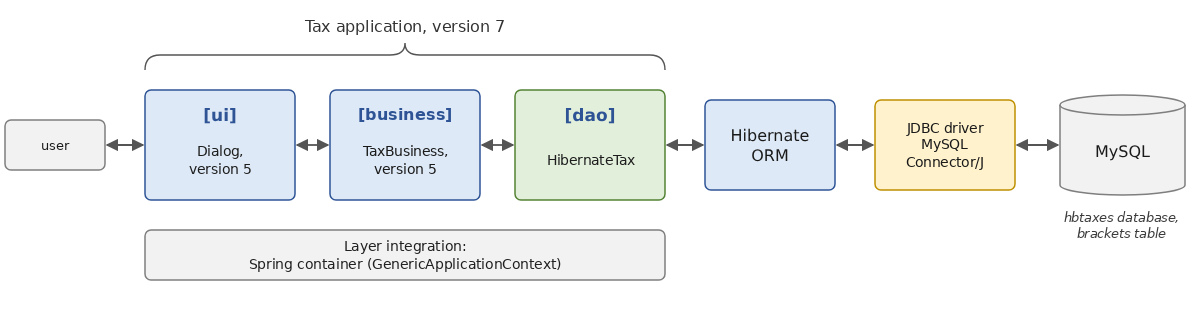
Version 7 consists of two subprojects from the structure in Chapter 11, stored in the [TaxV7] folder:
The [TaxV7] folder does not have a build file: like the [TaxV5] folder in Chapter 6, it is simply a collection of subprojects. The modules for version 5 ([tax-dao], [tax-business], [tax-ui], in version 5.0) are provided by the build from Chapter 6, included via the line [includeBuild("../06-architectures")] in the file [settings.gradle.kts]: Gradle replaces any [examples.tax:tax-xxx:5.0] dependency with the corresponding subproject from this build, which it compiles as needed. There is nothing to install beforehand, unlike with Maven, where you first had to enter [mvn install] in the version 5 folder.
11.15.2. The [dao] layer
The [tax-dao-hibernate] subproject depends on the [dao] layer from version 5, which contains the application entities ([TaxBracket], [TaxException]) and the [ITaxDao] interface:
- lines 5–6: entity plugins: the subproject defines the entity [Bracket];
- line 8: the subproject is a library that exposes some of its dependencies through the configuration [api];
- line 10: the [application] plugin, used to create the database (line 47);
- line 23: the [dao] layer of version 5. This is a dependency on [api]: the class [HibernateTax] implements the interface [ITaxDao] from this library, which its users must therefore also see;
- lines 25–27: Hibernate, the JDBC driver for MySQL, and Logback. Hibernate is a dependency of [implementation]: it is used internally by the library but does not appear in its public interface;
- lines 31–34: the standard configuration for the [allopen] plugin;
- lines 50–53: Programs launched by Gradle write their output to UTF-8 so that accented characters display correctly on Windows (Chapter 2).
The [TaxBracket] data class in version 5 cannot be a Hibernate entity: it is a data class (we’ve seen why this isn’t a good idea for an entity), it is immutable, and it has no identifier. We do not modify it, because it is part of the contract between the layers, shared by all versions. We create an entity, specific to the [dao] layer, whose role is to represent a row in the table:
- row 3: the table [brackets];
- rows 6–12: the three columns, declared in the primary constructor, with appropriate [decimal] types: the limit and the coefficient [coeffN] are amounts with two decimal places, and [coeffR] is a rate with four decimal places. The column names are in lowercase. The properties are private: the entity is used only to populate the table ([CreateDatabase]) and to write queries; the rest of the application never sees it. Hibernate, which accesses the fields directly, does not require them to be public;
- lines 15–17: the primary key, which is also used to sort the brackets.
The class [HibernateTax] implements the interface [ITaxDao]:
- lines 11–14: the error codes for this implementation, as with [FileTax] and [JsonTax];
- line 9: the [dao] layer receives the URL from the database, along with the user and their password. These are simply constructor parameters ([val] is not written: they do not become properties, since they are used only for construction). It reads the brackets once and for all during construction: it will be a singleton;
- line 18: the property [taxBrackets] of the interface [ITaxDao], initialized by an expression [try] (Chapter 3): its value is that of the block [try]; if an error occurs, [catch] throws an exception;
- Lines 20–25: A short-lived [SessionFactory]—just long enough to read the table—immediately closed by [use]. Since the layer accesses the database only once, there is no need to keep it; a [dao] layer that accessed the database on every call would instead receive a [SessionFactory] created once and for all, as in the previous example;
- Lines 27–29: Reading the table in primary key order. The query is a projection onto the data class [TaxBracket]: Hibernate requests only the three relevant columns from the DBMS and directly creates the application objects by calling the constructor of
*[TaxBracket]with the three values, without going through*[Bracket]entities. The value returned by [fromSession], and then by [use], is the list that was read: this is the value of the property; - Lines 32–35: An error from Hibernate or the DBMS (database inaccessible, table missing, etc.) manifests as a [PersistenceException] (the base class for Jakarta Persistence exceptions, from which Hibernate’s exceptions are derived). As in other implementations, it is encapsulated within a
*[TaxException]. The exception can occur as early as the creation of the*[SessionFactory]*(line 24), which connects to the server: it is also contained within the***[try]** block; - lines 38–41: an empty table is also an error: the [business] layer requires at least one row. The [init] block executes after the property is initialized, which precedes it in the class. The error code is passed via a named argument ([code = EMPTY_TABLE]), since the exception has no cause (Chapter 6).
11.15.3. The database
The database [hbtaxes] is created by the program [CreateDatabase.kt]. To avoid rewriting the pay scale brackets, it reuses those from class [HardwiredTax] in version 5:
- line 10: the database [hbtaxes], created by MySQL if it does not exist;
- line 13: displays the SQL statements, without formatting;
- line 15: the table is deleted and then recreated when [SessionFactory] is created;
- lines 19–21: one [Bracket] entity per bracket of the [HardwiredTax] class, persisted in a transaction. The [for] loop breaks down each [TaxBracket] into its three components ([(limit, coeffR, coeffN)]) using the functions [component1], [component2], and [component3], which are generated for a data class (Chapter 4).
The subproject also contains a file named [logback.xml], used by [CreateDatabase.kt] and by the application, which only allows the following errors to pass through:
- line 10: Errors from the DBMS, which Hibernate logs before throwing an exception, are not displayed: the application reports them itself;
- Line 11: The other logs record only errors.
Execution:
We check the table contents:
We see the pay scale brackets, with the last one having a zero limit (it is not used by layer [business], which selects the last bracket when no other applies).
To create the database on your own system:
- run MySQL (in Laragon; see the appendix; user [root] with no password);
- navigate to the [11-hibernate] folder and enter the command [gradlew -q :TaxV7:tax-dao-hibernate:run] (or run [CreateDatabase.kt] in IntelliJ IDEA, with the green triangle placed in front of its function [main]). Gradle compiles the Version 5 modules at the same time, in the adjacent folder [06-architectures].
The database [hbtaxes] is then created, with its table [brackets] populated. If the command fails, verify that MySQL is running and that the URL for [CreateDatabase.kt] corresponds to your server (port 3306, username [root], empty password). Alternatively, if you prefer, you can create the table and its rows using a SQL script, as described in Chapter 10.
11.15.4. Integrating the Layers
The [tax-ui-hibernate] subproject combines the following layers:
- lines 16–17: the layers [business] and [ui] from version 5. The [tax-ui] subproject contains the main program for version 5; it is used here as a library, specifically for its [Dialog] object;
- line 19: the new layer [dao], which includes Hibernate, the driver JDBC, and Logback;
- line 21: the Spring container;
- line 34: the main class;
- lines 37–39: the program reads from the keyboard (Chapter 6);
- lines 42–45: the programs launched by Gradle write their output to UTF-8, so that accented characters display correctly on Windows (Chapter 2).
The configuration file [tax-hibernate.properties], located in the subproject folder, specifies the database:
The file [tax-hibernate-error.properties] references a database named [hbtaxesmissing], which does not exist:
The main program is the one from version 5, in which only the composition of the [dao] layer changes:
- The file is not named [Main.kt]: it would be compiled into a class named [tax.ui.MainKt], which already exists in the [tax-ui] module of version 5, on which we depend. The file [MainHibernate.kt] generates a class named [tax.ui.MainHibernateKt];
- lines 26–29: the required URL database, the username, and the password, read from the configuration. [getProperty] returns [null] for a missing key: the Elvis operator ([?:]) then evaluates to [TaxException] ([throw] is a Kotlin expression);
- line 34: the [dao] layer is a [HibernateTax], created by a lambda that passes it the parameters from the database;
- line 36: the [business] layer in version 5: the container will pass the [dao] layer to its constructor;
- line 48: the dialog for version 5.
11.15.5. Executions
The user’s input, redirected to the program to obtain these results, was placed after the questions:
The control values from previous versions are retained: 4,282 euros for a married couple with two children and a combined income of 60,000 euros, 2,959 euros with three children, and 11,519 euros for a single person without children.
With the configuration file [tax-hibernate-error.properties], which refers to a nonexistent database:
- line 12: the original exception, thrown by the JDBC driver;
- lines 8 and 10: the Hibernate exceptions that encapsulate it: the error occurred during the creation of [SessionFactory], when Hibernate connected to the server to determine its version;
- line 6: the [dao] layer wrapped the error in a [TaxException];
- line 4: the Spring container, which was creating the [dao] layer, itself encapsulated the exception in a [BeanCreationException], which was displayed by the main program.
Changing the DBMS is equivalent to changing the URL in the database and the dependency on the JDBC driver: Hibernate automatically selects the SQL dialect from the DBMS encountered, and the code for the [HibernateTax] class, written in HQL, remains unchanged. Only the database creation—which depends on the column types—needs to be redone, which the program [CreateDatabase.kt] does without any modifications other than to its own URL.
11.16. Conclusion: JDBC, JdbcClient, jOOQ—Exposed or Hibernate?
We now have two ways to access a database: JDBC (Chapter 10) and Hibernate (this chapter). There are other, intermediate approaches that are widely used:
- JdbcClient, from the Spring Framework ([spring-jdbc] library), adds to JDBC a flexible API that executes a hand-written SQL query and automatically transforms the result rows into objects: [jdbcClient.sql("select * from articles where price > :price").param("price", 200).query(Article::class.java).list()]. You write the SQL; Spring handles the parameters and copies the columns into the objects (including data classes, whose constructors receive the columns). This is a “micro-ORM”;
- jOOQ generates, from the database schema, classes that allow you to write a SQL in Java or Kotlin that is verified by the compiler: [dsl.selectFrom(ARTICLES).where(ARTICLES.PRICE.gt(price)).fetch()]. You retain full control over the SQL, with the safety of type checking;
- Exposed, from JetBrains, is the database access library written in Kotlin and for Kotlin. Tables are described there using Kotlin objects ([object Articles : Table("articles")], with columns such as [val price = decimal("price", 10, 2)]), without code generation, and queries are written in a dedicated language (“ DSL”), which resembles SQL and is verified by the compiler: [Articles.selectAll().where { Articles.price greater minPrice }]. Exposed also offers a second API, a lightweight version of ORM (entity classes linked to tables), and relies on JDBC or, optionally, on non-blocking drivers (R2DBC) that can be used from coroutines. It takes advantage of everything we’ve covered about Kotlin: extension functions, lambdas with receivers, infix functions ([greater]), and nullable types for optional columns.
Strengths | Weaknesses | |
JDBC | Full control over SQL; performance; no dependencies | a lot of repetitive code (parameters, reading columns), streamlined in Kotlin by [use] and extension functions; SQL in strings, not checked by the compiler |
JdbcClient | SQL hand-written, without copy-and-paste code; performance similar to JDBC | No change tracking or generation of [INSERT]/[UPDATE]; SQL not verified |
jOOQ | SQL verified by the compiler; all features of the DBMS | Code generation with every schema change; no change tracking; paid license required for certain commercial DBMS versions |
Exposed | Designed for Kotlin; queries verified by the compiler, without code generation; lightweight | Kotlin-specific; less widespread than Hibernate, and less documentation; the schema is described manually in the code |
Hibernate | object-oriented model; change tracking; relationships; HQL and Criteria API; Jakarta Persistence standard; independent of the DBMS | an additional layer to understand (sessions, states, lazy loading); generated SQL code to monitor; less suitable for complex bulk processing; some adaptations for Kotlin ([jpa] and [allopen] plugins, no data classes for entities) |
The following guidelines can be suggested:
- Hibernate (often via Spring Data JPA) is suitable for most business applications: a model of interconnected entities, operations for reading and updating entities, and a schema that evolves with the application. It is the default choice for Spring Boot applications, in both Kotlin and Java;
- JDBC, JdbcClient, jOOQ or Exposed are suitable when you want precise control over the SQL being executed: complex statistical queries, stored procedures, processing very large volumes, or an existing database with a schema that is poorly suited to an object-oriented model. Exposed is a natural choice for an application written entirely in Kotlin, particularly outside of Spring (using the Ktor web framework from JetBrains, for example);
- these approaches can be combined: an application can use Hibernate for the bulk of its operations and hand-written SQL code—in the form of native queries—with [JdbcClient] or JDBC ([doWork]), for a few critical queries.
In any case, ORM does not eliminate the need to understand SQL and how the DBMS works: the log of executed SQL commands, which we have displayed throughout this chapter, is the primary tool for verifying what Hibernate is actually doing.
To learn more, the Hibernate documentation is comprehensive, and its introductory guide is the best place to start: Hibernate ORM - documentation. The Jakarta Persistence specification is published by the Eclipse Foundation: Jakarta Persistence. Spring’s guide on using JPA in Kotlin summarizes the concepts covered in this chapter (plugins, entities, nullability): Building web applications with Spring Boot and Kotlin. Exposed is presented on its GitHub page, which links to its documentation: JetBrains Exposed.