5. Commonly Used Java Classes
Here we present a few frequently used classes from the Java platform: strings, arrays, collections, files, and regular expressions. We also include the API Stream (Java 8), which is currently the most common way to search, sort, group, or transform elements in a Java collection. Before that, we’ll show you how to find information about the thousands of available classes. This resource is indispensable for any Java developer, even experienced ones.
With the exception of two (the JSON example and the sample application at the end), the examples in this chapter are compact source files executed by the source code launcher: [java File.java]. They are located in the [05-classes-java] folder of the course code and run in an English locale. Note that a compact source file automatically imports all public classes from the [java.base] module: [java.util], [java.io], [java.nio.file], [java.util.regex], [java.util.stream], [java.time]… This is why the programs below do not contain any [import] statements.
5.1. Seeking Help with Java Classes
The Java Standard Library (the API Java SE) includes more than 4,000 public classes. No one knows them all: Java developers constantly consult their documentation. This documentation is available online, free of charge, and published for each version of Java.
5.1.1. Online Documentation
The starting point is Oracle’s website at docs.oracle.com/en/java/javase/25. There you’ll find:
- the Java 25 reference: https://docs.oracle.com/en/java/javase/25/docs/api/. It describes, module by module and package by package, all Java classes and interfaces: their constructors, fields, and methods;
- a search box at the top of each page of the reference, where you can type the name of a class or method ([StringBuilder], [Matcher.find]…): the list of results populates as you type;
- the Java language specification (JLS) and topic-specific guides (JDK tools, security, regular expressions…);
- a “New Features” page that describes what’s new in each version. The new features themselves are described by JEP (JDK Enhancement Proposals), available on openjdk.org/jeps: For example, JEP 512 describes the compact source files used in this chapter.
A class page, such as java.lang.String, provides:
- the class’s module and package;
- its declaration, its parent classes, and the interfaces it implements;
- a general description, often lengthy and detailed, with examples;
- a summary list of its fields, constructors, and methods, followed by details for each: parameters, return value, possible exceptions, and the Java version in which it was introduced (under the “Since” heading).
The documentation is in English. A search on a search engine using the class’s full name and version (“java.lang.StringBuilder 25”) usually leads directly to the correct page.
5.1.2. Javadoc and the editor’s help
This documentation is generated by the [javadoc] tool from the JDK tool based on the documentation comments written in the source code of the classes. Such a comment begins with [/**] and is placed immediately before a class, field, or method. For example, here is the tax calculation method from the sample application in this chapter, documented as follows:
The comment begins with a summary sentence; the [@param] tags describe the parameters, and [@return] describes the returned value ([@throws] would describe an exception). You can document your own code in this way; the command [javadoc] (or [mvn javadoc:javadoc] in a Maven project) generates HTML pages similar to those in Java. Starting with Java 23, documentation comments can also be written in Markdown, with lines beginning with [///].
The code editor (IntelliJ IDEA, Visual Studio Code with the Extension Pack for Java) leverages these comments and provides immediate assistance without leaving the code:
- autocompletion: after typing [aString.], the editor displays a list of the object’s methods, along with their parameters and return types;
- Quick documentation: Hovering over a class or method name (or pressing Ctrl+Q in IntelliJ IDEA) displays its Javadoc;
- Parameter help: When you type the opening parenthesis of a call (or press Ctrl+P in IntelliJ IDEA), the editor displays the different method overloads and the role of each parameter;
- Go to Definition (Ctrl+B in IntelliJ, IDEA, F12 in VS Code): displays the source code for the class or method. JDK comes with the source code for its entire library (file [lib/src.zip]): This allows you to read the code for [ArrayList] or [HashMap], written by top Java experts, which is very educational.
Finally, the [jshell] tool from JDK lets you test a method without writing a program: you enter an expression, and it displays its value. Thus, ["abc".repeat(3)] displays ["abcabcabc"]. The command [/help] from [jshell] lists its options.
5.2. Strings
5.2.1. The String class
The [String] type ([java.lang] package) represents character strings. It offers numerous methods. Here are a few of them:
Method | role |
[int length()] | number of characters in the string |
[char charAt(int index)] | Character No. [index]; the first character is No. 0 |
[boolean startsWith(String prefix)] | returns [true] if the string begins with [prefix] |
[boolean endsWith(String suffix)] | returns [true] if the string ends with [suffix] |
[boolean contains(CharSequence s)] | returns [true] if the string contains [s] |
[boolean equals(Object other)] | returns [true] if the string has the same content as [other]; [equalsIgnoreCase] is case-insensitive |
[int indexOf(String str)] | the first occurrence of [str] in the string, or -1. Another overload starts the search at position [fromIndex] |
[int indexOf(int ch)] | same for the character [ch] |
[int lastIndexOf(int ch)] | same as [indexOf] but returns the last position instead of the first |
[static String join(CharSequence delimiter, CharSequence... elements)] | Class method: concatenates the elements, separating them with [delimiter] |
[String replace(char oldChar, char newChar)] | returns a copy of the string where the character [oldChar] has been replaced by [newChar]; an overload replaces one string with another |
[String[] split(String regex)] | the string is treated as a sequence of fields separated by a separator described by the regular expression [regex]; the result is an array of these fields |
[String substring(int beginIndex, int endIndex)] | substring consisting of the characters from position [beginIndex] (inclusive) to position [endIndex] (exclusive) |
[String toLowerCase()], [String toUpperCase()] | converts the string to lowercase, uppercase |
[String strip()] | removes leading and trailing spaces from the string (Java 11; [stripLeading], [stripTrailing]: on one side only) |
[String repeat(int count)] | repeats the string [count] times (Java 11) |
[boolean isEmpty()], [boolean isBlank()] | returns [true] if the string is empty, or if it contains only spaces (Java 11) |
[Stream<String> lines()] | returns the lines of the string as a stream (Java 11; see API Stream below) |
[String formatted(Object... args)] | returns the string, used as a template, in which the placeholders [%s], [%d]… have been replaced by the arguments (Java 15) |
It is important to note that a string of type [String] is immutable; it cannot be modified after it is created. When a method returns a string, that string is different from the string on which the method was applied. Thus, [s1.strip()] returns the string [s2], and [s1] and [s2] are two different strings: [s1] has not changed.
Unlike in other languages, a Java string is not an array: you do not write [c[i]] but [c.charAt(i)], and the number of characters is obtained using the [c.length()] method (with parentheses, whereas the length of an array is the [array.length] field, without parentheses).
The program [Strings01.java] is as follows:
Results:
Comments:
- line 6: character #10, i.e., the 11th character in the string;
- Lines 8, 10: An unsuccessful search returns -1;
- Line 11: The two parameters of [substring] are the positions of the first kept character and the first non-kept character: this yields the 7 characters at positions 4 through 10. This is the general Java convention for specifying an index range (start included, end excluded): it appears in many methods;
- Lines 16–17: The [String] class does not have an insertion method: we concatenate the beginning of the string, the inserted text, and the end of the string. We’ll see that the [StringBuilder] class has a [insert] method;
- Line 19: [split] splits the string into fields. Its parameter is not a single character but a regular expression, which we’ll examine at the end of the chapter: ["\\s+"] denotes a sequence of one or more whitespace characters (space, tab, line break, etc.). The character [\] must be doubled in a Java string, hence the notation [\\s];
- line 23: the static method [join] performs the inverse of [split];
- line 24: [strip] (Java 11) removes leading and trailing spaces. There is also the older method [trim], which recognizes only the spaces in the code for ASCII; [strip] recognizes all Unicode spaces and should be preferred;
- line 26: all of the previous methods returned new strings: [aString] remained unchanged (line 22 of the results);
- Lines 30–32: a method from the compact source file, called by the method [main] as in Chapter 3.
5.2.2. The split and join methods
The program [Strings02.java] performs a more detailed split of a string into fields:
Results:
Comments:
- Line 5: The fields are separated by the character [:]. Two consecutive [:] characters delimit an empty field (line 4 of the results). But be careful: [split] removes empty fields from the end. The final [:] in the string delimits a fifth, empty field that has been removed: only 4 fields are obtained, and [join] does not reconstruct the original string (line 6 of the results). This is a common pitfall;
- line 13: the second parameter of [split] is a limit. A negative limit instructs the program to keep all fields, including the empty fields at the end: we do indeed get 5 fields, and [join] reconstructs the original string;
- line 17: Since the separator is a regular expression, we can define complex separators: [":+"] matches one or more consecutive [:] characters. The two consecutive [:]s form a single separator, and the empty field disappears;
- Line 22: The pattern [\\s*[,;]\\s*] matches a comma or semicolon, preceded and followed by any number of spaces: the spaces surrounding the separators are removed along with them. Those at the beginning and end of the string are removed beforehand by [strip]. This produces the three “cleaned up” fields in a single statement;
- lines 27–35: To remove both the spaces around the fields and the empty fields, you can also process the fields one by one: the field consisting of two spaces between two commas becomes empty after [strip] and is not retained. The list [ArrayList] used here to store the retained fields will be discussed a little later. We will also see that the API stream allows this processing to be written in a single instruction;
- line 39: the [" | "] separator contains the character [|], which has a special meaning in a regular expression (“or”). The [Pattern.quote] method converts any string into a regular expression that literally matches it. We’ll use it whenever a separator contains one of the characters [\ ^ $ . | ? * + ( ) [ ] { }];
- Lines 43–48: [join] accepts only strings (more precisely, [CharSequence] objects, an interface implemented by [String] and [StringBuilder]): an array of integers must first be converted to an array of strings. We will see that with the API Stream, [Arrays.stream(numbers).mapToObj(String::valueOf).collect(Collectors.joining(" + "))] does the same thing in a single instruction.
5.2.3. Searching for and Comparing Strings
String comparison is more subtle than it seems: should uppercase and lowercase letters be distinguished? How should “éclair” be compared to “essay”? And most importantly, in Java, what does the [==] operator compare? The program [Strings03.java] demonstrates the search and comparison methods:
Results:
Comments:
- lines 6–9: [contains], [startsWith], and [endsWith] perform an exact, character-by-character comparison: “LANGUAGE” is not found;
- lines 12–14: These methods do not have a case-insensitive variant. The simplest way to perform a case-insensitive search is to convert both strings to lowercase;
- lines 16–17: The [regionMatches] method compares a portion of one string to a portion of another string. Its first parameter specifies whether to ignore case; the subsequent parameters are the starting position in the string, the other string, the starting position in the other string, and the number of characters to compare;
- lines 20–25: the most important part of this program. A variable of type [String] contains a reference to a string object (Chapter 4). The operator [] compares the references: it returns [true] if the two variables refer to the same object, and not to two objects with the same content. The variable [yes] (line 21) refers to a string “yes” constructed at runtime: this is a different object from the program’s literal string “yes,” and [yes == "yes"] evaluates to [false] (line 9 of the results), even though the two strings have the same content. To compare contents, we always use the method [equals], or [equalsIgnoreCase] to ignore case, which is the correct way to test a “yes” response entered from the keyboard in uppercase or lowercase. The comparison using [] “works” sometimes, when both strings are program literals, of which Java stores only a single instance: this is what makes the error difficult to detect;
- lines 28–31: The method [compareTo] returns a negative, zero, or positive integer depending on whether the string precedes, equals, or follows the parameter string. It compares the character codes: “éclair” comes after “essay” because the code for the character é (233) is greater than that for the character e (101); here, it returns the difference between the two codes, 132. To sort words according to the rules of a language, use a [java.text.Collator] object: in French, the character “é” is grouped with “e,” and “éclair” comes before “essay” (line 13 of the results). We’ll use the order defined by a [Collator] to sort words intended for a user, and [compareTo] to compare technical identifiers (file names, keys, etc.);
- lines 34–40: [isEmpty] checks for an empty string, while [isBlank] (Java 11) checks for an empty string or one containing only spaces. A variable of type [String] can also be [null] (no string): calling a method on [null] throws a [NullPointerException] exception. Therefore, we first test for [missing == null]; thanks to the short-circuit behavior of the [||] operator, [missing.isBlank()] is not evaluated when [missing] is [null];
- Lines 43–44: [String.format("%8s", ...)] pads a string with spaces up to a length of 8 characters, either on the left or on the right, using the format [%-8s]; [repeat] repeats a string.
5.2.4. Formats and Text Blocks
So far, we have built the strings to be displayed using concatenation with the [+] operator. To align values in columns, set the number of decimal places for a number, or display a date, use the [String.format] method, or the [formatted] instance method (Java 15), which does the same thing. The first parameter is a format: a string in which [%[-][width][.precision]conversion] specifiers indicate where and how to insert the following parameters. The [Strings04.java] program provides examples of this, as well as the Java 15 text blocks:
Results:
Comments:
- line 12: a width aligns the value to the right within a 10-character field; when preceded by the [-] symbol, it aligns it to the left;
- Lines 12–14: The most common conversions:
specifier | Meaning | example |
[%s] | string; any object is converted using its [toString] method | dupont |
[%d], [%5d] | integer, possibly 5 characters long | 45 |
[%05d] | integer with at least 5 digits, padded with zeros | 00045 |
[%X] | hexadecimal integer ([%x]: in lowercase) | 2D |
[%.2f], [%12.2f] | real number with 2 decimal places, possibly 12 characters long | 2345.68 |
[%,.2f], [%,d] | same as above, with a thousands separator | 2,345.68 |
[%e] | real number in scientific notation | 2.345678e+03 |
[%n] | system line break | |
[%%] | the % character | % |
- Numbers are formatted according to the current language, in this case English: decimal point, comma as a thousands separator. In the French formats of lines 19–22, the thousands separator is a space: a thin non-breaking space (character U+202F), which looks like a regular space but prevents a line break in the middle of a number; Similarly, a non-breaking space (U+00A0) precedes the € symbol and the % symbol. This will be taken into account when comparing these texts to strings written with regular spaces;
- line 16: ["...".formatted(...)] is equivalent to [String.format("...", ...)]. A conditional expression can provide a parameter;
- lines 19–22: Monetary amounts and percentages are formatted using [java.text.NumberFormat] objects, which are derived for a given language and country ([Locale.FRANCE]). The percentage format multiplies the value by 100;
- lines 25–27: Dates from the [java.time] API (Java 8) are formatted using a [DateTimeFormatter] object constructed from a template: [dd] day, [MM] month, [yyyy] year, [HH] hour, [mm] minutes, [ss] seconds, [EEEE] day of the week spelled out, [MMMM] month spelled out. Be careful with case: [MM] is the month, [mm] is the minutes. The names of the days and months are those used in everyday language;
- lines 30–34: the column widths allow data to be displayed in columns;
- Line 37: In a string, the character [\] introduces an escape sequence ([\n], [\t], [\"]…); to obtain the character [\] itself, you must double it. Java does not have “raw” strings where [\] would be a regular character, which makes writing Windows paths and regular expressions a bit cumbersome;
- Lines 41–46: A text block (Java 15) is delimited by three quotation marks; the text begins on the line following the opening quotation marks. It can span multiple lines and contain unescaped quotation marks. The indentation common to all lines (that of the least-indented line, counting from the closing quotation marks) is removed: the text JSON is displayed without the code margin. Escape sequences remain active here: [\] must still be doubled (line 44). Since the closing quotation marks are on their own line, the text ends with a line break: hence the use of [IO.print] on line 47 ([IO.println] would add a blank line after the closing curly brace);
- lines 49–50: Java does not support string interpolation—that is, expressions written directly within the text, such as [${name}] in other languages (a proposal, “String Templates,” was tested as a preview in Java 21 and 22, then removed). With a block of text, placeholders such as [%s], [%d]… are used, filled in by [formatted]. Placing the closing quotation marks at the end of the text prevents a final line break.
There is also the class [java.text.MessageFormat], whose formats refer to parameters by their numbers: [MessageFormat.format("{0} is {1} years old", name, age)]. It is used for messages translated into multiple languages, where the order of parameters may vary from one language to another.
5.2.5. The StringBuilder class
We mentioned that the methods of the [String] class that are applied to a [s1] string return another [s2] string. The [java.lang.StringBuilder] class allows you to modify a string without creating a new string for each operation. This improves performance when constructing a string through many successive additions, by avoiding the proliferation of strings with very short lifespans.
The class supports various constructors:
constructor | role |
[StringBuilder()] | creates an empty object with an initial capacity of 16 characters |
[StringBuilder(String str)] | construct and initialize with [str]; the initial capacity is the length of [str] plus 16 |
[StringBuilder(int capacity)] | constructing an empty object with an initial capacity of [capacity] characters |
A [StringBuilder] object stores its characters in an array whose size—its capacity—is automatically adjusted as the text grows. The program [Strings05.java] illustrates this concept of capacity:
Results:
Comments:
- line 3: creation of a [StringBuilder] object containing “test”: its initial capacity is 4 + 16 = 20 characters;
- line 4: [length] is the current number of characters; [capacity] is the number of characters the object can hold before it needs to expand its array;
- line 6: [append] appends a string to the end of the text;
- line 10: creation of an empty [StringBuilder] object with an initial capacity of 10, to which “test” is immediately added. The method [append] returns the object itself: it can be called directly on the result of the constructor.
The results show that when the capacity is insufficient, it is slightly more than doubled: the new capacity is the old one multiplied by 2, plus 2 (20, 42, 86 for the first object; 10, 22, 46 for the second). Each resize allocates a new array and copies the characters into it. If the approximate size of the text is known in advance, setting it at construction time avoids these successive resizes.
Here are some of the class’s methods:
method | role |
[StringBuilder append(String str)] | Add [str] to the end of the text. Overridden to accept the types [int], [double], [char], [boolean], [Object]… |
[StringBuilder insert(int offset, String str)] | Inserts [str] at the position of [offset]; overwritten as [append] |
[StringBuilder delete(int start, int end)] | deletes characters from positions [start] (inclusive) to [end] (exclusive); [deleteCharAt] deletes one character |
[StringBuilder replace(int start, int end, String str)] | replaces the characters at positions [start] (inclusive) through [end] (exclusive) with [str] |
[StringBuilder reverse()] | reverses the order of the characters |
[void setCharAt(int index, char ch)] | replaces character No. [index] with [ch] |
[int indexOf(String str)] | position of [str] in the text, or -1 |
[String toString()] | converts the text into a string [String] |
The program [Strings06.java] uses them:
Results:
Comments:
- Line 4: The modification methods return the [StringBuilder] object itself, which allows them to be chained together. Let’s follow the steps: “test” becomes “testabCD " ([append]), then “texyZTstabCD” ([insert] in position 2), then “xyZTstabCD " ([delete] for characters 0 and 1), and finally "XYZTstabCD" ([replace] for characters 0 and 1, with "XY"). Note that, unlike the [replace] method of [String], the method of [StringBuilder] does not search for text: it replaces a range of positions. [IO.println] displays the object by calling its method [toString];
- line 6: [reverse] reverses the text. Since [String] does not have a [reverse] method, this is the standard way to reverse a string;
- lines 9–12: constructing a multi-line text through successive additions—this is the typical use of [StringBuilder]. The additions are chained together on a single line of code;
- line 14: [StringBuilder] has no equivalent to [join]: the result of [String.join] is appended;
- line 17: a formatted string is added. The conversion [%f] requires a real number: passing the integer [total] would throw a [IllegalFormatConversionException] exception at runtime, hence the conversion [(double) total];
- line 19: the final text is obtained as a string [String];
- lines 24–28: the class [java.util.StringJoiner] constructs a string consisting of elements separated by a separator, with an optional prefix and suffix. [String.join] performs the same function, without a prefix or suffix.
For a few concatenations, the [+] operator is sufficient: the compiler optimizes them. [StringBuilder] is necessary when the number of additions is large or unknown, typically within a loop: the [s = s + ...] concatenation in a loop with n iterations creates n strings and copies the entire previously constructed string in each iteration. In older code, you’ll find the [StringBuffer] class, which has the same methods as [StringBuilder] but makes them usable simultaneously by multiple threads, at the cost of some performance overhead: today, [StringBuilder] is preferred over it.
5.2.6. Parsing a string without copying it
Each call to [substring] creates a new string in memory. In performance-critical code (such as parsing large files or network requests), you may want to avoid these creations. Java does not have a “view of a string segment” type built into the language, but several methods operate on a portion of a string without copying it. The program [Strings07.java] compares the two ways of parsing a line in the format “last name:first name:age”:
Results:
Comments:
- lines 8–9: Each call to [substring] creates a new string, even if, as with the age, it is only used for a moment;
- line 13: an overloaded version of [Integer.parseInt] (Java 9) parses the characters between two positions in the string, relative to the specified base (here 10), without creating a substring;
- line 15: [regionMatches], which we’ve already encountered, compares a portion of the string to another string without copying it;
- line 19: [CharBuffer.wrap] (package [java.nio]) returns a view of the characters from 0 to [p1] - 1 in the string: an object that does not contain a copy of the characters, but provides a way to access them. It implements the [CharSequence] interface, just like [String] and [StringBuilder]: many Java methods accept a [CharSequence] ([String.join], [contains], [append], and regular expressions, for example);
- line 24: an overloaded version of [indexOf] (Java 21) limits the search to a range of positions;
- line 27: a string is created only if it is actually needed.
These techniques are optimization tools: for an ordinary program, [substring] works perfectly well. Since Java 9, the virtual machine has also been storing strings that contain only characters from the Latin-1 character set (as is the case with French text) at one byte per character instead of two (“compact strings”), which cuts the memory they occupy in half. We’ll only try to avoid copies in code that has been measured to be critical for performance.
5.3. Arrays
5.3.1. The Arrays Class
Java arrays are objects, but they have no useful methods: aside from the [length] field, all operations on arrays are static methods of the utility class [java.util.Arrays]. These methods allow you to sort an array, search for an element in it, copy it, fill it, and so on… Almost all of them are overloaded: there is a version for each primitive type ([int[]], [double[]], [char[]]…) and a version for arrays of objects.
method | role |
[static int binarySearch(int[] a, int key)] | Returns the position of [key] in [a], which must be sorted; a negative number if [key] is missing |
[static int[] copyOf(int[] original, int newLength)] | returns a new array of [newLength] elements containing the first elements of [original], padded with zeros if necessary ([false] for Booleans, [null] for references) |
[static int[] copyOfRange(int[] original, int from, int to)] | returns a new array consisting of the elements from [from] (inclusive) to [to] (exclusive) |
[static boolean equals(int[] a, int[] a2)] | Returns [true] if both arrays have the same elements in the same order |
[static void fill(int[] a, int val)] | assigns [val] to all elements of [a]; an override fills only a range of indices |
[static void sort(int[] a)] | sorts [a] according to the natural order of its elements; an overload sorts only a range of indices; for an array of objects, an overload receives a [Comparator] that defines the order (Chapter 4) |
[static String toString(int[] a)] | returns the elements of the array as a string [[e1, e2, ...]]; [deepToString] does the same for an array of arrays |
[static <T> List<T> asList(T... a)] | returns a list that is a view of the array of objects [a] |
[static IntStream stream(int[] array)] | returns a stream of the array’s elements (see the API Stream section below) |
In addition, there is the [System.arraycopy(source, sourceStart, destination, destinationStart, count)] method, which copies elements from one array into another existing array.
The program [Arrays01.java] illustrates the use of certain methods of the [Arrays] class:
Comments:
- Lines 18–42: The [input] method enters array elements typed from the keyboard. Since the number of elements is unknown in advance, the program starts with an empty array (line 20) and expands it by one element for each new entry (line 37). The size of a Java array is fixed at creation: [Arrays.copyOf] actually creates a new array, one element larger, and copies the elements from the old one into it. A more efficient algorithm would allocate space in groups of N elements. An array is not designed to be expanded: this scenario is better handled with a list [ArrayList], as we will see shortly;
- line 39: the last element of an array has the index [length - 1];
- lines 30–35: the conversion of the entered string to a real number by [Double.parseDouble], which throws an exception [NumberFormatException] if the string is not a number. [Double.parseDouble] is not dependent on the system’s language: it always expects a decimal point and rejects the input “3,6” (line 5 of the results);
- lines 53–75: The method [search] searches the array for the characters typed on the keyboard. For an unsorted array, a linear search is performed (line 71), which examines the elements one by one. The class [Arrays] does not have a method named [indexOf]: we write it (lines 78–85). For a sorted array, we perform a binary search using [Arrays.binarySearch] (line 70), which halves the search range at each step: it finds an element among one million in about twenty comparisons;
- line 10: we sort the array. Here we use a variant of [sort] that has only one parameter: the array to be sorted. The ordering relation used to compare the array elements is then the implicit one for those elements: in this case, the natural order of numbers;
- Lines 45–50: Displaying an array. [IO.println] displays a [double] with a decimal point, regardless of the machine’s language, and always with at least one decimal place: -7 is displayed as -7.0;
- lines 88–91: [IO.readln] (Java 25) displays a prompt, then reads a line typed on the keyboard; it returns [null] if standard input is exhausted, for example when it comes from a file;
- line 94: an enumeration, declared in the compact source file just like methods.
Results:
When the searched-for element is missing, the method [indexOf] returns -1 and [binarySearch] returns a negative number (line 27): this is [-(p + 1)], where p is the position where the element should be inserted to keep the array sorted. Here, -3 = -(2 + 1): the number 0 should be inserted at position 2, between -1.5 and 3.6. Note: [binarySearch] on an unsorted array returns a meaningless result.
5.3.2. Other methods of the Arrays class
The program [Arrays02.java] demonstrates other methods of the [Arrays] class:
Results:
Comments:
- Line 4: [Arrays.toString] displays a table on a single line. Displaying an array directly with [IO.println(numbers)] would result in text similar to [[I@1b6d3586]]: the type ([[I]], array of integers) and an object identifier, without its elements;
- line 7: only elements with indices 1 through 3 are sorted, with the second index excluded: 10, 30, 20 become 10, 20, 30;
- line 12: copies the first 3 elements of [numbers] to the beginning of [copy], while the other elements retain their initial value of 0;
- lines 15–16: [copyOf] and [copyOfRange] create a new array. An array longer than the original is padded with zeros;
- lines 19–22: [fill] fills the array, then resets the elements at indices 1 and 2 (excluding 3) to 0;
- lines 25–27: As with strings, the operator [==] compares the references of two arrays, not their contents: [Arrays.equals] must be used;
- line 31: [Arrays.asList] returns a [List] (presented in the following section), which is a view of an array of objects: it does not copy the array but provides access to it using list methods. This yields [indexOf] and [lastIndexOf] (line 32);
- line 35: the method [Collections.reverse] reverses the order of the elements in a list. Since the list is a view of the array, it is the array itself that is reversed (line 11 of the results). The class [Arrays] does not have a reversal method; this process applies only to arrays of objects, not to arrays of primitive types such as [int[]];
- line 40: an array of strings is sorted according to the order of the [compareTo] method described above, that is, by character codes: uppercase letters (codes 65 through 90) come before lowercase letters (97 through 122), which come before accented letters (é: 233). “Zoé” is the first word and “éclair” is the last;
- line 43: to sort according to French rules, we pass an object of type [Collator]—which compares strings—to [sort];
- Lines 47–50: Java does not have two-dimensional rectangular arrays: [new int[2][3]] creates an array of 2 elements, each of which is an array of 3 integers. [matrix.length] is the number of rows, and [matrix[0].length] is the number of elements in row 0. [Arrays.deepToString] displays an array of arrays.
The API Stream, which we will discuss later, offers other ways to search, sort, or transform the elements of an array, for example, [Arrays.stream(numbers).sum()].
5.4. Collections
In addition to arrays, Java provides various classes for storing collections of elements. These form the Collections Framework in the [java.util] package, which was introduced in Java 1.2 and made generic in Java 5. It is organized around interfaces, which describe what a collection does, and classes that implement them, each in its own way:
interface | role | Main Implementations |
[List<E>] | an ordered sequence of elements, accessible by their position | [ArrayList], [LinkedList] |
[Set<E>] | a set: no duplicates | [HashSet], [LinkedHashSet], [TreeSet] |
[Map<K,V>] | a dictionary: (key, value) pairs, where the keys are unique | [HashMap], [LinkedHashMap], [TreeMap] |
[Deque<E>] | a double-ended queue, usable as a queue or a stack | [ArrayDeque], [LinkedList] |
[Queue<E>] | a queue | [ArrayDeque], [PriorityQueue] |
The interfaces [List], [Set], and [Queue] are derived from the interface [Collection<E>] ([size], [isEmpty], [contains], [add], [remove], [clear]…), which itself derives from [Iterable<E>], the interface for objects that can be iterated over using a loop [for]. Best practice is to declare variables and parameters using the interface type and to use the class name only at creation time: [List<String> cities = new ArrayList<>();]. This allows you to change the implementation without modifying the rest of the code.
A Java collection contains only objects. Java generics do not support primitive types: you do not write [List<int>] but rather [List<Integer>], where [Integer] is the wrapper class for the type [int] (similarly, [Double] for [double], [Boolean] for [boolean]…). The compiler automatically converts a [int] to [Integer] during an assignment (“autoboxing”) and a [Integer] into a [int] during a read (“unboxing”). This conversion incurs a cost in terms of memory and time: a list of one million integers contains one million [Integer] objects. For large volumes of numbers, it is preferable to use a [int[]] array or the primitive streams ([IntStream]) introduced with the API Stream.
The [java.util] package also contains the Java 1.0 collections: [Vector] (a list), [Hashtable] (a dictionary), and [Stack] (a stack). These are now obsolete: since they are synchronized on every operation, they are slower than their replacements [ArrayList], [HashMap], and [ArrayDeque]. They should no longer be used in new code. Similarly, avoid “raw types”—that is, generic collections used without type parameters ([List list = new ArrayList();])—as was done before Java 5: the compiler can no longer verify the type of the added elements and issues a warning for each use.
5.4.1. The List interface and the ArrayList class
The class [java.util.ArrayList<E>] implements a list of objects of type [E] whose size varies during program execution. It stores its elements in an internal array that it automatically resizes, just like [StringBuilder]. Element i of a [l] list is retrieved by [l.get(i)] and modified by [l.set(i, value)].
Here are some of the methods of the [List<E>] interface:
method | role |
[int size()] | number of items in the list |
[boolean add(E e)] | Adds [e] to the end of the list |
[void add(int index, E element)] | Insert [element] at position [index] in the list |
[boolean addAll(Collection<? extends E> c)] | adds the items from [c] to the end of the list |
[E get(int index)], [E set(int index, E element)] | reads and replaces element No. [index] |
[E getFirst()], [E getLast()] | the first and last elements (Java 21) |
[void clear()] | deletes all elements from the list |
[boolean contains(Object o)] | returns [true] if [o] is in the list, [false] otherwise |
[int indexOf(Object o)] | returns the position of [o] in the list, or -1 if [o] is not found; [lastIndexOf] returns the last position |
[boolean remove(Object o)] | deletes the first occurrence of [o]; returns [true] if the operation succeeds, [false] otherwise |
[E remove(int index)] | deletes element No. [index] and returns |
[List<E> subList(int from, int to)] | returns a view of the elements from [from] (inclusive) to [to] (exclusive) |
[void sort(Comparator<? super E> c)] | sorts the list according to the order defined by [c]; [sort(null)] uses the natural order of the elements |
[<T> T[] toArray(IntFunction<T[]> generator)] | returns the list elements as an array (Java 11) |
[static <E> List<E> of(E... elements)] | creates an immutable list containing the given elements (Java 9) |
The utility class [java.util.Collections] complements these methods, just as [Arrays] does for arrays: [sort], [binarySearch], [reverse], [shuffle], [max], [min]…
Let’s revisit the example we covered earlier using an array and now process it using an object of type [ArrayList<Double>]. Since a list is similar to an array, the code changes very little. This is the program [Collections01.java]:
Comments:
- line 22: the list is created empty. The diamond operator [<>] (Java 7) avoids repeating the element type: the compiler infers it from the variable’s type;
- line 39: there is no longer any need to handle list expansion; the list expands automatically. The value [element], of type [double], is automatically converted to a [Double] object;
- line 6: the number of elements in the list. Unlike [StringBuilder], [ArrayList] does not allow you to determine its capacity; the [ensureCapacity] method only allows you to set it in advance;
- lines 12, 70, 71: sorting and binary search are performed using the static methods [Collections.sort] and [Collections.binarySearch]; linear search using the [indexOf] method on the list, which the arrays did not have;
- Lines 45–50: The generic method [display] accepts two parameters:
- the first is the text to be written;
- the second is an object that implements the generic interface [java.lang.Iterable<T>], whose only abstract method is [Iterator<T> iterator()].
The loop [for (T element : elements)] is valid for any [elements] object that implements the [Iterable<T>] interface, as well as for arrays. All collections implement [Iterable]; arrays, however, do not implement it, and the [display] method is not suitable for an array: this is why we did not use it in [Arrays01.java]. We will revisit this interface with the API Stream.
Results:
The results are the same as with the table.
5.4.2. Methods of the List interface
The program [Collections02.java] uses the other methods of the [List] interface:
Results:
Comments:
- line 4: [List.of(...)] (Java 9) creates a read-only list (see below); it is copied into a [ArrayList], which is writable. This is the shortest way to initialize a list with values;
- Lines 8–10: Three ways to add elements;
- line 14: element #0 is replaced by [set];
- line 15: [get] reads an element; [getLast] (Java 21) returns the last element, which previously had to be written as [cities.get(cities.size() - 1)];
- line 22: [remove] returns [true] if the element was found and deleted;
- line 27: the strings are sorted in their natural order, that of [compareTo];
- line 31: [subList] returns a view of elements 1 and 2 (excluding 3), not a copy: modifying the view would modify the list;
- lines 35–36: conversion from a list to an array, and from an array to a list. The parameter of [toArray] is a constructor reference [String[]::new], which the list uses to create an array of strings of the correct size. Method and constructor references will be covered in Chapter 7;
- Lines 41–43: A pitfall with integer lists. The [List] interface has two methods, [remove]: [remove(int index)] deletes by position, and [remove(Object o)] deletes by value. For a [List<Integer>], [numbers.remove(1)] calls the first one and deletes element #1 (the value 20). To delete the value 1, you must pass an object [Integer]: [numbers.remove(Integer.valueOf(1))];
- lines 47–48: [clear] clears the list; [isEmpty] checks if it is empty;
- line 51: the type [List<?>] denotes a list of elements of any type (“wildcard,” Chapter 4): the method [display] accepts a [List<String>] just as it would a [List<Integer>]. A collection is displayed directly: its method [toString] returns its elements in square brackets.
5.4.3. The Map interface and the HashMap class
The [java.util.HashMap<K,V>] class allows you to implement a dictionary. A dictionary can be viewed as a two-column array:
key | value |
key1 | value1 |
key2 | value2 |
... | ... |
In the [Map<K,V>] interface, keys are of type [K], and values are of type [V]. The keys are unique: there cannot be two identical keys (as defined by the [equals] method). Such a dictionary might look like this if the types [K] and [V] referred to classes:
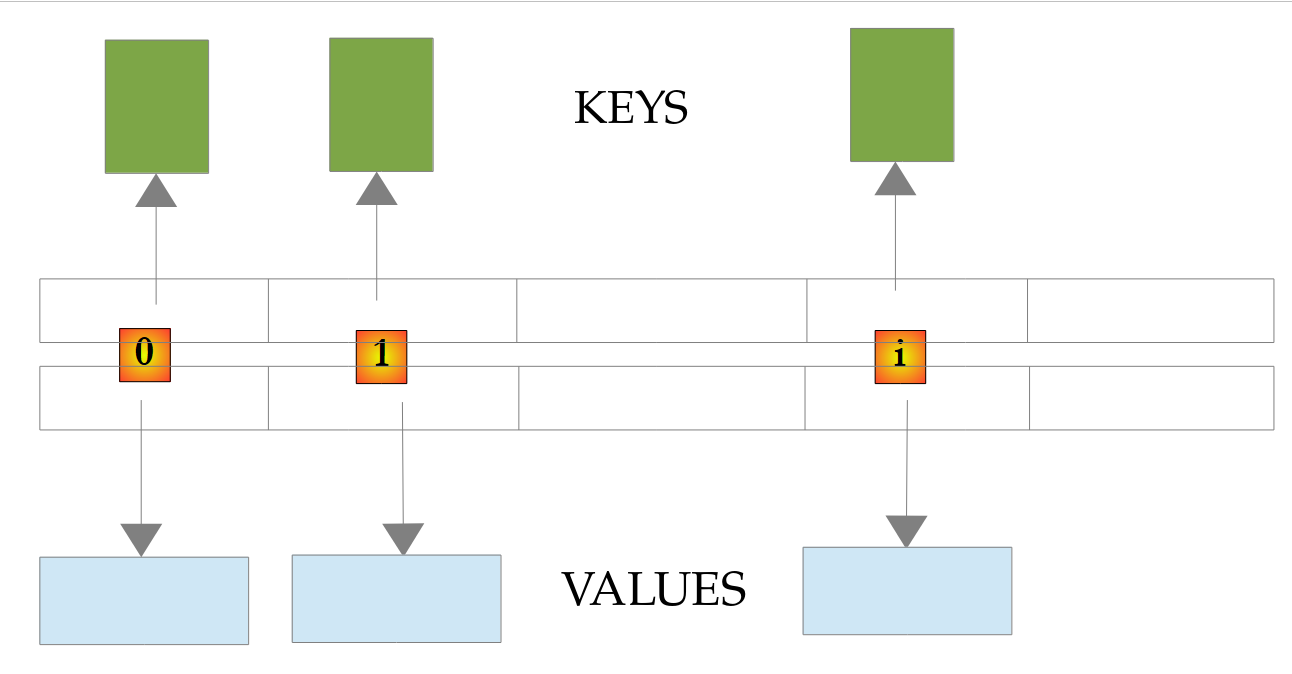
A [HashMap] stores its key-value pairs in a hash table: the position of a key-value pair in the table is calculated based on the hash code of its key (method [hashCode], Chapter 4). Retrieving the value associated with a key is therefore very fast, regardless of the dictionary’s size. However, the order of the key-value pairs in the table has no relation to the order in which they were added.
The main methods of the [Map<K,V>] interface are as follows:
method | role |
[int size()] | number of (key, value) pairs in the dictionary |
[V put(K key, V value)] | Associates [value] with [key]: adds the pair if the key is missing, otherwise replaces the value; returns the old value, or [null] |
[V putIfAbsent(K key, V value)] | adds the key-value pair only if the key is missing; returns the existing value, or [null] |
[V get(Object key)] | returns the value associated with [key], or [null] if the key is missing |
[V getOrDefault(Object key, V defaultValue)] | same as above, but returns [defaultValue] if the key is missing |
[boolean containsKey(Object key)] | returns [true] if [key] is a key in the dictionary; [containsValue] tests a value |
[V remove(Object key)] | deletes the key-value pair [key] and returns its value, or [null] |
[Set<K> keySet()] | all keys in the dictionary |
[Collection<V> values()] | the collection of dictionary values |
[Set<Map.Entry<K,V>> entrySet()] | the set of key-value pairs in the dictionary; a pair [Map.Entry] has the methods [getKey] and [getValue] |
[V merge(K key, V value, BiFunction<...> remappingFunction)] | adds the pair if the key is missing; otherwise, replaces the value with the combination of the old value and [value] |
[void clear()] | deletes all entries from the dictionary |
Consider the example program [Collections03.java]:
Comments:
- line 4: an array of strings that will be used to initialize the <String,Integer> dictionary;
- line 5: the dictionary, which is empty;
- lines 6–9: its initialization using the array of strings;
- line 11: the number of key-value pairs in the dictionary;
- lines 13–15: the keys and values of the dictionary. [dico.keySet()] and [dico.values()] are collections, so [Iterable]: the [display] method we’ve already encountered works here;
- line 23: removing a pair from the dictionary;
- Lines 26–28: A dictionary is not itself a collection, but [entrySet] returns the set of its key-value pairs, which are of type [Map.Entry<K,V>]. This approach is more efficient than the one in lines 18–20, which looks up the value of each key using [get];
- lines 30–31: [put] adds a pair or replaces the value of an existing key, without exception or warning; the returned value—either the old value or [null]—indicates what happened;
- lines 33–34: [putIfAbsent] does not replace the value of an existing key;
- lines 36–37: Reading a nonexistent key does not cause an error: [get] returns [null]. [getOrDefault] allows you to choose the returned value in this case, and [containsKey] allows you to check whether a key exists;
- Lines 39–40: [merge] adds the key “léa” with the value 1, and adds 1 to the value of the key “zoé,” which already exists. The third parameter is the function that combines the old and new values—in this case, the sum of two integers—passed as a method reference [Integer::sum] (Chapter 7). This is the standard way to count occurrences: [counters.merge(word, 1, Integer::sum)];
- lines 51–56: searching for a key in the dictionary. [get] returns a [Integer], not a [int], because it must be able to return [null]: this case is tested before the value is used. Entering [int age = dico.get(searchedName);] would generate a [NullPointerException] for a missing key during the automatic conversion of [null] to [int].
Results:
The keys are not listed in the order they were added, but in the order of the hash table, which depends on the keys’ hash codes: a [HashMap] does not guarantee any specific order. If the order of the keys matters, use a [LinkedHashMap], which preserves the order in which they were added, or a [TreeMap], which keeps the keys sorted: these are shown below.
5.4.4. Other collections
The [java.util] package contains other collections, each tailored for a specific use:
class | role |
[HashSet<E>] | a set: no duplicates, no order, very fast membership test; set operations (union [addAll], intersection [retainAll], difference [removeAll]) |
[LinkedHashSet<E>] | a set that preserves the order in which its elements were added |
[TreeSet<E>] | a set whose elements are kept sorted |
[ArrayDeque<E>] | a double-ended queue: when used as a queue, elements are removed in the order they were added (FIFO, first in first out); when used as a stack, the last element added is the first one removed (LIFO, last in first out) |
[LinkedHashMap<K,V>] | a dictionary that preserves the order in which its keys were added |
[TreeMap<K,V>] | a dictionary whose keys are kept sorted |
[PriorityQueue<E>] | a priority queue: the element that is removed is the smallest according to the queue's order |
[LinkedList<E>] | a doubly linked list: fast insertions and deletions at the ends and during traversal |
The program [Collections04.java] provides a quick overview:
Results:
Comments:
- line 4: a set initialized with the elements of a list;
- line 6: [add] returns [false] if the element is already in the set, which remains unchanged;
- Lines 9–14: [retainAll] keeps only the elements present in the other collection (intersection), while [addAll] adds those from the other collection (union). These methods modify the set: we are therefore working on a copy of [languages]. [Set.of] (Java 9) creates an immutable set. The order in which the elements of a [HashSet] are displayed has no significance;
- line 16: a
*[TreeSet]* constructed from the set displays its elements in sorted order; - lines 19–24: [ArrayDeque] used as a queue: [offer] inserts an element at the end of the queue, [poll] removes the oldest element, and [peek] retrieves an element without removing it. The operands of the concatenation passed to [IO.println] are evaluated from left to right: [peek], then the two [poll], then [size];
- lines 27–32: [ArrayDeque] is used as a stack: [push] pushes an element onto the stack, and [pop] pops the most recent element. The Java 1.0 class [Stack] should no longer be used;
- lines 34–40: on an empty stack, [pop] throws a [NoSuchElementException] exception, whereas [poll] returns [null]. Most operations of [Deque] thus exist in two versions: one throws an exception ([push], [pop], [getFirst]…), while the other returns a special value ([offer], [poll], [peek]…);
- lines 43–48: the pairs for a [TreeMap] are listed in key order;
- lines 50–54: those of a [LinkedHashMap] are listed in the order they were added;
- lines 57–67: a [PriorityQueue] needs to be able to compare its elements. Here, it is passed a [Comparator] that compares priorities: [Comparator.comparingInt(Emergency::priority)] reads “compare urgencies based on the integer value returned by their [priority] method.” Patients are discharged in order of increasing priority, regardless of their order of arrival. The loop stops when [poll] returns [null], indicating that the queue is empty;
- lines 71–72: A patient is represented by a [record] (Chapter 4).
5.4.5. Immutable Collections
A class that manages a collection often needs to expose it externally without allowing it to be modified. Java does not have a “read-only” interface distinct from [List]: a non-modifiable collection implements the full [List] interface, but its modification methods ([add], [remove], [set]…) throw a [UnsupportedOperationException] exception. There are two types:
- non-modifiable views, obtained via [Collections.unmodifiableList(list)] ([unmodifiableSet], [unmodifiableMap]…): they do not copy the collection but prevent recipients from modifying it;
- The read-only collections created by [List.of(...)], [Set.of(...)], [Map.of(...)] (Java 9), or copied by [List.copyOf(collection)] (Java 10): their contents are fixed once and for all.
The program [Collections05.java] uses them:
Results:
Comments:
- lines 44–61: The class [Classroom] manages a list of students. The list itself is private; only the method [enroll] allows it to be modified;
- lines 49–51: The method [getStudents] returns a read-only view of the list. Returning the list [students] itself would allow external code to modify it without the class’s knowledge;
- lines 10–14: The view has all the methods of
*[List]*, and***[students.add("intruder")]** is accepted by the compiler; the*[UnsupportedOperationException]exception is thrown at runtime; - line 15: the view’s actual class is an internal class of [Collections], which is known only through the [List] interface;
- lines 17–18: the view does not copy the list; it sees the changes made by the owning class;
- lines 54–56 and 21–23: [List.copyOf], on the other hand, returns a read-only copy: the list [copy] does not see the addition of “petit”;
- lines 26–33: [Map.of] creates a read-only dictionary from key-value pairs;
- lines 35–40: The collections created by [of] and [copyOf] reject the value [null], which triggers a [NullPointerException] immediately upon their creation.
The type of a variable such as [List<String>] therefore does not indicate whether the list is mutable: it is up to the documentation for the method that returns it to specify this. A common best practice is to return immutable collections and to create a new collection whenever you want to modify one. [record], whose fields are read-only, align well with this practice: [record Classroom(String name, List<String> students)] benefits from copying its list into its constructor using [List.copyOf].
5.4.6. Sorting, Iterating, Sequenced Collections
The program [Collections06.java] demonstrates three useful aspects of working with collections: writing a [Comparator], Java 21 sequenced collections, and removing elements during an iteration:
Results:
Comments:
- Line 8: The [sort] method of a list takes a [Comparator], an object that compares two elements (Chapter 4). The static method [Comparator.comparing] constructs a comparator from a function that extracts a key from each element—in this case, the name ([Student::name] refers to the method [name] of the record). The names are compared according to the natural order of strings: “Durand,” which begins with a capital letter, comes first, and “élise” comes last;
- line 10: a second parameter specifies how to compare the keys—in this case, using [Collator]—with the order following that of a French dictionary;
- lines 12–13: the comparators are defined as follows: [comparingInt] compares grades, [reversed] reverses the order (grades in descending order), and [thenComparing] adds a secondary criterion used to tie-break students with the same grade: names, ignoring case ([String.CASE_INSENSITIVE_ORDER]). Durand and Martin, who both have a score of 15, are ranked by name;
- Lines 17–25: Java 21 introduced sequenced collections: the interfaces [SequencedCollection], [SequencedSet], and [SequencedMap], implemented by collections whose elements have a defined order ([List], [Deque], [LinkedHashSet], [TreeSet], [LinkedHashMap], [TreeMap]…). They share common methods for accessing both ends: [getFirst], [getLast], [addFirst], [addLast], [removeFirst], [removeLast] ([firstEntry], [lastEntry]… for a dictionary), and the method [reversed], which returns a view of the collection in reverse order without copying it. Previously, retrieving the last element of a [LinkedHashSet] required iterating through the entire collection;
- lines 28–37: you must not modify a collection while iterating over it with a [for] loop: the iterator used by the loop detects the modification and throws a [ConcurrentModificationException] exception at the next element. The test is performed on a copy of the list;
- lines 39–44: The correct approach is to explicitly write the loop using a [Iterator] (introduced with the API Stream) and remove the current element using the iterator’s [remove] method;
- line 47: more simply, the [removeIf] method (Java 8) removes elements that satisfy a condition, expressed by an anonymous (lambda) [student -> student.grade() < 15], which reads “the function that associates a student with the Boolean [student.grade() < 15].” Lambdas will be studied in detail in Chapter 7; for now, it is enough to know how to read them. We will encounter them on every line of the following section;
- line 50: the method
*[forEach]* of any collection executes a lambda for each element; - lines 63–64: calling the [toString] method on a [record] returns the record’s name and the values of its components: [Student[name=Durand, grade=15]].
5.5. The API Stream
The API Stream ([java.util.stream] package, Java 8) is a set of methods that allow you to process the elements of a collection as if querying a database: filtering, sorting, grouping, calculating totals, etc. A [Stream<T>] stream is a sequence of elements of type [T] that are passed through a chain of operations. It is obtained from a collection ([list.stream()]), an array ([Arrays.stream(array)]), values ([Stream.of(1, 2, 3)]), rows from a file ([Files.lines(path)]), matches from a regular expression, and, with Hibernate (Chapter 11), rows from a database table.
These streams should not be confused with the input-output streams ([InputStream], [OutputStream]) that we will encounter with files: these are two unrelated concepts.
5.5.1. The Iterable and Iterator Interfaces
Before introducing streams, let’s revisit the [Iterable<T>] interface, which applies to objects that are iterated over using a [for] loop. It contains only one abstract method, [iterator], which returns an iterator [Iterator<T>]: an object that indicates whether there are any remaining elements ([hasNext]) and returns the next element ([next]).
An object [Iterable] does not need to contain its elements: its iterator can generate them one by one, on demand. The program [Streams01.java] provides an example of this and presents an infinite stream:
Results:
Comments:
- lines 34–64: The record [Evens] implements the interface [Iterable<Integer>]: its method [iterator] returns an iterator that produces even numbers from 0 to [max]. It does not construct any list: it simply stores the next number to be generated (line 41);
- line 39: the iterator is an anonymous class—a class without a name, declared and instantiated in a single expression [new Iterator<>() { ... }], which implements both methods of the interface. It has access to the [max] component of the record;
- lines 44–50: [hasNext] indicates whether there is one more element to generate;
- lines 53–61: [next] produces the next element. When called after there are no more elements, it must invoke a [NoSuchElementException];
- lines 5–7: The results (lines 3–12) show that the production of an element by the iterator and its consumption by the [for] loop alternate;
- lines 11–15: what the [for] loop actually does: it requests an iterator from the object, calls [hasNext] as long as that method returns [true], and obtains each element via [next];
- lines 19–22: an infinite sequence, the Fibonacci sequence. [Stream.iterate(seed, function)] produces the seed, then the result of the function applied to the seed, then the result of the function applied to that result, and so on. Each element here is an array of two consecutive numbers in the sequence; [map] keeps only the first one, [takeWhile] stops the stream at the first number greater than 100, and [forEach] displays each number. The entire stream is never calculated; only the requested elements are computed;
- Lines 26–30: A list is [Iterable]. A string is not: it cannot be iterated over directly using [for]. Its method [chars] returns the stream of its characters as integer codes, which are then converted back into single-character strings, and [Collectors.joining("-")] concatenates them with a separator. You can also iterate over the array returned by ["abc".toCharArray()].
Java does not have a statement that allows you to define an iterator as a simple method that produces its elements one by one ([yield return] in other languages): you must either implement the iterator class, as shown here, or use the stream creation methods ([Stream.iterate], [Stream.generate]), which also produce their elements on demand. This on-demand generation mechanism is used throughout the API Stream.
5.5.2. Filtering, Projecting, Sorting
The following examples work on a small list of people. A person is represented by a [record] (Java 16), introduced in Chapter 4: In a single line, we get a class with a constructor, methods for accessing components ([p.lastName()], [p.age()]…), a [toString] method that displays the components, and an equality operator that compares their values.
The program [Streams02.java] demonstrates the basic operations of the API stream:
Results:
Comments:
- lines 4–11: the list of people, which cannot be modified, created by [List.of];
- line 55: the [Person] record. A compact source file places its type declarations next to its methods;
- Line 14: [persons.stream()] returns the stream of list elements. The method [filter] filters the stream: it retains only the elements that satisfy a condition. This condition is passed to it in the form of a lambda [p -> p.age() >= 18], “the function that, for a person p, returns the Boolean [p.age() >= 18].” [filter] calls this function for each person;
- the result of [filter] is a new stream [Stream<Person>]: the list [persons] remains unchanged. This holds true for all operations in the API stream;
- Lines 49–52: The [display] method iterates through the stream using the [forEach] operation and displays each person using the [toString] method from the record: [Person[lastName=dupont, ...]];
- line 18: the [map] method projects each element of the stream onto a new value, in this case a string. The result is a [Stream<String>] stream;
- lines 22–26: The operations return streams, to which other operations can be applied. Operations are often written one per line: this chain of calls reads from top to bottom like a recipe. [Person::lastName] is a method reference, a shorthand notation for the lambda [p -> p.lastName()];
- line 25: [sorted] without parameters sorts the stream according to the natural order of its elements, in this case strings;
- line 26: [toList] (Java 16) places the elements of the stream into an immutable list. We also encounter the older syntax [collect(Collectors.toList())], which in practice returns a mutable list (a [ArrayList]), although the documentation does not guarantee this;
- Lines 30–31: [sorted] accepts a [Comparator], constructed as in [Collections06.java]: age in descending order, then name in ascending order to distinguish between people of the same age. Durand and Laurent, who are both 32 years old, are sorted by last name (lines 23–24 of the results);
- line 35: the streams do not provide the positions of their elements. To number them, we iterate over the indices using an integer stream [IntStream.range(0, 3)] (0, 1, 2; 3 excluded) and convert each index to a string using [mapToObj];
- lines 39–45: A stream is single-use: once traversed by a terminal operation (here, [count], which counts the elements), it can no longer be used and triggers a [IllegalStateException]. A new stream must be requested from the collection.
There are two types of operations in a flow: intermediate operations ([filter], [map], [sorted]…) return a new flow; terminal operations ([forEach], [toList], [count], [collect]…) traverse the stream and produce a result. A chain of operations always ends with a terminal operation. Unlike other languages, Java does not have a query syntax similar to SQL: processing is always written as a chain of method calls.
5.5.3. Quantifiers, aggregates, element selection
The program [Streams03.java] includes operations that return a single value and operations that select a portion of the stream:
Results:
Comments:
- lines 13–15: [anyMatch] returns [true] if at least one element satisfies the condition, [allMatch] if all of them satisfy it, and [noneMatch] if none of them satisfy it;
- lines 18–19: [count] counts the elements in the stream; to count those that satisfy a condition, the stream is first filtered. For a collection, the [size] method is obviously preferable to [stream().count()];
- lines 20–22: [mapToInt(Person::age)] transforms the stream of people into a [IntStream], a stream of values [int], which has calculation methods: [sum], [average], [min], [max]. [average] returns a [OptionalDouble], because the average of an empty flow does not exist; [orElse(0)] provides the value to be used in this case;
- lines 23–24: [summaryStatistics] calculates the count, sum, minimum, average, and maximum in a single pass;
- lines 26–28: [min] and [max], derived from a [Stream], receive a [Comparator] and return the minimum or maximum element (in this case, the person), rather than the key value. The result is a [Optional<Person>]: a box containing a person, or an empty box if the stream was empty. [get] returns the contents of the box;
- lines 31–34: [findFirst] returns the first element of the stream, in a [Optional]; when filtered, the stream returns the first element that satisfies a condition. For the last element of a list, the [getLast] method of the list is sufficient;
- lines 35–37: There is no one in Brest: [Optional] is empty ([isPresent] returns [false]). Rather than testing it, we transform it: [map(Person::lastName)] transforms its content if there is any; [orElse("nobody")] provides the value to use if it is empty;
- lines 38–43: [orElseThrow] returns the content of [Optional], or throws a [NoSuchElementException] if it is empty. It is used when the absence of a value constitutes an error. [get], used earlier, does the same thing, but its name does not indicate that it can throw an exception; [orElseThrow] is preferred. There is no operation that requires a stream to have exactly one element; you can check the size of the list returned by [toList];
- line 46: [distinct] removes duplicates (as defined by the [equals] method);
- lines 49–50: there is no ready-made operation to keep one person per city. Here, we use a set of cities that have already been encountered: [add] returns [true] for a new city (the person is retained) and [false] for a city that has already been encountered. A lambda that modifies an external variable, like this one, should be reserved for streams processed sequentially, which is the default behavior;
- lines 54–58: [limit(n)] keeps the first n elements, while [skip(n)] skips them. Combined, they extract a “page” of results. [takeWhile] (Java 9) keeps the elements as long as a condition is true and stops at the first element that does not satisfy it; [dropWhile] does the opposite: it skips those elements and keeps all subsequent ones;
- Line 61: The [gather] (Java 24) operation applies an intermediate collector (“gatherer”) to the stream, which can group, accumulate, or filter elements based on preceding elements. The [Gatherers] class provides several of these; [Gatherers.windowFixed(3)] splits the stream into lists of 3 elements, with the last list potentially being shorter. There are others, such as [windowSliding(n)] (sliding windows), and you can write your own.
5.5.4. Local records, groupings, joins
The program [Streams04.java] performs more complex operations, most of which are carried out using the terminal operation [collect] and the collectors of class [Collectors]:
Results:
Comments:
- Lines 18–19: A local record (Java 16), declared within the method where it is used. It allows you to assign a name and a type to the intermediate results of a process without having to declare a class in the program: line 23, each person over 40 is converted into a [Summary] that retains only the relevant data;
- lines 28–29: The [groupingBy] collector groups elements with the same key—in this case, the city. The result is a dictionary named [Map<String, List<Person>>]: each city is associated with a list of its residents. Without any other parameters, [groupingBy] creates a [HashMap], in which the order of the keys is unpredictable; here we ask it to create a
*[LinkedHashMap]*(***[LinkedHashMap::new]***, manufacturer reference), which keeps the cities in the order of their first appearance. The third parameter is the collector applied to the elements of each group, in this case*[toList]*; - lines 30–32: The [forEach] method of a dictionary takes a lambda with two parameters: the key and the value. For each group, it displays its size, average age, and names; the [Collectors.joining(", ")] collector concatenates strings using a separator;
- lines 36–40: The API stream has no join operation. This is achieved using [flatMap], which replaces each element with a stream and then concatenates all these streams: each person is replaced by the stream of cities with the same name as them (one or none), converted to strings. As in an internal SQL join, only matching pairs are retained: Laurent, who lives in Lyon—which is absent from the list of cities—does not appear, nor does Brest, which has no residents. This code iterates through the entire list of cities for each person;
- lines 42–47: the same join, but more efficient: the collector [toMap] builds a dictionary of cities, where the key is the city’s name ([City::name]) and the value is the city itself ([v -> v]); we then search this dictionary for the city of each adult. A duplicate key would cause [IllegalStateException] to throw an exception at [toMap];
- lines 50–54: [toList] and [toMap] perform the processing and store the results in a list and a dictionary, respectively;
- lines 55–59: [partitioningBy] divides the elements into two groups based on a condition; the result is a dictionary whose keys are [true] and [false]. The collector [mapping(Person::lastName, toList())] converts each person to their name before adding them to their group’s list;
- lines 62–68: the third parameter of [groupingBy] can be any collector, applied to each group: [counting] counts the elements in the group, [summingInt] adds an integer value ([averagingInt] calculates the average, [maxBy] finds the maximum…). With [TreeMap::new], the cities are sorted;
- lines 72–73: the position of each element in a filtered stream: the stream is stored in a list, and then the indices are traversed.
5.5.5. Lazy Evaluation
The intermediate operations in a stream are not executed when they are written, but when a terminal operation traverses the stream: this is called “lazy evaluation.” The program [Streams05.java] demonstrates this using lambda expressions that display what they do:
Results:
Comments:
- lines 7–15: a stream that keeps even numbers and then calculates their squares. The lambdas here are written with a body enclosed in curly braces, which displays a message before returning its value with [return];
- Line 3 of the results: After defining the flow, nothing was displayed: neither [filter] nor [map] has yet processed a single element. [evenSquares] does not contain results, but rather a description of a calculation;
- Lines 4–16 of the results: The calculation runs during the terminal operation [forEach], element by element: each number passes through [filter], then [map] if it is even, and then enters [forEach] before the next number is examined. No intermediate list is constructed;
- lines 23–26: Since a stream can only be traversed once, we instead store the means to create it: a parameterless lambda [() -> numbers.stream().filter(...)], of type [Supplier<Stream<Integer>>], whose method [get] creates a new stream on each call. The flow created after adding 10 takes this new element into account;
- lines 29–31: [toList] executes the processing and stores its results: [snapshot] is a list that does not see the addition of 20;
- lines 35–42: [findFirst] stops iterating as soon as it finds an element: the numbers following 3 are never examined. [anyMatch], [limit], [takeWhile]… likewise stop the iteration as early as possible; this is what allows infinite streams to be processed;
- Lines 46–49: Some intermediate operations cannot process elements one by one: [sorted] must know all the elements in order to transmit the smallest one. The operation [peek], which executes a lambda on each element as it passes through without modifying it, shows that the three elements are received by [sorted] before it transmits a single one;
- lines 52–55: the primitive streams [IntStream], [LongStream], and [DoubleStream] prevent the creation of objects [Integer], [Long], and [Double]. [IntStream.rangeClosed(1, 10)] generates the integers from 1 to 10 (including 10). [boxed] converts a [IntStream] to [Stream<Integer>], and a [asDoubleStream] to [DoubleStream]. A [double] concatenated with a string is displayed with all its decimal places and a decimal point; to limit the number of decimal places, you would use [formatted].
Lazy evaluation has two practical consequences:
- a stream can only be traversed once. If the result of a calculation is needed multiple times, it is stored in a list using [toList];
- operations can be chained together at no cost: chaining [filter], [map], and [limit] creates no intermediate collection, and only the necessary elements are computed.
Finally, note that the [parallelStream] method of a collection returns a stream whose elements are processed simultaneously by multiple threads (Chapter 8). It only speeds up time-consuming operations on large volumes of data and requires lambdas with no side effects: it should only be used after assessing its benefits. We will encounter the API stream throughout the course, and in Chapter 7 we will see how the functional interfaces it uses are constructed.
5.6. Text files
Java has two API packages for files: the [java.io] package, which has been available since Java 1.0 ([File], [FileReader], [FileInputStream]…), and the [java.nio.file] package, introduced with Java 7 ([Path], [Files]…). The latter is more comprehensive and provides better error reporting: it is the one you should use today. It relies on the read and write classes of [java.io] ([BufferedReader], [BufferedWriter]…), which are obtained through methods of the [Files] class.
A file is represented by a [java.nio.file.Path] object, created by [Path.of("infos.txt")] (Java 11). A relative path, such as this one, is supplemented by the program’s current directory—the one from which it was launched.
Since Java 18 (JEP 400), the default encoding for text files is UTF-8, regardless of the operating system. Previously, it depended on the system (often Windows-1252 on French-language Windows), and the same program could interpret the same file differently depending on the machine. The methods of the [Files] class had already been using UTF-8 by default since Java 8.
5.6.1. The BufferedReader class
The [java.io.BufferedReader] class allows you to read the contents of a text file line by line. It is actually capable of processing streams that are not files (a network connection, for example). It reads the file in blocks, which it stores in a buffer: most reading is done in memory, without accessing the disk.
Method | role |
[static BufferedReader Files.newBufferedReader(Path path)] | opens the file [path] for reading as UTF-8; an overload allows you to specify the encoding: [Files.newBufferedReader(path, StandardCharsets.ISO_8859_1)] |
[String readLine()] | returns the next line of the stream, without the end-of-line marker, or [null] if at the end of the stream |
[int read()] | returns the next character in the stream, or -1 at the end of the stream |
[Stream<String> lines()] | returns the remaining lines as a stream from the API stream |
[void close()] | closes the stream and releases the resources allocated for its management. This must be done after processing the stream, which is handled by the [try] instruction with resources |
The program [Files01.java] is as follows:
Comments:
- line 2: the [main] method receives the command-line arguments here, in the [args] array;
- Line 4: Displays the name of the current folder, the one from which the [java] command was launched. [Path.of("")] refers to the current folder; [toAbsolutePath] converts it to a full path, of which [getFileName] retains only the last element, so as not to clutter the results with a full path;
- line 6: The file being read is [infos.txt] or the one passed as an argument. Since this is a relative path, it is searched for in the current directory;
- line 10: The [try (resource declaration) { ... }] statement, known as a “try-with-resources” block (Java 7), ensures that the stream is closed upon exiting the block, even if an exception occurs within the block. It eliminates the need to explicitly call the [close] method. It applies to any object that implements the [AutoCloseable] interface—that is, any object with a [close] method that releases resources (file, network connection, database connection, etc.). Prior to Java 7, the stream had to be closed in a [finally] clause after verifying that it had indeed been opened;
- lines 13–15: the file is read line by line. The assignment [line = reader.readLine()] is an expression whose value is that of [line]: it is compared to [null], which indicates the end of the file;
- Line 20: [Files.readString] (Java 11) reads the entire file at once and closes it;
- Lines 21–27: Input/output errors are signaled by exceptions derived from [java.io.IOException]. These are checked exceptions (Chapter 4): the compiler requires that they be caught or declared. A missing file triggers a [NoSuchFileException], which is derived from it; therefore, it must be caught first. Its method [getFile] returns the path of the file being searched for. The older classes of [java.io] report the same error as a [FileNotFoundException].
The [infos.txt] file is as follows:
It is located in the [05-classes-java] folder, from which the program is run:
With a file that does not exist:
When a folder is used instead of a file, the read operation triggers another exception, [IOException], whose message is provided by the operating system:
Choosing the current directory to locate data files is natural for a compact source file that is run from its own directory. For a Maven project, the command [mvn exec:java] runs in the project directory: that is where we will place the data files for the example application.
5.6.2. The BufferedWriter class
The [java.io.BufferedWriter] class allows you to write to a text file. Like [BufferedReader], it uses a buffer and is capable of handling streams that are not files.
Method | Role |
[static BufferedWriter Files.newBufferedWriter(Path path)] | Opens the file [path] for writing as UTF-8. The file is created, or cleared if it already exists. Optional parameters allow you to specify the encoding and the opening mode: [Files.newBufferedWriter(path, StandardOpenOption.APPEND)] appends the writes to the end of the existing file |
[void write(String str)] | writes [str] to the file |
[void newLine()] | writes a line-end character: the system’s default, “\r\n” on Windows, “\n” on Linux, and macOS |
[void flush()] | writes the contents of the buffer to the file without waiting for it to be full |
[void close()] | closes the stream after writing the buffer’s contents to the file. This must be done after processing the stream |
Writes to a [BufferedWriter] are not immediate: the text is first written to the buffer, then to the file when the buffer is full, when it is explicitly flushed using the [flush] method, or when the stream is closed. This is the most efficient mode for files because it minimizes disk access. It is not suitable for all data streams, particularly network streams: in a dialogue between two partners, what one writes must be read immediately by the other, and the buffer must be flushed after each message. The [java.io.PrintWriter] class, which we will use later, adds the methods [print], [println], and [printf], and can automatically clear its buffer after each call to [println] (constructor [new PrintWriter(writer, true)]).
The program [Files02.java] is as follows:
Results:
Comments:
- line 6: once again, we use the [try] statement with resources so that we don’t have to explicitly close the stream. This closure occurs automatically at the end of the block (closing curly brace on line 19). It is this closure that writes the text remaining in the buffer to the file; without it, the file might remain incomplete;
- line 7: the default encoding, UTF-8;
- lines 16–17: writes a line to the text file, followed by a line break;
- line 22: the [Files.size] method returns the size of a file in bytes. The 18 bytes break down as follows: 16 characters, plus two one-byte line breaks ("\n" on Linux, where the tests were run; on Windows, each "\r\n" line break would take up 2 bytes);
- Line 24: Why [try / catch]? We could use a filename in the form [folder1/folder2/file] with a folder named [folder1/folder2] that does not exist, making it impossible to create the file. A [NoSuchFileException] exception, derived from [IOException], would then be thrown. There are other possible exception scenarios (disk full, insufficient permissions, etc.). In any case, the compiler requires that the checked exceptions [IOException] thrown by [newBufferedWriter], [write], or [size] be handled.
5.6.3. The Files and Path Classes
For common operations, the utility class [Files] eliminates the need to handle streams: a single method opens the file, reads or writes it in its entirety, and then closes it. It also allows you to create, copy, move, and delete files and folders. The [Path] interface handles paths.
Method | role |
[Files.readString(path)] | returns the file’s contents as a string (Java 11) |
[Files.readAllLines(path)] | returns the lines of the file in a list [List<String>] |
[Files.lines(path)] | Returns the lines of the file as a stream ([Stream<String>]) that is read on demand and must be closed after use |
[Files.writeString(path, text, options...)] | creates (or overwrites) the file and writes [text] (Java 11) to it; with the [StandardOpenOption.APPEND] option, appends the text to the end of the file |
[Files.write(path, lines, options...)] | writes a collection of lines, each followed by a newline |
[Files.readAllBytes(path)], [Files.write(path, bytes)] | reads and writes the file as a byte array |
[Files.exists(path)], [Files.size(path)], [Files.delete(path)], [Files.copy(source, target)], [Files.move(source, target)] | checks if a file exists, returns its size, deletes it, copies it, moves it |
[Files.createDirectories(path)] | creates the folder and its parent folders if they do not exist |
[Files.list(folder)], [Files.walk(folder)] | the elements of the folder and its entire tree structure, in the form of a stream [Stream<Path>] |
[path.resolve(other)] | builds a path by appending [other] to [path], using the system separator |
[path.getFileName()], [path.getParent()], [path.toAbsolutePath()] | the file name, its folder, and its full path |
The program [Files03.java] uses them:
Results:
Comments:
- Line 2: The methods in [Files] throw [IOException]. To keep this demo program lightweight, the [main] method declares them using the [throws IOException] clause instead of intercepting them: an error would terminate the program and display the exception;
- Lines 4–8: [resolve] uses the system’s path separator. The course runs were performed on Linux: the resulting path is [data/cities.txt]; on Windows, it would be [data\cities.txt]. Building paths using [resolve] (or [Path.of("data", "cities.txt")]) rather than concatenating strings makes the code portable. Since [Path] does not have a method that returns a file extension, it is separated from the name using [lastIndexOf];
- Line 11: Creating the folder [data] does not cause an error if it already exists;
- Lines 14–21: writing, adding, and reading, each in a single statement;
- Lines 23–26: [Files.lines] returns a stream: the lines are read one by one as the program processes them. You can apply the API stream to it, and thus process a file several gigabytes in size without loading it into memory, which is what [readAllLines] would do. The stream keeps the file open: it must be closed, hence the [try] instruction with resources ([Stream] implements [AutoCloseable]);
- lines 29–37: the same text “café” is written using three encodings, then the bytes in the files are displayed in hexadecimal using the [HexFormat] class (Java 17):
- In UTF-8, Java’s default encoding, accented characters take up 2 bytes (é = C3 A9) and the others 1 byte: 5 bytes for 4 characters;
- in UTF-8 with BOM (Byte Order Mark), the file begins with the 3 bytes EF BB BF, which signal to software that the file is encoded in UTF-8. Java never writes BOM on its own: it is obtained by writing the character U+FEFF at the beginning of the text, denoted as ["\uFEFF"];
- in Latin-1 (ISO-8859-1), the traditional encoding for Western European texts, each character occupies one byte (é = E9);
- Lines 39–44: Reading a file using an encoding different from the one used to write it alters accented characters: the byte E9 at the end of the file is invalid in UTF-8. [Files.readString] and [Files.readAllLines] reject such a file by throwing a [MalformedInputException] exception (derived from [IOException]);
- Lines 46–47: The conversion of a byte array to a string by the [new String(bytes, encoding)] constructor is less strict: each invalid byte is replaced by the character �. A [InputStreamReader] behaves the same way; in contrast, the [BufferedReader] returned by [Files.newBufferedReader] is strict, like [Files.readString], and also throws a [MalformedInputException];
- line 48: when read with the correct encoding, the file is correct;
- line 50: Upon reading, Java does not recognize the BOM: it is read as an invisible character at the beginning of the text, which has 5 characters instead of 4. If you need to read UTF-8 files generated with a BOM (by certain Windows software), you must remove this character yourself. Today, the rule is simple: write and read text files in UTF-8, without BOM;
- lines 53–59: the files in the folder. [Files.list] returns a stream that must be closed, just like the one for [Files.lines], and does not guarantee the order of the names: [sorted] sorts them;
- lines 62–67: deleting the folder. [Files.delete] refuses to delete a non-empty folder: we traverse the entire directory tree using [Files.walk], and sort the paths in reverse order ([Comparator.reverseOrder()]) to delete a folder’s contents before the folder itself.
The methods of [Files] block the thread that calls them until the operation is complete. In Chapter 9, which covers asynchronous programming, we’ll see how to avoid blocking a program during a long I/O operation.
5.7. Binary Files
5.7.1. The DataOutputStream and DataInputStream classes
The classes [java.io.DataOutputStream] and [java.io.DataInputStream] are used to write to and read from binary files. In such a file, data is not written as text but in its internal form: a [int] always occupies 4 bytes, regardless of its value. These are byte streams: they are derived from the classes [OutputStream] and [InputStream], whereas text streams are derived from [Writer] and [Reader].
Consider the following application:
The text file [persons1.txt] has the following content:
The program [Files04.java] is as follows:
Let’s take a closer look at the operations related to class [DataOutputStream]:
- Lines 13–14: The [DataOutputStream] object is built around another byte stream, following the principle of nested streams (the “decorator” design pattern):
- [Files.newOutputStream(Path.of(args[1]))] writes a byte stream to the file, which is created or flushed if it already exists;
- [BufferedOutputStream] adds a buffer to it, so as not to access the disk with every write;
- [DataOutputStream] adds methods for writing basic data types;
- Lines 50–51: the write operations. The [DataOutputStream] class has one method per simple data type: [writeInt], [writeDouble], [writeLong], [writeBoolean], [writeUTF] for a string…;
- Lines 12–15: The three streams are opened in a single [try] statement with resources, with their declarations separated by semicolons. They will be closed at the end of the [try] block, in the reverse order in which they were opened. Closing the outer stream ([DataOutputStream]) closes the streams it contains. The log file is written via a [PrintWriter], to make use of the [println] method;
- line 27: the separator is the character [:], surrounded by any spaces, which are removed along with it;
- Lines 42–47: The age must be a positive integer or zero. Java does not have a method that converts a string to an integer without throwing an exception in case of an error: the method [integer] (lines 67–73) catches the exception [NumberFormatException] and returns -1, which is an invalid value for an age;
- lines 9, 59, 62: [System.exit(n)] terminates the program with exit code n, which a script can check (0: success; this is the exit code of a program whose [main] method terminates normally).
The program’s three arguments are passed after the source file name in the [java] command. The results are as follows:
The log file [logs.txt] has the following content:
The contents of the binary file [persons1.bin] can be displayed in hexadecimal using the Linux command [od] (on Windows, the command PowerShell [Format-Hex] produces a similar display):
This shows how [DataOutputStream] writes the data:
- a string is written by [writeUTF], preceded by its length in bytes, on 2 bytes: 00 04, followed by the 4 bytes of “paul” (70 61 75 6c). The characters are encoded using a variant of UTF-8;
- an integer [int] is written over 4 bytes, with the most significant byte first (known as “big-endian” order, used in network protocols): 10 is written as 00 00 00 0a. This format is the same on all machines: a file written by [DataOutputStream] on Windows can be read on Linux;
- the data is written consecutively, without any separators or line breaks: the file is 48 bytes long (line 5: with the [-A d] option, [od] displays the positions in decimal).
To read this file, you must therefore know the exact order and type of the written data. For each method [writeXX] of [DataOutputStream], the class [DataInputStream] has a corresponding method [readXX]: [readUTF], [readInt], [readDouble]… However, it cannot indicate how many bytes remain to be read: a file read by [DataInputStream] must begin with the number of records it contains, or be read until the [EOFException] exception occurs, which signals the end of the stream. However, an exception must remain exceptional, and the end of a file is not.
5.7.2. The RandomAccessFile class
The [java.io.RandomAccessFile] class reads from and writes to a file using direct access: you can position the read/write head at any location in the file before reading or writing. It has the same read and write methods as [DataInputStream] and [DataOutputStream] (it implements the same interfaces, [DataInput] and [DataOutput]), and additionally:
method | role |
[RandomAccessFile(String name, String mode)] | opens the file for reading ([mode] "r") or for reading and writing ("rw") |
[long length()] | the file size, in bytes |
[long getFilePointer()] | the current position in the file |
[void seek(long pos)] | moves to position [pos] in the file |
The program [Files05.java] performs the reverse operation of the previous program: it reads the binary file to create a text file. If the resulting text file contains the correct data from the original file, we will know that the text → binary → text conversion was successful.
Let’s take a closer look at the operations involving the [RandomAccessFile] class:
- line 12: the [RandomAccessFile] object is opened in read-only mode (“r” mode);
- lines 18–19: the read operations, [readUTF] and [readInt]. They must be called in the order of the writes;
- line 16: reading continues until the current position in the file reaches the end of the file;
- lines 26–27: direct access: [seek] resets the position to the beginning of the file, and the first record is read again. If all records were the same size, we could read the nth record directly by moving to position n × size: this is the principle behind direct-access files, the precursors to databases;
- line 28: the exception [EOFException] now signals a true anomaly: a file that ends in the middle of a record;
- line 32: [RandomAccessFile], a subclass of [java.io], signals a missing file via a [FileNotFoundException], whose message—provided by the system—contains the file name.
Let’s run the program on the [persons1.bin] file generated earlier:
The contents of [persons2.txt] are as follows:
We find the 4 valid people from the file [persons1.txt]. With a file [truncated.bin] consisting of the first 33 bytes of [persons1.bin], reading Jacques’s age fails:
And with a nonexistent file:
Java also has a mechanism for binary serialization of objects: the classes *[ObjectOutputStream] and [ObjectInputStream] write and read entire objects, provided that their class implements the *[java.io.Serializable] interface. This mechanism is now deprecated: deserializing data from an untrusted source has enabled numerous attacks, as deserialization can execute code chosen by the attacker. A text-based format such as JSON is preferred instead. However, the [Serializable] interface is still found in many classes, particularly exceptions, which inherit it from the [Throwable] class: which is why the compiler, when using the [-Xlint:all] option, requires that they declare a [serialVersionUID] field, as we will see in the sample application.
5.7.3. JSON Serialization with Jackson
Writing to and reading from a binary file one data point at a time is tedious, and even the slightest discrepancy between writing and reading produces incorrect results. It is generally preferable to serialize objects: automatically converting them into a sequence of characters, then deserializing them to reconstruct them.
JSON (JavaScript Object Notation) is a text-based, human-readable, and universal format: it is the exchange format for web services (Chapter 13) and many configuration files. An object is written within curly braces as pairs of "property": value, or as an array enclosed in square brackets.
The Java standard library cannot read or write JSON. An external library is used; the most common one is Jackson, which Spring Boot uses by default. Version 3 (2025) has changed packages: [tools.jackson.*] instead of [com.fasterxml.jackson.*] for version 2, which is still commonly encountered; its annotations remain in the [com.fasterxml.jackson.annotation] package. An external library is obtained using Maven (Chapter 2): the program is therefore a Maven project, [Files06], with the following directory structure:
The file [pom.xml] declares the dependency on Jackson:
Comments:
- lines 7–9: the project details;
- lines 11–14: the Java version and the encoding of the source files;
- lines 16–23: the dependency on the [jackson-databind] library. Maven downloads it from the central repository (Maven Central), along with the libraries on which it itself depends ([jackson-core] and [jackson-annotations]);
- lines 27–37: the compiler, configured as in all projects in the course: warnings enabled ([-Xlint:all]) and parameter names preserved in the compiled code;
- lines 39–46: the plugin [exec-maven-plugin], which executes the main class using the command [mvn exec:java].
The central object in Jackson is [JsonMapper], which has two main methods:
method | role |
[String writeValueAsString(Object value)] | returns the text JSON representing the object [value] |
[<T> T readValue(String content, Class<T> valueType)] | reconstructs an object of type [T] from the text JSON [content]; throws a [JacksonException] if the text is incorrect. An overload receives a [TypeReference] instead of a [Class] |
The program [Files06.java] uses them:
It is run in the project folder using the command [mvn compile exec:java], or from IDE. We do not reproduce the Maven messages, but only the program’s output:
Comments:
- line 1: In a Maven project, classes are organized into packages: the class [Files06] from the package [json] is located in the file [src/main/java/json/Files06.java];
- Lines 3–14: Unlike a compact source file, a regular class must import the classes it uses, including those from the standard library;
- lines 20–21: the [Person] record to be serialized, declared in the [Files06] class. Jackson 3 can serialize a record: each component becomes a JSON property with the same name;
- lines 24–25: the annotation [@JsonProperty] sets the name of a component’s JSON property to [reference] instead of [code];
- line 27: the method [main] is a static method of a class. It declares the exception [IOException], which can be thrown by methods of [Files];
- lines 34–36: A [JsonMapper] is created by an object builder: [JsonMapper.builder()] returns an object to which the desired options are specified, and then [build] creates the [JsonMapper]. With the default options, the text is written on a single line, and accented characters are written as-is (line 2 of the results);
- Lines 38–39: The [ESCAPE_NON_ASCII] option instructs the system to write non-ASCII characters as escape sequences: [é] becomes [\u00E9]. The text remains correct, but it is difficult to read; this is useful when the text JSON must pass through a system that only recognizes ASCII;
- lines 42–43: The option [INDENT_OUTPUT] produces indented text spread across multiple lines. A list is serialized into an array JSON;
- lines 45–48: the text JSON is written to a text file and then read back to be displayed: this is how binary serialization is replaced today;
- lines 53–54: deserialization reconstructs the list. Jackson creates the objects [Person] by calling the record’s constructor, whose parameters are associated with the JSON properties of the same name. For a list, you must specify the type of its elements to Jackson. However, the expression [List<Person>.class] does not exist: Java generics are erased at compile time (“type erasure”), and at runtime there is only a [List] class, without any type parameters. The trick with
[TypeReference]is to create an anonymous class ([new TypeReference<List<Person>>() { }]***) derived from[TypeReference<List<Person>>]***: the parent type of a class is preserved in the compiled code, and Jackson can read it. For an array, which is simpler, we write [Person[].class]; - lines 61–62: serialization of a [Article]: the property [reference] has the name specified by the annotation. A [BigDecimal] is written as a number JSON;
- lines 64–69: With the [ACCEPT_CASE_INSENSITIVE_PROPERTIES] option, Jackson ignores case in property names during parsing: [REFERENCE] and [Price] are accepted;
- lines 72–79: An invalid JSON document—in this case, a string where a number is expected—triggers an exception derived from [JacksonException], in this case [InvalidFormatException]. In Jackson 3, these exceptions are unchecked (they are derived from [RuntimeException]), whereas in Jackson 2 they were derived from [IOException]. [getOriginalMessage] returns the message without the location information, which [getLocation] and [getPathReference] provide separately: row 1, column 23, property [age] of record [Person].
A [JsonMapper] is costly to create, but once created, it is reusable and can be shared among multiple threads: a program typically creates only one, stored in a constant. We will use JSON in the following example application and throughout the course.
5.8. Regular Expressions
The [java.util.regex] package supports the use of regular expressions. These allow you to validate the format of a string. For example, you can verify that a string representing a date is indeed in the dd/mm/yy format. To do this, you use a pattern and compare the string to that pattern. In this example, d, m, and y must be digits. The pattern for a valid date format is therefore [\d\d/\d\d/\d\d], where the symbol [\d] represents a digit. The symbols that can be used in a pattern are as follows:
character | description |
[\] | marks the following character as a special character or literal. For example, [n] corresponds to the character n, [\n] corresponds to a newline character, [\\] corresponds to \, and [\(] corresponds to ( |
[^] | corresponds to the beginning of the string |
[$] | corresponds to the end of the string |
[*] | matches the preceding element zero or more times. Thus, [zo*] matches z or zoo |
[+] | matches the preceding element one or more times. Thus, [zo+] matches "zoo," but not "z" |
[?] | matches the preceding element zero or one time. For example, [a?ve?] matches "ve" in "lever" |
[.] | matches any single character, except for a newline character |
[(pattern)] | searches for the pattern and stores the match (a group). The matching substring can be extracted from the result using the [group] method. To find matches with characters in parentheses, use [\(] or [\)] |
[x|y] | matches either x or y. For example, [z|foot] matches z or foot; [(z|f)oo] matches zoo or foo |
[{n}] | n is a non-negative integer. Corresponds exactly n times to the previous element. For example, [o{2}] does not correspond to o in Bob, but to the first two o’s in fooooot |
[{n,}] | matches the previous element at least n times. For example, [o{2,}] does not match the 'o' in "Bob," but matches all the 'o's in "fooooot." [o{1,}] is equivalent to [o+], and [o{0,}] is equivalent to [o*] |
[{n,m}] | matches the previous element at least n times and at most m times. For example, [o{1,3}] matches the first three “o”s in “foooooot”; [o{0,1}] is equivalent to [o?] |
[[xyz]] | character set: matches one of the specified characters. For example, [[abc]] matches the letter “a” in “plain” |
[[^xyz]] | negative character set: matches any character not listed. For example, [[^abc]] matches "p" in "plain" |
[[a-z]] | Character range: matches any character in the specified range, in this case a lowercase unaccented letter |
[[^m-z]] | negative character range: matches any character not between 'm' and 'z' |
[\b] | matches a word boundary, that is, the position between a word character and a non-word character. For example, [er\b] matches "er" in "lever," but not "er" in "verb" |
[\B] | corresponds to a position that is not a word boundary. [en*t\B] corresponds to “ent” in “mentor” |
[\d] | matches a digit; is equivalent to [[0-9]] |
[\D] | corresponds to a character that is not a digit |
[\f], [\n], [\r], [\t] | correspond to the characters page break, new line, carriage return, and tab, respectively |
[\s] | corresponds to any whitespace: space, tab, page break, line break… Equivalent to [[ \t\n\x0B\f\r]] |
[\S] | matches any character that is not a whitespace character |
[\w] | matches any word character: by default in Java, this is an unaccented letter, a digit, or an underscore; equivalent to [[a-zA-Z_0-9]]. With the [UNICODE_CHARACTER_CLASS] option (see below), it also recognizes accented letters |
[\W] | matches any character that is not a word character |
[\num] | num is a positive integer: refers to group number num. For example, [(.)\1] corresponds to two consecutive identical characters |
[\xnn], [\unnnn] | corresponds to the hexadecimal character nn (2 digits) or nnnn (4 digits). For example, [\x41] corresponds to A |
An element in a pattern can appear once or multiple times. Let’s look at a few examples using the symbol [\d], which represents a single digit:
pattern | Meaning |
[\d] | one digit |
[\d?] | 0 or 1 digit |
[\d*] | 0 or more digits |
[\d+] | 1 or more digits |
[\d{2}] | 2 digits |
[\d{3,}] | At least 3 digits |
[\d{5,7}] | between 5 and 7 digits |
Now let’s imagine a model capable of describing the expected format for a string:
target string | pattern |
a date in dd/mm/yy format | [\d{2}/\d{2}/\d{2}] |
a time in the hh:mm:ss format | [\d{2}:\d{2}:\d{2}] |
an unsigned integer | [\d+] |
a sequence of spaces, which may be empty | [\s*] |
an unsigned integer that may be preceded or followed by spaces | [\s*\d+\s*] |
an integer that may be signed and preceded or followed by spaces | [\s*[+-]?\s*\d+\s*] |
an unsigned real number that may be preceded or followed by spaces | [\s*\d+(\.\d*)?\s*] |
a real number that may be signed and preceded or followed by spaces | [\s*[+-]?\s*\d+(\.\d*)?\s*] |
a string containing the word "just" | [\bjust\b] |
Note that within square brackets, the character [|] has no specific meaning: the [[+|-]] pattern, which is sometimes used for the sign, also accepts the character | before a number. Similarly, the decimal point must be escaped, [\.]: an unescaped period matches any character.
You can specify where to search for the pattern in the string:
pattern | meaning |
[^pattern] | the pattern starts the string |
[pattern$] | The pattern ends the string |
[^pattern$] | The pattern starts and ends the string |
[pattern] | The pattern is searched for anywhere in the string, starting from the beginning of the string |
search string | pattern |
a string ending with an exclamation point | [!$] |
a string ending with a period | [\.$] |
a string beginning with the sequence // | [^//] |
a string consisting of a single word, possibly preceded or followed by spaces | [^\s*\w+\s*$] |
a string consisting of exactly two words, possibly preceded or followed by spaces | [^\s*\w+\s+\w+\s*$] |
a string containing the word "secret" | [\bsecret\b] |
Sub sets of a pattern can be “extracted.” Thus, not only can we verify that a string matches a particular pattern, but we can also extract from that string the elements corresponding to the pattern’s sub sets that have been enclosed in parentheses. For example, if we parse a string containing a date in the format dd/mm/yy and also want to extract the elements dd, mm, and yy from that date, we would use the pattern [(\d\d)/(\d\d)/(\d\d)].
In Java code, a pattern is written as a regular string: each character [\] in the pattern must be duplicated. The pattern [\d+] is written as ["\\d+"], and the pattern [\\], which represents the \ character, is written as ["\\\\"]. Text blocks do not change this: [\] is also an escape character here. The editor makes it easier to read: IntelliJ IDEA recognizes the strings passed to [Pattern.compile], highlights them as regular expressions, and allows you to test them.
5.8.1. Check whether a string matches a given pattern
A pattern is first compiled into a [java.util.regex.Pattern] object, which then provides [Matcher] objects responsible for searching within a given string:
method | role |
[static Pattern compile(String regex)] | compiles the [regex] pattern; throws a [PatternSyntaxException] exception if the pattern is invalid |
[static Pattern compile(String regex, int flags)] | same as above, with options (see below) |
[Matcher matcher(CharSequence input)] | returns a [Matcher] object that looks up the pattern in [input] |
[boolean find()] (class [Matcher]) | searches for the next occurrence of the pattern in the string; returns [true] if one is found |
[boolean matches()] (class [Matcher]) | returns [true] if the entire string matches the pattern |
[static boolean matches(String regex, CharSequence input)] | compiles the pattern and checks whether the entire string matches it |
The program [Regex01.java] is as follows:
Results:
Comments:
- line 3: the pattern for an unsigned integer, possibly surrounded by spaces, which occupies the entire string (anchors [^] and [$]). The [\] entries are duplicated;
- line 4: the pattern compilation;
- line 7: [find] searches for the pattern in the string. The string “123a,” surrounded by spaces, does not match the pattern: the character “a” cannot be a digit or a space. Without the anchors [^] and [$], the string would match, since it contains a number;
- lines 14–16: the difference between [find], which searches for the pattern within the string, and [matches], which requires that the entire string match the pattern, as if it were bounded by [^] and [$];
- Lines 18–20: The static method [Pattern.matches] and the method [matches] of the class [String] also test the entire string. They compile the pattern on every call: while useful for a standalone test, they should be avoided in a loop. The method [split] of [String], which we’ve already encountered, likewise compiles its pattern on every call, except for separators consisting of a single ordinary character, which it processes without a regular expression.
5.8.2. Finding all occurrences of a pattern in a string
The [find] method of a [Matcher] object can be called multiple times: each call searches for the next occurrence of the pattern. After a successful call, the [Matcher] object provides information about the occurrence found:
- [group()]: the text of the occurrence, i.e., an element matching the pattern;
- [start()]: the position where the element was found in the searched string; [end()]: the position following the element.
The program [Regex02.java] is as follows:
Results:
Comments:
- Line 3: The pattern being searched for is a sequence of digits;
- line 5: the string in which this pattern is searched for;
- lines 8–13: Each call to [find] finds the next occurrence; the loop stops when there are no more. Each occurrence and its position are displayed;
- line 16: the [results] method (Java 9) returns the stream of occurrences as [MatchResult] objects (which have the methods [group], [start], [end]): the API Stream is applied to it. Here, the sum of the found numbers is calculated;
- line 18: the number of occurrences of the pattern [[aeiouy]], which denotes a vowel, is the number of elements in the stream.
5.8.3. Retrieving Parts of a Pattern
As mentioned, the parts of a pattern enclosed in parentheses are stored: these are the groups. The program [Regex03.java] uses them:
Results:
Comments:
- lines 7–8: the string [sample4] is compared to the pattern [regex3]; [find] searches for the first occurrence of the pattern. After a successful call, we use two new methods from [Matcher]:
- [groupCount] (line 11): the number of parenthesis groups in the pattern;
- [group(i)] (line 12): the text captured by group #i; [group(0)], or [group()], is the entire occurrence of the pattern. [start(i)] is the position of this text in the parsed string. The loop therefore runs from 0 to [groupCount], inclusive;
- line 20: a group can be named using the syntax [(?<name>...)]. Here, the pattern recognizes a date in the format d/m/yyyy, with a one- or two-digit day and month;
- lines 26–28: A named group is referred to by its name rather than its number: the code is more readable and does not depend on the order of the parentheses;
- lines 29–31: The class [LocalDate] (Java 8) represents a date without a time. It is displayed using the pattern [EEEE d MMMM yyyy]: the day of the week appears in English, the language of the machine;
- line 35: the [replaceAll] method replaces each occurrence of the pattern with a string in which [${name}] (or [$1], [$2]… for numbered groups) denotes the value of a group. Dates are thus rewritten in year-month-day format;
- lines 38–39: an overloaded version of [replaceAll] (Java 9) takes a function that calculates the replacement text from each occurrence, of type [MatchResult]. Here, the date is constructed and replaced with its standardized notation ISO 8601, which is returned by the [toString] method of [LocalDate]: days and months always have two digits.
5.8.4. A Learning Program
Finding the regular expression that verifies whether a string matches a certain pattern can sometimes be a real challenge. The program [Regex04.java] allows you to practice. It takes a pattern and a string as input and indicates whether the string matches the pattern or not.
Comments:
- line 13: compilation of the pattern entered via the keyboard. An incorrect pattern triggers an exception [PatternSyntaxException], for which [getDescription] returns the error description and [getIndex] returns its position in the pattern (line 15). Its full message, returned by [getMessage], spans several lines and shows the pattern with a marker below the error;
- line 28: the search is not performed directly on the typed string, but on an object [TimeLimitedString] (lines 58–87), which limits the search duration to one second: if the search takes longer, a [TimeoutExceededException] exception is thrown and then caught on line 44. We’ll see later why this is useful and how it works;
- lines 36–39: for each match, groups #1 and subsequent groups are displayed, if any;
- lines 52–55: Unlike previous programs, spaces are not removed from the entered line; they may be part of the pattern or the string to be tested.
Here is an example of the output:
The patterns [^\s*\d+\s*$] and [^\s*(\d+)\s*$] demonstrate the benefits of using groups: the first recognizes the string “1456” preceded by three spaces, including the spaces; the second also extracts the number without the spaces. The [^(a+)+$] and [^(a+)+\1$] patterns are discussed below.
5.8.5. The split method
We have already encountered the [split] method of the [String] class, whose separator is a regular expression. The [Pattern] class has the same method, which uses the precompiled pattern:
method | role |
[String[] split(CharSequence input)] | The string [input] is split into fields, which are separated by a separator corresponding to the pattern |
[Stream<String> splitAsStream(CharSequence input)] | same as above, but the fields are returned as a stream |
Suppose, for example, that a text file contains lines of the form field1, field2, ..., fieldn. The fields are separated by a comma, but this comma may be preceded or followed by spaces. The pattern [\s*,\s*] describes this separator exactly, as shown by the program [Regex05.java]:
Results:
Comments:
- line 5: the separator: a comma preceded and followed by any number of spaces. The spaces are removed along with the separator. Once compiled, the pattern can split as many lines as desired without being recompiled: this is the method for splitting all the lines in a file;
- line 11: a separator that can take several forms: a semicolon or a vertical bar ([[;|]]), or ([|]) a sequence of spaces ([\s+]);
- line 14: [splitAsStream] returns the fields as a stream, to which the operation [map] is applied here.
5.8.6. Precompiled patterns, options, and searches that take too long
Unlike other platforms, Java does not have a mechanism that generates the code for a regular expression search at program compile time: a pattern is always parsed at runtime by [Pattern.compile]. This compilation comes at a cost; therefore, best practice is to compile each known pattern once and for all in advance and store the [Pattern] object in a constant, as the program [Regex06.java] does. A [Pattern] object is immutable and can be used simultaneously by multiple threads; a [Matcher] object, which stores the state of a search, cannot.
Results:
Comments:
- lines 4–8: The program’s patterns are compiled once and stored in [static final] constants (Chapter 4), written in uppercase as is customary. In a compact source file, these constants are fields of the implicit class that contains the file’s methods;
- lines 12–16: The constants are used in the same way as the [Pattern] objects in the previous programs;
- line 6: the second parameter of [compile] is a combination of options. [CASE_INSENSITIVE] is case-insensitive: “YES” and “Yes” match the pattern (line 4 of the results);
- Lines 23–27: The options are combined with the operator [|]. [MULTILINE] matches [^] and [$] at the beginning and end of each line in the string, rather than just at the beginning and end of the string itself. However, with the default options, [\w] recognizes only unaccented letters: the line “entrée: 3” is not recognized (line 5 of the results). The option [UNICODE_CHARACTER_CLASS] (Java 7) assigns the correct Unicode meanings to [\w], [\d], [\s], and [\b]: accented letters are treated as word characters (line 6 of the results). This option should be used for all French text. Other useful options include: [DOTALL] ([.] also handles line breaks), [COMMENTS] (spaces in the pattern are ignored, allowing it to be written across multiple lines, with comments), [UNICODE_CASE] (along with [CASE_INSENSITIVE], this also ignores the case of accented letters: É and é);
- line 29: options can also be written at the beginning of the pattern: [(?i)] for [CASE_INSENSITIVE], [(?m)] for [MULTILINE], [(?U)] for [UNICODE_CHARACTER_CLASS]…
The rest of the program addresses a security issue. Some patterns are pathological: when applied to certain strings, they force the regular expression engine to try an enormous number of ways to match the string to the pattern before reaching a conclusion. The Java engine uses a process called “backtracking”: when an attempt fails, it returns to the last choice made and tries another one. The pattern [^(a+)+\1$] on line 8 is an example of this: When applied to a sequence of “a”s ending with another character, it tries every possible way to distribute the “a”s among the repetitions of the group and its backreference [\1] before concluding that the match has failed, and the number of possibilities multiplies with each additional “a.” This is known as a catastrophic backtracking. When applied to user-entered strings, such a pattern constitutes a security vulnerability (known as ReDoS, “regular expression denial of service”): just a few requests are enough to bring a server to a standstill.
- Lines 32–37: The search duration is measured for 10, 15, and 20
a. It increases very rapidly (lines 8–10 of the results; durations vary from one execution and one machine to another). Since the duration roughly doubles with each additionala, the search would take several minutes with 30a; - lines 38–43: The [Pattern] class has no timeout option. A standard technique is used: the search is performed in an object of type [TimeLimitedString] (lines 61–89), which implements the [CharSequence] interface accepted by [matcher]. The regular expression engine reads the string character by character using the [charAt] method: this method checks the time and throws a [TimeoutExceededException] exception (lines 92–95) if the deadline—stored when the object was created—has been exceeded. The search is abandoned after 100 ms;
- lines 61–65: The [TimeLimitedString] record has two components: the text and the deadline, expressed as the value of the [System.nanoTime] clock, which must not be exceeded. The additional constructor calculates this deadline based on a timeout, an object [java.time.Duration];
- line 92: The exception [TimeoutExceededException] is derived from [RuntimeException]: it is an unchecked exception that [charAt] can throw without declaring it. It is declared as [static] so that it can be created in the record, which is itself implicitly static. The field [serialVersionUID] prevents a compiler warning, since an exception is serializable;
- lines 45–48: The Java runtime can recognize and efficiently handle simple cases of nested repetitions: the pattern [^(a+)+$], which is catastrophic with other runtimes, responds immediately here. It is the backward reference [\1] that prevents this optimization in the pattern on line 8.
It is important to note that you should be wary of patterns containing nested repetitions ([(a+)+], [(\w+\s?)*]…) and limit the duration of searches as soon as the pattern or string being searched for comes from outside the program. Java’s possessive quantifiers ([a++], [a*+]), which prevent backtracking within the element they repeat, also allow you to write safe patterns, provided you fully understand their meaning.
5.9. Example Application - V3
We’ll revisit the application discussed in Chapter 3 (Version 1) and Chapter 4 (Version 2). Remember that this is an exercise: the tax scale used is the 2004 version (2003 income), which has remained unchanged since the original course.
5.9.1. Data in a File
In Version 2, the tax calculation was performed in the abstract class [AbstractTax], which we are reusing here in the project’s [tax] package, with two minor differences: the tax brackets are now provided in the form of a table ([TaxBracket[]]) rather than a list, and the division is performed with 16 significant digits instead of 34, which is more than sufficient:
The [calculate] method uses the tax brackets returned by the abstract method [getTaxBrackets] (line 10). The [AbstractTax] class does not know where these brackets come from: it is up to the derived classes to provide them. In version 2, the derived class [HardwiredTax] hard-coded them into its code. The calculations are performed using exact decimal numbers [java.math.BigDecimal] (Chapter 3): [BigDecimal.TWO] (Java 19) is the constant 2; the division of the revenue by the number of shares is performed with 16 significant digits ([MathContext.DECIMAL64]); and [intValue] returns the integer part of the result. A bracket is represented, as in version 2, by the record [TaxBracket]:
and the calculation is described by the [ITax] interface, documented here by a Javadoc comment:
The new version stores the data in a file, which allows you to change the rate schedule without recompiling the program. We write two new classes derived from [AbstractTax]:
- [FileTax] reads the brackets from a text file [TaxData.txt];
- [JsonTax] reads them from a file named JSON [TaxData.json].
The text file [TaxData.txt] contains one segment per line, in the format limit:coeffR:coeffN:
Numbers in the file are written with a decimal point. A data file must not depend on the language of the machine reading it: a file written with decimal commas and interpreted according to French rules ([NumberFormat.getInstance(Locale.FRANCE)]) would be rejected or, worse, misinterpreted on an English-language machine. The [new BigDecimal(String)] generator, like [Double.parseDouble], always expects a decimal point, regardless of the machine’s language. This is also the convention for JSON and most data formats.
The file [TaxData.json] contains the same data, in the form of a JSON array of objects:
5.9.2. Errors
Processing these files may fail due to a missing file, a malformed line, an incorrect number, etc. We create a special exception class to report these errors, [TaxException]. It will also be used for other data sources (the JSON file here, and databases later). It carries an error code:
Comments:
- Line 7: The [TaxException] class derives from the [RuntimeException] class: this is an unchecked exception (Chapter 4). The compiler will not require the code that creates a [FileTax] or [JsonTax] object to catch this exception; that code will catch it where it is able to handle it;
- Lines 10–11: Every exception is serializable by inheriting from the [Throwable] class. A serializable class should declare a version number [serialVersionUID], which is used to verify that a serialized object is deserialized by the same version of the class; otherwise, the compiler, when using the [-Xlint:all] option, issues a warning. The [@Serial] annotation (Java 14) indicates that the field is part of the serialization mechanism;
- line 14: the error code, set when the exception is created;
- lines 16–24: two constructors. The first takes an error message and a code; the second also takes the exception that caused the error (the cause), which will be accessible via the [getCause] method. It is this form of exception, with an integer code, that subsequent versions of the application will use.
The possible error codes are described by an enumeration:
Comments:
- Lines 7–12: Possible error codes:
- [ACCESS]: error accessing the data file;
- [LINE]: row missing the three expected fields, or file containing no time periods;
- [FIELD1], [FIELD2], [FIELD3]: Field 1, 2, or 3 in a row is incorrect;
- [JSON]: The document JSON is incorrect;
- Lines 15–23: A Java enum is a class; it can have fields, a (private) constructor, and methods. Each constant is constructed with its integer value, enclosed in parentheses;
- lines 26–34: Some errors can occur in combination: all three fields in a line may be incorrect. Therefore, the error code values are powers of 2: each corresponds to a bit of the integer. An error in fields 2 and 3 will result in the code 8 | 16 = 24. The static method [decode] performs the inverse operation: it converts the set of codes into an integer by testing each bit with the operator [&]. The result is a
*[EnumSet]*, a specialized set for the constants of an enumeration, which stores them as the bits of an integer: this is the Java way of handling combinations of options. Its method [toString] displays a combination in the form “[FIELD2, FIELD3]”.
5.9.3. The FileTax class
The [FileTax] class provides the segments read from a text file:
Comments:
- line 13: the class [FileTax] is derived from the class [AbstractTax], just as the class [HardwiredTax] was in version 2;
- Lines 16–18: Two regular expressions, compiled once and for all and stored as constants: the field separator for a boundary line:coeffR:coeffN (the character [:], preceded and followed by any number of spaces), and a positive or zero number, consisting of digits possibly followed by a period and more digits;
- lines 21–27: the read segments, returned by the method [getTaxBrackets], which implements the abstract method [AbstractTax];
- line 29: the constructor receives the name of the text file containing the data. Its role is to populate the [taxBrackets] array;
- line 32: the file name without its path, used in error messages. The constructor may indeed receive a full path, which does not need to be displayed to the user;
- line 34: Reading a text file is sequential: the number of lines is not known until the entire file has been read. Therefore, the array cannot be sized in advance; the brackets are temporarily stored in a list;
- Lines 35–38: The file is read line by line using a [BufferedReader], opened by a [try] statement with resources;
- lines 46–50: The line is split into fields using a regular expression; if there are not three fields, a [TaxException] exception with code [LINE] is immediately thrown. The file is closed regardless: the [try] statement with resources closes [BufferedReader] regardless of how the block is exited—whether normally or via an exception;
- Lines 52–58: validation of the three fields. Errors are accumulated in the variable [code] using the operator [|=], then reported collectively. The method [matches] requires that the integer field conform to the pattern [NUMBER]: no sign, no spaces, and no decimal point. Negative numbers are thus rejected, which validates the data at the same time it is being checked;
- lines 60–61: the fields, now validated, are converted to [BigDecimal], with a decimal point regardless of the machine’s language;
- Lines 63–67: File access errors ([IOException] and its variants, such as [NoSuchFileException] for a missing file, [AccessDeniedException] for insufficient permissions, or [MalformedInputException] for a file that is not in UTF-8) are wrapped in a [TaxException] with code [ACCESS], with the original exception becoming its cause. The [TaxException] exceptions thrown within the loop are not [IOException] exceptions: they are not intercepted by this [catch] clause and exit the constructor as-is;
- lines 69–74: an empty file is rejected; otherwise, the list is transferred to the bracket array, which was the purpose of the constructor.
Encapsulating low-level exceptions ([IOException]) into an application-specific exception ([TaxException]) allows the calling code to handle only one type of exception, regardless of the data source: a text file, a JSON file, and, later in the course, a database. This is also why [TaxException] is unchecked: a checked exception would need to be declared by every method it passes through, which would tie the calling code to the details of the data source.
5.9.4. The JsonTax class
The [JsonTax] class provides the segments read from a JSON file:
Comments:
- Line 15: A single [JsonMapper], stored in a constant, is used for all [JsonTax] objects. The properties JSON, [limit], [coeffR], and [coeffN] are named after the components of the [TaxBracket] record: no annotation is necessary;
- lines 31–37: reading the file; an access error is handled as in [FileTax];
- line 41: a single instruction converts the text JSON into an array of tax brackets. Jackson constructs each record by calling its constructor and converts the numbers JSON to [BigDecimal] without any loss of precision;
- lines 42–46: an invalid document causes a [JacksonException], encapsulated in a [TaxException] with code [JSON]. The message indicates the location of the error, identified by [getLocation];
- lines 48–56: deserialization checks the document’s format, not the validity of the data: it remains to be verified that there is at least one segment (the document [null] or [[]] is a valid JSON) and that no values are negative or missing. If a property is missing from a JSON object, the corresponding component is assigned the value [null]. The [anyMatch] operation of the API Stream performs this final check in a single statement, with [Arrays.stream(brackets)] returning the stream of array elements;
- lines 61–63: the method that tests a value.
Comparing the two classes is instructive: with a structured data format and a library that understands it, parsing the file requires almost no code.
5.9.5. The main program
The Maven project [TaxV3] has the following directory structure:
The data files are located at the root of the project, next to the file [pom.xml]: this is the program’s current directory when it is run with the command [mvn exec:java] from the project directory. The file [pom.xml] corresponds to the project [Files06], differing only in its coordinates and main class:
The [groupId] [examples.tax] will be used for all versions of the sample application. The main class, declared in the [exec-maven-plugin] plugin, is [tax.Main]:
Comments:
- lines 7–11: the help text, in a text block stored in a constant;
- Line 15: The name of the data file is passed as an argument; by default, it is [TaxData.txt]. With Maven, the program’s arguments are passed via the property [exec.args]: [mvn exec:java -Dexec.args="TaxData.json"];
- Lines 21–25: An expression [switch] (Chapter 3) selects the class to instantiate based on the file extension, which is extracted from the filename using [lastIndexOf] and [substring]. The two branches return objects of different types, [JsonTax] and [FileTax], both of type [ITax]. The rest of the program only recognizes the [ITax] interface and is unaware of where the data comes from;
- lines 26–35: Creating the object may trigger a [TaxException], which is displayed before the program terminates. The code is decoded into a set of [ErrorCode] messages to be displayed in plain text; the original exception, if any, is indicated by its type. The [return] statement following [System.exit] is never executed, but the compiler—which does not know that [System.exit] does not yield control—requires it: without it, the variable [tax] would not be considered initialized on line 73;
- Lines 38–74: The dialog loop is the one from version 2.
5.9.6. Executions
With the file [TaxData.txt], by default:
The values from previous versions are retained: 4,282 euros for a married couple with 2 children, 2,959 euros with 3 children, and 11,519 euros for a single person without children, with an annual salary of 60,000 euros. Incorrect entries are flagged as in Version 2.
With the file [TaxData.json]:
With a non-existent [xx.txt] file:
With the following [TaxDataInvalid.txt] file, where the third line uses a decimal comma:
Fields 2 and 3 of line 3 are rejected: the error code is the combination [[FIELD2, FIELD3]]. Field 1 (14753), which has no decimal part, is correct.
With the following file, [TaxDataInvalid.json], where a coefficient is written as a string:
Jackson’s message specifies the error precisely: the string “0,068” cannot be converted to [BigDecimal]. Jackson accepts a string where a number is expected if it contains a valid number (“0.068”); it is the decimal comma that is rejected. The error is located on line 3 of the document—Jackson numbers lines starting at 1—and in column 30, immediately after the incorrect value.
5.10. Conclusion
This chapter has introduced the Java classes used in almost all programs:
- the immutable strings [String], which are compared with [equals] and not with [==], and [StringBuilder] for constructing them piece by piece; the formats [String.format] and [formatted], the text blocks;
- tables and the [Arrays] class;
- the [List] collections, [Map], [Set], [Deque], and their implementations [ArrayList], [HashMap], [LinkedHashMap], [TreeMap], [HashSet], [ArrayDeque], [PriorityQueue]; immutable collections ([List.of], [List.copyOf], [Collections.unmodifiableList]), Java 21 sequenced collections, and comparators ([Comparator]); Java 1.0 collections ([Vector], [Hashtable], [Stack]) are deprecated;
- the API Stream, its intermediate and terminal operations, its collectors, and its lazy evaluation;
- text files ([Files], [Path], [BufferedReader], [BufferedWriter]), still in UTF-8, binary files ([DataOutputStream], [DataInputStream], [RandomAccessFile]) and the JSON serialization using Jackson, which replaces the deprecated Java binary serialization;
- regular expressions, compiled once and for all and protected against excessively long searches when processing external data.
The sample application now reads its data from a text file or JSON. The following chapter reorganizes it into layers: data reading, tax calculation, and user interaction will become independent components.