10. JavaScript
In diesem Abschnitt zeigen wir drei Beispiele für die Verwendung von JavaScript auf den Seiten WEB. Wir konzentrieren uns auf die Formularverwaltung, aber JavaScript kann noch viel mehr.
10.1. Daten aus einem Formular abrufen
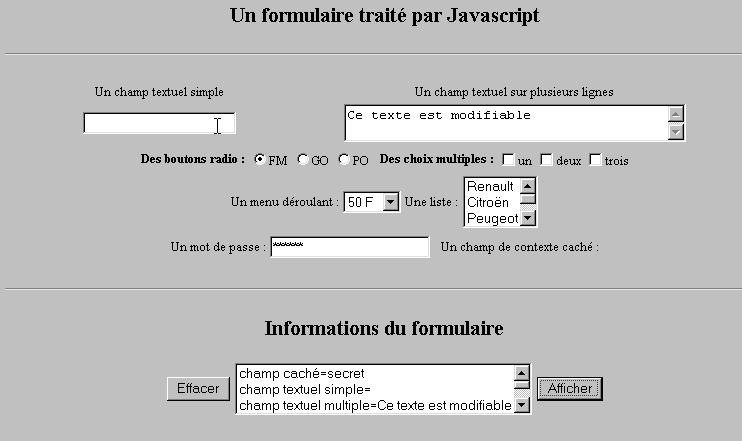
Das folgende Beispiel zeigt, wie die vom Benutzer in ein Formular eingegebenen Daten im Browser abgerufen werden können. Dies ermöglicht in der Regel eine Vorverarbeitung, bevor die Daten an den Server gesendet werden.
10.1.1. Das Formular
Wir haben ein Formular, das die gängigsten Komponenten enthält, sowie eine Schaltfläche „Anzeigen“, mit der die vom Benutzer vorgenommenen Eingaben angezeigt werden können.
10.1.2. Der Code
<html>
<head>
<title>Un formulaire traité par Javascript</title>
<script language="javascript">
function afficher(){
// zeigt die Formularinformationen in einer Liste an
// zuerst löschen
effacerInfos();
// man zeigt den Wert der # Felder an
with(document.frmExemple){
// verstecktes Feld
ecrire("champ caché="+cache.value);
// einfaches Textfeld
ecrire("champ textuel simple="+simple.value);
// Mehrfachtextfeld
ecrire("champ textuel multiple="+lignes.value);
// Optionsfelder
for(i=0;i<radio.length;i++){
texte="radio["+i+"]="+radio[i].value;
if(radio[i].checked) texte+=", coché";
ecrire(texte);
}//für
// Kontrollkästchen
for(i=0;i<qcm.length;i++){
texte="qcm["+i+"]="+qcm[i].value;
if(qcm[i].checked) texte+=", coché";
ecrire(texte);
}//für
//Dropdown-Liste
ecrire("index sélectionné dans le menu="+menu.selectedIndex);
for(i=0;i<menu.length;i++){
texte="menu["+i+"]="+menu.options[i].text;
if(menu.options[i].selected) texte+=",sélectionné";
ecrire(texte);
}//für
//Mehrfachauswahlliste
for(i=0;i<lstVoitures.length;i++){
texte="lstVoitures["+i+"]="+lstVoitures.options[i].text;
if(lstVoitures.options[i].selected) texte+=",sélectionné";
ecrire(texte);
}//für
//Passwort
ecrire("mot de passe="+passwd.value);
}//mit
}//Funktion
function ecrire(texte){
// schreibt Text in die Informationsliste
frmInfos.lstInfos.options[frmInfos.lstInfos.length]=new Option(texte);
}//schreiben
function effacerInfos(){
frmInfos.lstInfos.length=0;
}//effacerInfos
</script>
</head>
<body bgcolor="#C0C0C0" onload="afficher()">
<center>
<h2>Un formulaire traité par Javascript</h2>
<hr>
<form method="POST" name="frmExemple">
<input type="hidden" name="cache" value="secret">
<table border="0">
<tr>
<td align="center">Un champ textuel simple</td>
<td align="center" width="100"> </td>
<td align="center">Un champ textuel sur plusieurs lignes</td>
</tr>
<tr>
<td align="center"><input type="text" size="20" name="simple"></td>
<td align="center" width="100"> </td>
<td align="center">
<textarea name="lignes" rows="2" cols="40">Ce texte est modifiable</textarea>
</td>
</tr>
</table>
<table border="0">
<tr>
<td><strong>Des boutons radio :</strong></td>
<td>
<input type="radio" checked name="radio" value="FM">FM
</td>
<td>
<input type="radio" name="radio" value="GO">GO
</td>
<td>
<input type="radio" name="radio" value="PO">PO
</td>
<td> </td>
<td><strong>Des choix multiples :</strong></td>
<td>
<input type="checkbox" name="qcm" value="un">un
</td>
<td>
<input type="checkbox" name="qcm" value="deux">deux
</td>
<td>
<input type="checkbox" name="qcm" value="trois">trois
</td>
</tr>
</table>
<table border="0">
<tr>
<td>Un menu déroulant : </td>
<td>
<select name="menu" size="1">
<option>50 F</option>
<option>60 F</option>
<option>70 F</option>
<option>100 F</option>
</select>
</td>
<td>Une liste :</td>
<td>
<select name="lstVoitures" multiple size="3">
<option>Renault</option>
<option>Citroën</option>
<option>Peugeot</option>
<option>Fiat</option>
<option>Audi</option>
</select>
</td>
</tr>
</table>
<table border="0">
<tr>
<td>Un mot de passe : </td>
<td><input type="password" size="21" name="passwd"></td>
<td> </td>
<td>Un champ de contexte caché : </td>
</tr>
</table>
</form>
<hr>
<h2>Informations du formulaire</h2>
<form name="frmInfos">
<table>
<tr>
<td><input type="button" value="Effacer" onclick="effacerInfos()"></td>
<td>
<select name="lstInfos" multiple size="3">
</select>
</td>
<td>
<input type="button" name="cmdAfficher" value="Afficher" onclick="afficher()">
</td>
</tr>
</form>
</body>
</html>
10.2. Reguläre Ausdrücke in JavaScript
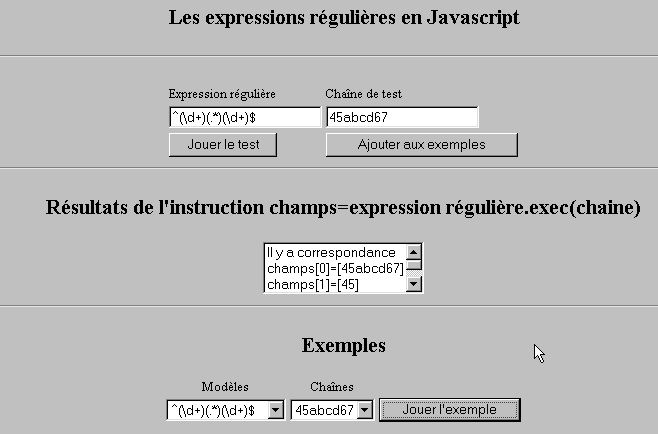
Auf Seiten des Browsers kann JavaScript verwendet werden, um die Gültigkeit der vom Benutzer eingegebenen Daten zu überprüfen, bevor diese an den Server gesendet werden. Hier ist ein Programm zum Testen dieser regulären Ausdrücke.
10.2.1. Die Testseite
10.2.2. Der Code der Seite
<html>

  <head>
    <title>Les expressions régulières en Javascript</title>
    <script language="javascript">
      function afficherInfos(){
        with(document.frmRegExp){
           // Gibt es etwas zu tun?
          if (! verifier()) return;
          // Alles klar – die vorherigen Ergebnisse werden gelöscht
          effacerInfos();
           // Überprüfung der Vorlage
          modele=new RegExp(txtModele.value);
          champs=modele.exec(txtChaine.value);
          if(champs==null)
             // Keine Übereinstimmung zwischen Muster und Zeichenfolge
            ecrireInfos("pas de correspondance");
          else{
             // Übereinstimmung – die Ergebnisse werden angezeigt
            ecrireInfos("Il y a correspondance");
            for(i=0;i<champs.length;i++)
              ecrireInfos("champs["+i+"]=["+champs[i]+"]");
          }//sonst
        }//mit
      }//Funktion

      function ecrireInfos(texte){
        // schreibt Text in die Informationsliste
        document.frmRegExp.lstInfos.options[document.frmRegExp.lstInfos.length]=new Option(texte);
      }//schreiben

      function effacerInfos(){
        frmRegExp.lstInfos.length=0;
      }//effacerInfos

      function jouer(){
         // prüft die Vorlage anhand der Zeichenfolge im ausgewählten Beispiel
        with(document.frmRegExp){
          txtModele.value=lstModeles.options[lstModeles.selectedIndex].text
          txtChaine.value=lstChaines.options[lstChaines.selectedIndex].text
          afficherInfos();
        }//mit
      }//abspielen

      function ajouter(){
         //fügt den aktuellen Test zu den Beispielen hinzu
        with(document.frmRegExp){
          // Gibt es etwas zu tun?
          if (! verifier()) return;
          // Hinzufügen
          lstModeles.options[lstModeles.length]=new Option(txtModele.value);
          lstChaines.options[lstChaines.length]=new Option(txtChaine.value);
          // Eingaben löschen
          txtModele.value="";
          txtChaine.value="";
        }//mit
      }//hinzufügen

      function verifier(){
         // Prüft, ob die Eingabefelder nicht leer sind
        with(document.frmRegExp){
          champs=/^\s*$/.exec(txtModele.value);
          if(champs!=null){
            alert("Vous n'avez pas indiqué de modèle");
            txtModele.focus();
            return false;
          }//if
          champs=/^\s*$/.exec(txtChaine.value);
          if(champs!=null){
            alert("Vous n'avez pas indiqué de chaîne de test");
            txtChaine.focus();
            return false;
          }//wenn
          // alles in Ordnung
          return true;
        }//mit
      }//prüfen
    </script>
  </head>

  <body bgcolor="#C0C0C0">
    <center>
     <h2>Les expressions régulières en Javascript</h2>
    <hr>
    <form name="frmRegExp">
      <table>
        <tr>
          <td>Expression régulière</td>
          <td>Chaîne de test</td>
        </tr>
        <tr>
          <td><input type="text" name="txtModele" size="20"></td>
          <td><input type="text" name="txtChaine" size="20"></td>
        </tr>
        <tr>
          <td>
            <input type="button" name="cmdAfficher" value="Jouer le test" onclick="afficherInfos()">
          </td>
          <td>
            <input type="button" name="cmdAjouter" value="Ajouter aux exemples" onclick="ajouter()">
          </td>
        </tr>
      </table>
      <hr>
      <h2>Résultats de l'instruction champs=expression régulière.exec(chaine)</h2>
      <table>
        <tr>
          <td>
            <select name="lstInfos" size="3">
            </select>
          </td>
        </tr>
      </table>
      <hr>
      <h2>Exemples</h2>
      <table>
 <tr>
          <td align="center">Modèles</td>
          <td align="center">Chaînes</td>
        </tr>
        <tr>
          <td>
            <select name="lstModeles" size="1">
              <option>^\d+$</option>
              <option>^(\d+) (\d+)$</option>
              <option>^(\d+)(.*)(\d+)$</option>
              <option>^(\d+)(\s+)(\d+)$</option>
            </select>
          </td>
          <td>
            <select name="lstChaines" size="1">
              <option>67</option>
              <option>56 84</option>
              <option>45abcd67</option>
              <option>45   67</option>
            </select>
          </td>
          <td>
            <input type="button" name="cmdJouer" value="Jouer l'exemple" onclick="jouer()">
          </td>
        </tr>
    </form>
  </body>
</html>
10.3. Listenverwaltung in JavaScript
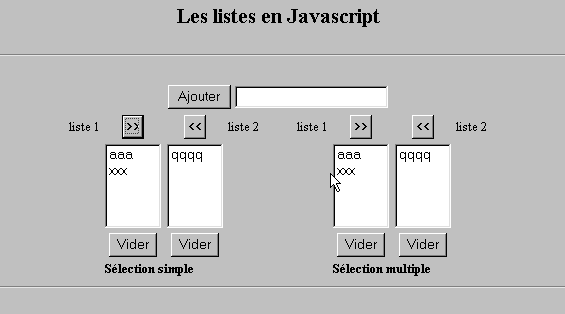
10.3.1. Das Formular
10.3.2. Der Code
<html>

  <head>
    <title>Les listes en Javascript</title>

    <script language="javascript">
       // hinzufügen
      function ajouter(L1,L2,T){
         // fügt den Wert des Feldes T zu den Listen L1 und L2 hinzu
           // Muss etwas unternommen werden?
          champs=/^\s*$/.exec(T.value);
          if(champs!=null){
            // Das Feld ist leer
            alert("Vous n'avez pas indiqué la valeur à ajouter");
            txtElement.focus();
            return;
          }//if
           // wird das Element hinzugefügt
          L1.options[L1.length]=new Option(T.value);
          L2.options[L2.length]=new Option(T.value);
          T.value="";
      }//Hinzufügen

       //leeren
      function vider(L){
         // leert die Liste L
        L.length=0;
      }//leeren

     //übertragen
      function transfert(L1,L2,simple){
        //überträgt die in der Liste L1 ausgewählten Elemente in L2

         // Gibt es etwas zu tun?
         // Index des in L1 ausgewählten Elements
        index1=L1.selectedIndex;
        if(index1==-1){
          alert("Vous n'avez pas sélectionné d'élément");
          return;
        }//if
         // Wie erfolgt die Auswahl der Elemente aus den Listen?
        if(simple){ // Einfache Auswahl
          element1=L1.options[index1].text;
           //Hinzufügen in L2
          L2.options[L2.length]=new Option(element1);
          //Löschen in L1
          L1.options[index1]=null;
        }//einfach
        if(! simple){ //Mehrfachauswahl
           //Liste 1 in umgekehrter Reihenfolge durchlaufen
          for(i=L1.length-1;i>=0;i--){
            //Element ausgewählt?
            if(L1.options[i].selected){
               //wird zu L2 hinzugefügt
              L2.options[L2.length]=new Option(L1.options[i].text);
              //Es wird aus L1 entfernt
              L1.options[i]=null;
            }//if
          }//für i
        }//if ! einfach
      }//Übertragung
   </script>
  </head>

  <body bgcolor="#C0C0C0">
    <center>
     <h2>Les listes en Javascript</h2>
    <hr>
    <form name="frmListes">
      <table>
        <tr>
          <td>
            <input type="button" name="cmdAjouter" value="Ajouter" onclick="ajouter(lst1A,lst1B,txtElement)">
          </td>
          <td>
            <input type="text" name="txtElement">
          </td>
        </tr>
      </table>
      <table>
        <tr>
          <td align="center">liste 1</td>
          <td align="center"><input type="button" value=">>" onclick="transfert(lst1A,lst2A,true)"</td>
          <td align="center"><input type="button" value="<<" onclick="transfert(lst2A,lst1A,true)"</td>
          <td align="center">liste 2</td>
          <td width="30"></td>
          <td align="center">liste 1</td>
          <td align="center"><input type="button" value=">>" onclick="transfert(lst1B,lst2B,false)"</td>
          <td align="center"><input type="button" value="<<" onclick="transfert(lst2B,lst1B,false)"</td>
          <td align="center">liste 2</td>
        </tr>
         <tr>
          <td></td>
          <td align="center">
            <select name="lst1A" size="5">
            </select>
          </td>
          <td align="center">
            <select name="lst2A" size="5">
            </select>
          </td>
          <td></td>
          <td></td>
          <td></td>
          <td align="center">
            <select name="lst1B" size="5" multiple >
            </select>
          </td>
          <td align="center">
            <select name="lst2B" size="5" multiple>
            </select>
          </td>

        </tr>
        <tr>
          <td></td>
          <td align="center"><input type="button" value="Vider" onclick="vider(lst1A)"</td>
          <td align="center"><input type="button" value="Vider" onclick="vider(lst2A)"</td>
          <td></td>
          <td></td>
          <td></td>
          <td align="center"><input type="button" value="Vider" onclick="vider(lst1B)"</td>
          <td align="center"><input type="button" value="Vider" onclick="vider(lst2B)"</td>
          <td></td>
        </tr>
        <tr>
          <td></td>
          <td colspan="2"><strong>Sélection simple</strong></td>
          <td></td>
          <td></td>
          <td></td>
          <td colspan="2"><strong>Sélection multiple</strong></td>
          <td></td>
        </tr>

      </table>
      <hr>
    </form>
  </body>
</html>