8. Übung zur Steuerberechnung mit MySQL
Wir haben bereits drei Versionen dieser Übung geschrieben. Die neueste Version verwendete eine Steuerberechnungsklasse. Diese Klasse holte die für die Berechnung benötigten Daten aus einer Textdatei. Nun wird sie diese aus einer Datenbank abrufen. Dazu schreiben wir einen ersten Code, der die Daten aus der Textdatei in eine Datenbank überträgt.
Die Textdatei impots.txt sieht wie folgt aus:
12620:13190:15640:24740:31810:39970:48360:55790:92970:127860:151250:172040:195000:0
0:0.05:0.1:0.15:0.2:0.25:0.3:0.35:0.4:0.45:0.5:0.55:0.6:0.65
0:631:1290.5:272.5:3309.5:4900:6898.5:9316.5:12106:16754.5:23147.5:30710:39312:49062
Die zu erstellende Datenbank sieht wie folgt aus:
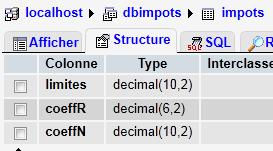 | 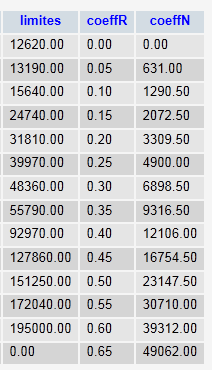 |
Die Datenbank trägt den Namen [dbimpots] und enthält eine einzige Tabelle [impots]. Der Zugriff erfolgt durch den Benutzer [root] ohne Passwort.
8.1. Importieren einer Textdatei in eine MySQL-Tabelle (txt2mysql)
<?php

// transfers the text file containing the data needed to calculate taxes
// in a mysql table
// the data
$IMPOTS = "impots.txt";
$BASE = "dbimpots";
$TABLE = "impots";
$USER = "root";
$PWD = "";
$HOTE = "localhost";

// the data required to calculate the tax has been placed in the $IMPOTS file
// one line per table in the form
// val1:val2:val3,...
list($erreur, $limites, $coeffR, $coeffN) = getTables($IMPOTS);
// was there a mistake?
if ($erreur) {
  print "$erreur\n";
  exit;
}//if
// transfer these tables to a mysql table
$erreur = copyToMysql($limites, $coeffR, $coeffN, $HOTE, $USER, $PWD, $BASE, $TABLE);
if ($erreur)
  print "$erreur\n";
else
  print "Transfert opéré\n";
// end
exit;

// --------------------------------------------------------------------------
function copyToMysql($limites, $coeffR, $coeffN, $HOTE, $USER, $PWD, $BASE, $TABLE) {
  // copy the 3 numerical tables $limites, $coeffR, $coeffN
  // in table $TABLE of mysql database $BASE
  // the mysql database is on machine $HOTE
  // the user is identified by $USER and $PWD
  // connection
  list($erreur, $connexion) = connecte("mysql:host=$HOTE;dbname=$BASE", $USER, $PWD);
  if ($erreur)
    return "Erreur lors de la connexion à MySql sous l'identité ($HOTE,$USER,$PWD) : $erreur\n";
  // table deletion
  $requête = "drop table $TABLE";
  exécuteRequête($connexion, $requête);
  // table creation
  $requête = "create table $TABLE (limites decimal(10,2), coeffR decimal(6,2), coeffN decimal(10,2))";
  list($erreur, $res) = exécuteRequête($connexion, $requête);
  if ($erreur)
    return "$requête : erreur ($erreur)";
  // filling
  for ($i = 0; $i < count($limites); $i++) {
    // insertion request
    $requête = "insert into $TABLE (limites,coeffR,coeffN) values ($limites[$i],$coeffR[$i],$coeffN[$i])";
    // query execution
    list($erreur, $res) = exécuteRequête($connexion, $requête);
    // return if error
    if ($erreur)
      return "$requête : erreur ($erreur)";
  }//for
  // it's over - log off
  déconnecte($connexion);
  // error-free return
  return "";
}
// --------------------------------------------------------------------------
function getTables($IMPOTS) {
  // $IMPOTS: name of the file containing data from tables $limites, $coeffR, $coeffN
  ...
  // end
  return array("", $limites, $coeffR, $coeffN);
}
// --------------------------------------------------------------------------
function cutNewLinechar($ligne) {
  // delete the end-of-line mark from $ligne if it exists
  ...
  // end
  return($ligne);
}
// ---------------------------------------------------------------------------------
function connecte($dsn, $login, $pwd) {
  // connects ($login,$pwd) to base $dsn
  // returns the connection id and an error msg
  ...
}

//connect
// ---------------------------------------------------------------------------------
function déconnecte($connexion) {
  // closes the connection identified by $connexion
  ...
}

// ---------------------------------------------------------------------------------
function exécuteRequête($connexion, $sql) {
  // executes the $sql request on the $connexion connection
  // returns an array of 2 elements ($erreur,$résultat)
 ...
}
Anzeige der Ergebnisse:
8.2. Das Steuerberechnungsprogramm ( impots_04)
Diese Version verwendet eine Impôts-Klasse, die die zur Steuerberechnung benötigten Werte aus einer Datenbank abruft. Hier führen wir ein neues Konzept ein: die vorbereitete Anweisung. Die Ausführung einer SQL-Anweisung durch ein DBMS erfolgt in zwei Schritten:
- Die Abfrage wird vorbereitet: Das DBMS erstellt einen optimierten Ausführungsplan für die Abfrage. Das Ziel ist es, diese so effizient wie möglich auszuführen.
- Die Abfrage wird ausgeführt.
Wenn dieselbe Abfrage N-mal ausgeführt wird, werden die beiden vorherigen Schritte N-mal durchgeführt. Es ist jedoch möglich, die Abfrage einmal vorzubereiten und N-mal auszuführen. Dazu müssen Sie vorbereitete Abfragen verwenden. Wenn $query die auszuführende SQL-Anweisung und $connection das PDO-Objekt ist, das die Verbindung darstellt:
- $statement = $connection->prepare($query) bereitet eine Abfrage vor und gibt die „vorbereitete“ Abfrage zurück
- $statement->execute() führt die vorbereitete Abfrage aus.
Wenn die vorbereitete Abfrage eine SELECT-Anweisung ist, dann
- gibt $statement->fetchAll() alle Zeilen aus der Ergebnistabelle der SELECT-Abfrage als Array T zurück, wobei T[i,j] der Wert der Spalte j in Zeile i der Tabelle ist
- $statement->fetch() gibt die aktuelle Zeile der Tabelle als Array T zurück, wobei T[j] den Wert der Spalte j in Zeile
Prepared Statements bieten nicht nur Vorteile hinsichtlich der Effizienz. Insbesondere sorgen sie für mehr Sicherheit. Daher sollten sie systematisch eingesetzt werden.
<?php

// test -----------------------------------------------------
// definition of constants
$DATA = "data.txt";
$RESULTATS = "resultats.txt";
$TABLE = "impots";
$BASE = "dbimpots";
$USER = "root";
$PWD = "";
$HOTE="localhost";

// the data required to calculate the tax has been placed in table mysqL $TABLE
// belonging to the $BASE database. The table has the following structure
// limits decimal(10,2), coeffR decimal(6,2), coeffN decimal(10,2)
// taxable person parameters (marital status, number of children, annual salary)
// were placed in the $DATA text file, one line for each taxpayer
// the results (marital status, number of children, annual salary, tax payable) are placed in the
// the $RESULTATS text file, with one result per line

// create a Tax object
$I = new Impôts($HOTE, $USER, $PWD, $BASE, $TABLE);
// was there a mistake?
$erreur=$I->getErreur();
if ($erreur) {
  print "$I->erreur\n";
  exit;
}//if
// create a utilities object
$u = new Utilitaires();

// opening taxpayer data files
$data = fopen($DATA, "r");
if (!$data) {
  print "Impossible d'ouvrir en lecture le fichier des données [$DATA]\n";
  exit;
}

// open results file
$résultats = fopen($RESULTATS, "w");
if (!$résultats) {
  print "Impossible de créer le fichier des résultats [$RESULTATS]\n";
  exit;
}

// the current line of the taxpayer data file is used
while ($ligne = fgets($data, 100)) {
  // remove any end-of-line marker
  $ligne = $u->cutNewLineChar($ligne);
  // we retrieve the 3 fields married,children,salary which form $ligne
  list($marié, $enfants, $salaire) = explode(",", $ligne);
  // tax calculation
  $impôt = $I->calculer($marié, $enfants, $salaire);
  // enter the result
  fputs($résultats, "$marié:$enfants:$salaire:$impôt\n");
  // following data
}
// close files
fclose($data);
fclose($résultats);

// end
exit;

// ---------------------------------------------------------------------------------
// definition of a Tax class
class Impôts {

  // attributes: the 3 data tables
  private $limites;
  private $coeffR;
  private $coeffN;
  private $erreur;
  private $nbLimites;

  // getter
  public function getErreur(){
    return $this->erreur;
  }
  // manufacturer

  function __construct($HOTE, $USER, $PWD, $BASE, $TABLE) {
    // initializes $limites, $coeffR, $coeffN attributes
    // the data required to calculate the tax has been placed in the mysql table $TABLE
    // belonging to the $BASE database. The table has the following structure
    // limits decimal(10,2), coeffR decimal(6,2), coeffN decimal(10,2)
    // connection to the mysql database on machine $HOTE is made as ($USER,$PWD)
    // initializes the $erreur field with a possible error
    // empty if no error
    //
    // connection to mysql database
    $DSN = "mysql:host=$HOTE;dbname=$BASE";
    list($erreur, $connexion) = connecte($DSN, $USER, $PWD);
    if ($erreur) {
      $this->erreur = "Erreur lors de la connexion à MySql sous l'identité ($HOTE,$USER,$PWD) : $erreur\n";
      return;
    }
    // read table $TABLE
    $requête = "select limites,coeffR,coeffN from $TABLE";
    // executes the $requête request on the $connexion connection
    try {
      $statement = $connexion->prepare($requête);
      $statement->execute();
      // query result evaluation
      while ($colonnes = $statement->fetch()) {
        $this->limites[] = $colonnes[0];
        $this->coeffR[] = $colonnes[1];
        $this->coeffN[] = $colonnes[2];
      }
      // no error
      $this->erreur = "";
      // number of elements in the limit table
      $this->nbLimites = count($this->limites);
    } catch (PDOException $e) {
      $this->erreur = $e->getMessage();
    }
     // disconnect
    déconnecte($connexion);
  }
  // --------------------------------------------------------------------------
  function calculer($marié, $enfants, $salaire) {
    // $marié : yes, no
    // $enfants : number of children
    // $salaire: annual salary

  // is the item in good condition?
    if ($this->erreur)
      return -1;

    // number of shares
    ...
  }

}

// ---------------------------------------------------------------------------------
// a class of utility functions
class Utilitaires {

  function cutNewLinechar($ligne) {
    // delete the end-of-line mark from $ligne if it exists
    ...
  }

}
// ---------------------------------------------------------------------------------
function connecte($dsn, $login, $pwd) {
  // connects ($login,$pwd) to base $dsn
  // returns the connection id and an error msg
  ...
}

//connect
// ---------------------------------------------------------------------------------
function déconnecte($connexion) {
  // closes the connection identified by $connexion
  ...
}
Ergebnisse: wie bei früheren Versionen.
Kommentare
Die neuen Funktionen befinden sich in den Zeilen 98–109:
- Zeile 99: die SQL-SELECT-Anweisung, die die zur Berechnung der Steuer erforderlichen Daten abruft.
- Zeile 102: Vorbereitung der SQL-SELECT-Anweisung
- Zeile 103: Ausführung der vorbereiteten Anweisung
- Zeilen 105–109: Zeilenweise Verarbeitung der Ergebnistabelle der SELECT-Anweisung