12. المشروع [vuejs-10]: المكون الإضافي [dao]، طلبات HTTP غير المتزامنة
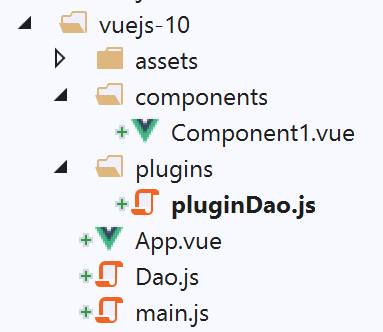
هيكل دليل مشروع [vuejs-10] هو كما يلي:
يوضح مشروع [vuejs-10] مكونًا يقوم بإرسال طلب HTTP إلى خادم بعيد. وتكون البنية المستخدمة كما يلي:
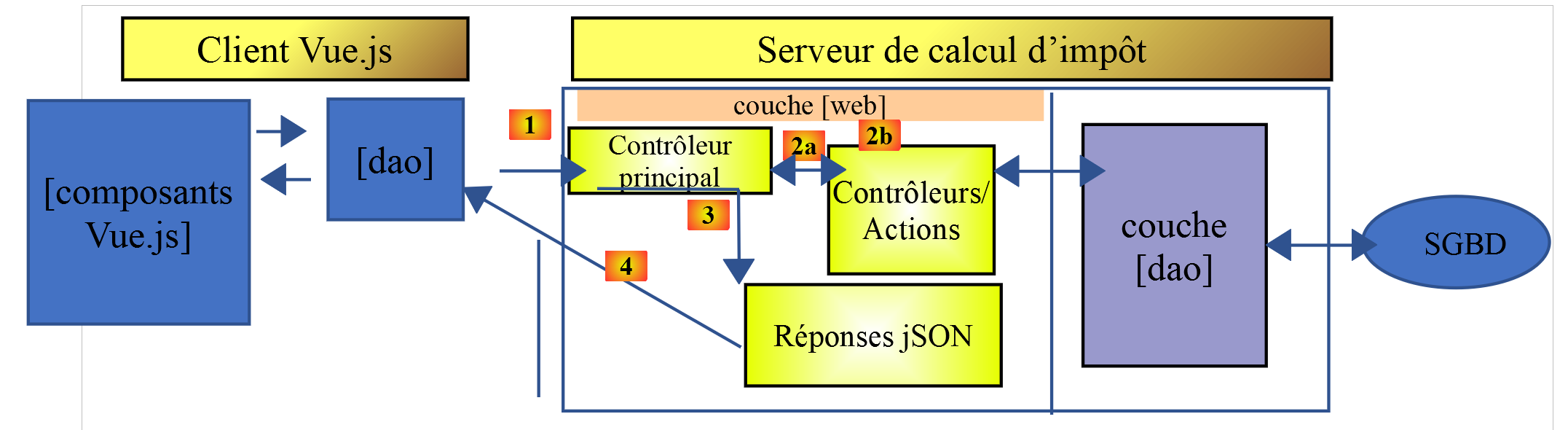
يستخدم مكون [Vue.js] طبقة [dao] للتواصل مع خادم حساب الضرائب.
12.1. تثبيت التبعيات
يستخدم تطبيق [vuejs-10] مكتبة [axios] لإرسال طلبات غير متزامنة إلى خادم حساب الضرائب. نحتاج إلى تثبيت هذه التبعية:
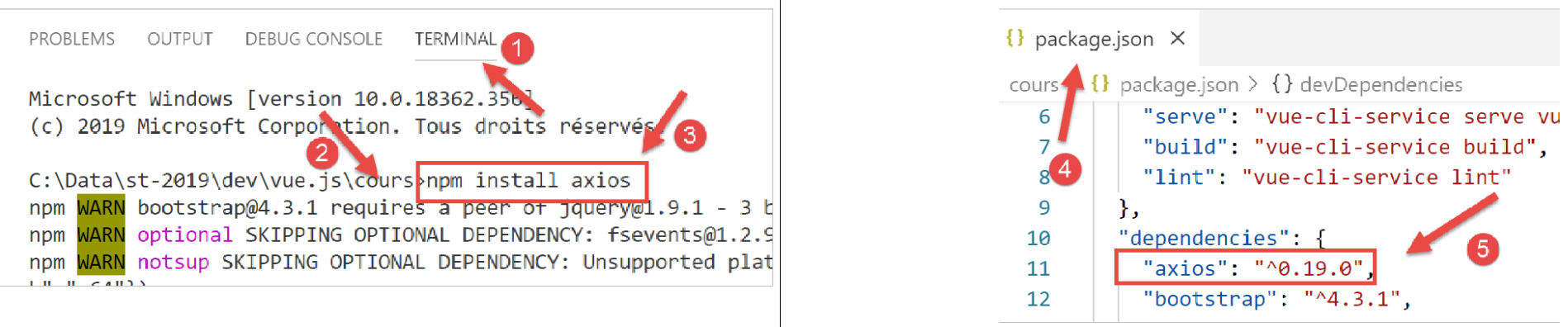
- في [4-5]، السطر المضاف إلى ملف [package.json] بعد تثبيت مكتبة [axios] [1-3]؛
12.2. فئة [Dao]
فئة [Dao] هي الفئة التي تم تطويرها في القسم [فئة Dao]. ندرجها هنا للرجوع إليها:
'use strict';

// imports
import qs from 'qs'

// dao] class
class Dao {

  // manufacturer
  constructor(axios) {
    this.axios = axios;
    // session cookie
    this.sessionCookieName = "PHPSESSID";
    this.sessionCookie = '';
  }

  // init session
  async  initSession() {
    // query options HHTP [get /main.php?action=init-session&type=json]
    const options = {
      method: "GET",
      // URL parameters
      params: {
        action: 'init-session',
        type: 'json'
      }
    };
    // execute query HTTP
    return await this.getRemoteData(options);
  }

  async  authentifierUtilisateur(user, password) {
    // query options HHTP [post /main.php?action=authenticate-user]
    const options = {
      method: "POST",
      headers: {
        'Content-type': 'application/x-www-form-urlencoded',
      },
      // body of POST
      data: qs.stringify({
        user: user,
        password: password
      }),
      // URL parameters
      params: {
        action: 'authentifier-utilisateur'
      }
    };
    // execute query HTTP
    return await this.getRemoteData(options);
  }

  async getAdminData() {
    // query options HHTP [get /main.php?action=get-admindata]
    const options = {
      method: "GET",
      // URL parameters
      params: {
        action: 'get-admindata'
      }
    };
    // execute query HTTP
    const data = await this.getRemoteData(options);
    // result
    return data;
  }

  async  getRemoteData(options) {
    // for the session cookie
    if (!options.headers) {
      options.headers = {};
    }
    options.headers.Cookie = this.sessionCookie;
    // execute query HTTP
    let response;
    try {
      // asynchronous request
      response = await this.axios.request('main.php', options);
    } catch (error) {
      // the [error] parameter is an exception instance - it can take various forms
      if (error.response) {
        // the server response is in [error.response]
        response = error.response;
      } else {
        // error restart
        throw error;
      }
    }
    // response is the entire HTTP response from the server (HTTP headers + response itself)
    // retrieve the session cookie if it exists
    const setCookie = response.headers['set-cookie'];
    if (setCookie) {
      // setCookie is an array
      // look for the session cookie in this table
      let trouvé = false;
      let i = 0;
      while (!trouvé && i < setCookie.length) {
        // look for the session cookie
        const results = RegExp('^(' + this.sessionCookieName + '.+?);').exec(setCookie[i]);
        if (results) {
          // the session cookie is stored
          // eslint-disable-next-line require-atomic-updates
          this.sessionCookie = results[1];
          // we found
          trouvé = true;
        } else {
          // next item
          i++;
        }
      }
    }
    // the server response is in [response.data]
    return response.data;
  }
}

// class export
export default Dao;
يستخدم مشروع [vuejs-10] فقط الطريقة غير المتزامنة [initSession] في الأسطر 18–30. لاحظ أن فئة [Dao] يتم إنشاء مثيل لها باستخدام معلمة [axios] في السطر 10، والتي يتم تهيئتها بواسطة كود الاستدعاء. في هذه الحالة، كود الاستدعاء هو البرنامج النصي [./main.js].
12.3. المكوّن الإضافي [pluginDao]
المكوّن الإضافي [pluginDao] هو كما يلي:
export default {
  install(Vue, dao) {
    // ajoute une propriété [$dao] à la classe Vue
    Object.defineProperty(Vue.prototype, '$dao', {
      // lorsque Vue.$dao est référencé, on rend le 2ième paramètre [dao]
      get: () => dao,
    })
  }
}
إذا تذكرنا الشرح المقدم لمكوّن [event-bus] الإضافي، نرى أن المكوّن الإضافي [pluginDao] ينشئ خاصية جديدة تسمى [$dao] في فئة/دالة [Vue]. ستكون قيمة هذه الخاصية (كما سنوضح) هي الكائن الذي تم تصديره بواسطة البرنامج النصي [./Dao]، أي فئة [Dao] السابقة.
12.4. البرنامج النصي الرئيسي [main.js]
فيما يلي كود البرنامج النصي الرئيسي [main.js]:
// imports
import Vue from 'vue'
import App from './App.vue'
import axios from 'axios';

// plugins
import BootstrapVue from 'bootstrap-vue'
Vue.use(BootstrapVue);

// bootstrap
import 'bootstrap/dist/css/bootstrap.css'
import 'bootstrap-vue/dist/bootstrap-vue.css'

// couche [dao]
import Dao from './Dao';
// configuration axios
axios.defaults.timeout = 2000;
axios.defaults.baseURL = 'http://localhost/php7/scripts-web/impots/version-14';
axios.defaults.withCredentials = true;
// instanciation couche [dao]
const dao = new Dao(axios);

// plugin [dao]
import pluginDao from './plugins/dao'
Vue.use(pluginDao, dao)

// configuration
Vue.config.productionTip = false

// instanciation projet [App]
new Vue({
  render: h => h(App),
}).$mount('#app')
نص البرمجة [main.js]:
- يقوم بإنشاء مثيل لطبقة [dao] في الأسطر 14–21؛
- يضم المكون الإضافي [pluginDao] في الأسطر 24–25؛
- السطر 15: يتم استيراد فئة [Dao]؛
- السطور 17-18: يتم تكوين كائن [axios]، الذي يتعامل مع طلبات HTTP. يتم استيراد هذا الكائن في السطر 4؛
- السطر 17: يحدد [timeout] بـ 2 ثانية؛
- السطر 18: عنوان URL لخادم حساب الضرائب؛
- السطر 19: لتمكين تبادل ملفات تعريف الارتباط مع الخادم؛
- السطران 24-25: استخدام المكون الإضافي [pluginDao]
- السطر 24: استيراد المكون الإضافي؛
- السطر 25: دمج المكون الإضافي. يمكننا أن نرى أن المعلمة الثانية لطريقة [Vue.use] هي الإشارة إلى طبقة [dao] المحددة في السطر 21. ولهذا السبب ستشير الخاصية [Vue.$dao] إلى طبقة [dao] في جميع مثيلات فئة/دالة [Vue]، أي في جميع مكونات [Vue.js]؛
12.5. العرض الرئيسي [App.vue]
فيما يلي كود العرض الرئيسي [App]:
<template>
  <div class="container">
    <b-card>
      <!-- message -->
      <b-alert show variant="success" align="center">
        <h4>[vuejs-10] : plugin [dao], requêtes HTTP asynchrones</h4>
      </b-alert>
      <!-- composant faisant une requête asynchrone au serveur de calcul d'impôt-->
      <Component1 @error="doSomethingWithError" @endWaiting="endWaiting" @beginWaiting="beginWaiting" />
      <!-- affichage d'une éventuelle erreur -->
      <b-alert show
               variant="danger"
               v-if="showError">Evénement [error] intercepté par [App]. Valeur reçue = {{error}}</b-alert>
      <!-- message d'attente avec un spinner -->
      <b-alert show v-if="showWaiting" variant="light">
        <strong>Requête au serveur de calcul d'impôt en cours...</strong>
        <b-spinner variant="primary" label="Spinning"></b-spinner>
      </b-alert>
    </b-card>
  </div>
</template>

<script>
  import Component1 from "./components/Component1";
  export default {
    name: "app",
    // état du composant
    data() {
      return {
        // contrôle le spinner d'attente
        showWaiting: false,
        // contrôle l'affichage de l'erreur
        showError: false,
        // l'erreur interceptée
        error: {}
      };
    },
    // composants utilisés
    components: {
      Component1
    },
    // méthodes de gestion des évts
    methods: {
      // début attente
      beginWaiting() {
        // on affiche l'attente
        this.showWaiting = true;
        // on cache le msg d'erreur
        this.showError = false;
      },
      // fin attente
      endWaiting() {
        // on cache l'attente
        this.showWaiting = false;
      },
      // gestion d'erreur
      doSomethingWithError(error) {
        // on note qu'il y a eu erreur
        this.error = error;
        // on affiche le msg d'erreur
        this.showError = true;
      }
    }
  };
</script>
تعليقات
- السطر 9: [Component1] هو المكون الذي يقوم بإجراء طلب HTTP غير متزامن. يمكنه إصدار ثلاثة أحداث:
- [beginWaiting]: الطلب على وشك أن يتم إرساله. يجب عرض رسالة انتظار للمستخدم؛
- [endWaiting]: اكتمل الطلب. يجب إيقاف الانتظار؛
- [error]: فشل الطلب. يجب عرض رسالة خطأ؛
- الأسطر 10-13: التنبيه الذي يعرض أي رسالة خطأ. يتم التحكم فيه بواسطة المتغير المنطقي [showError] في السطر 33. يعرض الخطأ في السطر 35؛
- الأسطر 14-18: التنبيه الذي يعرض رسالة الانتظار مع مؤشر الدوران. يتم التحكم فيه بواسطة المتغير المنطقي [showWaiting] في السطر 47؛
- الأسطر 45–50: [beginWaiting] هي الطريقة التي يتم تنفيذها عند استلام حدث [beginWaiting]. تعرض رسالة الانتظار (السطر 47) وتخفي رسالة الخطأ (السطر 49) في حالة ما إذا كانت لا تزال مرئية من عملية سابقة؛
- الأسطر 52-55: [endWaiting] هي الطريقة التي يتم تنفيذها عند استلام حدث [endWaiting]. وهي تخفي رسالة الانتظار (السطر 54)؛
- الأسطر 57-62: [doSomethingWithError] هي الطريقة التي يتم تنفيذها عند استلام حدث [error]. تقوم بتسجيل الخطأ المستلم (السطر 59) وعرض رسالة الخطأ (السطر 61)؛
12.6. المكون [Component1]
فيما يلي كود مكون [Component1]:
<template>
  <b-row>
    <b-col>
      <b-alert show
               variant="warning"
               v-if="showMsg">Valeur reçue du serveur = {{data}}</b-alert>
    </b-col>
  </b-row>
</template>

<script>
  export default {
    name: "component1",
    // component status
    data() {
      return {
        showMsg: false
      };
    },
    // event management methods
    methods: {
      // processing data received from the server
      doSomethingWithData(data) {
        // record the data received
        this.data = data;
        // we display it
        this.showMsg = true;
      }
    },
    // the component has just been created
    created() {
      // initialize the session with the server - asynchronous request
      // we use the promise rendered by the [dao] layer methods
      // we signal the start of the operation
      this.$emit("beginWaiting");
      // asynchronous operation is launched
      this.$dao
        // initialize a jSON session with the tax calculation server
        .initSession()
        // method that processes the data received in the event of success
        .then(data => {
          // we process the data received
          this.doSomethingWithData(data);
        })
        // error handling method in case of error
        .catch(error => {
          // the error is traced back to the parent component
          this.$emit("error", error.message);
        }).finally(() => {
          // end of wait
          this.$emit("endWaiting");
        })
    }
  };
</script>
تعليقات
- الأسطر 4–6: يتكون المكون من تنبيه واحد يعرض القيمة التي يعيدها خادم حساب الضريبة، ولكن فقط إذا نجح طلب HTTP. يتم التحكم في هذا التنبيه بواسطة المتغير المنطقي [showMsg] في السطر 17؛
- الأسطر 31–53: يتم إجراء طلب HTTP بمجرد إنشاء المكون. لذلك، يتم وضع كوده في الأسلوب [created] في السطر 31؛
- السطر 35: يتم إخطار المكون الأصلي بأن الطلب غير المتزامن على وشك البدء؛
- الأسطر 37-39: يتم تنفيذ طريقة [this.$dao.initSession]. وهي تقوم بتهيئة جلسة JSON مع خادم حساب الضرائب. والنتيجة الفورية لهذه الطريقة هي [Promise]؛
- الأسطر 41–44: يتم تشغيل هذا الكود عندما يعرض الخادم نتيجته دون حدوث خطأ. توجد نتيجة الخادم في [data]. في السطر 43، نستدعي طريقة [doSomethingWithData] لمعالجة هذه النتيجة؛
- الأسطر 46–49: يتم تشغيل هذا الكود في حالة حدوث خطأ أثناء تنفيذ الطلب. في السطر 48، يتم إخطار المكون الأصلي بحدوث خطأ، ويتم تمرير رسالة الخطأ [error.message] إليه؛
- الأسطر 49–52: يتم تشغيل هذا الرمز في جميع الحالات. نقوم بإخطار المكون الأصلي بأن طلب HTTP قد اكتمل؛
- الأسطر 23-28: طريقة [doSomethingWithData] مسؤولة عن معالجة البيانات [data] المرسلة من الخادم. في السطر 25، يتم تخزين هذه البيانات، وفي السطر 27، يتم عرضها؛
12.7. تشغيل المشروع
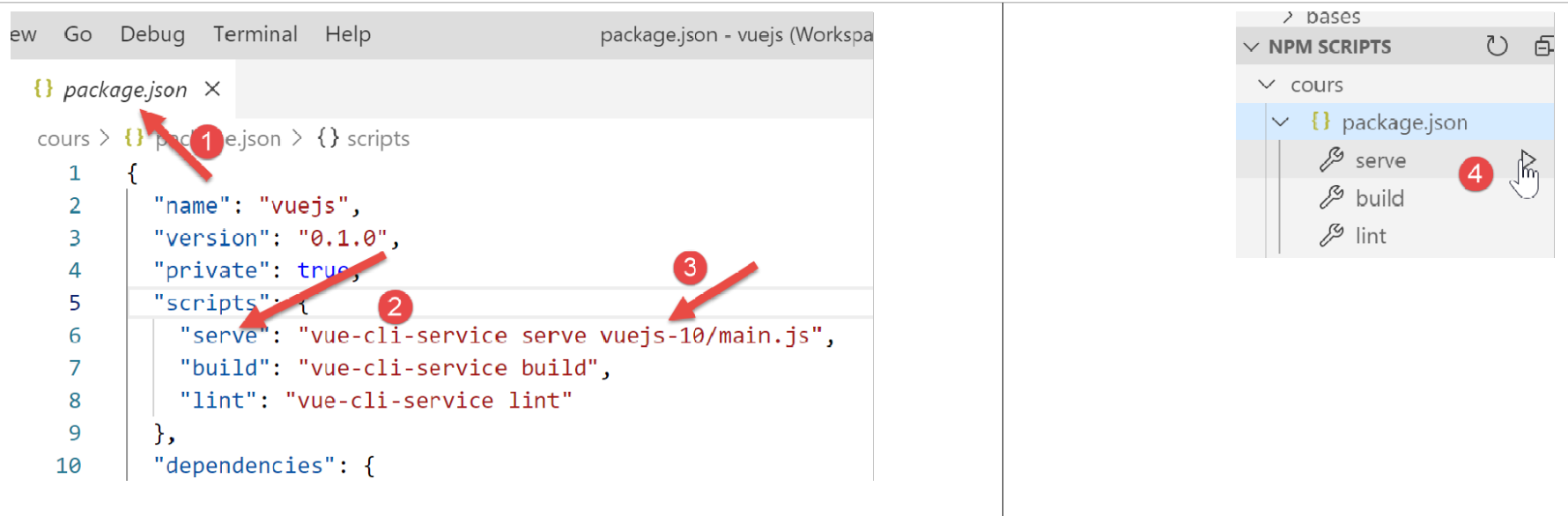
إذا لم يكن خادم حساب الضرائب قيد التشغيل عند بدء تشغيل المشروع، يتم الحصول على النتيجة التالية:
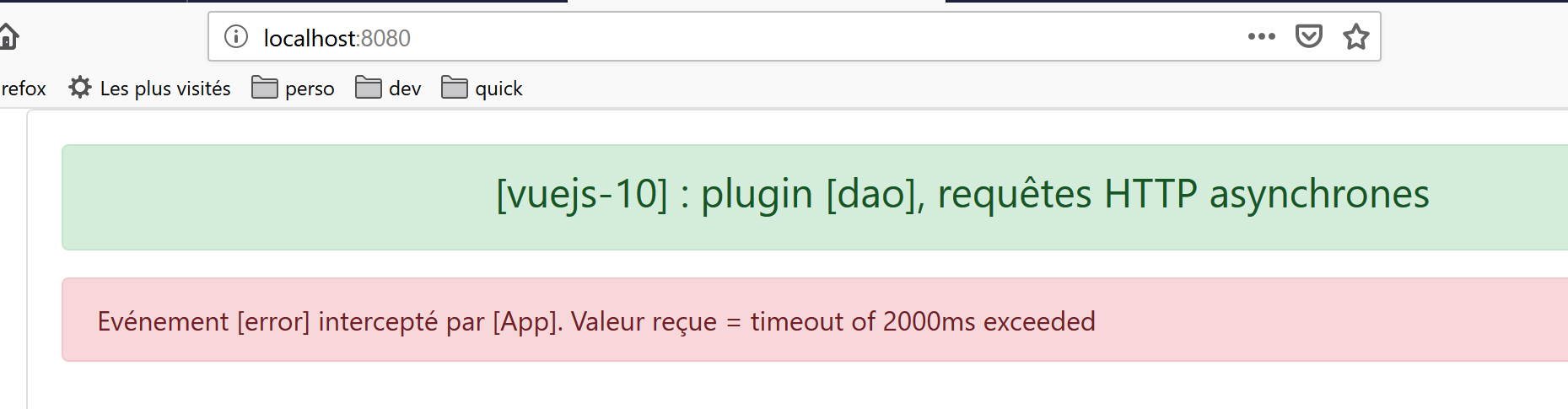
لنبدأ تشغيل خادم [Laragon] (انظر https://tahe.developpez.com/tutoriels-cours/php7) ونعيد تحميل الصفحة أعلاه. تكون النتيجة عندئذٍ كما يلي:
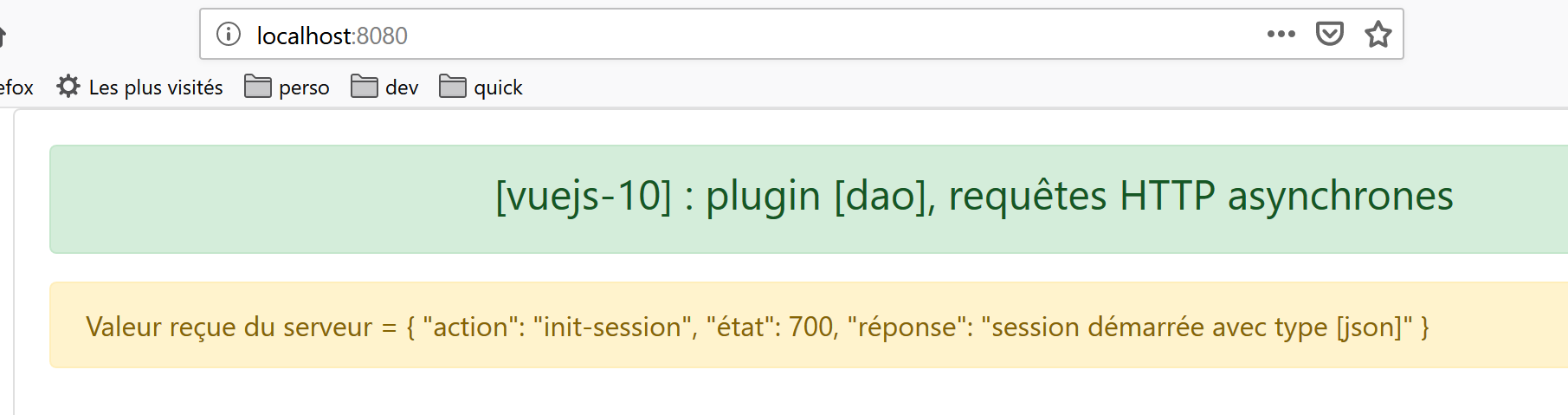
ملاحظة: نحن نستخدم الإصدار 14 من خادم حساب الضرائب المحدد في https://tahe.developpez.com/tutoriels-cours/php7.