6. الملفات النصية
الملف النصي هو ملف يحتوي على أسطر من النص. دعونا نستعرض إنشاء واستخدام هذه الملفات من خلال أمثلة.
6.1. الإنشاء والاستخدام
البرنامج |
 |
النتائج |
تعليقات
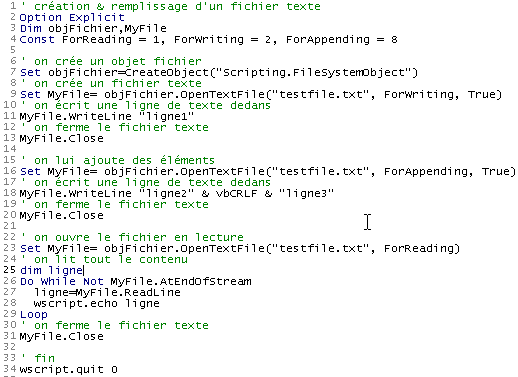
- يُنشئ السطر 7 كائن ملف من النوع "Scripting.FileSystemObject" بواسطة الدالة CreateObject("Scripting.FileSystemObject"). يتيح هذا الكائن الوصول إلى أي ملف في النظام، وليس فقط إلى الملفات النصية.
- السطر 9 ينشئ كائنًا "TextStream". ويرتبط إنشاء هذا الكائن بإنشاء الملف testfile.txt. لا يُشار إلى هذا الملف باسم مطلق من النوع c:\dir1\dir2\....\testfile.txt، بل باسم نسبي هو testfile.txt. وبالتالي، سيتم إنشاؤه في المجلد الذي سيتم منه تشغيل الأمر لتنفيذ الملف.
- لا يعرف نظام الملفات في نظام ويندوز مفاهيم مثل «ملف نصي» أو «ملف غير نصي». فهو لا يعرف سوى «الملفات» فقط. ولذلك، فإن الأمر متروك للبرنامج الذي يستخدم هذا الملف ليقرر ما إذا كان سيتعامل معه كملف نصي أم لا.
- يُنشئ السطر 9 كائنًا يُستخدم الأمر set لتعيينه. يتطلب إنشاء كائن ملف نصي إنشاء كائنين:
- إنشاء كائن Scripting.FileSystemObject (السطر 7)
- ثم إنشاء كائن «TextStream» (ملف نصي) باستخدام الطريقة OpenTextFile الخاصة بالكائن Scripting.FileSystemObject، والتي تقبل عدة معلمات:
- اسم الملف المراد معالجته (إلزامي)
- طريقة استخدام الملف. وهو عدد صحيح له 3 قيم ممكنة:
- 1: استخدام الملف للقراءة
- 2: استخدام الملف في وضع الكتابة. إذا لم يكن موجودًا بالفعل، وكان المعلمة الثالثة موجودة وقيمتها true، فسيتم إنشاؤه، وإلا فلن يتم إنشاؤه. إذا كان موجودًا بالفعل، فسيتم استبداله.
- 8: استخدام الملف في وضع الإضافة، c.a.d. الكتابة في نهاية الملف. إذا لم يكن الملف موجودًا بالفعل، وكان المعلمة الثالثة موجودة وقيمتها «true»، فسيتم إنشاؤه، وإلا فلن يتم إنشاؤه.
- يكتب السطر 11 سطرًا من النص باستخدام الطريقة WriteLine الخاصة بالكائن TextStream الذي تم إنشاؤه.
- السطر 13 «يغلق» الملف. وبذلك لا يمكن الكتابة فيه أو قراءته بعد ذلك.
- السطر 16 ينشئ كائنًا جديدًا «TextStream» لاستخدام نفس الملف كما في السابق، ولكن هذه المرة في وضع «الإضافة». وستُكتب الأسطر الجديدة بعد الأسطر الموجودة.
- يكتب السطر 18 سطرين جديدين، مع العلم أن الثابت vbCRLF يمثل علامة نهاية السطر في الملفات النصية.
- السطر 20 يغلق الملف مرة أخرى
- السطر 23 يعيد فتحه في وضع «القراءة»: سنقوم بقراءة محتوى الملف.
- يقرأ السطر 27 سطرًا من النص باستخدام الطريقة ReadLine الخاصة بالكائن TextStream. عندما يكون الملف قد «فُتح» للتو، يكون المؤشر موضوعًا على السطر الأول من النص فيه. وعندما يتم قراءة هذا السطر بواسطة الطريقة ReadLine، يتم تحديد الموضع على السطر الثاني. وبالتالي، فإن الطريقة Readline لا تقرأ السطر الحالي فحسب، بل «تنتقل» بعد ذلك تلقائيًا إلى السطر التالي.
- لتحويل جميع أسطر النص، يجب تطبيق الطريقة ReadLine بشكل متكرر ضمن حلقة. وتنتهي هذه الحلقة (السطر 26) عندما تأخذ السمة AtEndOfStream للكائن TextStream القيمة true. وهذا يعني أنه لم يعد هناك أي أسطر أخرى لقراءتها في الملف.
6.2. حالات الخطأ
هناك حالتان شائعتان للخطأ:
- فتح ملف غير موجود للقراءة
- فتح ملف غير موجود للقراءة أو لإضافة بيانات إليه مع تعيين المعلمة الثالثة على «false» عند استدعاء الطريقة OpenTextFile.
يوضح البرنامج التالي كيفية اكتشاف هذه الأخطاء:
البرنامج
' إنشاء ملف نصي وتعبئته
Option Explicit
Dim objFichier,MyFile
Const ForReading = 1, ForWriting = 2, ForAppending = 8
Dim codeErreur

' يتم إنشاء كائن ملف
Set objFichier=CreateObject("Scripting.FileSystemObject")

' فتح ملف نصي موجود للقراءة
On Error Resume Next
Set MyFile= objFichier.OpenTextFile("abcd", ForReading)
codeErreur=err.number
On Error GoTo 0
If codeErreur<>0 Then
     ' الملف غير موجود
    wscript.echo "Le fichier [abcd] n'existe pas"
Else
     ' إغلاق الملف النصي
    MyFile.Close
End If


' يتم فتح ملف نصي يجب أن يكون موجودًا في وضع الكتابة
On Error Resume Next
Set MyFile= objFichier.OpenTextFile("abcd", ForWriting, False)
codeErreur=err.number
On Error GoTo 0
If codeErreur<>0 Then
    wscript.echo "Le fichier [abcd] n'existe pas"
Else
     ' يتم إغلاق الملف النصي
    MyFile.Close
End If

' يتم فتح ملف نصي يجب أن يكون موجودًا في وضع الإضافة
On Error Resume Next
Set MyFile= objFichier.OpenTextFile("abcd", ForAppending, False)
codeErreur=err.number
On Error GoTo 0
If codeErreur<>0 Then
    wscript.echo "Le fichier [abcd] n'existe pas"
Else
     ' يتم إغلاق الملف النصي
    MyFile.Close
End If

' النهاية
wscript.quit 0
النتائج
6.3. تطبيق IMPOTS مع ملف نصي
نستأنف تطبيق حساب الضريبة بافتراض أن البيانات اللازمة لحساب الضريبة موجودة في ملف نصي يسمى data.txt:
12620 13190 15640 24740 31810 39970 48360 55790 92970 127860 151250 172040 195000 0
0 0,05 0,1 0,15 0,2 0,25 0,3 0,35 0,4 0,45 0,5 0,55 0,6 0,65
0 631 1290,5 2072,5 3309,5 4900 6898,5 9316,5 12106 16754,5 23147,5 30710 39312 49062
تحتوي الأسطر الثلاثة على بيانات جداول الحدود coeffR و coeffN الخاصة بالتطبيق، على التوالي. وبفضل تصميم تطبيقنا على أساس الوحدات النمطية، فإن التعديلات تتم بشكل أساسي في الإجراء getData المسؤول عن إنشاء الجداول الثلاثة. وفيما يلي البرنامج الجديد:
البرنامج
' حساب ضريبة أحد دافعي الضرائب
' يجب استدعاء البرنامج بثلاثة معلمات: متزوج، أطفال، راتب
' متزوج: الحرف O إذا كان متزوجًا، وN إذا كان غير متزوج
' الأطفال: عدد الأطفال
' الراتب: الراتب السنوي بدون السنتات

' الإعلان الإلزامي عن المتغيرات
Option Explicit
Dim erreur

' يتم استرداد الوسيطات بالتحقق من صحتها
Dim marie, enfants, salaire
erreur=getArguments(marie,enfants,salaire)
' خطأ؟
If erreur(0)<>0 Then wscript.echo erreur(1) : wscript.quit erreur(0)

' يتم استرداد البيانات اللازمة لحساب الضريبة
Dim limites, coeffR, coeffN
erreur=getData(limites,coeffR,coeffN)
' خطأ؟
If erreur(0)<>0 Then wscript.echo erreur(1) : wscript.quit 5

' يتم عرض النتيجة
wscript.echo "impôt=" & calculerImpot(marie,enfants,salaire,limites,coeffR,coeffN)

' الخروج دون أخطاء
wscript.quit 0

' ------------ الوظائف والإجراءات

' ----------- getArguments
Function getArguments(byref marie, ByRef enfants, ByRef salaire)
     ' يجب أن يسترد ثلاث قيم تم تمريرها كمعلمات إلى البرنامج الرئيسي
     ' يتم تمرير الحجة إلى البرنامج دون مسافات أمامها أو خلفها
     ' سيتم استخدام التعبيرات النمطية للتحقق من صحة البيانات

     ' تُرجع متغيرًا من نوع مصفوفة الأخطاء يحتوي على قيمتين
     ' خطأ(0): رمز الخطأ، 0 في حالة عدم وجود خطأ
     ' خطأ(1): رسالة الخطأ في حالة وجود خطأ، وإلا فإن السلسلة فارغة

    Dim syntaxe
    syntaxe= _
    "Syntaxe : pg marié enfants salaire" & vbCRLF & _
    "marié : caractère O si marié, N si non marié" & vbCRLF & _
    "enfants : nombre d'enfants (entier >=0)" & vbCRLF & _
    "salaire : salaire annuel sans les centimes (entier >=0)"

     ' يتم التحقق من وجود 3 معلمات
    Dim nbArguments
    nbArguments=wscript.arguments.count
    If nbArguments<>3 Then
         ' رسالة خطأ
        getArguments= array(1,syntaxe & vbCRLF & vbCRLF & "erreur : nombre d'arguments incorrect")
         ' النهاية
        Exit Function
    End If

    Dim modele, correspondances
    Set modele=new regexp

     ' يجب أن يكون الحالة الاجتماعية من بين الأحرف oOnN
    modele.pattern="^[oOnN]$"
    Set correspondances=modele.execute(wscript.arguments(0))
    If correspondances.count=0 Then
         ' رسالة خطأ
        getArguments=array(2,syntaxe & vbCRLF & vbCRLF & "erreur : argument marie incorrect")
         ' الخروج
        Exit Function
    End If
     ' استرداد القيمة
    If lcase(wscript.arguments(0)) = "o"Then
        marie=true
    Else
        marie=false
    End If

     ' يجب أن تكون «الأطفال» عددًا صحيحًا >=0
    modele.pattern="^\d{1,2}$"
    Set correspondances=modele.execute(wscript.arguments(1))
    If correspondances.count=0 Then
         ' خطأ
        getArguments= array(3,syntaxe & vbCRLF & vbCRLF & "erreur : argument enfants incorrect")
         ' الخروج
        Exit Function
    End If
     ' يتم استرداد القيمة
    enfants=cint(wscript.arguments(1))

     ' يجب أن يكون الراتب عددًا صحيحًا >=0
    modele.pattern="^\d{1,9}$"
    Set correspondances=modele.execute(wscript.arguments(2))
    If correspondances.count=0 Then
         ' خطأ
        getArguments= array(4,syntaxe & vbCRLF & vbCRLF & "erreur : argument salaire incorrect")
         ' الخروج
        Exit Function
    End If
     ' يتم استرداد القيمة
    salaire=clng(wscript.arguments(2))

     ' انتهى دون أخطاء
    getArguments=array(0,"")
End Function

' ----------- getData
Function getData(byref limites, ByRef coeffR, ByRef coeffN)
     ' بيانات الجداول الثلاثة الحدية، coeffR، coeffN موجودة في ملف نصي
     ' يسمى data.txt. ويحتل كل جدول سطرًا واحدًا بالصيغة val1 val2 ... valn
     ' نجد بالترتيب القيم الحدية: coeffR، coeffN

     ' يعرض متغيرًا لجدول الأخطاء المكون من عنصرين لمعالجة أي خطأ محتمل
     ' خطأ(0): 0 في حالة عدم وجود خطأ، أو عدد صحيح >0 في حالة وجود خطأ
    ' الخطأ(1): رسالة الخطأ في حالة وجود خطأ

    Dim objFichier,MyFile,codeErreur
    Const ForReading = 1, dataFileName="data.txt"

     ' يتم إنشاء كائن ملف
    Set objFichier=CreateObject("Scripting.FileSystemObject")
     ' يتم فتح الملف data.txt للقراءة
    On Error Resume Next
    Set MyFile= objFichier.OpenTextFile(dataFileName, ForReading)
     ' خطأ؟
    codeErreur=err.number
    On Error GoTo 0
    If codeErreur<>0 Then
         ' حدث خطأ - يتم تسجيله
        getData=array(1,"Impossible d'ouvrir le fichier des données [" & dataFileName & "] en lecture")
         ' يتم الإدخال
        Exit Function
    End If

     ' نفترض الآن أن المحتوى صحيح ولا نقوم بأي تحقق
     ' نقرأ الأسطر الثلاثة

     ' الحدود
    Dim ligne, i
    ligne=MyFile.ReadLine
    getDataFromLine ligne,limites

     ' coeffR
    ligne=MyFile.ReadLine
    getDataFromLine ligne,coeffR


     ' coeffN
    ligne=MyFile.ReadLine
    coeffN=split(ligne," ")
    getDataFromLine ligne,coeffN

     ' يتم إغلاق الملف
    MyFile.close

     ' انتهى الأمر دون أخطاء
    getData=array(0,"")
End Function

' ----------- getDataFromLine
Sub getDataFromLine(byref ligne, ByRef tableau)
     ' يضع القيم العددية الموجودة في السطر في جدول
     ' هذه القيم مفصولة بواحدة أو أكثر من المسافات

     ' في البداية، يكون الجدول فارغًا
    tableau=array()
     ' يتم تعريف نموذج للسطر
    Dim modele, correspondances
    Set modele= New RegExP
    With modele
        .pattern="\d+,\d+|\d+"    ' 140,5 ou 140
        .global=true              ' toutes les valeurs
    End With

     ' يتم تحليل السطر
    Set correspondances=modele.execute(ligne)
    Dim i
    For i=0 To correspondances.count-1
         ' يتم تغيير حجم الجدول
        ReDim Preserve tableau(i)
         ' يتم تعيين قيمة للعنصر الجديد
        tableau(i)=cdbl(correspondances(i).value)
    Next

     'النهاية
End Sub


' ----------- calculerImpot
Function calculerImpot(byval marie,ByVal enfants,ByVal salaire, ByRef limites, ByRef coeffR, ByRef coeffN)

     ' يتم حساب عدد الحصص
    Dim nbParts
    If marie=true Then
        nbParts=(enfants/2)+2
    Else
        nbParts=(enfants/2)+1
    End If
    If enfants>=3 Then nbParts=nbParts+0.5

     ' يتم حساب الحصة العائلية والدخل الخاضع للضريبة
    Dim revenu, qf
    revenu=0.72*salaire
    qf=revenu/nbParts

     ' يتم حساب الضريبة
    Dim i, impot
    i=0
    Do While i<ubound(limites) And qf>limites(i)
        i=i+1
    Loop
    calculerImpot=int(revenu*coeffr(i)-nbParts*coeffn(i))
End Function
تعليقات:
- في الملف النصي data.txt، قد تكون القيم مفصولة بمسافة واحدة أو أكثر، مما يجعل من المستحيل استخدام الدالة split لاستخراج قيم السطر. لذا كان لا بد من استخدام تعبير منتظم
- تُرجع الدالة getData، بالإضافة إلى الجداول الثلاثة المحددة، coeffR و coeffN، نتيجة تشير إلى ما إذا كان هناك خطأ أم لا. هذه النتيجة عبارة عن متغير صفيفي مكون من عنصرين. العنصر الأول هو رمز الخطأ (0 في حالة عدم وجود خطأ)، والثاني هو رسالة الخطأ في حالة حدوث خطأ.
- لا تختبر الدالة getData صحة القيم الموجودة في الملف data.txt. في الحالة الفعلية، ينبغي أن تقوم بذلك.