19. تمرين تطبيقي – الإصدار 9
في هذه النسخة، سنقوم بتحسين الخادم بالطريقة التالية:
- حاليًا، يتم البحث عن بيانات مصلحة الضرائب في قاعدة البيانات عند كل طلب. سنستخدم جلسة عمل:
- عند الطلب الأول من المستخدم، يتم البحث عن بيانات مصلحة الضرائب في قاعدة البيانات وتخزينها في الجلسة؛
- عند الطلبات التالية من نفس المستخدم، يتم البحث عن بيانات مصلحة الضرائب في الجلسة. يمكننا توقع توفير طفيف في وقت التنفيذ لأن الاستعلامات في قاعدة البيانات مكلفة؛
- سيقوم الخادم بتسجيل اللحظات المهمة في ملف نصي:
- نجاح أو فشل المصادقة؛
- صحة أو عدم صحة المعلمات المرسلة من العميل؛
- نتيجة حساب الضريبة؛
- حالات الخطأ المختلفة؛
- في حالة حدوث خطأ فادح، سيتم إرسال بريد إلكتروني إلى مسؤول التطبيق؛
يجب تعديل العميل أيضًا لإدارة ملف تعريف الارتباط الخاص بالجلسة الذي سيتم إرساله إليه.
19.1. الخادم
نحن مهتمون بجزء الخادم من التطبيق.
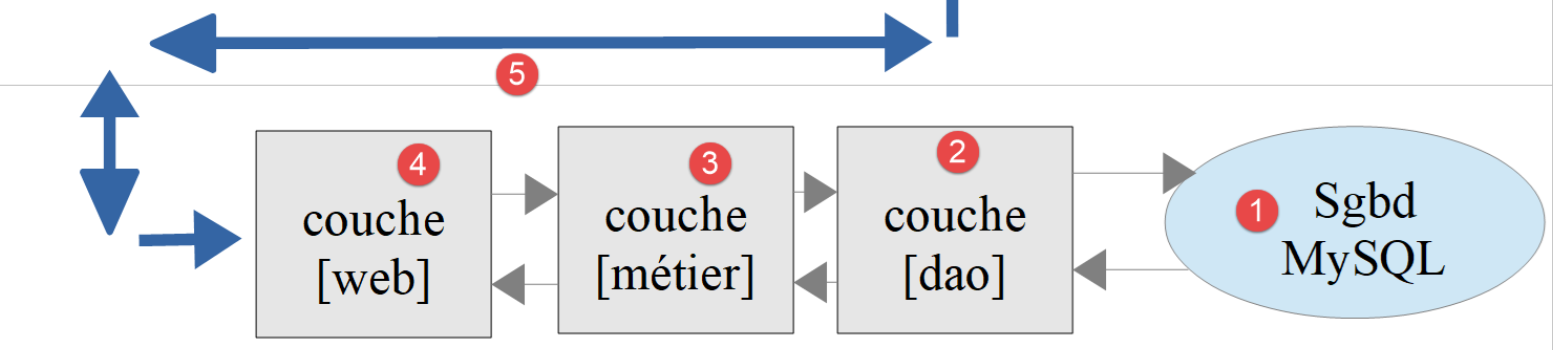
سيتم تنفيذ هذه البنية من خلال البرامج النصية التالية:
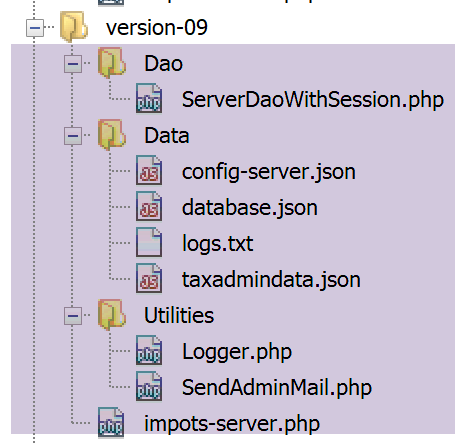
19.1.1. الأدوات المساعدة
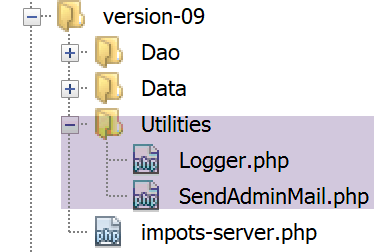
19.1.1.1. الفئة [Logger]
ستُستخدم الفئة [Logger] لكتابة السجلات في ملف نصي:
<?php

namespace Application;

class Logger {
  // السمة
  private $resource;

  // المنشئ
  public function __construct(string $logsFilename) {
    // فتح الملف
    $this->resource = fopen($logsFilename, "a");
    if (!$this->resource) {
      throw new ExceptionImpots("Echec lors de la création du fichier de logs [$logsFilename]");
    }
  }

  // كتابة رسالة في السجلات
  public function write(string $message) {
    fputs($this->resource, (new \DateTime())->format("d/m/y H:i:s:v") . " : $message");
  }

  // إغلاق ملف السجلات
  public function close() {
    fclose($this->resource);
  }

}
تعليقات
- السطر 7: مورد ملف السجلات؛
- السطر 10: يتلقى منشئ الفئة اسم ملف السجلات كمعلمة؛
- السطر 12: يتم فتح الملف النصي في وضع الإضافة (a+): سيتم فتح الملف مع الحفاظ على محتواه. وستتم عمليات الكتابة بعد المحتوى الحالي؛
- الأسطر 13-15: إذا تعذر فتح الملف، يتم إلقاء استثناء؛
- الأسطر 19-21: تسمح الطريقة [write] بكتابة الرسالة [$message] في ملف السجلات، مسبوقة بالتاريخ والوقت؛
- الأسطر 24-16: تتيح الطريقة [close] إغلاق ملف السجلات؛
ملاحظة: من المحتمل أن يخدم تطبيق الخادم عدة عملاء في وقت واحد. لكن لدينا ملف سجل واحد فقط لجميع العملاء. وبالتالي، هناك خطر حدوث وصول متزامن للكتابة في الملف. لذا، يجب مزامنة عمليات الكتابة لتجنب اختلاطها. لهذا الغرض، تتوفر في PHP إشارات [https://www.php.net/manual/fr/book.sem.php]. سنغفل عن تزامن عمليات الكتابة هنا، لكن يجب أن نبقى على دراية بالمشكلة.
19.1.1.2. الفئة [SendAdminMail]
تسمح الفئة [SendAdminMail] بإرسال بريد إلكتروني إلى مسؤول التطبيق في حالة تعطل التطبيق:
<?php

namespace Application;

class SendAdminMail {
  // السمات
  private $config;
  private $logger;

  // منشئ
  public function __construct(array $config, Logger $logger = NULL) {
    $this->config = $config;
    $this->logger = $logger;
  }

  public function send() {
    // إرسال $this->config['message'] إلى خادم SMTP $this->config['smtp-server'] على المنفذ $infos[smt-port]
    // إذا كان $this->config['tls'] صحيحًا، فسيتم استخدام الدعم TLS
    // يتم إرسال البريد الإلكتروني نيابة عن $this->config['from']
    // إلى المستلم $this->config['to']
    // الرسالة بعنوان $this->config['subject']
    // تم إرفاق المرفقات التالية بالبريد الإلكتروني: $this->config['attachments']
    // نتيجة الطريقة
    try {
      // إنشاء الرسالة
      $message = (new \Swift_Message())
        // موضوع الرسالة
        ->setSubject($this->config["subject"])
        // المرسل
        ->setFrom($this->config["from"])
        // المستلمون باستخدام قائمة (setTo/setCc/setBcc)
        ->setTo($this->config["to"])
        // نص الرسالة
        ->setBody($this->config["message"])
      ;
      // المرفقات
      foreach ($this->config["attachments"] as $attachment) {
        // مسار المرفق
        $fileName = __DIR__ . $attachment;
        // التحقق من وجود الملف
        if (file_exists($fileName)) {
          // إرفاق المستند بالرسالة
          $message->attach(\Swift_Attachment::fromPath($fileName));
        } else {
          if ($this->logger !== NULL) {
            // خطأ
            $this->logger->write("L'attachement [$fileName] n'existe pas\n");
          }
        }
      }
      // بروتوكول TLS ؟
      if ($this->config["tls"] === "TRUE") {
        // TLS
        $transport = (new \Swift_SmtpTransport($this->config["smtp-server"], $this->config["smtp-port"], 'tls'))
          ->setUsername($this->config["user"])
          ->setPassword($this->config["password"]);
      } else {
        // لا يوجد TLS
        $transport = (new \Swift_SmtpTransport($this->config["smtp-server"], $this->config["smtp-port"]));
      }
      // مدير الإرسال
      $mailer = new \Swift_Mailer($transport);
      // إرسال الرسالة
      $mailer->send($message);
      // النهاية
      if ($this->logger !== NULL) {
        $this->logger->write("Message [{$this->config["message"]}] envoyé à {$this->config["to"]}\n");
      }
    } catch (\Throwable $ex) {
      // خطأ
      if ($this->logger !== NULL) {
        $this->logger->write("Erreur lors de l'envoi du message [{$this->config["message"]}] à {$this->config["to"]}\n");
      }
    }
  }

}
تعليقات
- السطر 11: يتلقى المنشئ معلمتين:
- [$config]: مصفوفة مرتبطة تحتوي على جميع المعلومات اللازمة لإرسال البريد الإلكتروني؛
- [$logger]: مسجل يتيح تسجيل اللحظات المهمة أثناء إرسال البريد الإلكتروني؛
سيكون المصفوف الترابطي بالشكل التالي:
- الأسطر 16-76: تتيح الطريقة [send] إرسال البريد الإلكتروني. وقد تم عرض هذا الكود ووصفه في الفقرة المرتبطة؛
19.1.2. الطبقة [dao]
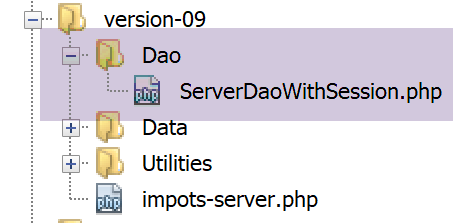
النص البرمجي [ServeurDaoWithSession.php] هو كما يلي:
<?php

// مساحة الأسماء
namespace Application;

// تعريف فئة ImpotsWithDataInDatabase
class ServerDaoWithSession extends ServerDao {

  // منشئ
  public function __construct(string $databaseFilename = NULL, TaxAdminData $taxAdminData = NULL) {
    // الحالة الأبسط
    if ($taxAdminData !== NULL) {
      $this->taxAdminData = $taxAdminData;
    } else {
      // نقوم بتسليم زمام الأمور إلى الفئة الأم
      parent::__construct($databaseFilename);
    }
  }

}
تعليقات
- السطر 7: الفئة [ServerDaoWithSession] من الإصدار 09 توسع نطاق الفئة [ServerDao] من الإصدار 08. في الواقع، الفئة [ServerDao] قادرة على استخدام قاعدة البيانات. لم يتبق لنا سوى توقع الحالة التي تكون فيها بيانات مصلحة الضرائب قد تم الحصول عليها بالفعل:
- السطر 10: يتلقى المُنشئ الآن معلمتين:
- [string $databaseFilename]: اسم الملف الذي يحتوي على المعلومات اللازمة للاتصال بقاعدة البيانات إذا لم يتم الحصول على بيانات مصلحة الضرائب بعد، وإلا فإن المعلمة هي NULL؛
- [TaxAdminData $taxAdminData]: بيانات مصلحة الضرائب إذا تم الحصول عليها بالفعل، وإلا فإنها تكون NULL؛
عند بدء جلسة ويب، سيتم إنشاء الطبقة [dao] باستخدام كائن [$databaseFilename] غير NULL وكائن [taxAdminData] NULL. سيتم بعد ذلك البحث عن بيانات إدارة الضرائب في قاعدة البيانات وتخزينها في الجلسة. عند الطلبات اللاحقة لنفس الجلسة، سيتم إنشاء الطبقة [dao] باستخدام كائن [databaseFilename] و NULL وكائن [taxAdminData] من الجلسة وليس NULL. وبالتالي لن يتم إجراء أي بحث في قاعدة البيانات.
19.1.3. نص برمجي الخادم
يتم تكوين البرنامج النصي للخادم [impots-server.php] بواسطة الملف jSON [config-server.json] التالي:
{
    "rootDirectory": "C:/myprograms/laragon-lite/www/php7/scripts-web/impots/version-09",
    "databaseFilename": "Data/database.json",
    "relativeDependencies": [
        "/../version-08/Entities/BaseEntity.php",
        "/../version-08/Entities/ExceptionImpots.php",
        "/../version-08/Entities/TaxAdminData.php",
        "/../version-08/Entities/Database.php",
        "/../version-08/Dao/InterfaceServerDao.php",
        "/../version-08/Dao/ServerDao.php",
        "/Dao/ServerDaoWithSession.php",
        "/../version-08/Métier/InterfaceServerMetier.php",
        "/../version-08/Métier/ServerMetier.php",
        "/Utilities/Logger.php",
        "/Utilities/SendAdminMail.php"
    ],
    "absoluteDependencies": ["C:/myprograms/laragon-lite/www/vendor/autoload.php"],
    "users": [
        {
            "login": "admin",
            "passwd": "admin"
        }
    ],
    "adminMail": {
        "smtp-server": "localhost",
        "smtp-port": "25",
        "from": "guest@localhost",
        "to": "guest@localhost",
        "subject": "plantage du serveur de calcul d'impôts",
        "tls": "FALSE",
        "attachments": []
    },
    "logsFilename": "Data/logs.txt"
}
يتطور البرنامج النصي للخادم [impots-server.php] على النحو التالي:
<?php

// الالتزام الصارم بأنواع المعلمات المعلنة للدوال
declare (strict_types=1);

// مساحة الأسماء
namespace Application;

// إدارة الأخطاء بواسطة PHP
ini_set("display_errors", "0");
//
// مسار ملف التكوين
define("CONFIG_FILENAME", "Data/config-server.json");

// استرداد التكوين
$config = \json_decode(file_get_contents(CONFIG_FILENAME), true);

// تضمين التبعيات اللازمة للنص البرمجي
$rootDirectory = $config["rootDirectory"];
foreach ($config["relativeDependencies"] as $dependency) {
  require "$rootDirectory$dependency";
}
// التبعيات المطلقة (مكتبات خارجية)
foreach ($config["absoluteDependencies"] as $dependency) {
  require "$dependency";
}
//
// التبعيات الخاصة بـ Symfony
use \Symfony\Component\HttpFoundation\Response;
use \Symfony\Component\HttpFoundation\Request;
use \Symfony\Component\HttpFoundation\Session\Session;

// الجلسة
$session = new Session();
$session->start();

// تحضير استجابة الخادم JSON
$response = new Response();
$response->headers->set("content-type", "application/json");
$response->setCharset("utf-8");

// إنشاء ملف السجلات
try {
  $logger = new Logger($config['logsFilename']);
} catch (ExceptionImpots $ex) {
  // خطأ داخلي في الخادم
  doInternalServerError($ex->getMessage(), $response, NULL, $config['adminMail']);
  // انتهى
  exit;
}

// السجل الأول
$logger->write("\n---nouvelle requête\n");

// استرداد الطلب الحالي
$request = Request::createFromGlobals();
// المصادقة في المرة الأولى فقط
if (!$session->has("user")) {
  // سجل
  $logger->write("Autentification en cours…\n");
  // المصادقة
  …
  }
  // هل تم العثور على المستخدم؟
  if (!$trouvé) {
    // لم يتم العثور عليه - الرمز 401 HTTP_UNAUTHORIZED
    sendResponse(
      $response,
      ["erreur" => "Echec de l'authentification [$requestUser, $requestPassword]"],
      Response::HTTP_UNAUTHORIZED,
      ["WWW-Authenticate" => "Basic realm=" . utf8_decode("\"Serveur de calcul d'impôts\"")],
      $logger
    );
    // انتهى
    exit;
  } else {
    // يتم تسجيل المصادقة على المستخدم في الجلسة
    $session->set("user", TRUE);
    // سجل
    $logger->write("Authentification réussie [$requestUser, $requestPassword]\n");
  }
} else {
  // سجل
  $logger->write("Authentification prise en session…\n");
}
// لدينا مستخدم صالح - يتم التحقق من المعلمات المستلمة
$erreurs = [];
// يجب أن تكون هناك ثلاثة معلمات GET
…

// أخطاء؟
if ($erreurs) {
// يتم إرسال رمز الخطأ 400 HTTP_BAD_REQUEST إلى العميل
  sendResponse($response, ["erreurs" => $erreurs], Response::HTTP_BAD_REQUEST, [], $logger);
  // انتهى
  exit;
} else {
  // السجلات
  $logger->write("paramètres ['marié'=>$marié, 'enfants'=>$enfants, 'salaire'=>$salaire] valides\n");
}
// لدينا كل ما نحتاجه للعمل
// إنشاء الطبقة [dao]
if (!$session->has("taxAdminData")) {
  // يتم استخراج البيانات من قاعدة البيانات
  $logger->write("données fiscales prises en base de données\n");
  try {
    // إنشاء الطبقة [dao]
    $dao = new ServerDaoWithSession($config["databaseFilename"], NULL);
    // يتم إدراج البيانات في الجلسة
    $session->set("taxAdminData", $dao->getTaxAdminData());
  } catch (\RuntimeException $ex) {
    // تسجيل الخطأ
    doInternalServerError(utf8_encode($ex->getMessage()), $response, $logger, $config['adminMail']);
    // انتهى
    exit;
  }
} else {
  // تم استرداد البيانات من الجلسة
  $dao = new ServerDaoWithSession(NULL, $session->get("taxAdminData"));
  // السجلات
  $logger->write("données fiscales prises en session\n");
}
// إنشاء الطبقة [métier]
$métier = new ServerMetier($dao);
// حساب الضريبة
$result = $métier->calculerImpot($marié, (int) $enfants, (int) $salaire);
// إعطاء الإجابة
sendResponse($response, $result, Response::HTTP_OK, [], $logger);
// النهاية
exit;

function doInternalServerError(string $message, Response $response, Logger $logger = NULL, array $infos) {
  // إرسال بريد إلكتروني إلى المسؤول
  // SendAdminMail يعترض جميع الاستثناءات ويسجلها بنفسه
  $infos['message'] = $message;
  $sendAdminMail = new SendAdminMail($infos, $logger);
  $sendAdminMail->send();
  // يتم إرسال رمز الخطأ 500 إلى العميل
  sendResponse($response, ["erreur" => $message], Response::HTTP_INTERNAL_SERVER_ERROR, [], $logger);
}

// وظيفة إرسال الرد HTTP إلى العميل
function sendResponse(Response $response, array $result, int $statusCode, array $headers, Logger $logger) {
  // $response: الرد HTTP
  // $result: جدول النتائج
  // $statusCode: حالة الرد HTTP
  // $headers: رؤوس HTTP التي يجب إدراجها في الرد
  // $logger: مسجل سجلات التطبيق
  //
  // الحالة HTTTP
  $response->setStatusCode($statusCode);
  // النص
  $body = \json_encode(["réponse" => $result], JSON_UNESCAPED_UNICODE);
  $response->setContent($body);
  // رؤوس
  $response->headers->add($headers);
  // الإرسال
  $response->send();
  // السجل
  if ($logger != NULL) {
    $logger->write("$body\n");
    $logger->close();
  }
}
تعليقات
- السطران 34-35: يتم بدء جلسة عمل؛
- الأسطر 38-40: يتم إعداد استجابة jSON؛
- الأسطر 42-50: محاولة إنشاء ملف السجلات. في حالة حدوث استثناء، يتم استدعاء الأسلوب [doInternalServer] (الأسطر 132-140)؛
- السطر 132: تقبل الطريقة [doInternalServer] أربعة معلمات:
- [$message]: الرسالة المراد تسجيلها في السجل. يجب ترميزها باستخدام UTF-8؛
- [$response]: الكائن [Response] الذي يغلف استجابة الخادم لعميله؛
- [$logger]: الكائن [Logger] الذي يتيح إجراء عمليات التسجيل؛
- [$infos]: المعلومات التي تتيح إرسال بريد إلكتروني إلى مسؤول التطبيق؛
- الأسطر 135-137: يتم إرسال بريد إلكتروني إلى مسؤول التطبيق؛
- السطر 139: يتم إرسال الرد إلى العميل:
- $response: الرد HTTP؛
- $result: يرسل الخادم السلسلة jSON من المصفوفة [‘réponse’=>["erreur" => $message]]؛
- $statusCode: [Response::HTTP_INTERNAL_SERVER_ERROR]، الرمز 500؛
- $headers: [], لا توجد رؤوس HTTP لإضافتها إلى الرد؛
- $logger: مسجل سجلات التطبيق؛
- السطر 58: بفضل الجلسة التي تم إنشاؤها، لن يتم مصادقة العميل سوى مرة واحدة:
- بمجرد مصادقة العميل، سيتم وضع مفتاح [user] في الجلسة (السطر 78)؛
- عند الطلب التالي من نفس العميل، يمنع السطر 58 إجراء مصادقة أصبحت غير ضرورية؛
- السطر 103: بفضل الجلسة التي تم إنشاؤها، لن يتم البحث عن البيانات في قاعدة البيانات إلا مرة واحدة فقط:
- عند الطلب الأول، سيتم البحث في قاعدة البيانات (السطر 108). ثم يتم وضع البيانات المسترجعة في الجلسة (السطر 110) مرتبطة بالمفتاح [taxAdminData]؛
- عند الطلبات التالية، سيتم العثور على المفتاح [taxAdminData] في الجلسة (السطر 103) ومن ثم سيتم إرسال البيانات الموجودة على القرص مباشرة إلى الطبقة [dao] (السطر 119)؛
- الأسطر 111-116: قد يفشل البحث عن البيانات الضريبية في قاعدة البيانات. في هذه الحالة، يتم إرسال الرمز [500 Internal Server Error] إلى العميل؛
- السطر 113: يتم ترميز رسالة الخطأ الخاصة باستثناء برنامج التشغيل MySQL برمز ISO 8859-1. يتم تحويلها إلى UTF-8 لتسجيلها بشكل صحيح؛
- باقي الكود مطابق تقريبًا للإصدار السابق؛
- الأسطر 143-164: تقوم الدالة [sendResponse] بإرسال جميع الردود إلى العميل؛
- الأسطر 144-148: معنى المعلمات؛
- السطر 153: الرد هو دائمًا السلسلة jSON من مصفوفة [‘résultat’=>qqChose]؛
- السطر 156: في بعض الأحيان، توجد رؤوس HTTP يجب إضافتها إلى الرد. وهذا هو الحال في السطر 71؛
- السطر 158: يتم إرسال الرد؛
- الأسطر 160-163: يتم تسجيل الرد في السجل وإغلاق أداة التسجيل؛
19.1.4. اختبارات [Codeception]
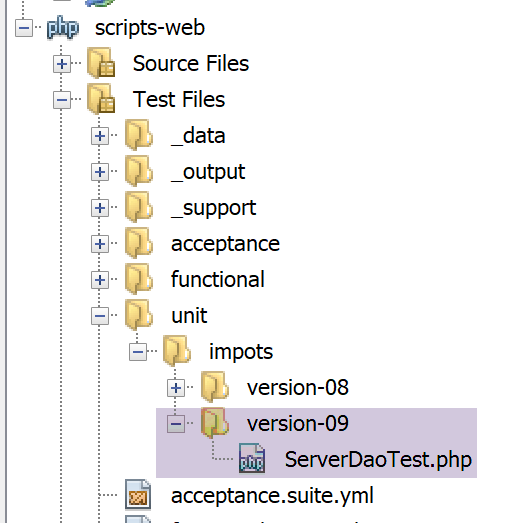
سنقوم باختبار الطبقة [dao] فقط، وهي الطبقة الوحيدة التي طرأت عليها تغييرات.
رمز اختبار [ServerDaoTest] هو كما يلي:
<?php

// الالتزام الصارم بأنواع المعلمات المعلنة للدوال
declare (strict_types=1);

// مساحة الأسماء
namespace Application;

// تعريف الثوابت
define("ROOT", "C:/myprograms/laragon-lite/www/php7/scripts-web/impots/version-09");
// مسار ملف التكوين
define("CONFIG_FILENAME", ROOT . "/Data/config-server.json");

// استرداد التكوين
$config = \json_decode(\file_get_contents(CONFIG_FILENAME), true);
// تضمين التبعيات اللازمة للنص البرمجي
$rootDirectory = $config["rootDirectory"];
foreach ($config["relativeDependencies"] as $dependency) {
  require "$rootDirectory$dependency";
}
// التبعيات المطلقة (مكتبات الجهات الخارجية)
foreach ($config["absoluteDependencies"] as $dependency) {
  require "$dependency";
}

// اختبار -----------------------------------------------------

class ServerDaoTest extends \Codeception\Test\Unit {
  // TaxAdminData
  private $taxAdminData;

  public function __construct() {
    // الأصل
    parent::__construct();
    // استرداد التكوين
    $config = \json_decode(\file_get_contents(CONFIG_FILENAME), true);
    // إنشاء الطبقة [dao]
    $dao = new ServerDaoWithSession(ROOT . "/" . $config["databaseFilename"]);
    $this->taxAdminData = $dao->getTaxAdminData();
  }

  // اختبارات
  public function testTaxAdminData() {
    …
  }

}
- الأسطر 9-24: يتم إنشاء بيئة تشغيل مطابقة لتلك الخاصة بالنص البرمجي للخادم [impots-server]؛
- السطر 38: لإنشاء الطبقة [dao]، يتم إنشاء مثيل للفئة [ServerDaoWithSession]؛
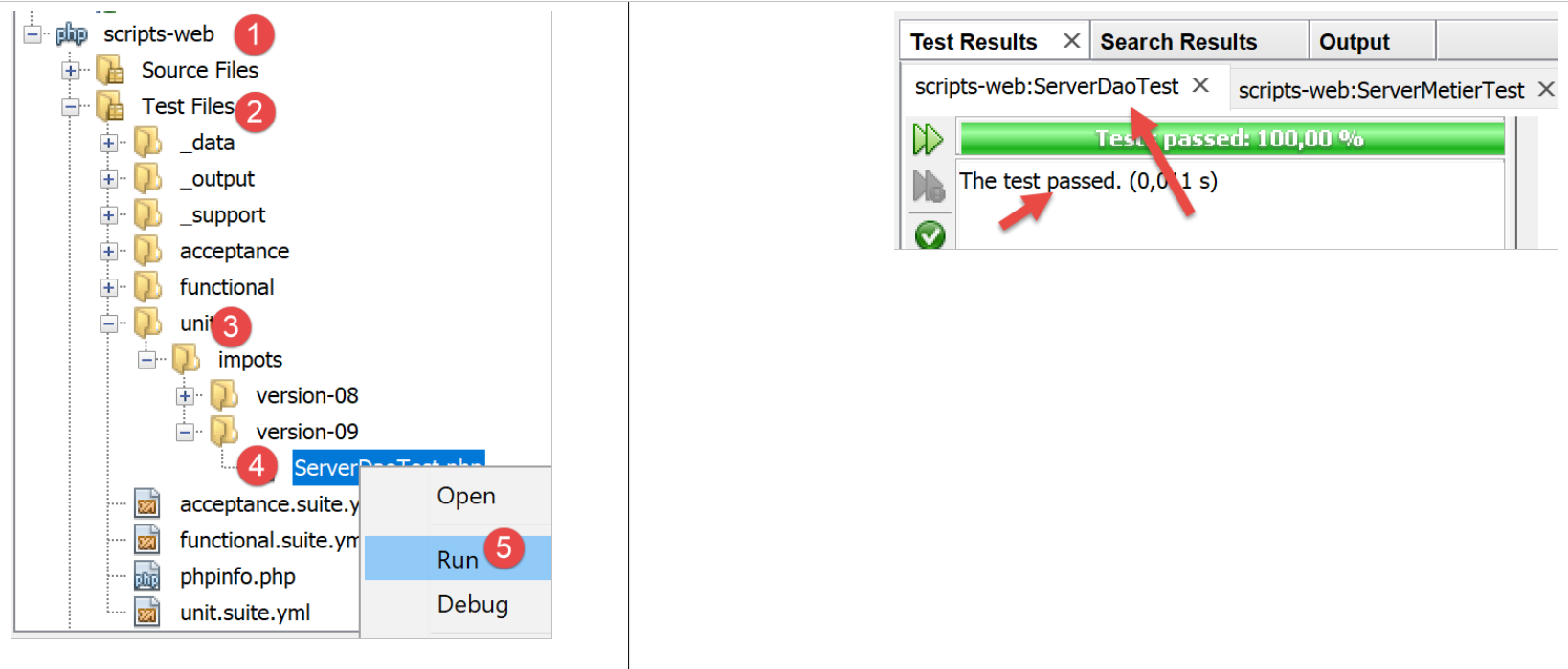
وكانت نتيجة الاختبارات كما يلي:
19.2. العميل
نحن مهتمون بالجزء الخاص بالعميل من التطبيق.
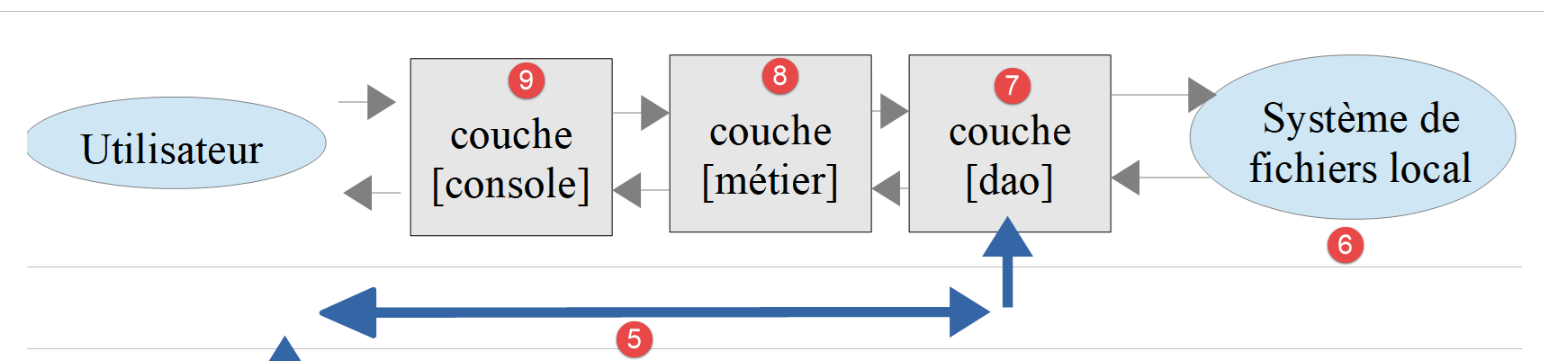
سيتم تنفيذ هذه البنية من خلال البرامج النصية التالية:
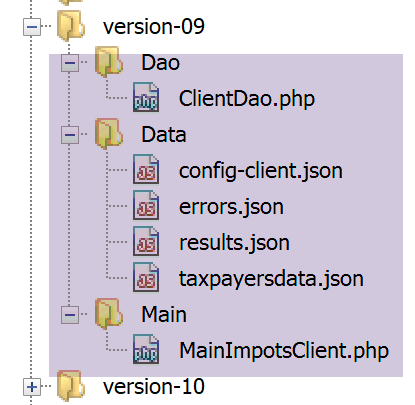
في الإصدار الجديد، التغييرات الوحيدة هي:
- ملف التكوين [config-client.json]؛
- طبقة [dao] الخاصة بالعميل؛
19.2.1. الطبقة [dao]
تتطور الطبقة [Dao] على النحو التالي:
<?php

namespace Application;

// التبعيات
use \Symfony\Component\HttpClient\HttpClient;

class ClientDao implements InterfaceClientDao {
  // استخدام ميزة
  use TraitDao;
  // السمات
  private $urlServer;
  private $user;
  private $sessionCookie;

  // منشئ
  public function __construct(string $urlServer, array $user) {
    $this->urlServer = $urlServer;
    $this->user = $user;
  }

  // حساب الضريبة
  public function calculerImpot(string $marié, int $enfants, int $salaire): array {
    // ملف تعريف ارتباط الجلسة؟
    if (!$this->sessionCookie) {
      // يتم إنشاء عميل HTTP
      $httpClient = HttpClient::create([
          'auth_basic' => [$this->user["login"], $this->user["passwd"]],
          "verify_peer" => false
      ]);
      // إرسال الطلب إلى الخادم بدون ملف تعريف ارتباط الجلسة
      $response = $httpClient->request('GET', $this->urlServer,
        ["query" => [
            "marié" => $marié,
            "enfants" => $enfants,
            "salaire" => $salaire
          ]
      ]);
    } else {
      // إرسال الطلب إلى الخادم باستخدام ملف تعريف ارتباط الجلسة
      // يتم إنشاء عميل HTTP
      $httpClient = HttpClient::create([
          "verify_peer" => false
      ]);
      $response = $httpClient->request('GET', $this->urlServer,
        ["query" => [
            "marié" => $marié,
            "enfants" => $enfants,
            "salaire" => $salaire
          ],
          "headers" => ["Cookie" => $this->sessionCookie]
      ]);
    }
    // يتم استرداد الرد
    $json = $response->getContent(false);
    $array = \json_decode($json, true);
    $réponse = $array["réponse"];
    // السجلات
    print "$json=json\n";
    // يتم استرداد حالة الرد
    $statusCode = $response->getStatusCode();
    // خطأ؟
    if ($statusCode !== 200) {
      // حدث خطأ - يتم إثارة استثناء
      $réponse = ["statut HTTP" => $statusCode] + $réponse;
      $message = \json_encode($réponse, JSON_UNESCAPED_UNICODE);
      throw new ExceptionImpots($message);
    }
    if (!$this->sessionCookie) {
      // يتم استرداد ملف تعريف الارتباط الخاص بالجلسة
      $headers = $response->getHeaders();
      if (isset($headers["set-cookie"])) {
        // ملف تعريف ارتباط الجلسة؟
        foreach ($headers["set-cookie"] as $cookie) {
          $match = [];
          $match = preg_match("/^PHPSESSID=(.+?);/", $cookie, $champs);
          if ($match) {
            $this->sessionCookie = "PHPSESSID=" . $champs[1];
          }
        }
      }
    }
    // نقوم بإرجاع الرد
    return $réponse;
  }

}
تعليقات
يتمثل التعديل الذي أُجري على الطبقة [dao] في إدارة جلسة العمل الآن:
- السطر 14: ملف تعريف الارتباط الخاص بالجلسة؛
- الأسطر 25-39: عند الطلب الأول، لا توجد ملف تعريف الارتباط هذا: عندئذ يتم إرسال الطلب إلى الخادم مع إرسال معلومات المصادقة (السطر 28)؛
- الأسطر 40-53: عند الطلبات التالية، عادةً ما يكون ملف تعريف الارتباط الخاص بجلسة العمل متوفراً. وعندها لا يتم إرسال معلومات المصادقة (الأسطر 42-44)؛
- الأسطر 69-82: ستتضمن استجابة الخادم للطلب الأول ملف تعريف ارتباط للجلسة. يتم استرداده. تم استخدام هذا الرمز وشرحه بالفعل في الفقرة الرابط؛
- السطر 78: يتم تخزين ملف تعريف الارتباط للجلسة الذي تم استرداده في سمة الفئة [$sessionCookie]؛
ملاحظة: كان بإمكاننا الاحتفاظ بالإصدار القديم من الطبقة [dao] وإجراء المصادقة مع كل طلب، لأن تكلفة ذلك ضئيلة. ولكن لأغراض تعليمية، أردنا توضيح كيفية إدارة الجلسة من قِبل عميل HTTP.
19.2.2. ملف التكوين
يتطور ملف التكوين jSON على النحو التالي:
{
    "rootDirectory": "C:/Data/st-2019/dev/php7/poly/scripts-console/impots/version-09",
    "taxPayersDataFileName": "Data/taxpayersdata.json",
    "resultsFileName": "Data/results.json",
    "errorsFileName": "Data/errors.json",
    "dependencies": [
        "/../version-08/Entities/BaseEntity.php",
        "/../version-08/Entities/TaxPayerData.php",
        "/../version-08/Entities/ExceptionImpots.php",
        "/../version-08/Utilities/Utilitaires.php",
        "/../version-08/Dao/InterfaceClientDao.php",
        "/../version-08/Dao/TraitDao.php",
        "/Dao/ClientDao.php",
        "/../version-08/Métier/InterfaceClientMetier.php",
        "/../version-08/Métier/ClientMetier.php"
    ],
    "absoluteDependencies": [
        "C:/myprograms/laragon-lite/www/vendor/autoload.php"
    ],
    "user": {
        "login": "admin",
        "passwd": "admin"
    },
    "urlServer": "https://localhost:443/php7/scripts-web/impots/version-09/impots-server.php"
}
يتغير فقط URL في السطر 24.
19.3. بعض الاختبارات
19.3.1. الاختبار 1
أولاً، نقوم بتشغيل العميل في بيئة خالية من الأخطاء. النتائج هي نفسها التي كانت في الإصدارات السابقة. ولكن الآن، على جانب الخادم، لدينا ملف سجلات [logs.txt]:
04/07/19 13:16:08:523 :
---nouvelle requête
04/07/19 13:16:08:529 : Autentification en cours…
04/07/19 13:16:08:529 : Authentification réussie [admin, admin]
04/07/19 13:16:08:529 : paramètres ['marié'=>oui, 'enfants'=>2, 'salaire'=>55555] valides
04/07/19 13:16:08:529 : tranches d'impôts prises en base de données
04/07/19 13:16:08:534 : {"réponse":{"impôt":2814,"surcôte":0,"décôte":0,"réduction":0,"taux":0.14}}
04/07/19 13:16:08:643 :
---nouvelle requête
04/07/19 13:16:08:648 : Authentification prise en session…
04/07/19 13:16:08:648 : paramètres ['marié'=>oui, 'enfants'=>2, 'salaire'=>50000] valides
04/07/19 13:16:08:648 : tranches d'impôts prises en session
04/07/19 13:16:08:648 : {"réponse":{"impôt":1384,"surcôte":0,"décôte":384,"réduction":347,"taux":0.14}}
04/07/19 13:16:08:769 :
---nouvelle requête
04/07/19 13:16:08:775 : Authentification prise en session…
04/07/19 13:16:08:775 : paramètres ['marié'=>oui, 'enfants'=>3, 'salaire'=>50000] valides
04/07/19 13:16:08:775 : tranches d'impôts prises en session
04/07/19 13:16:08:775 : {"réponse":{"impôt":0,"surcôte":0,"décôte":720,"réduction":0,"taux":0.14}}
04/07/19 13:16:08:888 :
---nouvelle requête
…
- الأسطر 3-7: عند الطلب الأول، تتم المصادقة والبحث عن البيانات في قاعدة البيانات؛
- الأسطر 9-14: عند الطلب التالي، لم تعد هناك عملية مصادقة ويتم استرجاع البيانات من الجلسة. ويتكرر هذا الأمر في الطلبات التالية (السطر 15 وما بعده)؛
19.3.2. الاختبار 2
الآن لنقم بقطع اتصال قاعدة البيانات MySQL. من جانب العميل، نحصل على النتيجة التالية في وحدة التحكم:
L'erreur suivante s'est produite : {"statut HTTP":500,"erreur":"SQLSTATE[HY000] [2002] Aucune connexion n’a pu être établie car l’ordinateur cible l’a expressément refusée.\r\n"}
Terminé
على جانب الخادم، نحصل على سجلات [logs.txt] التالية:
04/07/19 13:19:52:396 :
---nouvelle requête
04/07/19 13:19:52:405 : Autentification en cours…
04/07/19 13:19:52:405 : Authentification réussie [admin, admin]
04/07/19 13:19:52:405 : paramètres ['marié'=>oui, 'enfants'=>2, 'salaire'=>55555] valides
04/07/19 13:19:52:405 : tranches d'impôts prises en base de données
04/07/19 13:19:54:461 : {"réponse":{"erreur":"SQLSTATE[HY000] [2002] Aucune connexion n’a pu être établie car l’ordinateur cible l’a expressément refusée.\r\n"}}
04/07/19 13:19:55:602 : Message [SQLSTATE[HY000] [2002] Aucune connexion n’a pu être établie car l’ordinateur cible l’a expressément refusée.
] envoyé à guest@localhost
04/07/19 13:19:55:706 :
---nouvelle requête
…
للحصول على البريد الإلكتروني الذي تلقّاه مسؤول التطبيق، نستخدم البرنامج النصي [imap-03.php] الوارد في الفقرة المرتبطة بملف التكوين [config-imap-01.json] التالي:
ونحصل على النتيجة التالية:
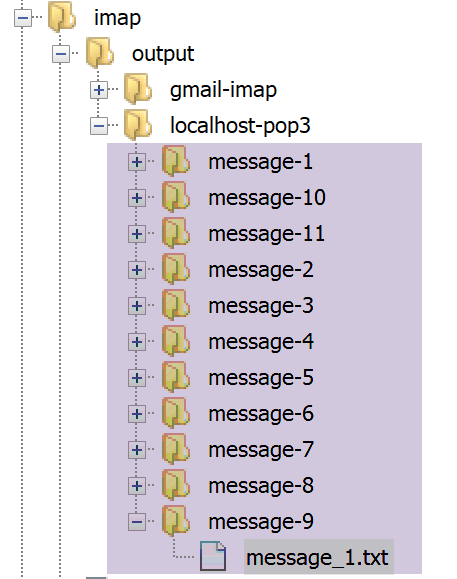
يحتوي الملف [message_1.txt] على النص التالي:
return-path: guest@localhost
received: from localhost (localhost [127.0.0.1]) by DESKTOP-528I5CU with ESMTP ; Thu, 4 Jul 2019 15:20:22 +0200
message-id: <c82d26df5fb352e10a51577cd1b9ed87@localhost>
date: Thu, 04 Jul 2019 13:20:20 +0000
subject: plantage du serveur de calcul d'impôts
from: guest@localhost
to: guest@localhost
mime-version: 1.0
content-type: text/plain; charset=utf-8
content-transfer-encoding: quoted-printable

SQLSTATE[HY000] [2002] Aucune connexion n’a pu être établie car l’ordinateur cible l’a expressément refusée.
19.3.3. اختبار 3
الآن لنتأكد من عدم إمكانية إنشاء الملف [logs.txt]. للقيام بذلك، يكفي إنشاء مجلد [logs.txt]:
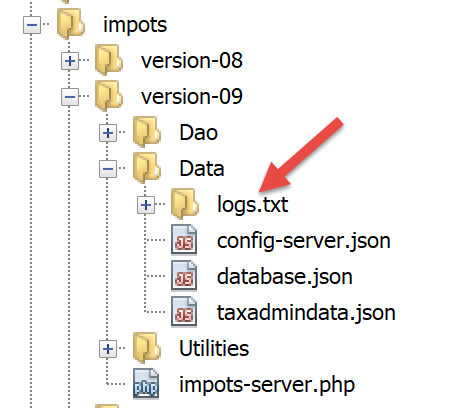
بعد ذلك، نقوم بتشغيل العميل.
على جانب العميل، تظهر النتائج التالية في وحدة التحكم:
L'erreur suivante s'est produite : {"statut HTTP":500,"erreur":"Echec lors de la création du fichier de logs [Data\/logs.txt]"}
Terminé
على جانب الخادم، لا توجد سجلات، لكن المسؤول يتلقى البريد الإلكتروني التالي:
return-path: guest@localhost
received: from localhost (localhost [127.0.0.1]) by DESKTOP-528I5CU with ESMTP ; Thu, 4 Jul 2019 15:31:49 +0200
message-id: <b2cee274f3437952231d62152ba1cdb3@localhost>
date: Thu, 04 Jul 2019 13:31:48 +0000
subject: plantage du serveur de calcul d'impôts
from: guest@localhost
to: guest@localhost
mime-version: 1.0
content-type: text/plain; charset=utf-8
content-transfer-encoding: quoted-printable

Echec lors de la création du fichier de logs [Data/logs.txt]
19.3.4. الاختبار 4
هذه المرة، سنقوم في ملف تكوين العميل بإدخال بيانات اعتماد خاطئة للعميل الذي يقوم بالاتصال.
يعرض العميل النتائج التالية على وحدة التحكم:
L'erreur suivante s'est produite : {"statut HTTP":401,"erreur":"Echec de l'authentification [x, x]"}
Terminé
على جانب الخادم، تظهر السجلات التالية:
---nouvelle requête
04/07/19 13:36:05:789 : Autentification en cours…
04/07/19 13:36:05:789 : {"réponse":{"erreur":"Echec de l'authentification [x, x]"}}
19.3.5. الاختبار 5
لنعد إدخال المستخدم الصحيح [admin, admin] في ملف تكوين العميل.
والآن، دعونا نطلب URL [http://localhost/php7/scripts-web/impots/version-08/impots-server.php] من الخادم مباشرةً في متصفح دون تمرير أي معلمات:
في ملف سجلات الخادم [logs.txt]، نجد الأسطر التالية:
---nouvelle requête
04/07/19 13:37:33:711 : Autentification en cours…
04/07/19 13:37:33:711 : Authentification réussie [admin, admin]
04/07/19 13:37:33:711 : {"réponse":{"erreurs":["Méthode GET requise avec les seuls paramètres [marié, enfants, salaire]","paramètre marié manquant","paramètre enfants manquant","paramètre salaire manquant"]}}
19.4. اختبارات [Codeception]
وكما حدث في الإصدارات السابقة، سنقوم بكتابة اختبارات [Codeception] للإصدار 09.
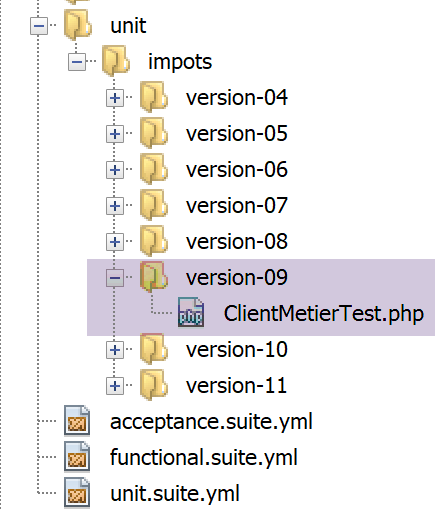
19.4.0.1. اختبار الطبقة [métier]
اختبار [ClientMetierTest.php] هو كما يلي:
<?php

// الالتزام الصارم بأنواع المعلمات المعلنة للدوال
declare (strict_types=1);

// مساحة الأسماء
namespace Application;

// تعريف الثوابت
define("ROOT", "C:/Data/st-2019/dev/php7/poly/scripts-console/impots/version-09");

// مسار ملف التكوين
define("CONFIG_FILENAME", ROOT . "/Data/config-client.json");

// استرداد التكوين
$config = \json_decode(file_get_contents(CONFIG_FILENAME), true);

// تضمين التبعيات اللازمة للنص البرمجي
$rootDirectory = $config["rootDirectory"];
foreach ($config["dependencies"] as $dependency) {
  require "$rootDirectory/$dependency";
}
// التبعيات المطلقة (مكتبات الجهات الخارجية)
foreach ($config["absoluteDependencies"] as $dependency) {
  require "$dependency";
}
//
// استخدامات
use Codeception\Test\Unit;
use const CONFIG_FILENAME;
use const ROOT;

// فئة الاختبار
class ClientMetierTest extends Unit {
  …
}
تعليقات
- بالمقارنة مع فئة الاختبار في الإصدار 08، لم يتغير سوى السطر 10 الذي يحدد المجلد الجذر للعميل المراد اختباره؛
نتائج الاختبار هي كما يلي:

من المثير للاهتمام الاطلاع على سجلات الخادم [logs.txt]:
04/07/19 13:48:48:525 :
---nouvelle requête
04/07/19 13:48:48:536 : Autentification en cours…
04/07/19 13:48:48:536 : Authentification réussie [admin, admin]
04/07/19 13:48:48:536 : paramètres ['marié'=>oui, 'enfants'=>2, 'salaire'=>55555] valides
04/07/19 13:48:48:536 : données fiscales prises en base de données
04/07/19 13:48:48:548 : {"réponse":{"impôt":2814,"surcôte":0,"décôte":0,"réduction":0,"taux":0.14}}
04/07/19 13:48:48:635 :
---nouvelle requête
04/07/19 13:48:48:645 : Autentification en cours…
04/07/19 13:48:48:645 : Authentification réussie [admin, admin]
04/07/19 13:48:48:645 : paramètres ['marié'=>oui, 'enfants'=>2, 'salaire'=>50000] valides
04/07/19 13:48:48:645 : données fiscales prises en base de données
04/07/19 13:48:48:655 : {"réponse":{"impôt":1384,"surcôte":0,"décôte":384,"réduction":347,"taux":0.14}}
04/07/19 13:48:48:751 :
---nouvelle requête
04/07/19 13:48:48:762 : Autentification en cours…
04/07/19 13:48:48:762 : Authentification réussie [admin, admin]
04/07/19 13:48:48:762 : paramètres ['marié'=>oui, 'enfants'=>3, 'salaire'=>50000] valides
04/07/19 13:48:48:762 : données fiscales prises en base de données
04/07/19 13:48:48:773 : {"réponse":{"impôt":0,"surcôte":0,"décôte":720,"réduction":0,"taux":0.14}}
04/07/19 13:48:48:865 :
---nouvelle requête
…
---nouvelle requête
04/07/19 13:48:49:546 : Autentification en cours…
04/07/19 13:48:49:546 : Authentification réussie [admin, admin]
04/07/19 13:48:49:546 : paramètres ['marié'=>oui, 'enfants'=>3, 'salaire'=>200000] valides
04/07/19 13:48:49:546 : données fiscales prises en base de données
04/07/19 13:48:49:551 : {"réponse":{"impôt":42842,"surcôte":17283,"décôte":0,"réduction":0,"taux":0.41}}
نلاحظ أن بيانات مصلحة الضرائب تُؤخذ دائمًا من قاعدة البيانات وليس من الجلسة أبدًا. لنعد إلى كود الاختبار الذي تم تنفيذه:
<?php

// الالتزام الصارم بأنواع المعلمات المعلنة للدوال
declare (strict_types=1);

// مساحة الأسماء
namespace Application;

…

// فئة اختبار
class ClientMetierTest extends Unit {
  // طبقة الأعمال
  private $métier;

  public function __construct() {
    parent::__construct();
    // استرداد التكوين
    $config = \json_decode(\file_get_contents(CONFIG_FILENAME), true);
    // إنشاء الطبقة [dao]
    $clientDao = new ClientDao($config["urlServer"], $config["user"]);
    // إنشاء الطبقة [métier]
    $this->métier = new ClientMetier($clientDao);
  }

  // اختبارات
  public function test1() {
    …
  }

  public function test2() {
    …
  }

  public function test3() {
    …
  }

  …

}
في فئة الاختبار [Codeception]، يتم تنفيذ المنشئ لكل اختبار.
- السطر 21: يتم إنشاء [ClientDao] جديد لكل اختبار مع ملف تعريف ارتباط للجلسة NULL. وهذا يفسر أن هذا العميل لا يستفيد من أي جلسة؛
يوضح لنا هذا المثال أن الجلسة ليست المكان المناسب لتخزين بيانات الإدارة الضريبية. ففي الواقع، هذه البيانات مشتركة بين جميع مستخدمي التطبيق. لكن هنا، يتم تكرارها في كل جلسة من جلسات هؤلاء المستخدمين.
في برمجة الويب، نُميّز بين ثلاثة أنواع من الرؤية للبيانات المشتركة:
- البيانات المشتركة بين جميع مستخدمي تطبيق الويب. وعادةً ما تكون هذه البيانات للقراءة فقط. ولا يتوفر هذا النوع من الذاكرة بشكل أصلي في PHP؛
- البيانات المشتركة بين طلبات العميل نفسه. يتم تخزين هذه البيانات في الجلسة. ويُشار عندئذٍ إلى «جلسة العميل» للإشارة إلى ذاكرة العميل. ويمكن لجميع طلبات العميل الوصول إلى هذه الجلسة، حيث يمكنها تخزين المعلومات وقراءتها منها. في البرامج النصية السابقة، يتم تنفيذ هذه الجلسة بواسطة كائن Symfony [HttpFoundation\Session\Session]؛
- ذاكرة الطلب، أو سياق الطلب. يمكن معالجة طلب المستخدم من خلال عدة إجراءات متتالية. يسمح سياق الطلب لعملية 1 بنقل المعلومات إلى عملية 2. في البرامج النصية السابقة، يتم تنفيذ الطلب بواسطة كائن Symfony [HttpFoundation\Request]، بينما يتم تنفيذ ذاكرته بواسطة السمة [HttpFoundation\Request::attributes]؛
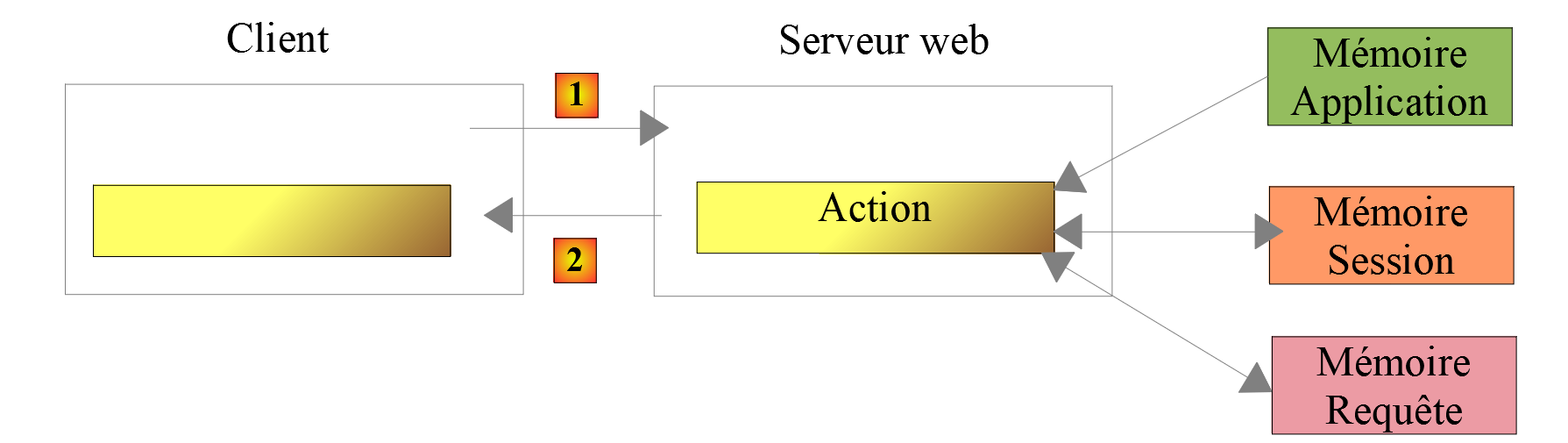
تتوفر مكتبات خارجية لتزويد PHP بذاكرة تطبيق. توضح النسخة الجديدة من تمرين التطبيق كيفية استخدام إحدى هذه المكتبات.