4. تطبيق توضيحي
نقترح توضيح الطريقة السابقة بمثال لحساب الضرائب.
4.1. المشكلة
نقترح كتابة برنامج يسمح بحساب ضريبة أحد دافعي الضرائب. نضع أنفسنا في حالة مبسطة لدافع ضرائب ليس لديه سوى راتبه الوحيد ليصرح عنه:
- نحسب عدد حصص الموظف nbParts=nbEnfants/2 +1 إذا كان غير متزوج، nbEnfants/2+2 إذا كان متزوجًا، حيث nbEnfants هو عدد أطفاله. يزداد عدد الحصص بمقدار 0.5 إذا كان هناك ثلاثة أطفال أو أكثر.
- يتم حساب دخله الخاضع للضريبة R=0.72*S حيث S هو راتبه السنوي
- يتم حساب معامل الأسرة Q=R/N
- يتم حساب ضريبته I بناءً على البيانات التالية
| يحتوي كل سطر على 3 حقول حدودية، وهي coeffR و coeffN. لحساب الضريبة I، نبحث عن السطر الأول الذي يكون فيه QF<=الحد. على سبيل المثال، إذا كان QF=30000، فسنجد السطر: 31810 0.2 3309.5. يكون الضريبة I عندئذٍ مساوية لـ 0.2*R - 3309.5*nbParts. إذا كان QF بحيث لا تتحقق العلاقة QF<=الحد أبدًا، فسيتم استخدام معاملات السطر الأخير: 0 0.65 49062 مما يعطي الضريبة I=0.65*R - 49062*nbParts. |
4.2. قاعدة البيانات
يتم تسجيل البيانات السابقة في قاعدة بيانات تسمى dbimpots. يتمتع المستخدم seldbimpots بكلمة المرور mdpseldbimpots بحق الوصول للقراءة فقط إلى محتوى قاعدة البيانات. تحتوي قاعدة البيانات هذه على جدول واحد يسمى impots، وهيكلها كما يلي:

ومحتواها كما يلي:

4.3. بنية التطبيق MVC
سيكون للتطبيق بنية MVC التالية:
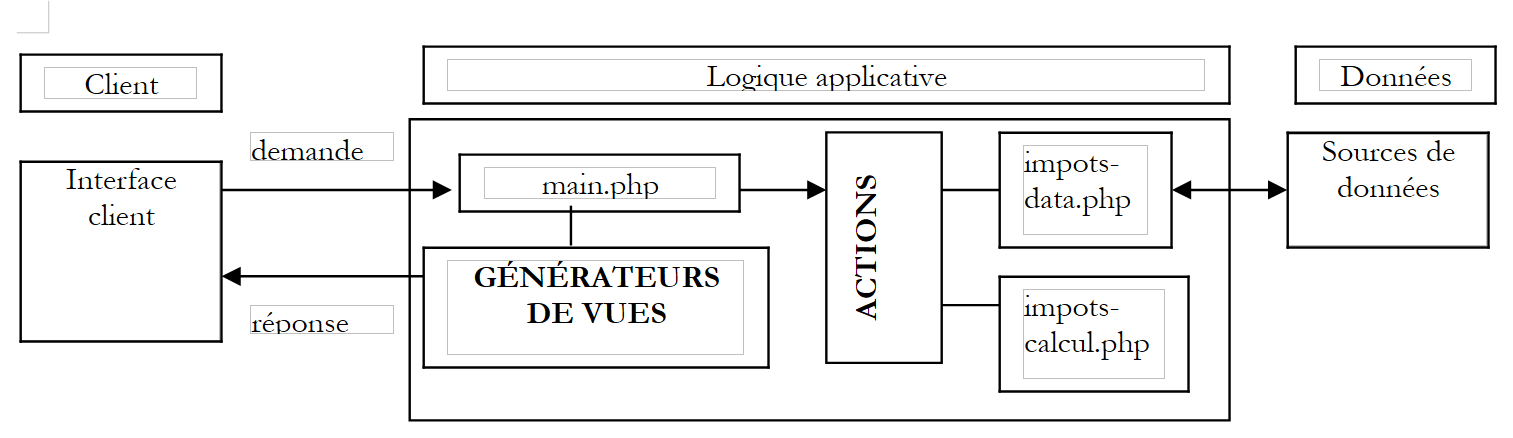 |
- سيكون وحدة التحكم main.php هي وحدة التحكم العامة التي تم عرضها سابقًا
- يتم إرسال طلب العميل إلى وحدة التحكم في شكل استعلام بالصيغة main.php?action=xx. تحدد قيمة المعلمة action البرنامج النصي للكتلة ACTIONS المطلوب تنفيذه. يعيد البرنامج النصي action الذي تم تنفيذه إلى وحدة التحكم متغيرًا يشير إلى الحالة التي يجب وضع التطبيق الويب فيها. وبناءً على هذه الحالة، ستقوم وحدة التحكم بتنشيط أحد مولدات العروض لإرسال الاستجابة إلى العميل.
- impots-data.php هي الفئة المسؤولة عن تزويد وحدة التحكم بالبيانات التي تحتاجها
- impots-calcul.php هي الفئة التجارية التي تسمح بحساب الضريبة
4.4. فئة الوصول إلى البيانات
تم إنشاء فئة الوصول إلى البيانات لإخفاء مصدر البيانات عن تطبيق الويب. في واجهتها، نجد طريقة getData التي تقدم الجداول الثلاثة للبيانات اللازمة لحساب الضريبة. في مثالنا، يتم أخذ البيانات من قاعدة بيانات MySQL. ولجعل الفئة مستقلة عن النوع الفعلي لـ SGBD، سنستخدم مكتبة pear::DB الموضحة في الملحق. وفيما يلي كود الفئة:
<?php

   // المكتبات
  require_once 'DB.php';

  class impots_data{
     // فئة الوصول إلى مصدر البيانات DBIMPOTS

       // السمات
        var $sDSN;         // سلسلة الاتصال
        var $sDatabase;    // اسم قاعدة البيانات
        var $oDB;          // الاتصال بقاعدة البيانات
        var $aErreurs;     // قائمة الأخطاء
        var $oRésultats;   // نتيجة الاستعلام
        var $connecté;     // قيمة منطقية تشير إلى ما إذا كان المستخدم متصلاً بالقاعدة أم لا
        var $sQuery ;      // آخر استعلام تم تنفيذه

     // منشئ
    function impots_data($dDSN){

         // $dDSN: قاموس يحدد الارتباط المطلوب إنشاؤه
       // $dDSN['sgbd']: نوع SGBD الذي يجب الاتصال به
       // $dDSN['host']: اسم الجهاز المضيف الذي يستضيفه
       // $dDSN['database']: اسم قاعدة البيانات التي يجب الاتصال بها
       // $dDSN['user']: أحد مستخدمي قاعدة البيانات
       // $dDSN['mdp']: كلمة المرور الخاصة به

       // ينشئ في $oDB اتصالاً بالقاعدة المحددة بواسطة $dDSN تحت هوية $dDSN['user']
       // إذا نجح الاتصال
           // يضع في $sDSN سلسلة الاتصال بالقاعدة
           // يضع في $sDataBase اسم قاعدة البيانات التي يتم الاتصال بها
         // يضع $connecté على "صحيح"
       // إذا فشل الاتصال
           // يضع رسائل الخطأ المناسبة في القائمة $aErreurs
         // يغلق الاتصال إذا لزم الأمر
         // يضع $connecté على "خطأ"

       // مسح قائمة الأخطاء
            $this->aErreurs=array();

       // يتم إنشاء اتصال بالقاعدة $sDSN
      $this->sDSN=$dDSN["sgbd"]."://".$dDSN["user"].":".$dDSN["mdp"]."@".$dDSN["host"]."/".$dDSN["database"];
      $this->sDatabase=$dDSN["database"];
      $this->connect();

       // متصل؟
      if( ! $this->connecté) return;

       // نجح الاتصال
      $this->connecté=TRUE;
    }//المصمم

    // ------------------------------------------------------------------
    function connect(){
         // (إعادة) الاتصال بالقاعدة
       // مسح قائمة الأخطاء
            $this->aErreurs=array();

       // يتم إنشاء اتصال بالقاعدة $sDSN
        $this->oDB=DB::connect($this->sDSN,true);

         // خطأ؟
        if(DB::iserror($this->oDB)){
           // تسجيل الخطأ
          $this->aErreurs[]="Echec de la connexion à la base [".$this->sDatabase."] : [".$this->oDB->getMessage()."]";
         // فشل الاتصال
        $this->connecté=FALSE;
         // النهاية
        return;
      }

       // تم الاتصال
      $this->connecté=TRUE;
    }//اتصال

    // ------------------------------------------------------------------
    function disconnect(){
       // إذا كنا متصلين، نغلق الاتصال بالقاعدة $sDSN
        if($this->connecté){
              $this->oDB->disconnect();
           // تم قطع الاتصال
        $this->connecté=FALSE;
            }//إذا
    }//disconnect

    // -------------------------------------------------------------------
    function execute($sQuery){
         // $sQuery: طلب للتنفيذ

         // يتم حفظ الطلب
            $this->sQuery=$sQuery;

       // هل نحن متصلون؟
      if(! $this->connecté){
           // يتم تسجيل الخطأ
        $this->aErreurs[]="Pas de connexion existante à la base [$this->sDatabase]";
         // النهاية
        return;
      }//if

       // تنفيذ الطلب
      $this->oRésultats=$this->oDB->query($sQuery);

         // خطأ؟
        if(DB::iserror($this->oRésultats)){
             // يتم تسجيل الخطأ
            $this->aErreurs[]="Echec de la requête [$sQuery] : [".$this->oRésultats->getMessage()."]";
           // العودة
        return;
      }//if
    }//تنفيذ

    // ------------------------------------------------------------------
    function getData(){
       // يتم استرداد 3 سلاسل من البيانات limits، coeffr، coeffn
      $this->execute('select limites, coeffR, coeffN from impots');
       // هل توجد أخطاء؟
      if(count($this->aErreurs)!=0) return array();
       // نستعرض نتيجة عملية الاختيار
      while ($ligne = $this->oRésultats->fetchRow(DB_FETCHMODE_ASSOC)) {
        $limites[]=$ligne['limites'];
        $coeffr[]=$ligne['coeffR'];
        $coeffn[]=$ligne['coeffN'];
      }//while
      return array($limites,$coeffr,$coeffn);
    }//getDataImpots

  }//فئة
?>
قد يكون برنامج الاختبار كما يلي:
<?php

  // مكتبة
  require_once "c-impots-data.php";
  require_once "DB.php";

    // اختبار فئة impots-data
  ini_set('track_errors','on');
  ini_set('display_errors','on');

     // تكوين قاعدة بيانات dbimpots
    $dDSN=array(
        "sgbd"=>"mysql",
        "user"=>"seldbimpots",
        "mdp"=>"mdpseldbimpots",
        "host"=>"localhost",
        "database"=>"dbimpots"
    );

  // تسجيل الدخول
  $oImpots=new impots_data($dDSN);
  // أخطاء؟
  if(checkErreurs($oImpots)){
    exit(0);
  }
  // المتابعة
  echo "Connecté à la base...\n";

  // استرداد بيانات الحدود، coeffr، coeffn
  list($limites,$coeffr,$coeffn)=$oImpots->getData();
  // أخطاء؟
  if( ! checkErreurs($oImpots)){
    // المحتوى
    echo "données : \n";
    for($i=0;$i<count($limites);$i++){
      echo "[$limites[$i],$coeffr[$i],$coeffn[$i]]\n";
    }//for
  }//if

  // يتم قطع الاتصال
  $oImpots->disconnect();
  // متابعة
  echo "Déconnecté de la base...\n";
  // النهاية
  exit(0);

  // ----------------------------------
  function checkErreurs(&$oImpots){
      // أخطاء؟
    if(count($oImpots->aErreurs)!=0){
        // عرض
      for($i=0;$i<count($oImpots->aErreurs);$i++){
          echo $oImpots->aErreurs[$i]."\n";
      }//من أجل
      // أخطاء
      return true;
    }//if
    // لا توجد أخطاء
    return false;
  }//checkErreurs

?>
يؤدي تشغيل برنامج الاختبار هذا إلى النتائج التالية:
Connecté à la base...
données :
[12620,0,0]
[13190,0.05,631]
[15640,0.1,1290.5]
[24740,0.15,2072.5]
[31810,0.2,3309.5]
[39970,0.25,4900]
[48360,0.3,6898]
[55790,0.35,9316.5]
[92970,0.4,12106]
[127860,0.45,16754]
[151250,0.5,23147.5]
[172040,0.55,30710]
[195000,0.6,39312]
[0,0.65,49062]
Déconnecté de la base...
4.5. فئة حساب الضريبة
تسمح هذه الفئة بحساب ضريبة المكلف. يتم تزويد منشئها بالبيانات التي تسمح بهذا الحساب. ثم يتولى هو حساب الضريبة المقابلة. رمز الفئة هو التالي:
<?php

  class impots_calcul{
    // فئة حساب الضريبة

    // الشركة المصنعة
    function impots_calcul(&$perso,&$data){
      // $perso: قاموس يحتوي على المفاتيح التالية
      // الأطفال: عدد الأطفال
      // الراتب: الراتب السنوي
      // متزوج(ة): قيمة منطقية تشير إلى ما إذا كان المكلف متزوجًا أم لا
      // الضريبة (الضرائب): الضريبة المستحقة الدفع المحسوبة بواسطة هذا المُنشئ
      // $data: قاموس يحتوي على المفاتيح التالية
      // الحدود: جدول حدود الشرائح
      // coeffr: جدول معاملات الدخل
      // coeffn: جدول معاملات عدد الحصص
      // تحتوي الجداول الثلاثة على نفس عدد العناصر

      // حساب عدد الحصص
      if($perso['marié'])
        $nbParts=$perso['enfants']/2+2;
        else $nbParts=$perso['enfants']/2+1;
      if ($perso['enfants']>=3) $nbParts+=0.5;

      // الدخل الخاضع للضريبة
      $revenu=0.72*$perso['salaire'];

      // الحصة العائلية
      $QF=$revenu/$nbParts;

      // البحث عن شريحة الضرائب المطابقة لـ QF
      $nbTranches=count($data['limites']);
      $i=0;
      while($i<$nbTranches-2 && $QF>$data['limites'][$i]) $i++;

      // الضريبة
      $perso['impot']=floor($data['coeffr'][$i]*$revenu-$data['coeffn'][$i]*$nbParts);
    }//المُصنِّع
  }//الفئة
?>
قد يكون برنامج الاختبار كما يلي:
<?php

  // مكتبة
  require_once "c-impots-data.php";
  require_once "c-impots-calcul.php";

     // تكوين قاعدة بيانات dbimpots
    $dDSN=array(
        "sgbd"=>"mysql",
        "user"=>"seldbimpots",
        "mdp"=>"mdpseldbimpots",
        "host"=>"localhost",
        "database"=>"dbimpots"
    );

  // تسجيل الدخول
  $oImpots=new impots_data($dDSN);
  // أخطاء؟
  if(checkErreurs($oImpots)){
    exit(0);
  }
  // المتابعة
  echo "Connecté à la base...\n";
  // استرداد بيانات الحدود، coeffr، coeffn
  list($limites,$coeffr,$coeffn)=$oImpots->getData();
  // أخطاء؟
  if(checkErreurs($oImpots)){
    exit(0);
  }
  // قطع الاتصال
  $oImpots->disconnect();
  // متابعة
  echo "Déconnecté de la base...\n";

  // حساب ضريبة
  $dData=array('limites'=>&$limites,'coeffr'=>&$coeffr,'coeffn'=>&$coeffn);
  $dPerso=array('enfants'=>2,'salaire'=>200000,'marié'=>true,'impot'=>0);
  new impots_calcul($dPerso,$dData);
  dump($dPerso);
  $dPerso=array('enfants'=>3,'salaire'=>200000,'marié'=>false,'impot'=>0);
  new impots_calcul($dPerso,$dData);
  dump($dPerso);
  $dPerso=array('enfants'=>3,'salaire'=>20000,'marié'=>true,'impot'=>0);
  new impots_calcul($dPerso,$dData);
  dump($dPerso);
  $dPerso=array('enfants'=>3,'salaire'=>2000000,'marié'=>true,'impot'=>0);
  new impots_calcul($dPerso,$dData);
  dump($dPerso);

  // نهاية
  exit(0);

  // ----------------------------------
  function checkErreurs(&$oImpots){
      // أخطاء؟
    if(count($oImpots->aErreurs)!=0){
        // عرض
      for($i=0;$i<count($oImpots->aErreurs);$i++){
          echo $oImpots->aErreurs[$i]."\n";
      }//for
      // أخطاء
      return true;
    }//if
    // لا توجد أخطاء
    return false;
  }//checkErreurs

?>
يؤدي تنفيذ برنامج الاختبارات هذا إلى النتائج التالية:
Connecté à la base...
Déconnecté de la base...
[enfants,2] [salaire,200000] [marié,1] [impot,22506]
[enfants,3] [salaire,200000] [marié,] [impot,22506]
[enfants,3] [salaire,20000] [marié,1] [impot,0]
[enfants,3] [salaire,2000000] [marié,1] [impot,706752]
4.6. طريقة عمل التطبيق
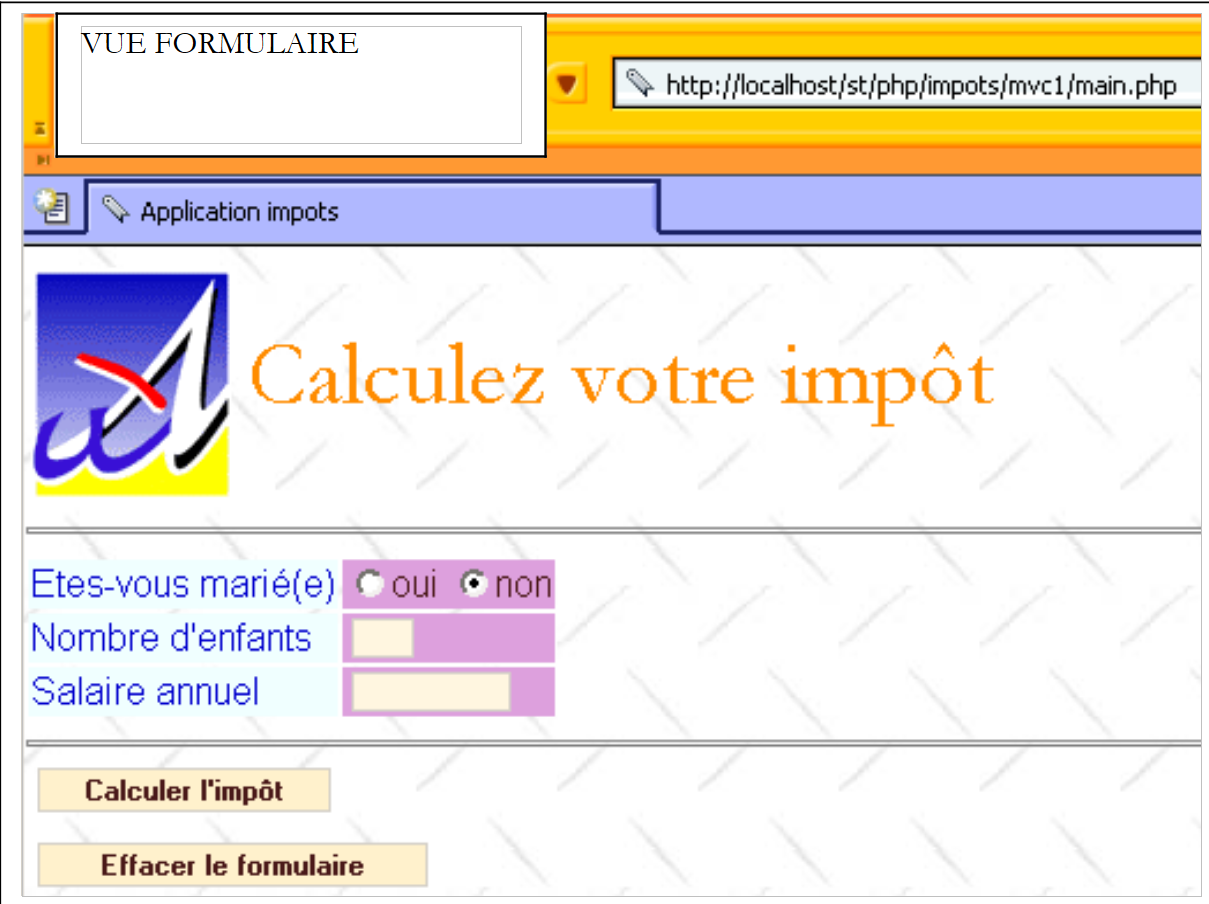
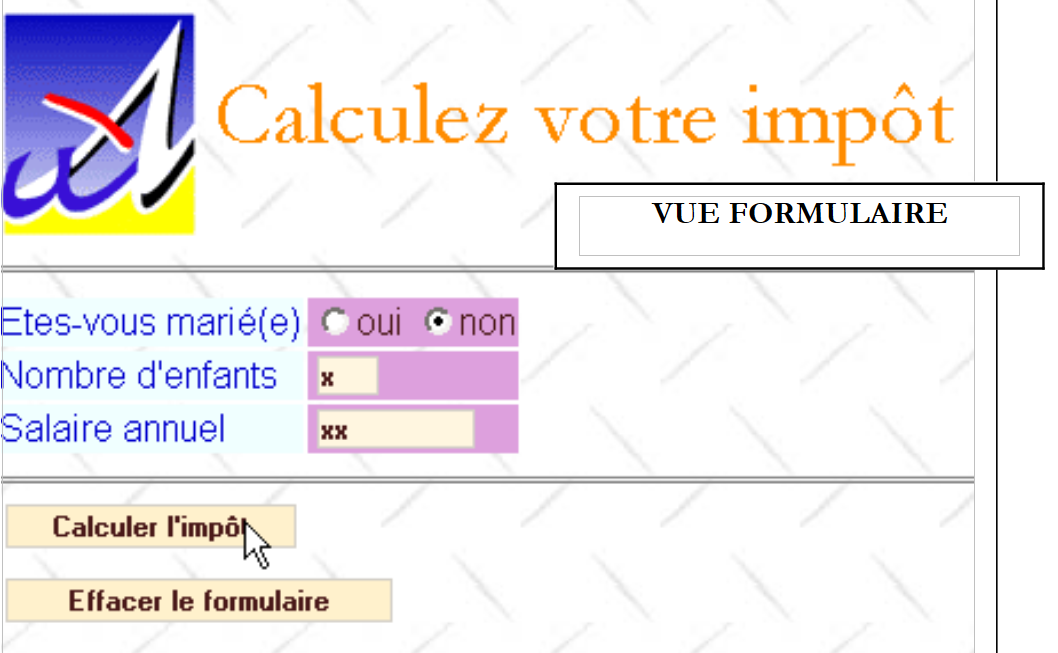
عند تشغيل تطبيق الويب لحساب الضريبة، تظهر الشاشة التالية [v-formulaire]:
 |
يقوم المستخدم بملء الحقول ويطلب حساب الضريبة:
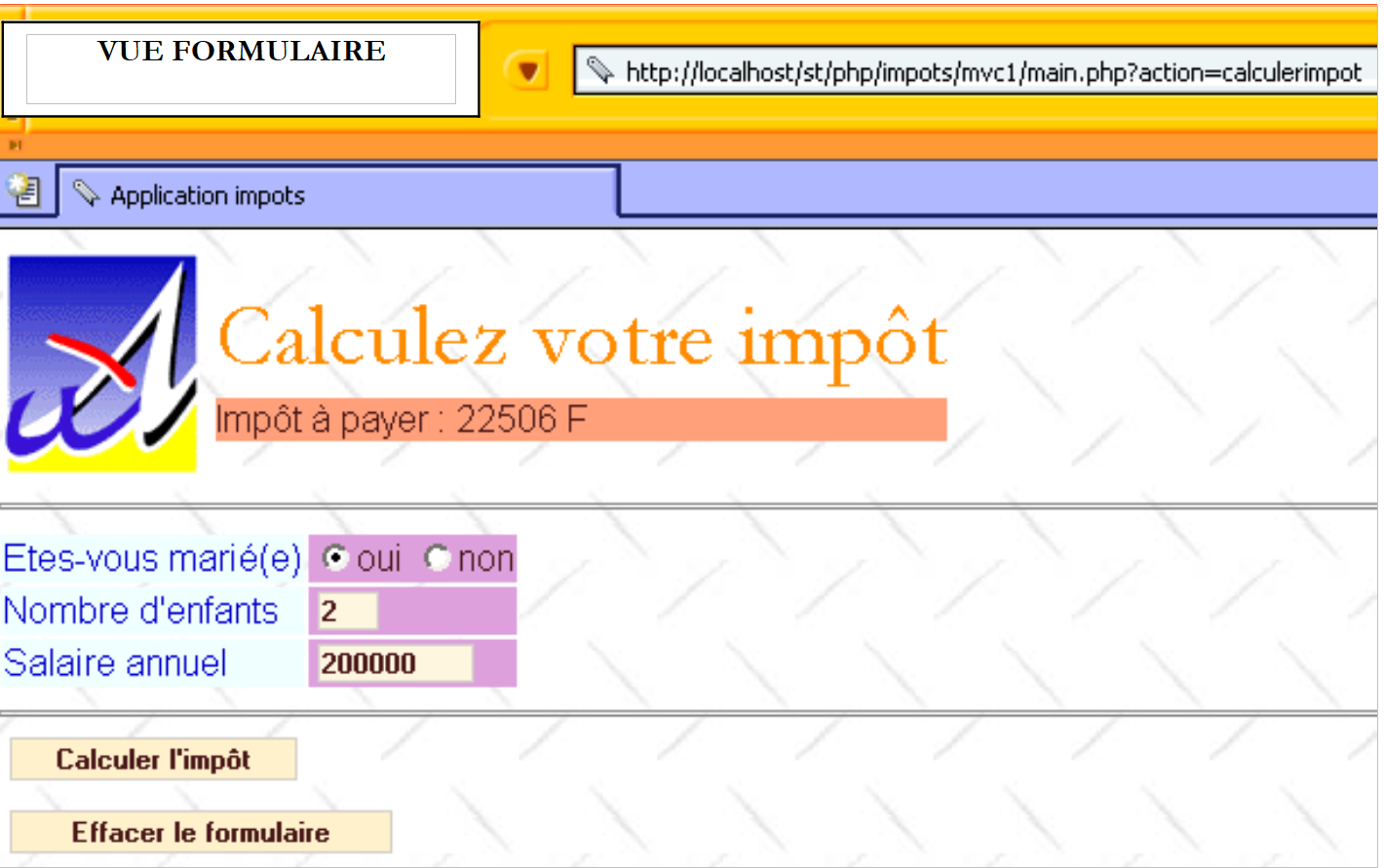 |
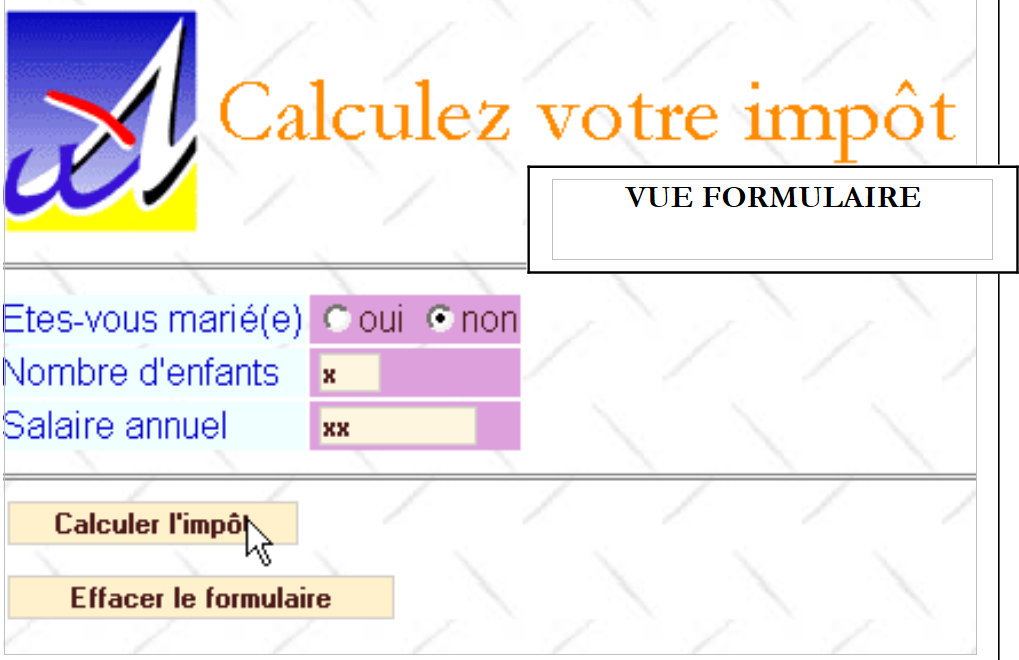
يُلاحظ أن النموذج يتم إعادة إنشاؤه في الحالة التي قام المستخدم بالتصديق عليها، كما أنه يعرض مبلغ الضريبة المستحقة. قد يرتكب المستخدم أخطاء في الإدخال. يتم الإبلاغ عن هذه الأخطاء من خلال صفحة أخطاء نسميها العرض [v-erreurs].
 |
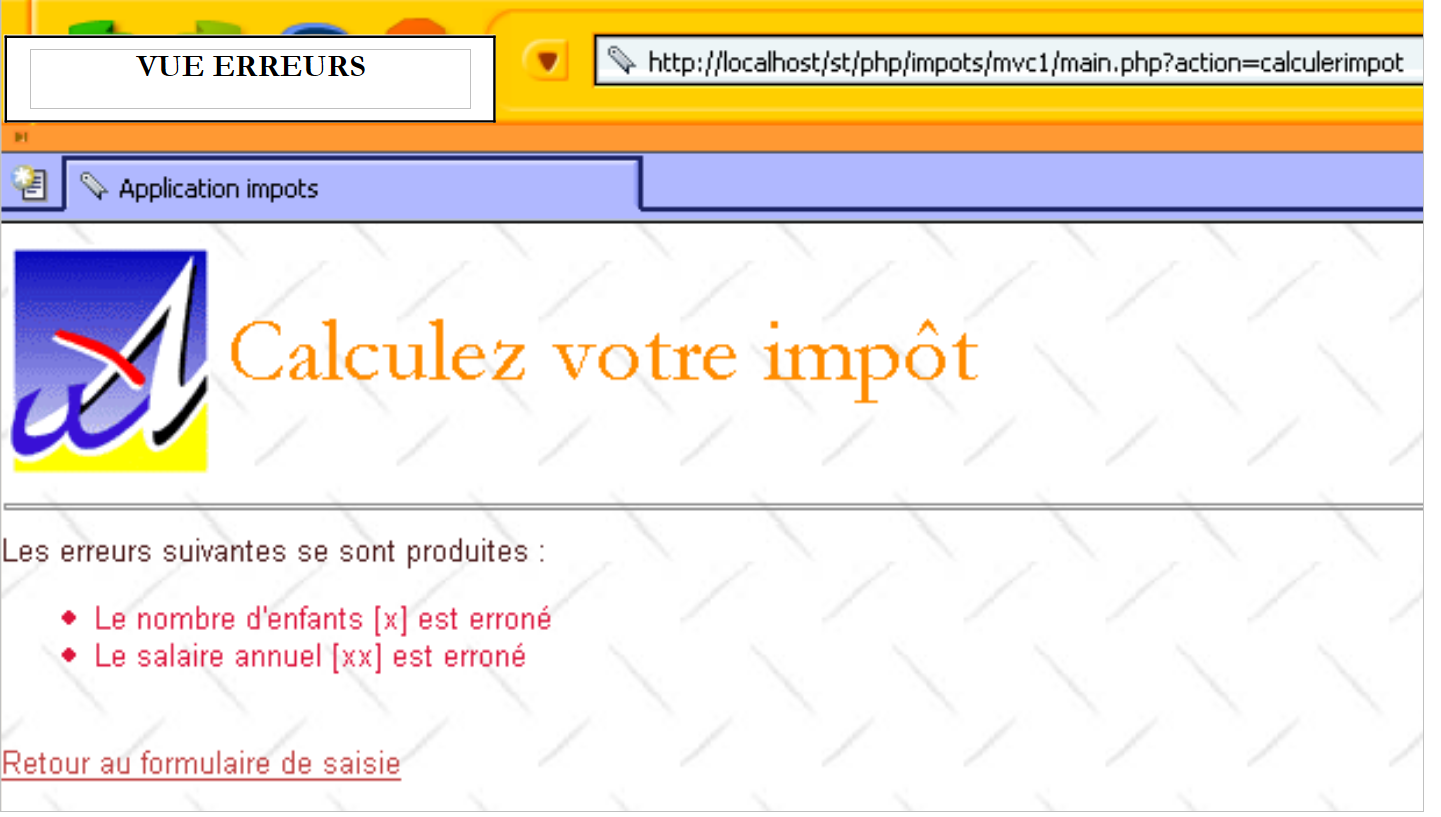 |
يتيح الرابط [Retour au formulaire de saisie] للمستخدم العثور على النموذج كما تم تأكيده.
 |
وأخيرًا، يعيد الزر [Effacer le formulaire] النموذج إلى حالته الأولية، c.a.d، كما استلمه المستخدم عند الطلب الأولي.
4.7. نظرة على بنية التطبيق MVC
تتميز التطبيق بالبنية التالية:
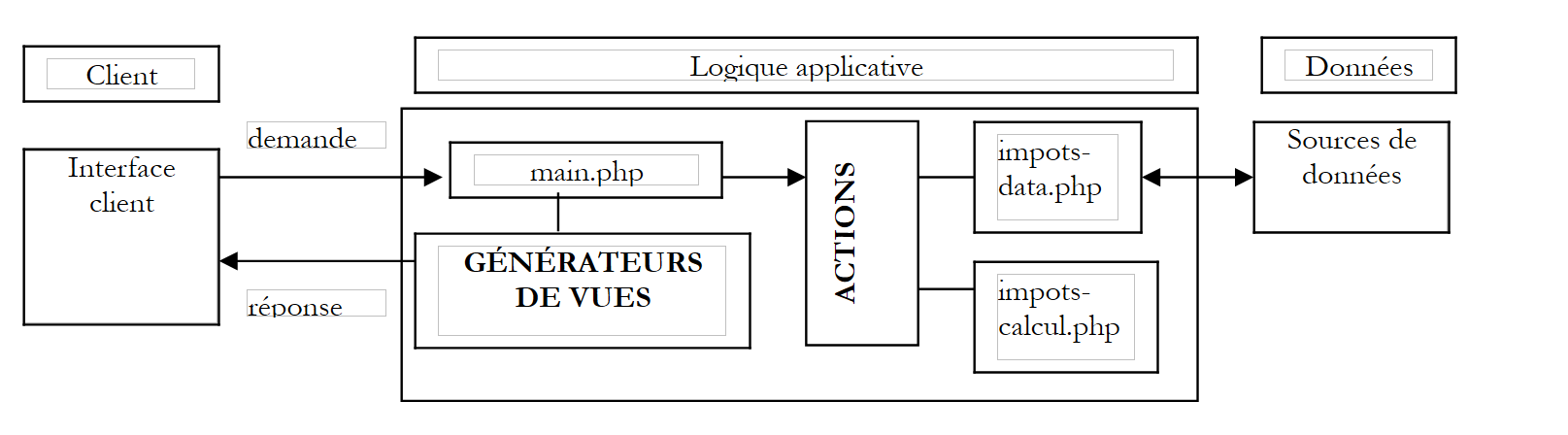 |
لقد وصفنا للتو الفئتين impots-data.php و impots-calcul.php. سنقوم الآن بوصف العناصر الأخرى للبنية.
4.8. وحدة التحكم في التطبيق
وحدة التحكم main.php للتطبيق هي تلك التي تم وصفها في الجزء الأول من هذا الفصل. وهي وحدة تحكم عامة مستقلة عن التطبيق.
<?php
     // وحدة تحكم عامة

  // قراءة التكوين
  include 'config.php';

  // تضمين المكتبات
  for($i=0;$i<count($dConfig['includes']);$i++){
      include($dConfig['includes'][$i]);
  }//for

  // بدء أو استئناف الجلسة
  session_start();
  $dSession=$_SESSION["session"];
  if($dSession) $dSession=unserialize($dSession);

  // استرداد الإجراء المطلوب
  $sAction=$_GET['action'] ? strtolower($_GET['action']) : 'init';
  $sAction=strtolower($_SERVER['REQUEST_METHOD']).":$sAction";

     // هل تسلسل الإجراءات طبيعي؟
  if( ! enchainementOK($dConfig,$dSession,$sAction)){
    // تسلسل غير طبيعي
    $sAction='enchainementinvalide';
  }//if

     // معالجة الإجراء
  $scriptAction=$dConfig['actions'][$sAction] ?
    $dConfig['actions'][$sAction]['url'] :
    $dConfig['actions']['actionInvalide']['url'];
  include $scriptAction;


  // إرسال الرد (العرض) إلى العميل
  $sEtat=$dSession['etat']['principal'];
  $scriptVue=$dConfig['etats'][$sEtat]['vue'];
  include $scriptVue;

  // نهاية البرنامج النصي - لا ينبغي الوصول إلى هذه المرحلة إلا في حالة وجود خطأ
  trace ("Erreur de configuration.");
  trace("Action=[$sAction]");
  trace("scriptAction=[$scriptAction]");
  trace("Etat=[$sEtat]");
  trace("scriptVue=[$scriptVue]");
  trace ("Vérifiez que les script existent et que le script [$scriptVue] se termine par l'appel à finSession.");
  exit(0);

  // ---------------------------------------------------------------
  function finSession(&$dConfig,&$dReponse,&$dSession){
    // $dConfig: قاموس التكوين
      // $dSession: قاموس يحتوي على معلومات الجلسة
         // $dReponse: قاموس معلمات صفحة الاستجابة

    // تسجيل الجلسة
    if(isset($dSession)){
      // يتم وضع معلمات الطلب في الجلسة
      $dSession['requete']=strtolower($_SERVER['REQUEST_METHOD'])=='get' ? $_GET :
          strtolower($_SERVER['REQUEST_METHOD'])=='post' ? $_POST : array();
        $_SESSION['session']=serialize($dSession);
      session_write_close();
    }else{
        // لا توجد جلسة
      session_destroy();
    }

        // عرض الرد
        include $dConfig['vuesReponse'][$dReponse['vuereponse']]['url'];

    // نهاية البرنامج النصي
    exit(0);
  }//إنهاء الجلسة

  //--------------------------------------------------------------------
    function enchainementOK(&$dConfig,&$dSession,$sAction){
      // التحقق مما إذا كان الإجراء الحالي مسموحًا به بالنسبة للحالة السابقة
    $etat=$dSession['etat']['principal'];
    if(! isset($etat)) $etat='sansetat';

    // التحقق من الإجراء
    $actionsautorisees=$dConfig['etats'][$etat]['actionsautorisees'];
    $autorise= ! isset($actionsautorisees) || in_array($sAction,$actionsautorisees);
        return $autorise;
  }

  //--------------------------------------------------------------------
  function dump($dInfos){
      // عرض قاموس المعلومات
    while(list($clé,$valeur)=each($dInfos)){
        echo "[$clé,$valeur]<br>\n";
    }//while
  }//المتابعة

  //--------------------------------------------------------------------
  function trace($msg){
      echo $msg."<br>\n";
  }//المتابعة
?>
4.9. إجراءات تطبيق الويب
هناك أربعة إجراءات:
- get:init: هي الإجراء الذي يتم تشغيله عند الطلب الأولي بدون معلمات إلى وحدة التحكم. وهي تولد عرض "نموذج" فارغ.
- post:effacerformulaire: إجراء يتم تشغيله بواسطة الزر [Effacer le formulaire]. يقوم بإنشاء عرض [v-formulaire] فارغ.
- post:calculerimpot: الإجراء الذي يتم تشغيله بواسطة الزر [Calculer l'impôt]. يقوم بإنشاء إما العرض [v-formulaire] مع مبلغ الضريبة المستحقة، أو العرض [v-erreurs].
- get:retourformulaire: إجراء يتم تشغيله بواسطة الرابط [Retour au formulaire de saisie]. ويقوم بإنشاء العرض [v-formulaire] مملوءًا مسبقًا بالبيانات الخاطئة.
يتم تكوين هذه الإجراءات على النحو التالي في ملف التكوين:
<?php
…
  // تكوين إجراءات التطبيق
  $dConfig['actions']['get:init']=array('url'=>'a-init.php');
  $dConfig['actions']['post:calculerimpot']=array('url'=>'a-calculimpot.php');
  $dConfig['actions']['get:retourformulaire']=array('url'=>'a-retourformulaire.php');
  $dConfig['actions']['post:effacerformulaire']=array('url'=>'a-init.php');
  $dConfig['actions']['enchainementinvalide']=array('url'=>'a-enchainementinvalide.php');
  $dConfig['actions']['actionInvalide']=array('url'=>'a-actioninvalide.php');
يرتبط بكل إجراء البرنامج النصي المسؤول عن معالجته. سيؤدي كل إجراء إلى نقل تطبيق الويب إلى حالة يحددها العنصر $dSession['etat']['principal']. ويُقصد بهذه الحالة أن يتم حفظها في الجلسة. بالإضافة إلى ذلك، تسجل الإجراء في القاموس $dReponse المعلومات المفيدة لعرض النظرة المرتبطة بالحالة الجديدة التي سيكون عليها التطبيق.
4.10. حالات تطبيق الويب
هناك حالتان:
- [e-formulaire]: حالة يتم فيها عرض المتغيرات المختلفة للطريقة [v-formulaire].
- [e-erreurs]: الحالة التي يتم فيها عرض العرض [v-erreurs].
الإجراءات المسموح بها في هذه الحالات هي التالية:
<?php
…
  // تكوين حالات التطبيق
  $dConfig['etats']['formulaire']=array(
       'actionsautorisees'=>array('post:calculerimpot','get:init','post:effacerformulaire'),
    'vue'=>'e-formulaire.php');
  $dConfig['etats']['erreurs']=array(
      'actionsautorisees'=>array('get:retourformulaire','get:init'),
      'vue'=>'e-erreurs.php');
  $dConfig['etats']['sansetat']=array('actionsautorisees'=>array('get:init'));
في الحالة، تتوافق الإجراءات المسموح بها مع أهداف الروابط أو الأزرار في العرض المرتبط بالحالة. بالإضافة إلى ذلك، فإن الإجراء 'get:init' مسموح به دائمًا. وهذا يسمح للمستخدم باسترداد URL main.php من قائمة URL في متصفحه وإعادة تشغيله بغض النظر عن حالة التطبيق. وهذا نوع من إعادة الضبط "يدويًا". لا توجد حالة "sansetat" إلا عند بدء تشغيل التطبيق.
يتم ربط كل حالة من حالات التطبيق ببرنامج نصي مسؤول عن إنشاء العرض المرتبط بالحالة:
- الحالة [e-formulaire]: البرنامج النصي e-formulaire.php
- الحالة [e-erreurs]: البرنامج النصي e-erreurs.php
سيعرض التقرير [e-formulaire] العرض [v-formulaire] مع بعض الاختلافات. ففي الواقع، يمكن عرض العرض [v-formulaire] فارغًا أو مملوءًا مسبقًا أو مع مبلغ الضريبة. تحدد الإجراء الذي سيؤدي إلى انتقال التطبيق إلى الحالة [e-formulaire] في المتغير $dSession['etat']['principal'] الحالة الرئيسية للتطبيق. لا يستخدم وحدة التحكم سوى هذه المعلومات. في تطبيقنا، ستضيف الإجراء الذي يؤدي إلى الحالة [e-formulaire] في $dSession['etat']['secondaire'] معلومات إضافية تسمح لمولد الاستجابة بمعرفة ما إذا كانيجب عليه إنشاء نموذج فارغ، أو مملوء مسبقًا، مع أو بدون مبلغ الضريبة. كان من الممكن اتباع نهج مختلف باعتبار أن هناك ثلاث حالات مختلفة وبالتالي ثلاثة مولدات للعرض يجب كتابتها.
4.11. ملف تكوين تطبيق الويب config.php
<?php

     // تكوين php
  ini_set("register_globals","off");
  ini_set("display_errors","off");
  ini_set("expose_php","off");

  // قائمة الوحدات النمطية المطلوب تضمينها
  $dConfig['includes']=array('c-impots-data.php','c-impots-calcul.php');

  // وحدة التحكم في التطبيق
  $dConfig['webapp']=array('titre'=>"Calculez votre impôt");

  // تكوين طرق عرض التطبيق
  $dConfig['vuesReponse']['modele1']=array('url'=>'m-reponse.php');
  $dConfig['vuesReponse']['modele2']=array('url'=>'m-reponse2.php');
  $dConfig['vues']['formulaire']=array('url'=>'v-formulaire.php');
  $dConfig['vues']['erreurs']=array('url'=>'v-erreurs.php');
  $dConfig['vues']['formulaire2']=array('url'=>'v-formulaire2.php');
  $dConfig['vues']['erreurs2']=array('url'=>'v-erreurs2.php');
  $dConfig['vues']['bandeau']=array('url'=>'v-bandeau.php');
  $dConfig['vues']['menu']=array('url'=>'v-menu.php');
  $dConfig['style']['url']='style1.css';

  // تكوين إجراءات التطبيق
  $dConfig['actions']['get:init']=array('url'=>'a-init.php');
  $dConfig['actions']['post:calculerimpot']=array('url'=>'a-calculimpot.php');
  $dConfig['actions']['get:retourformulaire']=array('url'=>'a-retourformulaire.php');
  $dConfig['actions']['post:effacerformulaire']=array('url'=>'a-init.php');
  $dConfig['actions']['enchainementinvalide']=array('url'=>'a-enchainementinvalide.php');
  $dConfig['actions']['actionInvalide']=array('url'=>'a-actioninvalide.php');

  // تكوين حالات التطبيق
  $dConfig['etats']['e-formulaire']=array(
       'actionsautorisees'=>array('post:calculerimpot','get:init','post:effacerformulaire'),
    'vue'=>'e-formulaire.php');
  $dConfig['etats']['e-erreurs']=array(
      'actionsautorisees'=>array('get:retourformulaire','get:init'),
      'vue'=>'e-erreurs.php');
  $dConfig['etats']['sansetat']=array('actionsautorisees'=>array('get:init'));

  // تكوين نموذج التطبيق
    $dConfig["DSN"]=array(
        "sgbd"=>"mysql",
        "user"=>"seldbimpots",
        "mdp"=>"mdpseldbimpots",
        "host"=>"localhost",
        "database"=>"dbimpots"
    );
?>
4.12. إجراءات تطبيق الويب
4.12.1. العمل العام لبرامج الإجراءات النصية
- يتم استدعاء برنامج نصي الإجراء بواسطة وحدة التحكم وفقًا لمعلمة الإجراء التي تلقتها من العميل.
- بعد التنفيذ، يجب أن يشير البرنامج النصي للإجراء إلى وحدة التحكم بالحالة التي يجب وضع التطبيق فيها. يجب الإشارة إلى هذه الحالة في $dSession['etat']['principal'].
- قد يرغب نص برمجي الإجراء في وضع معلومات في الجلسة. ويقوم بذلك عن طريق وضعها في القاموس $dSession، حيث يتم حفظ هذا القاموس تلقائيًا في الجلسة بواسطة وحدة التحكم في نهاية دورة الطلب والاستجابة.
- قد يحتوي برنامج نصي للعمل على معلومات يجب تمريرها إلى العروض. هذا الجانب مستقل عن وحدة التحكم. يتعلق الأمر بالواجهة بين الأعمال والعروض، وهي واجهة خاصة بكل تطبيق. في المثال الذي ندرسه هنا، ستوفر الأعمال معلومات لمولدات العروض عبر قاموس يسمى $dReponse.
4.12.2. الإجراء get:init
هذه هي الإجراء الذي يولد النموذج الفارغ. يوضح ملف التكوين أنه سيتم معالجته بواسطة البرنامج النصي a-init.php:
رمز البرنامج النصي a-init.php هو التالي:
<?php
     // يتم عرض نموذج الإدخال
  $dSession['etat']=array('principal'=>'e-formulaire', 'secondaire'=>'init');
?>
يقتصر هذا البرنامج النصي على تعيين الحالة التي يجب أن يكون عليها التطبيق في $dSession['etat']['principal']، الحالة [e-formulaire] ويقدم في $dSession['etat']['secondaire'] توضيحًا بشأن هذه الحالة. يُظهر لنا ملف التكوين أن وحدة التحكم ستنفذ البرنامج النصي e-formulaire.php لتوليد الاستجابة للعميل.
<?php
…
  $dConfig['etats']['e-formulaire']=array(
       'actionsautorisees'=>array('post:calculerimpot','get:init','post:effacerformulaire'),
    'vue'=>'e-formulaire.php');
سيقوم البرنامج النصي e-formulaire.php بإنشاء العرض [v-formulaire] في متغيراته [init] و c.a.d. النموذج فارغ.
4.12.3. الإجراء post:calculerimpot
هذه هي الإجراء الذي يسمح بحساب الضريبة بناءً على البيانات التي تم إدخالها في النموذج. يشير ملف التكوين إلى أن البرنامج النصي a-calculimpot.php هو الذي سيعالج هذا الإجراء:
رمز البرنامج النصي a-calculimpot.php هو التالي:
<?php
     // طلب حساب الضريبة

  // التحقق أولاً من صحة المعلمات
  $sOptMarie=$_POST['optmarie'];
  if($sOptMarie!='oui' && $sOptMarie!='non'){
      $erreurs[]="L'état marital [$sOptMarie] est erroné";
  }
  $sEnfants=trim($_POST['txtenfants']);
  if(! preg_match('/^\d{1,3}$/',$sEnfants)){
      $erreurs[]="Le nombre d'enfants [$sEnfants] est erroné";
  }
  $sSalaire=trim($_POST['txtsalaire']);
  if(! preg_match('/^\d+$/',$sSalaire)){
      $erreurs[]="Le salaire annuel [$sSalaire] est erroné";
  }

  // في حالة وجود أخطاء، ينتهي الأمر
  if(count($erreurs)!=0){
      // إعداد صفحة الأخطاء
    $dReponse['erreurs']=&$erreurs;
    $dSession['etat']=array('principal'=>'e-erreurs','secondaire'=>'saisie');
      return;
  }//if

  // البيانات المدخلة صحيحة
  // يتم استرداد البيانات اللازمة لحساب الضريبة
  if(! $dSession['limites']){
      // البيانات غير موجودة في الجلسة
    // يتم استردادها من مصدر البيانات
    list($erreurs,$limites,$coeffr,$coeffn)=getData($dConfig['DSN']);
    // في حالة وجود أخطاء، يتم عرض صفحة الأخطاء
    if(count($erreurs)!=0){
        // تحضير صفحة الأخطاء
      $dReponse['erreurs']=&$erreurs;
        $dSession['etat']=array('principal'=>'e-erreurs','secondaire'=>'database');
      return;
    }//if
    // لا توجد أخطاء - يتم وضع البيانات في الجلسة
    $dSession['limites']=&$limites;
    $dSession['coeffr']=&$coeffr;
    $dSession['coeffn']=&$coeffn;
  }//if

  // هنا لدينا البيانات اللازمة لحساب الضريبة
  // نحسب الضريبة
  $dData=array('limites'=>&$dSession['limites'],
      'coeffr'=>&$dSession['coeffr'],
    'coeffn'=>&$dSession['coeffn']);
  $dPerso=array('enfants'=>$sEnfants,'salaire'=>$sSalaire,'marié'=>($sOptMarie=='oui'),'impot'=>0);
  new impots_calcul($dPerso,$dData);

    // تحضير صفحة الرد
  $dSession['etat']=array('principal'=>'e-formulaire','secondaire'=>'calculimpot');
  $dReponse['impot']=$dPerso['impot'];
  return;

  //-----------------------------------------------------------------------
  function getData($dDSN){
      // الاتصال بمصدر البيانات المحدد بواسطة القاموس $dDSN
        $oImpots=new impots_data($dDSN);
    if(count($oImpots->aErreurs)!=0) return array($oImpots->aErreurs);
    // استرداد البيانات limits و coeffr و coeffn
        list($limites,$coeffr,$coeffn)=$oImpots->getData();
         // يتم قطع الاتصال
        $oImpots->disconnect();
    // إرجاع النتيجة
    if(count($oImpots->aErreurs)!=0) return array($oImpots->aErreurs);
        else return array(array(),$limites,$coeffr,$coeffn);
  }//getData
يقوم البرنامج النصي بما عليه القيام به: حساب الضريبة. نترك للقارئ مهمة فك شفرة معالجة البيانات. ما يهمنا هو الحالات التي قد تنشأ نتيجة لهذا الإجراء:
- إذا كانت البيانات المدخلة غير صحيحة أو حدثت مشكلة في الوصول إلى البيانات: يتم وضع التطبيق في الحالة [e-erreurs]. ويُظهر ملف التكوين أن البرنامج النصي e-erreurs.php هو المسؤول عن إنشاء عرض الاستجابة:
<?php
…
  $dConfig['etats']['e-erreurs']=array(
      'actionsautorisees'=>array('get:retourformulaire','get:init'),
      'vue'=>'e-erreurs.php');
- في جميع الحالات الأخرى، يتم وضع التطبيق في الحالة [e-formulaire] مع المتغير calculimpot المحدد في $dSession['etat']['secondaire']. يُظهر ملف التكوين أن البرنامج النصي e-formulaire.php هو الذي سيقوم بإنشاء عرض الاستجابة. وسيستخدم قيمة $dSession['etat']['secondaire'] لإنشاء نموذج مملوء مسبقًا بالقيم التي أدخلها المستخدم بالإضافة إلى مبلغ الضريبة.
4.12.4. الإجراء post:effacerformulaire
وهي مرتبطة حسب التكوين بالنص البرمجي a-init.php الذي تم وصفه سابقًا.
4.12.5. الإجراء get:retourformulaire
تسمح بالعودة إلى الحالة [e-formulaire] من الحالة [e-erreurs]. البرنامج النصي a-retourformulaire.php هو الذي يعالج هذا الإجراء:
النص البرمجي a-retourformulaire.php هو التالي:
<?php
     // عرض نموذج الإدخال
  $dSession['etat']=array('principal'=>'e-formulaire','secondaire'=>'retourformulaire');
?>
نطلب ببساطة أن يتم وضع التطبيق في الحالة [e-formulaire] في متغيره [retourformulaire]. يوضح لنا ملف التكوين أن وحدة التحكم ستقوم بتنفيذ البرنامج النصي e-formulaire.php لتوليد الاستجابة للعميل.
<?php
…
  $dConfig['etats']['e-formulaire']=array(
       'actionsautorisees'=>array('post:calculerimpot','get:init','post:effacerformulaire'),
    'vue'=>'e-formulaire.php');
سيقوم البرنامج النصي e-formulaire.php بإنشاء العرض [v-formulaire] في متغيراته [retourformulaire] و c.a.d. النموذج المملوء مسبقًا بالقيم التي أدخلها المستخدم ولكن بدون مبلغ الضريبة.
4.13. سلسلة الإجراءات غير صالحة
يتم تحديد الإجراءات الصالحة انطلاقًا من حالة معينة للتطبيق من خلال التكوين:
<?php
…
  // تكوين حالات التطبيق
  $dConfig['etats']['e-formulaire']=array(
       'actionsautorisees'=>array('post:calculerimpot','get:init','post:effacerformulaire'),
    'vue'=>'e-formulaire.php');
  $dConfig['etats']['e-erreurs']=array(
      'actionsautorisees'=>array('get:retourformulaire','get:init'),
      'vue'=>'e-erreurs.php');
  $dConfig['etats']['sansetat']=array('actionsautorisees'=>array('get:init'));
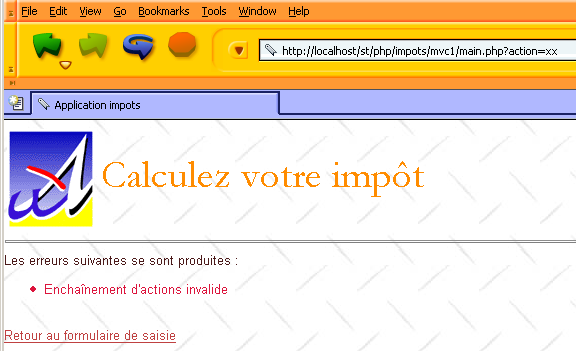
لقد شرحنا هذا التكوين من قبل. إذا تم الكشف عن سلسلة إجراءات غير صالحة، يتم تنفيذ البرنامج النصي a-enchainementinvalide.php:
رمز هذا البرنامج النصي هو التالي:
<?php
     // سلسلة إجراءات غير صالحة
  $dReponse['erreurs']=array("Enchaînement d'actions invalide");
  $dSession['etat']=array('principal'=>'e-erreurs','secondaire'=>'enchainementinvalide');
?>
ويتمثل ذلك في وضع التطبيق في الحالة [e-erreurs]. نقوم في $dSession['etat']['secondaire'] بإدخال معلومات سيتم استخدامها بواسطة مولد صفحة الأخطاء. كما رأينا سابقًا، هذا المولد هو e-erreurs.php:
<?php
…
  $dConfig['etats']['e-erreurs']=array(
      'actionsautorisees'=>array('get:retourformulaire','get:init'),
      'vue'=>'e-erreurs.php');
سنرى كود هذا المولد لاحقًا. العرض المرسَل إلى العميل هو التالي:
4.14. طرق عرض التطبيق
4.14.1. عرض العرض النهائي
لنلقِ نظرة على كيفية إرسال وحدة التحكم للرد إلى العميل، بمجرد تنفيذ الإجراء الذي طلبه العميل:
<?php
…
....
  // بدء الجلسة أو استئنافها
  session_start();
  $dSession=$_SESSION["session"];
  if($dSession) $dSession=unserialize($dSession);

  // استرداد الإجراء المطلوب
  $sAction=$_GET['action'] ? strtolower($_GET['action']) : 'init';
  $sAction=strtolower($_SERVER['REQUEST_METHOD']).":$sAction";

     // هل تسلسل الإجراءات طبيعي؟
  if( ! enchainementOK($dConfig,$dSession,$sAction)){
    // تسلسل غير طبيعي
    $sAction='enchainementinvalide';
  }//if

     // معالجة الإجراء
  $scriptAction=$dConfig['actions'][$sAction] ?
    $dConfig['actions'][$sAction]['url'] :
    $dConfig['actions']['actionInvalide']['url'];
  include $scriptAction;

  // إرسال الرد (العرض) إلى العميل
  $sEtat=$dSession['etat']['principal'];
  $scriptVue=$dConfig['etats'][$sEtat]['vue'];
  include $scriptVue;

.....

  // ---------------------------------------------------------------
  function finSession(&$dConfig,&$dReponse,&$dSession){
    // $dConfig: قاموس التكوين
      // $dSession: قاموس يحتوي على معلومات الجلسة
         // $dReponse: قاموس معلمات صفحة الرد

    // تسجيل الجلسة
...

         // إرسال الرد إلى العميل
        include $dConfig['vuesReponse'][$dReponse['vuereponse']]['url'];

    // نهاية البرنامج النصي
    exit(0);
  }//إنهاء الجلسة
عند عودة برنامج نصي للإجراء، يسترد وحدة التحكم في $dSession['etat']['principal'] الحالة التي يجب أن يضع فيها التطبيق. تم تحديد هذه الحالة بواسطة الإجراء الذي تم تنفيذه للتو. ثم يقوم وحدة التحكم بتنفيذ مولد العرض المرتبط بالحالة. ويجد اسم هذا المولد في ملف التكوين. وتتمثل وظيفة مولد العرض فيما يلي:
- تحديد اسم نموذج الاستجابة الذي سيتم استخدامه في $dReponse['vuereponse']. سيتم تمرير هذه المعلومات إلى وحدة التحكم. النموذج هو تكوين من العروض الأولية التي تشكل معًا العرض النهائي.
- يُعد المعلومات الديناميكية التي سيتم عرضها في العرض النهائي. هذه النقطة مستقلة عن وحدة التحكم. وهي بمثابة واجهة بين مُنشئ العروض والعرض النهائي. وهي خاصة بكل تطبيق.
- يجب أن تنتهي بالضرورة باستدعاء الدالة finSession الخاصة بوحدة التحكم. ستقوم هذه الدالة
- تحفظ الجلسة
- إرسال الاستجابة
رمز الدالة finSession هو التالي:
<?php
…
  // ---------------------------------------------------------------
  function finSession(&$dConfig,&$dReponse,&$dSession){
    // $dConfig: قاموس التكوين
      // $dSession: قاموس يحتوي على معلومات الجلسة
         // $dReponse: قاموس معلمات صفحة الاستجابة

    // تسجيل الجلسة
...

         // إرسال الرد إلى العميل
        include $dConfig['vuesReponse'][$dReponse['vuereponse']]['url'];

    // نهاية البرنامج النصي
    exit(0);
  }//إنهاء الجلسة
يتم تحديد العرض المرسَل إلى المستخدم بواسطة الكيان $dReponse['vuereponse'] الذي يحدد النموذج الذي سيتم استخدامه للاستجابة النهائية.
4.14.2. نموذج الرد
ستقوم التطبيق بإنشاء ردودها المختلفة وفقًا للنموذج الفريد التالي:
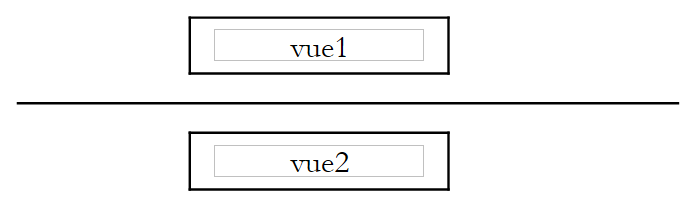 |
يرتبط هذا النموذج بالمفتاح modéle1 في القاموس $dConfig['vuesreponse']:
البرنامج النصي m-reponse.php مسؤول عن إنشاء هذا النموذج:
<html>
    <head>
      <title>Application impots</title>
      <link type="text/css" href="<?php echo $dReponse['urlstyle'] ?>" rel="stylesheet" />
  </head>
  <body>
    <?php
            include $dReponse['vue1'];
        ?>
    <hr>
    <?php
            include $dReponse['vue2'];
        ?>
    </body>
</html>
يحتوي هذا البرنامج النصي على ثلاثة عناصر ديناميكية موضوعة في قاموس $dReponse ومرتبطة بالمفاتيح التالية:
- urlstyle: عنوان URL لورقة أنماط النموذج
- vue1: اسم البرنامج النصي المسؤول عن إنشاء العرض vue1
- vue2: اسم البرنامج النصي المسؤول عن إنشاء العرض vue2
يجب على مولد العرض الذي يرغب في استخدام النموذج modèle1 تعريف هذه العناصر الديناميكية الثلاثة. نحدد الآن العروض الأولية التي يمكن أن تحل محل العناصر [vue1] و [vue2] في النموذج.
4.14.3. الطريقة الأساسية v-bandeau.php
يقوم البرنامج النصي v-bandeau.php بإنشاء عرض سيتم وضعه في المنطقة [vue1]:
<table>
    <tr>
      <td><img src="univ01.gif"></td>
    <td>
      <table>
        <tr>
          <td><div class='titre'><?php echo $dReponse['titre'] ?></div></td>
        </tr>
        <tr>
            <td><div class='resultat'><?php echo $dReponse['resultat']?></div></td>
        </tr>
      </table>
    </td>
  </tr>
</table>
يجب أن يحدد مولد العرض عنصرين ديناميكيين موضوعين في قاموس $dReponse ومرتبطين بالمفاتيح التالية:
- العنوان: العنوان المراد عرضه
- resultat: مبلغ الضريبة المستحقة
4.14.4. العرض الأساسي v-formulaire.php
الجزء [vue2] يتوافق إما مع العرض [v-formulaire] أو مع العرض [v-erreurs]. يتم إنشاء العرض [v-formulaire] بواسطة البرنامج النصي v-formulaire.php:
<form method="post" action="main.php?action=calculerimpot">
    <table>
      <tr>
        <td class="libelle">Etes-vous marié(e)</td>
      <td class="valeur">
          <input type="radio" name="optmarie" <?php echo $dReponse['optoui'] ?> value="oui">oui
          <input type="radio" name="optmarie" <?php echo $dReponse['optnon'] ?> value="non">non
      <td>
    <tr>
        <td class="libelle">Nombre d'enfants</td>
      <td class="valeur">
          <input type="text" class="text" name="txtenfants" size="3" value="<?php echo $dReponse['enfants'] ?>"
      </td>
    </tr>
    <tr>
        <td class="libelle">Salaire annuel</td>
      <td class="valeur">
          <input type="text" class="text" name="txtsalaire" size="10" value="<?php echo $dReponse['salaire'] ?>"
      </td>
    </tr>
    </table>
  <hr>
  <input type="submit" class="submit" value="Calculer l'impôt">
</form>
<form method="post" action="main.php?action=effacerformulaire">
  <input type="submit" class="submit" value="Effacer le formulaire">
</form>
الأجزاء الديناميكية في هذا العرض والتي يجب تعريفها بواسطة مولد العرض مرتبطة بالمفاتيح التالية في القاموس $dReponse:
- optoui: حالة زر الاختيار المسمى optoui
- optnon: حالة زر الاختيار المسمى optnon
- الأطفال: عدد الأطفال الذي يجب إدخاله في الحقل txtenfants
- salaire: الراتب السنوي الذي سيتم وضعه في الحقل txtsalaire
4.14.5. العرض الأساسي v-erreurs.php
يتم إنشاء العرض [v-erreurs] بواسطة البرنامج النصي v-erreurs.php:
Les erreurs suivantes se sont produites :
<ul>
    <?php
        for($i=0;$i<count($dReponse["erreurs"]);$i++){
            echo "<li class='erreur'>".$dReponse["erreurs"][$i]."</li>\n";
        }//for
    ?>
</ul>
<div class="info"><?php echo $dReponse["info"] ?></div>
<br>
<a href="<?php echo $dReponse["href"] ?>"><?php echo $dReponse["lien"] ?></a>
الأجزاء الديناميكية من هذا العرض التي يجب تحديدها بواسطة منشئ العرض مرتبطة بالمفاتيح التالية في القاموس $dReponse:
- الأخطاء: جدول رسائل الأخطاء
- info: رسالة إعلامية
- رابط: نص رابط
- href: عنوان URL الهدف للرابط أعلاه
4.14.6. ورقة الأنماط
يتم "تزيين" جميع العروض بواسطة ورقة أنماط. لتعديل المظهر المرئي للتطبيق، يتم تعديل ورقة الأنماط الخاصة به. ورقة الأنماط style1.css التالية:
div.menu {
    background-color: #FFD700;
    color: #F08080;
    font-weight: bolder;
    text-align: center;
}
td.separateur {
    background: #FFDAB9;
    width: 20px;
}

table.modele2 {
    width: 600px;
}

BODY {
    background-image : url(standard.jpg);
    margin-left : 0px;
    margin-top : 6px;
    color : #4A1919;
    font-size: 10pt;
    font-family: Arial, Helvetica, sans-serif;
    scrollbar-face-color:#F2BE7A;
    scrollbar-arrow-color:#4A1919;
    scrollbar-track-color:#FFF1CC;
    scrollbar-3dlight-color:#CBB673;
    scrollbar-darkshadow-color:#CBB673;
}

div.titre {
    font: 30pt Garamond;
    color: #FF8C00;
    background-color: Yellow;
}

table.menu {
    background-color: #ADD8E6;
}


A:HOVER {
    text-decoration: underline;
    color: #FF0000;
    background-color : transparent;
}
A:ACTIVE {
    text-decoration: underline;
    color : #BF4141;
    background-color : transparent;
}
A:VISITED {
    color : #BF4141;
    background-color : transparent;
}

.error {
    color : red;
    font-weight : bold;
}

INPUT.text {
    margin-left : 3px;
    font-size:8pt;
    font-weight:bold;
    color:#4A1919;
    background-color:#FFF6E0;
    border-right:1px solid;
    border-left:1px solid;
    border-top:1px solid;
    border-bottom:1px solid;
}
td.libelle {
    background-color: #F0FFFF;
    color: #0000CD;
}

td.valeur {
    background-color: #DDA0DD;
}

DIV.resultat {
    background-color : #FFA07A;
    font : bold 12pt;
}

div.info {
    color: #FA8072;
}

li.erreur {
    color: #DC143C;
}

INPUT.submit {
    margin-left : 6px;
    font-size:8pt;
    font-weight:bold;
    color:#4A1919;
    background-color:#FFF1CC;
    border-right:1px solid;
    border-left:1px solid;
    border-top:1px solid;
    border-bottom:1px solid;
}
4.15. مولدات العروض
4.15.1. دور مولد العرض
لنتذكر تسلسل كود وحدة التحكم الذي يقوم بتنفيذ مولد العرض:
<?php
…
     // معالجة الإجراء
  $scriptAction=$dConfig['actions'][$sAction] ?
    $dConfig['actions'][$sAction]['url'] :
    $dConfig['actions']['actionInvalide']['url'];
  include $scriptAction;

  // إرسال الرد (العرض) إلى العميل
  $sEtat=$dSession['etat']['principal'];
  $scriptVue=$dConfig['etats'][$sEtat]['vue'];
  include $scriptVue;
يرتبط مولد العرض بالحالة التي سيتم وضع التطبيق فيها. يتم تحديد الارتباط بين الحالة ومولد العرض من خلال التكوين:
<?php
…
  // تكوين حالات التطبيق
  $dConfig['etats']['e-formulaire']=array(
       'actionsautorisees'=>array('post:calculerimpot','get:init','post:effacerformulaire'),
    'vue'=>'e-formulaire.php');
  $dConfig['etats']['e-erreurs']=array(
      'actionsautorisees'=>array('get:retourformulaire','get:init'),
      'vue'=>'e-erreurs.php');
  $dConfig['etats']['sansetat']=array('actionsautorisees'=>array('get:init'));
لقد سبق أن أوضحنا دور مولد العرض. دعونا نذكره هنا. يقوم مولد العرض:
- يحدد في $dReponse['vuereponse'] اسم نموذج الاستجابة الذي سيتم استخدامه. سيتم تمرير هذه المعلومات إلى وحدة التحكم. النموذج هو تكوين من العروض الأولية التي تشكل معًا العرض النهائي.
- يقوم بإعداد المعلومات الديناميكية التي سيتم عرضها في العرض النهائي. هذه النقطة مستقلة عن وحدة التحكم. وهي بمثابة واجهة بين مولد العروض والعرض النهائي. وهي خاصة بكل تطبيق.
- يجب أن تنتهي بالضرورة باستدعاء الدالة finSession الخاصة بوحدة التحكم. ستقوم هذه الدالة
- تحفظ الجلسة
- إرسال الاستجابة
4.15.2. مولد العرض المرتبط بالحالة [e-formulaire]
يُسمى البرنامج النصي المسؤول عن إنشاء العرض المرتبط بالحالة [e-formulaire] بـ e-formulaire.php:
<?php
…
  $dConfig['etats']['e-formulaire']=array(
       'actionsautorisees'=>array('post:calculerimpot','get:init','post:effacerformulaire'),
    'vue'=>'e-formulaire.php');
الرمز الخاص به هو:
<?php
  // إعداد استجابة النموذج
  $dReponse['titre']=$dConfig['webapp']['titre'];
    $dReponse['vuereponse']='modele1';
  $dReponse['vue1']=$dConfig['vues']['bandeau']['url'];
  $dReponse['vue2']=$dConfig['vues']['formulaire']['url'];
  $dReponse['urlstyle']=$dConfig['style']['url'];
  $dReponse['titre']=$dConfig['webapp']['titre'];

  // التكوين وفقًا لنوع النموذج المراد إنشاؤه
    $type=$dSession['etat']['secondaire'];
  if($type=='init'){
      // نموذج فارغ
    $dReponse['optnon']='checked';
  }//if
  if($type=='calculimpot'){
      // يجب إعادة عرض معلمات الإدخال المخزنة في الاستعلام
    $dReponse['optoui']=$_POST['optmarie']=='oui' ? 'checked' : '';
    $dReponse['optnon']=$dReponse['optoui'] ? '' : 'checked';
    $dReponse['enfants']=$_POST['txtenfants'];
    $dReponse['salaire']=$_POST['txtsalaire'];
    $dReponse['resultat']='Impôt à payer : '.$dReponse['impot'].' F';
  }//if
  if($type=='retourformulaire'){
      // يجب إعادة عرض معلمات الإدخال المخزنة في الجلسة
    $dReponse['optoui']=$dSession['requete']['optmarie']=='oui' ? 'checked' : '';
    $dReponse['optnon']=$dReponse['optoui']=='' ? 'checked' : '';
    $dReponse['enfants']=$dSession['requete']['txtenfants'];
    $dReponse['salaire']=$dSession['requete']['txtsalaire'];
  }//if
  // نرسل الرد
  finSession($dConfig,$dReponse,$dSession);
?>
يُلاحظ أن مُنشئ العرض يلتزم بالشروط المفروضة على مُنشئ العرض:
- تحديد نموذج الاستجابة الذي سيتم استخدامه في $dReponse['vuereponse']
- تمرير المعلومات إلى هذا النموذج. هنا يتم تمريرها عبر القاموس $dReponse.
- الانتهاء باستدعاء الدالة finSession الخاصة بوحدة التحكم
هنا، النموذج المستخدم هو 'modèle1'. لذلك يحدد المولد المعلوماتتين اللتين يحتاجهما هذا النموذج $dReponse['vue1'] و $dReponse['vue2'].
في الحالة الخاصة لتطبيقنا، تعتمد طريقة العرض المرتبطة بالحالة [e-formulaire] على معلومة مخزنة في المتغير $dSession['etat']['secondaire']. هذا اختيار تطويري. قد يقرر تطبيق آخر نقل المعلومات الإضافية بطريقة أخرى. علاوة على ذلك، يتم هنا وضع جميع المعلومات اللازمة لعرض النظرة النهائية في القاموس $dReponse. ومرة أخرى، هذا خيار يعود للمطور. يمكن أن يحدث الحالة [e-formulaire] بعد أربعة إجراءات مختلفة: init، calculerimpot، retourformulaire، effacerformulaire. الطريقة التي سيتم عرضها ليست هي نفسها تمامًا في جميع الحالات. لذلك تم التمييز هنا بين ثلاث حالات في $dSession['etat']['secondaire']:
- init: يتم عرض النموذج فارغًا
- حساب الضريبة: يتم عرض النموذج مع مبلغ الضريبة والبيانات التي أدت إلى حسابها
- retourformulaire: يتم عرض النموذج مع البيانات التي تم إدخالها في البداية
فيما سبق، يستخدم البرنامج النصي e-formulaire.php هذه المعلومات لعرض الإجابة وفقًا لهذه المتغيرات الثلاثة.
4.15.3. العرض المرتبط بالتقرير [e-erreurs]
يُسمى البرنامج النصي المسؤول عن إنشاء العرض المرتبط بالتقرير [e-erreurs] بـ e-erreurs.php وهو كما يلي:
<?php

  // نقوم بإعداد الرد على الأخطاء
  $dReponse['titre']=$dConfig['webapp']['titre'];
    $dReponse['vuereponse']='modele1';
  $dReponse['vue1']=$dConfig['vues']['bandeau']['url'];
  $dReponse['vue2']=$dConfig['vues']['erreurs']['url'];
  $dReponse['urlstyle']=$dConfig['style']['url'];
  $dReponse['titre']=$dConfig['webapp']['titre'];
  $dReponse['lien']='Retour au formulaire de saisie';
  $dReponse['href']='main.php?action=retourformulaire';

  // معلومات إضافية
  $type=$dSession['etat']['secondaire'];
  if($type=='database'){
      $dReponse['info']="Veuillez avertir l'administrateur de l'application";
  }

  // يتم إرسال الرد
  finSession($dConfig,$dReponse,$dSession);
?>
4.15.4. عرض النظرة النهائية
ينتهي كل من البرنامجين النصيين اللذين يولدان العرضين النهائيين باستدعاء الدالة finSession الخاصة بوحدة التحكم:
<?php
…
  function finSession(&$dConfig,&$dReponse,&$dSession){
    // $dConfig: قاموس التكوين
      // $dSession: قاموس يحتوي على معلومات الجلسة
         // $dReponse: قاموس معلمات صفحة الرد

....

         // عرض الرد
        include $dConfig['vuesReponse'][$dReponse['vuereponse']]['url'];

    // نهاية البرنامج النصي
    exit(0);
  }//نهاية الجلسة
يتم تحديد العرض المرسَل إلى المستخدم بواسطة الكيان $dReponse['vuereponse'] الذي يحدد النموذج المطلوب استخدامه للاستجابة النهائية. بالنسبة للتقارير [e-formulaire] و [e-erreurs]، تم تعريف هذا النموذج على أنه يساوي modele1:
يتوافق هذا النموذج من حيث التكوين مع البرنامج النصي m-reponse.php:
4.16. تعديل نموذج الاستجابة
نفترض هنا أننا قررنا تغيير المظهر المرئي للرد المقدم للعميل ونرغب في فهم الآثار المترتبة على ذلك على مستوى الكود.
4.16.1. القالب الجديد
ستكون بنية الرد الآن كما يلي:
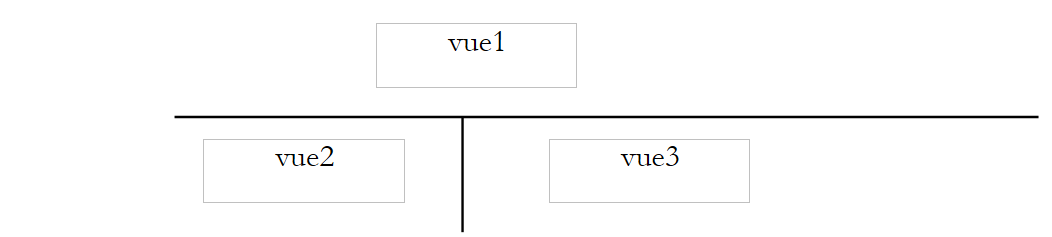 |
سيُطلق على هذا النموذج اسم modele2، وسيُطلق على البرنامج النصي المسؤول عن إنشاء هذا النموذج اسم m-reponse2.php:
البرنامج النصي المطابق لهذا النموذج هو التالي:
<html>
    <head>
      <title>Application impots</title>
      <link type="text/css" href="<?php echo $dReponse['urlstyle'] ?>" rel="stylesheet" />
  </head>
  <body>
      <table class='modele2'>
        <!-- بداية الشريط -->
        <tr>
          <td colspan="2"><?php    include $dReponse['vue1']; ?></td>
      </tr>
        <!-- نهاية الشريط -->
      <tr>
            <!-- بداية القائمة -->
          <td><?php include $dReponse['vue2']; ?></td>
            <!-- نهاية القائمة -->
            <!-- بداية المنطقة 3 -->
          <td><?php include $dReponse['vue3']; ?></td>
            <!-- نهاية المنطقة 3 -->
      </tr>
   </table>
    </body>
</html>
العناصر الديناميكية للنموذج هي التالية:
- $dReponse['urlstyle']: ورقة الأنماط المطلوب استخدامها
- $dReponse['vue1']: البرنامج النصي الذي سيتم استخدامه لإنشاء [vue1]
- $dReponse['vue2']: البرنامج النصي الذي سيتم استخدامه لتوليد [vue2]
- $dReponse['vue3']: البرنامج النصي المستخدم لتوليد [vue3]
يجب تحديد هذه العناصر بواسطة مولدات العروض.
4.16.2. صفحات الرد المختلفة
سيعرض التطبيق الآن الردود التالية للمستخدم. عند الاستدعاء الأولي، ستكون صفحة الرد كما يلي:
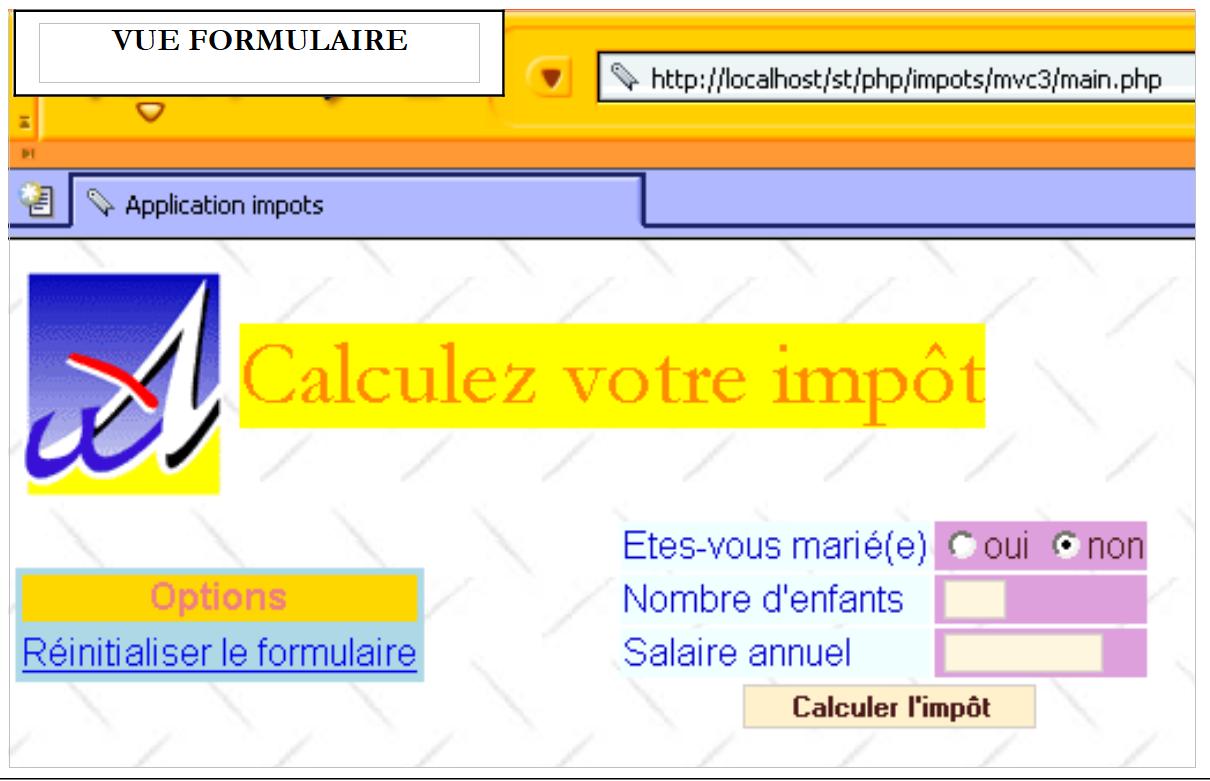 |
إذا قدم المستخدم بيانات صالحة، يتم حساب الضريبة:
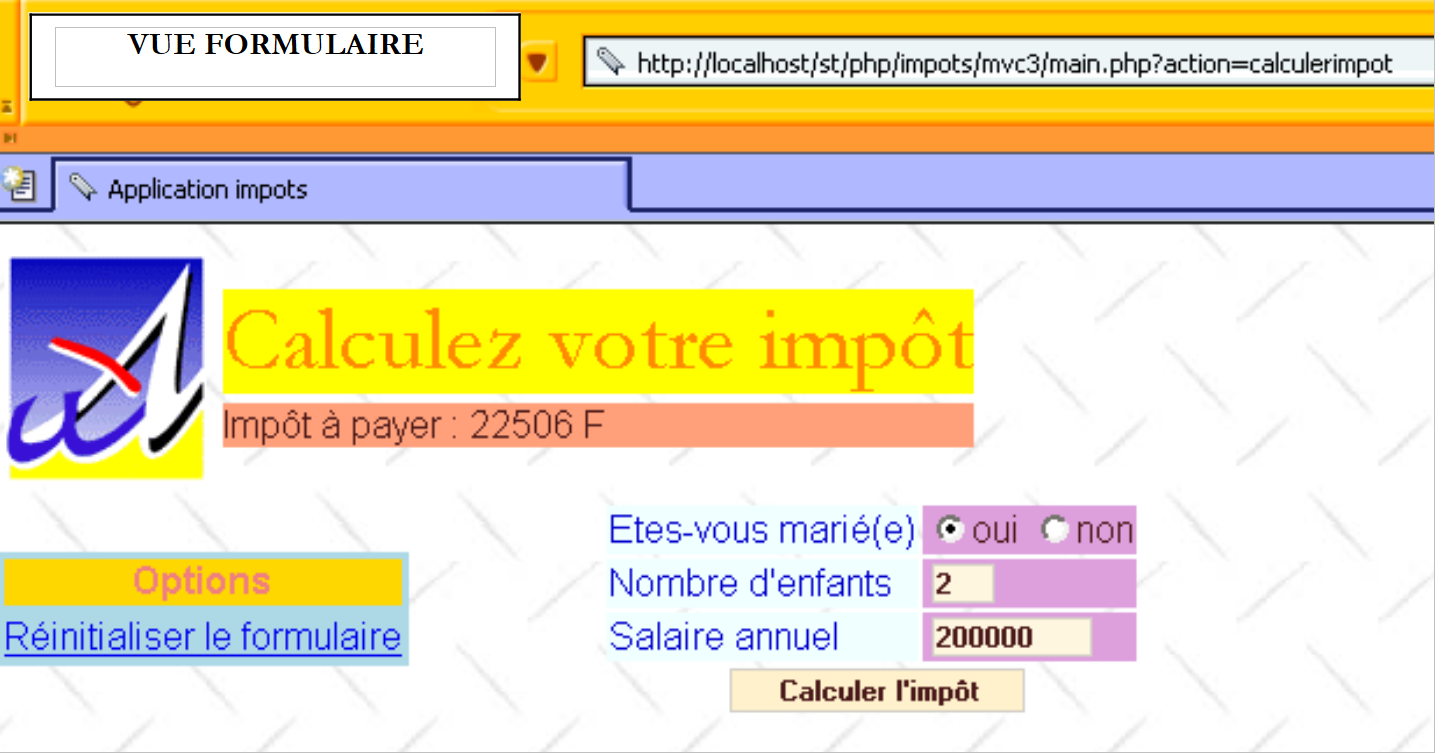 |
إذا ارتكب أخطاء في الإدخال، يتم عرض صفحة الأخطاء:
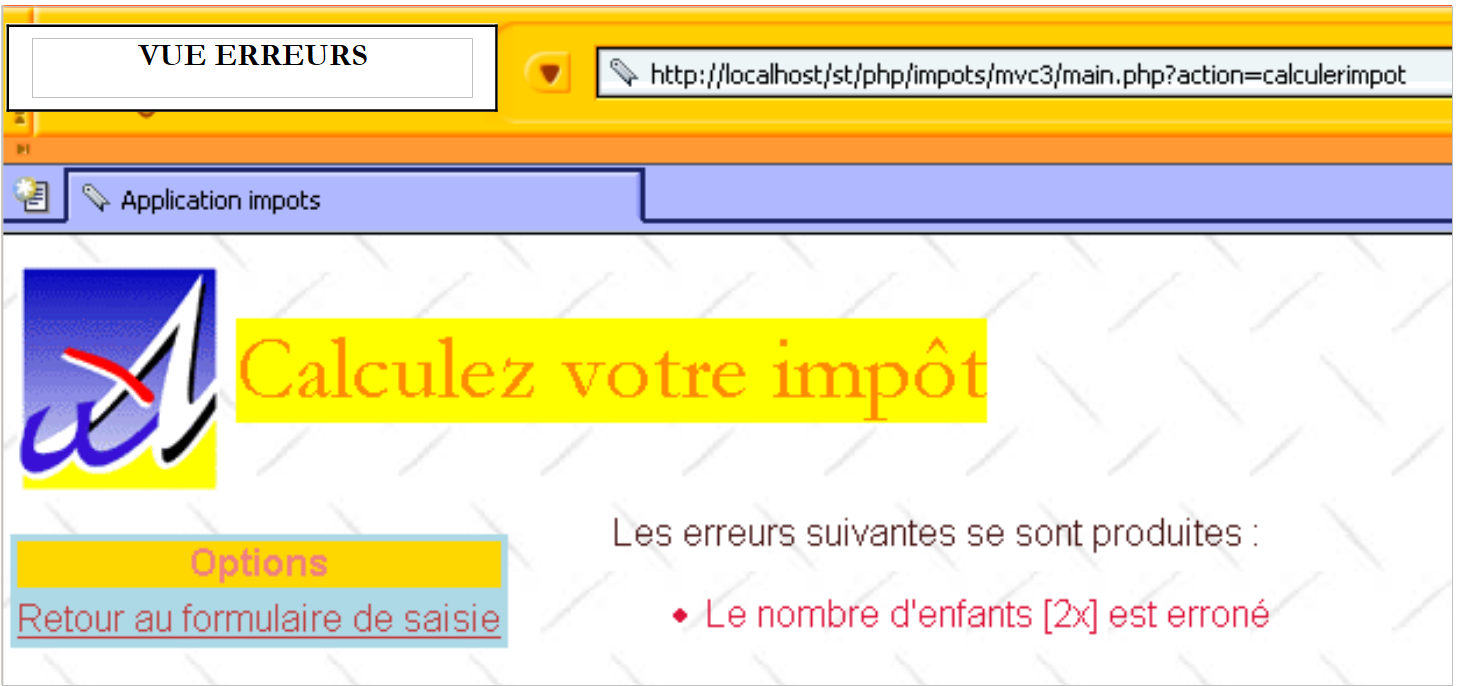 |
إذا استخدم الرابط [Retour au formulaire de saisie]، فسيجد النموذج كما تم تأكيده:
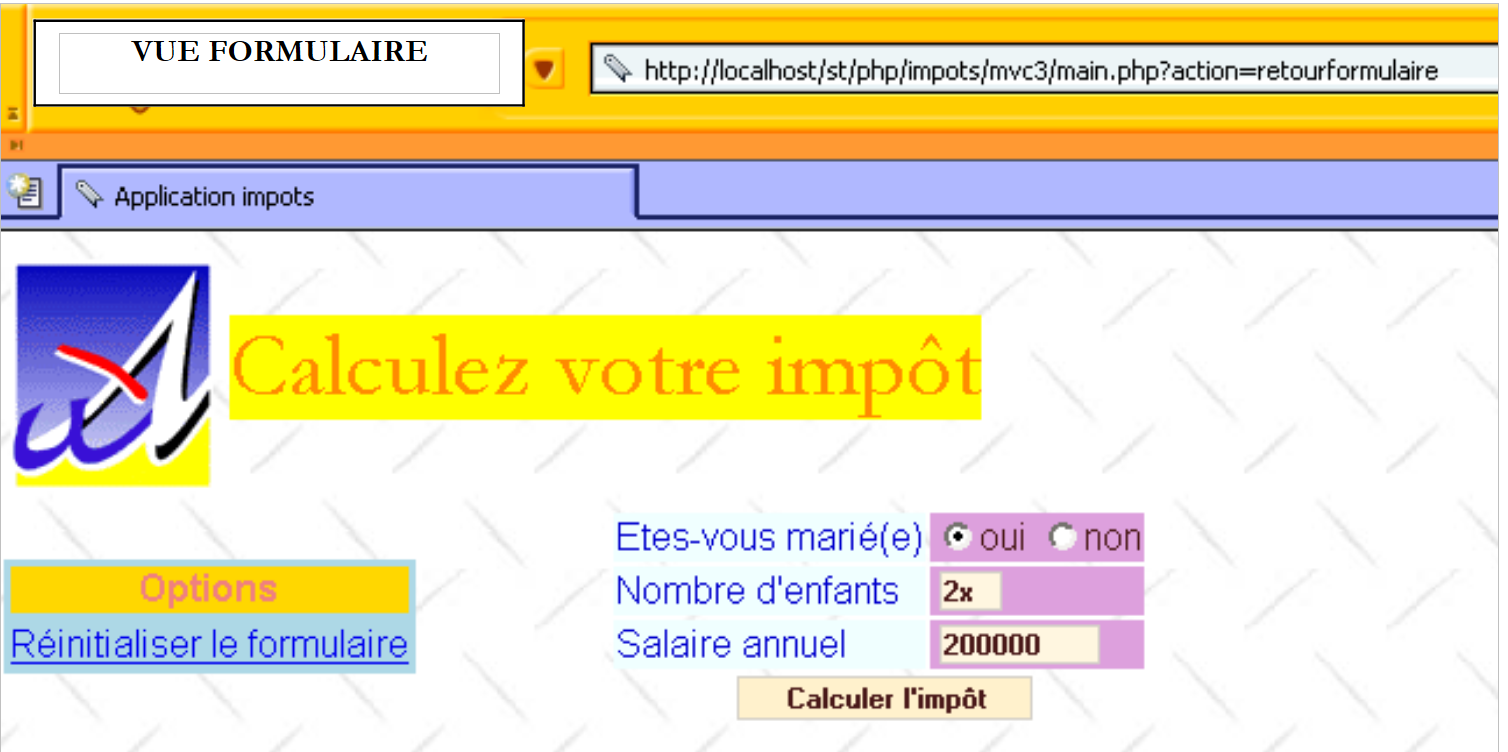 |
إذا استخدم الرابط [Réinitialiser le formulaire] أعلاه، فسيجد نموذجًا فارغًا:
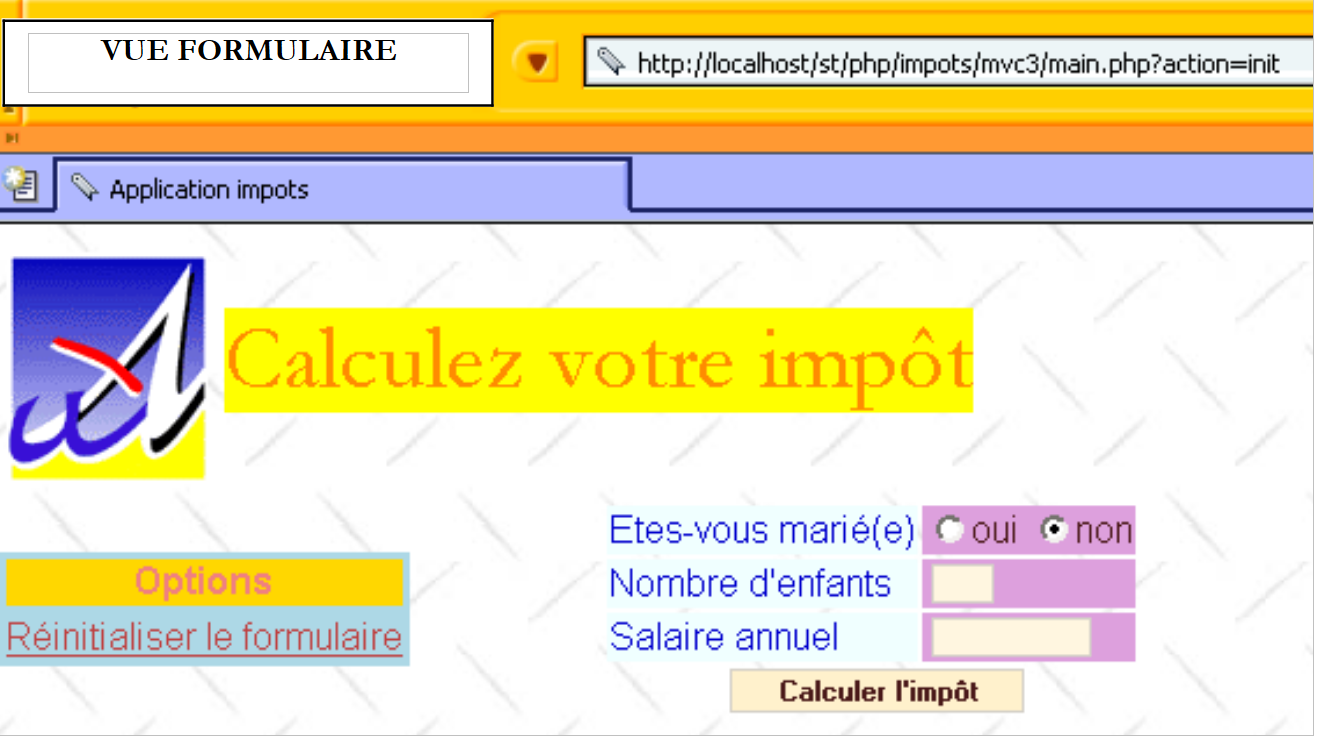 |
تجدر الإشارة إلى أن التطبيق يستخدم بالفعل نفس الإجراءات كما في السابق. لم يتغير سوى شكل الإجابات.
4.16.3. العروض الأولية
سيتم ربط العرض الأساسي [vue1]، كما في المثال السابق، بالنص البرمجي v-bandeau.php:
<table>
    <tr>
      <td><img src="univ01.gif"></td>
    <td>
      <table>
        <tr>
          <td><div class='titre'><?php echo $dReponse['titre'] ?></div></td>
        </tr>
        <tr>
            <td><div class='resultat'><?php echo $dReponse['resultat']?></div></td>
        </tr>
      </table>
    </td>
  </tr>
</table>
تحتوي هذه الصفحة على عنصرين ديناميكيين:
- $dReponse['titre']: العنوان المراد عرضه
- $dReponse['resultat']: مبلغ الضريبة المستحقة
وسيتم ربط العرض الأساسي [vue2] بالنص البرمجي v-menu.php التالي:
<table class="menu">
    <tr>
      <td><div class="menu">Options</div></td>
  </tr>
  <?php
      for($i=0;$i<count($dReponse['liens']);$i++){
        echo '<tr><td><div class="option"><a href="'.
          $dReponse['liens'][$i]['url'].
        '">'.$dReponseQZXW2HTMLBWydsaWVucyddZQXQZXW2HTMLBWyRpXQZQXQZXW2HTMLBWyd0ZXh0ZSddZQX."</a></div></td></tr>\n";
    }//$i
  ?>
</table>
تحتوي هذه العرض على العناصر الديناميكية التالية:
- $dReponse['liens']: جدول الروابط المراد عرضها في [vue2]. كل عنصر في الجدول عبارة عن قاموس ذي مفتاحين:
- 'url': عنوان URL الهدف للرابط
- 'نص': نص الرابط
سيتم ربط العرض الأساسي [vue3] بالنص البرمجي v-formulaire2.php إذا أردنا عرض نموذج الإدخال أو بالنص البرمجي v-erreurs2.php إذا أردنا عرض صفحة الأخطاء. رمز البرنامج النصي v-formulaire2.php هو التالي:
<form method="post" action="main.php?action=calculerimpot">
    <table>
      <tr>
        <td class="libelle">Etes-vous marié(e)</td>
      <td class="valeur">
          <input type="radio" name="optmarie" <?php echo $dReponse['optoui'] ?> value="oui">oui
          <input type="radio" name="optmarie" <?php echo $dReponse['optnon'] ?> value="non">non
      </td>
    </tr>
    <tr>
        <td class="libelle">Nombre d'enfants</td>
      <td class="valeur">
          <input type="text" class="text" name="txtenfants" size="3" value="<?php echo $dReponse['enfants'] ?>"
      </td>
    </tr>
    <tr>
        <td class="libelle">Salaire annuel</td>
      <td class="valeur">
          <input type="text" class="text" name="txtsalaire" size="10" value="<?php echo $dReponse['salaire'] ?>"
      </td>
    </tr>
    <tr>
        <td colspan="2" align="center"><input type="submit" class="submit" value="Calculer l'impôt"></td>
    </tr>
    </table>
</form>
الأجزاء الديناميكية في هذا العرض والتي يجب تعريفها بواسطة مولد العرض مرتبطة بالمفاتيح التالية في القاموس $dReponse:
- optoui: حالة زر الاختيار المسمى optoui
- optnon: حالة زر الاختيار المسمى optnon
- enfants: عدد الأطفال المراد إدخاله في الحقل txtenfants
- salaire: الراتب السنوي الذي سيتم وضعه في الحقل txtsalaire
يُسمى البرنامج النصي الذي يُنشئ صفحة الأخطاء v-erreurs2.php. وفيما يلي كوده:
Les erreurs suivantes se sont produites :
<ul>
    <?php
        for($i=0;$i<count($dReponse["erreurs"]);$i++){
            echo "<li class='erreur'>".$dReponse["erreurs"][$i]."</li>\n";
        }//لـ
    ?>
</ul>
<div class="info"><?php echo $dReponse["info"] ?></div>
الأجزاء الديناميكية في هذا العرض التي يجب تحديدها بواسطة منشئ العرض مرتبطة بالمفاتيح التالية في القاموس $dReponse:
- الأخطاء: جدول رسائل الأخطاء
- info: رسالة معلومات
4.16.4. ورقة الأنماط
لم تتغير. لا تزال هي style1.css.
4.16.5. ملف التكوين الجديد
لإدخال هذه العروض الجديدة، يتعين علينا تعديل بعض الأسطر في ملف التكوين.
<?php

     // تكوين php
  ini_set("register_globals","off");
  ini_set("display_errors","off");
  ini_set("expose_php","off");

  // قائمة الوحدات النمطية المطلوب تضمينها
  $dConfig['includes']=array('c-impots-data.php','c-impots-calcul.php');

  // وحدة التحكم في التطبيق
  $dConfig['webapp']=array('titre'=>"Calculez votre impôt");

  // تكوين طرق عرض التطبيق
  $dConfig['vuesReponse']['modele1']=array('url'=>'m-reponse.php');
  $dConfig['vuesReponse']['modele2']=array('url'=>'m-reponse2.php');
  $dConfig['vues']['formulaire']=array('url'=>'v-formulaire.php');
  $dConfig['vues']['erreurs']=array('url'=>'v-erreurs.php');
  $dConfig['vues']['formulaire2']=array('url'=>'v-formulaire2.php');
  $dConfig['vues']['erreurs2']=array('url'=>'v-erreurs2.php');
  $dConfig['vues']['bandeau']=array('url'=>'v-bandeau.php');
  $dConfig['vues']['menu']=array('url'=>'v-menu.php');
  $dConfig['style']['url']='style1.css';

  // تكوين إجراءات التطبيق
  $dConfig['actions']['get:init']=array('url'=>'a-init.php');
  $dConfig['actions']['post:calculerimpot']=array('url'=>'a-calculimpot.php');
  $dConfig['actions']['get:retourformulaire']=array('url'=>'a-retourformulaire.php');
  $dConfig['actions']['post:effacerformulaire']=array('url'=>'a-init.php');
  $dConfig['actions']['enchainementinvalide']=array('url'=>'a-enchainementinvalide.php');
  $dConfig['actions']['actionInvalide']=array('url'=>'a-actioninvalide.php');

  // تكوين تقارير التطبيق
  $dConfig['etats']['e-formulaire']=array(
       'actionsautorisees'=>array('post:calculerimpot','get:init','post:effacerformulaire'),
    'vue'=>'e-formulaire2.php');
  $dConfig['etats']['e-erreurs']=array(
      'actionsautorisees'=>array('get:retourformulaire','get:init'),
      'vue'=>'e-erreurs2.php');
  $dConfig['etats']['sansetat']=array('actionsautorisees'=>array('get:init'));

  // تكوين نموذج التطبيق
    $dConfig["DSN"]=array(
        "sgbd"=>"mysql",
        "user"=>"seldbimpots",
        "mdp"=>"mdpseldbimpots",
        "host"=>"localhost",
        "database"=>"dbimpots"
    );
?>
يتمثل التعديل الأساسي في تغيير مولدات العرض المرتبطة بالتقارير [e-formulaire] و [e-erreurs]. وبمجرد القيام بذلك، تتولى مولدات العرض الجديدة مهمة إنشاء صفحات الاستجابة الجديدة.
4.16.6. مولد العرض المرتبط بالتقرير [e-formulaire]
في ملف التكوين، أصبح التقرير [e-formulaire] مرتبطًا الآن بمولد العرض e-formulaire2.php. رمز هذا البرنامج النصي هو كما يلي:
<?php
  // إعداد استجابة النموذج
  $dReponse['titre']=$dConfig['webapp']['titre'];
    $dReponse['vuereponse']='modele2';
  $dReponse['vue1']=$dConfig['vues']['bandeau']['url'];
  $dReponse['vue2']=$dConfig['vues']['menu']['url'];
  $dReponse['vue3']=$dConfig['vues']['formulaire2']['url'];
  $dReponse['urlstyle']=$dConfig['style']['url'];
  $dReponse['titre']=$dConfig['webapp']['titre'];
  $dReponse['liens']=array(
      array('texte'=>'Réinitialiser le formulaire', 'url'=>'main.php?action=init')
  );

  // التكوين وفقًا لنوع النموذج المراد إنشاؤه
    $type=$dSession['etat']['secondaire'];
  if($type=='init'){
      // نموذج فارغ
    $dReponse['optnon']='checked';
  }//if
  if($type=='calculimpot'){
      // يجب إعادة عرض معلمات الإدخال المخزنة في الاستعلام
    $dReponse['optoui']=$_POST['optmarie']=='oui' ? 'checked' : '';
    $dReponse['optnon']=$dReponse['optoui'] ? '' : 'checked';
    $dReponse['enfants']=$_POST['txtenfants'];
    $dReponse['salaire']=$_POST['txtsalaire'];
    $dReponse['resultat']='Impôt à payer : '.$dReponse['impot'].' F';
  }//if
  if($type=='retourformulaire'){
      // يجب إعادة عرض معلمات الإدخال المخزنة في الجلسة
    $dReponse['optoui']=$dSession['requete']['optmarie']=='oui' ? 'checked' : '';
    $dReponse['optnon']=$dReponse['optoui']=='' ? 'checked' : '';
    $dReponse['enfants']=$dSession['requete']['txtenfants'];
    $dReponse['salaire']=$dSession['requete']['txtsalaire'];
  }//if
  // نرسل الرد
  finSession($dConfig,$dReponse,$dSession);
?>
التعديلات الرئيسية هي كما يلي:
- يشير مولد العرض إلى أنه يريد استخدام نموذج الاستجابة modele2
- ولهذا السبب يقوم بتعبئة العناصر الديناميكية $dReponse['vue1']، $dReponse['vue2']، $dReponse['vue3']، وجميعها الثلاثة ضرورية لنموذج الاستجابة modele2.
- يقوم المولد أيضًا بتعبئة العنصر الديناميكي $dReponse['liens'] الذي يحدد الروابط المراد عرضها في منطقة [vue2] من الاستجابة.
4.16.7. مولد العرض المرتبط بالحالة [e-erreurs]
في ملف التكوين، أصبح التقرير [e-erreurs] مرتبطًا الآن بمولد العرض e-erreurs2.php. رمز هذا البرنامج النصي هو كما يلي:
<?php

  // نقوم بإعداد الرد على الأخطاء
  $dReponse['titre']=$dConfig['webapp']['titre'];
    $dReponse['vuereponse']='modele2';
  $dReponse['vue1']=$dConfig['vues']['bandeau']['url'];
  $dReponse['vue2']=$dConfig['vues']['menu']['url'];
  $dReponse['vue3']=$dConfig['vues']['erreurs2']['url'];
  $dReponse['urlstyle']=$dConfig['style']['url'];
  $dReponse['titre']=$dConfig['webapp']['titre'];
  $dReponse['liens']=array(
      array('texte'=>'Retour au formulaire de saisie', 'url'=>'main.php?action=retourformulaire')
  );

  // معلومات إضافية
  $type=$dSession['etat']['secondaire'];
  if($type=='database'){
      $dReponse['info']="Veuillez avertir l'administrateur de l'application";
  }

  // يتم إرسال الرد
  finSession($dConfig,$dReponse,$dSession);
?>
التعديلات التي تم إجراؤها مطابقة لتلك التي تم إجراؤها على مولد العرض e-formulaire2.php.
4.17. الخلاصة
تمكنا من إظهار فائدة وحدة التحكم العامة الخاصة بنا من خلال مثال. لم نضطر إلى كتابة هذه الوحدة. اكتفينا بكتابة نصوص الإجراءات ومولدات العرض وعروض التطبيق. كما أظهرنا فائدة فصل الإجراءات عن العروض. وبذلك تمكنا من تغيير شكل الاستجابات دون تعديل سطر واحد من نصوص الإجراءات. لم يتم تعديل سوى البرامج النصية المشاركة في إنشاء العروض. ولتحقيق ذلك، يجب ألا تفترض البرامج النصية للإجراءات أي شيء بشأن العرض الذي سيعرض المعلومات التي قامت بحسابها. يجب أن تكتفي بتسليم هذه المعلومات إلى وحدة التحكم التي تنقلها إلى مولد العرض الذي سيقوم بتنسيقها. هذه قاعدة مطلقة: يجب أن تكون الإجراء منفصلة تمامًا عن العروض.
لقد تناولنا في هذا الفصل فلسفة Struts المعروفة جيدًا لمطوري Java. يتيح مشروع "مفتوح المصدر" يسمى php.mvc تطوير الويب/PHP باستخدام فلسفة Struts. يمكن الرجوع إلى الموقع http://www.phpmvc.net/ لمزيد من المعلومات.